Win 11 - cannot hide system tray network icon. Not in Taskbar Personalisation list


tpriest

Active member
Local time
4:57 PM
Posts
34
OS
Win 11 Home 25H2 (OS Build 26200.7019)
Win 11, 25H2 (26200.7019), desktop PC. The network icon is permanently visible in the System Tray, I do not want it showing, it's unnecessary, PC is ethernet connected and ultra reliable internet.

In Personalisation/Taskbar/Other System Tray Icons there is no network icon in the list. So no option to hide. For me it's an untidy irritant. There's no relevant setting that I can see in Internet Options either.

Any suggestions how to hide it?
 

My Computers My Computers

  • At a glance

    Win 11 Home 25H2 (OS Build 26200.7019)Intel Core i7 1470032GB Corsair VengeanceBuilt in
    OS
    Win 11 Home 25H2 (OS Build 26200.7019)
    Computer type
    PC/Desktop
    Manufacturer/Model
    Custom build
    CPU
    Intel Core i7 14700
    Motherboard
    ASUS PRIME B760M-K D4 (LGA1700)
    Memory
    32GB Corsair Vengeance
    Graphics Card(s)
    Built in
    Sound Card
    Built in
    Monitor(s) Displays
    Benq G2222HDL 21.5"
    Screen Resolution
    1920 x 1080
    Hard Drives
    512Gb SSD
    1Tb SSD
    PSU
    Vida
    Case
    Fractal Pop Air
    Keyboard
    Standard PS/2 wired keyboard
    Mouse
    Microsoft USB wired wheel mouse
    Internet Speed
    500Mbps
    Browser
    Chrome
    Antivirus
    Defender
  • At a glance

    Win 11 Home 24H2 (OS Build 26100.4202)12th Gen Intel Core i5-1150H16GbBuilt in
    Operating System
    Win 11 Home 24H2 (OS Build 26100.4202)
    Computer type
    Laptop
    Manufacturer/Model
    HP Zbook Fury
    CPU
    12th Gen Intel Core i5-1150H
    Motherboard
    HP 8AA1 KBC
    Memory
    16Gb
    Graphics card(s)
    Built in
    Sound Card
    Built in
    Hard Drives
    1Tb SSD
    Internet Speed
    500Mbps
    Browser
    Chrome
    Antivirus
    Defender
Win 11, 25H2 (26200.7019), desktop PC. The network icon is permanently visible in the System Tray, I do not want it showing, it's unnecessary, PC is ethernet connected and ultra reliable internet.

In Personalisation/Taskbar/Other System Tray Icons there is no network icon in the list. So no option to hide. For me it's an untidy irritant. There's no relevant setting that I can see in Internet Options either.

Any suggestions how to hide it?
Windhawk can give you what you are looking for & more.
Natively, Windows does not give you that option.


My Computers My Computers

  • At a glance

    All Branches but ReleaseAMD Ryzen 7 7735HS 3200-4500 Mhz 8 cores x 232 GB DDR5Radeon Graphic / NVIDIA GeForce RTX 4060 8 GB...
    OS
    All Branches but Release
    Computer type
    Laptop
    Manufacturer/Model
    Acer Nitro ANV15-51
    CPU
    AMD Ryzen 7 7735HS 3200-4500 Mhz 8 cores x 2
    Motherboard
    Sportage_RBH
    Memory
    32 GB DDR5
    Graphics Card(s)
    Radeon Graphic / NVIDIA GeForce RTX 4060 8 GB GDDR6
    Sound Card
    AMD/Realtek(R) Audio
    Monitor(s) Displays
    Integrated Monitor (15.3"vis)
    Screen Resolution
    FHD 1920X1080 16:9 144Hz
    Hard Drives
    KINGSTON OM8SEP4512Q-AA 1TB
    Western Digital 256GB
    PSU
    19V DC 6.32 A 120 W
    Cooling
    Dual Fans
    Mouse
    MS Bluetooth
    Internet Speed
    Fiber 1GB Cox -us & 1GB Orange-fr
    Browser
    Edge Canary- Firefox Nightly-Chrome Dev-Chrome Dev
    Antivirus
    Windows Defender
  • At a glance

    Windows 11 BetaAMD A9-94208 GB of DDR4AMD Radeon R5
    Operating System
    Windows 11 Beta
    Computer type
    Laptop
    Manufacturer/Model
    Asus X751BP
    CPU
    AMD A9-9420
    Memory
    8 GB of DDR4
    Graphics card(s)
    AMD Radeon R5
    Screen Resolution
    1600x900
    Hard Drives
    Seagate 1 TB
Thanks. Shame, Windows 10 didn't show it :(
 

My Computers My Computers

  • At a glance

    Win 11 Home 25H2 (OS Build 26200.7019)Intel Core i7 1470032GB Corsair VengeanceBuilt in
    OS
    Win 11 Home 25H2 (OS Build 26200.7019)
    Computer type
    PC/Desktop
    Manufacturer/Model
    Custom build
    CPU
    Intel Core i7 14700
    Motherboard
    ASUS PRIME B760M-K D4 (LGA1700)
    Memory
    32GB Corsair Vengeance
    Graphics Card(s)
    Built in
    Sound Card
    Built in
    Monitor(s) Displays
    Benq G2222HDL 21.5"
    Screen Resolution
    1920 x 1080
    Hard Drives
    512Gb SSD
    1Tb SSD
    PSU
    Vida
    Case
    Fractal Pop Air
    Keyboard
    Standard PS/2 wired keyboard
    Mouse
    Microsoft USB wired wheel mouse
    Internet Speed
    500Mbps
    Browser
    Chrome
    Antivirus
    Defender
  • At a glance

    Win 11 Home 24H2 (OS Build 26100.4202)12th Gen Intel Core i5-1150H16GbBuilt in
    Operating System
    Win 11 Home 24H2 (OS Build 26100.4202)
    Computer type
    Laptop
    Manufacturer/Model
    HP Zbook Fury
    CPU
    12th Gen Intel Core i5-1150H
    Motherboard
    HP 8AA1 KBC
    Memory
    16Gb
    Graphics card(s)
    Built in
    Sound Card
    Built in
    Hard Drives
    1Tb SSD
    Internet Speed
    500Mbps
    Browser
    Chrome
    Antivirus
    Defender
Any suggestions how to hide it?
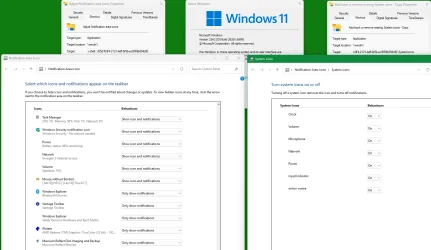
What about the dialogs shown by these shortcuts?
%windir%\explorer.exe shell:::{05d7b0f4-2121-4eff-bf6b-ed3f69b894d9}
and its subordinate
%windir%\explorer.exe shell:::{05d7b0f4-2121-4eff-bf6b-ed3f69b894d9}\SystemIcons
Network appears in both of mine.
I made no note of other routes to display these dialogs so I don't know if they are ones you have already tried.


All the best,
Denis
 

My Computer My Computer

At a glance

Windows 11 Home x64 Version 25H2 Build 26200....
OS
Windows 11 Home x64 Version 25H2 Build 26200.8037
What about the dialogs shown by these shortcuts?
%windir%\explorer.exe shell:::{05d7b0f4-2121-4eff-bf6b-ed3f69b894d9}
and its subordinate
%windir%\explorer.exe shell:::{05d7b0f4-2121-4eff-bf6b-ed3f69b894d9}\SystemIcons
Network appears in both of mine.
I made no note of other routes to display these dialogs so I don't know if they are ones you have already tried.


All the best,
Denis
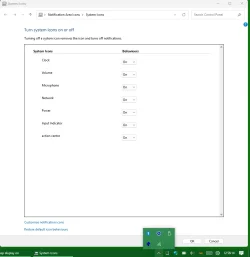
Denis,
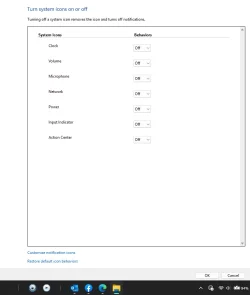
The second option is good but no longer works in Win11 for me.

Screenshot 2025-10-31 203851.webp
 
Last edited:

My Computers My Computers

  • At a glance

    All Branches but ReleaseAMD Ryzen 7 7735HS 3200-4500 Mhz 8 cores x 232 GB DDR5Radeon Graphic / NVIDIA GeForce RTX 4060 8 GB...
    OS
    All Branches but Release
    Computer type
    Laptop
    Manufacturer/Model
    Acer Nitro ANV15-51
    CPU
    AMD Ryzen 7 7735HS 3200-4500 Mhz 8 cores x 2
    Motherboard
    Sportage_RBH
    Memory
    32 GB DDR5
    Graphics Card(s)
    Radeon Graphic / NVIDIA GeForce RTX 4060 8 GB GDDR6
    Sound Card
    AMD/Realtek(R) Audio
    Monitor(s) Displays
    Integrated Monitor (15.3"vis)
    Screen Resolution
    FHD 1920X1080 16:9 144Hz
    Hard Drives
    KINGSTON OM8SEP4512Q-AA 1TB
    Western Digital 256GB
    PSU
    19V DC 6.32 A 120 W
    Cooling
    Dual Fans
    Mouse
    MS Bluetooth
    Internet Speed
    Fiber 1GB Cox -us & 1GB Orange-fr
    Browser
    Edge Canary- Firefox Nightly-Chrome Dev-Chrome Dev
    Antivirus
    Windows Defender
  • At a glance

    Windows 11 BetaAMD A9-94208 GB of DDR4AMD Radeon R5
    Operating System
    Windows 11 Beta
    Computer type
    Laptop
    Manufacturer/Model
    Asus X751BP
    CPU
    AMD A9-9420
    Memory
    8 GB of DDR4
    Graphics card(s)
    AMD Radeon R5
    Screen Resolution
    1600x900
    Hard Drives
    Seagate 1 TB
System icon dialogs - WIn11.webp


Denis
 

My Computer My Computer

At a glance

Windows 11 Home x64 Version 25H2 Build 26200....
OS
Windows 11 Home x64 Version 25H2 Build 26200.8037
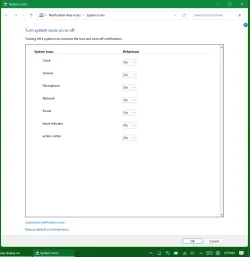
System icons, Network, On
System icons, Network, On.webp

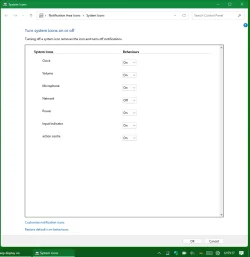
System icons, Network, Off
System icons, Network, Off.webp

System icons, Network, On again
System icons, Network, On again.webp


I have ExplorerPatcher in order to have Taskbar Toolbars; perhaps that affects the network icon behaviour.

Added later - I did not restart explorer or anything else inbetween these screenshots.


Denis
 
Last edited:

My Computer My Computer

At a glance

Windows 11 Home x64 Version 25H2 Build 26200....
OS
Windows 11 Home x64 Version 25H2 Build 26200.8037
I have ExplorerPatcher in order to have Taskbar Toolbars; perhaps that affects the network icon behaviour.


Denis
Thanks Denis.
Could be ExplorerPatcher, we will see what the OP says. That could be another incentive to use it.
I have Dev, Beta & Canary and sadly, all choices are in the OFF position and turning them ON does zilch.
I am OK with that as my main system is using Wi-Fi and I want to see the Network icon.
 

My Computers My Computers

  • At a glance

    All Branches but ReleaseAMD Ryzen 7 7735HS 3200-4500 Mhz 8 cores x 232 GB DDR5Radeon Graphic / NVIDIA GeForce RTX 4060 8 GB...
    OS
    All Branches but Release
    Computer type
    Laptop
    Manufacturer/Model
    Acer Nitro ANV15-51
    CPU
    AMD Ryzen 7 7735HS 3200-4500 Mhz 8 cores x 2
    Motherboard
    Sportage_RBH
    Memory
    32 GB DDR5
    Graphics Card(s)
    Radeon Graphic / NVIDIA GeForce RTX 4060 8 GB GDDR6
    Sound Card
    AMD/Realtek(R) Audio
    Monitor(s) Displays
    Integrated Monitor (15.3"vis)
    Screen Resolution
    FHD 1920X1080 16:9 144Hz
    Hard Drives
    KINGSTON OM8SEP4512Q-AA 1TB
    Western Digital 256GB
    PSU
    19V DC 6.32 A 120 W
    Cooling
    Dual Fans
    Mouse
    MS Bluetooth
    Internet Speed
    Fiber 1GB Cox -us & 1GB Orange-fr
    Browser
    Edge Canary- Firefox Nightly-Chrome Dev-Chrome Dev
    Antivirus
    Windows Defender
  • At a glance

    Windows 11 BetaAMD A9-94208 GB of DDR4AMD Radeon R5
    Operating System
    Windows 11 Beta
    Computer type
    Laptop
    Manufacturer/Model
    Asus X751BP
    CPU
    AMD A9-9420
    Memory
    8 GB of DDR4
    Graphics card(s)
    AMD Radeon R5
    Screen Resolution
    1600x900
    Hard Drives
    Seagate 1 TB
its EP. that replaces the taskbar. in windows 11 you cannot separate the Control Center natively, thus cannot hide those icons individually. SAB and WH will allow you to do so too.
 

My Computer My Computer

At a glance

Windows 11 Pro
OS
Windows 11 Pro
its EP. that replaces the taskbar. in windows 11 you cannot separate the Control Center natively, thus cannot hide those icons individually. SAB and WH will allow you to do so too.
Thanks @dacrone. I just installed EP & indeed that functionality is restored.
 

My Computers My Computers

  • At a glance

    All Branches but ReleaseAMD Ryzen 7 7735HS 3200-4500 Mhz 8 cores x 232 GB DDR5Radeon Graphic / NVIDIA GeForce RTX 4060 8 GB...
    OS
    All Branches but Release
    Computer type
    Laptop
    Manufacturer/Model
    Acer Nitro ANV15-51
    CPU
    AMD Ryzen 7 7735HS 3200-4500 Mhz 8 cores x 2
    Motherboard
    Sportage_RBH
    Memory
    32 GB DDR5
    Graphics Card(s)
    Radeon Graphic / NVIDIA GeForce RTX 4060 8 GB GDDR6
    Sound Card
    AMD/Realtek(R) Audio
    Monitor(s) Displays
    Integrated Monitor (15.3"vis)
    Screen Resolution
    FHD 1920X1080 16:9 144Hz
    Hard Drives
    KINGSTON OM8SEP4512Q-AA 1TB
    Western Digital 256GB
    PSU
    19V DC 6.32 A 120 W
    Cooling
    Dual Fans
    Mouse
    MS Bluetooth
    Internet Speed
    Fiber 1GB Cox -us & 1GB Orange-fr
    Browser
    Edge Canary- Firefox Nightly-Chrome Dev-Chrome Dev
    Antivirus
    Windows Defender
  • At a glance

    Windows 11 BetaAMD A9-94208 GB of DDR4AMD Radeon R5
    Operating System
    Windows 11 Beta
    Computer type
    Laptop
    Manufacturer/Model
    Asus X751BP
    CPU
    AMD A9-9420
    Memory
    8 GB of DDR4
    Graphics card(s)
    AMD Radeon R5
    Screen Resolution
    1600x900
    Hard Drives
    Seagate 1 TB
if my notes still stand from windows 10 (should for EP taskbar)... powershell:


Volume Icon:

Code:
# Hide Volume Icon from the system tray
Set-ItemProperty -Path "HKCU:\Software\Microsoft\Windows\CurrentVersion\Explorer\TrayNotify" -Name "IconStreams" -Value ""
Set-ItemProperty -Path "HKCU:\Software\Microsoft\Windows\CurrentVersion\Explorer\TrayNotify" -Name "PastIconsStream" -Value ""

# Restart the Explorer to apply the change
Stop-Process -Name explorer
Start-Process explorer

Code:
# Show Volume Icon in the system tray
Remove-ItemProperty -Path "HKCU:\Software\Microsoft\Windows\CurrentVersion\Explorer\TrayNotify" -Name "IconStreams"
Remove-ItemProperty -Path "HKCU:\Software\Microsoft\Windows\CurrentVersion\Explorer\TrayNotify" -Name "PastIconsStream"

# Restart Explorer again to apply the change
Stop-Process -Name explorer
Start-Process explorer


Network Icon:

Code:
# Hide Network Icon from the system tray
Set-ItemProperty -Path "HKCU:\Software\Microsoft\Windows\CurrentVersion\Explorer\TrayNotify" -Name "IconStreams" -Value ""
Set-ItemProperty -Path "HKCU:\Software\Microsoft\Windows\CurrentVersion\Explorer\TrayNotify" -Name "PastIconsStream" -Value ""

# Restart Explorer to apply the change
Stop-Process -Name explorer
Start-Process explorer

Code:
# Show the Network Icon in the system tray
# Reset "IconStreams" and "PastIconsStream" for the Network icon.
Set-ItemProperty -Path "HKCU:\Software\Microsoft\Windows\CurrentVersion\Explorer\TrayNotify" -Name "IconStreams" -Value ""
Set-ItemProperty -Path "HKCU:\Software\Microsoft\Windows\CurrentVersion\Explorer\TrayNotify" -Name "PastIconsStream" -Value ""

# Restart Explorer to apply the change
Stop-Process -Name explorer
Start-Process explorer


Bluetooth Icon:

Code:
# Hide Bluetooth Icon from the system tray
Set-ItemProperty -Path "HKCU:\Software\Microsoft\Windows\CurrentVersion\Explorer\TrayNotify" -Name "IconStreams" -Value ""
Set-ItemProperty -Path "HKCU:\Software\Microsoft\Windows\CurrentVersion\Explorer\TrayNotify" -Name "PastIconsStream" -Value ""

# Restart Explorer to apply the change
Stop-Process -Name explorer
Start-Process explorer

Code:
# Show Bluetooth Icon in the system tray
# Reset "IconStreams" and "PastIconsStream" for the Bluetooth icon.
Set-ItemProperty -Path "HKCU:\Software\Microsoft\Windows\CurrentVersion\Explorer\TrayNotify" -Name "IconStreams" -Value ""
Set-ItemProperty -Path "HKCU:\Software\Microsoft\Windows\CurrentVersion\Explorer\TrayNotify" -Name "PastIconsStream" -Value ""

# Restart Explorer to apply the change
Stop-Process -Name explorer
Start-Process explorer
 

My Computer My Computer

At a glance

Windows 11 Pro
OS
Windows 11 Pro
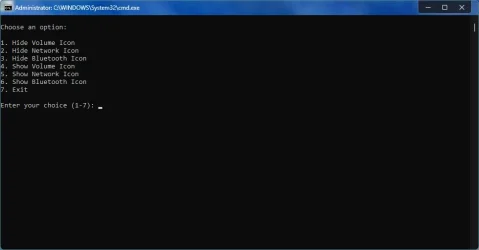
here, made it easier. just make this run as admin and pin wherever. then you dont have to go into any programs' settings to change them...
.bat is attached

1762009856400.webp
 

Attachments

My Computer My Computer

At a glance

Windows 11 Pro
OS
Windows 11 Pro
What about the dialogs shown by these shortcuts?
%windir%\explorer.exe shell:::{05d7b0f4-2121-4eff-bf6b-ed3f69b894d9}
and its subordinate
%windir%\explorer.exe shell:::{05d7b0f4-2121-4eff-bf6b-ed3f69b894d9}\SystemIcons
Network appears in both of mine.
I made no note of other routes to display these dialogs so I don't know if they are ones you have already tried.


All the best,
Denis
Thanks but sadly, no effect. I'll have to live with it.
 

My Computers My Computers

  • At a glance

    Win 11 Home 25H2 (OS Build 26200.7019)Intel Core i7 1470032GB Corsair VengeanceBuilt in
    OS
    Win 11 Home 25H2 (OS Build 26200.7019)
    Computer type
    PC/Desktop
    Manufacturer/Model
    Custom build
    CPU
    Intel Core i7 14700
    Motherboard
    ASUS PRIME B760M-K D4 (LGA1700)
    Memory
    32GB Corsair Vengeance
    Graphics Card(s)
    Built in
    Sound Card
    Built in
    Monitor(s) Displays
    Benq G2222HDL 21.5"
    Screen Resolution
    1920 x 1080
    Hard Drives
    512Gb SSD
    1Tb SSD
    PSU
    Vida
    Case
    Fractal Pop Air
    Keyboard
    Standard PS/2 wired keyboard
    Mouse
    Microsoft USB wired wheel mouse
    Internet Speed
    500Mbps
    Browser
    Chrome
    Antivirus
    Defender
  • At a glance

    Win 11 Home 24H2 (OS Build 26100.4202)12th Gen Intel Core i5-1150H16GbBuilt in
    Operating System
    Win 11 Home 24H2 (OS Build 26100.4202)
    Computer type
    Laptop
    Manufacturer/Model
    HP Zbook Fury
    CPU
    12th Gen Intel Core i5-1150H
    Motherboard
    HP 8AA1 KBC
    Memory
    16Gb
    Graphics card(s)
    Built in
    Sound Card
    Built in
    Hard Drives
    1Tb SSD
    Internet Speed
    500Mbps
    Browser
    Chrome
    Antivirus
    Defender
Back
Top Bottom