

CROSSAFELA
Member
- Local time
- 5:59 AM
- Posts
- 2
- OS
- Windows 11 22H2
So I'm trying to add icons that are marked in red below. I am using resource hacker but I am not sure what Icon Group numbers i should be changing for the icons I have marked in red below. Does anyone have like a layout or key for what icon group number corresponds with Control Panel file explorer icons?
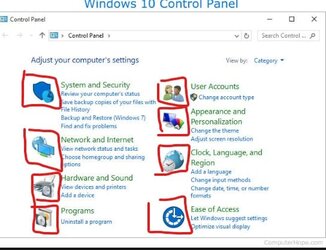
the icons i need to add.

My Windows Build/Version: Windows 11 22H2
the icons i need to add.
My Windows Build/Version: Windows 11 22H2
- Windows Build/Version
- Windows 11 22H2
My Computer
At a glance
Windows 11 22H2i9 99 somethin32GB CORSAIR3080Ti
- OS
- Windows 11 22H2
- Computer type
- PC/Desktop
- Manufacturer/Model
- CUSTOM
- CPU
- i9 99 somethin
- Motherboard
- z390 AORUS PRO WIFI
- Memory
- 32GB CORSAIR
- Graphics Card(s)
- 3080Ti
- Monitor(s) Displays
- Alienware 240htz
- Screen Resolution
- 240
- Hard Drives
- SAMSUNG NVME 1TB
- PSU
- 850W
- Case
- Lian-Li O11 Dynamic
- Cooling
- LIQUID COOLING
- Keyboard
- ROCCAT Vulcan 122 Mechanical + ANNE PRO 2
- Mouse
- MODEL O
- Internet Speed
- FAST






