Win 11 - Speakers sound terrible


aghlblagh

New member
Local time
10:16 PM
Posts
4
OS
Windows 11
When I plug my Logitech Z623 speakers into my brand-new HP Thinkpad 860 G9, the computer only recognizes them as headphones. I cannot figure out how to change this. The sound, when it comes out, is terrible, mostly the blown-out bass. I've tried updating all the drivers via Windows but can't find a legit Logitech driver (is 'logitecg502.com' legit?), tried adjusting every Windows audio mixer I could find, still sounds bad.

Can someone kindly point me towards a legit driver, and tell me how to get my computer to recognize it?
 
Windows Build/Version
Win 11 21h2

My Computer My Computer

At a glance

Windows 11Intel i72tb
OS
Windows 11
Computer type
Laptop
Manufacturer/Model
HP
CPU
Intel i7
Memory
2tb
Have you try change Default Format sound 16 bits 48000 Hz in your sound setting? or try change and test the sound correct!
 

My Computer My Computer

At a glance

Windows 11 25H2i9 285KCorsair Vengeance RGB 48GB DDR 9200mt/s 2 x 24gbNVIDIA RTX 4080 Foundation Editon 16 GB
OS
Windows 11 25H2
Computer type
PC/Desktop
Manufacturer/Model
MSI
CPU
i9 285K
Motherboard
MSI Z890 MEG ACE
Memory
Corsair Vengeance RGB 48GB DDR 9200mt/s 2 x 24gb
Graphics Card(s)
NVIDIA RTX 4080 Foundation Editon 16 GB
Sound Card
EVGA NU Audio
Monitor(s) Displays
Acer Predator X35 35-inch Curved G-Sync Ultimate 200Hz
Screen Resolution
3440 x 1440 G-Sync
Hard Drives
M.2 Samsung Pro 1100 1TB
M.2 Samsung Pro 990 1TB HDD 1TB
PSU
EVGA SuperNOVA 1300 X3
Case
EVGA case D77
Cooling
EVGA CLCx 380 Liquid / Water CPU Cooler
Keyboard
EVGA Z10
Mouse
EVGA Torq X10
Internet Speed
900 mb/s
Browser
Mircosoft Edges Google and Bing
Antivirus
Kaspersky Internet
Other Info
Logitech Z906 THX 5.1 Surround Sound Speakers SPDIF
Thank you for the suggestions, but I've tried both - doesn't solve the problem!
 

My Computer My Computer

At a glance

Windows 11Intel i72tb
OS
Windows 11
Computer type
Laptop
Manufacturer/Model
HP
CPU
Intel i7
Memory
2tb
There are no additional drivers for this device. It should use the generic Microsoft drivers.
Instead,
1. check that the Windows Audio volume is set to at least 80%.
2. On one of the satelitte speakers there should be a Bass control. Turn that down to zero.
3. Play a test sound and adjust the main volume control to your liking.
4. While still playing the test sound, turn up the Bass until it reaches a comfortable level.
 

My Computers My Computers

  • At a glance

    Windows 11AMD Ryzen 5 560016 GBSapphire Radeon RX 6500XT (8 GB version)
    OS
    Windows 11
    Computer type
    PC/Desktop
    CPU
    AMD Ryzen 5 5600
    Motherboard
    MSI B550-A Pro
    Memory
    16 GB
    Graphics Card(s)
    Sapphire Radeon RX 6500XT (8 GB version)
    Monitor(s) Displays
    BenQ Mobuiz EX2710Q QHD, Iiyama ProLite X23377HDS
    Hard Drives
    MSI Spatium M461 4TB
  • At a glance

    Windows 11Intel Celeron N4020
    Operating System
    Windows 11
    Computer type
    Laptop
    Manufacturer/Model
    Acer A114
    CPU
    Intel Celeron N4020
Are you sure that's not an Elitebook. The only G9 HP lists with that model number is not a Thinkpad. Thinkpad is Lenovo.
As @iko22 said, the speakers do not have a driver. Have you used the same speakers with no issues with another computer or are they new like the laptop?

HP EliteBook 860 16 inch G9 Notebook PC​

sound drivers here HP EliteBook 860 16 inch G9 Notebook PC Software and Driver Downloads | HP® Customer Support
Realtek audio driver dated 2/23/23 version 22.9481.7919.68 Rev.N Is that the sound driver you have?
 

My Computers My Computers

  • At a glance

    Windows 11 Pro 25H2 26200.8655i9-10900 10 core 20 threads32 gbnone-Intel UHD Graphics 630
    OS
    Windows 11 Pro 25H2 26200.8655
    Computer type
    PC/Desktop
    Manufacturer/Model
    Dell Optiplex 7080
    CPU
    i9-10900 10 core 20 threads
    Motherboard
    DELL 0J37VM
    Memory
    32 gb
    Graphics Card(s)
    none-Intel UHD Graphics 630
    Sound Card
    Integrated Realtek
    Monitor(s) Displays
    Benq 27
    Screen Resolution
    2560x1440
    Hard Drives
    2x1tb Solidigm m.2 nvme /External drives 512gb Samsung m.2 sata+2tb Kingston m2.nvme
    PSU
    500w
    Case
    MT
    Cooling
    Dell Premium
    Keyboard
    Logitech wired
    Mouse
    Logitech wireless
    Internet Speed
    so slow I'm too embarrassed to tell
    Browser
    #1 Edge #2 Firefox
    Antivirus
    Defender+MWB Premium
  • At a glance

    Windows 11 Pro 24H2 26200.8457AMD Ryzen 7 6800U32 gbintegrated
    Operating System
    Windows 11 Pro 24H2 26200.8457
    Computer type
    PC/Desktop
    Manufacturer/Model
    Beelink Mini PC SER5
    CPU
    AMD Ryzen 7 6800U
    Memory
    32 gb
    Graphics card(s)
    integrated
    Sound Card
    integrated
    Monitor(s) Displays
    Benq 27
    Screen Resolution
    2560x1440
    Hard Drives
    1TB Crucial nvme
    Keyboard
    Logitech wired
    Mouse
    Logitech wireless
    Internet Speed
    still too embarrassed to tell
    Browser
    Firefox
    Antivirus
    Defender
    Other Info
    System 3 is non compliant Dell 9020 i7-4770/24gb ram Win11 PRO 26200.8457
Oh man I'm sorry, Elitebook not Thinkpad.

There is indeed a bass setting on the speakers themselves -- it's at zero, the bass still sounds incredibly blown-out. These speakers worked just fine with my previous laptop.
 

My Computer My Computer

At a glance

Windows 11Intel i72tb
OS
Windows 11
Computer type
Laptop
Manufacturer/Model
HP
CPU
Intel i7
Memory
2tb
Have you tried reinstalling the audio drivers via device manager? Worth a try.
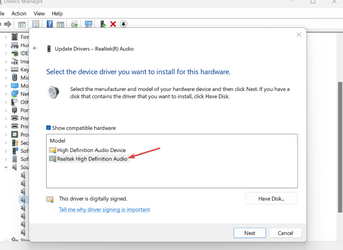
Device manager -sound video and game controller -right click Realtek(R) Audio - Update drivers -Browse my computer for drivers -Let me pick from a list of available drivers on my computer and select the driver to install then reboot. Worth a try.
Just an example:

1688305799265.png
 

My Computers My Computers

  • At a glance

    Win 11 ProAMD Ryzen™ 7 7730U24GB Dual-Channel DDR4 @ 1596MHz (22-22-22-52)512MB ATI AMD Radeon Graphics (ASUStek Comput...
    OS
    Win 11 Pro
    Computer type
    Laptop
    Manufacturer/Model
    ASUS Vivobook
    CPU
    AMD Ryzen™ 7 7730U
    Motherboard
    M1605YA
    Memory
    24GB Dual-Channel DDR4 @ 1596MHz (22-22-22-52)
    Graphics Card(s)
    512MB ATI AMD Radeon Graphics (ASUStek Computer Inc)
    Monitor(s) Displays
    Generic PnP Monitor (1920x1200@60Hz) - P1 PLUS (1920x1080@59Hz)
    Screen Resolution
    1920 X 1200
    Hard Drives
    953GB Western Digital WD
    PSU
    45 Watts
    Mouse
    Lenovo Bluetooth.
    Internet Speed
    500 Mbps
    Browser
    Edge
    Antivirus
    Defender
  • At a glance

    Windows 11AMD Ryzen 7 5800H / 3.2 GHz32 GB DDR4 SDRAM 3200 MHzNVIDIA GeForce RTX 3060 6 GB GDDR6 SDRAM
    Operating System
    Windows 11
    Computer type
    Laptop
    Manufacturer/Model
    ACER NITRO
    CPU
    AMD Ryzen 7 5800H / 3.2 GHz
    Motherboard
    CZ Scala_CAS (FP6)
    Memory
    32 GB DDR4 SDRAM 3200 MHz
    Graphics card(s)
    NVIDIA GeForce RTX 3060 6 GB GDDR6 SDRAM
    Sound Card
    Realtek Audio. NVIDIA High Definition Audio
    Monitor(s) Displays
    15.6" LED backlight 1920 x 1080 (Full HD) 144 Hz
    Screen Resolution
    1920 x 1080 (Full HD)
    Hard Drives
    Samsung 970 Evo Plus 2TB NVMe M.2
    PSU
    180 Watt, 19.5 V
    Mouse
    Lenovo Bluetooth
    Internet Speed
    500 Mbps
    Browser
    Edge
    Antivirus
    Defender
The drivers will already be installed on your new Laptop, probably with an additional App overlaying. You can deduce that by the drivers supplied by HP.

There are no drivers required for your Logitech speakers, as they say any input will do and that includes Headphone.

The Headphone icon means nothing, you can easily change that to Speakers icon.
I just leave it at Speakers whether I use Speakers or Headphones.

You can disconnect the Bass speaker, i.e. 2.0 Audio and see how that sounds.
 

My Computer My Computer

At a glance

Windows 11
OS
Windows 11
I have tried reinstalling the drivers via the Windows update function, it doesn't work.
 

My Computer My Computer

At a glance

Windows 11Intel i72tb
OS
Windows 11
Computer type
Laptop
Manufacturer/Model
HP
CPU
Intel i7
Memory
2tb
Try contacting @MoKiChU. He helped me to install the correct Realtek driver for my desktop. He is very knowledgeable about Realtek Drivers. You can also try the program FxSound.
 

My Computers My Computers

  • At a glance

    Windows 11 Pro 25H2Intel Core i7-10700K16GB (8GB PC4-19200 DDR4 SDRAM x2)NVIDIA GeForce GTX 1050 TI
    OS
    Windows 11 Pro 25H2
    Computer type
    PC/Desktop
    Manufacturer/Model
    PowerSpec B746
    CPU
    Intel Core i7-10700K
    Motherboard
    ASRock Z490 Phantom Gaming 4/ax
    Memory
    16GB (8GB PC4-19200 DDR4 SDRAM x2)
    Graphics Card(s)
    NVIDIA GeForce GTX 1050 TI
    Sound Card
    Realtek Audio
    Monitor(s) Displays
    #1. LG ULTRAWIDE 34" #2. AOC Q32G2WG3 32"
    Screen Resolution
    #1. 3440 X 1440 #2. 1920 x 1080
    Hard Drives
    NVMe WDC WDS100T2B0C-00PXH0 1TB
    Samsung SSD 860 EVO 1TB
    PSU
    750 Watts (62.5A)
    Case
    PowerSpec/Lian Li ATX 205
    Keyboard
    Logitech K270
    Mouse
    Logitech M185
    Browser
    Microsoft Edge and Firefox
    Antivirus
    Webroot SecureAnywhere CE 26.1
  • At a glance

    Windows 11 Canary ChannelIntel Core i5-8400 CPU @ 2.80GHz16 MB DDR 4-2666
    Operating System
    Windows 11 Canary Channel
    Computer type
    PC/Desktop
    Manufacturer/Model
    PowerSpec G156
    CPU
    Intel Core i5-8400 CPU @ 2.80GHz
    Motherboard
    AsusTeK Prime B360M-A
    Memory
    16 MB DDR 4-2666
    Monitor(s) Displays
    23" Speptre HDMI 75Hz
    Screen Resolution
    1920x1080
    Hard Drives
    Samsung 970 EVO 500GB NVMe
    Keyboard
    Logitek K270
    Mouse
    Logitek M185
    Browser
    Firefox, Edge and Edge Canary
    Antivirus
    Windows Defender
Back
Top Bottom