Windhawk Mods (Official Topic - Please Post All Here)


thats because it forces a classic titlebar on uwp apps. and it has conflicts with file explorer now. thats why i didnt list it here

And it conflicts with Microsoft Edge. Shows two title bars. Removed it.
 

My Computers

System One System Two

  • OS
    Windows 11 Education For 25H2
    Computer type
    Laptop
    Manufacturer/Model
    HP ZBook G2
    CPU
    Intel® Core i7 5500u
    Motherboard
    HP
    Memory
    8 GB
    Graphics Card(s)
    Intel HD Family Graphics 5500 AMD Firepro 4150M
    Sound Card
    Realtek High Audio
    Hard Drives
    1 TB SSD
    Mouse
    HP USB Mouse
    Antivirus
    Windows Defender

  • Operating System
    Windows 11 Pro For Workstations 25H2
    Computer type
    Laptop
    Manufacturer/Model
    HP Zbook G4
    CPU
    Xeon 1535m v6
    Motherboard
    HP
    Memory
    32 GB
    Graphics card(s)
    AMD Quadro Pro 4100
    Sound Card
    Bang and Olufson Audio
    Hard Drives
    1TB SSD
    Mouse
    HP USB Mouse
    Antivirus
    Windows Defender

thats because it forces a classic titlebar on uwp apps. and it has conflicts with file explorer now. thats why i didnt list it here
It does not inject neither UWP, nor Explorer by default (and if set to inject, does not conflict).
 

My Computer

System One

  • OS
    Windows 11
It does not inject neither UWP, nor Explorer by default (and if set to inject, does not conflict).
I’ve tested and it messed up explorer titlebar. I did not add anything to the inclusion list, so it glitched something somewhere. Don’t know what else to tell you.
 

My Computer

System One

  • OS
    Windows 11 Pro
I’ve tested and it messed up explorer titlebar. I did not add anything to the inclusion list, so it something somewhere. Don’t know what else to tell you.
This is the default inclusion list. No Explorer. Mainly, Chromium-based apps:

// @include chrome.exe
// @include brave.exe
// @include msedge.exe
// @include opera.exe
// @include yandex.exe
// @include whale.exe
// @include supermium.exe
// @include chromium.exe
// @include devenv.exe
// @include steamwebhelper.exe
// @include PowerToys.*.exe
// @include olk.exe
// @include WebViewHost.exe
// @include winword.exe
// @include excel.exe
// @include powerpnt.exe
// @include msaccess.exe
// @include onenote.exe
// @include outlook.exe
// @include mspub.exe
// @include hwp.exe
// @include Photos.exe
// @include MuseScore*.exe
// @include ms-teams.exe
 

My Computer

System One

  • OS
    Windows 11
This is the default inclusion list. No Explorer. Mainly, Chromium-based apps:
ok. as stated, i did not add to that inclusion list and it still make the explorer top portion odd. again, dont know what else to tell you. if it works for you, congratulations.
 

My Computer

System One

  • OS
    Windows 11 Pro

Bug Report – Translucent Windows Mod​

Mod: Translucent WindowsVersion: 1.6.3 (or current)Operating System: Windows 11 23H2 (or your current version)

Issues encountered:

  1. When renaming a file in File Explorer, the text field becomes completely black or invisible.
  2. With HDR enabled, some windows become overly transparent or unreadable.
  3. Taskbar icons sometimes become unresponsive when multiple windows are minimized.
  4. Context menus and system dialogs occasionally become illegible due to excessive transparency.
Troubleshooting attempts:

  • Disabled HDR
  • Added explorer.exe to the “Excluded Processes” list
  • Disabled “Text Alpha Blending”
  • Restarted File Explorer after each change
Personal note:

The mod delivers a beautiful visual effect, but it introduces several usability issues across the Windows GUI. It would be helpful to have an option to apply the effect only to non-system windows or to limit its scope more precisely.
 

My Computer

System One

  • OS
    Windows 11
    Computer type
    PC/Desktop
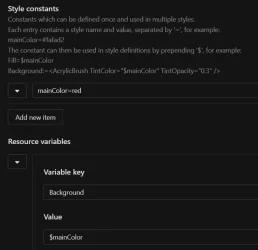
Since I can't have Openshell anymore (see Is Open Shell still developed or is it abandoned by Developers ? · Open-Shell Open-Shell-Menu · Discussion #2399 , a major bummer), I guess Windhawk will have to do. Thx to Michael at Ramen Software for fighting the good fight for Openshell as long as he did and for at least furnishing a kinda-sorta substitute in the face of opposition by the Leviathan. Anyhow, I'm using Windows 10 (Minimal) with Windows 11 Start Menu Styler and I'd like to add a picture background (just to the menu) but I can't even get a basic color background to work. It doesn't work as a target ("Background" in the Control styles Target field and "red" in the Styles field), and it doesn't work in the Style constants section either.

I tried to follow the directions there but no dice (see screenshot). I have no idea what I'm doing (in my defense, I did searches and tried to RTFM but there don't seem to be any basic directions anywhere that lay out the fundamentals of working with Windhawk for nontechnical noobs). So I tried but can't make headway. If I've missed the "Windhawk for Dummies" docs somewhere (they sure ain't on github--that's all for professional programmers) I'll be happy to go read them but otherwise help with my little issue would be greatly appreciated.

Also please keep in mind that my ultimate goal is an image, not just a background color, so if any syntax is required other than a barebones path surrounded by quote marks, please tell me that too. Muy grazi.
 

Attachments

  • WindhawkNoBGcolor.webp
    WindhawkNoBGcolor.webp
    26.5 KB · Views: 2

My Computer

System One

  • OS
    Windows 11
    Computer type
    Laptop
    Manufacturer/Model
    ASUS
    CPU
    Intel i7-13620H 10-Core
    Motherboard
    ASUS TUF FX507
    Memory
    32GB DDR5
    Graphics Card(s)
    GeForce RTX 4070
    Sound Card
    onboard
    Monitor(s) Displays
    laptop screen or Dell U3223QE
    Screen Resolution
    1980 or 2160, depending on laptop screen or desktop monitor
    Hard Drives
    SSD
    PSU
    laptop
    Case
    laptop
    Cooling
    laptop
    Keyboard
    laptop
    Mouse
    logitech M525
    Internet Speed
    5g
    Browser
    Firefox
Since I can't have Openshell anymore (see Is Open Shell still developed or is it abandoned by Developers ? · Open-Shell Open-Shell-Menu · Discussion #2399 , a major bummer), I guess Windhawk will have to do.
I still use Open-Shell on the latest stable build of Windows 11 25H2 currently, i.e., build 26200.7705. I use it together with Windhawk and ExplorerPatcher actually.
Thx to Michael at Ramen Software for fighting the good fight for Openshell as long as he did and for at least furnishing a kinda-sorta substitute in the face of opposition by the Leviathan. Anyhow, I'm using Windows 10 (Minimal) with Windows 11 Start Menu Styler and I'd like to add a picture background (just to the menu) but I can't even get a basic color background to work. It doesn't work as a target ("Background" in the Control styles Target field and "red" in the Styles field), and it doesn't work in the Style constants section either.

I tried to follow the directions there but no dice (see screenshot). I have no idea what I'm doing (in my defense, I did searches and tried to RTFM but there don't seem to be any basic directions anywhere that lay out the fundamentals of working with Windhawk for nontechnical noobs). So I tried but can't make headway. If I've missed the "Windhawk for Dummies" docs somewhere (they sure ain't on github--that's all for professional programmers) I'll be happy to go read them but otherwise help with my little issue would be greatly appreciated.

Also please keep in mind that my ultimate goal is an image, not just a background color, so if any syntax is required other than a barebones path surrounded by quote marks, please tell me that too. Muy grazi.
In the settings of the "Windows 11 Start Menu Styler" mod, under Control styles, set Target to Border#AcrylicBorder
and set Styles to Background:=<ImageBrush Stretch="UniformToFill" ImageSource="<image>" /> where <image> is the path to the background image you want. Click on Save settings. Done.
 
Last edited:

My Computers

System One System Two

  • OS
    11 Home
    Computer type
    Laptop
    Manufacturer/Model
    Asus TUF Gaming F16 (2024)
    CPU
    i7 13650HX
    Memory
    16GB DDR5
    Graphics Card(s)
    GeForce RTX 4060 Mobile
    Sound Card
    Eastern Electric MiniMax DAC Supreme; Emotiva UMC-200; Astell & Kern AK240
    Monitor(s) Displays
    Sony Bravia XR-55X90J
    Screen Resolution
    3840×2160
    Hard Drives
    512GB SSD internal
    37TB external
    PSU
    Li-ion
    Cooling
    2× Arc Flow Fans, 4× exhaust vents, 5× heatpipes
    Keyboard
    Logitech K800
    Mouse
    Logitech G402
    Internet Speed
    30Mbit/s up, 500Mbit/s down
    Browser
    FF
    Antivirus
    What's an antivirus?
  • Operating System
    11 Home
    Computer type
    Laptop
    Manufacturer/Model
    Medion S15450
    CPU
    i5 1135G7
    Memory
    16GB DDR4
    Graphics card(s)
    Intel Iris Xe
    Sound Card
    Eastern Electric MiniMax DAC Supreme; Emotiva UMC-200; Astell & Kern AK240
    Monitor(s) Displays
    Sony Bravia XR-55X90J
    Screen Resolution
    3840×2160
    Hard Drives
    2TB SSD internal
    37TB external
    PSU
    Li-ion
    Keyboard
    Logitech K800
    Mouse
    Logitech G402
    Internet Speed
    30Mbit/s up, 500Mbit/s down
    Browser
    FF
Suh-weet! Worked a treat. Thanks very much.

I still use Open-Shell on the latest stable build of Windows 11 25H2 currently

Oh, I'm sure it'll continue working for a while on some builds. But I want to future-proof my current system configuration as much as possible, take a final image, and then have done with the OS for as long as possible. WAU Manager helps, but Microsoft has ensured that it's not foolproof. Under these circumstances abandonware feels like a dagger at my back.

I really miss the good old days of Windows 7 stability. Got it pretty much configured exactly the way I wanted in 2014 or thereabouts when they stopped releasing feature updates. Then I took a final image and never had to worry again until fall 2024 when we got the last security update. That was a whole decade of awesome worry-free computing, very much unlike the quarterly black hole of a time-waster that Windows has now become. I've been holding off on Linux because of the learning curve (I don't like tweaking but I do a lot of it in order to get a system that looks and works the way I want, so Linux will be a big job). But Microsoft has turned Windows 11 into a torture chamber worse than a Linux learning curve could ever be on a distribution like Mint, which I've put on my old Win10 machine and will start to mess with in earnest when I'm done with my Win11 configuration. Now I'm wishing I hadn't bought an 11 machine at all and had just gone Linux when they flushed 10. Well, that's the last Windows mistake I ever make.

In the meantime, you experts in this forum are lifesavers.
 
Last edited:

My Computer

System One

  • OS
    Windows 11
    Computer type
    Laptop
    Manufacturer/Model
    ASUS
    CPU
    Intel i7-13620H 10-Core
    Motherboard
    ASUS TUF FX507
    Memory
    32GB DDR5
    Graphics Card(s)
    GeForce RTX 4070
    Sound Card
    onboard
    Monitor(s) Displays
    laptop screen or Dell U3223QE
    Screen Resolution
    1980 or 2160, depending on laptop screen or desktop monitor
    Hard Drives
    SSD
    PSU
    laptop
    Case
    laptop
    Cooling
    laptop
    Keyboard
    laptop
    Mouse
    logitech M525
    Internet Speed
    5g
    Browser
    Firefox
Tried to edit previous response but apparently there's a 60-minute limit on editing a message. On the issue of Windows updates I wanted to give credit where credit is due and acknowledge your previous post here , but I don't want to have to monitor every little update and handle it individually in the way your recommendation would require. It's a great tip and doesn't take a whole lot of time for each instance but there are enough instances that the accumulation is too much. I want to use my time for other things. I want a system that's fire-and-forget--and it shouldn't be a chimera. For an entire decade, Windows 7 gave me just such a system.
 

My Computer

System One

  • OS
    Windows 11
    Computer type
    Laptop
    Manufacturer/Model
    ASUS
    CPU
    Intel i7-13620H 10-Core
    Motherboard
    ASUS TUF FX507
    Memory
    32GB DDR5
    Graphics Card(s)
    GeForce RTX 4070
    Sound Card
    onboard
    Monitor(s) Displays
    laptop screen or Dell U3223QE
    Screen Resolution
    1980 or 2160, depending on laptop screen or desktop monitor
    Hard Drives
    SSD
    PSU
    laptop
    Case
    laptop
    Cooling
    laptop
    Keyboard
    laptop
    Mouse
    logitech M525
    Internet Speed
    5g
    Browser
    Firefox
Heya.

I'm using the Windows 11 Explorer Styler mod... I'm looking for a way to target and modify the opacity of the top frame of the window, where tabs, location bar and command bar resides... I've been unable to locate the XAML target I need to change the opacity...

Anyone knows how to?

Cheers!
 

My Computers

System One System Two

  • OS
    Windows 11 Pro 25H2
    Computer type
    PC/Desktop
    Manufacturer/Model
    Built PC
    CPU
    AMD Ryzen 5 5600G @ 3.9/4.4Ghz
    Motherboard
    MSI B550M-PRO-WiFi Ver. 1.4
    Memory
    2 x 16 GB DDR4 Kingston Fury Beast 3200 Mhz
    Graphics Card(s)
    AMD Radeon RX 6600 XT MSI Mech 2X OC Edition 8 GB
    Sound Card
    Realtek High Definition Audio (Integrated)
    Monitor(s) Displays
    Samsung C50Rx 27" LED / HP S2031 20" LCD
    Screen Resolution
    1920 x 1080 px / 1600 x 900 px
    Hard Drives
    WD Blue SN570 NVME M.2 SSD [1 TB] -- External Drives: - WD Scorpion Blue 250 GB 5400 RPM (Data Backup) - Hitachi 500 GB 5400 RPM (Software / ISOs Backup) - Toshiba MQ01ABD100 1 TB 5400 RPM (OS Images) - HGST TravelStar 7K1000 1 TB, 7200 RPM USB 3.0 - ADATA SU800 2TB SSD USB 3.0
    PSU
    Corsair RM750e 750W Fully Modular
    Case
    Naceb Hydra NA-1602
    Cooling
    Naceb Orpheus x 3 (Front) + Naceb Cepheus 1200 RPM Max (Rear) + ThemalRight Assasin X 90 SE (CPU)
    Keyboard
    Logitech MK470 Wireless
    Mouse
    Logitech MK470 Wireless
    Internet Speed
    120 MB Symetrical
    Browser
    Firefox / Brave / Edge
    Antivirus
    Windows Defender

    Other Info
    - VMs: WMware Player - Windows 8.1 Pro x64 / Windows 11 Pro
    - Wacom Intuos Pro Small Tablet PTH-460
  • Operating System
    Windows 11 Pro 25H2
    Computer type
    Laptop
    Manufacturer/Model
    HP Pavilion 15-eh3000la (80M53LA)
    CPU
    AMD Ryzen 7 7730U @ 2.0/4.5 Ghz
    Motherboard
    HP 8BC7
    Memory
    2 x 16 GB Kingston Fury Impact DDR4 3200 Mhz
    Graphics card(s)
    Radeon (tm) Graphics Vega 8 (512 MB)
    Sound Card
    Realtek High Definition Audio (Integrated)
    Monitor(s) Displays
    AU Optronics
    Screen Resolution
    1920 x 1080 px (125% size)
    Hard Drives
    WD Blue SN570 1TB NVME M.2 Drive
    PSU
    45 Watt Charger
    Cooling
    Laptop Cooling Pad
    Keyboard
    Free Wolf Foldable Portable Keyboard
    Mouse
    Free Wolf Wireless Mouse
    Internet Speed
    120 MB Symetrical
    Browser
    Firefox / Brave / Edge
    Antivirus
    Windows Defender

    Other Info
    - 41mWh battery.
    - Wacom Intuos Pro Small Tablet PTH-460
This looks like it might be a good solution for people who miss the ability to enhance their taskbar clock in Windows 11.


My Computers

System One System Two

  • OS
    Windows 11 Pro
    Computer type
    PC/Desktop
    Manufacturer/Model
    Stigg's Build
    CPU
    Intel Core i9-10900X
    Motherboard
    GIGABYTE X299X DESIGNARE 10G
    Memory
    Corsair 64 GB (4 x 16 GB) CMW64GX4M4C3000C15 Vengeance RGB Pro 3000Mhz DDR4
    Graphics Card(s)
    GIGABYTE GeForce GTX 1660 Super Mini ITX 6 GB OC
    Sound Card
    Realtek ALC1220
    Monitor(s) Displays
    Samsung 27" FHD LED FreeSync Gaming Monitor (LS27F350FHEXXY)
    Screen Resolution
    1920 x 1080
    Hard Drives
    Samsung 970 Pro Series 1TB M.2 2280 NVMe SSD
    Western Digital Red Pro WD8003FFBX-68B9AN0 8 TB, 7200 RPM, SATA-III
    Western Digital Red Pro WD8003FFBX-68B9AN0 8 TB, 7200 RPM, SATA-III
    PSU
    Corsair HX1200 1200W 80 Plus Platinum
    Case
    Fractal Design Define 7 Black Solid Case
    Cooling
    Noctua NH-D15 Chromax Black
    Keyboard
    Razer Ornata V2
    Mouse
    Razer DeathAdder Essential
    Internet Speed
    FTTN 100Mbps / 40Mbps
    Browser
    Mozilla Firefox
    Antivirus
    N/A
    Other Info
    Logitech BRIO 4k Ultra HD USB-C Webcam
  • Operating System
    Windows 10 Pro
    Computer type
    Laptop
    Manufacturer/Model
    ASUS ROG Zephyrus M GM501GS
    CPU
    Core i7-8750H
    Motherboard
    Zephyrus M GM501GS
    Memory
    SK Hynix 32 GB (2 x 16 GB) HMA82GS6CJR8N-VK 16 GB DDR4-2666 DDR4 SDRAM
    Graphics card(s)
    NVIDIA GeForce GTX 1070
    Sound Card
    Realtek ALC294
    Monitor(s) Displays
    AU Optronics B156HAN07.1 [15.6" LCD]
    Screen Resolution
    1920 x 1080
    Hard Drives
    Samsung MZVKW512HMJP-00000 512 GB, PCI-E 3.0 x4
    Samsung SSD 860 QVO 4TB 4 TB, SATA-III
    PSU
    N/A
    Case
    N/A
    Cooling
    N/A
    Keyboard
    PC/AT Enhanced PS2 Keyboard (101/102-Key)
    Mouse
    Razer DeathAdder Essential
    Internet Speed
    FTTN 100Mbps / 40Mbps
    Browser
    Mozilla Firefox
    Antivirus
    N/A
    Other Info
    USB2.0 HD UVC Webcam
This looks like it might be a good solution for people who miss the ability to enhance their taskbar clock in Windows 11.
Yes indeed, that mod I am using.
These are my settings:
Show seconds: Off
Time format: HH':'mm
Date format: Default (empty)
Week day format: Default (empty)
Top line: EMPTY!
Bottom line: %time%
Middle line: %weekday% (Windows 10 only)
Tooltip extra line: Default (empty)
Clock width: 180 (Windows 10 only)
Clock height: 60 (Windows 10 only)
Clock max width (Windows 11 only) (set to zero to have no max width): 0
Line spacing: 2 (with this you can change vertical position)
Web content items:
Web content URL: EMPTY!
Other values: unchanged
Top line style (Windows 11 version 22H2 and newer)
Hidden: ON!
Other values: unchanged
Bottom line style (Windows 11 version 22H2 and newer)
Text color: Default (empty)
Text alignment: Left
Font size: 19
Font family: Arial
Font style: Default
Font stretch: Normal
Character spacing: 0
Customize the old taskbar on Windows 11: Default (Off)

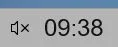
Result is this clock (no date, just a clock)
001280.webp
 

My Computer

System One

  • OS
    Windows 11 Pro 25H2 26200.8457
    Computer type
    PC/Desktop
    Manufacturer/Model
    Build by vendor to my specs
    CPU
    AMD Ryzen 7 5700G
    Motherboard
    MSI PRO B550M-P Gen3
    Memory
    Kingston FURY Beast 2x16GB DIMM DDR4 2666 CL16
    Graphics Card(s)
    MSI GeForce GT 730 2GB LP V1
    Sound Card
    Creative Sound Blaster Audigy FX
    Monitor(s) Displays
    Samsung S24E450F 24"
    Screen Resolution
    1920 x 1080
    Hard Drives
    1. SSD Crucial P5 Plus 500GB PCIe M.2
    2. SSD-SATA Crucial MX500-2TB
    PSU
    Corsair CV650W
    Case
    Cooler Master Silencio S400
    Cooling
    Cooler Master Hyper H412R with Be Quiet Pure Wings 2 PWM BL038 fan
    Keyboard
    Cherry Stream (wired, scissor keys)
    Mouse
    Asus WT465 (wireless)
    Internet Speed
    70 Mbps down / 80 Mbps up
    Browser
    Firefox 130.0
    Antivirus
    F-Secure (Internetprovider version)
    Other Info
    Router: FRITZBox 7490
    Oracle VirtualBox 7 for testing software on Win 10 or 11
I realise this is not exactly a "support" thread, but don't know where to turn and Eleven forumers are usually "supportive", so here goes.

I am an ultra-newbie to Hawkwind and my head is not in a good place, having just had to reinstall Win11 following loads of problems disrupting my "work".

Start11 is installed for Win7 appearance, I've used it since Start10 was introduced, with no ill effects.

Have just installed Hawkwind in desperation, solely to get rid of labels in the taskbar because Windows11's setting "Always" under "Group icons and hide labels" is not working - all open apps still have labels.

Despite installing Taskbar Labels for Windows 11, the labels are still there - restarting Explorer disappears them but only momentarily - as does rebooting laptop.

Might Hawkwind have failed to overcome Windows' glitch or have I done something wrong? I was a bit put off by other settings below that one with numbers 'n stuff in, I left them as there were.

Will I have to do a RegEdit (which I dread) to get rid of the dang labels?
 

My Computer

System One

  • OS
    Wndows 11
    Computer type
    Laptop
    Manufacturer/Model
    Dell Precision modded
    CPU
    Intel(R) Core(TM) i9-8950HK CPU @ 2.90GHz (2.90 GHz)
    Motherboard
    ?
    Memory
    64.0 GB
    Graphics Card(s)
    NVIDIA Quadro P2000 (4 GB)
    Screen Resolution
    4K
    Hard Drives
    Crucial 4TB
    Internet Speed
    250+ Mbps
    Browser
    Firefox
    Antivirus
    Windows Defender
Yes indeed, that mod I am using.
These are my settings:


Result is this clock (no date, just a clock)
001280.webp
Hi, Kees.

What's the benefit of having a standard looking clock that could be displayed without the use of Windhawk? Have I missed something? :unsure:
 

My Computers

System One System Two

  • OS
    Windows 11 Pro
    Computer type
    PC/Desktop
    Manufacturer/Model
    Stigg's Build
    CPU
    Intel Core i9-10900X
    Motherboard
    GIGABYTE X299X DESIGNARE 10G
    Memory
    Corsair 64 GB (4 x 16 GB) CMW64GX4M4C3000C15 Vengeance RGB Pro 3000Mhz DDR4
    Graphics Card(s)
    GIGABYTE GeForce GTX 1660 Super Mini ITX 6 GB OC
    Sound Card
    Realtek ALC1220
    Monitor(s) Displays
    Samsung 27" FHD LED FreeSync Gaming Monitor (LS27F350FHEXXY)
    Screen Resolution
    1920 x 1080
    Hard Drives
    Samsung 970 Pro Series 1TB M.2 2280 NVMe SSD
    Western Digital Red Pro WD8003FFBX-68B9AN0 8 TB, 7200 RPM, SATA-III
    Western Digital Red Pro WD8003FFBX-68B9AN0 8 TB, 7200 RPM, SATA-III
    PSU
    Corsair HX1200 1200W 80 Plus Platinum
    Case
    Fractal Design Define 7 Black Solid Case
    Cooling
    Noctua NH-D15 Chromax Black
    Keyboard
    Razer Ornata V2
    Mouse
    Razer DeathAdder Essential
    Internet Speed
    FTTN 100Mbps / 40Mbps
    Browser
    Mozilla Firefox
    Antivirus
    N/A
    Other Info
    Logitech BRIO 4k Ultra HD USB-C Webcam
  • Operating System
    Windows 10 Pro
    Computer type
    Laptop
    Manufacturer/Model
    ASUS ROG Zephyrus M GM501GS
    CPU
    Core i7-8750H
    Motherboard
    Zephyrus M GM501GS
    Memory
    SK Hynix 32 GB (2 x 16 GB) HMA82GS6CJR8N-VK 16 GB DDR4-2666 DDR4 SDRAM
    Graphics card(s)
    NVIDIA GeForce GTX 1070
    Sound Card
    Realtek ALC294
    Monitor(s) Displays
    AU Optronics B156HAN07.1 [15.6" LCD]
    Screen Resolution
    1920 x 1080
    Hard Drives
    Samsung MZVKW512HMJP-00000 512 GB, PCI-E 3.0 x4
    Samsung SSD 860 QVO 4TB 4 TB, SATA-III
    PSU
    N/A
    Case
    N/A
    Cooling
    N/A
    Keyboard
    PC/AT Enhanced PS2 Keyboard (101/102-Key)
    Mouse
    Razer DeathAdder Essential
    Internet Speed
    FTTN 100Mbps / 40Mbps
    Browser
    Mozilla Firefox
    Antivirus
    N/A
    Other Info
    USB2.0 HD UVC Webcam
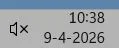
What's the benefit of having a standard looking clock that could be displayed without the use of Windhawk?
This is how that clock looks without the Windhawk mod for the clock:

001307.webp

I don't need to see the date continuously and I want the clock to have bigger characters, while having a small taskbar.
I always had a small taskbar, from Windows 95 until Windows 10, only Windows 11 forced me to use a large taskbar.

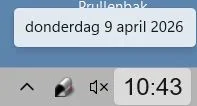
When hoovering the clock I can see the date:

001308.webp

So this is exactly how I like it and how I did before by T-Clock, that stopped functioning in Windows 11.
Any objections?:-)
 

My Computer

System One

  • OS
    Windows 11 Pro 25H2 26200.8457
    Computer type
    PC/Desktop
    Manufacturer/Model
    Build by vendor to my specs
    CPU
    AMD Ryzen 7 5700G
    Motherboard
    MSI PRO B550M-P Gen3
    Memory
    Kingston FURY Beast 2x16GB DIMM DDR4 2666 CL16
    Graphics Card(s)
    MSI GeForce GT 730 2GB LP V1
    Sound Card
    Creative Sound Blaster Audigy FX
    Monitor(s) Displays
    Samsung S24E450F 24"
    Screen Resolution
    1920 x 1080
    Hard Drives
    1. SSD Crucial P5 Plus 500GB PCIe M.2
    2. SSD-SATA Crucial MX500-2TB
    PSU
    Corsair CV650W
    Case
    Cooler Master Silencio S400
    Cooling
    Cooler Master Hyper H412R with Be Quiet Pure Wings 2 PWM BL038 fan
    Keyboard
    Cherry Stream (wired, scissor keys)
    Mouse
    Asus WT465 (wireless)
    Internet Speed
    70 Mbps down / 80 Mbps up
    Browser
    Firefox 130.0
    Antivirus
    F-Secure (Internetprovider version)
    Other Info
    Router: FRITZBox 7490
    Oracle VirtualBox 7 for testing software on Win 10 or 11
Start11 is installed for Win7 appearance, I've used it since Start10 was introduced, with no ill effects.

Have just installed Hawkwind in desperation, solely to get rid of labels in the taskbar because Windows11's setting "Always" under "Group icons and hide labels" is not working - all open apps still have labels.
It's not good to mix tweaking apps like Start11 and Windhawk, because they may conflict. If your taskbar labels cannot be disabled, this has to be something in your Start11 settings. No Windhawk mod or registry setting can change that, if Start11 is taking the first interception of the Explorer functions..

Please note that it's 'Windhawk', not 'Hawkwind'.
 

My Computer

System One

  • OS
    Windows 11 Pro 25H2 26200.8457
    Computer type
    PC/Desktop
    Manufacturer/Model
    Build by vendor to my specs
    CPU
    AMD Ryzen 7 5700G
    Motherboard
    MSI PRO B550M-P Gen3
    Memory
    Kingston FURY Beast 2x16GB DIMM DDR4 2666 CL16
    Graphics Card(s)
    MSI GeForce GT 730 2GB LP V1
    Sound Card
    Creative Sound Blaster Audigy FX
    Monitor(s) Displays
    Samsung S24E450F 24"
    Screen Resolution
    1920 x 1080
    Hard Drives
    1. SSD Crucial P5 Plus 500GB PCIe M.2
    2. SSD-SATA Crucial MX500-2TB
    PSU
    Corsair CV650W
    Case
    Cooler Master Silencio S400
    Cooling
    Cooler Master Hyper H412R with Be Quiet Pure Wings 2 PWM BL038 fan
    Keyboard
    Cherry Stream (wired, scissor keys)
    Mouse
    Asus WT465 (wireless)
    Internet Speed
    70 Mbps down / 80 Mbps up
    Browser
    Firefox 130.0
    Antivirus
    F-Secure (Internetprovider version)
    Other Info
    Router: FRITZBox 7490
    Oracle VirtualBox 7 for testing software on Win 10 or 11
This is how that clock looks without the Windhawk mod for the clock:

View attachment 168174

I don't need to see the date continuously and I want the clock to have bigger characters, while having a small taskbar.
I always had a small taskbar, from Windows 95 until Windows 10, only Windows 11 forced me to use a large taskbar.

When hoovering the clock I can see the date:

View attachment 168175

So this is exactly how I like it and how I did before by T-Clock, that stopped functioning in Windows 11.
Any objections?:-)
No objections.
It's a personal choice.

Hey, maybe they should call some computers a PC (Personal Computer). :-)
 

My Computers

System One System Two

  • OS
    Windows 11 Pro
    Computer type
    PC/Desktop
    Manufacturer/Model
    Stigg's Build
    CPU
    Intel Core i9-10900X
    Motherboard
    GIGABYTE X299X DESIGNARE 10G
    Memory
    Corsair 64 GB (4 x 16 GB) CMW64GX4M4C3000C15 Vengeance RGB Pro 3000Mhz DDR4
    Graphics Card(s)
    GIGABYTE GeForce GTX 1660 Super Mini ITX 6 GB OC
    Sound Card
    Realtek ALC1220
    Monitor(s) Displays
    Samsung 27" FHD LED FreeSync Gaming Monitor (LS27F350FHEXXY)
    Screen Resolution
    1920 x 1080
    Hard Drives
    Samsung 970 Pro Series 1TB M.2 2280 NVMe SSD
    Western Digital Red Pro WD8003FFBX-68B9AN0 8 TB, 7200 RPM, SATA-III
    Western Digital Red Pro WD8003FFBX-68B9AN0 8 TB, 7200 RPM, SATA-III
    PSU
    Corsair HX1200 1200W 80 Plus Platinum
    Case
    Fractal Design Define 7 Black Solid Case
    Cooling
    Noctua NH-D15 Chromax Black
    Keyboard
    Razer Ornata V2
    Mouse
    Razer DeathAdder Essential
    Internet Speed
    FTTN 100Mbps / 40Mbps
    Browser
    Mozilla Firefox
    Antivirus
    N/A
    Other Info
    Logitech BRIO 4k Ultra HD USB-C Webcam
  • Operating System
    Windows 10 Pro
    Computer type
    Laptop
    Manufacturer/Model
    ASUS ROG Zephyrus M GM501GS
    CPU
    Core i7-8750H
    Motherboard
    Zephyrus M GM501GS
    Memory
    SK Hynix 32 GB (2 x 16 GB) HMA82GS6CJR8N-VK 16 GB DDR4-2666 DDR4 SDRAM
    Graphics card(s)
    NVIDIA GeForce GTX 1070
    Sound Card
    Realtek ALC294
    Monitor(s) Displays
    AU Optronics B156HAN07.1 [15.6" LCD]
    Screen Resolution
    1920 x 1080
    Hard Drives
    Samsung MZVKW512HMJP-00000 512 GB, PCI-E 3.0 x4
    Samsung SSD 860 QVO 4TB 4 TB, SATA-III
    PSU
    N/A
    Case
    N/A
    Cooling
    N/A
    Keyboard
    PC/AT Enhanced PS2 Keyboard (101/102-Key)
    Mouse
    Razer DeathAdder Essential
    Internet Speed
    FTTN 100Mbps / 40Mbps
    Browser
    Mozilla Firefox
    Antivirus
    N/A
    Other Info
    USB2.0 HD UVC Webcam
It's not good to mix tweaking apps like Start11...
I've re-examined following a sleep - thank you, issue resolved, got my taskbar back!

Please note that it's 'Windhawk', not 'Hawkwind'.

Apologies, showing my age in more ways than one ;-)

Thanks again, Kees 🌟
 

My Computer

System One

  • OS
    Wndows 11
    Computer type
    Laptop
    Manufacturer/Model
    Dell Precision modded
    CPU
    Intel(R) Core(TM) i9-8950HK CPU @ 2.90GHz (2.90 GHz)
    Motherboard
    ?
    Memory
    64.0 GB
    Graphics Card(s)
    NVIDIA Quadro P2000 (4 GB)
    Screen Resolution
    4K
    Hard Drives
    Crucial 4TB
    Internet Speed
    250+ Mbps
    Browser
    Firefox
    Antivirus
    Windows Defender
Captura de pantalla 2026-04-09 221017.webp

I know I'm obsessive... but having the metrics there is a marvel...~
 

My Computers

System One System Two

  • OS
    Windows 11 Pro 25H2
    Computer type
    PC/Desktop
    Manufacturer/Model
    Built PC
    CPU
    AMD Ryzen 5 5600G @ 3.9/4.4Ghz
    Motherboard
    MSI B550M-PRO-WiFi Ver. 1.4
    Memory
    2 x 16 GB DDR4 Kingston Fury Beast 3200 Mhz
    Graphics Card(s)
    AMD Radeon RX 6600 XT MSI Mech 2X OC Edition 8 GB
    Sound Card
    Realtek High Definition Audio (Integrated)
    Monitor(s) Displays
    Samsung C50Rx 27" LED / HP S2031 20" LCD
    Screen Resolution
    1920 x 1080 px / 1600 x 900 px
    Hard Drives
    WD Blue SN570 NVME M.2 SSD [1 TB] -- External Drives: - WD Scorpion Blue 250 GB 5400 RPM (Data Backup) - Hitachi 500 GB 5400 RPM (Software / ISOs Backup) - Toshiba MQ01ABD100 1 TB 5400 RPM (OS Images) - HGST TravelStar 7K1000 1 TB, 7200 RPM USB 3.0 - ADATA SU800 2TB SSD USB 3.0
    PSU
    Corsair RM750e 750W Fully Modular
    Case
    Naceb Hydra NA-1602
    Cooling
    Naceb Orpheus x 3 (Front) + Naceb Cepheus 1200 RPM Max (Rear) + ThemalRight Assasin X 90 SE (CPU)
    Keyboard
    Logitech MK470 Wireless
    Mouse
    Logitech MK470 Wireless
    Internet Speed
    120 MB Symetrical
    Browser
    Firefox / Brave / Edge
    Antivirus
    Windows Defender
    Other Info
    - VMs: WMware Player - Windows 8.1 Pro x64 / Windows 11 Pro
    - Wacom Intuos Pro Small Tablet PTH-460
  • Operating System
    Windows 11 Pro 25H2
    Computer type
    Laptop
    Manufacturer/Model
    HP Pavilion 15-eh3000la (80M53LA)
    CPU
    AMD Ryzen 7 7730U @ 2.0/4.5 Ghz
    Motherboard
    HP 8BC7
    Memory
    2 x 16 GB Kingston Fury Impact DDR4 3200 Mhz
    Graphics card(s)
    Radeon (tm) Graphics Vega 8 (512 MB)
    Sound Card
    Realtek High Definition Audio (Integrated)
    Monitor(s) Displays
    AU Optronics
    Screen Resolution
    1920 x 1080 px (125% size)
    Hard Drives
    WD Blue SN570 1TB NVME M.2 Drive
    PSU
    45 Watt Charger
    Cooling
    Laptop Cooling Pad
    Keyboard
    Free Wolf Foldable Portable Keyboard
    Mouse
    Free Wolf Wireless Mouse
    Internet Speed
    120 MB Symetrical
    Browser
    Firefox / Brave / Edge
    Antivirus
    Windows Defender
    Other Info
    - 41mWh battery.
    - Wacom Intuos Pro Small Tablet PTH-460

Latest Support Threads

Back
Top Bottom