
Windhawk Mods (Official Topic - Please Post All Here)


Yes, it's the "New Start Menu" modded with Windhawk using the "Windows 11 Start Menu Styler" mod and the "Start Menu Size" mod. If I scroll the all apps list on the left, the pinned list on the right does not scroll along with it. I just noticed that, while setting the height in the "Start Menu Size" mod to 645 in my second example like how I explained makes the scrollbar of the pinned list disappear when five or fewer rows of pinned icons are present in it, I can still scroll it ever so slightly (by only two pixels or so) with the mousewheel. After I increased the height setting from 645 to 646, the pinned list became non-scrollable (just like I had intended it to be).

In the "Windows 11 Start Menu Styler" mod's settings, you can switch the settings to Textual mode. In the box that appears in there, you can paste the code I posted, then click on Save settings. Then when you switch back to Visual mode, you can set the theme to SydeBySide2 so that's what I did. (Switching to Textual mode again next reveals that it automatically made some changes in the text content of the box.) On a 4k screen with the Scale set to 150% (Windows Settings > System > Display > Scale) the result is what you see in the second screenshot I posted.

In the "Start Menu Size" mod's settings I changed the width from 1153 to 858 so the number of columns in the pinned list went down from 7 to 5 and the number of rows went up from 5 to 7. In the "Windows 11 Start Menu Styler" mod's (Textual mode) settings I replaced Height=420 with Height=580so the pinned list cuts off after the 7th row of icons (as opposed to cuts off after the 5th row). As you can see, the pinned list now has its own separate scrollbar:

View attachment 174376
I think I know what's going on here.
They updated the theme, so only the all apps list scrolls instead of the whole damn thing.

BUT, this helped me to get a scrollbar!

Thanks a ton mate!
 

My Computers My Computers

  • At a glance

    Windows 11 Pro 25H2AMD Ryzen 5 5600G @ 3.9/4.4Ghz2 x 16 GB DDR4 Kingston Fury Beast 3200 MhzAMD Radeon RX 6600 XT MSI Mech 2X OC Edition ...
    OS
    Windows 11 Pro 25H2
    Computer type
    PC/Desktop
    Manufacturer/Model
    Built PC
    CPU
    AMD Ryzen 5 5600G @ 3.9/4.4Ghz
    Motherboard
    MSI B550M-PRO-WiFi Ver. 1.4
    Memory
    2 x 16 GB DDR4 Kingston Fury Beast 3200 Mhz
    Graphics Card(s)
    AMD Radeon RX 6600 XT MSI Mech 2X OC Edition 8 GB
    Sound Card
    Realtek High Definition Audio (Integrated)
    Monitor(s) Displays
    Samsung C50Rx 27" LED / HP S2031 20" LCD
    Screen Resolution
    1920 x 1080 px / 1600 x 900 px
    Hard Drives
    WD Blue SN570 NVME M.2 SSD [1 TB] -- External Drives: - WD Scorpion Blue 250 GB 5400 RPM (Data Backup) - Hitachi 500 GB 5400 RPM (Software / ISOs Backup) - Toshiba MQ01ABD100 1 TB 5400 RPM (OS Images) - HGST TravelStar 7K1000 1 TB, 7200 RPM USB 3.0 - ADATA SU800 2TB SSD USB 3.0
    PSU
    Corsair RM750e 750W Fully Modular
    Case
    Naceb Hydra NA-1602
    Cooling
    Naceb Orpheus x 3 (Front) + Naceb Cepheus 1200 RPM Max (Rear) + ThemalRight Assasin X 90 SE (CPU)
    Keyboard
    Logitech MK470 Wireless
    Mouse
    Logitech MK470 Wireless
    Internet Speed
    120 MB Symetrical
    Browser
    Firefox / Brave / Edge
    Antivirus
    Windows Defender
    Other Info
    - VMs: WMware Player - Windows 8.1 Pro x64 / Windows 11 Pro
    - Wacom Intuos Pro Small Tablet PTH-460
  • At a glance

    Windows 11 Pro 25H2AMD Ryzen 7 7730U @ 2.0/4.5 Ghz2 x 16 GB Kingston Fury Impact DDR4 3200 MhzRadeon (tm) Graphics Vega 8 (512 MB)
    Operating System
    Windows 11 Pro 25H2
    Computer type
    Laptop
    Manufacturer/Model
    HP Pavilion 15-eh3000la (80M53LA)
    CPU
    AMD Ryzen 7 7730U @ 2.0/4.5 Ghz
    Motherboard
    HP 8BC7
    Memory
    2 x 16 GB Kingston Fury Impact DDR4 3200 Mhz
    Graphics card(s)
    Radeon (tm) Graphics Vega 8 (512 MB)
    Sound Card
    Realtek High Definition Audio (Integrated)
    Monitor(s) Displays
    AU Optronics
    Screen Resolution
    1920 x 1080 px (125% size)
    Hard Drives
    WD Blue SN570 1TB NVME M.2 Drive
    PSU
    45 Watt Charger
    Cooling
    Laptop Cooling Pad
    Keyboard
    Free Wolf Foldable Portable Keyboard
    Mouse
    Free Wolf Wireless Mouse
    Internet Speed
    120 MB Symetrical
    Browser
    Firefox / Brave / Edge
    Antivirus
    Windows Defender
    Other Info
    - 41mWh battery.
    - Wacom Intuos Pro Small Tablet PTH-460
you can combine it with the "Start Menu Size" mod
just in case you dont want to have a second mod running for no reason (since you already use the styler), you can add


Code:
  - target: Grid#FrameRoot
    styles:
      - MaxHeight=1000
  - target: Grid#MainMenu
    styles:
      - Width=1000

right below controlStyles: to change the start menu size
 

My Computer My Computer

At a glance

Windows 11 Pro
OS
Windows 11 Pro
Sadly that doesn't work to resize the search pane... for some reason the Start Menu Size mod does the job just fine.
 

My Computers My Computers

  • At a glance

    Windows 11 Pro 25H2AMD Ryzen 5 5600G @ 3.9/4.4Ghz2 x 16 GB DDR4 Kingston Fury Beast 3200 MhzAMD Radeon RX 6600 XT MSI Mech 2X OC Edition ...
    OS
    Windows 11 Pro 25H2
    Computer type
    PC/Desktop
    Manufacturer/Model
    Built PC
    CPU
    AMD Ryzen 5 5600G @ 3.9/4.4Ghz
    Motherboard
    MSI B550M-PRO-WiFi Ver. 1.4
    Memory
    2 x 16 GB DDR4 Kingston Fury Beast 3200 Mhz
    Graphics Card(s)
    AMD Radeon RX 6600 XT MSI Mech 2X OC Edition 8 GB
    Sound Card
    Realtek High Definition Audio (Integrated)
    Monitor(s) Displays
    Samsung C50Rx 27" LED / HP S2031 20" LCD
    Screen Resolution
    1920 x 1080 px / 1600 x 900 px
    Hard Drives
    WD Blue SN570 NVME M.2 SSD [1 TB] -- External Drives: - WD Scorpion Blue 250 GB 5400 RPM (Data Backup) - Hitachi 500 GB 5400 RPM (Software / ISOs Backup) - Toshiba MQ01ABD100 1 TB 5400 RPM (OS Images) - HGST TravelStar 7K1000 1 TB, 7200 RPM USB 3.0 - ADATA SU800 2TB SSD USB 3.0
    PSU
    Corsair RM750e 750W Fully Modular
    Case
    Naceb Hydra NA-1602
    Cooling
    Naceb Orpheus x 3 (Front) + Naceb Cepheus 1200 RPM Max (Rear) + ThemalRight Assasin X 90 SE (CPU)
    Keyboard
    Logitech MK470 Wireless
    Mouse
    Logitech MK470 Wireless
    Internet Speed
    120 MB Symetrical
    Browser
    Firefox / Brave / Edge
    Antivirus
    Windows Defender
    Other Info
    - VMs: WMware Player - Windows 8.1 Pro x64 / Windows 11 Pro
    - Wacom Intuos Pro Small Tablet PTH-460
  • At a glance

    Windows 11 Pro 25H2AMD Ryzen 7 7730U @ 2.0/4.5 Ghz2 x 16 GB Kingston Fury Impact DDR4 3200 MhzRadeon (tm) Graphics Vega 8 (512 MB)
    Operating System
    Windows 11 Pro 25H2
    Computer type
    Laptop
    Manufacturer/Model
    HP Pavilion 15-eh3000la (80M53LA)
    CPU
    AMD Ryzen 7 7730U @ 2.0/4.5 Ghz
    Motherboard
    HP 8BC7
    Memory
    2 x 16 GB Kingston Fury Impact DDR4 3200 Mhz
    Graphics card(s)
    Radeon (tm) Graphics Vega 8 (512 MB)
    Sound Card
    Realtek High Definition Audio (Integrated)
    Monitor(s) Displays
    AU Optronics
    Screen Resolution
    1920 x 1080 px (125% size)
    Hard Drives
    WD Blue SN570 1TB NVME M.2 Drive
    PSU
    45 Watt Charger
    Cooling
    Laptop Cooling Pad
    Keyboard
    Free Wolf Foldable Portable Keyboard
    Mouse
    Free Wolf Wireless Mouse
    Internet Speed
    120 MB Symetrical
    Browser
    Firefox / Brave / Edge
    Antivirus
    Windows Defender
    Other Info
    - 41mWh battery.
    - Wacom Intuos Pro Small Tablet PTH-460
Sadly that doesn't work to resize the search pane... for some reason the Start Menu Size mod does the job just fine.
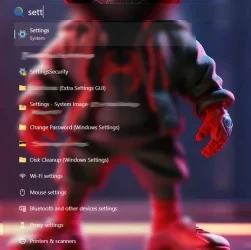
Because it’s a different target line. The resize mod does both. i'll find the target to adjust for the start menu search frame. i dont know it offhand because i made mine just a hovering search bar like mac's spotlight

1782029263871.webp
 

My Computer My Computer

At a glance

Windows 11 Pro
OS
Windows 11 Pro
just in case you dont want to have a second mod running for no reason (since you already use the styler), you can add


Code:
  - target: Grid#FrameRoot
    styles:
      - MaxHeight=1000
  - target: Grid#MainMenu
    styles:
      - Width=1000

right below controlStyles: to change the start menu size
It works but I had to change the width from 858 ➔ 834 to get it to match, as the Start Menu Size mod calculates the padding like this:
Code:
            // The requested width is the overall visible width. MainMenu is
            // nested inside frameRoot > AnimationRoot, so subtract any
            // padding/margin between them to get the correct inner width.
            double frameRootActualWidth = frameRoot.ActualWidth();
            double mainMenuActualWidth = mainMenu.ActualWidth();
            double padding = 0;
            if (frameRootActualWidth > 0 && mainMenuActualWidth > 0) {
                padding = frameRootActualWidth - mainMenuActualWidth;
            }

Because it’s a different target line. The resize mod does both. i'll find the target to adjust for the start menu search frame. i dont know it offhand because i made mine just a hovering search bar like mac's spotlight

View attachment 174823
As a matter of fact they are two separate processes (the Search Menu is SearchHost.exe, the Start Menu is StartMenuExperienceHost.exe).
 

My Computers My Computers

  • At a glance

    11 Homei7 13650HX16GB DDR5GeForce RTX 4060 Mobile
    OS
    11 Home
    Computer type
    Laptop
    Manufacturer/Model
    Asus TUF Gaming F16 (2024)
    CPU
    i7 13650HX
    Memory
    16GB DDR5
    Graphics Card(s)
    GeForce RTX 4060 Mobile
    Sound Card
    Eastern Electric MiniMax DAC Supreme; Emotiva UMC-200; Astell & Kern AK240
    Monitor(s) Displays
    Sony Bravia XR-55X90J
    Screen Resolution
    3840×2160
    Hard Drives
    512GB SSD internal
    37TB external
    PSU
    Li-ion
    Cooling
    2× Arc Flow Fans, 4× exhaust vents, 5× heatpipes
    Keyboard
    Logitech K800
    Mouse
    Logitech G402
    Internet Speed
    30Mbit/s up, 500Mbit/s down
    Browser
    FF
    Antivirus
    What's an antivirus?
  • At a glance

    11 Homei5 1135G716GB DDR4Intel Iris Xe
    Operating System
    11 Home
    Computer type
    Laptop
    Manufacturer/Model
    Medion S15450
    CPU
    i5 1135G7
    Memory
    16GB DDR4
    Graphics card(s)
    Intel Iris Xe
    Sound Card
    Eastern Electric MiniMax DAC Supreme; Emotiva UMC-200; Astell & Kern AK240
    Monitor(s) Displays
    Sony Bravia XR-55X90J
    Screen Resolution
    3840×2160
    Hard Drives
    2TB SSD internal
    37TB external
    PSU
    Li-ion
    Keyboard
    Logitech K800
    Mouse
    Logitech G402
    Internet Speed
    30Mbit/s up, 500Mbit/s down
    Browser
    FF
As a matter of fact they are two separate processes
Yep. I’ve modded mine already ^, but the target I made invisible isn’t what needs resized. I’ll have to play with spy and find the correct one
 

My Computer My Computer

At a glance

Windows 11 Pro
OS
Windows 11 Pro

Latest Support Threads

Back
Top Bottom




