UPDATE 4/13:
 www.elevenforum.com
Source:

 blogs.windows.com
Check Windows Updates
UUP Dump:
64-bit ISO download: Select language for Windows 11 Insider Preview 22593.1 (ni_release) amd64
ARM64 ISO download: Select language for Windows 11 Insider Preview 22593.1 (ni_release) arm64
 www.elevenforum.com
KB5014105 Windows 11 22H2 Insider Dev and Beta Build 22598.200 (ni_release) - April 19
UPDATE 4/29: https://www.elevenforum.com/t/windows-11-22h2-insider-dev-and-beta-build-22610-1-ni_release-april-29.6166/ UPDATE 4/19: We are starting to roll out Cumulative Update Build 22598.200 (KB5014105). This update does not include anything new and is designed to test our servicing...
www.elevenforum.com
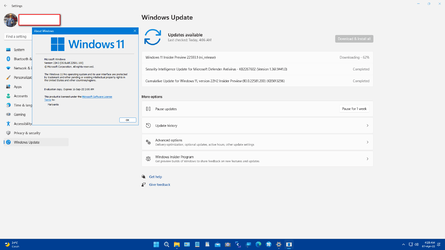
Hello Windows Insiders, today we are releasing Windows 11 Insider Preview Build 22593 to the Dev and Beta Channels.
TL;DR
- We’ve received a lot of feedback from Windows Insiders in the Beta Channel about the desktop watermark. It is normal to see this watermark on your desktop after updating to the latest pre-release builds. It does not change the licensing of your device. But please note that these are pre-release builds that do expire so it’s important for you to stay up to date with the latest builds we’re releasing.
- This build includes only a handful of changes and improvements but includes a good set of fixes that will improve Insider’s overall experience on their device.
- We also added some new known issues so please read below as they may affect you.
Changes and Improvements
[General]
[File Explorer]
- [REMINDER] As described in our in our blog post here, Windows Insiders who use the Dev Channel may get to try out new ideas, longer lead features, and experiences that may never get released. In this build, a limited set of Insiders will see the first of these experimental features as we explore additional ways to help people discover and get quick access to content they care about on the web with the Windows search box. If you see some of these concepts, be sure to let us know what you think via Feedback Hub (Win + F) and choose category Desktop Environment > Search.
- Updated WIN + X so that if Windows Terminal is installed the menu will include an entry for Terminal, and in cases where Windows Terminal is uninstalled it will display Windows PowerShell.
Open Win+X Quick Link Menu in Windows 11
This tutorial will show different ways on how to open the Win+X Quick Link menu in Windows 11. The Win+X Quick Link menu (aka: Power User menu) is a pop-up menu from the Start button that includes shortcuts of common management, configuration, and other power user tools for Windows. Starting...
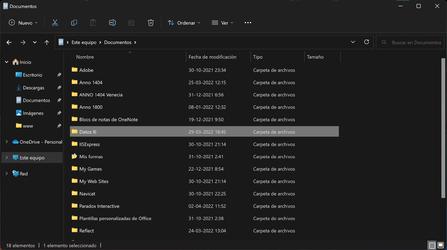
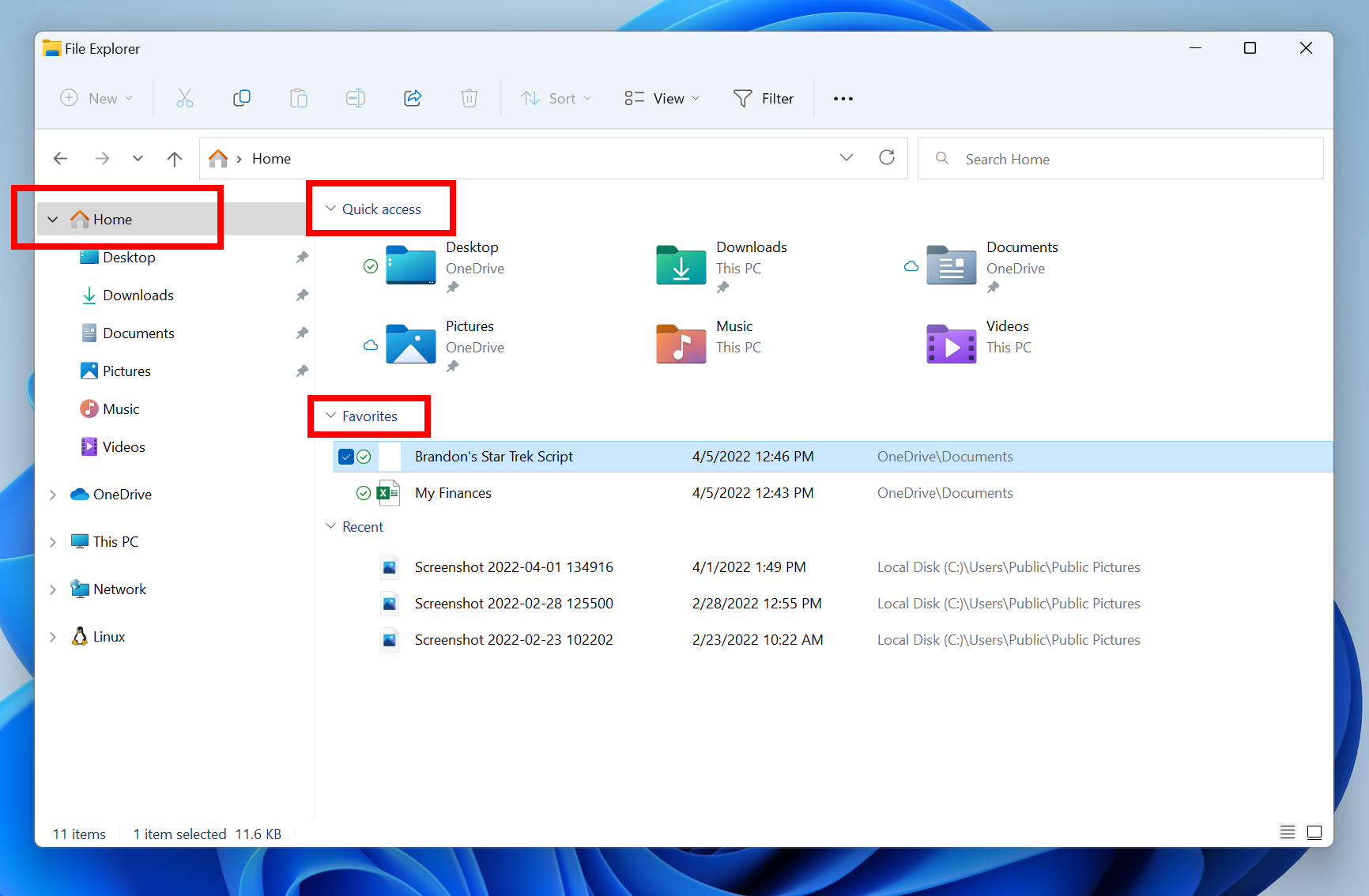
- The default homepage of File Explorer is now called Home. The name Quick access has been repurposed for the pinned/frequent folders section and Pinned files is now called Favorites to align with Office and OneDrive.
Change Folder to Open File Explorer to by Default in Windows 11
This tutorial will show you how to set File Explorer to open to either This PC, Home (Quick access), OneDrive, Downloads, or a custom location by default for your account in Windows 11. File Explorer opens to Home (Quick access) by default in Window 11, but you can change File Explorer to open...
Add or Remove Home in Navigation Pane of File Explorer in Windows 11
This tutorial will show you how to add or remove Home in the navigation pane of File Explorer for your account or all users in Windows 11. Home in the navigation pane is the default homepage of File Explorer (Win+E) that allows you to quickly access and view your pinned/frequent locations...
Add and Remove Favorites in File Explorer Home in Windows 11
This tutorial will show you how to add, remove, or clear and reset Favorites in File Explorer Home for your account or all users in Windows 11. Starting with Windows 11 build 22593, Quick access in File Explorer (Win+E) is now called Home. The name Quick access has been repurposed for the...
The default homepage of File Explorer is now called Home with the name Quick access repurposed for the pinned/frequent folders section and Pinned files is now called Favorites.
[Input]
- Recent and pinned files displayed in Home are now searchable using the search box in File Explorer even if they are not local files, so you can find Office files recently shared with you.
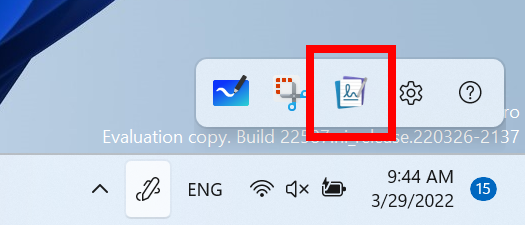
- Microsoft Journal is now pinned by default on the Pen menu. If you don’t have the app installed, it will be installed from the Microsoft Store if chosen on the Pen menu.

Add and Remove Apps on Pen Menu in Windows 11
This tutorial will show you how to add and remove apps on the pen menu on the taskbar system tray for your account in Windows 11. The pen menu in Windows 11 makes it easy for you to access your favorite apps. If you have a pen, tap it on your screen. The pen menu will appear in the corner of...
Journal, a Microsoft Garage Project, is now pinned by default on the Pen menu.
[Windowing]
[Focus]
- If you press WIN + Z to open snap layouts, all the layouts will now show associated numbers, so you can quickly use the number keys to select the desired layout.
[Windows Security]
- Added 5-minute increments for everything under a half hour to focus session length options.
Start and End Focus Session in Windows 11
This tutorial will show you how to start, pause, resume, or end a focus session for your account in Windows 11. Focus is a Windows feature designed to help you stay on task by minimizing distractions. Whether you're working on an important project, studying for an exam, or simply need some...
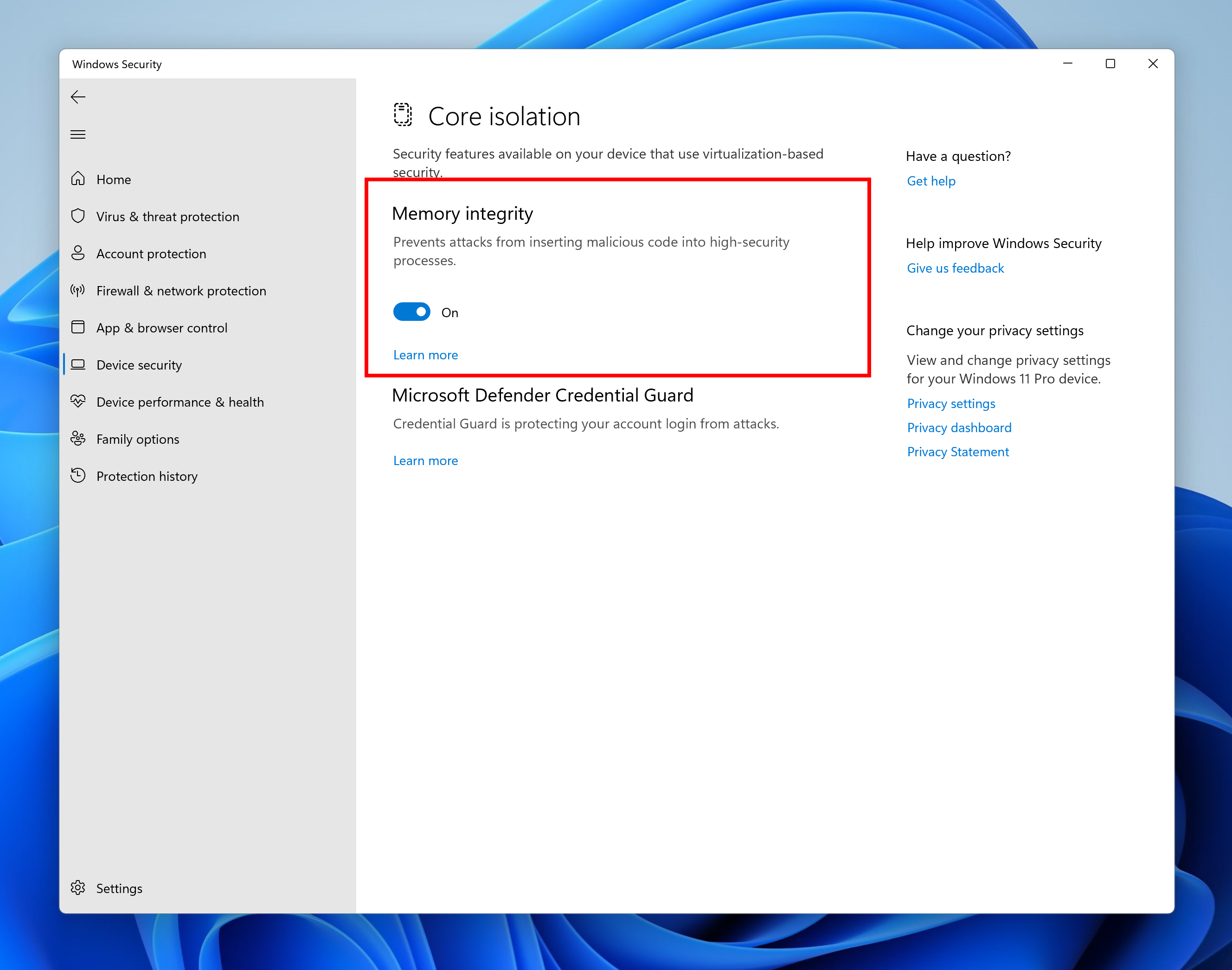
- Memory integrity is a feature in Windows 11 designed to prevent attacks from inserting malicious code into high-security processes. This feature can be found in Windows Security under Device Security > Core isolation. In the most recent Insider Preview builds, we will notify the user that this feature is currently turned off so that action can be taken for the user to turn it back on so that their device is as secure as possible against malicious attacks.

Enable or Disable Core Isolation Memory Integrity in Windows 11
This tutorial will show you how to turn on or off core isolation memory integrity in Windows 11. Core isolation is a security feature of Microsoft Windows that protects important core processes of Windows from malicious software by isolating them in memory. It does this by running those core...
Memory integrity in Windows Security.
[Input]
- Updated the ADLaM keyboard layout to add access to brackets and ADLaM Hamza. To access these:
- Right Alt + \ will now input »
- Right Alt + | will now input «
- Right Alt + Shift + [ will now input {
- Right Alt + Shift + ] will now input }
- Ctrl + Shift + ; will now input the Hamza character
- Updated the Pashto keyboard layout so that ې and ئ are now directly accessible on the keyboard. Accessing ظ and ط is now done by holding Shift and pressing the aforementioned letters, respectively.
Fixes
[General]
[Taskbar]
- Fixed a few more issues impacting explorer.exe reliability in recent flights.
[Start menu]
- Fixed an issue where app icons were unexpectedly animating in from the upper left when launching a new app.
- Improved the performance of rearranging taskbar icons.
- Addressed an issue in the previous flight leading to duplicate app icons after closing and re-opening an app.
- If you have a lot of apps open, the icons shouldn’t overlap the date and time on your secondary monitors anymore.
- Taskbar will no longer disappear when you enter search over a full screen window.
- Fixed an issue that was causing icon spacing to invert so that it was large when it should be small and vice versa when switching in and out of the tablet-optimized taskbar.
- Tablet-optimized taskbar will now stay visible over full screen apps when expanded and only hide when you collapse it.
- If you have multiple keyboards for your current language, the input indicator will now only show one row of text when the tablet-optimized taskbar is in a collapsed state, so that it doesn’t get clipped.
- Fixed a crash that was causing taskbar to get stuck in the tablet-optimized taskbar view.
- Settings will now remember your taskbar’s auto-hide setting more consistently.
- Mitigated an issue where some app icons in the system tray which were expected to flash weren’t doing that.
- Fixed an issue causing system tray icons to get stuck there even after you closed the application.
- Made a fix for an issue where some mouse move events weren’t being passed to apps for icons in the system tray.
- Addressed an issue leading to a decrease in Notification Center launch reliability in recent flights.
- Mitigated an issue causing the Notification Center and its context to sometimes show the wrong color text for the system’s theme, making it unreadable.
- Updated the names of some of the months in the Simplified and Traditional Chinese lunar calendar to be more accurate.
[Search]
- Updated the design of the folders in Start so that they’re a little bigger, making it easier to see the app icons highlighted within the folder without having to open it.
- Fixed an issue where if you created a folder in Start in the same position as a deleted folder, it would show the old name.
- If you tab into naming a folder in Start with your keyboard, you can now tab back out instead of having to hit Esc.
- Fixed an issue where when using the keyboard to select options following WIN + X didn’t work. And dismissing WIN + X should be more consistent now.
- Fixed an issue where the prompt wasn’t coming to the front when launching Windows Terminal as an admin from Start’s right-click context menu (WIN + X).
- The search icon in the taskbar should no longer unexpectedly flash when closing the Start menu.
[File Explorer]
- Made some improvements to help with search indexer thread and memory usage for users with a very high number of indexed items.
- Fixed an issue impacting search reliability (where you would type into the search window or Start and nothing would happen) in recent flights.
- Made another fix to help address an issue where the search searches flyout could get stuck on the screen in a transparent area.
[Widgets]
- Improved performance of loading Home in File Explorer.
- Fixed a scaling issue where the context menu could be an unexpected size when invoking it on systems with mixed DPI monitors.
- Addressed an issue where the Show More Options entry in the context menu wasn’t working for items in File Explorer’s navigation pane (for example, if you were to right click on This PC).
- Did some work to help reduce the chance you will see “Loading” for app entries in the context menu.
- Fixed an issue which was causing the “Open in Windows Terminal” context menu option to be unexpectedly missing for secondary users in some cases.
- Opening suggested results shown while entering search terms in File Explorer’s search box should now work as expected.
- Mitigated an underlying issue leading to the address bar being inaccessible in certain cases.
- Mitigated an issue leading to increased launch time for certain file types in the previous flight.
[Input]
- We fixed the issue where sometimes when pinning from the Feed, the pinned widget is placed at the top instead of below other pinned widgets.
- We fixed the issue where after rearranging widgets in the widgets board, some users experience problems with widgets in the pinned section rendering incorrectly.
[Settings]
- Fixed an issue preventing several input UI surfaces from displaying following explorer.exe crashes in recent flights – this included the emoji panel, candidate windows, clipboard history, and the touch keyboard.
- Mitigated an issue where Narrator was silent when launching the emoji panel in certain cases, for example if the search box wasn’t displayed.
- Fixed an issue that was causing custom theme changes in Settings > Personalization > Text input to not save properly sometimes.
- Addressed a few more color issues with the touch keyboard, including where after changing from dark to light mode, the touch keyboard might end up with a mix of dark and light.
- Updated the touch keyboard button so that pressing it always shows the touch keyboard, rather than hiding it if it’s visible.
- Returned the Backspace key to the touch keyboard’s small layout when using Chinese (Traditional).
- Improved reliability of launching the touch keyboard on the login screen.
- You should be able to use the Japanese IME’s context menu on the login screen to change conversion mode now.
- Fixed an issue where the Chinese (Traditional) IMEs were only showing 5 suggested associated phrases when they should have been showing 9.
- Fixed an issue where if you’d set a custom background image under Settings > Personalization > Text Input, the preview wouldn’t show how it looked in the candidate window for Chinese (Simplified).
- Addressed a rendering issue with the corners of the IME toolbar.
- Fixed an issue where the IME toolbar wasn’t hiding and showing correctly when using the previous version of the Japanese IME.
- Improved voice typing reliability.
- Updated voice typing error message “Voice typing is limited on this app” to be “Some voice typing features might not work in this app”, so it’s a little clearer that basic voice typing will still work.
- Fixed an issue causing some voice typing commands not to work, for example “scratch that” (刮除它) in Chinese (Simplified).
- Addressed an issue where the setting “Disable Touch while using Pen” under Settings > Bluetooth & Devices > Pen & Windows Ink would arbitrarily not take effect sometimes on first boot in recent flights.
Enable or Disable Ignore Touch Input when using Pen in Windows 11
This tutorial will show you how to turn on or off ignore touch input while using a pen for your account in Windows 11. A touch screen, or touchscreen, is an input device that enables you to interact directly with what is displayed, rather than using a mouse, touchpad, or other such devices...- Fixed an issue causing the Get-InstalledLanguage and Install-Language PowerShell commands to unexpectedly fail with error 0x8007023E for some languages.
[Windowing]
- If keyboard focus is on the chevron for a collapsible region on a Settings page, for example, the Snap windows section under System > Multitasking, you can now use the left and right arrows to expand and collapse the area.
- Fixed an issue impacting reliability of System > Power & Battery.
- When using the custom color picker on Personalization > Colors now, it should appear centered in the window frame and not randomly off to the side.
- Setting your background image fit to “fit” under Personalization > Background should no longer cause the background image preview to become a solid color.
- Addressed another issue that could cause Windows Spotlight to unexpectedly stop updating for a prolonged period of time.
- Fixed an issue that was causing the Settings app to crash when going to focus settings.
- Fixed an issue that was letting keyboard focus go to elements in the contrast theme previews in Accessibility > Contrast Themes that you couldn’t interact with.
- Fixed an issue where leaving the contrast themes editor in Settings by selecting the breadcrumbs would clear the dropdown selection, but the buttons were still acting as if you had a theme selected.
- Updated the text description for voice typing under Accessibility > Speech to make more sense when using the Japanese display language.
- Addressed an issue that was preventing Quick Settings from launching with its new touch gesture.
- Quick Settings will now show the correct icon to represent your audio output device again.
[Voice access]
- Mitigated an issue which could lead to explorer.exe crashes when using ALT + Tab.
- Fixed an issue where the keyboard focus outline in ALT + Tab sometimes was smaller than the displayed thumbnail.
- Addressed an underlying DWM issue which was leading to crashes when using touch gestures from the sides of the screen.
- Fixed a DWM crash when rotating the screen.
- Mitigated an issue leading to some lag when resizing two apps snapped side by side in certain cases.
- Fixed an issue where snap assist could unexpectedly dismiss if the initial window wouldn’t fit into the selected zone size. Now we resize the snap assist regions accordingly when minimum window size of the initial snapped window is larger than the selected zone.
- If you invoke Task View with touch, the close buttons should no longer overlap with the window titles.
- Hovering your mouse over the tooltip with the Desktop’s name will no longer unexpectedly make the Desktops flyout dismiss.
- Using drag and drop to reorder your Desktops via the Desktop flyout should no longer leave a thumbnail of the Desktop you moved stuck on the screen.
[Live captions]
- Fixed a crash that was impacting voice access reliability.
- Addressed an issue that was preventing voice access’s speech models from downloading correctly.
[Narrator]
- Addressed an underlying issue leading to live captions showing a download error, even though the download had actually completed successfully.
- Live captions will now remember your chosen settings for position across sessions.
- Mitigated an issue where the live captions position changed to floating when entering full screen, but the settings incorrectly showed the last position still.
- Removed the live captions notification about audio playing from multiple apps as it was popping up repeatedly during usage.
- The border of the live captions window will now match the style of all other borders in contrast themes.
[Task Manager]
- We fixed the issue that was causing natural voices to break up sporadically in recent builds.
- Narrator will now read out the word minutes with the duration times listed in Settings for focus options.
- Fixed an issue that was causing Narrator to read dialog buttons incorrectly in scan mode.
[Other]
- Removed backplate (colored square) from UWP app icons were displayed in Task Manager.
- Mitigated an issue where the one side of the View button did not appear to do anything.
- Fixed an issue which was causing the real time update speed to get set to Paused on its own. Please note, if you were impacted by this, you will need to make a one-time change to set the setting back to your preferred update speed after upgrading to this build.
NOTE: Some fixes noted here in Insider Preview builds from the active development branch may make their way into the servicing updates for the released version of Windows 11 that became generally available on October 5th, 2021.
- Mitigated an issue which was leading to a black (albeit interactable) screen when playing certain full screen games with Auto HDR enabled.
- Fixed a memory leak in Connected Devices Platform User Service.
- The volume and brightness flyouts you get when using your hardware keys will no longer show a focus window outline on top of them.
- If WIN + Alt + K is pressed when a supported app isn’t running, the pop-up text displayed will now say “No supported apps in use for mic mute”, instead of “Mic mute unavailable”, so it’s clearer.
- Addressed an issue which was leading to unexpected errors being displayed in Event Viewer when conhost.exe was activated.
Known issues
[General]
[Taskbar]
- We will not be offering new builds to Windows Insiders in China on Lenovo PCs.
- Windows Insiders running Windows 10 who join the Dev or Beta Channels to get the latest builds may encounter a download error code 0xc8000402 while trying to download the latest build. As a workaround, please join the Release Preview Channel first, install Windows 11 from there (Build 22000.xxxx), and then switch to the Dev or Beta Channel to receive the latest Insider Preview build. This issue is understood and will be fixed in an upcoming build.
- We’re investigating reports that a few Insiders have been experiencing an issue where explorer.exe is crashing repeatedly in a loop in the latest builds and unable to successfully load. This build includes a mitigation that may help some Insiders who were experiencing this.
- When opening Group Policy editor, an Administrative Template error will pop up. Click “Ok” to dismiss and continue using Group Policy editor normally.
- Devices using Windows Information Protection (formerly EDP) policies will not be able to access controlled data via protected apps such as Outlook, Word, Microsoft Edge, etc. on this build. It is recommended that users temporarily pause updates under Settings > Windows Update until a new Insider Preview build is released with a fix. If you have installed Build 22593 already, you can roll back to the prior build to restore expected data access.
[File Explorer]
- The taskbar doesn’t always automatically collapse after launching an app or tapping outside of the expanded taskbar on 2-in-1 devices.
- Some areas of the OS are not yet tracking the height of the expanded taskbar on 2-in-1 devices so you may see overlapping components.
- We’re working on fixing an issue where hovering over some app icons in the system tray isn’t showing previews or tooltips.
[Widgets]
- We’re working on fixing issues regarding icon sizing, visual bugs, and text clipping in the flyout showing OneDrive storage.
- Using the right-click option to rename a file in File Explorer will cause explorer.exe to crash. As a workaround, please single-click to highlight the file and use the rename button in the File Explorer command bar to complete the rename process.
[Network]
- The widgets board may not open successfully when using the gesture from the side of the screen. If you are impacted, please tap the Widgets icon in the taskbar for now instead.
[Live captions]
- We’re investigating reports from the previous flight of internet connectivity issues when certain VPNs are connected.
- Certain apps in full screen (e.g., video players) prevent live captions from being visible.
- Certain apps positioned near the top of the screen and closed before live captions is run will re-launch behind the live captions window positioned at top. Use the system menu (ALT + Spacebar) while the app has focus to move the app’s window further down.
- The very top of maximized apps (e.g., title bar window management buttons) can’t be reached with touch while live captions is positioned at the top.
For developers
You can download the latest Windows Insider SDK at aka.ms/windowsinsidersdk.
SDK NuGet packages are now also flighting at NuGet Gallery | WindowsSDK which include:
These NuGet packages provide more granular access to the SDK and better integrate in CI/CD pipelines.
- .NET TFM packages for use in .NET apps as described at ms/windowsinsidersdk
- C++ packages for Win32 headers and libs per architecture
- BuildTools package when you just need tools like MakeAppx.exe, MakePri.exe, and SignTool.exe
About the Dev & Beta Channels [Updated!]
As a reminder, we are evolving the way we develop and release to Insiders with the Dev and Beta Channels now representing parallel development paths from our engineers. The Dev Channel will be a place where we will try out different concepts, incubate new ideas, and work on long lead items that may not get released to general customers. The Beta Channel will be the place we preview experiences that are closer to what we will ship to our general customers. However, this does not mean every feature we try out in the Beta Channel will ship. We encourage Insiders to read this blog post from last month that outlines the ways we’ll try things out with Insiders in the Dev and Beta Channels.
Now that the Dev and Beta Channels are receiving the same builds, the limited window has opened for Insiders to switch channels if you wish to do so by following these simple steps:
- Open Settings > Windows Update > Windows Insider Program.
- Select Choose your Insider settings.
- Select Beta Channel.
- The next time you receive an update, it will be for your new channel.

Change Windows Insider Program Channel in Windows 11
This tutorial will show you how to change your Windows Insider Program channel to the Beta, Experimental, or Release Preview channel to get Insider preview builds of Windows 11 on your PC. Flighting is the process of running Windows Insider Preview Builds on your device. When you run these...
IMPORTANT: This window will close once we release builds with higher build numbers to the Dev Channel. If your device stays on the Dev Channel and receives a build that is a higher build number than what is in the Beta Channel, you will have to do a clean installation of the released version of Windows 11 on your device to switch to the Beta Channel.
These aren’t always stable builds, and sometimes you will see issues that block key activities or require workarounds. It is important to make sure you read the known issues listed in our blog posts as we document many of these issues with each flight.
The desktop watermark you see at the lower right corner of your desktop is normal for these pre-release builds.
Important Insider Links
Thanks,
- Want to learn how we made Windows 11? Check out our Inside Windows 11 website to hear and meet our makers from Engineering, Design and Research to share their insights and unique perspectives throughout this journey.
- You can check out our Windows Insider Program documentation here.
- Check out Flight Hub for a complete look at what build is in which Insider channel.
Amanda & Brandon
Source:
Announcing Windows 11 Insider Preview Build 22593
Hello Windows Insiders, today we are releasing Windows 11 Insider Preview Build 22593 to the Dev and Beta Channels. TL;DR We’ve received a lot of feedback from Windows Insiders in the Beta Chann
blogs.windows.com
Check Windows Updates
UUP Dump:
64-bit ISO download: Select language for Windows 11 Insider Preview 22593.1 (ni_release) amd64
ARM64 ISO download: Select language for Windows 11 Insider Preview 22593.1 (ni_release) arm64
UUP Dump - Download Windows Insider ISO
UUP Dump is the most practical and easy way to get ISO images of any Insider Windows 10 or Windows 11 version, as soon as Microsoft has released a new build. UUP Dump creates a download configuration file according to your choices, downloads necessary files directly from Microsoft servers, and...
www.elevenforum.com
Last edited: