- Local time
- 9:02 AM
- Posts
- 15
- OS
- Windows 11 Home 25H2
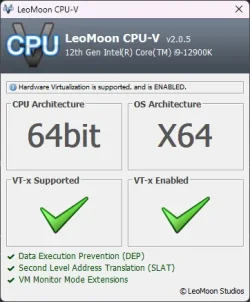
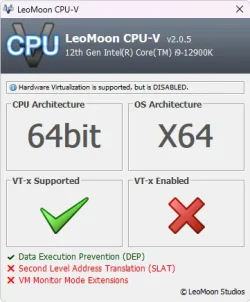
After doing a new install of Windows 11 24H2, hardware virtualization is now being blocked from working by virtualization based security. You used to just have to open Windows security and disable the sliders in Core Isolation and run the command: bcdedit /set hypervisorlaunchtype off. Now none of that works anymore.
With hardware virtualization being disabled, it lowers your CPU frequency by 2MHz. Using LeoMoon CPU-V you can easily check and now nothing works. I've turned VMX and VT-d on in the bios as well. I'm on the latest version of Windows 11 24H2 26100.4770.
With hardware virtualization being disabled, it lowers your CPU frequency by 2MHz. Using LeoMoon CPU-V you can easily check and now nothing works. I've turned VMX and VT-d on in the bios as well. I'm on the latest version of Windows 11 24H2 26100.4770.
Attachments
My Computer
At a glance
Windows 11 Home 25H2Core i9-12900K @ 3.90 GHz32 GB of DDR5 CORSAIR VengeanceGigabyte GTX 1660 Ti 6GB
- OS
- Windows 11 Home 25H2
- Computer type
- PC/Desktop
- Manufacturer/Model
- Gigabyte Technology Co., Ltd.
- CPU
- Core i9-12900K @ 3.90 GHz
- Motherboard
- Z690 AORUS ELITE AX
- Memory
- 32 GB of DDR5 CORSAIR Vengeance
- Graphics Card(s)
- Gigabyte GTX 1660 Ti 6GB
- Sound Card
- Realtek Digital Output (Realtek(R) Audio)
- Monitor(s) Displays
- BenQ GL2460
- Screen Resolution
- 1920x1080
- Hard Drives
- 1 Western Digital 1TB NVMe SSD and 2 Western Digital (500GB/1TB) SATA SSDs
- PSU
- EVGA 750 G5
- Case
- Cooler Master
- Cooling
- HYPER 212 EVO V2
- Keyboard
- Wired Macally
- Mouse
- Wired Macally Quiet click
- Internet Speed
- Spectrum 1Gbps
- Browser
- Firefox, Brave, Edge
- Antivirus
- Windows Security