Windows 11: Adding a new user for daily use instead of the admin account


Johnm32073

Active member
Local time
12:59 PM
Posts
8
OS
11
I am using Windows 11 Pro Version 25H2, and I am the only user on my home computer. When I boot up, I go straight into Windows. I am the admin, and there is no other account on the computer.I want to add a new user account (for myself) for daily use, both for safety and so I don't mess things up.

1. If I add a new account, will all my software work on my second account, or will I have to reinstall all my programs on it?
2. When I boot up my computer, do I have to choose which account I want to use? I do not use a password on my computer, and I have never had an account other than admin.

0. I also make an image backup after every 2 Microsoft updates or every 2 to 3 months.


John
 

My Computer My Computer

At a glance

11AMD 5 4500068GBNot High End ( I am not a Game Player)
OS
11
Computer type
PC/Desktop
Manufacturer/Model
asus
CPU
AMD 5 45000
Motherboard
ASUS Prime B450m-A ll
Memory
68GB
Graphics Card(s)
Not High End ( I am not a Game Player)
Sound Card
builted in
Monitor(s) Displays
Viewsonic
Hard Drives
1 TB
Case
coolerMaster
Keyboard
yes
Mouse
yes
1. If I add a new account, will all my software work on my second account, or will I have to reinstall all my programs on it?
2. When I boot up my computer, do I have to choose which account I want to use? I do not use a password on my computer, and I have never had an account other than admin.

0. I also make an image backup after every 2 Microsoft updates or every 2 to 3 months.


John
Hi John,
1.This usually depends on the software and how it was installed. Newest software tends to ask you to install machine wide or for single user.
UWP apps (windows app) usually get installed in the user folder, so those few might need to be re-installed.
Keep in mind that you will have access to program files & program files (x86), so you can create shortcuts for your new user from there.
2. The lock screen will show you 2 users to choose from or it will go automatically (if no password) to the last user that was logged in.
By right clicking on the start button, you will have the option to switch user, or to sign out. I would recommend choosing sign out so
that only one session is maintained in memory at one time.
 

My Computers My Computers

  • At a glance

    All Branches but StableAMD Ryzen 7 7735HS 3200-4500 Mhz 8 cores x 232 GB DDR5Radeon Graphic / NVIDIA GeForce RTX 4060 8 GB...
    OS
    All Branches but Stable
    Computer type
    Laptop
    Manufacturer/Model
    Acer Nitro ANV15-51
    CPU
    AMD Ryzen 7 7735HS 3200-4500 Mhz 8 cores x 2
    Motherboard
    Sportage_RBH
    Memory
    32 GB DDR5
    Graphics Card(s)
    Radeon Graphic / NVIDIA GeForce RTX 4060 8 GB GDDR6
    Sound Card
    AMD/Realtek(R) Audio
    Monitor(s) Displays
    Integrated Monitor (15.3"vis)
    Screen Resolution
    FHD 1920X1080 16:9 144Hz
    Hard Drives
    KINGSTON OM8SEP4512Q-AA 1TB
    Western Digital 256GB
    PSU
    19V DC 6.32 A 120 W
    Cooling
    Dual Fans
    Mouse
    MS Bluetooth
    Internet Speed
    Fiber 1GB Cox -us & 1GB Orange-fr
    Browser
    Edge Canary- Firefox Nightly-Chrome Dev-Chrome Dev
    Antivirus
    Windows Defender
  • At a glance

    Windows 11 BetaAMD A9-94208 GB of DDR4AMD Radeon R5
    Operating System
    Windows 11 Beta
    Computer type
    Laptop
    Manufacturer/Model
    Asus X751BP
    CPU
    AMD A9-9420
    Memory
    8 GB of DDR4
    Graphics card(s)
    AMD Radeon R5
    Screen Resolution
    1600x900
    Hard Drives
    Seagate 1 TB
I would create a new user as an admin. Log in and change your first user to a standard one; he will have all your programs and settings.
 

My Computers My Computers

  • At a glance

    Windows 11 Pro 25H2 26200.9550AMD Ryzen 7 5825U with Radeon Graphics16GB
    OS
    Windows 11 Pro 25H2 26200.9550
    Computer type
    Laptop
    Manufacturer/Model
    Acemagic LX15PRO
    CPU
    AMD Ryzen 7 5825U with Radeon Graphics
    Motherboard
    BIOS CT_BI_AMI_LX15PRO_AB8139_A-004
    Memory
    16GB
    Screen Resolution
    1920 x 1080
    Hard Drives
    SSD 2TB
    Internet Speed
    30 Mbps
    Browser
    Brave
    Antivirus
    Webroot SecureAnywhere Complete beta
  • At a glance

    Windows 11 Pro 23H2 22631.2506Atom N450 1.66GHz2GB
    Operating System
    Windows 11 Pro 23H2 22631.2506
    Computer type
    Laptop
    Manufacturer/Model
    HP Mini 210-1090NR PC (bought in late 2009!)
    CPU
    Atom N450 1.66GHz
    Memory
    2GB
    Browser
    Brave
    Antivirus
    Webroot
  • Acer Swift SF114-34 laptop
    OS Windows 11 Pro 26200.8894
    CPU Pentium Silver N6000
    RAM 4GB
    BIOS v1.17
    SSD Samsung 970 EVO Plus SSD 2TB (an upgrade)
1. If I add a new account, will all my software work on my second account, or will I have to reinstall all my programs on it?
2. When I boot up my computer, do I have to choose which account I want to use? I do not use a password on my computer, and I have never had an account other than admin.
2. The lock screen will show you 2 users to choose from or it will go automatically (if no password) to the last user that was logged in.
I would create a new user as an admin. Log in and change your first user to a standard one; he will have all your programs and settings.
Kepler's suggestion is a good one, but be very careful to make the new user an admin before you make the original one a standard user. It is essential that at all times you have at least one admin account, else you'll loose the ability to manage your PC. I always make an extra local admin account on my PCs so that I have another way in for emergencies.

As OAT says, if your accounts have no password, on start up Windows will go straight to the desktop of the last user that was signed in. I would add to kepler's suggestion that you should create this new admin account as a local account, and that you should give it a password. Keep it simple and easy to remember, you could set it to be the same as the account name, for example.

That way, if the last signed in user was this admin account you'll not go straight in, rather you'll stop at the sign in screen where it asks for the password. You can leave your standard account with no password. That way you'll go straight in to the standard account, but stop yourself automatically going into the admin account by mistake.
 

My Computers My Computers

  • At a glance

    Windows 11 HomeAMD Athlon Silver 3050U8GBRadeon Graphics
    OS
    Windows 11 Home
    Computer type
    Laptop
    Manufacturer/Model
    Acer Aspire 3 A315-23-R9VY
    CPU
    AMD Athlon Silver 3050U
    Memory
    8GB
    Graphics Card(s)
    Radeon Graphics
    Monitor(s) Displays
    laptop screen
    Screen Resolution
    1366x768 native resolution, up to 2560x1440 with Radeon Virtual Super Resolution
    Hard Drives
    1TB Samsung EVO 870 SSD (from April 2026: 250GB EVO 850)
    Internet Speed
    150 Mbps
    Browser
    Edge, Firefox
    Antivirus
    Defender
    Other Info
    UPDATE - 11 April 2026: due to lid hinges starting to break up this laptop has been retired from active duty. The OS with all software and files has been migrated to my System Seven in 'Other systems' to carry on as my general purpose 'main machine'.

    I've now clean installed 25H2 and used Garlin's scripts to update Secure Boot to CA 2023 and revoke the PCA 2011 certificates. It's new role is to test secure boot issues.

    Info for 2021-2026:
    fully 'Windows 11 ready' laptop. Windows 10 C: partition migrated from my old unsupported 'main machine' then upgraded to 11. A test migration ran Insider builds for 2 months. When 11 was released on 5th October 2021 it was re-imaged back to 10 and was offered the upgrade in Windows Update on 20th October. Windows Update offered the 22H2 Feature Update on 20th September 2022. It got the 23H2 Feature Update on 4th November 2023 through Windows Update, 24H2 on 3rd October 2024 through Windows Update by setting the Target Release Version for 24H2, and 25H2 on 30th September 2025 through Windows Update by setting the Target Release Version for 25H2.
  • At a glance

    Windows 11 ProIntel® Core™ i5-520M8GB(integrated graphics) Intel HD Graphics
    Operating System
    Windows 11 Pro
    Computer type
    Laptop
    Manufacturer/Model
    Dell Latitude E4310
    CPU
    Intel® Core™ i5-520M
    Motherboard
    0T6M8G
    Memory
    8GB
    Graphics card(s)
    (integrated graphics) Intel HD Graphics
    Screen Resolution
    1366x768
    Hard Drives
    500GB Crucial MX500 SSD
    Browser
    Firefox, Edge
    Antivirus
    Defender
    Other Info
    unsupported machine: Legacy bios, MBR, TPM 1.2, upgraded from W10 to W11 using W10/W11 hybrid install media workaround.

    In-place upgrade to 22H2 using ISO and a workaround.
    Feature Update to 23H2 by manually installing the Enablement Package.
    In-place upgrade to 24H2 using hybrid 23H2/24H2 install media.
    Upgraded to 25H2 by Enablement Package.

    Also running Insider Experimental 263xx and 29xxx builds and Windows 10 as native boot .vhdx.
  • My SYSTEM THREE is a Dell Latitude 5410, i7-10610U, 32GB RAM, 512GB NVMe ssd, supported device running Windows 11 Pro.

    My SYSTEM FOUR was a 2-in-1 convertible Lenovo Yoga 11e (1st gen) type 20DA, Celeron N2930, 8GB RAM, 256GB ssd. Unsupported device. This has now been sold. It has been replaced by my System Eight.

    My SYSTEM FIVE is a Dell Latitude 3190 2-in-1, Pentium Silver N5030, 8GB RAM, 1TB NVMe ssd, supported device running Windows 11 Pro, plus Insider Beta, Experimental 263xx and 29xxx builds (and a few others) as a native boot .vhdx.

    My SYSTEM SIX is a Dell Latitude 5550, Core Ultra 7 165H, 64GB RAM, 1TB NVMe SSD, supported device, Windows 11 Pro, Hyper-V host machine. Updated to 25H2 on 30th September 2025.

    My SYSTEM SEVEN is a Lenovo Thinkpad T580, 1920x1080 touchscreen, Intel Core i7-8650U, 16GB RAM, 512GB NVMe SSD + 2nd 512GB NVMe SSD, a supported device for Windows 11. This is my current general purpose 'main machine'. The installed Windows 11 Home from my System One has been migrated to this machine. As its new home has an existing digital licence for Pro I've been able to upgrade the migrated OS from Home to Pro.

    My SYSTEM EIGHT is a 2-in-1 convertible Lenovo Yoga 11e (5th gen) type 20LN, Celeron N4120, 8GB RAM, 512GB NVMe ssd, a supported device for Windows 11. Currently running Windows 11 Pro, plus Insider Beta, Experimental 263xx and 29xxx builds as native boot vhdx.
I totally agree with the admin account having a password, but if you did want to disable the automatic sign in….


My Computer My Computer

At a glance

Windows 11 Enterprise 25H2
OS
Windows 11 Enterprise 25H2
The Admin user account is a Standard user account till you elevate your Admin privileges that is where UAC prompt comes in asking you elevate your Admin privileges.
 

My Computer My Computer

At a glance

Windows 11AMD Ryzen 7 5700GMicron Technology DDR4-3200 16GBNVIDIA GeForce RTX 3060
OS
Windows 11
Computer type
PC/Desktop
Manufacturer/Model
HP Pavilion
CPU
AMD Ryzen 7 5700G
Motherboard
Erica6
Memory
Micron Technology DDR4-3200 16GB
Graphics Card(s)
NVIDIA GeForce RTX 3060
Sound Card
Realtek ALC671
Monitor(s) Displays
Samsung SyncMaster U28E590
Screen Resolution
3840 x 2160
Hard Drives
SAMSUNG MZVLQ1T0HALB-000H1
The Admin user account is a Standard user account till you elevate your Admin privileges that is where UAC prompt comes in asking you elevate your Admin privileges.
Not really true. An administrator account normally operates with standard-user privileges because UAC uses a filtered administrator token. When administrative privileges are required, UAC prompts the user to elevate. A standard user can also initiate an elevation, but must provide administrator credentials.
 

My Computers My Computers

  • At a glance

    Windows 11 Pro 25H2 26200.9550AMD Ryzen 7 5825U with Radeon Graphics16GB
    OS
    Windows 11 Pro 25H2 26200.9550
    Computer type
    Laptop
    Manufacturer/Model
    Acemagic LX15PRO
    CPU
    AMD Ryzen 7 5825U with Radeon Graphics
    Motherboard
    BIOS CT_BI_AMI_LX15PRO_AB8139_A-004
    Memory
    16GB
    Screen Resolution
    1920 x 1080
    Hard Drives
    SSD 2TB
    Internet Speed
    30 Mbps
    Browser
    Brave
    Antivirus
    Webroot SecureAnywhere Complete beta
  • At a glance

    Windows 11 Pro 23H2 22631.2506Atom N450 1.66GHz2GB
    Operating System
    Windows 11 Pro 23H2 22631.2506
    Computer type
    Laptop
    Manufacturer/Model
    HP Mini 210-1090NR PC (bought in late 2009!)
    CPU
    Atom N450 1.66GHz
    Memory
    2GB
    Browser
    Brave
    Antivirus
    Webroot
  • Acer Swift SF114-34 laptop
    OS Windows 11 Pro 26200.8894
    CPU Pentium Silver N6000
    RAM 4GB
    BIOS v1.17
    SSD Samsung 970 EVO Plus SSD 2TB (an upgrade)
Not really true. An administrator account normally operates with standard-user privileges because UAC uses a filtered administrator token. When administrative privileges are required, UAC prompts the user to elevate. A standard user can also initiate an elevation, but must provide administrator credentials.
What is not true you repated my post.
 

My Computer My Computer

At a glance

Windows 11AMD Ryzen 7 5700GMicron Technology DDR4-3200 16GBNVIDIA GeForce RTX 3060
OS
Windows 11
Computer type
PC/Desktop
Manufacturer/Model
HP Pavilion
CPU
AMD Ryzen 7 5700G
Motherboard
Erica6
Memory
Micron Technology DDR4-3200 16GB
Graphics Card(s)
NVIDIA GeForce RTX 3060
Sound Card
Realtek ALC671
Monitor(s) Displays
Samsung SyncMaster U28E590
Screen Resolution
3840 x 2160
Hard Drives
SAMSUNG MZVLQ1T0HALB-000H1
"The Admin user account is a Standard user account" no, it isn't.
 

My Computers My Computers

  • At a glance

    Windows 11 Pro 25H2 26200.9550AMD Ryzen 7 5825U with Radeon Graphics16GB
    OS
    Windows 11 Pro 25H2 26200.9550
    Computer type
    Laptop
    Manufacturer/Model
    Acemagic LX15PRO
    CPU
    AMD Ryzen 7 5825U with Radeon Graphics
    Motherboard
    BIOS CT_BI_AMI_LX15PRO_AB8139_A-004
    Memory
    16GB
    Screen Resolution
    1920 x 1080
    Hard Drives
    SSD 2TB
    Internet Speed
    30 Mbps
    Browser
    Brave
    Antivirus
    Webroot SecureAnywhere Complete beta
  • At a glance

    Windows 11 Pro 23H2 22631.2506Atom N450 1.66GHz2GB
    Operating System
    Windows 11 Pro 23H2 22631.2506
    Computer type
    Laptop
    Manufacturer/Model
    HP Mini 210-1090NR PC (bought in late 2009!)
    CPU
    Atom N450 1.66GHz
    Memory
    2GB
    Browser
    Brave
    Antivirus
    Webroot
  • Acer Swift SF114-34 laptop
    OS Windows 11 Pro 26200.8894
    CPU Pentium Silver N6000
    RAM 4GB
    BIOS v1.17
    SSD Samsung 970 EVO Plus SSD 2TB (an upgrade)
Most software will be available to all users but there are exceptions.

C:\Users\UserA\AppData\Local\Programs\


AI offered:
If you give me a list of the programs you currently have installed, I can go through them one by one and tell you "shared installation," "separate installation," or "depends on licensing."
 

My Computer My Computer

At a glance

Windows 10Intel(R) Core(TM) i7-4800MQ CPU @ 2.70GHz16 GB Total: Manufacturer : Samsung MemoryTyp...NVIDIA Quadro K3100M; Intel(R) HD Graphics 4600
OS
Windows 10
Computer type
Laptop
Manufacturer/Model
HP
CPU
Intel(R) Core(TM) i7-4800MQ CPU @ 2.70GHz
Motherboard
Product : 190A Version : KBC Version 94.56
Memory
16 GB Total: Manufacturer : Samsung MemoryType : DDR3 FormFactor : SODIMM Capacity : 8GB Speed : 1600
Graphics Card(s)
NVIDIA Quadro K3100M; Intel(R) HD Graphics 4600
Sound Card
IDT High Definition Audio CODEC; PNP Device ID HDAUDIO\FUNC_01&VEN_111D&DEV_76E0
Hard Drives
Model Hitachi HTS727575A9E364
Antivirus
Microsoft Defender
Other Info
Mobile Workstation
"The Admin user account is a Standard user account" no, it isn't.
Yes its you need Admin privileges elevated to complete Admin Tasks.
 

My Computer My Computer

At a glance

Windows 11AMD Ryzen 7 5700GMicron Technology DDR4-3200 16GBNVIDIA GeForce RTX 3060
OS
Windows 11
Computer type
PC/Desktop
Manufacturer/Model
HP Pavilion
CPU
AMD Ryzen 7 5700G
Motherboard
Erica6
Memory
Micron Technology DDR4-3200 16GB
Graphics Card(s)
NVIDIA GeForce RTX 3060
Sound Card
Realtek ALC671
Monitor(s) Displays
Samsung SyncMaster U28E590
Screen Resolution
3840 x 2160
Hard Drives
SAMSUNG MZVLQ1T0HALB-000H1
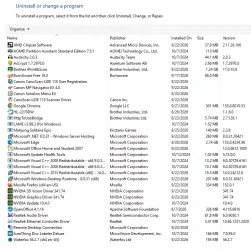
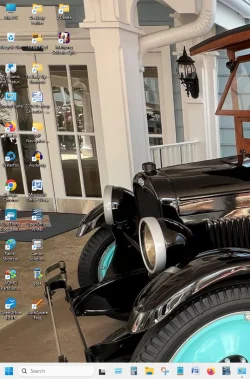
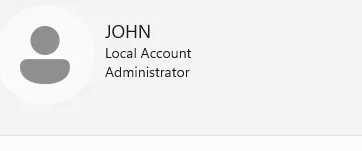
Here are a List of installed stuff
 

Attachments

  • Programs Installed.webp
    Programs Installed.webp
    114.9 KB · Views: 1
  • Desktop Icons.webp
    Desktop Icons.webp
    122.1 KB · Views: 1
  • Account.webp
    Account.webp
    2.1 KB · Views: 1

My Computer My Computer

At a glance

11AMD 5 4500068GBNot High End ( I am not a Game Player)
OS
11
Computer type
PC/Desktop
Manufacturer/Model
asus
CPU
AMD 5 45000
Motherboard
ASUS Prime B450m-A ll
Memory
68GB
Graphics Card(s)
Not High End ( I am not a Game Player)
Sound Card
builted in
Monitor(s) Displays
Viewsonic
Hard Drives
1 TB
Case
coolerMaster
Keyboard
yes
Mouse
yes
@Johnm32073 if you follow my suggestion, you don't need to move a single file. It takes a minute or two.
 

My Computers My Computers

  • At a glance

    Windows 11 Pro 25H2 26200.9550AMD Ryzen 7 5825U with Radeon Graphics16GB
    OS
    Windows 11 Pro 25H2 26200.9550
    Computer type
    Laptop
    Manufacturer/Model
    Acemagic LX15PRO
    CPU
    AMD Ryzen 7 5825U with Radeon Graphics
    Motherboard
    BIOS CT_BI_AMI_LX15PRO_AB8139_A-004
    Memory
    16GB
    Screen Resolution
    1920 x 1080
    Hard Drives
    SSD 2TB
    Internet Speed
    30 Mbps
    Browser
    Brave
    Antivirus
    Webroot SecureAnywhere Complete beta
  • At a glance

    Windows 11 Pro 23H2 22631.2506Atom N450 1.66GHz2GB
    Operating System
    Windows 11 Pro 23H2 22631.2506
    Computer type
    Laptop
    Manufacturer/Model
    HP Mini 210-1090NR PC (bought in late 2009!)
    CPU
    Atom N450 1.66GHz
    Memory
    2GB
    Browser
    Brave
    Antivirus
    Webroot
  • Acer Swift SF114-34 laptop
    OS Windows 11 Pro 26200.8894
    CPU Pentium Silver N6000
    RAM 4GB
    BIOS v1.17
    SSD Samsung 970 EVO Plus SSD 2TB (an upgrade)
I just want another account Local user to use daily most of the time a try to make a change and i get a message That I have to have admin Privileges To make these changes . It screws with my head because i am on the only account and it admin.
I yell at the computer but it doesn't hear.
So if i have another account then I can log in on the admin account
Thanks again for all you're help again
John
 

My Computer My Computer

At a glance

11AMD 5 4500068GBNot High End ( I am not a Game Player)
OS
11
Computer type
PC/Desktop
Manufacturer/Model
asus
CPU
AMD 5 45000
Motherboard
ASUS Prime B450m-A ll
Memory
68GB
Graphics Card(s)
Not High End ( I am not a Game Player)
Sound Card
builted in
Monitor(s) Displays
Viewsonic
Hard Drives
1 TB
Case
coolerMaster
Keyboard
yes
Mouse
yes
Also I might add I do not have a Microsoft account, nor will I ever they are to controling
I use the accounts list on windows account
 

My Computer My Computer

At a glance

11AMD 5 4500068GBNot High End ( I am not a Game Player)
OS
11
Computer type
PC/Desktop
Manufacturer/Model
asus
CPU
AMD 5 45000
Motherboard
ASUS Prime B450m-A ll
Memory
68GB
Graphics Card(s)
Not High End ( I am not a Game Player)
Sound Card
builted in
Monitor(s) Displays
Viewsonic
Hard Drives
1 TB
Case
coolerMaster
Keyboard
yes
Mouse
yes
Here are a List of installed stuff

Please paste your post into ai.

If it accepts the image instead of a text list then you're set.
 

My Computer My Computer

At a glance

Windows 10Intel(R) Core(TM) i7-4800MQ CPU @ 2.70GHz16 GB Total: Manufacturer : Samsung MemoryTyp...NVIDIA Quadro K3100M; Intel(R) HD Graphics 4600
OS
Windows 10
Computer type
Laptop
Manufacturer/Model
HP
CPU
Intel(R) Core(TM) i7-4800MQ CPU @ 2.70GHz
Motherboard
Product : 190A Version : KBC Version 94.56
Memory
16 GB Total: Manufacturer : Samsung MemoryType : DDR3 FormFactor : SODIMM Capacity : 8GB Speed : 1600
Graphics Card(s)
NVIDIA Quadro K3100M; Intel(R) HD Graphics 4600
Sound Card
IDT High Definition Audio CODEC; PNP Device ID HDAUDIO\FUNC_01&VEN_111D&DEV_76E0
Hard Drives
Model Hitachi HTS727575A9E364
Antivirus
Microsoft Defender
Other Info
Mobile Workstation
Kelper I am going to do as you posted, I change it Monday when I get back from out of town.
I will also, Make a windows image first in case I mess things up, I can reformat my drive and reinstall windows
 

My Computer My Computer

At a glance

11AMD 5 4500068GBNot High End ( I am not a Game Player)
OS
11
Computer type
PC/Desktop
Manufacturer/Model
asus
CPU
AMD 5 45000
Motherboard
ASUS Prime B450m-A ll
Memory
68GB
Graphics Card(s)
Not High End ( I am not a Game Player)
Sound Card
builted in
Monitor(s) Displays
Viewsonic
Hard Drives
1 TB
Case
coolerMaster
Keyboard
yes
Mouse
yes
I am using Windows 11 Pro Version 25H2, and I am the only user on my home computer. When I boot up, I go straight into Windows. I am the admin, and there is no other account on the computer.I want to add a new user account (for myself) for daily use, both for safety and so I don't mess things up.

1. If I add a new account, will all my software work on my second account, or will I have to reinstall all my programs on it?
2. When I boot up my computer, do I have to choose which account I want to use? I do not use a password on my computer, and I have never had an account other than admin.

0. I also make an image backup after every 2 Microsoft updates or every 2 to 3 months.


John
Most software should be fine but some like Chrome can install per user. Store apps are installed per user. I uses a standard user account for routine work on all my PCs. When you start Windows you will see a selection of accounts to log in to. Not using a password is a brave decision. I would use a much more frequent backup schedule. I use a weekly scheduled Reflect backup plus hourly file & folder backup.
 

My Computer My Computer

At a glance

Windows 11 ProCore i7-13700K64 GB Kingston Fury Beast DDR5Gigabyte GeForce RTX 2060 Super Gaming OC 8G
OS
Windows 11 Pro
Computer type
PC/Desktop
Manufacturer/Model
Self build
CPU
Core i7-13700K
Motherboard
Asus TUF Gaming Plus WiFi Z790
Memory
64 GB Kingston Fury Beast DDR5
Graphics Card(s)
Gigabyte GeForce RTX 2060 Super Gaming OC 8G
Sound Card
Realtek S1200A
Monitor(s) Displays
Viewsonic VP2770 & Dell (secondary)
Screen Resolution
2560 x 1440
Hard Drives
Kingston KC3000 2TB NVME SSD & SATA HDDs & SSD
PSU
EVGA SuperNova G2 850W
Case
Nanoxia Deep Silence 1
Cooling
Noctua NH-D14
Keyboard
Microsoft Digital Media Pro
Mouse
Logitech Wireless
Internet Speed
80 Mb / s
Browser
Chrome
Antivirus
Defender, Malwarebytes Free & AdwCleaner
Back
Top Bottom