Windows-11 How to clear Windows-defender: Quarantaine


ariespaan

Well-known member
Local time
4:20 AM
Posts
65
OS
windows 11
Hi,

I work with Windows-11 and use Windows-Defender for protection

I see sometimes there are some items in the Quarantaine-box of Windows-Defender
My question is: Is it possible that i can delete these items out of the Quarantaine or are they deleted automatically after some time?

Thanks for all advice
 

My Computer

System One

  • OS
    windows 11
Defender normally keeps quarantined files for 90 days, before automatically purging them.

You can choose to delete files by hand, or change the default retention policy in days from PowerShell (as Admin).
Code:
powershell (Get-MpPreference).QuarantinePurgeItemsAfterDelay
Code:
powershell Set-MpPreference -QuarantinePurgeItemsAfterDelay 30
 
Last edited:

My Computer

System One

  • OS
    Windows 7
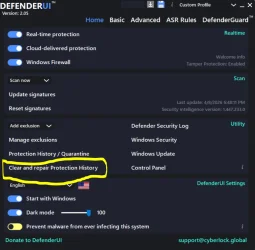
I use Defender UI, which allows for a much easier access to the different "bits and pieces" of Microsoft Defender.
It has an option to clear & repair protection history (see screenshot). And it gives you the possibility to remove the smart screen protection for newly downloaded apps (through a simple context menu entry).
 

Attachments

  • Capture.webp
    Capture.webp
    57.9 KB · Views: 3

My Computer

System One

  • OS
    Windows 11
    Computer type
    PC/Desktop
    Manufacturer/Model
    Gigabyte H610M H V2 DDR4 (Rev. 1.0)
    CPU
    Intel Core i3 12 100 12th generation
    Motherboard
    American Megatrend F34
    Memory
    Kingston DDR4-3200 16 GBytes
    Graphics Card(s)
    Intel UHD 730
Back
Top Bottom