
Hello,
A few days ago, I noticed that the "Cloud-delivered protection" and "Automatic sample submission" options in Defender are greyed out, with the message "This setting is managed by your administrator" displayed in red above them. Incidentally, I *am* the administrator—please see the attached image.
I have two operating systems running Windows 11; the settings are fine on the second one, but not on my primary system, and this is bothering me. I would appreciate help on how to fix this. Resetting the Defender application itself doesn't solve the issue, nor does reinstalling the system via Windows Update. I’ve already tried a few things—including using AI—but without success. It appears to be a setting that is locked in the registry.
Please help.
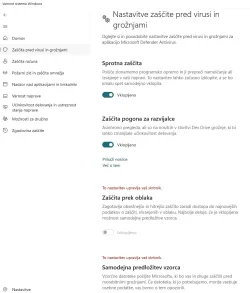
A few days ago, I noticed that the "Cloud-delivered protection" and "Automatic sample submission" options in Defender are greyed out, with the message "This setting is managed by your administrator" displayed in red above them. Incidentally, I *am* the administrator—please see the attached image.
I have two operating systems running Windows 11; the settings are fine on the second one, but not on my primary system, and this is bothering me. I would appreciate help on how to fix this. Resetting the Defender application itself doesn't solve the issue, nor does reinstalling the system via Windows Update. I’ve already tried a few things—including using AI—but without success. It appears to be a setting that is locked in the registry.
Please help.
- Windows Build/Version
- Windows 11 28000
My Computer
At a glance
Windows 11Intel16GBFX 580 8GB
- OS
- Windows 11
- Computer type
- PC/Desktop
- Manufacturer/Model
- noname
- CPU
- Intel
- Motherboard
- Gigabyte
- Memory
- 16GB
- Graphics Card(s)
- FX 580 8GB
- Monitor(s) Displays
- Samsung 32"
- Screen Resolution
- 1080
- Hard Drives
- M.2 Gen4
- PSU
- 500W
- Cooling
- Silent
- Keyboard
- Fujitsu white
- Mouse
- hofer/lidl
- Internet Speed
- 1000/20
- Browser
- Chrome
- Antivirus
- Windows
- Other Info
- I am single ;)






