Insider Windows 11 Insider Canary build 26200.5001 (24H2) - April 19


UPDATE 5/08:


 Windows Blogs:

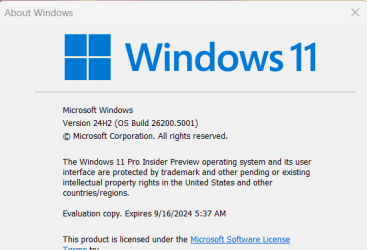
Hello Windows Insiders, today we are releasing Windows 11 Insider Preview Build 26200 to the Canary Channel.

(Note the .5001 after the build number does not mean anything relevant to Windows Insiders and we will continue to use the primary build number for these flight blog posts.)

With the Canary Channel moving to a higher build number, the window closes on being able to switch to the Dev Channel without doing a clean-install of Windows. If you haven’t switched channels yet, you can still do so BEFORE taking Build 26200.


Developers, please note that for a short period of time, we will not be releasing a SDK for builds we flight to the Canary Channel.

Changes and Improvements

[General]

  • [REMINDER] As we’ve been mentioning previously that would happen, the build watermark at the lower right-hand corner of the desktop has returned.

[Widgets]

  • We are also making some improvements to the Widgets button on the taskbar so that the icons on the taskbar are clearer and we are rolling out a larger set of animated icons too.
  • As part of the Widgets board improvements that we began rolling out with Build 26090 a few weeks ago (which are now also rolling out to Insiders in the Dev Channel), we are introducing the ability for developers to send notifications to the taskbar button with their custom dashboards for the Widgets board. Developers can check out this documentation on how to implement this capability with their Widgets dashboards. To manage notifications from multiple dashboards, Widgets is also providing more granular control over what content shows on the Widgets button on the taskbar. You can go to Widgets Settings > Notifications and enable or disable taskbar notifications from individual dashboards. NOTE: These changes are only initially available to Windows Insiders in the European Economic Area (EEA).

[Taskbar & System Tray]

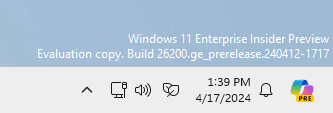
  • After trying out a different design for the energy saver icon in system tray a few months ago for PCs that are plugged in and do not have batteries (such as desktop PCs), we reverted the design back to the leaf icon a few builds ago. (This change is also present in Build 26100.)


    Energy saver icon shown on the system tray for PCs that do not have batteries.
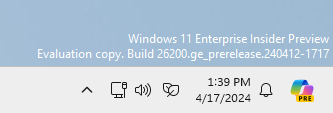
    Energy saver icon shown on the system tray for PCs that do not have batteries.

Fixes for known issues

[Taskbar & System Tray]

  • Fixed an issue that caused a dead zone you couldn’t click inside of next to the notification center.
  • Fixed an issue that was causing the page icons in quick settings to not work in secondary settings pages.
  • Fixed an issue where keyboard focus wasn’t shifting to the top item of the new page correctly after switching pages in quick settings.

[Input]

  • Fixed a tabtip.exe crash, which could impact the ability to input text.

[Windowing]

  • Fixed an issue which could cause RemoteApp windows to get cut off when using 200% scaling.

[Multiple Desktops]

  • Fixed an issue where the option to set a different wallpaper on each desktop wasn’t working.

Known issues

[General]

  • [IMPORTANT NOTE] We are investigating reports that some Windows Insiders in the Canary and Dev Channels are stuck on Build 26040 or Build 23620. The investigation is ongoing, however if you are impacted by this and really want to get onto the latest build in the Canary or Dev Channel today – you can download the latest ISO here and do a clean install and opt your device back into flighting in the Canary or Dev Channels.

[Copilot in Windows*]

  • [NEW] We are aware of reports by Insiders in the Canary, Dev, and Beta Channels that Copilot is auto-launching unexpectedly after restarting their PCs. We hope to have a fix for this issue soon and is unrelated to the auto-launching experience we tried out with Insiders in the Canary and Dev Channels in early February which we stopped rolling out in March.
  • Voice access does not work reliably with the updated Copilot in Windows experience that introduces the ability for Copilot to act like a normal application.
  • Using Windows Ink to write in Copilot will not work with the updated Copilot in Windows experience that introduces the ability for Copilot to act like a normal application window.

Reminders for Windows Insiders

  • The builds we release to the Canary Channel should not be seen as matched to any specific release of Windows and features and experiences included in these builds may never get released as we try out different concepts and get feedback. Features may change over time, be removed, or replaced and never get released beyond Windows Insiders. Some of these features and experiences could show up in future Windows releases when they’re ready.
  • Many features in the Canary Channel are rolled out using Control Feature Rollout technology, starting with a subset of Insiders and ramping up over time as we monitor feedback to see how they land before pushing them out to everyone in this channel.
  • To get off the Canary Channel, a clean install of Windows 11 will be required. As a reminder – Insiders can’t switch to a channel that is receiving builds with lower build numbers without doing a clean installation of Windows 11 due to technical setup requirements.
  • The desktop watermark shown at the lower right corner of the desktop is normal for these pre-release builds.
  • Check out Flight Hub for a complete look at what build is in which Insider channel.
  • Copilot in Windows* in preview is being rolled out gradually to Windows Insiders in select global markets. The initial markets for the Copilot in Windows preview include North America, United Kingdom and parts of Asia and South America. It is our intention to add additional markets over time.
Thanks,
Amanda & Brandon


 Source:


Check Windows Updates


UUP Dump:

64-bit ISO download:

ARM64 ISO download:

 
Last edited:

hi i have just downloaded this uup dump and had this error message in the middle and was wondering if it is safe to install the iso it made
regards Braderror.png
 

My Computer My Computer

At a glance

Dual Boot 10 & 11Ryzen 5 3600Corssair Vengance lpx 16gbMsi radeon Rx 5500xt x8
OS
Dual Boot 10 & 11
Computer type
PC/Desktop
Manufacturer/Model
HOme Made
CPU
Ryzen 5 3600
Motherboard
Gigabyte 450 aorus Pro wifi
Memory
Corssair Vengance lpx 16gb
Graphics Card(s)
Msi radeon Rx 5500xt x8
Sound Card
intel
Monitor(s) Displays
acer 24 inch x2
Screen Resolution
1920 x 1080
Hard Drives
crucial p2 500gb nvme m.2
PSU
lifepower gen2 650
Case
thermaltake h200tg
Cooling
air
Keyboard
gigabyte
Mouse
gigabyte
Internet Speed
nbn 50
Browser
firefox nightly
Antivirus
avast
Update done, but the circle that rotates, when the computer starts, below the Windows logo (or the motherboard brand logo) has disappeared!
 

My Computer My Computer

At a glance

Windows 11 Insider Experimental (26H2) ChannelIntel Core i5-13600K32 Go DDR4ASUS Dual GeForce RTX 4060 Ti OC Edition 8GB
OS
Windows 11 Insider Experimental (26H2) Channel
Computer type
PC/Desktop
Manufacturer/Model
Made
CPU
Intel Core i5-13600K
Motherboard
ASUS PRIME B760-PLUS D4
Memory
32 Go DDR4
Graphics Card(s)
ASUS Dual GeForce RTX 4060 Ti OC Edition 8GB
Monitor(s) Displays
ViewSonic 1080p
Screen Resolution
1080p
Hard Drives
2 NVMe + SSD Intern + 1 HHD Interne + 4 HDD extern
Keyboard
Roccat Swamm
Internet Speed
Fibre
Browser
Microsoft Edge
Antivirus
Windows Defender
Any problem updating apps from MS Store after updating the Build with ISO?

It seems fixed here after updating with ISO the MS Store updates worked fine.

View attachment 93914

Any problem updating apps from MS Store after updating the Build with ISO?

It seems fixed here after updating with ISO the MS Store updates worked fine.

View attachment 93914
On both of my computers the Feedback Hub and the VP9 Video extensions won't update. The other apps updated Ok.
 

My Computers My Computers

  • At a glance

    Windows 11 Pro 25H2Intel Core i7-10700K16GB (8GB PC4-19200 DDR4 SDRAM x2)NVIDIA GeForce GTX 1050 TI
    OS
    Windows 11 Pro 25H2
    Computer type
    PC/Desktop
    Manufacturer/Model
    PowerSpec B746
    CPU
    Intel Core i7-10700K
    Motherboard
    ASRock Z490 Phantom Gaming 4/ax
    Memory
    16GB (8GB PC4-19200 DDR4 SDRAM x2)
    Graphics Card(s)
    NVIDIA GeForce GTX 1050 TI
    Sound Card
    Realtek Audio
    Monitor(s) Displays
    #1. LG ULTRAWIDE 34" #2. AOC Q32G2WG3 32"
    Screen Resolution
    #1. 3440 X 1440 #2. 1920 x 1080
    Hard Drives
    NVMe WDC WDS100T2B0C-00PXH0 1TB
    Samsung SSD 860 EVO 1TB
    PSU
    750 Watts (62.5A)
    Case
    PowerSpec/Lian Li ATX 205
    Keyboard
    Logitech K270
    Mouse
    Logitech M185
    Browser
    Microsoft Edge and Firefox
    Antivirus
    Webroot SecureAnywhere CE 26.1
  • At a glance

    Windows 11 Canary ChannelIntel Core i5-8400 CPU @ 2.80GHz16 MB DDR 4-2666
    Operating System
    Windows 11 Canary Channel
    Computer type
    PC/Desktop
    Manufacturer/Model
    PowerSpec G156
    CPU
    Intel Core i5-8400 CPU @ 2.80GHz
    Motherboard
    AsusTeK Prime B360M-A
    Memory
    16 MB DDR 4-2666
    Monitor(s) Displays
    23" Speptre HDMI 75Hz
    Screen Resolution
    1920x1080
    Hard Drives
    Samsung 970 EVO 500GB NVMe
    Keyboard
    Logitek K270
    Mouse
    Logitek M185
    Browser
    Firefox, Edge and Edge Canary
    Antivirus
    Windows Defender
On both of my computers the Feedback Hub and the VP9 Video extensions won't update. The other apps updated Ok.
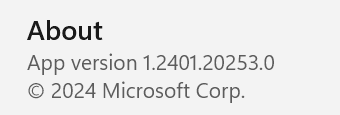
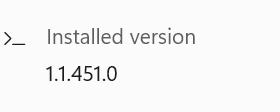
I was going to uninstall the Feedback Hub and The VP9 extensions with Revo so I could try reinstalling them. Revo has them listed as being installed yesterday. I updated to build 26200.5001 last night so it appears that they may be updated. The version I have of the Feedback Hub is 1.2401.20253.0 and the version of the VP9 Video Extensions is 1.1.451.0. I would be very grateful if someone would check to see if these are the newest versions or not. I went ahead and uninstalled them with Revo and reinstalled them from the MS Store. They now show as being modified a minute ago.
 
Last edited:

My Computers My Computers

  • At a glance

    Windows 11 Pro 25H2Intel Core i7-10700K16GB (8GB PC4-19200 DDR4 SDRAM x2)NVIDIA GeForce GTX 1050 TI
    OS
    Windows 11 Pro 25H2
    Computer type
    PC/Desktop
    Manufacturer/Model
    PowerSpec B746
    CPU
    Intel Core i7-10700K
    Motherboard
    ASRock Z490 Phantom Gaming 4/ax
    Memory
    16GB (8GB PC4-19200 DDR4 SDRAM x2)
    Graphics Card(s)
    NVIDIA GeForce GTX 1050 TI
    Sound Card
    Realtek Audio
    Monitor(s) Displays
    #1. LG ULTRAWIDE 34" #2. AOC Q32G2WG3 32"
    Screen Resolution
    #1. 3440 X 1440 #2. 1920 x 1080
    Hard Drives
    NVMe WDC WDS100T2B0C-00PXH0 1TB
    Samsung SSD 860 EVO 1TB
    PSU
    750 Watts (62.5A)
    Case
    PowerSpec/Lian Li ATX 205
    Keyboard
    Logitech K270
    Mouse
    Logitech M185
    Browser
    Microsoft Edge and Firefox
    Antivirus
    Webroot SecureAnywhere CE 26.1
  • At a glance

    Windows 11 Canary ChannelIntel Core i5-8400 CPU @ 2.80GHz16 MB DDR 4-2666
    Operating System
    Windows 11 Canary Channel
    Computer type
    PC/Desktop
    Manufacturer/Model
    PowerSpec G156
    CPU
    Intel Core i5-8400 CPU @ 2.80GHz
    Motherboard
    AsusTeK Prime B360M-A
    Memory
    16 MB DDR 4-2666
    Monitor(s) Displays
    23" Speptre HDMI 75Hz
    Screen Resolution
    1920x1080
    Hard Drives
    Samsung 970 EVO 500GB NVMe
    Keyboard
    Logitek K270
    Mouse
    Logitek M185
    Browser
    Firefox, Edge and Edge Canary
    Antivirus
    Windows Defender
Do Dev and Canary Builds freeze your computer or do you people install it on virtual machines?
 

My Computer My Computer

At a glance

window 10 version 22H2 (OS Build 19045.6466Intel Core i7 @2.80GHz 57 °C Sandy Bridge 32n...4.00GB Dual-Channel DDR3 @ 665MHz (9-9-9-24)Intel HD Graphics 3000
OS
window 10 version 22H2 (OS Build 19045.6466
Computer type
Laptop
Manufacturer/Model
Dell/E6400
CPU
Intel Core i7 @2.80GHz 57 °C Sandy Bridge 32nm Tech
Motherboard
Dell Inc. 0K0DNP (CPU 1)
Memory
4.00GB Dual-Channel DDR3 @ 665MHz (9-9-9-24)
Graphics Card(s)
Intel HD Graphics 3000
Sound Card
High Definition Audio Device
Monitor(s) Displays
single
Screen Resolution
1366x768 pixels
Hard Drives
WDC WD2500BPVT-75JJ5T0
Keyboard
Device Name Standard PS/2 Keyboard
Mouse
PS/2 Compatible Mouse
Internet Speed
10mb
Browser
ms edge
Antivirus
win defender

My Computers My Computers

  • At a glance

    Windows 11 Pro 25H2Intel Core i7-10700K16GB (8GB PC4-19200 DDR4 SDRAM x2)NVIDIA GeForce GTX 1050 TI
    OS
    Windows 11 Pro 25H2
    Computer type
    PC/Desktop
    Manufacturer/Model
    PowerSpec B746
    CPU
    Intel Core i7-10700K
    Motherboard
    ASRock Z490 Phantom Gaming 4/ax
    Memory
    16GB (8GB PC4-19200 DDR4 SDRAM x2)
    Graphics Card(s)
    NVIDIA GeForce GTX 1050 TI
    Sound Card
    Realtek Audio
    Monitor(s) Displays
    #1. LG ULTRAWIDE 34" #2. AOC Q32G2WG3 32"
    Screen Resolution
    #1. 3440 X 1440 #2. 1920 x 1080
    Hard Drives
    NVMe WDC WDS100T2B0C-00PXH0 1TB
    Samsung SSD 860 EVO 1TB
    PSU
    750 Watts (62.5A)
    Case
    PowerSpec/Lian Li ATX 205
    Keyboard
    Logitech K270
    Mouse
    Logitech M185
    Browser
    Microsoft Edge and Firefox
    Antivirus
    Webroot SecureAnywhere CE 26.1
  • At a glance

    Windows 11 Canary ChannelIntel Core i5-8400 CPU @ 2.80GHz16 MB DDR 4-2666
    Operating System
    Windows 11 Canary Channel
    Computer type
    PC/Desktop
    Manufacturer/Model
    PowerSpec G156
    CPU
    Intel Core i5-8400 CPU @ 2.80GHz
    Motherboard
    AsusTeK Prime B360M-A
    Memory
    16 MB DDR 4-2666
    Monitor(s) Displays
    23" Speptre HDMI 75Hz
    Screen Resolution
    1920x1080
    Hard Drives
    Samsung 970 EVO 500GB NVMe
    Keyboard
    Logitek K270
    Mouse
    Logitek M185
    Browser
    Firefox, Edge and Edge Canary
    Antivirus
    Windows Defender
Do Dev and Canary Builds freeze your computer or do you people install it on virtual machines?
I'm not using any virtual machines on my two desktops and I don't have any freezing problems.
 

My Computers My Computers

  • At a glance

    Windows 11 Pro 25H2Intel Core i7-10700K16GB (8GB PC4-19200 DDR4 SDRAM x2)NVIDIA GeForce GTX 1050 TI
    OS
    Windows 11 Pro 25H2
    Computer type
    PC/Desktop
    Manufacturer/Model
    PowerSpec B746
    CPU
    Intel Core i7-10700K
    Motherboard
    ASRock Z490 Phantom Gaming 4/ax
    Memory
    16GB (8GB PC4-19200 DDR4 SDRAM x2)
    Graphics Card(s)
    NVIDIA GeForce GTX 1050 TI
    Sound Card
    Realtek Audio
    Monitor(s) Displays
    #1. LG ULTRAWIDE 34" #2. AOC Q32G2WG3 32"
    Screen Resolution
    #1. 3440 X 1440 #2. 1920 x 1080
    Hard Drives
    NVMe WDC WDS100T2B0C-00PXH0 1TB
    Samsung SSD 860 EVO 1TB
    PSU
    750 Watts (62.5A)
    Case
    PowerSpec/Lian Li ATX 205
    Keyboard
    Logitech K270
    Mouse
    Logitech M185
    Browser
    Microsoft Edge and Firefox
    Antivirus
    Webroot SecureAnywhere CE 26.1
  • At a glance

    Windows 11 Canary ChannelIntel Core i5-8400 CPU @ 2.80GHz16 MB DDR 4-2666
    Operating System
    Windows 11 Canary Channel
    Computer type
    PC/Desktop
    Manufacturer/Model
    PowerSpec G156
    CPU
    Intel Core i5-8400 CPU @ 2.80GHz
    Motherboard
    AsusTeK Prime B360M-A
    Memory
    16 MB DDR 4-2666
    Monitor(s) Displays
    23" Speptre HDMI 75Hz
    Screen Resolution
    1920x1080
    Hard Drives
    Samsung 970 EVO 500GB NVMe
    Keyboard
    Logitek K270
    Mouse
    Logitek M185
    Browser
    Firefox, Edge and Edge Canary
    Antivirus
    Windows Defender
I'm not using any virtual machines on my two desktops and I don't have any freezing problems.
Yes, I don’t use any modifying explorer software either and have no issues with canary.
 

My Computers My Computers

  • At a glance

    windows 10 & 11AMD Ryzen 7X64GbRadeon RX 480 8Gb
    OS
    windows 10 & 11
    Computer type
    PC/Desktop
    Manufacturer/Model
    iBuyPower (special build)
    CPU
    AMD Ryzen 7X
    Motherboard
    Asus Prime x370 Pro
    Memory
    64Gb
    Graphics Card(s)
    Radeon RX 480 8Gb
    Monitor(s) Displays
    Samsung UHD 27 inch
    Screen Resolution
    UHD
    Hard Drives
    3 Samsung 1 TB SSD each; 1 Samsung PCIe M.2 at 2 TB
  • At a glance

    Windows 11 proAMD 9 5900X32 GbNvidia GeForce RTX 3080 Ti 12 GB GDDR6X
    Operating System
    Windows 11 pro
    Computer type
    PC/Desktop
    Manufacturer/Model
    IBuyPower
    CPU
    AMD 9 5900X
    Motherboard
    Asus x570 ROG Crosshair VIII Dark Hero WI-FI 6E ARGB
    Memory
    32 Gb
    Graphics card(s)
    Nvidia GeForce RTX 3080 Ti 12 GB GDDR6X
    Sound Card
    3D PREMIUM surround sound onboard
    Monitor(s) Displays
    Samsung 32 inch UHD curved monitor
    Screen Resolution
    UHD
    Hard Drives
    Samsung 980 pro 2 tb gen 4 NVMe ssd
    PSU
    850 watt consair RM850X
    Case
    Lian Li LANCOOL ONE tempered glass RGB gaming case
    Cooling
    DEEPCOOL GAMERSTORM RGB 240 mm CASTLE 240EX liquid cooler
    Keyboard
    Ares m.2 gaming keyboard
    Mouse
    Ares m.2 gaming optical mouse
    Internet Speed
    450
    Browser
    Firefox / Edge
    Antivirus
    Windows defender
    Other Info
    With all this gaming rig I am not a gamer!
I was going to uninstall the Feedback Hub and The VP9 extensions with Revo so I could try reinstalling them. Revo has them listed as being installed yesterday. I updated to build 26200.5001 last night so it appears that they may be updated. The version I have of the Feedback Hub is 1.2401.20253.0 and the version of the VP9 Video Extensions is 1.1.451.0. I would be very grateful if someone would check to see if these are the newest versions or not. I went ahead and uninstalled them with Revo and reinstalled them from the MS Store. They now show as being modified a minute ago.
These are mine, but they were updated weeks ago, not with latest build. 🤷‍♂️

FBH
1713633560506.png

VP9
1713633703492.png
 

My Computer My Computer

At a glance

Windows 11 Pro 25H2Intel I9-9900K64GBNVIDIA RTX 2060
OS
Windows 11 Pro 25H2
Computer type
PC/Desktop
Manufacturer/Model
Dell XPS 8930
CPU
Intel I9-9900K
Memory
64GB
Graphics Card(s)
NVIDIA RTX 2060
Sound Card
NVIDIA High Definition Audio
Monitor(s) Displays
4k Samsung
Screen Resolution
3840 x 2160
Hard Drives
512GB NVMe, ADATA SU 800, 2TB HDD
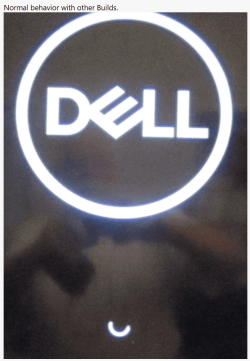
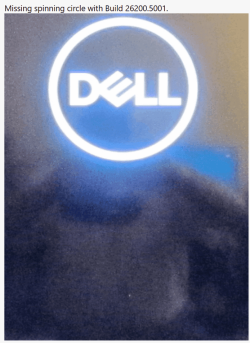
Update done, but the circle that rotates, when the computer starts, below the Windows logo (or the motherboard brand logo) has disappeared!
I see the same problem on my Dell XPS 8940 after updating to 26200.5001.
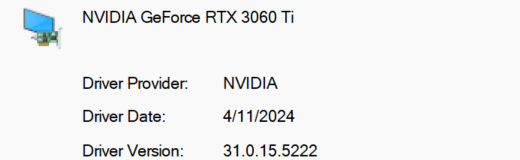
Nvidia Driver 552.22 if that matters. 🤷‍♂️

1713644873255.png


1713647038434.png

1713647080360.png


Same behavior on a mini PC GMKtec K3 Pro with Intel Graphics display adapter..
 
Last edited:

My Computer My Computer

At a glance

Windows 11 Pro 25H2Intel I9-9900K64GBNVIDIA RTX 2060
OS
Windows 11 Pro 25H2
Computer type
PC/Desktop
Manufacturer/Model
Dell XPS 8930
CPU
Intel I9-9900K
Memory
64GB
Graphics Card(s)
NVIDIA RTX 2060
Sound Card
NVIDIA High Definition Audio
Monitor(s) Displays
4k Samsung
Screen Resolution
3840 x 2160
Hard Drives
512GB NVMe, ADATA SU 800, 2TB HDD

My Computers My Computers

  • At a glance

    Windows 11 Pro 25H2Intel Core i7-10700K16GB (8GB PC4-19200 DDR4 SDRAM x2)NVIDIA GeForce GTX 1050 TI
    OS
    Windows 11 Pro 25H2
    Computer type
    PC/Desktop
    Manufacturer/Model
    PowerSpec B746
    CPU
    Intel Core i7-10700K
    Motherboard
    ASRock Z490 Phantom Gaming 4/ax
    Memory
    16GB (8GB PC4-19200 DDR4 SDRAM x2)
    Graphics Card(s)
    NVIDIA GeForce GTX 1050 TI
    Sound Card
    Realtek Audio
    Monitor(s) Displays
    #1. LG ULTRAWIDE 34" #2. AOC Q32G2WG3 32"
    Screen Resolution
    #1. 3440 X 1440 #2. 1920 x 1080
    Hard Drives
    NVMe WDC WDS100T2B0C-00PXH0 1TB
    Samsung SSD 860 EVO 1TB
    PSU
    750 Watts (62.5A)
    Case
    PowerSpec/Lian Li ATX 205
    Keyboard
    Logitech K270
    Mouse
    Logitech M185
    Browser
    Microsoft Edge and Firefox
    Antivirus
    Webroot SecureAnywhere CE 26.1
  • At a glance

    Windows 11 Canary ChannelIntel Core i5-8400 CPU @ 2.80GHz16 MB DDR 4-2666
    Operating System
    Windows 11 Canary Channel
    Computer type
    PC/Desktop
    Manufacturer/Model
    PowerSpec G156
    CPU
    Intel Core i5-8400 CPU @ 2.80GHz
    Motherboard
    AsusTeK Prime B360M-A
    Memory
    16 MB DDR 4-2666
    Monitor(s) Displays
    23" Speptre HDMI 75Hz
    Screen Resolution
    1920x1080
    Hard Drives
    Samsung 970 EVO 500GB NVMe
    Keyboard
    Logitek K270
    Mouse
    Logitek M185
    Browser
    Firefox, Edge and Edge Canary
    Antivirus
    Windows Defender
the circle that rotates, when the computer starts, below the Windows logo (or the motherboard brand logo) has disappeared!
I see the same problem on my Dell XPS 8940 after updating to 26200.5001.
So do I on my Dell Latitude 3190 2-in-1....

Nvidia Driver 552.22 if that matters. 🤷‍♂️
Probably not.....

1713659720174.png

In addition, I'm still seeing the boot menu shrunk to the left half of the screen and bright pink when Canary is the default OS.
 

My Computers My Computers

  • At a glance

    Windows 11 HomeAMD Athlon Silver 3050U8GBRadeon Graphics
    OS
    Windows 11 Home
    Computer type
    Laptop
    Manufacturer/Model
    Acer Aspire 3 A315-23-R9VY
    CPU
    AMD Athlon Silver 3050U
    Memory
    8GB
    Graphics Card(s)
    Radeon Graphics
    Monitor(s) Displays
    laptop screen
    Screen Resolution
    1366x768 native resolution, up to 2560x1440 with Radeon Virtual Super Resolution
    Hard Drives
    1TB Samsung EVO 870 SSD (from April 2026: 250GB EVO 850)
    Internet Speed
    150 Mbps
    Browser
    Edge, Firefox
    Antivirus
    Defender
    Other Info
    UPDATE - 11 April 2026: due to lid hinges starting to break up this laptop has been retired from active duty. The OS with all software and files has been migrated to my System Seven in 'Other systems' to carry on as my general purpose 'main machine'.

    I've now clean installed 25H2 and used Garlin's scripts to update Secure Boot to CA 2023 and revoke the PCA 2011 certificates. It's new role is to test secure boot issues.

    Info for 2021-2026:
    fully 'Windows 11 ready' laptop. Windows 10 C: partition migrated from my old unsupported 'main machine' then upgraded to 11. A test migration ran Insider builds for 2 months. When 11 was released on 5th October 2021 it was re-imaged back to 10 and was offered the upgrade in Windows Update on 20th October. Windows Update offered the 22H2 Feature Update on 20th September 2022. It got the 23H2 Feature Update on 4th November 2023 through Windows Update, 24H2 on 3rd October 2024 through Windows Update by setting the Target Release Version for 24H2, and 25H2 on 30th September 2025 through Windows Update by setting the Target Release Version for 25H2.
  • At a glance

    Windows 11 ProIntel® Core™ i5-520M8GB(integrated graphics) Intel HD Graphics
    Operating System
    Windows 11 Pro
    Computer type
    Laptop
    Manufacturer/Model
    Dell Latitude E4310
    CPU
    Intel® Core™ i5-520M
    Motherboard
    0T6M8G
    Memory
    8GB
    Graphics card(s)
    (integrated graphics) Intel HD Graphics
    Screen Resolution
    1366x768
    Hard Drives
    500GB Crucial MX500 SSD
    Browser
    Firefox, Edge
    Antivirus
    Defender
    Other Info
    unsupported machine: Legacy bios, MBR, TPM 1.2, upgraded from W10 to W11 using W10/W11 hybrid install media workaround.

    In-place upgrade to 22H2 using ISO and a workaround.
    Feature Update to 23H2 by manually installing the Enablement Package.
    In-place upgrade to 24H2 using hybrid 23H2/24H2 install media.
    Upgraded to 25H2 by Enablement Package.

    Also running Insider Dev, and Canary builds and Windows 10 as native boot .vhdx.
  • My SYSTEM THREE is a Dell Latitude 5410, i7-10610U, 32GB RAM, 512GB NVMe ssd, supported device running Windows 11 Pro.

    My SYSTEM FOUR was a 2-in-1 convertible Lenovo Yoga 11e (1st gen) type 20DA, Celeron N2930, 8GB RAM, 256GB ssd. Unsupported device. This has now been sold. It has been replaced by my System Eight.

    My SYSTEM FIVE is a Dell Latitude 3190 2-in-1, Pentium Silver N5030, 8GB RAM, 1TB NVMe ssd, supported device running Windows 11 Pro, plus Insider Beta, Dev, and Canary builds (and a few others) as a native boot .vhdx.

    My SYSTEM SIX is a Dell Latitude 5550, Core Ultra 7 165H, 64GB RAM, 1TB NVMe SSD, supported device, Windows 11 Pro, Hyper-V host machine. Updated to 25H2 on 30th September 2025.

    My SYSTEM SEVEN is a Lenovo Thinkpad T580, 1920x1080 touchscreen, Intel Core i7-8650U, 16GB RAM, 512GB NVMe SSD + 2nd 512GB NVMe SSD, a supported device for Windows 11. This is my current general purpose 'main machine'. The installed Windows 11 Home from my System One has been migrated to this machine. As its new home has an existing digital licence for Pro I've been able to upgrade the migrated OS from Home to Pro.

    My SYSTEM EIGHT is a 2-in-1 convertible Lenovo Yoga 11e (5th gen) type 20LN, Celeron N4120, 8GB RAM, 512GB NVMe ssd, a supported device for Windows 11. Currently running Windows 11 Pro, plus Insider Dev, Beta, and Canary builds as native boot vhdx.
So do I on my Dell Latitude 3190 2-in-1....


Probably not.....


In addition, I'm still seeing the boot menu shrunk to the left half of the screen and bright pink when Canary is the default OS.
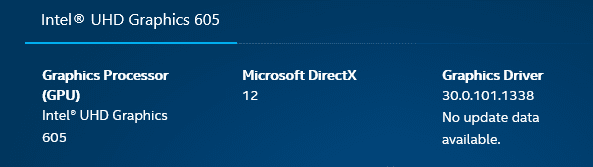
Same missing spinning circle on a mini GMKtec K3 Pro with Intel driver 32.0.101.5439 that was installed by W.U. on Canary, not available from Intel yet. 😂
Looks like a new bug added with this build, affecting different machines with different configurations. 😎


I have not seen the shrunk menu with any of the latest Builds.
You may have something left over from some older build, I got that problem on one machine long time ago and I solved it by restoring a good backup and then updating again, I have not seen that problem anymore. 🤷‍♂️
 
Last edited:

My Computer My Computer

At a glance

Windows 11 Pro 25H2Intel I9-9900K64GBNVIDIA RTX 2060
OS
Windows 11 Pro 25H2
Computer type
PC/Desktop
Manufacturer/Model
Dell XPS 8930
CPU
Intel I9-9900K
Memory
64GB
Graphics Card(s)
NVIDIA RTX 2060
Sound Card
NVIDIA High Definition Audio
Monitor(s) Displays
4k Samsung
Screen Resolution
3840 x 2160
Hard Drives
512GB NVMe, ADATA SU 800, 2TB HDD
Thanks for the advice to switch from DEV to Canary -- before doing this update. I'll keep both - but installing from new is a pain. I'll just replicate also existing DEV to a new system and then have both DEV and CANARY. With big SSD's (Nveme's) having a load of windows installs on physical vhdx files just works perfectly.

Note - replicating existing systems doesn't require new activations or licenses.

Note also those vhdx files can also be used in VM's -- simply copy the vhdx to the virtual disk in the vm and reinstall the bootloader. You'll probably end up with the Microsoft basic video adapter on the VM - but install on the GUEST the VM's "vmware tools, vbox additions, or on linux hosts using KVM/WEMU the windows virtual tools --virtio iso from the fedora site and install the redhat qxl video driver).

A VM though even copied from an existing physical system might (but sometimes not if you are lucky) be regarded as new hardware so will want activation or a new license. Sometimes though replicating from a physical install with the physical drivers still installed can at times confuse the "new hardware detection" mechanism so you could be lucky. If that's the case then do your updates in the vm - test and if OK copy back to a physical machine. You've got the original drivers so no probs there either.

cheers
jimbo
I want advice on switching from DEV to CANARY because of Virtual Machine VM consideration since Microsoft switched me, without notice, from CANARY to DEV, and only because I switched back on my new SSD, it was not in time for my VMware VM. No matter I am debaing at the mmemtn whether to overwrite Windows with either Ubuntu 24.04 LTS or Debian 12 Testing both of which I have up in QEMU/KVM on Fedora Rawhide (importable to Garuda). It's a pleasant internal debate and I will probably decide next build.
 

My Computer My Computer

At a glance

Fedora Silverblue Rawhide Debian 13 Ubuntu 25...AMD Ryzen 7 7800X3D 8-Core64GBNvidia
OS
Fedora Silverblue Rawhide Debian 13 Ubuntu 25.10,
Computer type
PC/Desktop
Manufacturer/Model
HomeBrew
CPU
AMD Ryzen 7 7800X3D 8-Core
Motherboard
Gigabyte
Memory
64GB
Graphics Card(s)
Nvidia
Monitor(s) Displays
Dell
Hard Drives
3 ssd 2 spinners configured as raid 0
Keyboard
Eluktronics
Mouse
Eluktronics
Browser
Firefox and Chromium
Other Info
Gnome 46
Thanks for the advice to switch from DEV to Canary -- before doing this update. I'll keep both - but installing from new is a pain. I'll just replicate also existing DEV to a new system and then have both DEV and CANARY. With big SSD's (Nveme's) having a load of windows installs on physical vhdx files just works perfectly.

Note - replicating existing systems doesn't require new activations or licenses.

Note also those vhdx files can also be used in VM's -- simply copy the vhdx to the virtual disk in the vm and reinstall the bootloader. You'll probably end up with the Microsoft basic video adapter on the VM - but install on the GUEST the VM's "vmware tools, vbox additions, or on linux hosts using KVM/WEMU the windows virtual tools --virtio iso from the fedora site and install the redhat qxl video driver).

A VM though even copied from an existing physical system might (but sometimes not if you are lucky) be regarded as new hardware so will want activation or a new license. Sometimes though replicating from a physical install with the physical drivers still installed can at times confuse the "new hardware detection" mechanism so you could be lucky. If that's the case then do your updates in the vm - test and if OK copy back to a physical machine. You've got the original drivers so no probs there either.

cheers
jimbo
Using a native boot vhd
I want advice on switching from DEV to CANARY because of Virtual Machine VM consideration since Microsoft switched me, without notice, from CANARY to DEV, and only because I switched back on my new SSD, it was not in time for my VMware VM. No matter I am debaing at the mmemtn whether to overwrite Windows with either Ubuntu 24.04 LTS or Debian 12 Testing both of which I have up in QEMU/KVM on Fedora Rawhide (importable to Garuda). It's a pleasant internal debate and I will probably decide next build.
You will not be switched from Dev to Canary. That only happened when Canary was first introduced So it is up to you which you select.

Bear in mind if you move to Canary, you cannot change again, once Canary diverges until Dev possibly reconverges im the future

Regarding Linux, despite the "benefits" spread by Linux users, the basic fact is that the range of main stream applications is much more limited.

People get so swept up in the Linux vs Windows debates, they forget the most fundamental point i.e. the purpose of an OS is to run apps.

Each user has to judge which OS meets their apps requirements. For some Linux is adequate but for many, it is certainly not.
 

My Computer My Computer

At a glance

Windows 11 Pro + Win11 Canary VM.I9 13th gen i9-13900H 2.60 GHZ16 GB solderedIntegrated Intel Iris XE
OS
Windows 11 Pro + Win11 Canary VM.
Computer type
Laptop
Manufacturer/Model
ASUS Zenbook 14
CPU
I9 13th gen i9-13900H 2.60 GHZ
Motherboard
Yep, Laptop has one.
Memory
16 GB soldered
Graphics Card(s)
Integrated Intel Iris XE
Sound Card
Realtek built in
Monitor(s) Displays
laptop OLED screen
Screen Resolution
2880x1800 touchscreen
Hard Drives
1 TB NVME SSD (only weakness is only one slot)
PSU
Internal + 65W thunderbolt USB4 charger
Case
Yep, got one
Cooling
Stella Artois (UK pint cans - 568 ml) - extra cost.
Keyboard
Built in UK keybd
Mouse
Bluetooth , wireless dongled, wired
Internet Speed
900 mbs (ethernet), wifi 6 typical 350-450 mb/s both up and down
Browser
Edge
Antivirus
Defender
Other Info
TPM 2.0, 2xUSB4 thunderbolt, 1xUsb3 (usb a), 1xUsb-c, hdmi out, 3.5 mm audio out/in combo, ASUS backlit trackpad (inc. switchable number pad)

Macrium Reflect Home V8
Office 365 Family (6 users each 1TB onedrive space)
Hyper-V (a vm runs almost as fast as my older laptop)
Using a native boot vhd
You will not be switched from Dev to Canary. That only happened when Canary was first introduced So it is up to you which you select.

Bear in mind if you move to Canary, you cannot change again, once Canary diverges until Dev possibly reconverges im the future

Regarding Linux, despite the "benefits" spread by Linux users, the basic fact is that the range of main stream applications is much more limited.

People get so swept up in the Linux vs Windows debates, they forget the most fundamental point i.e. the purpose of an OS is to run apps.

Each user has to judge which OS meets their apps requirements. For some Linux is adequate but for many, it is certainly not.
I understand that giving up a few shareware programs I have bought (actually thousands of dollars) will be difficult, if not impossible, to run under, say, Wine; almost everything I personally need is available on Linux. I am not a gamer but have bought a gaming motherboard (A Gigabyte Ultra Durable) is working for me. I have used Hyper-V and WSL and they are fine but for reasons are not "my cup of tea". Ubuntu 24.04 LTS looks quite good as does Debian Trixis. When I get a Manjaro 2024 image (just found out how I caN get one on Garida Linux (if you lilke performance you should check it out in a VM!). Manjaro and Garuda are Arch based and have all the programs you could ever want through AUR. Fedora is also fine - I am running Rawhide ...
 

My Computer My Computer

At a glance

Fedora Silverblue Rawhide Debian 13 Ubuntu 25...AMD Ryzen 7 7800X3D 8-Core64GBNvidia
OS
Fedora Silverblue Rawhide Debian 13 Ubuntu 25.10,
Computer type
PC/Desktop
Manufacturer/Model
HomeBrew
CPU
AMD Ryzen 7 7800X3D 8-Core
Motherboard
Gigabyte
Memory
64GB
Graphics Card(s)
Nvidia
Monitor(s) Displays
Dell
Hard Drives
3 ssd 2 spinners configured as raid 0
Keyboard
Eluktronics
Mouse
Eluktronics
Browser
Firefox and Chromium
Other Info
Gnome 46
I see the same problem on my Dell XPS 8940 after updating to 26200.5001.
Nvidia Driver 552.22 if that matters. 🤷‍♂️

View attachment 93978


View attachment 93980

View attachment 93981


Same behavior on a mini PC GMKtec K3 Pro with Intel Graphics display adapter..
Looks like it is not communicating with the BIOS but I'm far f rom a Windows Canary expert.
 

My Computer My Computer

At a glance

Fedora Silverblue Rawhide Debian 13 Ubuntu 25...AMD Ryzen 7 7800X3D 8-Core64GBNvidia
OS
Fedora Silverblue Rawhide Debian 13 Ubuntu 25.10,
Computer type
PC/Desktop
Manufacturer/Model
HomeBrew
CPU
AMD Ryzen 7 7800X3D 8-Core
Motherboard
Gigabyte
Memory
64GB
Graphics Card(s)
Nvidia
Monitor(s) Displays
Dell
Hard Drives
3 ssd 2 spinners configured as raid 0
Keyboard
Eluktronics
Mouse
Eluktronics
Browser
Firefox and Chromium
Other Info
Gnome 46
If i expand the copilot window to far, the right hand pane is unresponsive. Also, the copilot hover feature still does not work for me, it didn't work in 26100 either, did they disable this in 24H2? I've tried copying text and/or images to the clipboard, when I hover over copilot, nothing happens. Anyone else having these issues?
 

My Computer My Computer

At a glance

Windows 11
OS
Windows 11
Computer type
PC/Desktop
Manufacturer/Model
MSI
The Passkey settings page will be getting an Advanced options page soon, which will let you manage passkey sync settings and credential manager settings. (disabled by default, build 26200.)

vivetool /enable /id:33722644,46264199,48412482,48433719


My Computers My Computers

  • At a glance

    Windows 11 Pro for WorkstationsIntel i7-8700K 5 GHz64 GB (4x16GB) G.SKILL TridentZ RGB DDR4 3600...ASUS ROG-STRIX-GTX1080TI-O11G-GAMING (11GB GD...
    OS
    Windows 11 Pro for Workstations
    Computer type
    PC/Desktop
    Manufacturer/Model
    Custom self build
    CPU
    Intel i7-8700K 5 GHz
    Motherboard
    ASUS ROG Maximus XI Formula Z390
    Memory
    64 GB (4x16GB) G.SKILL TridentZ RGB DDR4 3600 MHz (F4-3600C18D-32GTZR)
    Graphics Card(s)
    ASUS ROG-STRIX-GTX1080TI-O11G-GAMING (11GB GDDR5X)
    Sound Card
    Integrated Digital Audio (S/PDIF)
    Monitor(s) Displays
    2 x Samsung Odyssey G75 27"
    Screen Resolution
    2560x1440
    Hard Drives
    1TB Samsung 990 PRO M.2,
    4TB Samsung 990 PRO M.2,
    TerraMaster F8 SSD Plus NAS
    PSU
    Seasonic Prime Titanium 850W
    Case
    Thermaltake Core P3 wall mounted
    Cooling
    Corsair Hydro H115i
    Keyboard
    Amazon Basics Wired Full Keyboard MD005
    Mouse
    Logitech MX Master 4
    Internet Speed
    2 Gbps Download and 100 Mbps Upload
    Browser
    Chrome and Edge
    Antivirus
    Microsoft Defender
    Other Info
    Logitech Z625 speaker system,
    Logitech BRIO 4K Pro webcam,
    HP Color LaserJet Pro MFP M477fdn,
    CyberPower CP1500PFCLCD
    Galaxy S23 Plus phone
  • At a glance

    Windows 11 ProSnapdragon X Elite (12 core) 3.42 GHz16 GB LPDDR5x-7467 MHz
    Operating System
    Windows 11 Pro
    Computer type
    Laptop
    Manufacturer/Model
    Surface Laptop 7 Copilot+ PC
    CPU
    Snapdragon X Elite (12 core) 3.42 GHz
    Memory
    16 GB LPDDR5x-7467 MHz
    Monitor(s) Displays
    15" HDR
    Screen Resolution
    2496 x 1664
    Hard Drives
    1 TB SSD
    Internet Speed
    Wi-Fi 7 and Bluetooth 5.4
    Browser
    Chrome and Edge
    Antivirus
    Microsoft Defender
updateScreenshot 2024-04-21 223521.png
 

My Computers My Computers

  • At a glance

    Windows 11 Pro Insider OS Build 29617.1000i9-9900 8C/16T Coffee Lake(2 x 8 GB) 16 GB DDR-4 @3000 Mhz Patriot ViperNvidea RTX-2080 Ti 11 GB asus
    OS
    Windows 11 Pro Insider OS Build 29617.1000
    Computer type
    PC/Desktop
    Manufacturer/Model
    Build Aswin😂😂👍
    CPU
    i9-9900 8C/16T Coffee Lake
    Motherboard
    MSI-B360 Gaming Pro Carbon-ATX(update bios 2D2(2021) to 2D0 (2022)
    Memory
    (2 x 8 GB) 16 GB DDR-4 @3000 Mhz Patriot Viper
    Graphics Card(s)
    Nvidea RTX-2080 Ti 11 GB asus
    Sound Card
    Speaker(Realtek audio)(standby) and Lg Speaker build in
    Monitor(s) Displays
    Monitors LG TV 43 inch 43NANO75TPA,(4K,60 Hz,WCG,HLG,HDR10+): Hdmi 2.0b x3
    Screen Resolution
    Desktop mode 4096 x 2160/60 Hz Active Signal Mode 4096 x 2160/60 Hz,HDR Enable: Destop Mode 4096x2160/60Hz Active Signal Mode 4096 x2160/60 Hz
    Hard Drives
    1.M2.Nvme SSD Gen 3 x4,1 TB KYO Utimate K350 (OS) with heat sink 2.M2.Nvme SSD gen 3 x 4-512 GB KYO ULTIMATE K350 with heat Sink 3. SSD SATA 500 GB WD 4.SSD SATA120 GB Kingston....5. HDD 1TB Seagate
    PSU
    850 w full modular 80 gold gamemax
    Case
    Aigo DarkFlash phantom ATX(with 8 RGB Fans(4 Front+ 2 Rear (exhaust)+ 2 bottom side) DR 12) Tempered glass -Full Tower.
    Cooling
    AIO gamemax(CPU liquid cooler) L240 RGB-Top side(exhaust)
    Keyboard
    Logitech
    Mouse
    logitech
    Internet Speed
    Cable LAN CAT 6 E(25 meters) ,TP-link switch adapter 5 ports 1000/1000 Mbps Download 141 Mbps Upload 141 Mbps, Intel® I219-V Gigabit LAN controller
    Browser
    edge stable
    Antivirus
    MS defender A/V
    Other Info
    This PC on second floor, GPON ONT (optic network terminal ISP term) on ist floor
    2021
    add 2 fans 120 mm in bottom side😊👍.oct
    2022
    Replace TP link switch adapter 100/100 to 1000/1000 may
    2023 jan
    detected 1 Ram 3200 Mhz Hyper X kingston problem -> replace both with patriot DDR4 3000 Mhz from ex i7-9700😁
    2023 jan
    update bios 2D2(2021) --->> 2D0 (2022)
    2023 March
    Change storage : SSD SATA ------>>>>M2.NVme SSD (OS)
    2023 April
    Change storage for OS Nvme 512GB ---->>> 1TB
    2024
    PSU 650 w 80 plus bronze -------> 850 w full modular 80 gold
    GTX 1060 6 GB galax-------> RTX 2080 Ti Asrock 2 x 8 pin
    update bios from 2D0------>>> 2E0
    change cable Hdmi 2.0b to hdmi 2.1 and resetting Nvidia control panel
    just testing after new processor come will replace with hdmi2.0b .

    26 March 2026 update bios from 2D0(2022) to 2E0 (2024)
  • At a glance

    Windows 11 Pro Insider OS ver 26 H2 26300.9032Intel core i5-9300H [email protected] GHz 4C/8T Coffee ...DDR4 16 GB 2 x 8 GB, 2666 Mhz Sk Hynix- Jedec...1. Intel graphic UHD 630 2. Nvidea Geforce GT...
    Operating System
    Windows 11 Pro Insider OS ver 26 H2 26300.9032
    Computer type
    Laptop
    Manufacturer/Model
    Acer Nitro AN515-54
    CPU
    Intel core i5-9300H [email protected] GHz 4C/8T Coffee Lake
    Motherboard
    Manufacturer CFL , Model Octavia_CFS , Bios Version V1.33( 11/17/2020)
    Memory
    DDR4 16 GB 2 x 8 GB, 2666 Mhz Sk Hynix- Jedec 11 : CL : 20-19-19-43-61/1.2 V
    Graphics card(s)
    1. Intel graphic UHD 630 2. Nvidea Geforce GTX 1650 , 4 GB
    Sound Card
    1.Realtek Version 6.0.8929.1 2. NVIDIA Version 4.39.0.0 ( Virtual Audio Device ( Wave Extensible) (WDM)
    Monitor(s) Displays
    15.6"
    Screen Resolution
    1920 x 1080
    Hard Drives
    1.M2.Nvme SSD gen 3 x 4-1TB (OS) XPG SX8200 Pro with Heatsink 2. M2. SATA 1 TB 3. HDD 1 TB
    PSU
    Acer
    Case
    Acer
    Cooling
    Double Cooling Fans
    Keyboard
    1.Acer 2.Votre(wired)
    Mouse
    Optical mouse(FO)
    Internet Speed
    1. Cable Lan Cat 6E (25 meters) 2. Intel Wireless-AC 9560 160 Mhz 3. Realtek Gaming GBe Family cont (RJ45). TP-link switch adapter 1000/1000 Mbps Download : 187 Mbps Upload : 87 Mbps
    Browser
    Edge Stable
    Antivirus
    MS A/V
    Other Info
    This Laptop on second Floor , GPON ONT(optic network terminal ISP term ) on 1st Floor
    2022
    1. Upgraded from Windows 11 Home to Pro------May
    2. Replace TP link switch adapter 100/100 to 1000/1000→→→May
    2023
    3.Repale Storage(OS) from SATA to NVME---->> Feb
    4. ugrade ram 12 GB to 16 GB------>>>>April
    2024
    nvme 512GB replace to 1 TB
    M2 sata 240 GB replace to 1 TB

Latest Support Threads

Back
Top Bottom