UPDATE 11/13:
 www.elevenforum.com
Hello Windows Insiders, today we are releasing Windows 11 Insider Preview Build 27744 to the Canary Channel.
We are also not planning to release SDKs for 27xxx series builds for the time being.
This new support in Prism is already in limited use today in the retail version of Windows 11, version 24H2, where it enables the ability to run Adobe Premiere Pro 25 on Arm. Starting with Build 27744, the support is being opened to any x64 application under emulation. You may find some games or creative apps that were blocked due to CPU requirements before will be able to run using Prism on this build of Windows.
At a technical level, the virtual CPU used by x64 emulated applications through Prism will now have support for additional extensions to the x86 instruction set architecture. These extensions include AVX and AVX2, as well as BMI, FMA, F16C, and others, that are not required to run Windows but have become sufficiently commonplace that some apps expect them to be present. You can see some of the new features in the output of a tool like Coreinfo64.exe.

You can see some of the new features in the output of a tool like Coreinfo64.exe with newly exposed CPU features are highlighted above in green.
Note that in today’s preview, only x64 applications can use these new CPU features. If you have a 32-bit app or a 64-bit app that uses a 32-bit helper to detect CPU feature support, that app won’t detect the new features in Prism.
We welcome any feedback from Insiders who are interested in trying out apps and games using this early preview of Prism. Please submit any feedback on compatibility issues or performance regressions through the Feedback Hub (Win + F) under Apps and the specific app you’re seeing issues with (if you don’t see the app listed, use “All other apps”) to help us to ensure that this updated Prism provides a great experience.
Thanks for helping us improve emulation on Windows. We’re excited to see customers able to run more apps and games that they care about on Windows on Arm!
Amanda & Brandon

 blogs.windows.com
Check Windows Updates
UUP Dump:
64-bit ISO download:

ARM64 ISO download:
 www.elevenforum.com
Windows 11 Insider Canary build 27749.1000 - Nov. 13
UPDATE 11/20: https://www.elevenforum.com/t/windows-11-insider-canary-build-27754-1000-nov-20.30787/ Windows Blogs: Hello Windows Insiders, today we are releasing Windows 11 Insider Preview Build 27749 to the Canary Channel. We are releasing ISOs for this build – they can be downloaded here...
www.elevenforum.com
Windows Blogs:
Hello Windows Insiders, today we are releasing Windows 11 Insider Preview Build 27744 to the Canary Channel.
We are also not planning to release SDKs for 27xxx series builds for the time being.
What’s new with Build 27744
New Processor Feature Support in Prism
In today’s Canary Channel Insider Preview build, we’re previewing a major feature update to Prism, our emulator for Windows on Arm, that will make it possible for more 64-bit x86 (x64) applications to run under emulation by adding support for more CPU features under emulation.This new support in Prism is already in limited use today in the retail version of Windows 11, version 24H2, where it enables the ability to run Adobe Premiere Pro 25 on Arm. Starting with Build 27744, the support is being opened to any x64 application under emulation. You may find some games or creative apps that were blocked due to CPU requirements before will be able to run using Prism on this build of Windows.
At a technical level, the virtual CPU used by x64 emulated applications through Prism will now have support for additional extensions to the x86 instruction set architecture. These extensions include AVX and AVX2, as well as BMI, FMA, F16C, and others, that are not required to run Windows but have become sufficiently commonplace that some apps expect them to be present. You can see some of the new features in the output of a tool like Coreinfo64.exe.
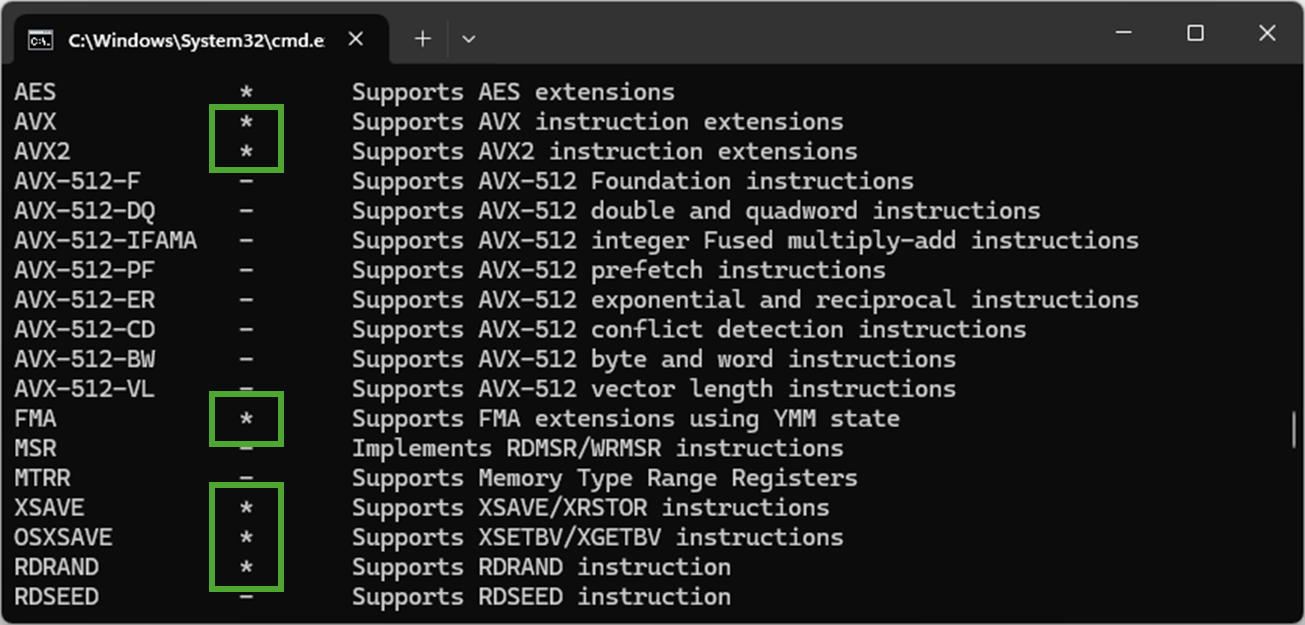
You can see some of the new features in the output of a tool like Coreinfo64.exe with newly exposed CPU features are highlighted above in green.
Note that in today’s preview, only x64 applications can use these new CPU features. If you have a 32-bit app or a 64-bit app that uses a 32-bit helper to detect CPU feature support, that app won’t detect the new features in Prism.
We welcome any feedback from Insiders who are interested in trying out apps and games using this early preview of Prism. Please submit any feedback on compatibility issues or performance regressions through the Feedback Hub (Win + F) under Apps and the specific app you’re seeing issues with (if you don’t see the app listed, use “All other apps”) to help us to ensure that this updated Prism provides a great experience.
Thanks for helping us improve emulation on Windows. We’re excited to see customers able to run more apps and games that they care about on Windows on Arm!
Changes and Improvements
[Start menu]
- “All apps” is now just “All” on the Start menu.

Open Start Menu in Windows 11
This tutorial will show you how to open the Start menu in Windows 11. The Start menu in Windows 11 is comprised of three sections: Pinned, Recent, and All apps. The Pinned section on the Start menu is where you can Pin to Start apps, and rearrange them in any order you want. You can customize...
www.elevenforum.com
[Input]
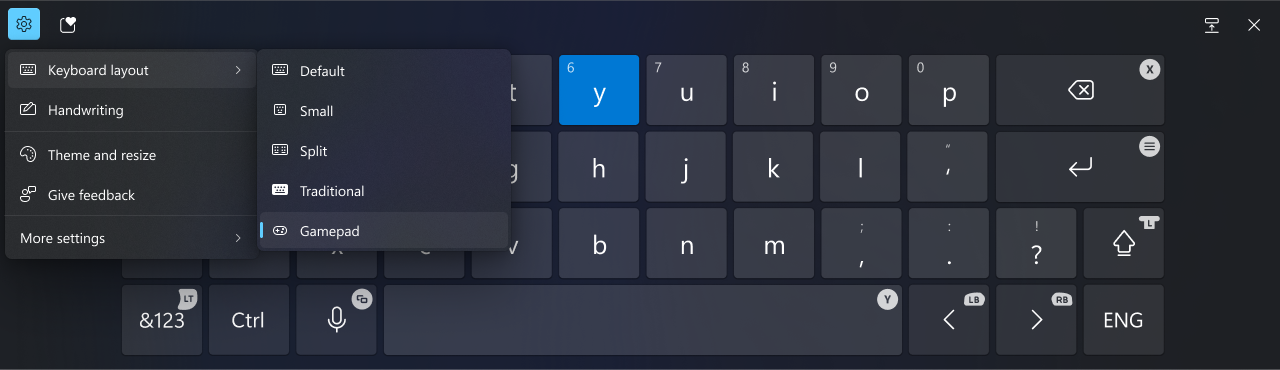
- We’re beginning to roll out a new Gamepad keyboard layout for the on-screen keyboard in Windows 11 that supports the ability to use your Xbox controller to navigate and type. This includes button accelerators (example: X button for backspace, Y button for spacebar) additionally the keyboard keys have been vertically aligned for better controller navigation patterns.

Change Touch Keyboard Layout in Windows 11
This tutorial will show you how to change the touch keyboard layout for your account in Windows 11. Windows 11 includes a touch keyboard you can click/tap on to enter text. This can be handy if you have a PC with a touchscreen without a physical keyboard. There are four different layouts you...
www.elevenforum.com
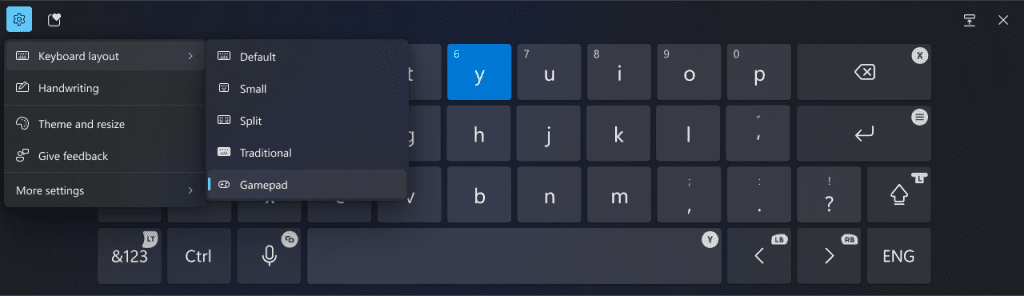
New Gamepad keyboard layout for the on-screen keyboard in Windows 11 that supports the ability to use your Xbox controller to navigate and type.
[Task Manager]
- We’ve updated the design of the Disconnect and Logoff dialogs in Task Manager to now support dark mode and text scaling.
- In the Performance section we now label listed disks with their type.

Check if HDD, SSD, or NVMe Disk Drive in Windows 11
This tutorial will show you how to quickly check if a disk drive is a HDD, SSD, or NVMe type in Windows 10 and Windows 11. Hard disk drive (HDD) = This is the older mechanical magnetic spinner disk. While HDDs are slower than SSD or NVMe, a HDD does offer much larger storage capacity at a...
www.elevenforum.com
[Settings]
- The detach virtual hard disk (VHD/VHDx) button we added under Settings > System > Storage > Disks & Volumes introduced with Build 27686 is now back with this build after being temporarily disabled starting with Build 27718.

Mount or Unmount VHD and VHDX file as Drive in Windows 11
This tutorial will show you how to natively mount (attach) or unmount (detach) a VHD or VHDX virtual hard disk file as a drive in Windows 11. Virtual hard disks (VHDs) are disk image file formats that have similar functionalities to a physical hard drive and are designed primarily for use with...
www.elevenforum.com
Fixes
[General]
- We fixed the issue causing some Insiders with PCs that have older NVIDIA GPUs (like the GTX 970, Quadro K620, etc.) to experience issues where their displays appear stuck at a black screen and unresponsive or seeing their GPUs showing errors in Device Manager and not working correctly.
[Input]
- Fixed an underlying issue causing the Emoji Panel and Clipboard History to not open in certain surfaces anymore, including in Registry Editor.
- Fixed an underlying issue which could lead to clipboard history not displaying items you’d copied.
[Windows Sandbox]
- Fixed an issue impacting performance of Windows Sandbox for some Insiders after the latest updates.
[Graphics]
- Fixed an which could lead dynamic refresh rate to get stuck at 60Hz on first boot.
[Other]
- Fixed an issue causing some Insiders to see a bugcheck with error PAGE_FAULT_IN_NONPAGED_AREA starting in Build 27723.
- Fixed an issue causing remote desktop connection (mstsc.exe) to crash in the previous flight.
- Fixed a msmpeg2vdec.dll related issue in the last couple flights which was leading to some apps crashing.
- Fixed an issue where rotation info about JPGs couldn’t be queried via APIs (for example, via PowerShell).
- Fixed an underlying issue which was causing the Get-WindowsCapability command to get into a state sometimes where it would fail unexpectedly until rebooting your PC.
- Fixed an issue causing mica to not work correctly when using a slideshow for your desktop background.
- Fixed an issue which could lead to certain apps not detecting a scanner, although one was connected.
Known issues
[General]
- [IMPORTANT NOTE FOR COPILOT+ PCs] If you are joining the Canary Channel on a new Copilot+ PC from the Dev Channel, Release Preview Channel or retail, you will lose Windows Hello pin and biometrics to sign into your PC with error 0xd0000225 and error message “Something went wrong, and your PIN isn’t available”. You should be able to re-create your PIN by clicking “Set up my PIN”.

Fix Something happened and your PIN isn't available on Windows 11
Windows Hello is a more personal, more secure way to get instant access to your Windows 11 devices using a PIN, facial recognition, or fingerprint. You'll need to set up a PIN as part of setting up fingerprint or facial recognition sign-in, but you can also sign in with just your PIN. A PIN is...
www.elevenforum.com
- We’re investigating reports that some Insiders are still experiencing rollbacks (with error code 0xc190010) when attempting to install the latest Canary builds.
[Desktop]
- [NEW] We’re working on the fix for an issue where your desktop background may not show correctly sometimes with multiple monitors (showing big black areas).
Reminders for Windows Insiders in the Canary Channel
- The builds we release to the Canary Channel represent the latest platform changes early in the development cycle and should not be seen as matched to any specific release of Windowsand features and experiences included in these builds may never get released as we try out different concepts and get feedback. Features may change over time, be removed, or replaced and never get released beyond Windows Insiders. Some of these features and experiences could show up in future Windows releases when they’re ready.
- Many features in the Canary Channel are rolled out using Control Feature Rollout technology, starting with a subset of Insiders and ramping up over time as we monitor feedback to see how they land before pushing them out to everyone in this channel.
- Some features may show up in the Dev and Beta Channels first before showing up in the Canary Channel.
- Some features in active development we preview with Windows Insiders may not be fully localized and localization will happen over time as features are finalized. As you see issues with localization in your language, please report those issues to us via Feedback Hub.
- To get off the Canary Channel, a clean install of Windows 11 will be required. As a reminder – Insiders can’t switch to a channel that is receiving builds with lower build numbers without doing a clean installation of Windows 11 due to technical setup requirements.
- The desktop watermark shown at the lower right corner of the desktop is normal for these pre-release builds.
- Check out Flight Hub for a complete look at what build is in which Insider channel.
Amanda & Brandon
Source:
Announcing Windows 11 Insider Preview Build 27744 (Canary Channel)
Hello Windows Insiders, today we are releasing Windows 11 Insider Preview Build 27744 to the Canary Channel. We are also not planning to release SDKs for 27xxx series builds for the time being. What’s
blogs.windows.com
Check Windows Updates
UUP Dump:
64-bit ISO download:
Select language for Windows 11 Insider Preview 27744.1000 (rs_prerelease) amd64
Select language for Windows 11 Insider Preview 27744.1000 (rs_prerelease) amd64 on UUP dump. UUP dump lets you download Unified Update Platform files, like Windows Insider updates, directly from Windows Update.
uupdump.net
ARM64 ISO download:
Select language for Windows 11 Insider Preview 27744.1000 (rs_prerelease) arm64
Select language for Windows 11 Insider Preview 27744.1000 (rs_prerelease) arm64 on UUP dump. UUP dump lets you download Unified Update Platform files, like Windows Insider updates, directly from Windows Update.
uupdump.net
UUP Dump - Download Windows Insider ISO
UUP Dump is the most practical and easy way to get ISO images of any Insider Windows 10 or Windows 11 version, as soon as Microsoft has released a new build. UUP Dump creates a download configuration file according to your choices, downloads necessary files directly from Microsoft servers, and...
www.elevenforum.com
Last edited: