Insider Windows 11 Insider Canary build 27950.1 - Sep. 19


UPDATE 9/25:


 Windows Insider Blog:

Hello Windows Insiders, today we are releasing Windows 11 Insider Preview Build 27950 to the Canary Channel.

Changes and Improvements

[General]

  • This update includes a small set of general improvements and fixes that improve the overall experience for Insiders running this build on their PCs.

[Settings]

  • Advanced Settings will revert to the previous “For Developers” experience after updating to this build. This change will come back soon.

Fixes

[General]

  • Fixed an issue causing some Insiders to experience a rollback attempting to install the latest build with either an 0xC1900101-0x20017 error or 0xC1900101-0x30017 error.

[Taskbar and System Tray]

  • Fixed an issue which could cause the app preview windows in the taskbar to become misaligned (away from the app icon you’d clicked / hovered over) after a display resolution change.

[File Explorer]

  • Fixed an issue where interacting with the context menu in File Explorer could lead to the body of File Explorer becoming unresponsive to clicks.
  • Fixed an issue which could lead to certain apps hanging when launching the Open or Save Dialog.
  • Fixed an issue where with certain apps installed, when you right clicked you may see the context menu unexpectedly switch back and forth with each right click between the normal initial view and “Show more options”.

[Graphics]

  • Fixed an which was causing some Insiders to experience screen flickers when using the browser (and potentially other scenarios) in the latest Canary builds.

 
Last edited:
Hi folks
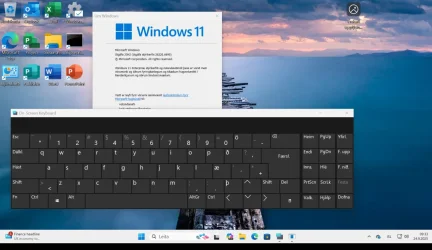
Another issue again related to languages in the Canary version (Languages that have to be added afterwords as the base full language pack doesn't exist in Windows) fails to install on screen keyboard correctly in the language selected for some languages.

Works perfectly on the standard 25H2 update

Screenshot_20250924_093357.webp

I understand that probably only 2 if that of the probable 100,000 Indian developers understand some of these minor languages - but it's easy enough these days

Provided you can separate a lot of the apps from the GUI you could establish basic screen definitions and then set up something like a Data Dictionary for the text elements / labels for the screen objects. Back ages ago when I actually did a bit of programming I think this type of technique was called MVC. (Model View controller).

I believe multi language versions of SAP (Huge world wide Software company) use this type of approach so it's relatively simple to have multi language versions in almost any existing language on the planet with only minor modifications from the base product.

In SAP works like this :


Cheers
jimbo
 
Last edited:

My Computer

System One

  • OS
    Windows XP,11 Linux Fedora Rawhide pre-release 45
    Computer type
    PC/Desktop
    CPU
    2 X Intel i7
    Screen Resolution
    4KUHD X 2
Hi folks
Another issue again related to languages in the Canary version (Languages that have to be added afterwords as the base full language pack doesn't exist in Windows) fails to install on screen keyboard correctly in the language selected for some languages.

Works perfectly on the standard 25H2 update

View attachment 146376

I understand that probably only 2 if that of the probable 100,000 Indian developers understand some of these minor languages - but it's easy enough these days

Provided you can separate a lot of the apps from the GUI you could establish basic screen definitions and then set up something like a Data Dictionary for the text elements / labels for the screen objects. Back ages ago when I actually did a bit of programming I think this type of technique was called MVC. (Model View controller).

I believe multi language versions of SAP (Huge world wide Software company) use this type of approach so it's relatively simple to have multi language versions in almost any existing language on the planet with only minor modifications from the base product.

In SAP works like this :


Cheers
jimbo
It's 27950.1 thread. Not 26220.6690.
 

My Computer

System One

  • OS
    26200.8037
    Computer type
    PC/Desktop
    CPU
    i5-11400F
    Motherboard
    Gigabyte
    Memory
    32GB
    Graphics Card(s)
    Geforce GT-1030
    Keyboard
    Logitech K400
    Mouse
    Logitech M720
    Internet Speed
    600 Mb
    Browser
    Edge
It's 27950.1 thread. Not 26220.6690.
Hi there

@cute two
I know -- I was trying to show problems with the Canary build (latest) compared with what is running OK in the standard 25H2 build. Language issues that were WORKING now aren't !!!

Cheers
jimbo
 

My Computer

System One

  • OS
    Windows XP,11 Linux Fedora Rawhide pre-release 45
    Computer type
    PC/Desktop
    CPU
    2 X Intel i7
    Screen Resolution
    4KUHD X 2
 

My Computers

System One System Two

  • OS
    Windows 11 Pro for Workstations
    Computer type
    PC/Desktop
    Manufacturer/Model
    Custom self build
    CPU
    Intel i7-8700K 5 GHz
    Motherboard
    ASUS ROG Maximus XI Formula Z390
    Memory
    64 GB (4x16GB) G.SKILL TridentZ RGB DDR4 3600 MHz (F4-3600C18D-32GTZR)
    Graphics Card(s)
    ASUS ROG-STRIX-GTX1080TI-O11G-GAMING (11GB GDDR5X)
    Sound Card
    Integrated Digital Audio (S/PDIF)
    Monitor(s) Displays
    2 x Samsung Odyssey G75 27"
    Screen Resolution
    2560x1440
    Hard Drives
    1TB Samsung 990 PRO M.2,
    4TB Samsung 990 PRO M.2,
    TerraMaster F8 SSD Plus NAS
    PSU
    Seasonic Prime Titanium 850W
    Case
    Thermaltake Core P3 wall mounted
    Cooling
    Corsair Hydro H115i
    Keyboard
    Amazon Basics Wired Full Keyboard MD005
    Mouse
    Logitech MX Master 4
    Internet Speed
    2 Gbps Download and 100 Mbps Upload
    Browser
    Chrome and Edge
    Antivirus
    Microsoft Defender
    Other Info
    Logitech Z625 speaker system,
    Logitech BRIO 4K Pro webcam,
    HP Color LaserJet Pro MFP M477fdn,
    CyberPower CP1500PFCLCD
    Galaxy S23 Plus phone
  • Operating System
    Windows 11 Pro
    Computer type
    Laptop
    Manufacturer/Model
    Surface Laptop 7 Copilot+ PC
    CPU
    Snapdragon X Elite (12 core) 3.42 GHz
    Memory
    16 GB LPDDR5x-7467 MHz
    Monitor(s) Displays
    15" HDR
    Screen Resolution
    2496 x 1664
    Hard Drives
    1 TB SSD
    Internet Speed
    Wi-Fi 7 and Bluetooth 5.4
    Browser
    Chrome and Edge
    Antivirus
    Microsoft Defender
Back
Top Bottom