Insider Windows 11 Insider Dev Build 25126.1000 (rs_prerelease) 22H2 - May 25


UPDATE 6/2:

Hello Windows Insiders, today we are releasing Windows 11 Insider Preview Build 25126 to the Dev Channel.

TL;DR

  • We are beginning to roll out new account settings page improvements to Insiders in the Dev Channel starting with this build.
  • This build includes a good set of fixes including a fix for an issue causing some Insiders to experience rollbacks trying to update to the latest Dev Channel builds.
  • Did you miss yesterday’s webcast featuring controller bar? Watch it on-demand here!
  • This week is our annual Build developer conference. Check out this blog post from Panos Panay on all the exciting Windows news for developers and this blog post from Giorgio Sardo on the latest improvements coming for the Microsoft Store.

What’s new in Build 25126

Account settings page improvements

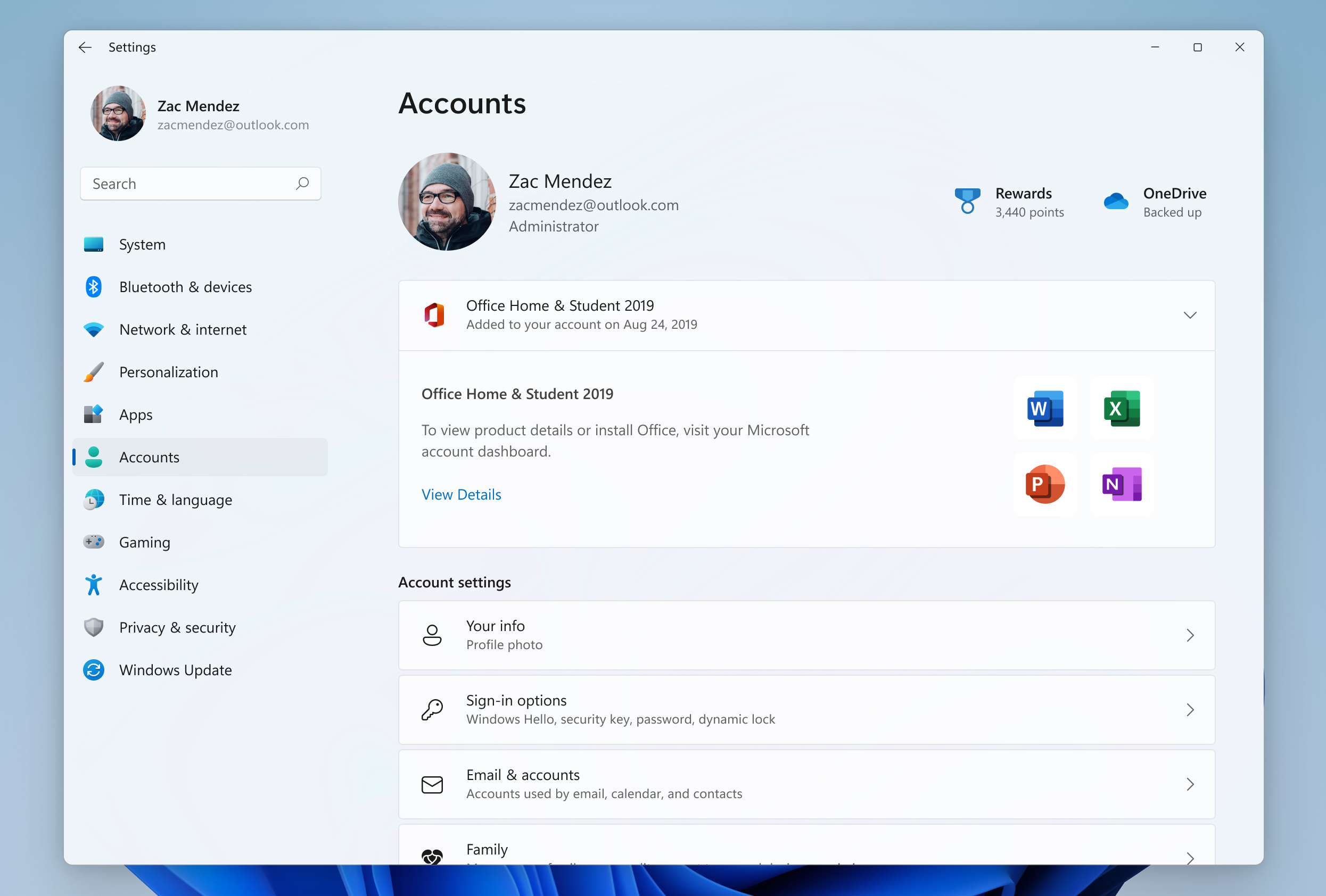
In October, we introduced subscription management in Settings > Accounts, which enabled you to view your Microsoft 365 subscriptions in Windows 11. With this build, we’re making it easier for you to view all supported Office perpetual products such as Office 2021 or Office 2019 associated with your account within Settings > Accounts.

All supported Microsoft 365 Office products licensed to your account shown under Account settings.

This update will allow you to view all supported Microsoft 365 Office products licensed to your account and you can view details about your product or install Office by clicking the “View Details” button. This information is shown on the Microsoft account management page and you will now be able to view these datils in Windows 11 via Settings > Accounts as shown in the above screenshot, starting with this build.

[We are beginning to roll this feature out, so it isn’t available to all Insiders just yet as we plan to monitor feedback and see how it lands before pushing it out to everyone.]

FEEDBACK: Please file feedback in Feedback Hub (WIN + F) under Settings > User Profile Account Settings.

Fixes

[General]

  • We fixed the issue causing some Insiders to experience a bugcheck with error DRIVER_IRQL_NOT_LESS_OR_EQUAL in pci.sys causing a rollback trying to install the latest builds in the Dev Channel.
  • We did work to mitigate the issue causing the Program Compatibility Assistant Service to use an unexpectedly large amount of CPU for some Insiders after upgrading to the latest Insider Preview builds in the Dev Channel.

[Start menu]

  • If the touch keyboard is docked it should no longer unexpectedly dismiss when trying to edit the name of a folder in Start.

[Search]

  • Fixed a high hitting explorer.exe crash that could happen when using Search.

[Settings]

  • The preview image under Personalization > Lock Screen should no longer be backwards when using an Arabic or Hebrew display language.

[Task Manager]

  • If explorer.exe has hung, that should no longer hang Task Manager.
  • Fixed an issue where the context menus weren’t following the same mode (light or dark) as Task Manager itself for some Insiders.
  • Fixed a typo in the “Minimize on use” tooltip.
  • If you’ve hidden the graphs on the side of the Performance page, the color of the circles used instead should now match the graph in the summary view.
  • Addressed an issue where the Not Responding status for certain apps wasn’t being reflected on the Processes page.

[Windows Sandbox]

  • Removed the Lock option in Start menu as it didn’t work.

[Other]

  • Fixed an issue where using “Open All Active Printers” from the printer icon in the system tray would unexpectedly open File Explorer when there were no active queues.
NOTE: Some fixes noted here in Insider Preview builds from the Dev Channel may make their way into the servicing updates for the released version of Windows 11.

Known issues

[General]

  • Some games that use Easy Anti-Cheat may crash or cause your PC to bugcheck.

[Live captions]

  • Certain apps in full screen (e.g., video players) prevent live captions from being visible.
  • Certain apps positioned near the top of the screen and closed before live captions is run will re-launch behind the live captions window positioned at top. Use the system menu (ALT + Spacebar) while the app has focus to move the app’s window further down.

About the Dev

The Dev Channel receives builds that represent long lead work from our engineers with features and experiences that may never get released as we try out different concepts and get feedback. It is important to remember that the builds we release to the Dev Channel should not be seen as matched to any specific release of Windows and the features included may change over time, be removed, or replaced in Insider builds or may never be released beyond Windows Insiders to general customers. For more information, please read this blog post about how we plan to use the Dev Channel to incubate new ideas, work on long lead items, and control the states of individual features.

These aren’t always stable builds, and sometimes you will see issues that block key activities or require workarounds. It is important to make sure you read the known issues listed in our blog posts as we document many of these issues with each flight.

Build numbers are higher in the Dev Channel than the Windows 11 preview builds in the Beta and Release Preview Channels. You will not be able to switch from the Dev Channel to the Beta or Release Preview Channels without doing a clean install back to the released version of Windows 11 currently.

The desktop watermark you see at the lower right corner of your desktop is normal for these pre-release builds.

Important Insider Links

Thanks,
Amanda & Brandon


Source:

Check Windows Updates


UUP Dump:

64-bit ISO download:
Select language for Windows 11 Insider Preview 25126.1000 (rs_prerelease) amd64

ARM64 ISO download: Select language for Windows 11 Insider Preview 25126.1000 (rs_prerelease) arm64

 
Last edited:

My Computer My Computer

At a glance

Windows 11 Pro Beta, 11 Dev, W11 CanaryAMD Ryzen™ 9 5900HX32GBNVIDIA® GeForce RTX™ 3070 8GB GDDR6
OS
Windows 11 Pro Beta, 11 Dev, W11 Canary
Computer type
Laptop
Manufacturer/Model
Dell Alienware M15 Ryzen Edition R6
CPU
AMD Ryzen™ 9 5900HX
Memory
32GB
Graphics Card(s)
NVIDIA® GeForce RTX™ 3070 8GB GDDR6
Hard Drives
1 x Samsung 980 Pro 1TB
1 x Samsung 970 Evo Plus 1TB
Hi!
I could use your help with the issue I'm having: I can't install recent builds from beta and dev channel without network connection. This wasn't the case about a month ago (?).
My network is air gapped.
Can anyone please point me to a tutorial or anything helpful how to bypass the network connection requirement when doing a clean install of recent dev and beta builds?

Thank you!
 

My Computer My Computer

At a glance

Windows 11 Pro, Build No.: 22000
OS
Windows 11 Pro, Build No.: 22000
Computer type
Laptop
Hi!
I could use your help with the issue I'm having: I can't install recent builds from beta and dev channel without network connection. This wasn't the case about a month ago (?).
My network is air gapped.
Can anyone please point me to a tutorial or anything helpful how to bypass the network connection requirement when doing a clean install of recent dev and beta builds?

Thank you!
Hi there

latest builds of W11 do need an Internet connection -- no way round it -- but you at least on PRO versions can still do a local account via giving a rubbish email address for the ms account.

You can install previous builds and then do an upgrade via setup.exe w rather than by WU from insider which should work.
Get previous releases via UUPDUMP if you need the ISO's again.

Other way is to install on a "technician" type of computer -- one which does have Internet, dump the image and restore to your air gapped machine.

Cheers
jimbo
 

My Computer My Computer

At a glance

Windows XP,11 Linux Fedora Rawhide pre-releas...2 X Intel i7
OS
Windows XP,11 Linux Fedora Rawhide pre-release 45
Computer type
PC/Desktop
CPU
2 X Intel i7
Screen Resolution
4KUHD X 2
I know I'm usually griping about what Win 11 won't do, but finally a version that did something correctly. I've been trying to get rid of the Windows.old directory since upgrading to Win 11. I went through all the usual Windows cleanup scenarios with out luck. I've tried manually doing it, but ended up not doing it that way because I didn't have 23 hours to spend. Today I went into Windows Setup>System>Storage and tried again. Wow! BAM! Finally it was GONE! I know it takes little to entertain me and that directory wasn't hurting me in any way. It was just there...
 

My Computer My Computer

At a glance

Windows 11I7 870016gbMSI 1050t
OS
Windows 11
Computer type
PC/Desktop
Manufacturer/Model
HP Pavilion Gaming 790-0077c
CPU
I7 8700
Motherboard
Berks Form factor: ATX, 36.45 x 24.88 cm (15.35 x 9.79 in)
Memory
16gb
Graphics Card(s)
MSI 1050t
Sound Card
Creative SoundBlaster AE-9
Monitor(s) Displays
Twin Samsung 27" curved
Screen Resolution
1920 x 1080
Hard Drives
512Gb and 1Tb
I know I'm usually griping about what Win 11 won't do, but finally a version that did something correctly. I've been trying to get rid of the Windows.old directory since upgrading to Win 11. I went through all the usual Windows cleanup scenarios with out luck. I've tried manually doing it, but ended up not doing it that way because I didn't have 23 hours to spend. Today I went into Windows Setup>System>Storage and tried again. Wow! BAM! Finally it was GONE! I know it takes little to entertain me and that directory wasn't hurting me in any way. It was just there...
Can concur. I also note that if I run the Disc Cleanup app, I see that it scans "Windows Update Cleanup", but no entry for it shows up in the check-list of categories to clean.
 

My Computers My Computers

  • At a glance

    Win 11 Pro (25H2 RP)Intel(R) Core(TM) i5-9300H CPU @ 2.40GHz 2.40...32GBNvidia GeForce GTX 1650, Intel UHD 630
    OS
    Win 11 Pro (25H2 RP)
    Computer type
    Laptop
    Manufacturer/Model
    Acer AN515-54
    CPU
    Intel(R) Core(TM) i5-9300H CPU @ 2.40GHz 2.40 GHz
    Memory
    32GB
    Graphics Card(s)
    Nvidia GeForce GTX 1650, Intel UHD 630
    Monitor(s) Displays
    Acer CB272D
    Screen Resolution
    1920x1080
    Hard Drives
    256GB and 1T SSD
    Internet Speed
    500MB
    Browser
    Edge (Stable)
    Antivirus
    Microsoft Defender
  • At a glance

    Win 11 Pro (RP)Intel(R) Core(TM) Ultra 9 275HX (2.70 GHz)32GB DDR5-5600NVIDIA® GeForce RTX™ 5060 8GB
    Operating System
    Win 11 Pro (RP)
    Computer type
    Laptop
    Manufacturer/Model
    Lenovo Legion 5 16IAX10 - Type 83NX
    CPU
    Intel(R) Core(TM) Ultra 9 275HX (2.70 GHz)
    Memory
    32GB DDR5-5600
    Graphics card(s)
    NVIDIA® GeForce RTX™ 5060 8GB
    Monitor(s) Displays
    Acer CB272D
    Screen Resolution
    1920x1080 75Hz
    Hard Drives
    WD Green SN3000 (2TB)
    Samsung Portable T5 (2TB)
    Keyboard
    Logi MX Keys
    Mouse
    Logi MX Anywhere 3
    Internet Speed
    500MB
    Browser
    Edge
    Antivirus
    MS Defender
Any news of a new build today?
 

My Computers My Computers

  • At a glance

    Windows 11 Home ((26100.2894)Intel Core Ultra 5 226VLPDDR5X16GBIntel Arc Graphics
    OS
    Windows 11 Home ((26100.2894)
    Computer type
    Laptop
    Manufacturer/Model
    Acer Swift SF14-51
    CPU
    Intel Core Ultra 5 226V
    Motherboard
    Icefresh_LNV
    Memory
    LPDDR5X16GB
    Graphics Card(s)
    Intel Arc Graphics
    Sound Card
    Realtek
    Monitor(s) Displays
    Samsung ATNA40YK11-0
    Screen Resolution
    2880x1800
    Hard Drives
    512GB NVMe Gen 4 M.2 SSD
    Keyboard
    Generic
    Browser
    Edge
    Antivirus
    Windows Defender
  • At a glance

    Windows 11Home(26120.3073)24H2i7-155hLPDDR5X 32GBIntel Arc Graphics
    Operating System
    Windows 11Home(26120.3073)24H2
    Computer type
    Laptop
    Manufacturer/Model
    Acer Swift SFG14-72
    CPU
    i7-155h
    Motherboard
    Coral_MTH
    Memory
    LPDDR5X 32GB
    Graphics card(s)
    Intel Arc Graphics
    Sound Card
    Realtek
    Monitor(s) Displays
    SamsungATNA40YK 11-0
    Screen Resolution
    2880x1800
    Hard Drives
    1TB NVMe Gen 4 M.2 SSD
    Browser
    Edge, Google Chrome
    Antivirus
    Windows Defender

My Computer My Computer

At a glance

Windows 11 Pro Beta, 11 Dev, W11 CanaryAMD Ryzen™ 9 5900HX32GBNVIDIA® GeForce RTX™ 3070 8GB GDDR6
OS
Windows 11 Pro Beta, 11 Dev, W11 Canary
Computer type
Laptop
Manufacturer/Model
Dell Alienware M15 Ryzen Edition R6
CPU
AMD Ryzen™ 9 5900HX
Memory
32GB
Graphics Card(s)
NVIDIA® GeForce RTX™ 3070 8GB GDDR6
Hard Drives
1 x Samsung 980 Pro 1TB
1 x Samsung 970 Evo Plus 1TB

My Computers My Computers

  • At a glance

    Windows 11 Home ((26100.2894)Intel Core Ultra 5 226VLPDDR5X16GBIntel Arc Graphics
    OS
    Windows 11 Home ((26100.2894)
    Computer type
    Laptop
    Manufacturer/Model
    Acer Swift SF14-51
    CPU
    Intel Core Ultra 5 226V
    Motherboard
    Icefresh_LNV
    Memory
    LPDDR5X16GB
    Graphics Card(s)
    Intel Arc Graphics
    Sound Card
    Realtek
    Monitor(s) Displays
    Samsung ATNA40YK11-0
    Screen Resolution
    2880x1800
    Hard Drives
    512GB NVMe Gen 4 M.2 SSD
    Keyboard
    Generic
    Browser
    Edge
    Antivirus
    Windows Defender
  • At a glance

    Windows 11Home(26120.3073)24H2i7-155hLPDDR5X 32GBIntel Arc Graphics
    Operating System
    Windows 11Home(26120.3073)24H2
    Computer type
    Laptop
    Manufacturer/Model
    Acer Swift SFG14-72
    CPU
    i7-155h
    Motherboard
    Coral_MTH
    Memory
    LPDDR5X 32GB
    Graphics card(s)
    Intel Arc Graphics
    Sound Card
    Realtek
    Monitor(s) Displays
    SamsungATNA40YK 11-0
    Screen Resolution
    2880x1800
    Hard Drives
    1TB NVMe Gen 4 M.2 SSD
    Browser
    Edge, Google Chrome
    Antivirus
    Windows Defender

My Computer My Computer

At a glance

Windows 11 Pro Beta, 11 Dev, W11 CanaryAMD Ryzen™ 9 5900HX32GBNVIDIA® GeForce RTX™ 3070 8GB GDDR6
OS
Windows 11 Pro Beta, 11 Dev, W11 Canary
Computer type
Laptop
Manufacturer/Model
Dell Alienware M15 Ryzen Edition R6
CPU
AMD Ryzen™ 9 5900HX
Memory
32GB
Graphics Card(s)
NVIDIA® GeForce RTX™ 3070 8GB GDDR6
Hard Drives
1 x Samsung 980 Pro 1TB
1 x Samsung 970 Evo Plus 1TB
nought, nada, zilch, sfa, not a sausage, llareggub on any IP Channel :-(.
 

My Computer My Computer

At a glance

Windows 11 Pro + Win11 Canary VM.I9 13th gen i9-13900H 2.60 GHZ16 GB solderedIntegrated Intel Iris XE
OS
Windows 11 Pro + Win11 Canary VM.
Computer type
Laptop
Manufacturer/Model
ASUS Zenbook 14
CPU
I9 13th gen i9-13900H 2.60 GHZ
Motherboard
Yep, Laptop has one.
Memory
16 GB soldered
Graphics Card(s)
Integrated Intel Iris XE
Sound Card
Realtek built in
Monitor(s) Displays
laptop OLED screen
Screen Resolution
2880x1800 touchscreen
Hard Drives
1 TB NVME SSD (only weakness is only one slot)
PSU
Internal + 65W thunderbolt USB4 charger
Case
Yep, got one
Cooling
Stella Artois (UK pint cans - 568 ml) - extra cost.
Keyboard
Built in UK keybd
Mouse
Bluetooth , wireless dongled, wired
Internet Speed
900 mbs (ethernet), wifi 6 typical 350-450 mb/s both up and down
Browser
Edge
Antivirus
Defender
Other Info
TPM 2.0, 2xUSB4 thunderbolt, 1xUsb3 (usb a), 1xUsb-c, hdmi out, 3.5 mm audio out/in combo, ASUS backlit trackpad (inc. switchable number pad)

Macrium Reflect Home V8
Office 365 Family (6 users each 1TB onedrive space)
Hyper-V (a vm runs almost as fast as my older laptop)

My Computer My Computer

At a glance

W11 Pro and Insider DevAMD Ryzen 9 7900x2x16GB Kingston 6000MHz, Cl 32 @ 6200MHz Cl30Gigabyte Rx 6600XT Gaming OC 8G Pro
OS
W11 Pro and Insider Dev
Computer type
PC/Desktop
Manufacturer/Model
Home brewed
CPU
AMD Ryzen 9 7900x
Motherboard
ASROCK b650 PRO RS
Memory
2x16GB Kingston 6000MHz, Cl 32 @ 6200MHz Cl30
Graphics Card(s)
Gigabyte Rx 6600XT Gaming OC 8G Pro
Sound Card
MB, Realtek Ac1220p
Monitor(s) Displays
3 x 27"
Screen Resolution
1080p
Hard Drives
Kingston KC3000. 1TBSamsung 970 evo Plus 500GB, Crucial P1 NVMe 1TB, Lexar NVMe 2 TB, Silicon Power M.2 SATA 500GB
PSU
Seasonic 750W
Case
Custom Raidmax
Cooling
Arctic Liquid Freezer III 360mm
Internet Speed
20/19 mbps

My Computer My Computer

At a glance

Windows 11 Pro + Win11 Canary VM.I9 13th gen i9-13900H 2.60 GHZ16 GB solderedIntegrated Intel Iris XE
OS
Windows 11 Pro + Win11 Canary VM.
Computer type
Laptop
Manufacturer/Model
ASUS Zenbook 14
CPU
I9 13th gen i9-13900H 2.60 GHZ
Motherboard
Yep, Laptop has one.
Memory
16 GB soldered
Graphics Card(s)
Integrated Intel Iris XE
Sound Card
Realtek built in
Monitor(s) Displays
laptop OLED screen
Screen Resolution
2880x1800 touchscreen
Hard Drives
1 TB NVME SSD (only weakness is only one slot)
PSU
Internal + 65W thunderbolt USB4 charger
Case
Yep, got one
Cooling
Stella Artois (UK pint cans - 568 ml) - extra cost.
Keyboard
Built in UK keybd
Mouse
Bluetooth , wireless dongled, wired
Internet Speed
900 mbs (ethernet), wifi 6 typical 350-450 mb/s both up and down
Browser
Edge
Antivirus
Defender
Other Info
TPM 2.0, 2xUSB4 thunderbolt, 1xUsb3 (usb a), 1xUsb-c, hdmi out, 3.5 mm audio out/in combo, ASUS backlit trackpad (inc. switchable number pad)

Macrium Reflect Home V8
Office 365 Family (6 users each 1TB onedrive space)
Hyper-V (a vm runs almost as fast as my older laptop)

My Computer My Computer

At a glance

Windows 11 Pro Beta, 11 Dev, W11 CanaryAMD Ryzen™ 9 5900HX32GBNVIDIA® GeForce RTX™ 3070 8GB GDDR6
OS
Windows 11 Pro Beta, 11 Dev, W11 Canary
Computer type
Laptop
Manufacturer/Model
Dell Alienware M15 Ryzen Edition R6
CPU
AMD Ryzen™ 9 5900HX
Memory
32GB
Graphics Card(s)
NVIDIA® GeForce RTX™ 3070 8GB GDDR6
Hard Drives
1 x Samsung 980 Pro 1TB
1 x Samsung 970 Evo Plus 1TB
Windows Update offered me a driver update today on this build, for a system device (OEM hidclass), package pulled from WU cache:
1654017527300.png
They appear to be made in 2021, but were never seen on the internet until now.. not on VT, and the version number 18.16.37.672 yields no results anywhere on the web. So it's first released now. I don't know if everyone will have this pop up in WU or if it depends on hardware configuration, but i do wonder what changed and how it ends up signed in 2021 if this is the first time they publish it.

MD5 of acpibus.sys is 76D669B062BF18452971162BC8F5B891

inf contents:

Code:
;/*++
;
;Copyright (c) 1990-1999 Microsoft Corporation All rights Reserved
;
;Module Name:
;
;    ACPIBUS.INF
;
;Abstract:
;    INF file for installing toaster bus enumerator driver
;
;Installation Notes:
;    Using Devcon: Type "devcon install acpibus.inf ACPI\QMAP0002" to install
;
;Modified by Jason 190805, based on 2.0.0.4
;Modified by Jason 200326, based on 2.0.0.6
;--*/
[Version]
Signature="$WINDOWS NT$"
Class= HIDClass
ClassGUID={745a17a0-74d3-11d0-b6fe-00a0c90f57da}
Provider=%MSFT%
DriverVer=09/16/2015,18.16.37.672
CatalogFile=acpibus.cat

[DestinationDirs]
DefaultDestDir = 12
ToasterStatBus_Device_CoInstaller_CopyFiles = 11

[SourceDisksNames]
1 = %DiskId1%,,,""

[SourceDisksFiles]
acpibus.sys = 1,,
WdfCoInstaller01009.dll=1 ; make sure the number matches with SourceDisksNames

;*****************************************
; ToasterStatBus  Install Section
;*****************************************

[Manufacturer]
%StdMfg%=Standard,NTamd64.6.1

[Standard.NTamd64.6.1]
%ToasterStatBus.DeviceDesc%=ToasterStatBus_Device, ACPI\QMAP0002
%customCollection% = customCollection.Inst, HID_DEVICE_UP:FF00_U:0001

[ToasterStatBus_Device.NT]
CopyFiles=Drivers_Dir

[ToasterStatBus_Device.NT.HW]
AddReg=ToasterStatBus_Device.NT.AddReg

[ToasterStatBus_Device.NT.AddReg]                      
HKR,,"UpperFilters",0x00010000,"mshidkmdf"
HKR,,"AllowIdleIrpInD3",0x00010001,0x1

[Drivers_Dir]
acpibus.sys

;-------------- Service installation
[ToasterStatBus_Device.NT.Services]
AddService = AcpiBus,%SPSVCINST_ASSOCSERVICE%, ACPIbus_Service_Inst

; -------------- statbus driver install sections
[ACPIbus_Service_Inst]
DisplayName    = %statbus.SVCDESC%
ServiceType    = %SERVICE_KERNEL_DRIVER%                  ; SERVICE_KERNEL_DRIVER
StartType      = %SERVICE_DEMAND_START%                    ; SERVICE_DEMAND_START
ErrorControl   = %SERVICE_ERROR_IGNORE%                      ; SERVICE_ERROR_NORMAL
ServiceBinary  = %12%\acpibus.sys
LoadOrderGroup = Extended Base

;===============================================================
;   Custom Collection install section
; - Only a Null service is installed.
;===============================================================
[customCollection.Inst.NT]
; NULL section

[customCollection.Inst.NT.HW]
AddReg = customCollection.Inst.AddReg.NT.HW

[customCollection.Inst.AddReg.NT.HW]
HKR,,"SelectiveSuspendEnabled",0x00000001,0x1

[customCollection.Inst.NT.Services]
AddService = ,0x00000002,   ; NULL Service

;
;--- ToasterStatBus_Device WDF Coinstaller installation ------
;
;[DestinationDirs]
;ToasterStatBus_Device_CoInstaller_CopyFiles = 11

[ToasterStatBus_Device.NT.CoInstallers]
AddReg=ToasterStatBus_Device_CoInstaller_AddReg
CopyFiles=ToasterStatBus_Device_CoInstaller_CopyFiles

[ToasterStatBus_Device_CoInstaller_AddReg]
HKR,,CoInstallers32,0x00010000, "WdfCoInstaller01009.dll,WdfCoInstaller"

[ToasterStatBus_Device_CoInstaller_CopyFiles]
WdfCoInstaller01009.dll

;[SourceDisksFiles]
;WdfCoInstaller01009.dll=1 ; make sure the number matches with SourceDisksNames

[ToasterStatBus_Device.NT.Wdf]
KmdfService = AcpiBus, AcpiBus_wdfsect
[AcpiBus_wdfsect]
KmdfLibraryVersion = 1.9


[Strings]
SPSVCINST_ASSOCSERVICE= 0x00000002
MSFT = "OEM"
StdMfg = "(Standard system devices)"
DiskId1 = "Static Bus Installation Disk #1"
ToasterStatBus.DeviceDesc = "ACPI Bus Enumerator"
statbus.SVCDESC = "ACPI Bus Enumerator"
customCollection = "HID Vendor-defined hCollection"

;  *******Non Localizable Strings*******

SERVICE_BOOT_START     = 0x0
SERVICE_SYSTEM_START   = 0x1
SERVICE_AUTO_START     = 0x2
SERVICE_DEMAND_START   = 0x3
SERVICE_DISABLED       = 0x4

SERVICE_KERNEL_DRIVER  = 0x1
SERVICE_ERROR_IGNORE   = 0x0
SERVICE_ERROR_NORMAL   = 0x1
SERVICE_ERROR_SEVERE   = 0x2
SERVICE_ERROR_CRITICAL = 0x3

REG_EXPAND_SZ          = 0x00020000
REG_DWORD              = 0x00010001
REG_MULTI_SZ           = 0x00010000
REG_BINARY             = 0x00000001
REG_SZ                 = 0x00000000
 
Last edited:

My Computer My Computer

At a glance

Windows 11 Dev Channeli7-12700KF32GB DDR4 4600MHzMSI Radeon RX 6600 MECH 2X 8G
OS
Windows 11 Dev Channel
Computer type
PC/Desktop
Manufacturer/Model
Custom
CPU
i7-12700KF
Motherboard
ASUS PRIME Z790M-PLUS D4
Memory
32GB DDR4 4600MHz
Graphics Card(s)
MSI Radeon RX 6600 MECH 2X 8G
Sound Card
Logitech PRO X (USB DAC)
Monitor(s) Displays
AOC C27G1 240Hz
Screen Resolution
1920 x 1080
Hard Drives
1TB KC3000 PCIe 4.0 NVMe SSD
PSU
Seasonic Prima TX-650 (80+ Titanium)
Mouse
Razer Viper 8KHz
Internet Speed
300mb/s
Windows Update offered me a driver update today on this build, for a system device (OEM hidclass), package pulled from WU cache:
View attachment 30469
They appear to be made in 2021, but were never seen on the internet until now.. not on VT, and the version number 18.16.37.672 yields no results anywhere on the web. So it's first released now. I don't know if everyone will have this pop up in WU or if it depends on hardware configuration, but i do wonder what changed

MD5 of acpibus.sys is 76D669B062BF18452971162BC8F5B891

inf contents:

Code:
;/*++
;
;Copyright (c) 1990-1999 Microsoft Corporation All rights Reserved
;
;Module Name:
;
;    ACPIBUS.INF
;
;Abstract:
;    INF file for installing toaster bus enumerator driver
;
;Installation Notes:
;    Using Devcon: Type "devcon install acpibus.inf ACPI\QMAP0002" to install
;
;Modified by Jason 190805, based on 2.0.0.4
;Modified by Jason 200326, based on 2.0.0.6
;--*/
[Version]
Signature="$WINDOWS NT$"
Class= HIDClass
ClassGUID={745a17a0-74d3-11d0-b6fe-00a0c90f57da}
Provider=%MSFT%
DriverVer=09/16/2015,18.16.37.672
CatalogFile=acpibus.cat

[DestinationDirs]
DefaultDestDir = 12
ToasterStatBus_Device_CoInstaller_CopyFiles = 11

[SourceDisksNames]
1 = %DiskId1%,,,""

[SourceDisksFiles]
acpibus.sys = 1,,
WdfCoInstaller01009.dll=1 ; make sure the number matches with SourceDisksNames

;*****************************************
; ToasterStatBus  Install Section
;*****************************************

[Manufacturer]
%StdMfg%=Standard,NTamd64.6.1

[Standard.NTamd64.6.1]
%ToasterStatBus.DeviceDesc%=ToasterStatBus_Device, ACPI\QMAP0002
%customCollection% = customCollection.Inst, HID_DEVICE_UP:FF00_U:0001

[ToasterStatBus_Device.NT]
CopyFiles=Drivers_Dir

[ToasterStatBus_Device.NT.HW]
AddReg=ToasterStatBus_Device.NT.AddReg

[ToasterStatBus_Device.NT.AddReg]                      
HKR,,"UpperFilters",0x00010000,"mshidkmdf"
HKR,,"AllowIdleIrpInD3",0x00010001,0x1

[Drivers_Dir]
acpibus.sys

;-------------- Service installation
[ToasterStatBus_Device.NT.Services]
AddService = AcpiBus,%SPSVCINST_ASSOCSERVICE%, ACPIbus_Service_Inst

; -------------- statbus driver install sections
[ACPIbus_Service_Inst]
DisplayName    = %statbus.SVCDESC%
ServiceType    = %SERVICE_KERNEL_DRIVER%                  ; SERVICE_KERNEL_DRIVER
StartType      = %SERVICE_DEMAND_START%                    ; SERVICE_DEMAND_START
ErrorControl   = %SERVICE_ERROR_IGNORE%                      ; SERVICE_ERROR_NORMAL
ServiceBinary  = %12%\acpibus.sys
LoadOrderGroup = Extended Base

;===============================================================
;   Custom Collection install section
; - Only a Null service is installed.
;===============================================================
[customCollection.Inst.NT]
; NULL section

[customCollection.Inst.NT.HW]
AddReg = customCollection.Inst.AddReg.NT.HW

[customCollection.Inst.AddReg.NT.HW]
HKR,,"SelectiveSuspendEnabled",0x00000001,0x1

[customCollection.Inst.NT.Services]
AddService = ,0x00000002,   ; NULL Service

;
;--- ToasterStatBus_Device WDF Coinstaller installation ------
;
;[DestinationDirs]
;ToasterStatBus_Device_CoInstaller_CopyFiles = 11

[ToasterStatBus_Device.NT.CoInstallers]
AddReg=ToasterStatBus_Device_CoInstaller_AddReg
CopyFiles=ToasterStatBus_Device_CoInstaller_CopyFiles

[ToasterStatBus_Device_CoInstaller_AddReg]
HKR,,CoInstallers32,0x00010000, "WdfCoInstaller01009.dll,WdfCoInstaller"

[ToasterStatBus_Device_CoInstaller_CopyFiles]
WdfCoInstaller01009.dll

;[SourceDisksFiles]
;WdfCoInstaller01009.dll=1 ; make sure the number matches with SourceDisksNames

[ToasterStatBus_Device.NT.Wdf]
KmdfService = AcpiBus, AcpiBus_wdfsect
[AcpiBus_wdfsect]
KmdfLibraryVersion = 1.9


[Strings]
SPSVCINST_ASSOCSERVICE= 0x00000002
MSFT = "OEM"
StdMfg = "(Standard system devices)"
DiskId1 = "Static Bus Installation Disk #1"
ToasterStatBus.DeviceDesc = "ACPI Bus Enumerator"
statbus.SVCDESC = "ACPI Bus Enumerator"
customCollection = "HID Vendor-defined hCollection"

;  *******Non Localizable Strings*******

SERVICE_BOOT_START     = 0x0
SERVICE_SYSTEM_START   = 0x1
SERVICE_AUTO_START     = 0x2
SERVICE_DEMAND_START   = 0x3
SERVICE_DISABLED       = 0x4

SERVICE_KERNEL_DRIVER  = 0x1
SERVICE_ERROR_IGNORE   = 0x0
SERVICE_ERROR_NORMAL   = 0x1
SERVICE_ERROR_SEVERE   = 0x2
SERVICE_ERROR_CRITICAL = 0x3

REG_EXPAND_SZ          = 0x00020000
REG_DWORD              = 0x00010001
REG_MULTI_SZ           = 0x00010000
REG_BINARY             = 0x00000001
REG_SZ                 = 0x00000000
Yeah, I got that update too.... Best I can tell it has to do with OEM touchpad handling (Acer Nitro in my case)....
 

My Computers My Computers

  • At a glance

    Win 11 Pro (25H2 RP)Intel(R) Core(TM) i5-9300H CPU @ 2.40GHz 2.40...32GBNvidia GeForce GTX 1650, Intel UHD 630
    OS
    Win 11 Pro (25H2 RP)
    Computer type
    Laptop
    Manufacturer/Model
    Acer AN515-54
    CPU
    Intel(R) Core(TM) i5-9300H CPU @ 2.40GHz 2.40 GHz
    Memory
    32GB
    Graphics Card(s)
    Nvidia GeForce GTX 1650, Intel UHD 630
    Monitor(s) Displays
    Acer CB272D
    Screen Resolution
    1920x1080
    Hard Drives
    256GB and 1T SSD
    Internet Speed
    500MB
    Browser
    Edge (Stable)
    Antivirus
    Microsoft Defender
  • At a glance

    Win 11 Pro (RP)Intel(R) Core(TM) Ultra 9 275HX (2.70 GHz)32GB DDR5-5600NVIDIA® GeForce RTX™ 5060 8GB
    Operating System
    Win 11 Pro (RP)
    Computer type
    Laptop
    Manufacturer/Model
    Lenovo Legion 5 16IAX10 - Type 83NX
    CPU
    Intel(R) Core(TM) Ultra 9 275HX (2.70 GHz)
    Memory
    32GB DDR5-5600
    Graphics card(s)
    NVIDIA® GeForce RTX™ 5060 8GB
    Monitor(s) Displays
    Acer CB272D
    Screen Resolution
    1920x1080 75Hz
    Hard Drives
    WD Green SN3000 (2TB)
    Samsung Portable T5 (2TB)
    Keyboard
    Logi MX Keys
    Mouse
    Logi MX Anywhere 3
    Internet Speed
    500MB
    Browser
    Edge
    Antivirus
    MS Defender
Yeah, I got that update too.... Best I can tell it has to do with OEM touchpad handling (Acer Nitro in my case)....
in my case it's a normal desktop PC with 12th Gen i5-12400F and B660 chipset, self built without OEM stuff, so i dont think so. I just wonder if they really worked on a system driver update so far in advance before releasing it anywhere.. who knows it has to pass extremely rigorous testing and validation?
 

My Computer My Computer

At a glance

Windows 11 Dev Channeli7-12700KF32GB DDR4 4600MHzMSI Radeon RX 6600 MECH 2X 8G
OS
Windows 11 Dev Channel
Computer type
PC/Desktop
Manufacturer/Model
Custom
CPU
i7-12700KF
Motherboard
ASUS PRIME Z790M-PLUS D4
Memory
32GB DDR4 4600MHz
Graphics Card(s)
MSI Radeon RX 6600 MECH 2X 8G
Sound Card
Logitech PRO X (USB DAC)
Monitor(s) Displays
AOC C27G1 240Hz
Screen Resolution
1920 x 1080
Hard Drives
1TB KC3000 PCIe 4.0 NVMe SSD
PSU
Seasonic Prima TX-650 (80+ Titanium)
Mouse
Razer Viper 8KHz
Internet Speed
300mb/s
in my case it's a normal desktop PC with 12th Gen i5-12400F and B660 chipset, self built without OEM stuff, so i dont think so. I just wonder if they really worked on a system driver update so far in advance before releasing it anywhere.. who knows it has to pass extremely rigorous testing and validation?
Who knows, but HID generally means Huma Interface Device, pertaining to keyboard, mice, touchpads and the like. Could be something more generic in that area, though I figured the OEM meant something more specific to the manufacturer.
1654019267684.png
 

My Computers My Computers

  • At a glance

    Win 11 Pro (25H2 RP)Intel(R) Core(TM) i5-9300H CPU @ 2.40GHz 2.40...32GBNvidia GeForce GTX 1650, Intel UHD 630
    OS
    Win 11 Pro (25H2 RP)
    Computer type
    Laptop
    Manufacturer/Model
    Acer AN515-54
    CPU
    Intel(R) Core(TM) i5-9300H CPU @ 2.40GHz 2.40 GHz
    Memory
    32GB
    Graphics Card(s)
    Nvidia GeForce GTX 1650, Intel UHD 630
    Monitor(s) Displays
    Acer CB272D
    Screen Resolution
    1920x1080
    Hard Drives
    256GB and 1T SSD
    Internet Speed
    500MB
    Browser
    Edge (Stable)
    Antivirus
    Microsoft Defender
  • At a glance

    Win 11 Pro (RP)Intel(R) Core(TM) Ultra 9 275HX (2.70 GHz)32GB DDR5-5600NVIDIA® GeForce RTX™ 5060 8GB
    Operating System
    Win 11 Pro (RP)
    Computer type
    Laptop
    Manufacturer/Model
    Lenovo Legion 5 16IAX10 - Type 83NX
    CPU
    Intel(R) Core(TM) Ultra 9 275HX (2.70 GHz)
    Memory
    32GB DDR5-5600
    Graphics card(s)
    NVIDIA® GeForce RTX™ 5060 8GB
    Monitor(s) Displays
    Acer CB272D
    Screen Resolution
    1920x1080 75Hz
    Hard Drives
    WD Green SN3000 (2TB)
    Samsung Portable T5 (2TB)
    Keyboard
    Logi MX Keys
    Mouse
    Logi MX Anywhere 3
    Internet Speed
    500MB
    Browser
    Edge
    Antivirus
    MS Defender
Can concur. I also note that if I run the Disc Cleanup app, I see that it scans "Windows Update Cleanup", but no entry for it shows up in the check-list of categories to clean.
Ok... That's grand! I feel a new Sticker idea in the works. I'm glad they fixed the one cleanup I've been waiting for.
I have to say that these builds run pretty good.
 

My Computer My Computer

At a glance

Windows 11I7 870016gbMSI 1050t
OS
Windows 11
Computer type
PC/Desktop
Manufacturer/Model
HP Pavilion Gaming 790-0077c
CPU
I7 8700
Motherboard
Berks Form factor: ATX, 36.45 x 24.88 cm (15.35 x 9.79 in)
Memory
16gb
Graphics Card(s)
MSI 1050t
Sound Card
Creative SoundBlaster AE-9
Monitor(s) Displays
Twin Samsung 27" curved
Screen Resolution
1920 x 1080
Hard Drives
512Gb and 1Tb
Who knows, but HID generally means Huma Interface Device, pertaining to keyboard, mice, touchpads and the like. Could be something more generic in that area, though I figured the OEM meant something more specific to the manufacturer.
View attachment 30470
Thankyou for posting what this driver (OEM - HIDClass - 18.16.37.672) probably is for. It showed up today on my Windows Update (Win 11 Beta / Samsung 2021 Intel Notebook).

The updates that appear on Windows Update are very frustrating, because I can rarely find exactly what the update in fixing or improving.

In the case of this update, there's not even an indication exactly which Human Interface Device (Touchpad, S-Pen, Keyboard?) will be affected.

Anyway, thanks again for providing much better insight than Microsoft did/does.

Allen in Chicagoland
 

My Computer My Computer

At a glance

Windows 11 64-bitIntel® Core™ i7-1065G7 CPU @ 1.30GHz12GBIntel Iris Graphics
OS
Windows 11 64-bit
Computer type
Laptop
Manufacturer/Model
Samsung
CPU
Intel® Core™ i7-1065G7 CPU @ 1.30GHz
Motherboard
SAMSUNG ELECTRONICS CO., LTD. Model NP950QCG-K01US
Memory
12GB
Graphics Card(s)
Intel Iris Graphics
Hard Drives
SAMSUNG MZVLB512HBJQ-000 SSD 476.94 GB
Mouse
Logitech MX Mobile BlueTooth
Internet Speed
686.6 Mbps download 23.6 Mbps upload Latency: 8 ms Server: Chicago
Browser
Edge (Default) and FireFox installed.
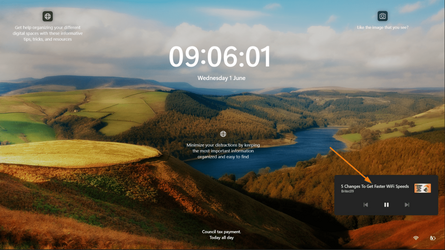
Still on 25120 (GSOD when trying to update) but just came across this on the lock screen. Never seen it before. Rebooted while a YT video was paused.

1654071627777.png
 

My Computers My Computers

  • At a glance

    Win 11 ProAMD Ryzen™ 7 7730U24GB Dual-Channel DDR4 @ 1596MHz (22-22-22-52)512MB ATI AMD Radeon Graphics (ASUStek Comput...
    OS
    Win 11 Pro
    Computer type
    Laptop
    Manufacturer/Model
    ASUS Vivobook
    CPU
    AMD Ryzen™ 7 7730U
    Motherboard
    M1605YA
    Memory
    24GB Dual-Channel DDR4 @ 1596MHz (22-22-22-52)
    Graphics Card(s)
    512MB ATI AMD Radeon Graphics (ASUStek Computer Inc)
    Monitor(s) Displays
    Generic PnP Monitor (1920x1200@60Hz) - P1 PLUS (1920x1080@59Hz)
    Screen Resolution
    1920 X 1200
    Hard Drives
    953GB Western Digital WD
    PSU
    45 Watts
    Mouse
    Lenovo Bluetooth.
    Internet Speed
    500 Mbps
    Browser
    Edge
    Antivirus
    Defender
  • At a glance

    Windows 11AMD Ryzen 7 5800H / 3.2 GHz32 GB DDR4 SDRAM 3200 MHzNVIDIA GeForce RTX 3060 6 GB GDDR6 SDRAM
    Operating System
    Windows 11
    Computer type
    Laptop
    Manufacturer/Model
    ACER NITRO
    CPU
    AMD Ryzen 7 5800H / 3.2 GHz
    Motherboard
    CZ Scala_CAS (FP6)
    Memory
    32 GB DDR4 SDRAM 3200 MHz
    Graphics card(s)
    NVIDIA GeForce RTX 3060 6 GB GDDR6 SDRAM
    Sound Card
    Realtek Audio. NVIDIA High Definition Audio
    Monitor(s) Displays
    15.6" LED backlight 1920 x 1080 (Full HD) 144 Hz
    Screen Resolution
    1920 x 1080 (Full HD)
    Hard Drives
    Samsung 970 Evo Plus 2TB NVMe M.2
    PSU
    180 Watt, 19.5 V
    Mouse
    Lenovo Bluetooth
    Internet Speed
    500 Mbps
    Browser
    Edge
    Antivirus
    Defender
Back
Top Bottom