Insider Windows 11 Insider Dev Build 25169.1000 (rs_prerelease) - July 28


UPDATE 8/3:


Hello Windows Insiders, today we are releasing Windows 11 Insider Preview Build 25169 to the Dev Channel.

TL;DR​

  • This build includes a lockdown feature for IT administrators and some improvements including a brand-new Windows Spotlight theme.
  • As always, this build also includes a good set of fixes.

What’s new​

Multi-App Kiosk Mode​

Multi-app kiosk mode is a lockdown feature for Windows 11 that allows an IT administrator to select a set of allowable apps to run on the device, while all other functionalities are blocked. This enables you to create multiple different apps and access configurations for different user types, all on a single device.

Some lockdown customizations include:
  • Limiting access to Settings, except selected pages (e.g., Wi-Fi and screen brightness)
  • Lock down the Start menu to show only allowed apps.
  • Block toasts and pop-ups that lead to unwanted UI.
Multi-app kiosk mode is ideal for scenarios in which multiple people need to use the same device. This can include frontline workers and retail scenarios, education and test taking.

Currently, multi-app kiosk mode can be enabled using PowerShell and WMI Bridge, with support for Intune/MDM and provisioning package configuration coming soon.

To configure using WMI, follow these instructions. Using the Windows 10 sample XML will enable the feature, but will result in an empty Start menu. To populate the Start menu with your apps, follow these instructions to generate the list of pinned apps, then add it to your XML file after closing the StartLayout section, like the below:

<win11:StartPins><![CDATA[ <em>Your JSON here </em>]]></win11:StartPins>

FEEDBACK: Please file feedback in Feedback Hub (WIN + F) under Security and Privacy > Device Lockdown

Changes and Improvements​

[General]​

  • The changes noted here in this previous blog post on changes to how IT admins enroll devices in the Windows diagnostic data processor configuration option are now included in this build (Build 25169 and higher). A reminder that if the documented changes are not acceptable, it is recommended to pause flighting.

[Windows Spotlight]​

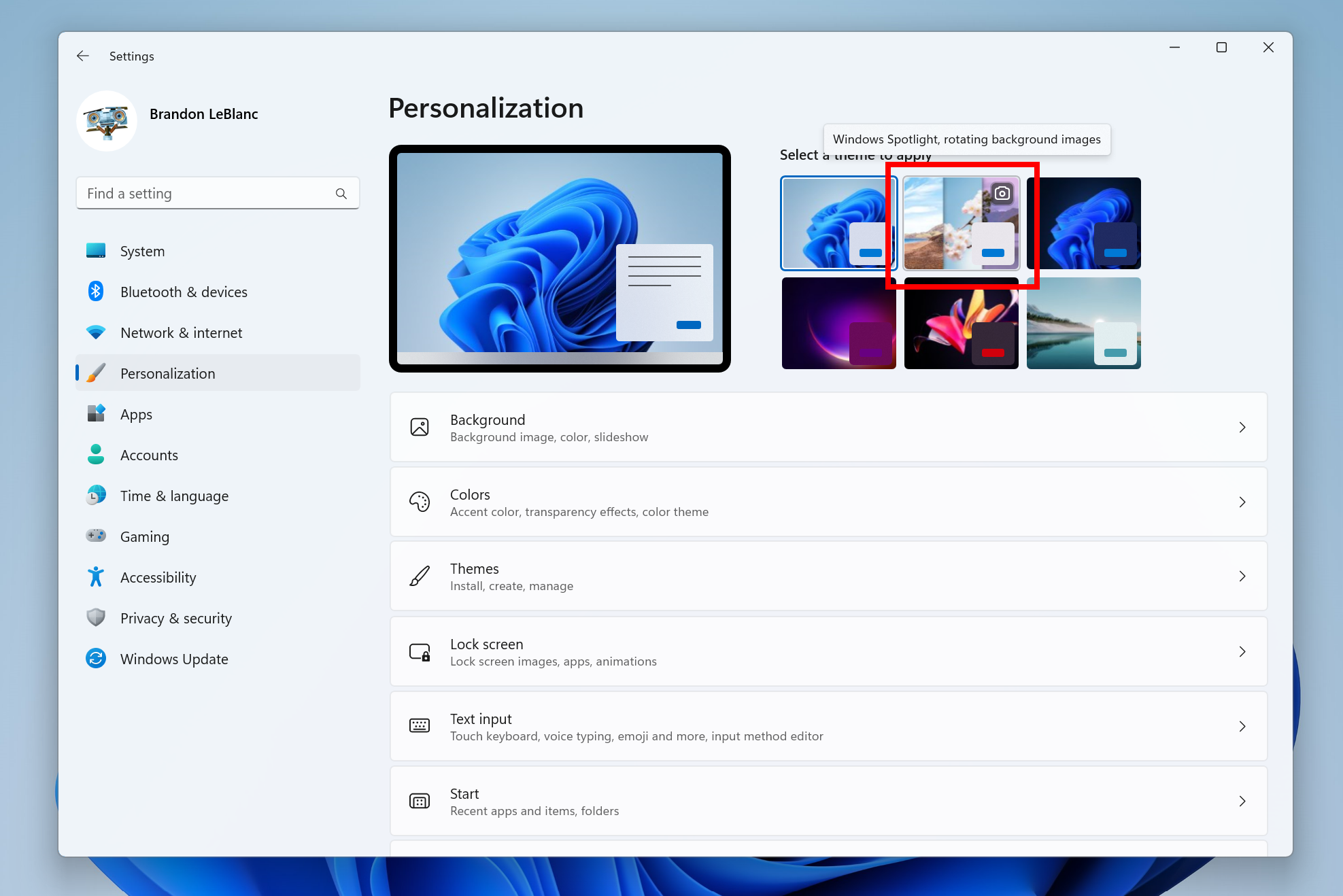
  • You can now enable Windows Spotlight on the desktop via a brand-new Windows Spotlight theme now included in the latest builds in the Dev Channel under Settings > Personalization and Settings > Personalization > Themes. Additionally, you can make your own custom themes with Windows Spotlight’s rotating images as well.

The brand-new Windows Spotlight theme.

[Input]​

  • We have updated the U.S. English (EN-US) handwriting model to be faster and more accurate. Use the updated Handwriting Panel for ink-to-text and let us know what you think.

[Settings]​

  • Settings now supports managing apps which were earlier only supported from Control Panel. This includes uninstallation of apps which have inter-dependencies (e.g., Steam and gaming apps running on Steam), repair and modifying of Win32 apps.

[Windows Security]​

  • The Windows Security app version is now displayed in Windows Security settings under About.

Fixes​

[File Explorer]​

  • Fixed an issue leading to the Azure Information Protection context menu entry unexpectedly showing with the name Microsoft.Azip.RightClick after an upgrade.

[Taskbar]​

  • Fixed an explorer.exe crash that was preventing taskbar from loading when launching Microsoft Teams meetings sometimes.
  • Fixed a couple explorer.exe crashes some Insiders were experiencing related to taskbar overflow.

[Start]​

  • Fixed an issue that was removing the “More” button in Start’s Recommended section.

[Settings]​

  • Fixed an issue where after using the reveal password button in the Wi-Fi section of Quick Settings, the text field might unexpectedly lose focus.

[Input]​

  • We made a small tweak to improve the key repeat rate for the traditional touch keyboard layout, as well as the default touch keyboard layout, so it feels more responsive. Now it has the rate of 20 keys per second (for example, when holding down the delete key).

[Other]​

  • Fixed an issue believed to be the root cause of some Insiders experiencing bug checks when opening and copying files from network locations recently.
  • Fixed an issue which could cause desynced audio when recording game play with the Xbox Game Bar.
  • Fixed an issue leading to error code 0x80004005 when using the network troubleshooter.
  • Made some adjustments to fix an issue where the scrollbar in certain places (like File Explorer) was unexpectedly wide when using high DPI scaling.
  • Fixed an issue believed to be the root cause of Windows Security saying standard hardware security wasn’t supported on devices where it was actually supported, as well as showing a warning in the taskbar but not showing any issues when Windows Security was launched. Please note, due to timing of the payload, these issues may come back after the next Windows Security update. It will go away again after a future Windows Security update.
NOTE: Some fixes noted here in Insider Preview builds from the Dev Channel may make their way into the servicing updates for the released version of Windows 11.

Known issues​

[General]​

  • We’re investigating reports that SQL Server Management Studio is failing to launch for some Insiders.
  • Some games that use Easy Anti-Cheat may crash or cause your PC to bugcheck.

[File Explorer]​

  • [NEW] The left-half of the File Explorer title bar may not be draggable via mouse or touch.
  • The up arrow is misaligned in File Explorer tabs. This will be fixed in a future update.
  • We’re working on a fix to address reports that launching File Explorer in certain ways when using dark mode (for example, from the command line) is showing the body of File Explorer unexpectedly in light mode.

[Widgets]​

  • Notification badge number may appear misaligned on the taskbar.
  • In some cases, the notification banner for some badging will not appear in the widgets board.
  • We’re working on the fix for an issue causing Widgets preferences (temperature units and pinned widgets) to unexpectedly get reset to default.

For developers​

You can download the latest Windows Insider SDK at aka.ms/windowsinsidersdk.

SDK NuGet packages are now also flighting at NuGet Gallery | WindowsSDK which include:
These NuGet packages provide more granular access to the SDK and better integrate in CI/CD pipelines.

About the Dev Channel​

The Dev Channel receives builds that represent long lead work from our engineers with features and experiences that may never get released as we try out different concepts and get feedback. It is important to remember that the builds we release to the Dev Channel should not be seen as matched to any specific release of Windows and the features included may change over time, be removed, or replaced in Insider builds or may never be released beyond Windows Insiders to general customers. For more information, please read this blog post about how we plan to use the Dev Channel to incubate new ideas, work on long lead items, and control the states of individual features.

These aren’t always stable builds, and sometimes you will see issues that block key activities or require workarounds. It is important to make sure you read the known issues listed in our blog posts as we document many of these issues with each flight.

Build numbers are higher in the Dev Channel than the Windows 11 preview builds in the Beta and Release Preview Channels. You will not be able to switch from the Dev Channel to the Beta or Release Preview Channels without doing a clean install back to the released version of Windows 11 currently.

ALSO: Because the Dev and Beta Channels represent parallel development paths from our engineers, there may be cases where features and experiences show up in the Beta Channel first.

The desktop watermark you see at the lower right corner of your desktop is normal for these pre-release builds.

Important Insider Links​

Thanks,
Amanda & Brandon

Source:

Check Windows Updates

UUP Dump:

64-bit ISO download: Select language for Windows 11 Insider Preview 25169.1000 (rs_prerelease) amd64

ARM64 ISO download: Select language for Windows 11 Insider Preview 25169.1000 (rs_prerelease) arm64

 
Last edited:

25169.jpg
 

My Computers My Computers

  • At a glance

    Windows 11 Pro for WorkstationsIntel i7-8700K 5 GHz64 GB (4x16GB) G.SKILL TridentZ RGB DDR4 3600...ASUS ROG-STRIX-GTX1080TI-O11G-GAMING (11GB GD...
    OS
    Windows 11 Pro for Workstations
    Computer type
    PC/Desktop
    Manufacturer/Model
    Custom self build
    CPU
    Intel i7-8700K 5 GHz
    Motherboard
    ASUS ROG Maximus XI Formula Z390
    Memory
    64 GB (4x16GB) G.SKILL TridentZ RGB DDR4 3600 MHz (F4-3600C18D-32GTZR)
    Graphics Card(s)
    ASUS ROG-STRIX-GTX1080TI-O11G-GAMING (11GB GDDR5X)
    Sound Card
    Integrated Digital Audio (S/PDIF)
    Monitor(s) Displays
    2 x Samsung Odyssey G75 27"
    Screen Resolution
    2560x1440
    Hard Drives
    1TB Samsung 990 PRO M.2,
    4TB Samsung 990 PRO M.2,
    TerraMaster F8 SSD Plus NAS
    PSU
    Seasonic Prime Titanium 850W
    Case
    Thermaltake Core P3 wall mounted
    Cooling
    Corsair Hydro H115i
    Keyboard
    Amazon Basics Wired Full Keyboard MD005
    Mouse
    Logitech MX Master 4
    Internet Speed
    2 Gbps Download and 100 Mbps Upload
    Browser
    Chrome and Edge
    Antivirus
    Microsoft Defender
    Other Info
    Logitech Z625 speaker system,
    Logitech BRIO 4K Pro webcam,
    HP Color LaserJet Pro MFP M477fdn,
    CyberPower CP1500PFCLCD
    Galaxy S23 Plus phone
  • At a glance

    Windows 11 ProSnapdragon X Elite (12 core) 3.42 GHz16 GB LPDDR5x-7467 MHz
    Operating System
    Windows 11 Pro
    Computer type
    Laptop
    Manufacturer/Model
    Surface Laptop 7 Copilot+ PC
    CPU
    Snapdragon X Elite (12 core) 3.42 GHz
    Memory
    16 GB LPDDR5x-7467 MHz
    Monitor(s) Displays
    15" HDR
    Screen Resolution
    2496 x 1664
    Hard Drives
    1 TB SSD
    Internet Speed
    Wi-Fi 7 and Bluetooth 5.4
    Browser
    Chrome and Edge
    Antivirus
    Microsoft Defender
1659028170922.png

It's on the way down
 

My Computer My Computer

At a glance

Windows 11I7 870016gbMSI 1050t
OS
Windows 11
Computer type
PC/Desktop
Manufacturer/Model
HP Pavilion Gaming 790-0077c
CPU
I7 8700
Motherboard
Berks Form factor: ATX, 36.45 x 24.88 cm (15.35 x 9.79 in)
Memory
16gb
Graphics Card(s)
MSI 1050t
Sound Card
Creative SoundBlaster AE-9
Monitor(s) Displays
Twin Samsung 27" curved
Screen Resolution
1920 x 1080
Hard Drives
512Gb and 1Tb
1659030153541.png
 

My Computer My Computer

At a glance

W11 Pro and Insider DevAMD Ryzen 9 7900x2x16GB Kingston 6000MHz, Cl 32 @ 6200MHz Cl30Gigabyte Rx 6600XT Gaming OC 8G Pro
OS
W11 Pro and Insider Dev
Computer type
PC/Desktop
Manufacturer/Model
Home brewed
CPU
AMD Ryzen 9 7900x
Motherboard
ASROCK b650 PRO RS
Memory
2x16GB Kingston 6000MHz, Cl 32 @ 6200MHz Cl30
Graphics Card(s)
Gigabyte Rx 6600XT Gaming OC 8G Pro
Sound Card
MB, Realtek Ac1220p
Monitor(s) Displays
3 x 27"
Screen Resolution
1080p
Hard Drives
Kingston KC3000. 1TBSamsung 970 evo Plus 500GB, Crucial P1 NVMe 1TB, Lexar NVMe 2 TB, Silicon Power M.2 SATA 500GB
PSU
Seasonic 750W
Case
Custom Raidmax
Cooling
Arctic Liquid Freezer III 360mm
Internet Speed
20/19 mbps
Done

Still no tabs in Explorer. But working fine for now
 

My Computers My Computers

  • At a glance

    Windows 10 Pro, Windows 11 DevIntel I3 1010016 GB DDR4 CrucialIntel on chip
    OS
    Windows 10 Pro, Windows 11 Dev
    Computer type
    PC/Desktop
    Manufacturer/Model
    Homebuilt
    CPU
    Intel I3 10100
    Motherboard
    ASUS B460M
    Memory
    16 GB DDR4 Crucial
    Graphics Card(s)
    Intel on chip
    Sound Card
    Realtek onboard
    Monitor(s) Displays
    ASUS 24, LG 24
    Screen Resolution
    Full HD x 2
    Hard Drives
    kingston A2000 NVMe PCIe 500 GB
    PSU
    LC Power 650W
    Case
    Noname
    Cooling
    Air 2x 120mm
    Keyboard
    Cherry G-81
    Mouse
    Logitech M500
    Internet Speed
    100/20
    Browser
    Firefox, Vivaldi
    Antivirus
    MS Defender
  • At a glance

    Windows 10 HomeRyzen 7 4700u8 GB DDR4AMD Vega
    Operating System
    Windows 10 Home
    Computer type
    Laptop
    Manufacturer/Model
    ASUS/Vivobook Flip 14
    CPU
    Ryzen 7 4700u
    Memory
    8 GB DDR4
    Graphics card(s)
    AMD Vega
    Sound Card
    Realtek onboard
    Monitor(s) Displays
    14"
    Screen Resolution
    FullHD
    Hard Drives
    512 Samsung NVMe PCIe
    PSU
    -
    Case
    Laptop
    Mouse
    Touchpad, Touchscreen
    Internet Speed
    100/20
    Browser
    Firefox, Vivaldi
    Antivirus
    MS Defender
Interesting, downloading!
 

My Computer My Computer

At a glance

Windows 11 Latest Dev BuildIntel(R) Core(TM) i5-3470T CPU @ 2.90GHz (Dua...6 GB DDR3-1600 / PC3-12800 DDR3 SDRAM SO-DIMM...Intel HD Graphics 2500 Intel Ivy Bridge-DT GT...
OS
Windows 11 Latest Dev Build
Computer type
PC/Desktop
Manufacturer/Model
Samsung DP700A3D-A01US AIO
CPU
Intel(R) Core(TM) i5-3470T CPU @ 2.90GHz (Dual Core)
Motherboard
(Unknown) UEFI BIOS version: Date: 02/13/2014 Version: P10KMS.076.140213.XJ
Memory
6 GB DDR3-1600 / PC3-12800 DDR3 SDRAM SO-DIMM Clock = 800 MHz
Graphics Card(s)
Intel HD Graphics 2500 Intel Ivy Bridge-DT GT1 - Integrated Graphics [E1/L1/N0/P0]
Sound Card
Intel Cougar Point PCH - High-Definition Audio Controller [B2]
Monitor(s) Displays
Display Name (Manuf) DM700A-D ID: Monitor\SEM0324
Screen Resolution
1920 x 1080 720p
Hard Drives
(Main) Samsung SSD 860 Pro 256GB Sata
(Backup Drive) WDC Wd20SPZX-60UA7T0 2TB
PSU
Integrated No UPS.
Case
SAMSUNG ELECTRONICS CO., LTD. All in One
Cooling
Integrated single fan.
Keyboard
Logitech K520
Mouse
Logitech M-U0007
Internet Speed
Up to 800 Mbps. 300 Mbps max on this PC.
Browser
Microsoft Edge Canary
Antivirus
Microsoft Defender
Very smooth. So far...
 

My Computer My Computer

At a glance

Windows 11 RPAMD Ryzen 5 Pro 3400GE @3.30 GHz (4.0 GHz Turbo)20 GB DDR4 2666 (1x16GB + 1x4GB)AMD Radeon Vega 11
OS
Windows 11 RP
Computer type
PC/Desktop
Manufacturer/Model
Lenovo ThinkCentre M75Q-1
CPU
AMD Ryzen 5 Pro 3400GE @3.30 GHz (4.0 GHz Turbo)
Motherboard
Lenovo 3151
Memory
20 GB DDR4 2666 (1x16GB + 1x4GB)
Graphics Card(s)
AMD Radeon Vega 11
Sound Card
Integrated
Monitor(s) Displays
AOC 2369
Screen Resolution
1920 x 1080
Hard Drives
WD 512 GB NVME + SPCC 240GB SATA SSD
PSU
External 65W
Case
Mini (1L)
1659034269557.png
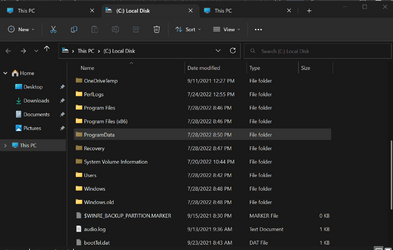
Took a long while,there's Windows.old. not a usual thinh for such small updates and yes, Tabs are still here.
1659034446839.png
 

My Computer My Computer

At a glance

W11 Pro and Insider DevAMD Ryzen 9 7900x2x16GB Kingston 6000MHz, Cl 32 @ 6200MHz Cl30Gigabyte Rx 6600XT Gaming OC 8G Pro
OS
W11 Pro and Insider Dev
Computer type
PC/Desktop
Manufacturer/Model
Home brewed
CPU
AMD Ryzen 9 7900x
Motherboard
ASROCK b650 PRO RS
Memory
2x16GB Kingston 6000MHz, Cl 32 @ 6200MHz Cl30
Graphics Card(s)
Gigabyte Rx 6600XT Gaming OC 8G Pro
Sound Card
MB, Realtek Ac1220p
Monitor(s) Displays
3 x 27"
Screen Resolution
1080p
Hard Drives
Kingston KC3000. 1TBSamsung 970 evo Plus 500GB, Crucial P1 NVMe 1TB, Lexar NVMe 2 TB, Silicon Power M.2 SATA 500GB
PSU
Seasonic 750W
Case
Custom Raidmax
Cooling
Arctic Liquid Freezer III 360mm
Internet Speed
20/19 mbps
1659035750821.png
 

My Computer My Computer

At a glance

Windows 11 Pro Insider Preview DevAMD Ryzen™ 5 5600G with Radeon Graphics 3.90 GHz16,0 GBNVIDIA GeForce GT 720, NVIDIA compatible
OS
Windows 11 Pro Insider Preview Dev
Computer type
PC/Desktop
Manufacturer/Model
To be filled by O.E.M.
CPU
AMD Ryzen™ 5 5600G with Radeon Graphics 3.90 GHz
Motherboard
MSI B450 GAMING PLUS MAX
Memory
16,0 GB
Graphics Card(s)
NVIDIA GeForce GT 720, NVIDIA compatible
Sound Card
NVIDIA High Definition Audio
Monitor(s) Displays
BenQ GW2270 Color Profile.D6500
Screen Resolution
1920 x 1080
Hard Drives
Samsung SSD 850 EVO 250GB + CT1000BX500SSD1 + ST2000DM006-2DM164 + WDC WD5000AAKS-07TMA0 +WDC WD10EARX-00N0YB0
PSU
EVGA 600 W2, 80+ WHITE 600W, 3 Year Warranty, Power Supply 100-W2-0600-K2 (EU)
Case
RAIJINTEK Agos - mid tower - ATX
Cooling
Cooler Master Hyper 212 Evo heatsink + Fans: 2 front+1 back+1 up
Keyboard
Logitech Internet 350 Keyboard
Mouse
Logitech MX Revolution
Internet Speed
Download 159.29 Mbps - Upload 80.14 Mbps
Browser
Google Crome Dev
Antivirus
Microsoft Windows Security
Getting this build right now.,
 

My Computer My Computer

At a glance

Windows 11 Home- RP - 26H2 -26300.9550AMD Ryzen 5 5600GG.SKILL Ripjaws V Series 64GB 4x16Nvidia geforce gtx titan x
OS
Windows 11 Home- RP - 26H2 -26300.9550
Computer type
PC/Desktop
Manufacturer/Model
Banana Junior 5600-G Series
CPU
AMD Ryzen 5 5600G
Motherboard
Asus ROG Strix B550-F
Memory
G.SKILL Ripjaws V Series 64GB 4x16
Graphics Card(s)
Nvidia geforce gtx titan x
Monitor(s) Displays
28" ASUS VP28U 4k
Screen Resolution
4K
Hard Drives
Primary SAMSUNG 970 EVO Plus
PSU
EVGA BQ 700w 80+ Bronze
Case
Zalman i3 NEO
Cooling
ARCTIC Freezer 7 X
Keyboard
Corsair
Mouse
Amazon Generic with Cord
Internet Speed
Download: 295.11 mbps Upload: 65.35 mbps T-Mobile Internet


Browser
Firefox and Edge
Antivirus
MS - Defender
Other Info
Speakers: Klipsch ProMedia 2.1
I was interested in the multi kiosk feature but I have no idea how to set it up. The MS sites are way above my pay grade.
 

My Computer My Computer

At a glance

Windows 11 Pro + Win11 Canary VM.I9 13th gen i9-13900H 2.60 GHZ16 GB solderedIntegrated Intel Iris XE
OS
Windows 11 Pro + Win11 Canary VM.
Computer type
Laptop
Manufacturer/Model
ASUS Zenbook 14
CPU
I9 13th gen i9-13900H 2.60 GHZ
Motherboard
Yep, Laptop has one.
Memory
16 GB soldered
Graphics Card(s)
Integrated Intel Iris XE
Sound Card
Realtek built in
Monitor(s) Displays
laptop OLED screen
Screen Resolution
2880x1800 touchscreen
Hard Drives
1 TB NVME SSD (only weakness is only one slot)
PSU
Internal + 65W thunderbolt USB4 charger
Case
Yep, got one
Cooling
Stella Artois (UK pint cans - 568 ml) - extra cost.
Keyboard
Built in UK keybd
Mouse
Bluetooth , wireless dongled, wired
Internet Speed
900 mbs (ethernet), wifi 6 typical 350-450 mb/s both up and down
Browser
Edge
Antivirus
Defender
Other Info
TPM 2.0, 2xUSB4 thunderbolt, 1xUsb3 (usb a), 1xUsb-c, hdmi out, 3.5 mm audio out/in combo, ASUS backlit trackpad (inc. switchable number pad)

Macrium Reflect Home V8
Office 365 Family (6 users each 1TB onedrive space)
Hyper-V (a vm runs almost as fast as my older laptop)
Done and done.. no issues to report so far.
 

My Computer My Computer

At a glance

Windows 11 Home- RP - 26H2 -26300.9550AMD Ryzen 5 5600GG.SKILL Ripjaws V Series 64GB 4x16Nvidia geforce gtx titan x
OS
Windows 11 Home- RP - 26H2 -26300.9550
Computer type
PC/Desktop
Manufacturer/Model
Banana Junior 5600-G Series
CPU
AMD Ryzen 5 5600G
Motherboard
Asus ROG Strix B550-F
Memory
G.SKILL Ripjaws V Series 64GB 4x16
Graphics Card(s)
Nvidia geforce gtx titan x
Monitor(s) Displays
28" ASUS VP28U 4k
Screen Resolution
4K
Hard Drives
Primary SAMSUNG 970 EVO Plus
PSU
EVGA BQ 700w 80+ Bronze
Case
Zalman i3 NEO
Cooling
ARCTIC Freezer 7 X
Keyboard
Corsair
Mouse
Amazon Generic with Cord
Internet Speed
Download: 295.11 mbps Upload: 65.35 mbps T-Mobile Internet
Browser
Firefox and Edge
Antivirus
MS - Defender
Other Info
Speakers: Klipsch ProMedia 2.1
downloading
Screenshot 2022-07-29 055516.png
 

My Computers My Computers

  • At a glance

    Windows 11 Pro Insider OS Build 29671.1000i9-9900 8C/16T Coffee Lake(2 x 8 GB) 16 GB DDR-4 @3000 Mhz Patriot ViperNvidea RTX-2080 Ti 11 GB asus
    OS
    Windows 11 Pro Insider OS Build 29671.1000
    Computer type
    PC/Desktop
    Manufacturer/Model
    Build Aswin😂😂👍
    CPU
    i9-9900 8C/16T Coffee Lake
    Motherboard
    MSI-B360 Gaming Pro Carbon-ATX(update bios 2D2(2021) to 2D0 (2022)
    Memory
    (2 x 8 GB) 16 GB DDR-4 @3000 Mhz Patriot Viper
    Graphics Card(s)
    Nvidea RTX-2080 Ti 11 GB asus
    Sound Card
    Speaker(Realtek audio)(standby) and Lg Speaker build in
    Monitor(s) Displays
    Monitors LG TV 43 inch 43NANO75TPA,(4K,60 Hz,WCG,HLG,HDR10+): Hdmi 2.0b x3
    Screen Resolution
    Desktop mode 4096 x 2160/60 Hz Active Signal Mode 4096 x 2160/60 Hz,HDR Enable: Destop Mode 4096x2160/60Hz Active Signal Mode 4096 x2160/60 Hz
    Hard Drives
    1.M2.Nvme SSD Gen 3 x4,1 TB KYO Utimate K350 (OS) with heat sink 2.M2.Nvme SSD gen 3 x 4-512 GB KYO ULTIMATE K350 with heat Sink 3. SSD SATA 500 GB WD 4.SSD SATA120 GB Kingston....5. HDD 1TB Seagate
    PSU
    850 w full modular 80 gold gamemax
    Case
    Aigo DarkFlash phantom ATX(with 8 RGB Fans(4 Front+ 2 Rear (exhaust)+ 2 bottom side) DR 12) Tempered glass -Full Tower.
    Cooling
    AIO gamemax(CPU liquid cooler) L240 RGB-Top side(exhaust)
    Keyboard
    Logitech
    Mouse
    logitech
    Internet Speed
    Cable LAN CAT 6 E(25 meters) ,TP-link switch adapter 5 ports 1000/1000 Mbps Download 141 Mbps Upload 141 Mbps, Intel® I219-V Gigabit LAN controller
    Browser
    edge stable
    Antivirus
    MS defender A/V
    Other Info
    This PC on second floor, GPON ONT (optic network terminal ISP term) on ist floor
    2021
    add 2 fans 120 mm in bottom side😊👍.oct
    2022
    Replace TP link switch adapter 100/100 to 1000/1000 may
    2023 jan
    detected 1 Ram 3200 Mhz Hyper X kingston problem -> replace both with patriot DDR4 3000 Mhz from ex i7-9700😁
    2023 jan
    update bios 2D2(2021) --->> 2D0 (2022)
    2023 March
    Change storage : SSD SATA ------>>>>M2.NVme SSD (OS)
    2023 April
    Change storage for OS Nvme 512GB ---->>> 1TB
    2024
    PSU 650 w 80 plus bronze -------> 850 w full modular 80 gold
    GTX 1060 6 GB galax-------> RTX 2080 Ti Asrock 2 x 8 pin
    update bios from 2D0------>>> 2E0
    change cable Hdmi 2.0b to hdmi 2.1 and resetting Nvidia control panel
    just testing after new processor come will replace with hdmi2.0b .

    26 March 2026 update bios from 2D0(2022) to 2E0 (2024)
  • At a glance

    Windows 11 Pro Insider OS ver 26 H2 26340.9482Intel core i5-9300H CPU@2.4 GHz 4C/8T Coffee ...DDR4 16 GB 2 x 8 GB, 2666 Mhz Sk Hynix- Jedec...1. Intel graphic UHD 630 2. Nvidea Geforce GT...
    Operating System
    Windows 11 Pro Insider OS ver 26 H2 26340.9482
    Computer type
    Laptop
    Manufacturer/Model
    Acer Nitro AN515-54
    CPU
    Intel core i5-9300H CPU@2.4 GHz 4C/8T Coffee Lake
    Motherboard
    Manufacturer CFL , Model Octavia_CFS , Bios Version V1.33( 11/17/2020)
    Memory
    DDR4 16 GB 2 x 8 GB, 2666 Mhz Sk Hynix- Jedec 11 : CL : 20-19-19-43-61/1.2 V
    Graphics card(s)
    1. Intel graphic UHD 630 2. Nvidea Geforce GTX 1650 , 4 GB
    Sound Card
    1.Realtek Version 6.0.8929.1 2. NVIDIA Version 4.39.0.0 ( Virtual Audio Device ( Wave Extensible) (WDM)
    Monitor(s) Displays
    15.6"
    Screen Resolution
    1920 x 1080
    Hard Drives
    1.M2.Nvme SSD gen 3 x 4-1TB (OS) XPG SX8200 Pro with Heatsink 2. M2. SATA 1 TB 3. HDD 1 TB
    PSU
    Acer
    Case
    Acer
    Cooling
    Double Cooling Fans
    Keyboard
    1.Acer 2.Votre(wired)
    Mouse
    Optical mouse(FO)
    Internet Speed
    1. Cable Lan Cat 6E (25 meters) 2. Intel Wireless-AC 9560 160 Mhz 3. Realtek Gaming GBe Family cont (RJ45). TP-link switch adapter 1000/1000 Mbps Download : 187 Mbps Upload : 87 Mbps
    Browser
    Edge Stable
    Antivirus
    MS A/V
    Other Info
    This Laptop on second Floor , GPON ONT(optic network terminal ISP term ) on 1st Floor
    2022
    1. Upgraded from Windows 11 Home to Pro------May
    2. Replace TP link switch adapter 100/100 to 1000/1000→→→May
    2023
    3.Repale Storage(OS) from SATA to NVME---->> Feb
    4. ugrade ram 12 GB to 16 GB------>>>>April
    2024
    nvme 512GB replace to 1 TB
    M2 sata 240 GB replace to 1 TB
Inb4 long winded incoherent rant about how it doesn't work.

21HTVWr.png


Thru WU...still no tpm, no secure boot. All good working fine here.
 

My Computer My Computer

At a glance

Windows 11
OS
Windows 11
Well, for me, the same failure now for the last three builds:
1659049995374.png

I've tried every suggestion in countless threads, updating drivers, sfc /scannow, dism updating, clean boot, disable Defender, deleting/renaming the SoftwareDistribution folder.

I've tried updating via Windows Update and ISO, the last three builds have failed with error 0x8007001f

Because of some critical configurations, I can't afford the risk/time to do a clean install --- so unless I get upgrading fixed, I'll be stuck at 25158.1000 indefinitely.

If anyone comes up with a fix that gets me past this error and updated, I will offer a generous bounty via PayPal
 

My Computer My Computer

At a glance

Win11 Pro 23H2 (Canary on secondary boxes)
OS
Win11 Pro 23H2 (Canary on secondary boxes)
Well, for me, the same failure now for the last three builds:
View attachment 35199

I've tried every suggestion in countless threads, updating drivers, sfc /scannow, dism updating, clean boot, disable Defender, deleting/renaming the SoftwareDistribution folder.

Because of some critical configurations, I can't afford the risk/time to do a clean install --- so unless I get upgrading fixed, I'll be stuck at 25158.1000 indefinitely.

If anyone comes up with a fix that gets me past this error and updating, I will offer a generous bounty via PayPal
Have you tried a UUPDump.net ISO? Always works when I have issues via WU.
 

My Computer My Computer

At a glance

Windows 11 Latest Dev BuildIntel(R) Core(TM) i5-3470T CPU @ 2.90GHz (Dua...6 GB DDR3-1600 / PC3-12800 DDR3 SDRAM SO-DIMM...Intel HD Graphics 2500 Intel Ivy Bridge-DT GT...
OS
Windows 11 Latest Dev Build
Computer type
PC/Desktop
Manufacturer/Model
Samsung DP700A3D-A01US AIO
CPU
Intel(R) Core(TM) i5-3470T CPU @ 2.90GHz (Dual Core)
Motherboard
(Unknown) UEFI BIOS version: Date: 02/13/2014 Version: P10KMS.076.140213.XJ
Memory
6 GB DDR3-1600 / PC3-12800 DDR3 SDRAM SO-DIMM Clock = 800 MHz
Graphics Card(s)
Intel HD Graphics 2500 Intel Ivy Bridge-DT GT1 - Integrated Graphics [E1/L1/N0/P0]
Sound Card
Intel Cougar Point PCH - High-Definition Audio Controller [B2]
Monitor(s) Displays
Display Name (Manuf) DM700A-D ID: Monitor\SEM0324
Screen Resolution
1920 x 1080 720p
Hard Drives
(Main) Samsung SSD 860 Pro 256GB Sata
(Backup Drive) WDC Wd20SPZX-60UA7T0 2TB
PSU
Integrated No UPS.
Case
SAMSUNG ELECTRONICS CO., LTD. All in One
Cooling
Integrated single fan.
Keyboard
Logitech K520
Mouse
Logitech M-U0007
Internet Speed
Up to 800 Mbps. 300 Mbps max on this PC.
Browser
Microsoft Edge Canary
Antivirus
Microsoft Defender
Have you tried a UUPDump.net ISO? Always works when I have issues via WU.
Yep, I was editing to include that when you replied. I've tried via WU and ISO, each of the last three builds failing with 0x8007001f
 

My Computer My Computer

At a glance

Win11 Pro 23H2 (Canary on secondary boxes)
OS
Win11 Pro 23H2 (Canary on secondary boxes)
Well, for me, the same failure now for the last three builds:
Do you have an image of an older build than build you're running now? If you do, you can restore it and see if you can update to this build.
 

My Computers My Computers

  • At a glance

    Windows 11 Pro 25H2Intel Core i7-10700K16GB (8GB PC4-19200 DDR4 SDRAM x2)NVIDIA GeForce GTX 1050 TI
    OS
    Windows 11 Pro 25H2
    Computer type
    PC/Desktop
    Manufacturer/Model
    PowerSpec B746
    CPU
    Intel Core i7-10700K
    Motherboard
    ASRock Z490 Phantom Gaming 4/ax
    Memory
    16GB (8GB PC4-19200 DDR4 SDRAM x2)
    Graphics Card(s)
    NVIDIA GeForce GTX 1050 TI
    Sound Card
    Realtek Audio
    Monitor(s) Displays
    #1. LG ULTRAWIDE 34" #2. AOC Q32G2WG3 32"
    Screen Resolution
    #1. 3440 X 1440 #2. 1920 x 1080
    Hard Drives
    NVMe WDC WDS100T2B0C-00PXH0 1TB
    Samsung SSD 860 EVO 1TB
    PSU
    750 Watts (62.5A)
    Case
    PowerSpec/Lian Li ATX 205
    Keyboard
    Logitech K270
    Mouse
    Logitech M185
    Browser
    Microsoft Edge and Firefox
    Antivirus
    Webroot SecureAnywhere CE 26.1
  • At a glance

    Windows 11 Canary ChannelIntel Core i5-8400 CPU @ 2.80GHz16 MB DDR 4-2666
    Operating System
    Windows 11 Canary Channel
    Computer type
    PC/Desktop
    Manufacturer/Model
    PowerSpec G156
    CPU
    Intel Core i5-8400 CPU @ 2.80GHz
    Motherboard
    AsusTeK Prime B360M-A
    Memory
    16 MB DDR 4-2666
    Monitor(s) Displays
    23" Speptre HDMI 75Hz
    Screen Resolution
    1920x1080
    Hard Drives
    Samsung 970 EVO 500GB NVMe
    Keyboard
    Logitek K270
    Mouse
    Logitek M185
    Browser
    Firefox, Edge and Edge Canary
    Antivirus
    Windows Defender
0001281.png 🤷‍♂️
 

My Computers My Computers

  • At a glance

    Windows 11 Pro
    OS
    Windows 11 Pro
    Computer type
    PC/Desktop
    Manufacturer/Model
    ASUS ROG Strix
  • At a glance

    Windows 11 Pro
    Operating System
    Windows 11 Pro
    Computer type
    Laptop
    Manufacturer/Model
    ASUS VivoBook
  • ASUS VivoBook 'Lite' ~ Windows 11 Home
Do you have an image of an older build than build you're running now? If you do, you can restore it and see if you can update to this build.
I do have several Acronis images, yea I may resort to that if I can't get this resolved. Silly me, I don't have any kind of a list of "stuff I've changed since the last backup". Maybe a good idea to start doing that too
 

My Computer My Computer

At a glance

Win11 Pro 23H2 (Canary on secondary boxes)
OS
Win11 Pro 23H2 (Canary on secondary boxes)

Latest Support Threads

Back
Top Bottom