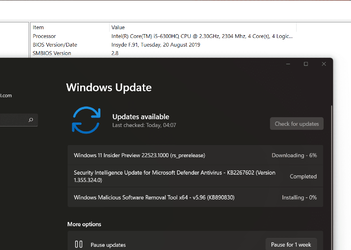
Insider Windows 11 Insider Preview Dev Build 22523 (rs_prerelease) - Dec. 15


UPDATE 1/6:


Hello Windows Insiders, today we are releasing Windows 11 Insider Preview Build 22523 to the Dev Channel.

TL;DR

  • ARM64 PCs will be offered this build.
  • We are providing ISOs for this build which can be downloaded here.
  • This will be our final flight for the holidays. See you in 2022!

Changes and Improvements

  • We are showing snap groups in ALT + TAB and Task View just like when you hover open apps on the taskbar, and you see them there, with all Insiders in the Dev Channel. just like when you hover open apps on the taskbar, and you see them there, with all Insiders in the Dev Channel.

  • When File Explorer is open to This PC, the add media server and (if appropriate) remove media server option is now available when you click the “…” in the command bar.
  • As part of our ongoing effort to bring over settings from Control Panel into the Settings app:
    • Links to Programs & Features in Control Panel will now open to Settings > Apps > Installed Apps.

    • We’re moving Uninstall Updates (for cumulative updates, etc.) from Control Panel to a new page in Settings under Settings > Windows Update > Update History.

Fixes

[Taskbar]
  • Fixed an issue related to text input initialization that could lead to the shell (for example, Start menu and search) becoming non-responsive on ARM64 PCs.
  • The battery icon tooltip should no longer unexpectedly show a percent above 100.
  • App icons should no longer overlap the date & time on secondary monitors when there are a lot of open apps.
[File Explorer]
  • Did some work to address an issue that was leading to losing keyboard focus sometimes after pressing Enter when using F2 to rename OneDrive files.
[Spotlight collection]
  • After enabling spotlight collection, your first image (after Whitehaven Beach) should arrive a little faster now.
  • Added icons to the spotlight collection context menu entries.
[Input]
  • Improved reliability of invoking voice typing.
  • Fixed an issue where the border of our text input experiences (voice typing, emoji panel, etc) wasn’t drawing correctly when a contrast theme was enabled.
  • Mitigated an intermittent crash with the pen menu process if it was launched and then immediately closed before the launch happened.
[Widgets]
  • We fixed the issue causing links to not open properly when opening the widgets board using hover.
[Settings]
  • Settings content should no longer get truncated off the side of the window when making the Settings window small.
  • Settings should no longer sporadically crash when opening comboboxes, which was impacting certain settings such as the ability to set custom click actions for the pen.
  • Addressed an issue where the “Add a device” option in Bluetooth & Devices was silently crashing when trying to connect new Bluetooth devices.
  • Added a number of keywords to make the Voice Access feature appear in settings search results.
[Other]
  • Fixed an issue that was causing ARM64 PCs to experience bug checks citing a memory management error in the previous flight.
  • Fixed an issue that was causing DWM to crash (causing the screen to flash repeatedly) when trying to use certain apps.
  • Mitigated an issue leading to certain apps hanging when Narrator was running.
  • Added some missing information when examining the details in the properties of narratorquickstart.exe.
  • Addressed an issue where Narrator would not respond to UIA events such as notifications, live regions or text events.
NOTE: Some fixes noted here in Insider Preview builds from the active development branch may make their way into the servicing updates for the released version of Windows 11 that became generally available on October 5th.

Known issues

[General]
  • You may be unable to sign-in to certain apps such as Feedback Hub. Restarting your PC should correct the issue.
  • We’re investigating reports that some Insiders are seeing driver and firmware update failures in recent builds with the error 0x8007012a.
[Start]
  • In some cases, you might be unable to enter text when using Search from Start or the taskbar. If you experience the issue, press WIN + R on the keyboard to launch the Run dialog box, then close it.
[Taskbar]
  • The taskbar will sometimes flicker when switching input methods.
  • The network icon sometimes goes missing in the taskbar when it’s supposed to be there. If you encounter this, please try using Task Manager to restart explorer.exe.
  • If you have multiple monitors connected to your PC and right-click on the date and time on the taskbar on your primary monitor, it will crash explorer.exe
[Search]
  • After clicking the Search icon on the Taskbar, the Search panel may not open. If this occurs, restart the “Windows Explorer” process, and open the search panel again.
[Settings]
  • When viewing the list of available Wi-Fi networks, the signal strength indicators do not reflect the correct signal strength.
  • Settings may crash when going to System > Display > HDR.
  • There is a blank entry under Bluetooth & Devices.
[Spotlight collection]
  • If you’re using spotlight collection, the current image does not currently migrate on upgrade, which may leave you with a black desktop background after upgrading to this build. This should be addressed in the next flight.
[Widgets]
  • Changing the taskbar alignment can cause the Widgets button to disappear from taskbar.
  • Widgets board may not have the correct resolution when hovering the entry point on a secondary monitor.
  • The Widgets board may be temporarily blank.
  • When having multiple monitors, Widgets content on taskbar may get out of sync between monitors.
  • With the taskbar left-aligned, information such as temperature is not shown. This will be fixed in a future update.
[Voice access]
  • Some text authoring commands, e.g., “select that” or “delete that”, may not work as expected across Windows applications.
  • Recognition of some punctuation marks and symbols such as @ sign is not accurate.

For developers

You can download the latest Windows Insider SDK at aka.ms/windowsinsidersdk.

SDK NuGet packages are now also flighting at NuGet Gallery | WindowsSDK which include:
These NuGet packages provide more granular access to the SDK and better integrate in CI/CD pipelines.

About the Dev Channel

We have moved the Dev Channel back to receiving builds from our active development branch (RS_PRERELEASE). These builds are from the earliest stage in a new development cycle with the latest work-in-progress code from our engineers. These aren’t always stable builds, and sometimes you will see issues that block key activities or require workarounds while flighting in the Dev Channel. It is important to make sure you read the known issues listed in our blog posts as we document many of these issues with each flight.

These builds are also not matched to a specific release. New features and OS improvements from these builds could show up in future Windows releases when they’re ready, and we may deliver them as full OS updates or servicing releases.

Build numbers are higher in the Dev Channel than the Windows 11 preview builds in the Beta and Release Preview Channels. You will not be able to switch from the Dev Channel to the Beta or Release Preview Channels without doing a clean install back to the released version of Windows 11 currently.

Are you not seeing any of the features listed for this build? Check your Windows Insider Settings to make sure you’re in the Dev Channel. Submit feedback here to let us know if things weren’t working the way you expected.

The desktop watermark you see at the lower right corner of your desktop is normal for these pre-release builds.

Important Insider Links

Thanks,
Amanda & Brandon


Source: Announcing Windows 11 Insider Preview Build 22523


ISO from Microsoft:



UUP Dump:

64-bit ISO download:
Select language for Windows 11 Insider Preview 22523.1000 (rs_prerelease) amd64

ARM64 ISO download: Select language for Windows 11 Insider Preview 22523.1000 (rs_prerelease) arm64

 
Last edited:

My Computers My Computers

  • At a glance

    Win 11 ProAMD Ryzen™ 7 7730U24GB Dual-Channel DDR4 @ 1596MHz (22-22-22-52)512MB ATI AMD Radeon Graphics (ASUStek Comput...
    OS
    Win 11 Pro
    Computer type
    Laptop
    Manufacturer/Model
    ASUS Vivobook
    CPU
    AMD Ryzen™ 7 7730U
    Motherboard
    M1605YA
    Memory
    24GB Dual-Channel DDR4 @ 1596MHz (22-22-22-52)
    Graphics Card(s)
    512MB ATI AMD Radeon Graphics (ASUStek Computer Inc)
    Monitor(s) Displays
    Generic PnP Monitor (1920x1200@60Hz) - P1 PLUS (1920x1080@59Hz)
    Screen Resolution
    1920 X 1200
    Hard Drives
    953GB Western Digital WD
    PSU
    45 Watts
    Mouse
    Lenovo Bluetooth.
    Internet Speed
    500 Mbps
    Browser
    Edge
    Antivirus
    Defender
  • At a glance

    Windows 11AMD Ryzen 7 5800H / 3.2 GHz32 GB DDR4 SDRAM 3200 MHzNVIDIA GeForce RTX 3060 6 GB GDDR6 SDRAM
    Operating System
    Windows 11
    Computer type
    Laptop
    Manufacturer/Model
    ACER NITRO
    CPU
    AMD Ryzen 7 5800H / 3.2 GHz
    Motherboard
    CZ Scala_CAS (FP6)
    Memory
    32 GB DDR4 SDRAM 3200 MHz
    Graphics card(s)
    NVIDIA GeForce RTX 3060 6 GB GDDR6 SDRAM
    Sound Card
    Realtek Audio. NVIDIA High Definition Audio
    Monitor(s) Displays
    15.6" LED backlight 1920 x 1080 (Full HD) 144 Hz
    Screen Resolution
    1920 x 1080 (Full HD)
    Hard Drives
    Samsung 970 Evo Plus 2TB NVMe M.2
    PSU
    180 Watt, 19.5 V
    Mouse
    Lenovo Bluetooth
    Internet Speed
    500 Mbps
    Browser
    Edge
    Antivirus
    Defender
The old machine is still updating successfully.

Screenshot_15.png
 

My Computers My Computers

  • At a glance

    Win 11 ProAMD Ryzen™ 7 7730U24GB Dual-Channel DDR4 @ 1596MHz (22-22-22-52)512MB ATI AMD Radeon Graphics (ASUStek Comput...
    OS
    Win 11 Pro
    Computer type
    Laptop
    Manufacturer/Model
    ASUS Vivobook
    CPU
    AMD Ryzen™ 7 7730U
    Motherboard
    M1605YA
    Memory
    24GB Dual-Channel DDR4 @ 1596MHz (22-22-22-52)
    Graphics Card(s)
    512MB ATI AMD Radeon Graphics (ASUStek Computer Inc)
    Monitor(s) Displays
    Generic PnP Monitor (1920x1200@60Hz) - P1 PLUS (1920x1080@59Hz)
    Screen Resolution
    1920 X 1200
    Hard Drives
    953GB Western Digital WD
    PSU
    45 Watts
    Mouse
    Lenovo Bluetooth.
    Internet Speed
    500 Mbps
    Browser
    Edge
    Antivirus
    Defender
  • At a glance

    Windows 11AMD Ryzen 7 5800H / 3.2 GHz32 GB DDR4 SDRAM 3200 MHzNVIDIA GeForce RTX 3060 6 GB GDDR6 SDRAM
    Operating System
    Windows 11
    Computer type
    Laptop
    Manufacturer/Model
    ACER NITRO
    CPU
    AMD Ryzen 7 5800H / 3.2 GHz
    Motherboard
    CZ Scala_CAS (FP6)
    Memory
    32 GB DDR4 SDRAM 3200 MHz
    Graphics card(s)
    NVIDIA GeForce RTX 3060 6 GB GDDR6 SDRAM
    Sound Card
    Realtek Audio. NVIDIA High Definition Audio
    Monitor(s) Displays
    15.6" LED backlight 1920 x 1080 (Full HD) 144 Hz
    Screen Resolution
    1920 x 1080 (Full HD)
    Hard Drives
    Samsung 970 Evo Plus 2TB NVMe M.2
    PSU
    180 Watt, 19.5 V
    Mouse
    Lenovo Bluetooth
    Internet Speed
    500 Mbps
    Browser
    Edge
    Antivirus
    Defender
Hi there
This build won't upgrade on a "physical vhdx" boot on external drive. Clean install required - and it will have to be iso from UUPDUMP if you need to bypass the Windows check for W11 on an older PC.
Testing now with update on Internal drive.

Cheers
jimbo
 

My Computer My Computer

At a glance

Windows XP,11 Linux Fedora Rawhide pre-releas...2 X Intel i7
OS
Windows XP,11 Linux Fedora Rawhide pre-release 45
Computer type
PC/Desktop
CPU
2 X Intel i7
Screen Resolution
4KUHD X 2
Yes - but at least they're getting rid of the old Control Panel slowly. We'll have more 'hunting' for various settings in the future as they deprecate the CP further.
I'll be glad when the old CP is eventually removed and there'll be only one place for all settings :cautious:
I never had a problem using Control Panel. If MS wants to get rid of it I wish they would stop dragging their feet and do it. The sooner they remove it, the sooner I can get adjusted to the change.
 

My Computers My Computers

  • At a glance

    Windows 11 Pro 25H2Intel Core i7-10700K16GB (8GB PC4-19200 DDR4 SDRAM x2)NVIDIA GeForce GTX 1050 TI
    OS
    Windows 11 Pro 25H2
    Computer type
    PC/Desktop
    Manufacturer/Model
    PowerSpec B746
    CPU
    Intel Core i7-10700K
    Motherboard
    ASRock Z490 Phantom Gaming 4/ax
    Memory
    16GB (8GB PC4-19200 DDR4 SDRAM x2)
    Graphics Card(s)
    NVIDIA GeForce GTX 1050 TI
    Sound Card
    Realtek Audio
    Monitor(s) Displays
    #1. LG ULTRAWIDE 34" #2. AOC Q32G2WG3 32"
    Screen Resolution
    #1. 3440 X 1440 #2. 1920 x 1080
    Hard Drives
    NVMe WDC WDS100T2B0C-00PXH0 1TB
    Samsung SSD 860 EVO 1TB
    PSU
    750 Watts (62.5A)
    Case
    PowerSpec/Lian Li ATX 205
    Keyboard
    Logitech K270
    Mouse
    Logitech M185
    Browser
    Microsoft Edge and Firefox
    Antivirus
    Webroot SecureAnywhere CE 26.1
  • At a glance

    Windows 11 Canary ChannelIntel Core i5-8400 CPU @ 2.80GHz16 MB DDR 4-2666
    Operating System
    Windows 11 Canary Channel
    Computer type
    PC/Desktop
    Manufacturer/Model
    PowerSpec G156
    CPU
    Intel Core i5-8400 CPU @ 2.80GHz
    Motherboard
    AsusTeK Prime B360M-A
    Memory
    16 MB DDR 4-2666
    Monitor(s) Displays
    23" Speptre HDMI 75Hz
    Screen Resolution
    1920x1080
    Hard Drives
    Samsung 970 EVO 500GB NVMe
    Keyboard
    Logitek K270
    Mouse
    Logitek M185
    Browser
    Firefox, Edge and Edge Canary
    Antivirus
    Windows Defender
As long as they actually keep atleast everything that the old CP could change.
Hopefully everything will be there and all we need to do is get use to where it is.
 

My Computers My Computers

  • At a glance

    Windows 11 Pro 25H2Intel Core i7-10700K16GB (8GB PC4-19200 DDR4 SDRAM x2)NVIDIA GeForce GTX 1050 TI
    OS
    Windows 11 Pro 25H2
    Computer type
    PC/Desktop
    Manufacturer/Model
    PowerSpec B746
    CPU
    Intel Core i7-10700K
    Motherboard
    ASRock Z490 Phantom Gaming 4/ax
    Memory
    16GB (8GB PC4-19200 DDR4 SDRAM x2)
    Graphics Card(s)
    NVIDIA GeForce GTX 1050 TI
    Sound Card
    Realtek Audio
    Monitor(s) Displays
    #1. LG ULTRAWIDE 34" #2. AOC Q32G2WG3 32"
    Screen Resolution
    #1. 3440 X 1440 #2. 1920 x 1080
    Hard Drives
    NVMe WDC WDS100T2B0C-00PXH0 1TB
    Samsung SSD 860 EVO 1TB
    PSU
    750 Watts (62.5A)
    Case
    PowerSpec/Lian Li ATX 205
    Keyboard
    Logitech K270
    Mouse
    Logitech M185
    Browser
    Microsoft Edge and Firefox
    Antivirus
    Webroot SecureAnywhere CE 26.1
  • At a glance

    Windows 11 Canary ChannelIntel Core i5-8400 CPU @ 2.80GHz16 MB DDR 4-2666
    Operating System
    Windows 11 Canary Channel
    Computer type
    PC/Desktop
    Manufacturer/Model
    PowerSpec G156
    CPU
    Intel Core i5-8400 CPU @ 2.80GHz
    Motherboard
    AsusTeK Prime B360M-A
    Memory
    16 MB DDR 4-2666
    Monitor(s) Displays
    23" Speptre HDMI 75Hz
    Screen Resolution
    1920x1080
    Hard Drives
    Samsung 970 EVO 500GB NVMe
    Keyboard
    Logitek K270
    Mouse
    Logitek M185
    Browser
    Firefox, Edge and Edge Canary
    Antivirus
    Windows Defender
Got the upgrade on the second shot. First time, it got to 100% and then on the first boot got the "attempting to restore....." After the restore, I let it upgrade again and it was successful. I have Win 11 compatible hardware so that should not have been an issue (i9 9900K with 16GB RAM and a Samsung SSD).
 

My Computers My Computers

  • At a glance

    Windows 11 Proi7 1360P16GBIntel CPU
    OS
    Windows 11 Pro
    Computer type
    Laptop
    Manufacturer/Model
    Dell Inspiron 16 5630
    CPU
    i7 1360P
    Motherboard
    Dell
    Memory
    16GB
    Graphics Card(s)
    Intel CPU
    Sound Card
    Realtek
    Monitor(s) Displays
    16" Touch Screen
    Screen Resolution
    1920X1080
    Hard Drives
    1TB Samsung NVME SSD
    PSU
    65 Watt Dell
    Case
    Dell
    Cooling
    Dell
    Keyboard
    Dell
    Mouse
    Trackpad
    Internet Speed
    Google Fiber
    Browser
    Edge
    Antivirus
    Defender and Malwarebytes
    Other Info
    Cakewalk by Bandlab and Presonus Studio One 4.6 Pro recording programs. MOTU recording interface
  • Computer type
    Laptop
Huh. reading a Tom's post about Win 10 vs Win 11 in games, the comments mentioned ALT-TAB vs WIN-TAB. Try it out. WIN-TAB gives bigger images of the windows so it is easier to see what window you want to select or close. Give it a try...
 

My Computer My Computer

At a glance

Windows 11 version 26200Intel Core Ultra 7 Desktop Processor 265K64GBASUS TUF RTX 4090 OC card
OS
Windows 11 version 26200
Computer type
PC/Desktop
Manufacturer/Model
home built
CPU
Intel Core Ultra 7 Desktop Processor 265K
Motherboard
ASUS Rog Strix Z890-F Gaming
Memory
64GB
Graphics Card(s)
ASUS TUF RTX 4090 OC card
Sound Card
Alpha Wireless 5.1 Headphones
Monitor(s) Displays
Gigabyte M32U 32 inch 4k IPS 144Hz monitor
Screen Resolution
3340 by 2160 144 Hz with HDR 10
Hard Drives
4TB Samsung 9100 Pro NVME, 3X Samsung 4TB 860 EVO
PSU
Corsair RM850e modular
Case
Corsair Graphite 780T
Cooling
Cooler Master Hyper 3DHP air cooled 58C under full load.
Keyboard
Corsair K95 RGB
Mouse
Logitech G502 wired
Internet Speed
Frontier 990Mbps up/down Fiber to the home
Browser
Chrome
Antivirus
MS Defender
Wouldn't install via WU so I downloaded the ISO and it went like a dream. Not sure if it's a placebo effect but everything seems snappier... not bad for a machine that isn't up to official W11 spec!
 

My Computer My Computer

At a glance

W11 ProIntel(R) Core(TM) i7-477016GBIntel HD 4600 & GeForce GT 750M
OS
W11 Pro
Computer type
PC/Desktop
Manufacturer/Model
Dell XPS One 2720
CPU
Intel(R) Core(TM) i7-4770
Motherboard
Dell
Memory
16GB
Graphics Card(s)
Intel HD 4600 & GeForce GT 750M
Sound Card
Realtek HD Audio
Monitor(s) Displays
27"
Screen Resolution
2560*1440
Hard Drives
512GB SSD boot drive connected via mSATA card
2TB SSD Data Drive
Case
AIO
Internet Speed
1GB Fibre
Antivirus
Microsoft
I've just remembered that in a previous flight update it wouldn't install if Core Isolation Memory integrity was turned on.
I just found that Core Isolation Memory Integrity is turned off because of the driver for the WD USB drives.
 

My Computers My Computers

  • At a glance

    Windows 11 Pro 25H2Intel Core i7-10700K16GB (8GB PC4-19200 DDR4 SDRAM x2)NVIDIA GeForce GTX 1050 TI
    OS
    Windows 11 Pro 25H2
    Computer type
    PC/Desktop
    Manufacturer/Model
    PowerSpec B746
    CPU
    Intel Core i7-10700K
    Motherboard
    ASRock Z490 Phantom Gaming 4/ax
    Memory
    16GB (8GB PC4-19200 DDR4 SDRAM x2)
    Graphics Card(s)
    NVIDIA GeForce GTX 1050 TI
    Sound Card
    Realtek Audio
    Monitor(s) Displays
    #1. LG ULTRAWIDE 34" #2. AOC Q32G2WG3 32"
    Screen Resolution
    #1. 3440 X 1440 #2. 1920 x 1080
    Hard Drives
    NVMe WDC WDS100T2B0C-00PXH0 1TB
    Samsung SSD 860 EVO 1TB
    PSU
    750 Watts (62.5A)
    Case
    PowerSpec/Lian Li ATX 205
    Keyboard
    Logitech K270
    Mouse
    Logitech M185
    Browser
    Microsoft Edge and Firefox
    Antivirus
    Webroot SecureAnywhere CE 26.1
  • At a glance

    Windows 11 Canary ChannelIntel Core i5-8400 CPU @ 2.80GHz16 MB DDR 4-2666
    Operating System
    Windows 11 Canary Channel
    Computer type
    PC/Desktop
    Manufacturer/Model
    PowerSpec G156
    CPU
    Intel Core i5-8400 CPU @ 2.80GHz
    Motherboard
    AsusTeK Prime B360M-A
    Memory
    16 MB DDR 4-2666
    Monitor(s) Displays
    23" Speptre HDMI 75Hz
    Screen Resolution
    1920x1080
    Hard Drives
    Samsung 970 EVO 500GB NVMe
    Keyboard
    Logitek K270
    Mouse
    Logitek M185
    Browser
    Firefox, Edge and Edge Canary
    Antivirus
    Windows Defender
22523.1000--Posted recently about my c:\windows\temp dir constantly filling up with literally thousands of .evtx and .txt/.tmp files, and would take C:\ freespace down to 0 without my daily attention. Stumbled across a fix that works fine for me and thought I would share it here--already posted at the Hub:

Disable the AppX Deployment Service using Registry Editor

Note: Usual regedit proviso. Changing this manually using services.msc does not work (Windows resets it to Manual or does not allow you to change it at all)

WIN+R and type regedit.exe
Navigate to HKLM\SYSTEM\CurrentControlSet\Services\AppXSvc
Change Start to 4
This sets the service to Disabled

_____________________________________

*If you find that after doing the above step you are still seeing progressively more .tmp files and .txt files accumulating every day in C:\Windows\temp and bringing down your c:\ freespace, you will want to:

Disable your Microsoft Store Install Service You can do this (without regedit) right from the Services page.

____________________________________

I found you must take both steps above to keep .evtx, .tmp., and .txt files from eventually eating all of your C:\freespace. This must be done each build unfortunately, until Microsoft fixes this bug!

Doing the above, deleting everything in c:\windows\temp and rebooting will allow you to verify that there are no .evtx files adding to your c:\windows\temp dir (to the tune of thousands of them each day!) Didn't have this problem before the last three Win11 Dev-channel builds prior to 22523.1000.

Hope everyone has a great Christmas holiday!
 
Last edited:

My Computer My Computer

At a glance

Win11 Release Beta channelAMD R7 7800X3DGSkill 2x16GB @ 6400MT/sXFX 9070 XT SWIFT tri-fan (PCIe5.0)
OS
Win11 Release Beta channel
Computer type
PC/Desktop
Manufacturer/Model
a cherry-picked assembly
CPU
AMD R7 7800X3D
Motherboard
MSI x870 Tomahawk Wi-Fi, 8-layer, 2 oz copper, server PCB
Memory
GSkill 2x16GB @ 6400MT/s
Graphics Card(s)
XFX 9070 XT SWIFT tri-fan (PCIe5.0)
Sound Card
Creative Labs G8 USB External Sound device, Gaming DAC, Sound Card & Earphone AMP.. HIGHLY RECOMMENDED, btw. Totally changed my opinion of external USB sound. I like!...;)
Monitor(s) Displays
Philips 43" Momentum DisplayHDR 1000-certified
Screen Resolution
3840x2160
Hard Drives
*Boot: Samsung 980 Pro 2 TB NVMe (PCIe4x4)
*Samsung 980 EVO NVMe 500GB (PCIe 4x4)
*Kingston SNV3S2000G 2TB NVMe (PCIe4x4)
*Samsung 960 EVO 250GB NVMe(PCIe3x2)
*8TB Toshiba x300 HDD
*ST4000DM004 S3 4TB HDD
PSU
Gigabyte 850W Gold, Rev 2
Case
Lian Li Lancool 217, white, with wood trim, very nice looking--tired of black, 5-fans standard
Cooling
Air coutesy Lian Li
Keyboard
Cherry MX 2.0S RGB
Mouse
Razer Basilisk V3 24k DPI
Internet Speed
~950Mbps down and up!
Browser
Firefox x64 DE
Antivirus
Defender
Other Info
Great New system. Exceeds my expectations by quite a bit, btw. I love the USB G8 SoundBlaster, it's quite an improvement over the G6!
Finally got back to my computer and found this update!

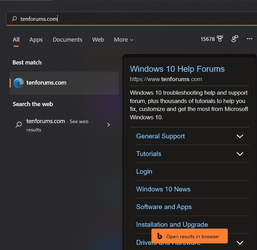
I can still type a URL into the "Search Bar" for a site and Firefox opens and takes me there.

It shows that Edge will take me there, but it's broken and can't do anything. So, Firefox, as my default is open instead.

defaults to Firefox.png

1639734205532.png

You can barely see the underlines beneath Firefod and SurfShark but they're there.
 

My Computers My Computers

  • At a glance

    Windows 11 23H2 22631.2861Intel(R) Core(TM) i7-10700 CPU @ 2.90GHz 2.90...16384 MBytesIntel UHD Graphics 630
    OS
    Windows 11 23H2 22631.2861
    Computer type
    PC/Desktop
    Manufacturer/Model
    HP Envy TE01-1xxx
    CPU
    Intel(R) Core(TM) i7-10700 CPU @ 2.90GHz 2.90 GHz
    Motherboard
    16.0GB Dual-Channel Unknown @ 1463MHz (21-21-21-47)
    Memory
    16384 MBytes
    Graphics Card(s)
    Intel UHD Graphics 630
    Sound Card
    Realtek High Definition Audio
    Monitor(s) Displays
    Monitor 1 - Acer 27" Monitor 2 - Acer 27"
    Screen Resolution
    1920 x 1080
    Hard Drives
    WDC PC SN530 SDBPNPZ-512G-1006 (SSD)
    Seagate ST1000DM003-1SB102
    Seagate BUP Slim SCSI Disk Device (SSD)
    PSU
    HP
    Case
    HP
    Cooling
    Standard
    Keyboard
    Logitech Wave K350
    Mouse
    Logitech M705
    Internet Speed
    500 mbps
    Browser
    Firefox
    Antivirus
    Windows Defender
    Other Info
    That's all Folks!
  • At a glance

    Windows 11Intel Core i7 (10th gen) 1070016 GBIntel UHD Graphics 630
    Operating System
    Windows 11
    Computer type
    PC/Desktop
    Manufacturer/Model
    HP
    CPU
    Intel Core i7 (10th gen) 10700
    Motherboard
    Intel
    Memory
    16 GB
    Graphics card(s)
    Intel UHD Graphics 630
    Sound Card
    Built-in
    Monitor(s) Displays
    Acer 27" & Samsung 24"
    Screen Resolution
    1920 x
    Hard Drives
    SSD (512 GB)
    HDD (1 TB)
    Seagate
    PSU
    Intel i7 10th Generation
    Case
    HP
    Cooling
    HP/Intel?
    Keyboard
    Logitech Wave K350
    Mouse
    Logitech M705
    Internet Speed
    50 mbps
    Browser
    Firefox 90.2
    Antivirus
    Windows Defender
    Other Info
    Headphone/Microphone Combo
    SuperSpeed USB Type-A (4 on front)
    HP 3-in-One Card Readr
    SuperSpeed USB Type-C
    DVD Writer
000242.png
 

My Computers My Computers

  • At a glance

    Windows 11 Pro
    OS
    Windows 11 Pro
    Computer type
    PC/Desktop
    Manufacturer/Model
    ASUS ROG Strix
  • At a glance

    Windows 11 Pro
    Operating System
    Windows 11 Pro
    Computer type
    Laptop
    Manufacturer/Model
    ASUS VivoBook
  • ASUS VivoBook 'Lite' ~ Windows 11 Home
Now you can "Download & install" each update in Windows Update.
 

My Computer My Computer

At a glance

26200.8037i5-11400F32GBGeforce GT-1030
OS
26200.8037
Computer type
PC/Desktop
CPU
i5-11400F
Motherboard
Gigabyte
Memory
32GB
Graphics Card(s)
Geforce GT-1030
Keyboard
Logitech K400
Mouse
Logitech M720
Internet Speed
600 Mb
Browser
Edge
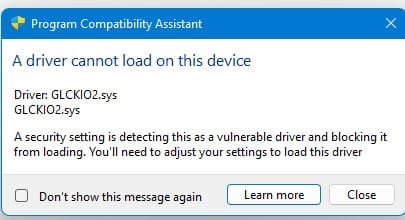
Anyone having trouble with Core Isolation. On this build it was turned off because of a driver problem for the WD USB drives. I deleted the driver in Device Manager and turned Core Isolation on. Now I get an error about the GLCKIO2.sys driver. My WD external drives still work.
 

My Computers My Computers

  • At a glance

    Windows 11 Pro 25H2Intel Core i7-10700K16GB (8GB PC4-19200 DDR4 SDRAM x2)NVIDIA GeForce GTX 1050 TI
    OS
    Windows 11 Pro 25H2
    Computer type
    PC/Desktop
    Manufacturer/Model
    PowerSpec B746
    CPU
    Intel Core i7-10700K
    Motherboard
    ASRock Z490 Phantom Gaming 4/ax
    Memory
    16GB (8GB PC4-19200 DDR4 SDRAM x2)
    Graphics Card(s)
    NVIDIA GeForce GTX 1050 TI
    Sound Card
    Realtek Audio
    Monitor(s) Displays
    #1. LG ULTRAWIDE 34" #2. AOC Q32G2WG3 32"
    Screen Resolution
    #1. 3440 X 1440 #2. 1920 x 1080
    Hard Drives
    NVMe WDC WDS100T2B0C-00PXH0 1TB
    Samsung SSD 860 EVO 1TB
    PSU
    750 Watts (62.5A)
    Case
    PowerSpec/Lian Li ATX 205
    Keyboard
    Logitech K270
    Mouse
    Logitech M185
    Browser
    Microsoft Edge and Firefox
    Antivirus
    Webroot SecureAnywhere CE 26.1
  • At a glance

    Windows 11 Canary ChannelIntel Core i5-8400 CPU @ 2.80GHz16 MB DDR 4-2666
    Operating System
    Windows 11 Canary Channel
    Computer type
    PC/Desktop
    Manufacturer/Model
    PowerSpec G156
    CPU
    Intel Core i5-8400 CPU @ 2.80GHz
    Motherboard
    AsusTeK Prime B360M-A
    Memory
    16 MB DDR 4-2666
    Monitor(s) Displays
    23" Speptre HDMI 75Hz
    Screen Resolution
    1920x1080
    Hard Drives
    Samsung 970 EVO 500GB NVMe
    Keyboard
    Logitek K270
    Mouse
    Logitek M185
    Browser
    Firefox, Edge and Edge Canary
    Antivirus
    Windows Defender
Anyone having trouble with Core Isolation. On this build it was turned off because of a driver problem for the WD USB drives. I deleted the driver in Device Manager and turned Core Isolation on. Now I get an error about the GLCKIO2.sys driver. My WD external drives still work.
I had exactly the same driver incompatibility with wdsam64_prewin8.sys, and upon rebooting with the wd driver properly uninstalled, I got another error message that popped up that a certain file was being blocked because of a vulnerability (Core Isolation caught it, actually, as I had not seen it before.) I didn't get the exact file name, but the boot completed successfully, with Core Isolation now running properly. Next reboot I'll get the exact file name, but as with the first driver I doubt it is anything I'm using today...;) The wdsam64_prewin8.sys driver dated back to 2015...and probably wasn't used since Win7 or earlier, imo.
 

My Computer My Computer

At a glance

Win11 Release Beta channelAMD R7 7800X3DGSkill 2x16GB @ 6400MT/sXFX 9070 XT SWIFT tri-fan (PCIe5.0)
OS
Win11 Release Beta channel
Computer type
PC/Desktop
Manufacturer/Model
a cherry-picked assembly
CPU
AMD R7 7800X3D
Motherboard
MSI x870 Tomahawk Wi-Fi, 8-layer, 2 oz copper, server PCB
Memory
GSkill 2x16GB @ 6400MT/s
Graphics Card(s)
XFX 9070 XT SWIFT tri-fan (PCIe5.0)
Sound Card
Creative Labs G8 USB External Sound device, Gaming DAC, Sound Card & Earphone AMP.. HIGHLY RECOMMENDED, btw. Totally changed my opinion of external USB sound. I like!...;)
Monitor(s) Displays
Philips 43" Momentum DisplayHDR 1000-certified
Screen Resolution
3840x2160
Hard Drives
*Boot: Samsung 980 Pro 2 TB NVMe (PCIe4x4)
*Samsung 980 EVO NVMe 500GB (PCIe 4x4)
*Kingston SNV3S2000G 2TB NVMe (PCIe4x4)
*Samsung 960 EVO 250GB NVMe(PCIe3x2)
*8TB Toshiba x300 HDD
*ST4000DM004 S3 4TB HDD
PSU
Gigabyte 850W Gold, Rev 2
Case
Lian Li Lancool 217, white, with wood trim, very nice looking--tired of black, 5-fans standard
Cooling
Air coutesy Lian Li
Keyboard
Cherry MX 2.0S RGB
Mouse
Razer Basilisk V3 24k DPI
Internet Speed
~950Mbps down and up!
Browser
Firefox x64 DE
Antivirus
Defender
Other Info
Great New system. Exceeds my expectations by quite a bit, btw. I love the USB G8 SoundBlaster, it's quite an improvement over the G6!

My Computers My Computers

  • At a glance

    Windows 11 23H2 22631.2861Intel(R) Core(TM) i7-10700 CPU @ 2.90GHz 2.90...16384 MBytesIntel UHD Graphics 630
    OS
    Windows 11 23H2 22631.2861
    Computer type
    PC/Desktop
    Manufacturer/Model
    HP Envy TE01-1xxx
    CPU
    Intel(R) Core(TM) i7-10700 CPU @ 2.90GHz 2.90 GHz
    Motherboard
    16.0GB Dual-Channel Unknown @ 1463MHz (21-21-21-47)
    Memory
    16384 MBytes
    Graphics Card(s)
    Intel UHD Graphics 630
    Sound Card
    Realtek High Definition Audio
    Monitor(s) Displays
    Monitor 1 - Acer 27" Monitor 2 - Acer 27"
    Screen Resolution
    1920 x 1080
    Hard Drives
    WDC PC SN530 SDBPNPZ-512G-1006 (SSD)
    Seagate ST1000DM003-1SB102
    Seagate BUP Slim SCSI Disk Device (SSD)
    PSU
    HP
    Case
    HP
    Cooling
    Standard
    Keyboard
    Logitech Wave K350
    Mouse
    Logitech M705
    Internet Speed
    500 mbps
    Browser
    Firefox
    Antivirus
    Windows Defender
    Other Info
    That's all Folks!
  • At a glance

    Windows 11Intel Core i7 (10th gen) 1070016 GBIntel UHD Graphics 630
    Operating System
    Windows 11
    Computer type
    PC/Desktop
    Manufacturer/Model
    HP
    CPU
    Intel Core i7 (10th gen) 10700
    Motherboard
    Intel
    Memory
    16 GB
    Graphics card(s)
    Intel UHD Graphics 630
    Sound Card
    Built-in
    Monitor(s) Displays
    Acer 27" & Samsung 24"
    Screen Resolution
    1920 x
    Hard Drives
    SSD (512 GB)
    HDD (1 TB)
    Seagate
    PSU
    Intel i7 10th Generation
    Case
    HP
    Cooling
    HP/Intel?
    Keyboard
    Logitech Wave K350
    Mouse
    Logitech M705
    Internet Speed
    50 mbps
    Browser
    Firefox 90.2
    Antivirus
    Windows Defender
    Other Info
    Headphone/Microphone Combo
    SuperSpeed USB Type-A (4 on front)
    HP 3-in-One Card Readr
    SuperSpeed USB Type-C
    DVD Writer

My Computers My Computers

  • At a glance

    Windows 11 Pro
    OS
    Windows 11 Pro
    Computer type
    PC/Desktop
    Manufacturer/Model
    ASUS ROG Strix
  • At a glance

    Windows 11 Pro
    Operating System
    Windows 11 Pro
    Computer type
    Laptop
    Manufacturer/Model
    ASUS VivoBook
  • ASUS VivoBook 'Lite' ~ Windows 11 Home

My Computers My Computers

  • At a glance

    Windows 11 23H2 22631.2861Intel(R) Core(TM) i7-10700 CPU @ 2.90GHz 2.90...16384 MBytesIntel UHD Graphics 630
    OS
    Windows 11 23H2 22631.2861
    Computer type
    PC/Desktop
    Manufacturer/Model
    HP Envy TE01-1xxx
    CPU
    Intel(R) Core(TM) i7-10700 CPU @ 2.90GHz 2.90 GHz
    Motherboard
    16.0GB Dual-Channel Unknown @ 1463MHz (21-21-21-47)
    Memory
    16384 MBytes
    Graphics Card(s)
    Intel UHD Graphics 630
    Sound Card
    Realtek High Definition Audio
    Monitor(s) Displays
    Monitor 1 - Acer 27" Monitor 2 - Acer 27"
    Screen Resolution
    1920 x 1080
    Hard Drives
    WDC PC SN530 SDBPNPZ-512G-1006 (SSD)
    Seagate ST1000DM003-1SB102
    Seagate BUP Slim SCSI Disk Device (SSD)
    PSU
    HP
    Case
    HP
    Cooling
    Standard
    Keyboard
    Logitech Wave K350
    Mouse
    Logitech M705
    Internet Speed
    500 mbps
    Browser
    Firefox
    Antivirus
    Windows Defender
    Other Info
    That's all Folks!
  • At a glance

    Windows 11Intel Core i7 (10th gen) 1070016 GBIntel UHD Graphics 630
    Operating System
    Windows 11
    Computer type
    PC/Desktop
    Manufacturer/Model
    HP
    CPU
    Intel Core i7 (10th gen) 10700
    Motherboard
    Intel
    Memory
    16 GB
    Graphics card(s)
    Intel UHD Graphics 630
    Sound Card
    Built-in
    Monitor(s) Displays
    Acer 27" & Samsung 24"
    Screen Resolution
    1920 x
    Hard Drives
    SSD (512 GB)
    HDD (1 TB)
    Seagate
    PSU
    Intel i7 10th Generation
    Case
    HP
    Cooling
    HP/Intel?
    Keyboard
    Logitech Wave K350
    Mouse
    Logitech M705
    Internet Speed
    50 mbps
    Browser
    Firefox 90.2
    Antivirus
    Windows Defender
    Other Info
    Headphone/Microphone Combo
    SuperSpeed USB Type-A (4 on front)
    HP 3-in-One Card Readr
    SuperSpeed USB Type-C
    DVD Writer
I had exactly the same driver incompatibility with wdsam64_prewin8.sys, and upon rebooting with the wd driver properly uninstalled, I got another error message that popped up that a certain file was being blocked because of a vulnerability (Core Isolation caught it, actually, as I had not seen it before.) I didn't get the exact file name, but the boot completed successfully, with Core Isolation now running properly. Next reboot I'll get the exact file name, but as with the first driver I doubt it is anything I'm using today...;) The wdsam64_prewin8.sys driver dated back to 2015...and probably wasn't used since Win7 or earlier, imo.
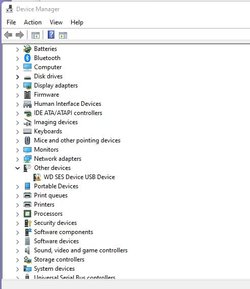
I know my problem is caused by the WD external USB driver. When I look in Device manager the WD SES Device USB Device show the exclamation mark. The external drives still work. Unless I run into a problem, I'll leave Core Isolation turned on.

GLCKIO2.jpg

WD SES.jpg
 

My Computers My Computers

  • At a glance

    Windows 11 Pro 25H2Intel Core i7-10700K16GB (8GB PC4-19200 DDR4 SDRAM x2)NVIDIA GeForce GTX 1050 TI
    OS
    Windows 11 Pro 25H2
    Computer type
    PC/Desktop
    Manufacturer/Model
    PowerSpec B746
    CPU
    Intel Core i7-10700K
    Motherboard
    ASRock Z490 Phantom Gaming 4/ax
    Memory
    16GB (8GB PC4-19200 DDR4 SDRAM x2)
    Graphics Card(s)
    NVIDIA GeForce GTX 1050 TI
    Sound Card
    Realtek Audio
    Monitor(s) Displays
    #1. LG ULTRAWIDE 34" #2. AOC Q32G2WG3 32"
    Screen Resolution
    #1. 3440 X 1440 #2. 1920 x 1080
    Hard Drives
    NVMe WDC WDS100T2B0C-00PXH0 1TB
    Samsung SSD 860 EVO 1TB
    PSU
    750 Watts (62.5A)
    Case
    PowerSpec/Lian Li ATX 205
    Keyboard
    Logitech K270
    Mouse
    Logitech M185
    Browser
    Microsoft Edge and Firefox
    Antivirus
    Webroot SecureAnywhere CE 26.1
  • At a glance

    Windows 11 Canary ChannelIntel Core i5-8400 CPU @ 2.80GHz16 MB DDR 4-2666
    Operating System
    Windows 11 Canary Channel
    Computer type
    PC/Desktop
    Manufacturer/Model
    PowerSpec G156
    CPU
    Intel Core i5-8400 CPU @ 2.80GHz
    Motherboard
    AsusTeK Prime B360M-A
    Memory
    16 MB DDR 4-2666
    Monitor(s) Displays
    23" Speptre HDMI 75Hz
    Screen Resolution
    1920x1080
    Hard Drives
    Samsung 970 EVO 500GB NVMe
    Keyboard
    Logitek K270
    Mouse
    Logitek M185
    Browser
    Firefox, Edge and Edge Canary
    Antivirus
    Windows Defender
Yep, I left core isolation on as well. My driver blocked by Core Isolation after enabling it was Asio.sys--I found it in two places on C:\Windows\SysWow64 & C:\Windows\SysWow64\Drivers and deleted all instances of it and stopped getting the message. From a device I no longer use, I'm sure.
 

My Computer My Computer

At a glance

Win11 Release Beta channelAMD R7 7800X3DGSkill 2x16GB @ 6400MT/sXFX 9070 XT SWIFT tri-fan (PCIe5.0)
OS
Win11 Release Beta channel
Computer type
PC/Desktop
Manufacturer/Model
a cherry-picked assembly
CPU
AMD R7 7800X3D
Motherboard
MSI x870 Tomahawk Wi-Fi, 8-layer, 2 oz copper, server PCB
Memory
GSkill 2x16GB @ 6400MT/s
Graphics Card(s)
XFX 9070 XT SWIFT tri-fan (PCIe5.0)
Sound Card
Creative Labs G8 USB External Sound device, Gaming DAC, Sound Card & Earphone AMP.. HIGHLY RECOMMENDED, btw. Totally changed my opinion of external USB sound. I like!...;)
Monitor(s) Displays
Philips 43" Momentum DisplayHDR 1000-certified
Screen Resolution
3840x2160
Hard Drives
*Boot: Samsung 980 Pro 2 TB NVMe (PCIe4x4)
*Samsung 980 EVO NVMe 500GB (PCIe 4x4)
*Kingston SNV3S2000G 2TB NVMe (PCIe4x4)
*Samsung 960 EVO 250GB NVMe(PCIe3x2)
*8TB Toshiba x300 HDD
*ST4000DM004 S3 4TB HDD
PSU
Gigabyte 850W Gold, Rev 2
Case
Lian Li Lancool 217, white, with wood trim, very nice looking--tired of black, 5-fans standard
Cooling
Air coutesy Lian Li
Keyboard
Cherry MX 2.0S RGB
Mouse
Razer Basilisk V3 24k DPI
Internet Speed
~950Mbps down and up!
Browser
Firefox x64 DE
Antivirus
Defender
Other Info
Great New system. Exceeds my expectations by quite a bit, btw. I love the USB G8 SoundBlaster, it's quite an improvement over the G6!

Latest Support Threads

Back
Top Bottom