
Windows 11 not allowing me to change Adapter settings from 1Gb setting to 2.5Gb setting?.


saltyseadog

Member
Local time
10:28 AM
Posts
4
OS
Windows 11
I have recently upgraded my broadband package with Zen Broadband herein the UK from Full Fibre 900G to their Full Fibre Max 1.6Gb package. My router is an Archer GX90 AX6600 Tri-Band Wi-Fi Gaming Router with both 2.5Gbps & 1Gbps WAN/LAN connections. The Open Reach ONT box is 2.5Gbps capable and connected to the routers 2.5Gb port via a Cat6a ethernet cable run through the Realtek Gaming 2.5GbEFamily Controller installed in the PC with the latest drivers.

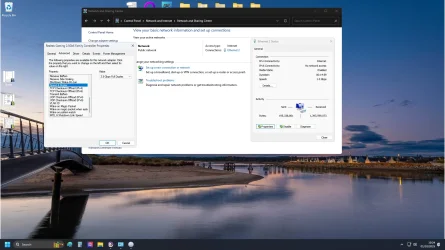
The problem I am having is I am only getting 945mbps d/l & 116Mbps. I have been in contact with Zen and everything is okay from their end. On checking my Ethernet settings I find that even though I have the 2.5Gb set in the Speed & Duplex box it is only giving 1.0Gbps (see Screenshot). I have the Realtek Family Controller on the motherboard switched off as I use a dedicated NIC card Realtek Gaming 2.5GbE Family Controller installed instead.

I have changed the settings several times but it doesn't change anything as you can see in the screenshot it states 2.5Gb but is only giving 1.0Gb which ties in with 945 Mbps download & 116 Mbps upload readings I am getting.

Does anyone have any idea on why this happening?. Any advice or help offered is vastly appreciated.

Aggregated link speed (Receive/Transmit): 1000/1000 (Mbps)

IPv4default gateway: 192.168.0.1

Manufacturer: Realtek

Description: Realtek Gaming 2.5GbE Family Controller

Driver version: 10.75.324.2025
 
Windows Build/Version
Windows 11 Home Version 24H2 OS Build 26100.6584

Attachments
  • Screenshot (3).webp
    Screenshot (3).webp
    195.6 KB · Views: 3

My Computer My Computer

At a glance

Windows 11AMD Ryzen 7 5700X32GB DDR4NVIDIA GeForce GTX1080
OS
Windows 11
Computer type
PC/Desktop
Manufacturer/Model
Self Build
CPU
AMD Ryzen 7 5700X
Motherboard
MSI B550 Gaming Gen3
Memory
32GB DDR4
Graphics Card(s)
NVIDIA GeForce GTX1080
Sound Card
Xonar Soundcard
I have recently upgraded my broadband package with Zen Broadband herein the UK from Full Fibre 900G to their Full Fibre Max 1.6Gb package. My router is an Archer GX90 AX6600 Tri-Band Wi-Fi Gaming Router with both 2.5Gbps & 1Gbps WAN/LAN connections. The Open Reach ONT box is 2.5Gbps capable and connected to the routers 2.5Gb port via a Cat6a ethernet cable run through the Realtek Gaming 2.5GbEFamily Controller installed in the PC with the latest drivers.

The problem I am having is I am only getting 945mbps d/l & 116Mbps. I have been in contact with Zen and everything is okay from their end. On checking my Ethernet settings I find that even though I have the 2.5Gb set in the Speed & Duplex box it is only giving 1.0Gbps (see Screenshot). I have the Realtek Family Controller on the motherboard switched off as I use a dedicated NIC card Realtek Gaming 2.5GbE Family Controller installed instead.

I have changed the settings several times but it doesn't change anything as you can see in the screenshot it states 2.5Gb but is only giving 1.0Gb which ties in with 945 Mbps download & 116 Mbps upload readings I am getting.

Does anyone have any idea on why this happening?. Any advice or help offered is vastly appreciated.

Aggregated link speed (Receive/Transmit): 1000/1000 (Mbps)

IPv4default gateway: 192.168.0.1

Manufacturer: Realtek

Description: Realtek Gaming 2.5GbE Family Controller

Driver version: 10.75.324.2025
I suspect that even if you use a dedicated NIC card - the maximum speed you can get is limited by the actual BUS on the MOBO -- this is always a problem when buying new faster hardware to plug into older machines. If that's the case there's not much you can do I'm afraid.You might get more throughput if you can set the NIC properties to full duplex and fiddle around with some other things but if the BUS is only capable of specific speeds then that's it.

Another way to test it -- just download a LIVE Linux distro - and check the NIC speed again -- Linux Networking usually works straight OOTB - Windows is always questionable with networking. Just then start a browser and use OOKLA speed test or whatever.

If it shows the same as your Windows results then it's a hardware limitation -- you've confirmed with your ISP that connection is fine at their end (although some of these companies can be a bit "economical with the truth !!").


Cheers
jimbo
 
Last edited:

My Computer My Computer

At a glance

Windows XP,11 Linux Fedora Rawhide pre-releas...2 X Intel i7
OS
Windows XP,11 Linux Fedora Rawhide pre-release 45
Computer type
PC/Desktop
CPU
2 X Intel i7
Screen Resolution
4KUHD X 2
The speed shows your connection between that PC and the router to be 1.0Gbps and not 2.5Gbps. I assume your issue could be between the PC and the router, initially anyway, as that connection should show 2.5Gbps, regardless of your Internet download speed etc...?

I did not need to make any setting changes etc, as soon as I installed a 2.5Gb capable switch on my LAN, and then connected my main PC into it, the connection showed 2.5Gb, regardless of what was after the switch.


speed.webp
 
Last edited:

My Computers My Computers

  • At a glance

    Windows 11 Pro build 25H2Intel 265k32GB DDR5 Corsair Dominator 7200MhzFE Edition 4080
    OS
    Windows 11 Pro build 25H2
    Computer type
    PC/Desktop
    Manufacturer/Model
    Home brew
    CPU
    Intel 265k
    Motherboard
    Gigabyte Z890 Aorus Elite
    Memory
    32GB DDR5 Corsair Dominator 7200Mhz
    Graphics Card(s)
    FE Edition 4080
    Sound Card
    onboard
    Monitor(s) Displays
    Acer 32" 4k IPS monitor
    Screen Resolution
    4k
    Hard Drives
    Various NVME and two SSD's
    PSU
    Antec ATX 3.1 1200w
    Case
    Meshify 2 XL
    Cooling
    Corsair Nautilus 360 AIO
    Keyboard
    Mechanical blue switch
    Mouse
    G502 Lightspeed Wireless
    Internet Speed
    FTTP 500Mb
    Browser
    Edge
    Antivirus
    Microsoft
  • At a glance

    Windows 11 Pro 24h2Alder Lake 3.4Ghz 4 Core16GB DDR4 3200GhzInternal GPU to the CPU
    Operating System
    Windows 11 Pro 24h2
    Computer type
    PC/Desktop
    Manufacturer/Model
    NUC N100 type model and System 3 but an N150 CPU
    CPU
    Alder Lake 3.4Ghz 4 Core
    Motherboard
    built in SOC
    Memory
    16GB DDR4 3200Ghz
    Graphics card(s)
    Internal GPU to the CPU
    Sound Card
    nah
    Monitor(s) Displays
    Samsung Syncmaster 913n VGA but used headless mainly.
    Screen Resolution
    1280x1024
    Hard Drives
    NVME 512GB and a SATA SSD at 1TB
    PSU
    I reckon so, external type
    Case
    yup it has one of those
    Cooling
    probably
    Keyboard
    only attached for rare local access
    Mouse
    not really needed but attached. Old Logitech, with a ball...!
    Internet Speed
    FTTC 500GB.
    Browser
    Edge
Link speed is showing 1Gbps which could be a bad cable.
I once had a cat6 cable new out of the box that would only link at 1Gbps instead of 2.5 Gbps.
Swapped with another new cable and link went to 2.5Gbps.
Set it to auto negotiation and if it still says 1Gbps it is most likely a bad cable.
All it takes is one pin not connecting to do this.

Screenshot 2025-10-01 052909.webp
 

My Computer My Computer

At a glance

Windows 11 Pro
OS
Windows 11 Pro
Yup, really annoyed me with one so called CAT6 expensive capable, annoyed at myself for not testing it before laying it concealed. As it would only connect at 1Gb.
Surprised also how so much of my quite ancient CAT 5 will run at 2.5Gb.
 

My Computers My Computers

  • At a glance

    Windows 11 Pro build 25H2Intel 265k32GB DDR5 Corsair Dominator 7200MhzFE Edition 4080
    OS
    Windows 11 Pro build 25H2
    Computer type
    PC/Desktop
    Manufacturer/Model
    Home brew
    CPU
    Intel 265k
    Motherboard
    Gigabyte Z890 Aorus Elite
    Memory
    32GB DDR5 Corsair Dominator 7200Mhz
    Graphics Card(s)
    FE Edition 4080
    Sound Card
    onboard
    Monitor(s) Displays
    Acer 32" 4k IPS monitor
    Screen Resolution
    4k
    Hard Drives
    Various NVME and two SSD's
    PSU
    Antec ATX 3.1 1200w
    Case
    Meshify 2 XL
    Cooling
    Corsair Nautilus 360 AIO
    Keyboard
    Mechanical blue switch
    Mouse
    G502 Lightspeed Wireless
    Internet Speed
    FTTP 500Mb
    Browser
    Edge
    Antivirus
    Microsoft
  • At a glance

    Windows 11 Pro 24h2Alder Lake 3.4Ghz 4 Core16GB DDR4 3200GhzInternal GPU to the CPU
    Operating System
    Windows 11 Pro 24h2
    Computer type
    PC/Desktop
    Manufacturer/Model
    NUC N100 type model and System 3 but an N150 CPU
    CPU
    Alder Lake 3.4Ghz 4 Core
    Motherboard
    built in SOC
    Memory
    16GB DDR4 3200Ghz
    Graphics card(s)
    Internal GPU to the CPU
    Sound Card
    nah
    Monitor(s) Displays
    Samsung Syncmaster 913n VGA but used headless mainly.
    Screen Resolution
    1280x1024
    Hard Drives
    NVME 512GB and a SATA SSD at 1TB
    PSU
    I reckon so, external type
    Case
    yup it has one of those
    Cooling
    probably
    Keyboard
    only attached for rare local access
    Mouse
    not really needed but attached. Old Logitech, with a ball...!
    Internet Speed
    FTTC 500GB.
    Browser
    Edge
My motherboard is an MSI B550 Gaming GEN3 on an (AM4) Socket. I only built it last year although only the MB, the CPU, the RAM are new. The GPU, the NIC and other peripheral are all from my previous build. I am 75 and although I have built several PC's over the years the technical stuff like this goes over my head a bit so how could I tell if the MB bus is too light?.

After reading these replies I changed back out the Cat 6a cable to the one the ONT box came with originally, rechecked the settings but it still shows only 1.0Gb.

Of course if it is not capable then I shall have to be happy with the speed I am getting but any help in how I can resolve this is welcome. Thanks a lot for your time.
 

My Computer My Computer

At a glance

Windows 11AMD Ryzen 7 5700X32GB DDR4NVIDIA GeForce GTX1080
OS
Windows 11
Computer type
PC/Desktop
Manufacturer/Model
Self Build
CPU
AMD Ryzen 7 5700X
Motherboard
MSI B550 Gaming Gen3
Memory
32GB DDR4
Graphics Card(s)
NVIDIA GeForce GTX1080
Sound Card
Xonar Soundcard
A wild stab in the dark here, just trying to help with limited understanding of your hardware.....

Firstly it would be important to see a 2.5Gb connection as shown in my screenshot, putting aside your actual download speed for the moment.

So, that would mean the connection from your added NIC to the router. Forget, for now. the connection from the router to the ONT box.

However, if I am right, the router you have noted only has a single 2.5Gb combined WAN/LAN port and so that would be used to connect it to the ONT box..?

The rest of its ports are 1Gb only.

So, if the above is correct, that would mean you are using the 2.5Gb port on the router to connect to the ONT box and that leaves you only 1Gb ports for your LAN connections.


It could be possible to test that, but not correct the download speed. .....

Use the 2.5Gb WAN/LAN port on the router as a LAN port and connect the PC to it.
Use the 1GB WAN/LAN port on the router as the WAN port and connect the ONT to that. You should see a 2.5GB connection for the LAN, but...................................
 

My Computers My Computers

  • At a glance

    Windows 11 Pro build 25H2Intel 265k32GB DDR5 Corsair Dominator 7200MhzFE Edition 4080
    OS
    Windows 11 Pro build 25H2
    Computer type
    PC/Desktop
    Manufacturer/Model
    Home brew
    CPU
    Intel 265k
    Motherboard
    Gigabyte Z890 Aorus Elite
    Memory
    32GB DDR5 Corsair Dominator 7200Mhz
    Graphics Card(s)
    FE Edition 4080
    Sound Card
    onboard
    Monitor(s) Displays
    Acer 32" 4k IPS monitor
    Screen Resolution
    4k
    Hard Drives
    Various NVME and two SSD's
    PSU
    Antec ATX 3.1 1200w
    Case
    Meshify 2 XL
    Cooling
    Corsair Nautilus 360 AIO
    Keyboard
    Mechanical blue switch
    Mouse
    G502 Lightspeed Wireless
    Internet Speed
    FTTP 500Mb
    Browser
    Edge
    Antivirus
    Microsoft
  • At a glance

    Windows 11 Pro 24h2Alder Lake 3.4Ghz 4 Core16GB DDR4 3200GhzInternal GPU to the CPU
    Operating System
    Windows 11 Pro 24h2
    Computer type
    PC/Desktop
    Manufacturer/Model
    NUC N100 type model and System 3 but an N150 CPU
    CPU
    Alder Lake 3.4Ghz 4 Core
    Motherboard
    built in SOC
    Memory
    16GB DDR4 3200Ghz
    Graphics card(s)
    Internal GPU to the CPU
    Sound Card
    nah
    Monitor(s) Displays
    Samsung Syncmaster 913n VGA but used headless mainly.
    Screen Resolution
    1280x1024
    Hard Drives
    NVME 512GB and a SATA SSD at 1TB
    PSU
    I reckon so, external type
    Case
    yup it has one of those
    Cooling
    probably
    Keyboard
    only attached for rare local access
    Mouse
    not really needed but attached. Old Logitech, with a ball...!
    Internet Speed
    FTTC 500GB.
    Browser
    Edge
However, if I am right, the router you have noted only has a single 2.5Gb combined WAN/LAN port and so that would be used to connect it to the ONT box..?

I see the same thing only one 2.5 port and the rest are 1Gb.

Per TP-Link:

Screenshot 2025-10-01 085924.webp

You need a router with at least two 2.5 ports so you can use one for WAN and one for LAN.
All four ports on my router are 2.5 Gb.

Screenshot 2025-10-01 090200.webp
 

My Computer My Computer

At a glance

Windows 11 Pro
OS
Windows 11 Pro
With those limitations noted it would be useful to contact ZEN as the provider of the 1.6Gb FTTP connection. They should be able to supply a router with both an adequate WAN and at least a single 2.5Gb LAN port. Putting aside for the moment whether the OP would want that.
 

My Computers My Computers

  • At a glance

    Windows 11 Pro build 25H2Intel 265k32GB DDR5 Corsair Dominator 7200MhzFE Edition 4080
    OS
    Windows 11 Pro build 25H2
    Computer type
    PC/Desktop
    Manufacturer/Model
    Home brew
    CPU
    Intel 265k
    Motherboard
    Gigabyte Z890 Aorus Elite
    Memory
    32GB DDR5 Corsair Dominator 7200Mhz
    Graphics Card(s)
    FE Edition 4080
    Sound Card
    onboard
    Monitor(s) Displays
    Acer 32" 4k IPS monitor
    Screen Resolution
    4k
    Hard Drives
    Various NVME and two SSD's
    PSU
    Antec ATX 3.1 1200w
    Case
    Meshify 2 XL
    Cooling
    Corsair Nautilus 360 AIO
    Keyboard
    Mechanical blue switch
    Mouse
    G502 Lightspeed Wireless
    Internet Speed
    FTTP 500Mb
    Browser
    Edge
    Antivirus
    Microsoft
  • At a glance

    Windows 11 Pro 24h2Alder Lake 3.4Ghz 4 Core16GB DDR4 3200GhzInternal GPU to the CPU
    Operating System
    Windows 11 Pro 24h2
    Computer type
    PC/Desktop
    Manufacturer/Model
    NUC N100 type model and System 3 but an N150 CPU
    CPU
    Alder Lake 3.4Ghz 4 Core
    Motherboard
    built in SOC
    Memory
    16GB DDR4 3200Ghz
    Graphics card(s)
    Internal GPU to the CPU
    Sound Card
    nah
    Monitor(s) Displays
    Samsung Syncmaster 913n VGA but used headless mainly.
    Screen Resolution
    1280x1024
    Hard Drives
    NVME 512GB and a SATA SSD at 1TB
    PSU
    I reckon so, external type
    Case
    yup it has one of those
    Cooling
    probably
    Keyboard
    only attached for rare local access
    Mouse
    not really needed but attached. Old Logitech, with a ball...!
    Internet Speed
    FTTC 500GB.
    Browser
    Edge
The problem here is the same problem that bites many attempting higher than 1 gig ethernet speeds. While your router does indeed support 2.5 g WAN speeds with the single 2.5 g WAN/LAN port all the other ports are only 1g. So no matter how you connect a 1g LAN port will only work at 1g. To achieve faster than 1g LAN speeds you need to find a router that has multiple 2.5 g ports.
 

My Computer My Computer

At a glance

Win 7/10/11
OS
Win 7/10/11
Computer type
PC/Desktop
Other Info
I'm a computer enthusiast so have quite a few systems that I run. More like an advanced hobby.
You don't by any chance have Access Control turned ON in the router do you? I found that slowed my actual throughput down drastically when doing a speed test. It's best to have that turned off.
 

My Computer My Computer

At a glance

Windows 11 Pro 25H2 26200.7922Intel Core i9 13900F2 x Kingston Fury 32gb DDR5 5600 BeastGigabyte Eagle (Nvidia) RTX 3060
OS
Windows 11 Pro 25H2 26200.7922
Computer type
PC/Desktop
Manufacturer/Model
Local shop built (KC Computers Ltd)
CPU
Intel Core i9 13900F
Motherboard
Gigabyte Z690 Gaming X (rev. 1.0/1.1) - (BIOS: F32 09 18 2025)
Memory
2 x Kingston Fury 32gb DDR5 5600 Beast
Graphics Card(s)
Gigabyte Eagle (Nvidia) RTX 3060
Sound Card
Chord Async USB 44.1kHz - 384kHz 2Qute DAC
Monitor(s) Displays
Gigabyte AORUS FO32U2 32” OLED Flat Gaming Monitor, 0.03ms, KVM, 250 cd/m2, FreeSync Premium Pro, HDR True Black 400
Screen Resolution
3840 x 2160 (UHD), 240Hz
Hard Drives
1 x KINGSTON NVMe M.2 SSDSKC3000D2048G 2TB
1 x Samsung SSD 870 EVO 250GB
2 x Crucial CT4000MX500SSD1 4TB
2 x Crucial CT2000MX500SSD1 2TB
1 x Crucial CT250MX500SSD1 250.0 GB
PSU
Gigabyte 750w
Case
Fractal Torrent
Cooling
Stock Intel CPU, 2 x Fractal 180mm PWM (front), 3 x Fractal 140mm PWM (bottom)
Keyboard
Logitech MX Mechanical Wireless Illuminated Performance Keyboard
Mouse
Logitech MX Master 3S Wireless Performance Mouse
Internet Speed
900 Mbps/900 Mbps Trooli FTTP
Browser
Firefox
Antivirus
Eset Nod32
A wild stab in the dark here, just trying to help with limited understanding of your hardware.....

Firstly it would be important to see a 2.5Gb connection as shown in my screenshot, putting aside your actual download speed for the moment.

So, that would mean the connection from your added NIC to the router. Forget, for now. the connection from the router to the ONT box.

However, if I am right, the router you have noted only has a single 2.5Gb combined WAN/LAN port and so that would be used to connect it to the ONT box..?

The rest of its ports are 1Gb only.

So, if the above is correct, that would mean you are using the 2.5Gb port on the router to connect to the ONT box and that leaves you only 1Gb ports for your LAN connections.


It could be possible to test that, but not correct the download speed. .....

Use the 2.5Gb WAN/LAN port on the router as a LAN port and connect the PC to it.
Use the 1GB WAN/LAN port on the router as the WAN port and connect the ONT to that. You should see a 2.5GB connection for the LAN, but...................................
I just finished testing this out and as you reckoned the 2.5Gb appeared in the box (see screenshot). Only thing was I had no internet connection and ended up swapping the cables back again. I shall ring Zen in the morning and ask if their router box which I declined has more than one 2.5Gb WAN/LAN port. Thanks again for the advice.Screenshot (4).webp
 

My Computer My Computer

At a glance

Windows 11AMD Ryzen 7 5700X32GB DDR4NVIDIA GeForce GTX1080
OS
Windows 11
Computer type
PC/Desktop
Manufacturer/Model
Self Build
CPU
AMD Ryzen 7 5700X
Motherboard
MSI B550 Gaming Gen3
Memory
32GB DDR4
Graphics Card(s)
NVIDIA GeForce GTX1080
Sound Card
Xonar Soundcard
You don't by any chance have Access Control turned ON in the router do you? I found that slowed my actual throughput down drastically when doing a speed test. It's best to have that turned off.
It was actually and I switched it off but it made no difference to my speed so I switched it back on again.
 

My Computer My Computer

At a glance

Windows 11AMD Ryzen 7 5700X32GB DDR4NVIDIA GeForce GTX1080
OS
Windows 11
Computer type
PC/Desktop
Manufacturer/Model
Self Build
CPU
AMD Ryzen 7 5700X
Motherboard
MSI B550 Gaming Gen3
Memory
32GB DDR4
Graphics Card(s)
NVIDIA GeForce GTX1080
Sound Card
Xonar Soundcard
I just finished testing this out and as you reckoned the 2.5Gb appeared in the box (see screenshot). Only thing was I had no internet connection and ended up swapping the cables back again. I shall ring Zen in the morning and ask if their router box which I declined has more than one 2.5Gb WAN/LAN port. Thanks again for the advice.View attachment 147371


You're welcome..

You should leave the advanced controller settings set to auto negotiate, not to 2.5Gb. Might not make a difference but it does allow adapting speeds up to that of the fastest supported one.

Yes, you do need a router, as you are wanting a wired ethernet connection, to have at the very least one 2.5Gb LAN and then a 2.5Gb WAN. Some can have WAN ports up to 10Gb, not necessary, in your case.............as yet.
 

My Computers My Computers

  • At a glance

    Windows 11 Pro build 25H2Intel 265k32GB DDR5 Corsair Dominator 7200MhzFE Edition 4080
    OS
    Windows 11 Pro build 25H2
    Computer type
    PC/Desktop
    Manufacturer/Model
    Home brew
    CPU
    Intel 265k
    Motherboard
    Gigabyte Z890 Aorus Elite
    Memory
    32GB DDR5 Corsair Dominator 7200Mhz
    Graphics Card(s)
    FE Edition 4080
    Sound Card
    onboard
    Monitor(s) Displays
    Acer 32" 4k IPS monitor
    Screen Resolution
    4k
    Hard Drives
    Various NVME and two SSD's
    PSU
    Antec ATX 3.1 1200w
    Case
    Meshify 2 XL
    Cooling
    Corsair Nautilus 360 AIO
    Keyboard
    Mechanical blue switch
    Mouse
    G502 Lightspeed Wireless
    Internet Speed
    FTTP 500Mb
    Browser
    Edge
    Antivirus
    Microsoft
  • At a glance

    Windows 11 Pro 24h2Alder Lake 3.4Ghz 4 Core16GB DDR4 3200GhzInternal GPU to the CPU
    Operating System
    Windows 11 Pro 24h2
    Computer type
    PC/Desktop
    Manufacturer/Model
    NUC N100 type model and System 3 but an N150 CPU
    CPU
    Alder Lake 3.4Ghz 4 Core
    Motherboard
    built in SOC
    Memory
    16GB DDR4 3200Ghz
    Graphics card(s)
    Internal GPU to the CPU
    Sound Card
    nah
    Monitor(s) Displays
    Samsung Syncmaster 913n VGA but used headless mainly.
    Screen Resolution
    1280x1024
    Hard Drives
    NVME 512GB and a SATA SSD at 1TB
    PSU
    I reckon so, external type
    Case
    yup it has one of those
    Cooling
    probably
    Keyboard
    only attached for rare local access
    Mouse
    not really needed but attached. Old Logitech, with a ball...!
    Internet Speed
    FTTC 500GB.
    Browser
    Edge

Latest Support Threads

Back
Top Bottom




