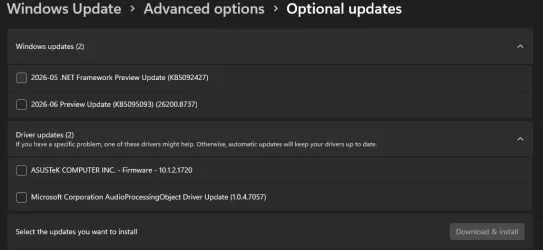
Solved Windows 11 optional Driverupdate has a bios 1720 for my board - Seems wrong?


In my MSI Z690 BIOS, I have a setting to present downgrade my BIOS ..
Me too, but I don't think it will prevent an update delivered through the OS. I think it's only for the EZ-bios update.
 

My Computer My Computer

At a glance

Windows 11proI7-12700KFKingston Fury Beast 2*16GB DDR5-5200Asus GeForce® RTX 3080 12GB ROG Strix
OS
Windows 11pro
Computer type
PC/Desktop
Manufacturer/Model
I bought the parts retail and build it myself.
CPU
I7-12700KF
Motherboard
Gaming z690-PLUS + Bios v4101
Memory
Kingston Fury Beast 2*16GB DDR5-5200
Graphics Card(s)
Asus GeForce® RTX 3080 12GB ROG Strix
Sound Card
Motherboard + Edifier active speakers.
Monitor(s) Displays
2 * AOC
Screen Resolution
1920x1080
Hard Drives
Asus ROG Strix SQ7 1TB NVMe PCIe 4.0 SSD
Kingston Fury Renegade 2TB NVMe PCIe 4.0 SSD
PSU
Corsair HX1000 1000W 80+ Platinum (Modulær)
Case
Corsair 4000D Tempered Glass VG-Edition
Cooling
Thermalright Macho Rev.B
Keyboard
Corsair K70 RGB TKL Optical
Mouse
Logitech G603
Internet Speed
1000/1000 Fiber
Browser
Chrome
Antivirus
Malwarebytes in tandem with Defender

DO NOT INSTALL A BIOS UPDATE OFFERED IN WINDOWS UPDATE

I've had terrible experiences with that, especially since they love to mess with secure boot settings and even set supervisor passwords that you need to reset after to get back control over your system.

Hide it using Windows Update Mini Tool, or block driver updates entirely, you are risking yourself to be left out of your BIOS configuration interface (Unless you reset the supervisor password with generators online... is a true mess).

If you absolutely need to update your BIOS, go to your vendor's site and install an update from there.

Do not let Microsoft handle that for you, they could even potentially brick your system.
Exactly, that's why having this optional biosupdate lurking is scary. What if MS decides that it's to important to be optional, even though that bios are older than dinos. After all, MS do make crazy mistakes from time to time.
 

My Computer My Computer

At a glance

Windows 11proI7-12700KFKingston Fury Beast 2*16GB DDR5-5200Asus GeForce® RTX 3080 12GB ROG Strix
OS
Windows 11pro
Computer type
PC/Desktop
Manufacturer/Model
I bought the parts retail and build it myself.
CPU
I7-12700KF
Motherboard
Gaming z690-PLUS + Bios v4101
Memory
Kingston Fury Beast 2*16GB DDR5-5200
Graphics Card(s)
Asus GeForce® RTX 3080 12GB ROG Strix
Sound Card
Motherboard + Edifier active speakers.
Monitor(s) Displays
2 * AOC
Screen Resolution
1920x1080
Hard Drives
Asus ROG Strix SQ7 1TB NVMe PCIe 4.0 SSD
Kingston Fury Renegade 2TB NVMe PCIe 4.0 SSD
PSU
Corsair HX1000 1000W 80+ Platinum (Modulær)
Case
Corsair 4000D Tempered Glass VG-Edition
Cooling
Thermalright Macho Rev.B
Keyboard
Corsair K70 RGB TKL Optical
Mouse
Logitech G603
Internet Speed
1000/1000 Fiber
Browser
Chrome
Antivirus
Malwarebytes in tandem with Defender
yes, I hate it very bad when MS windows stick their nose in my motherboard files... stay out! you can't do anything right, stay out of my motherboard! they try b.s. like that with my Asus motherboard.
Exactly, bios updates should not even be a part of windows update imo.
 

My Computer My Computer

At a glance

Windows 11proI7-12700KFKingston Fury Beast 2*16GB DDR5-5200Asus GeForce® RTX 3080 12GB ROG Strix
OS
Windows 11pro
Computer type
PC/Desktop
Manufacturer/Model
I bought the parts retail and build it myself.
CPU
I7-12700KF
Motherboard
Gaming z690-PLUS + Bios v4101
Memory
Kingston Fury Beast 2*16GB DDR5-5200
Graphics Card(s)
Asus GeForce® RTX 3080 12GB ROG Strix
Sound Card
Motherboard + Edifier active speakers.
Monitor(s) Displays
2 * AOC
Screen Resolution
1920x1080
Hard Drives
Asus ROG Strix SQ7 1TB NVMe PCIe 4.0 SSD
Kingston Fury Renegade 2TB NVMe PCIe 4.0 SSD
PSU
Corsair HX1000 1000W 80+ Platinum (Modulær)
Case
Corsair 4000D Tempered Glass VG-Edition
Cooling
Thermalright Macho Rev.B
Keyboard
Corsair K70 RGB TKL Optical
Mouse
Logitech G603
Internet Speed
1000/1000 Fiber
Browser
Chrome
Antivirus
Malwarebytes in tandem with Defender
I have the exact same board. BIOS v. 4505 will give you every updated Secure Boot certificate. Just something to consider.
And I've never had Windows Update offer me a bios update, so I'm surprised they offered you one, and a very old one at that.
They don't actively offer it, but they have it lurking in "windows update/advanced options/optional updates/Driver updates" have you looked there?

I know it's posted as optional, but a tired MS-dev could probably at some point make it important by accident. That is scary.snap.webp
 

My Computer My Computer

At a glance

Windows 11proI7-12700KFKingston Fury Beast 2*16GB DDR5-5200Asus GeForce® RTX 3080 12GB ROG Strix
OS
Windows 11pro
Computer type
PC/Desktop
Manufacturer/Model
I bought the parts retail and build it myself.
CPU
I7-12700KF
Motherboard
Gaming z690-PLUS + Bios v4101
Memory
Kingston Fury Beast 2*16GB DDR5-5200
Graphics Card(s)
Asus GeForce® RTX 3080 12GB ROG Strix
Sound Card
Motherboard + Edifier active speakers.
Monitor(s) Displays
2 * AOC
Screen Resolution
1920x1080
Hard Drives
Asus ROG Strix SQ7 1TB NVMe PCIe 4.0 SSD
Kingston Fury Renegade 2TB NVMe PCIe 4.0 SSD
PSU
Corsair HX1000 1000W 80+ Platinum (Modulær)
Case
Corsair 4000D Tempered Glass VG-Edition
Cooling
Thermalright Macho Rev.B
Keyboard
Corsair K70 RGB TKL Optical
Mouse
Logitech G603
Internet Speed
1000/1000 Fiber
Browser
Chrome
Antivirus
Malwarebytes in tandem with Defender
This is a bit off to the side, but do you have Armoury Crate installed? Do you have its autoinstall enabled in the BIOS settings?
 

My Computers My Computers

  • At a glance

    Windows 11 26200.8728Amd Threadripper 7970X128GB (4 X 32) G.Skill DDR5 6400 (RDIMM)Gigabyte RTX 4090 OC
    OS
    Windows 11 26200.8728
    Computer type
    PC/Desktop
    Manufacturer/Model
    homebuilt
    CPU
    Amd Threadripper 7970X
    Motherboard
    Gigabyte TRX50 Aero D Rev. 1.0
    Memory
    128GB (4 X 32) G.Skill DDR5 6400 (RDIMM)
    Graphics Card(s)
    Gigabyte RTX 4090 OC
    Sound Card
    none (USB to speakers), Realtek
    Monitor(s) Displays
    Innocn 32" OLED
    Screen Resolution
    3840 X 2160 @ 60Hz
    Hard Drives
    Crucial T700 2TB M.2 NVME SSD
    WD 4TB Blue SATA SSD
    Seagate 18TB IronWolf Pro
    PSU
    BeQuiet! Straight Power 12 1500W
    Case
    Lian Li 011 Dynamic Evo XL
    Cooling
    SilverStone Technology XE360-TR5, with 3 Phanteks T30 fans
    Keyboard
    Cherry KC 500 MX LP (mechanical)
    Mouse
    Logitech M500s (wired)
    Internet Speed
    2000/250 Mbps (down/up)
    Other Info
    xFinity gateway
  • At a glance

    windows 11 26200.8728Intel I9-13900K64GB G.Skill DDR5-6000Gigabyte RTX 3090 ti
    Operating System
    windows 11 26200.8728
    Computer type
    PC/Desktop
    Manufacturer/Model
    homebuilt
    CPU
    Intel I9-13900K
    Motherboard
    Asus RoG Strix Z690-E
    Memory
    64GB G.Skill DDR5-6000
    Graphics card(s)
    Gigabyte RTX 3090 ti
    Sound Card
    built in Realtek
    Monitor(s) Displays
    Philips 27E1N8900 27" OLED
    Screen Resolution
    3840 X 2160 @60Hz
    Hard Drives
    WDC SN850 1TB
    8TB Seagate Ironwolf
    4TB Seagate Ironwolf
    PSU
    eVGA SuperNOVA 1300 GT
    Case
    Lian Li 011 Dynamic Evo
    Cooling
    Corsair iCUE H150i ELITE CAPELLIX Liquid CPU Cooler
    Keyboard
    Cherry Streaming (wired)
    Mouse
    Logitech M500s (wired)
Exactly, bios updates should not even be a part of windows update imo.
BIOS updates are offered, because your OEM provided them to MS. There is a supported mechanism for vendors to package a BIOS update in a "capsule" format, and have Window execute the update by rebooting into an EFI tool. This replaces the proprietary flashing tool with a MS-provided app.

MS doesn't force the vendors to provide BIOS updates, your OEM volunteered it.
 

My Computer My Computer

At a glance

Windows 7
OS
Windows 7
This is a bit off to the side, but do you have Armoury Crate installed? Do you have its autoinstall enabled in the BIOS settings?
No, never had it installed. Not a big fan of tools like that. And it has been disabled in bios from the start.
 

My Computer My Computer

At a glance

Windows 11proI7-12700KFKingston Fury Beast 2*16GB DDR5-5200Asus GeForce® RTX 3080 12GB ROG Strix
OS
Windows 11pro
Computer type
PC/Desktop
Manufacturer/Model
I bought the parts retail and build it myself.
CPU
I7-12700KF
Motherboard
Gaming z690-PLUS + Bios v4101
Memory
Kingston Fury Beast 2*16GB DDR5-5200
Graphics Card(s)
Asus GeForce® RTX 3080 12GB ROG Strix
Sound Card
Motherboard + Edifier active speakers.
Monitor(s) Displays
2 * AOC
Screen Resolution
1920x1080
Hard Drives
Asus ROG Strix SQ7 1TB NVMe PCIe 4.0 SSD
Kingston Fury Renegade 2TB NVMe PCIe 4.0 SSD
PSU
Corsair HX1000 1000W 80+ Platinum (Modulær)
Case
Corsair 4000D Tempered Glass VG-Edition
Cooling
Thermalright Macho Rev.B
Keyboard
Corsair K70 RGB TKL Optical
Mouse
Logitech G603
Internet Speed
1000/1000 Fiber
Browser
Chrome
Antivirus
Malwarebytes in tandem with Defender
BIOS updates are offered, because your OEM provided them to MS. There is a supported mechanism for vendors to package a BIOS update in a "capsule" format, and have Window execute the update by rebooting into an EFI tool. This replaces the proprietary flashing tool with a MS-provided app.

MS doesn't force the vendors to provide BIOS updates, your OEM volunteered it.
My rig is build by me, so it's not OEM, all parts retail, even the OS :) . I still don't get why the OS is ignoring that the Bios installed are way newer.
 

My Computer My Computer

At a glance

Windows 11proI7-12700KFKingston Fury Beast 2*16GB DDR5-5200Asus GeForce® RTX 3080 12GB ROG Strix
OS
Windows 11pro
Computer type
PC/Desktop
Manufacturer/Model
I bought the parts retail and build it myself.
CPU
I7-12700KF
Motherboard
Gaming z690-PLUS + Bios v4101
Memory
Kingston Fury Beast 2*16GB DDR5-5200
Graphics Card(s)
Asus GeForce® RTX 3080 12GB ROG Strix
Sound Card
Motherboard + Edifier active speakers.
Monitor(s) Displays
2 * AOC
Screen Resolution
1920x1080
Hard Drives
Asus ROG Strix SQ7 1TB NVMe PCIe 4.0 SSD
Kingston Fury Renegade 2TB NVMe PCIe 4.0 SSD
PSU
Corsair HX1000 1000W 80+ Platinum (Modulær)
Case
Corsair 4000D Tempered Glass VG-Edition
Cooling
Thermalright Macho Rev.B
Keyboard
Corsair K70 RGB TKL Optical
Mouse
Logitech G603
Internet Speed
1000/1000 Fiber
Browser
Chrome
Antivirus
Malwarebytes in tandem with Defender
Seems odd that Windows Update is offering firmware that is older than what you have installed.

I suggest using the Group Policy Editor to block all automatic driver updates. (A BIOS update is treated as a driver update.)

I'll give this solution a go.


Thank you to all who chipped in, it's really appreciated.

Hope you all get a nice weekend.
 

My Computer My Computer

At a glance

Windows 11proI7-12700KFKingston Fury Beast 2*16GB DDR5-5200Asus GeForce® RTX 3080 12GB ROG Strix
OS
Windows 11pro
Computer type
PC/Desktop
Manufacturer/Model
I bought the parts retail and build it myself.
CPU
I7-12700KF
Motherboard
Gaming z690-PLUS + Bios v4101
Memory
Kingston Fury Beast 2*16GB DDR5-5200
Graphics Card(s)
Asus GeForce® RTX 3080 12GB ROG Strix
Sound Card
Motherboard + Edifier active speakers.
Monitor(s) Displays
2 * AOC
Screen Resolution
1920x1080
Hard Drives
Asus ROG Strix SQ7 1TB NVMe PCIe 4.0 SSD
Kingston Fury Renegade 2TB NVMe PCIe 4.0 SSD
PSU
Corsair HX1000 1000W 80+ Platinum (Modulær)
Case
Corsair 4000D Tempered Glass VG-Edition
Cooling
Thermalright Macho Rev.B
Keyboard
Corsair K70 RGB TKL Optical
Mouse
Logitech G603
Internet Speed
1000/1000 Fiber
Browser
Chrome
Antivirus
Malwarebytes in tandem with Defender
  • Like
Reactions: OAT
My rig is build by me, so it's not OEM, all parts retail, even the OS :) . I still don't get why the OS is ignoring that the Bios installed are way newer.
ASUS is the OEM. Just because it's not a factory PC, doesn't mean ASUS won't supply a BIOS.
 

My Computer My Computer

At a glance

Windows 7
OS
Windows 7
All you have to do is update the BIOS to 4505 dated 15.12.2025, check, double check, and PC in good working order before you do so.
You have obviously done this probably several times before. Just leave the optional 1720 lounge there, it will probably go away once diagnostics have been sent to Microsoft.
It is up to you, use the ASUS updater, or do it manually.

My rig is build by me, so it's not OEM, all parts retail, even the OS :)
A desktop PC is a modular design, each module is OEM - MOBO, RAM modules, Graphics Card, Cooler, fans, case, etc. You assembled OEM premade modules in to your PC, You are the OEM of your assembled PC.
 

My Computer My Computer

At a glance

Windows 11
OS
Windows 11
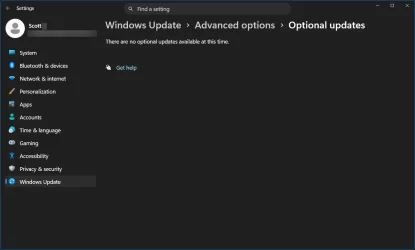
in "windows update/advanced options/optional updates/Driver updates" have you looked there?

Turns out I don't have a "Driver Updates" section.

1783135475886.webp

Might be because I have this enabled

1783135522102.webp

1783135572419.webp
 

My Computers My Computers

  • At a glance

    Win 11 Pro 25H2 26200.8737Intel® Core™ i7-14700KG.SKILL Ripjaws S5 Series 64GB (2 x 32GB) DDR5ASUS GeForce RTX 4070 Super 12GB
    OS
    Win 11 Pro 25H2 26200.8737
    Computer type
    PC/Desktop
    Manufacturer/Model
    Self Built
    CPU
    Intel® Core™ i7-14700K
    Motherboard
    ASUS TUF Z690-PLUS WIFI (BIOS 4505)
    Memory
    G.SKILL Ripjaws S5 Series 64GB (2 x 32GB) DDR5
    Graphics Card(s)
    ASUS GeForce RTX 4070 Super 12GB
    Sound Card
    Sound Blaster AE-5 Plus
    Monitor(s) Displays
    ASUS TUF Gaming 27" 2K HDR Gaming
    Screen Resolution
    2560 x 1440
    Hard Drives
    Samsung 990 Pro 1TB NVMe (Win 11 25H2)
    SK hynix P41 500GB NVMe
    SK hynix P41 2TB NVMe (x3)
    Crucial P3 Plus 4TB
    PSU
    Corsair RM850x Shift
    Case
    Antec Dark Phantom DP502 FLUX
    Cooling
    Corsair Nautilus 360 RS AIO
    Keyboard
    Logitech MK 320
    Mouse
    Razer Basilisk V3
    Internet Speed
    750Mbs
    Browser
    Firefox
    Antivirus
    Winows Security
    Other Info
    MR 8.1 Home
  • At a glance

    Win 11 Pro 25H2 26200.8737Intel Core i5-1140064 GB DDR4MSI GeForce RTX 3060 Ventus 2X 12GB
    Operating System
    Win 11 Pro 25H2 26200.8737
    Computer type
    PC/Desktop
    Manufacturer/Model
    Self Built
    CPU
    Intel Core i5-11400
    Motherboard
    Asus TUF Gaming Z590 Plus WiFi (BIOS 2803)
    Memory
    64 GB DDR4
    Graphics card(s)
    MSI GeForce RTX 3060 Ventus 2X 12GB
    Sound Card
    SoundBlaster Audigy Fx V2
    Monitor(s) Displays
    Samsung F27T350
    Screen Resolution
    1920x1080
    Hard Drives
    Samsung 980 Pro 1TB
    Samsung 970 EVO Plus 2TB
    Samsung 870 EVO 500GB SSD
    PSU
    Corsair HX750
    Case
    Cougar MX330-G Window
    Cooling
    Thermalright Frozen Edge 240 Black AIO
    Internet Speed
    350Mbps
    Browser
    Firefox
    Antivirus
    Windows Security
  • System Three
    Win 11 Pro 25H2 26200.8737
    ASUS PRIME Z370-P II BIOS 3004 7/12/21
    Intel Core i7-8700 CPU @ 3.20GHz
    32GB DDR4 RAM (4x8)
    iGPU Intel UHD Graphics 630
    Mid-Tower Desktop
In my ignorance, I'm surprised that MS modifies a firmware update that it is passing through from Asus.
Probably I should clarify that I'm talking about my old Acer laptop... it's not Asus, but the same principles apply TBH, I would only trust the manufacturer website for it...
 

My Computers My Computers

  • At a glance

    Windows 11 Pro 25H2AMD Ryzen 5 5600G @ 3.9/4.4Ghz2 x 16 GB DDR4 Kingston Fury Beast 3200 MhzAMD Radeon RX 6600 XT MSI Mech 2X OC Edition ...
    OS
    Windows 11 Pro 25H2
    Computer type
    PC/Desktop
    Manufacturer/Model
    Built PC
    CPU
    AMD Ryzen 5 5600G @ 3.9/4.4Ghz
    Motherboard
    MSI B550M-PRO-WiFi Ver. 1.4
    Memory
    2 x 16 GB DDR4 Kingston Fury Beast 3200 Mhz
    Graphics Card(s)
    AMD Radeon RX 6600 XT MSI Mech 2X OC Edition 8 GB
    Sound Card
    Realtek High Definition Audio (Integrated)
    Monitor(s) Displays
    Samsung C50Rx 27" LED / HP S2031 20" LCD
    Screen Resolution
    1920 x 1080 px / 1600 x 900 px
    Hard Drives
    WD Blue SN570 NVME M.2 SSD [1 TB] -- External Drives: - WD Scorpion Blue 250 GB 5400 RPM (Data Backup) - Hitachi 500 GB 5400 RPM (Software / ISOs Backup) - Toshiba MQ01ABD100 1 TB 5400 RPM (OS Images) - HGST TravelStar 7K1000 1 TB, 7200 RPM USB 3.0 - ADATA SU800 2TB SSD USB 3.0
    PSU
    Corsair RM750e 750W Fully Modular
    Case
    Naceb Hydra NA-1602
    Cooling
    Naceb Orpheus x 3 (Front) + Naceb Cepheus 1200 RPM Max (Rear) + ThemalRight Assasin X 90 SE (CPU)
    Keyboard
    Logitech MK470 Wireless
    Mouse
    Logitech MK470 Wireless
    Internet Speed
    120 MB Symetrical
    Browser
    Firefox / Brave / Edge
    Antivirus
    Windows Defender
    Other Info
    - VMs: WMware Player - Windows 8.1 Pro x64 / Windows 11 Pro
    - Wacom Intuos Pro Small Tablet PTH-460
  • At a glance

    Windows 11 Pro 25H2AMD Ryzen 7 7730U @ 2.0/4.5 Ghz2 x 16 GB Kingston Fury Impact DDR4 3200 MhzRadeon (tm) Graphics Vega 8 (512 MB)
    Operating System
    Windows 11 Pro 25H2
    Computer type
    Laptop
    Manufacturer/Model
    HP Pavilion 15-eh3000la (80M53LA)
    CPU
    AMD Ryzen 7 7730U @ 2.0/4.5 Ghz
    Motherboard
    HP 8BC7
    Memory
    2 x 16 GB Kingston Fury Impact DDR4 3200 Mhz
    Graphics card(s)
    Radeon (tm) Graphics Vega 8 (512 MB)
    Sound Card
    Realtek High Definition Audio (Integrated)
    Monitor(s) Displays
    AU Optronics
    Screen Resolution
    1920 x 1080 px (125% size)
    Hard Drives
    WD Blue SN570 1TB NVME M.2 Drive
    PSU
    45 Watt Charger
    Cooling
    Laptop Cooling Pad
    Keyboard
    Free Wolf Foldable Portable Keyboard
    Mouse
    Free Wolf Wireless Mouse
    Internet Speed
    120 MB Symetrical
    Browser
    Firefox / Brave / Edge
    Antivirus
    Windows Defender
    Other Info
    - 41mWh battery.
    - Wacom Intuos Pro Small Tablet PTH-460
Exactly, that's why having this optional biosupdate lurking is scary. What if MS decides that it's to important to be optional, even though that bios are older than dinos. After all, MS do make crazy mistakes from time to time.
There's also this if you are positive about their updates: If you don't have a UPS or an alternative way to power your system, and they think it's time to update your BIOS, and power just goes off, they will basically bricking your system, because they pushed an update they shouldn't push without any type of safeguard.

I am more inclined to seek for updates in my manufacturer's website and install if needed. And even there, I just update BIOS if it's A MUST... Things are expensive today to just risk your backside and brick your PC. I don't like to update BIOS, I just did it recently in February for the Secure Boot Armaggedon... fortunately all works perfectly and system is updated. No more BIOS updates for me unless it's absolutely necessary, and ONLY from my vendors website.

So no, Microsoft, thank you, I'll hide firmware updates for my HP until the end of time.

Again, is a good idea to use Windows Update MiniTool to hide updates, that way you can safely update windows without risking a sneaky BIOS update.
 

My Computers My Computers

  • At a glance

    Windows 11 Pro 25H2AMD Ryzen 5 5600G @ 3.9/4.4Ghz2 x 16 GB DDR4 Kingston Fury Beast 3200 MhzAMD Radeon RX 6600 XT MSI Mech 2X OC Edition ...
    OS
    Windows 11 Pro 25H2
    Computer type
    PC/Desktop
    Manufacturer/Model
    Built PC
    CPU
    AMD Ryzen 5 5600G @ 3.9/4.4Ghz
    Motherboard
    MSI B550M-PRO-WiFi Ver. 1.4
    Memory
    2 x 16 GB DDR4 Kingston Fury Beast 3200 Mhz
    Graphics Card(s)
    AMD Radeon RX 6600 XT MSI Mech 2X OC Edition 8 GB
    Sound Card
    Realtek High Definition Audio (Integrated)
    Monitor(s) Displays
    Samsung C50Rx 27" LED / HP S2031 20" LCD
    Screen Resolution
    1920 x 1080 px / 1600 x 900 px
    Hard Drives
    WD Blue SN570 NVME M.2 SSD [1 TB] -- External Drives: - WD Scorpion Blue 250 GB 5400 RPM (Data Backup) - Hitachi 500 GB 5400 RPM (Software / ISOs Backup) - Toshiba MQ01ABD100 1 TB 5400 RPM (OS Images) - HGST TravelStar 7K1000 1 TB, 7200 RPM USB 3.0 - ADATA SU800 2TB SSD USB 3.0
    PSU
    Corsair RM750e 750W Fully Modular
    Case
    Naceb Hydra NA-1602
    Cooling
    Naceb Orpheus x 3 (Front) + Naceb Cepheus 1200 RPM Max (Rear) + ThemalRight Assasin X 90 SE (CPU)
    Keyboard
    Logitech MK470 Wireless
    Mouse
    Logitech MK470 Wireless
    Internet Speed
    120 MB Symetrical
    Browser
    Firefox / Brave / Edge
    Antivirus
    Windows Defender
    Other Info
    - VMs: WMware Player - Windows 8.1 Pro x64 / Windows 11 Pro
    - Wacom Intuos Pro Small Tablet PTH-460
  • At a glance

    Windows 11 Pro 25H2AMD Ryzen 7 7730U @ 2.0/4.5 Ghz2 x 16 GB Kingston Fury Impact DDR4 3200 MhzRadeon (tm) Graphics Vega 8 (512 MB)
    Operating System
    Windows 11 Pro 25H2
    Computer type
    Laptop
    Manufacturer/Model
    HP Pavilion 15-eh3000la (80M53LA)
    CPU
    AMD Ryzen 7 7730U @ 2.0/4.5 Ghz
    Motherboard
    HP 8BC7
    Memory
    2 x 16 GB Kingston Fury Impact DDR4 3200 Mhz
    Graphics card(s)
    Radeon (tm) Graphics Vega 8 (512 MB)
    Sound Card
    Realtek High Definition Audio (Integrated)
    Monitor(s) Displays
    AU Optronics
    Screen Resolution
    1920 x 1080 px (125% size)
    Hard Drives
    WD Blue SN570 1TB NVME M.2 Drive
    PSU
    45 Watt Charger
    Cooling
    Laptop Cooling Pad
    Keyboard
    Free Wolf Foldable Portable Keyboard
    Mouse
    Free Wolf Wireless Mouse
    Internet Speed
    120 MB Symetrical
    Browser
    Firefox / Brave / Edge
    Antivirus
    Windows Defender
    Other Info
    - 41mWh battery.
    - Wacom Intuos Pro Small Tablet PTH-460
Back
Top Bottom