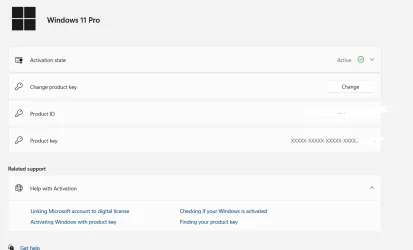
Windows 11 pro partial product key


asadermo

Well-known member
Local time
3:55 PM
Posts
41
OS
Win 11
have purchased Windows 11 pro digital key, I need to know when I format the windows and reinstall then it will work on it?

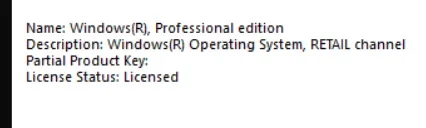
when I run the CMD 'slmgr /dli'' the following information are displayed

Name: Windows(R), Professional edition

Description: Windows(R) Operating System, RETAIL channel

Partial Product Key: xxxx
Screenshot 2026-04-16 161810.webp
License Status: Licensed
 
Windows Build/Version
Version 24H2 ( OS Build 26100. 3323)

My Computer

System One

  • OS
    Win 11
    Computer type
    Laptop
    Manufacturer/Model
    DELL VOSTRO 3515
    CPU
    AMD RYZEN 5
    Memory
    8 GB
    Graphics Card(s)
    AMD RADEON
Dare I ask from where you purchased it?

And of course, if you have a valid activated license, you can normally clean install Windows as many times as you wish on that same PC, and changing RAM or disk has no significance. Should a different key also be embedded in your BIOS, that can cause complications.

Recommended: associate your activation (digital license) with your MS account if you have one. Tutorial available.
 

My Computer

System One

  • OS
    Windows 11 Pro
    Computer type
    Laptop
    Manufacturer/Model
    Lenovo t480s
    CPU
    i7-8650U
    Memory
    16GB
    Graphics Card(s)
    Intel UHD 620
    Screen Resolution
    1920x1080
    Hard Drives
    C SN810 SDCPNRY-512G-1006
    Browser
    Edge, Firefox
    Antivirus
    Defender
I have purchased from a third party retailer
Screenshot 2026-04-16 190503.webp
 

My Computer

System One

  • OS
    Win 11
    Computer type
    Laptop
    Manufacturer/Model
    DELL VOSTRO 3515
    CPU
    AMD RYZEN 5
    Memory
    8 GB
    Graphics Card(s)
    AMD RADEON
Thank you for your reply. There are reliable ones - and others. That you've asked if there may be a problem using it makes me think the latter.

See this utility:
ShowKeyPlus (Recommended): Displays product name, ID, installed key, and OEM key. It can also identify if your key is from a retail store, OEM, or a digital license.
You might find this interesting (albeit from tenforums.com)
 

My Computer

System One

  • OS
    Windows 11 Pro
    Computer type
    Laptop
    Manufacturer/Model
    Lenovo t480s
    CPU
    i7-8650U
    Memory
    16GB
    Graphics Card(s)
    Intel UHD 620
    Screen Resolution
    1920x1080
    Hard Drives
    C SN810 SDCPNRY-512G-1006
    Browser
    Edge, Firefox
    Antivirus
    Defender
As your Win 11 Pro is activated, your computer is registered on MS servers and it has a "Digital License".
That means that you can do a win 11 clean install (deleting all partitions on the drive), skipping to enter any key and it will activate.
As Dalchina already mentioned, your DELL VOSTRO 3515 has a key engraved on BIOS. If it came with Win 10 or 11 Home it won't ask witch version you want to install and will install Home and then you will have to change it to Pro after installation.
You can add an ei.cfg file on /sources folder of the installation drive that tell you want to install pro.
Create a “ei.cfg” file containing the following text:

[EditionID]
Professional
[Channel]
Retail


Save the ei.cfg file to the \Sources folder on your Windows 11 installation media (USB flash drive).
 
Last edited:

My Computers

System One System Two

  • OS
    Windows 11 Pro - Windows 7 HP 64 - Lubuntu
    Computer type
    PC/Desktop
    Manufacturer/Model
    custom build
    CPU
    i5 6600K - 800MHz to 4400MHz
    Motherboard
    GA-Z170-HD3P
    Memory
    4+4G GSkill DDR4 3000
    Graphics Card(s)
    IG - Intel 530
    Monitor(s) Displays
    Samsung 226BW
    Screen Resolution
    1680x1050
    Hard Drives
    (1) -1 SM951 – 128GB M.2 AHCI PCIe SSD drive for Win 11
    (2) -1 WD SATA 3 - 1T for Data
    (3) -1 WD SATA 3 - 1T for backup
    (4) -1 BX500 SSD - 256G for Windows 7 and Lubuntu
    PSU
    Thermaltake 450W TR2 gold
    Keyboard
    Old and good Chicony mechanical keyboard
    Mouse
    Logitech mX performance - 9 buttons (had to disable some)
    Internet Speed
    500 Mb/s
    Browser
    Firefox 64
  • Operating System
    Windows 11 Pro
    Computer type
    Laptop
    Manufacturer/Model
    Asus Q550LF
    CPU
    i7-4500U 800- 3000MHz
    Motherboard
    Asus Q550LF
    Memory
    (4+4)G DDR3 1600
    Graphics card(s)
    IG intel 4400 + NVIDIA GeForce GT 745M
    Sound Card
    Realtek
    Monitor(s) Displays
    LG Display LP156WF4-SPH1
    Screen Resolution
    1920 x 1080
    Hard Drives
    BX500 120G SSD for Windows and programs
    & 1T HDD for data
    Internet Speed
    500 Mb/s
    Browser
    Firefox 64

Latest Support Threads

Back
Top Bottom