
KurtWagner
New member
- Local time
- 5:47 AM
- Posts
- 1
- OS
- windows 11
I have a hibernate/sleep problem in windows 11 msi laptop katana 15 B12V. When I close the lid and open it again after some time, I see that all the applications are shut down. I am seeing the windows as if it is just started.
What do I need to do to fix this problem? I uninstalled all NVIDIA drivers and I am still facing with that problem.
I have enclosed some of the power settings in my computer.

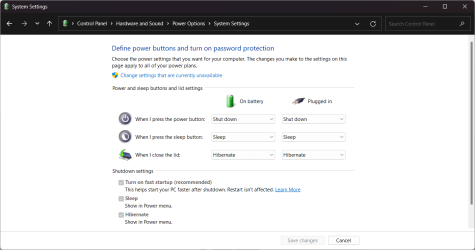
What do I need to do to fix this problem? I uninstalled all NVIDIA drivers and I am still facing with that problem.
I have enclosed some of the power settings in my computer.
- Windows Build/Version
- 22631.3880
Last edited:
My Computer
At a glance
windows 11i732GB
- OS
- windows 11
- Computer type
- Laptop
- Manufacturer/Model
- msi
- CPU
- i7
- Memory
- 32GB






