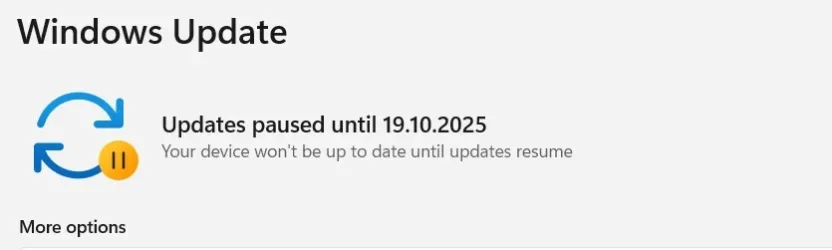
Windows 11 updates always fail at 100% :-(


LarsErikOsterud

Active member
Member
Local time
2:42 PM
Posts
56
OS
Windows 10
I am so VERY tired of Windows 11 updates always failing at 100%. Never happends in Windows 10. But happends on Windows 11 EVERY SINGLE TIME. I'm so tired of using DISM, SFC and in-place upgrades to fix things EVERY TIME. Can it be that hard to make this work as before? And why can't it say WHAT went wrong (and not ony "something" went wrong). Seriously thinking about downgrading my Windows 11 PCs to 10 :-(
 

My Computers My Computers

  • At a glance

    Windows 10Intel Core i5-6600 3.30Ghz16 GBAsus Nvidia GeForce GTX 960
    OS
    Windows 10
    Computer type
    PC/Desktop
    Manufacturer/Model
    Asus
    CPU
    Intel Core i5-6600 3.30Ghz
    Motherboard
    Asus B150M
    Memory
    16 GB
    Graphics Card(s)
    Asus Nvidia GeForce GTX 960
    Sound Card
    Onboard
    Monitor(s) Displays
    Samsung
    Hard Drives
    Samsung SSD 850 EBO 128 GB
    WDC WD1003FZEX-00MK2A0
  • At a glance

    Windows 1111the Gen Intel Core i5-1135G7 2.40 GHz8 GBIntel Xe
    Operating System
    Windows 11
    Computer type
    Laptop
    Manufacturer/Model
    Asus ExpertBook
    CPU
    11the Gen Intel Core i5-1135G7 2.40 GHz
    Memory
    8 GB
    Graphics card(s)
    Intel Xe
    Sound Card
    Onboard
    Hard Drives
    NVMe WDC PC SN530 SDBPNPZ 256 GB
Problems with your laptop or desktop?
 

My Computer My Computer

At a glance

Microsoft Windows 11 HomeIntel Core i5-13490F2 x 16 Patriot Memory (PDP Systems) PSD516G56...GIGABYTE GeForce RTX 4070 WINDFORCE OC 12G (G...
OS
Microsoft Windows 11 Home
Computer type
PC/Desktop
Manufacturer/Model
MSI MS-7D98
CPU
Intel Core i5-13490F
Motherboard
MSI B760 GAMING PLUS WIFI
Memory
2 x 16 Patriot Memory (PDP Systems) PSD516G560081 6400MT (32-37-37-74); 1.35V)
Graphics Card(s)
GIGABYTE GeForce RTX 4070 WINDFORCE OC 12G (GV-N4070WF3OC-12GD)
Sound Card
Bluetooth Аудио
Monitor(s) Displays
INNOCN 15K1F
Screen Resolution
1920 x 1080
Hard Drives
WD_BLACK SN770 250GB
KINGSTON SNV2S1000G (ELFK0S.6)
PSU
Thermaltake Toughpower GF3 1000W
Case
CG560 - DeepCool
Cooling
ID-COOLING SE-224-XTS / 2 x 140Mm Fan - rear and top; 3 x 120Mm - front
Keyboard
Corsair K70 RGB TKL
Mouse
Corsair KATAR PRO XT
Internet Speed
100 Mbps
Browser
Firefox
Antivirus
Microsoft Defender Antivirus
Other Info
https://www.userbenchmark.com/UserRun/66553205
My Windows 11 laptop (my Windows 10 desktop updated without any hickups at all).
Last update I had to do an in-place upgrade to make the update install.
Now this update won't install either. Do I have to do an in-place upgrade EVERY time there is an update.
Can't MS get their act together and fix this (I see I'm not the only one with this problem).
 

My Computers My Computers

  • At a glance

    Windows 10Intel Core i5-6600 3.30Ghz16 GBAsus Nvidia GeForce GTX 960
    OS
    Windows 10
    Computer type
    PC/Desktop
    Manufacturer/Model
    Asus
    CPU
    Intel Core i5-6600 3.30Ghz
    Motherboard
    Asus B150M
    Memory
    16 GB
    Graphics Card(s)
    Asus Nvidia GeForce GTX 960
    Sound Card
    Onboard
    Monitor(s) Displays
    Samsung
    Hard Drives
    Samsung SSD 850 EBO 128 GB
    WDC WD1003FZEX-00MK2A0
  • At a glance

    Windows 1111the Gen Intel Core i5-1135G7 2.40 GHz8 GBIntel Xe
    Operating System
    Windows 11
    Computer type
    Laptop
    Manufacturer/Model
    Asus ExpertBook
    CPU
    11the Gen Intel Core i5-1135G7 2.40 GHz
    Memory
    8 GB
    Graphics card(s)
    Intel Xe
    Sound Card
    Onboard
    Hard Drives
    NVMe WDC PC SN530 SDBPNPZ 256 GB

1.webp
 

My Computer My Computer

At a glance

Microsoft Windows 11 HomeIntel Core i5-13490F2 x 16 Patriot Memory (PDP Systems) PSD516G56...GIGABYTE GeForce RTX 4070 WINDFORCE OC 12G (G...
OS
Microsoft Windows 11 Home
Computer type
PC/Desktop
Manufacturer/Model
MSI MS-7D98
CPU
Intel Core i5-13490F
Motherboard
MSI B760 GAMING PLUS WIFI
Memory
2 x 16 Patriot Memory (PDP Systems) PSD516G560081 6400MT (32-37-37-74); 1.35V)
Graphics Card(s)
GIGABYTE GeForce RTX 4070 WINDFORCE OC 12G (GV-N4070WF3OC-12GD)
Sound Card
Bluetooth Аудио
Monitor(s) Displays
INNOCN 15K1F
Screen Resolution
1920 x 1080
Hard Drives
WD_BLACK SN770 250GB
KINGSTON SNV2S1000G (ELFK0S.6)
PSU
Thermaltake Toughpower GF3 1000W
Case
CG560 - DeepCool
Cooling
ID-COOLING SE-224-XTS / 2 x 140Mm Fan - rear and top; 3 x 120Mm - front
Keyboard
Corsair K70 RGB TKL
Mouse
Corsair KATAR PRO XT
Internet Speed
100 Mbps
Browser
Firefox
Antivirus
Microsoft Defender Antivirus
Other Info
https://www.userbenchmark.com/UserRun/66553205
But that doesn't fix the problem. When all new updates fail at 100%.
Then my Windows 11 will soon be as wonarable as Windows 10 :-)
Isn't there an easy way to find WHY it always fails at 100%?
 

My Computers My Computers

  • At a glance

    Windows 10Intel Core i5-6600 3.30Ghz16 GBAsus Nvidia GeForce GTX 960
    OS
    Windows 10
    Computer type
    PC/Desktop
    Manufacturer/Model
    Asus
    CPU
    Intel Core i5-6600 3.30Ghz
    Motherboard
    Asus B150M
    Memory
    16 GB
    Graphics Card(s)
    Asus Nvidia GeForce GTX 960
    Sound Card
    Onboard
    Monitor(s) Displays
    Samsung
    Hard Drives
    Samsung SSD 850 EBO 128 GB
    WDC WD1003FZEX-00MK2A0
  • At a glance

    Windows 1111the Gen Intel Core i5-1135G7 2.40 GHz8 GBIntel Xe
    Operating System
    Windows 11
    Computer type
    Laptop
    Manufacturer/Model
    Asus ExpertBook
    CPU
    11the Gen Intel Core i5-1135G7 2.40 GHz
    Memory
    8 GB
    Graphics card(s)
    Intel Xe
    Sound Card
    Onboard
    Hard Drives
    NVMe WDC PC SN530 SDBPNPZ 256 GB

Please share your log files:


Please run > post share links


1) Run upgrade_failure_info > post a share link


2) Run Tuneup plus > post a share link


3) Run the V2 log collector > post a share link


My Computer My Computer

At a glance

Windows 10Intel(R) Core(TM) i7-4800MQ CPU @ 2.70GHz16 GB Total: Manufacturer : Samsung MemoryTyp...NVIDIA Quadro K3100M; Intel(R) HD Graphics 4600
OS
Windows 10
Computer type
Laptop
Manufacturer/Model
HP
CPU
Intel(R) Core(TM) i7-4800MQ CPU @ 2.70GHz
Motherboard
Product : 190A Version : KBC Version 94.56
Memory
16 GB Total: Manufacturer : Samsung MemoryType : DDR3 FormFactor : SODIMM Capacity : 8GB Speed : 1600
Graphics Card(s)
NVIDIA Quadro K3100M; Intel(R) HD Graphics 4600
Sound Card
IDT High Definition Audio CODEC; PNP Device ID HDAUDIO\FUNC_01&VEN_111D&DEV_76E0
Hard Drives
Model Hitachi HTS727575A9E364
Antivirus
Microsoft Defender
Other Info
Mobile Workstation
The fact that you have to do an in-place upgrade before updates will complete tells me that for whatever reason the files necessary for updates to complete are getting corrupted.... somehow.

All I can tell you is I can't remember the last time I had an upgrade fail. I always disable my third party antivirus before updating. If you run 3rd party AV, you might try that next time.

Another suggestion is to put the computer in a clean boot state and run windows update.
It is a recommended troubleshooting step to install new updates by preventing conflicts with third-party software and services(this would include AV software). A clean boot starts Windows with only the essential Microsoft services and drivers, which helps identify if a non-Microsoft startup program or service is interfering with the update process.

If neither of those suggestions work I would certainly reset windows update before I went to the effort of a repair install (ie: in-place upgrade)..


Be sure to restart afterwards.
 

My Computers My Computers

  • At a glance

    Windows 11 Pro 25H2 26200.8655i9-10900 10 core 20 threads32 gbnone-Intel UHD Graphics 630
    OS
    Windows 11 Pro 25H2 26200.8655
    Computer type
    PC/Desktop
    Manufacturer/Model
    Dell Optiplex 7080
    CPU
    i9-10900 10 core 20 threads
    Motherboard
    DELL 0J37VM
    Memory
    32 gb
    Graphics Card(s)
    none-Intel UHD Graphics 630
    Sound Card
    Integrated Realtek
    Monitor(s) Displays
    Benq 27
    Screen Resolution
    2560x1440
    Hard Drives
    2x1tb Solidigm m.2 nvme /External drives 512gb Samsung m.2 sata+2tb Kingston m2.nvme
    PSU
    500w
    Case
    MT
    Cooling
    Dell Premium
    Keyboard
    Logitech wired
    Mouse
    Logitech wireless
    Internet Speed
    so slow I'm too embarrassed to tell
    Browser
    #1 Edge #2 Firefox
    Antivirus
    Defender+MWB Premium
  • At a glance

    Windows 11 Pro 24H2 26200.8457AMD Ryzen 7 6800U32 gbintegrated
    Operating System
    Windows 11 Pro 24H2 26200.8457
    Computer type
    PC/Desktop
    Manufacturer/Model
    Beelink Mini PC SER5
    CPU
    AMD Ryzen 7 6800U
    Memory
    32 gb
    Graphics card(s)
    integrated
    Sound Card
    integrated
    Monitor(s) Displays
    Benq 27
    Screen Resolution
    2560x1440
    Hard Drives
    1TB Crucial nvme
    Keyboard
    Logitech wired
    Mouse
    Logitech wireless
    Internet Speed
    still too embarrassed to tell
    Browser
    Firefox
    Antivirus
    Defender
    Other Info
    System 3 is non compliant Dell 9020 i7-4770/24gb ram Win11 PRO 26200.8457
Kind of annoying since this is a laptop delivered with Windows 11 Pro.
And there is no 3rd party anti-virus or anything like that.

Last update (KB5064081) did this when I downloaded it from the catalog.
Installed to 30% at reboot (as normal).
Then got to 98% on stage 1 of 2 and then rolled back :-(
No error message other than "something went wrong" :-(
 

My Computers My Computers

  • At a glance

    Windows 10Intel Core i5-6600 3.30Ghz16 GBAsus Nvidia GeForce GTX 960
    OS
    Windows 10
    Computer type
    PC/Desktop
    Manufacturer/Model
    Asus
    CPU
    Intel Core i5-6600 3.30Ghz
    Motherboard
    Asus B150M
    Memory
    16 GB
    Graphics Card(s)
    Asus Nvidia GeForce GTX 960
    Sound Card
    Onboard
    Monitor(s) Displays
    Samsung
    Hard Drives
    Samsung SSD 850 EBO 128 GB
    WDC WD1003FZEX-00MK2A0
  • At a glance

    Windows 1111the Gen Intel Core i5-1135G7 2.40 GHz8 GBIntel Xe
    Operating System
    Windows 11
    Computer type
    Laptop
    Manufacturer/Model
    Asus ExpertBook
    CPU
    11the Gen Intel Core i5-1135G7 2.40 GHz
    Memory
    8 GB
    Graphics card(s)
    Intel Xe
    Sound Card
    Onboard
    Hard Drives
    NVMe WDC PC SN530 SDBPNPZ 256 GB

My Computer My Computer

At a glance

Windows 10Intel(R) Core(TM) i7-4800MQ CPU @ 2.70GHz16 GB Total: Manufacturer : Samsung MemoryTyp...NVIDIA Quadro K3100M; Intel(R) HD Graphics 4600
OS
Windows 10
Computer type
Laptop
Manufacturer/Model
HP
CPU
Intel(R) Core(TM) i7-4800MQ CPU @ 2.70GHz
Motherboard
Product : 190A Version : KBC Version 94.56
Memory
16 GB Total: Manufacturer : Samsung MemoryType : DDR3 FormFactor : SODIMM Capacity : 8GB Speed : 1600
Graphics Card(s)
NVIDIA Quadro K3100M; Intel(R) HD Graphics 4600
Sound Card
IDT High Definition Audio CODEC; PNP Device ID HDAUDIO\FUNC_01&VEN_111D&DEV_76E0
Hard Drives
Model Hitachi HTS727575A9E364
Antivirus
Microsoft Defender
Other Info
Mobile Workstation
Here are the logs from my other Windows 11 laptop (same update problem there):
 

Attachments

My Computers My Computers

  • At a glance

    Windows 10Intel Core i5-6600 3.30Ghz16 GBAsus Nvidia GeForce GTX 960
    OS
    Windows 10
    Computer type
    PC/Desktop
    Manufacturer/Model
    Asus
    CPU
    Intel Core i5-6600 3.30Ghz
    Motherboard
    Asus B150M
    Memory
    16 GB
    Graphics Card(s)
    Asus Nvidia GeForce GTX 960
    Sound Card
    Onboard
    Monitor(s) Displays
    Samsung
    Hard Drives
    Samsung SSD 850 EBO 128 GB
    WDC WD1003FZEX-00MK2A0
  • At a glance

    Windows 1111the Gen Intel Core i5-1135G7 2.40 GHz8 GBIntel Xe
    Operating System
    Windows 11
    Computer type
    Laptop
    Manufacturer/Model
    Asus ExpertBook
    CPU
    11the Gen Intel Core i5-1135G7 2.40 GHz
    Memory
    8 GB
    Graphics card(s)
    Intel Xe
    Sound Card
    Onboard
    Hard Drives
    NVMe WDC PC SN530 SDBPNPZ 256 GB
Update KB5064081 (Build 26200.5074) Preview for Windows 11, version 25H2
Release Preview - for testing before a general release, which is expected before the end of this year.

But why do you use the "Release Preview".
As I understand it, you want to help Microsoft correct possible problems.

This is reminiscent of a passage in a book by the American writer M. Twain.
Dudes were forced to paint a fence by social engineering.
 
Last edited:

My Computer My Computer

At a glance

Microsoft Windows 11 HomeIntel Core i5-13490F2 x 16 Patriot Memory (PDP Systems) PSD516G56...GIGABYTE GeForce RTX 4070 WINDFORCE OC 12G (G...
OS
Microsoft Windows 11 Home
Computer type
PC/Desktop
Manufacturer/Model
MSI MS-7D98
CPU
Intel Core i5-13490F
Motherboard
MSI B760 GAMING PLUS WIFI
Memory
2 x 16 Patriot Memory (PDP Systems) PSD516G560081 6400MT (32-37-37-74); 1.35V)
Graphics Card(s)
GIGABYTE GeForce RTX 4070 WINDFORCE OC 12G (GV-N4070WF3OC-12GD)
Sound Card
Bluetooth Аудио
Monitor(s) Displays
INNOCN 15K1F
Screen Resolution
1920 x 1080
Hard Drives
WD_BLACK SN770 250GB
KINGSTON SNV2S1000G (ELFK0S.6)
PSU
Thermaltake Toughpower GF3 1000W
Case
CG560 - DeepCool
Cooling
ID-COOLING SE-224-XTS / 2 x 140Mm Fan - rear and top; 3 x 120Mm - front
Keyboard
Corsair K70 RGB TKL
Mouse
Corsair KATAR PRO XT
Internet Speed
100 Mbps
Browser
Firefox
Antivirus
Microsoft Defender Antivirus
Other Info
https://www.userbenchmark.com/UserRun/66553205
I done the scripts for resetting Windows Update. And used DISM and SFC to restore health
(all SFC did accoring to the log was readd all the Start Menu entries I had deleted :-)

Update still fails, but at least I found the error in the updae log. It says FAILED 800706BA.

On the other system the update now won't install at all (fails before install starts). Errorcode 0x8007139F
When I try to scan for updates again it says it can't install this update. Errorcode 0x800f0922.
 
Last edited:

My Computers My Computers

  • At a glance

    Windows 10Intel Core i5-6600 3.30Ghz16 GBAsus Nvidia GeForce GTX 960
    OS
    Windows 10
    Computer type
    PC/Desktop
    Manufacturer/Model
    Asus
    CPU
    Intel Core i5-6600 3.30Ghz
    Motherboard
    Asus B150M
    Memory
    16 GB
    Graphics Card(s)
    Asus Nvidia GeForce GTX 960
    Sound Card
    Onboard
    Monitor(s) Displays
    Samsung
    Hard Drives
    Samsung SSD 850 EBO 128 GB
    WDC WD1003FZEX-00MK2A0
  • At a glance

    Windows 1111the Gen Intel Core i5-1135G7 2.40 GHz8 GBIntel Xe
    Operating System
    Windows 11
    Computer type
    Laptop
    Manufacturer/Model
    Asus ExpertBook
    CPU
    11the Gen Intel Core i5-1135G7 2.40 GHz
    Memory
    8 GB
    Graphics card(s)
    Intel Xe
    Sound Card
    Onboard
    Hard Drives
    NVMe WDC PC SN530 SDBPNPZ 256 GB
When available please post the result share links into the newest post.

upgrade_failure_info
Tuneup plus
V2 log collector
 

My Computer My Computer

At a glance

Windows 10Intel(R) Core(TM) i7-4800MQ CPU @ 2.70GHz16 GB Total: Manufacturer : Samsung MemoryTyp...NVIDIA Quadro K3100M; Intel(R) HD Graphics 4600
OS
Windows 10
Computer type
Laptop
Manufacturer/Model
HP
CPU
Intel(R) Core(TM) i7-4800MQ CPU @ 2.70GHz
Motherboard
Product : 190A Version : KBC Version 94.56
Memory
16 GB Total: Manufacturer : Samsung MemoryType : DDR3 FormFactor : SODIMM Capacity : 8GB Speed : 1600
Graphics Card(s)
NVIDIA Quadro K3100M; Intel(R) HD Graphics 4600
Sound Card
IDT High Definition Audio CODEC; PNP Device ID HDAUDIO\FUNC_01&VEN_111D&DEV_76E0
Hard Drives
Model Hitachi HTS727575A9E364
Antivirus
Microsoft Defender
Other Info
Mobile Workstation
Errorcode 0x800f0922
This is a common rollback issue, so please provide the latest CBS logs to look at.

Upload a copy of the CBS folder
  • Open Windows Explorer and browse to the C:\Windows\Logs folder.
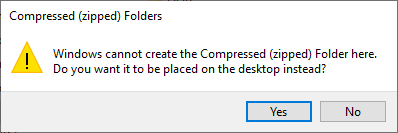
  • Right-click on the CBS folder and choose Send to > Compressed (zipped) folder.
  • Now the message will appear, "Windows cannot create the Compressed (zipped) Folder here. Do you want it to be placed on the desktop instead?"
  • Click on the Yes button here.
653a64385d891-618e949e09fef-CBS-Folder.png

  • Attach the file CBS.zip to your next reply. If the file is too large to attach, upload the CBS.zip file to www.wetransfer.com and post the link in your next reply.
 

My Computer My Computer

At a glance

Windows 10
OS
Windows 10
Have a worse problem even now. Tried to do and in-place upgrade to fix all.
Trouble is that an in-place install also fails. In the SAFE_OS MIGRATION phase :-(
Tried to restore an old backup of my boot disk, but the same happends :-(
Never had anything like that with Windows 10. In-place upgrade always work.
 

My Computers My Computers

  • At a glance

    Windows 10Intel Core i5-6600 3.30Ghz16 GBAsus Nvidia GeForce GTX 960
    OS
    Windows 10
    Computer type
    PC/Desktop
    Manufacturer/Model
    Asus
    CPU
    Intel Core i5-6600 3.30Ghz
    Motherboard
    Asus B150M
    Memory
    16 GB
    Graphics Card(s)
    Asus Nvidia GeForce GTX 960
    Sound Card
    Onboard
    Monitor(s) Displays
    Samsung
    Hard Drives
    Samsung SSD 850 EBO 128 GB
    WDC WD1003FZEX-00MK2A0
  • At a glance

    Windows 1111the Gen Intel Core i5-1135G7 2.40 GHz8 GBIntel Xe
    Operating System
    Windows 11
    Computer type
    Laptop
    Manufacturer/Model
    Asus ExpertBook
    CPU
    11the Gen Intel Core i5-1135G7 2.40 GHz
    Memory
    8 GB
    Graphics card(s)
    Intel Xe
    Sound Card
    Onboard
    Hard Drives
    NVMe WDC PC SN530 SDBPNPZ 256 GB
Have a worse problem even now. Tried to do and in-place upgrade to fix all.
Trouble is that an in-place install also fails. In the SAFE_OS MIGRATION phase :-(
Tried to restore an old backup of my boot disk, but the same happends :-(
Never had anything like that with Windows 10. In-place upgrade always work.
In order to perform a Repair Install / Update In Situ, ALL the following criteria MUST be met:-

You will only be able to perform a repair install of Windows 11 from within Windows 11. You will not be able to perform a repair install at boot or in Safe Mode

The Windows 11 installation media (ISO or USB) must be the same edition, same version, and same or higher build as the currently installed Windows 11.

The Windows 11 installation media (ISO or USB) must be for the same language as your currently installed Windows 11.


Otherwise, you can't keep personal files and / or apps
 

My Computer My Computer

At a glance

Windows 11 Pro 25H2 (Build 26200.8737)Intel Core Ultra 9 285 5.6 GHz32.00 GBIntel Integrated Graphics (128 MB)
OS
Windows 11 Pro 25H2 (Build 26200.8737)
Computer type
PC/Desktop
Manufacturer/Model
Dell Pro Max Tower T2 FCT2250
CPU
Intel Core Ultra 9 285 5.6 GHz
Motherboard
64-bit operating system, x64-based processor
Memory
32.00 GB
Graphics Card(s)
Intel Integrated Graphics (128 MB)
Sound Card
Realtek Audio
Monitor(s) Displays
Dell P2714H Monitor
Screen Resolution
1920 x 1080
Hard Drives
1 x 512GB M.2 XG10d SED KIOXIA PCIe solid state drive (Internal)
1 x 2TB Seagate ST2000DM008-2UB102 HDD (Internal)
1 x 1TB Seagate STGX4000400 External HDD
1 x 4TB Seagate STGX4000400 External HDD
1 x 6TB WD Elements AE 2689 External HDD
PSU
500 Watts
Cooling
Air
Keyboard
Microsoft Wired Keyboard 600
Mouse
Microsoft USB Basic Optical Mouse v2.0
Browser
Firefox
Antivirus
Windows Defender + Malwarebytes Premium
Other Info
BaseBoard Manufacturer Dell Inc.
BaseBoard Product 022RY57
BaseBoard Version A01
There were multiple requests for files for troubleshooting: (#6, 9, 13, 14)


If you plan to post these files then comment into the thread.

If you plan to reset save files, custom or clean install then comment into the thread.
 

My Computer My Computer

At a glance

Windows 10Intel(R) Core(TM) i7-4800MQ CPU @ 2.70GHz16 GB Total: Manufacturer : Samsung MemoryTyp...NVIDIA Quadro K3100M; Intel(R) HD Graphics 4600
OS
Windows 10
Computer type
Laptop
Manufacturer/Model
HP
CPU
Intel(R) Core(TM) i7-4800MQ CPU @ 2.70GHz
Motherboard
Product : 190A Version : KBC Version 94.56
Memory
16 GB Total: Manufacturer : Samsung MemoryType : DDR3 FormFactor : SODIMM Capacity : 8GB Speed : 1600
Graphics Card(s)
NVIDIA Quadro K3100M; Intel(R) HD Graphics 4600
Sound Card
IDT High Definition Audio CODEC; PNP Device ID HDAUDIO\FUNC_01&VEN_111D&DEV_76E0
Hard Drives
Model Hitachi HTS727575A9E364
Antivirus
Microsoft Defender
Other Info
Mobile Workstation
Now I have installed Windows 11 all the way from scratch :-(

But that **** KB5063878 still fails at 100% when installing with 0x800F0922 :-(
(and then uses forever to rollback during two reeboots)

Come on? What is the problem Microsoft? This is unbelivable.
 

My Computers My Computers

  • At a glance

    Windows 10Intel Core i5-6600 3.30Ghz16 GBAsus Nvidia GeForce GTX 960
    OS
    Windows 10
    Computer type
    PC/Desktop
    Manufacturer/Model
    Asus
    CPU
    Intel Core i5-6600 3.30Ghz
    Motherboard
    Asus B150M
    Memory
    16 GB
    Graphics Card(s)
    Asus Nvidia GeForce GTX 960
    Sound Card
    Onboard
    Monitor(s) Displays
    Samsung
    Hard Drives
    Samsung SSD 850 EBO 128 GB
    WDC WD1003FZEX-00MK2A0
  • At a glance

    Windows 1111the Gen Intel Core i5-1135G7 2.40 GHz8 GBIntel Xe
    Operating System
    Windows 11
    Computer type
    Laptop
    Manufacturer/Model
    Asus ExpertBook
    CPU
    11the Gen Intel Core i5-1135G7 2.40 GHz
    Memory
    8 GB
    Graphics card(s)
    Intel Xe
    Sound Card
    Onboard
    Hard Drives
    NVMe WDC PC SN530 SDBPNPZ 256 GB
Tried to download the stand alone installer from the catalog. Same result. Logs attached.
 

Attachments

My Computers My Computers

  • At a glance

    Windows 10Intel Core i5-6600 3.30Ghz16 GBAsus Nvidia GeForce GTX 960
    OS
    Windows 10
    Computer type
    PC/Desktop
    Manufacturer/Model
    Asus
    CPU
    Intel Core i5-6600 3.30Ghz
    Motherboard
    Asus B150M
    Memory
    16 GB
    Graphics Card(s)
    Asus Nvidia GeForce GTX 960
    Sound Card
    Onboard
    Monitor(s) Displays
    Samsung
    Hard Drives
    Samsung SSD 850 EBO 128 GB
    WDC WD1003FZEX-00MK2A0
  • At a glance

    Windows 1111the Gen Intel Core i5-1135G7 2.40 GHz8 GBIntel Xe
    Operating System
    Windows 11
    Computer type
    Laptop
    Manufacturer/Model
    Asus ExpertBook
    CPU
    11the Gen Intel Core i5-1135G7 2.40 GHz
    Memory
    8 GB
    Graphics card(s)
    Intel Xe
    Sound Card
    Onboard
    Hard Drives
    NVMe WDC PC SN530 SDBPNPZ 256 GB

Back
Top Bottom