Windows and Linux networking and Samba


retiredat44

Well-known member
Member
VIP
Local time
7:41 PM
Posts
491
Location
Oregon
OS
Win11
Windows and Linux networking and Samba. I can get windows 10 on my laptop to see linux desktop, but cannot get Windows 11 to see linux. wth?? what a PIA!
yes, I look on Ubuntu forums, but too much info and mostly worthless!

anyone know of a forum that has easy info that helps this issue? Thanx
 

My Computer My Computer

At a glance

Win11i9-1390064 GBNvidia RTX 5070 TI OC
OS
Win11
Computer type
PC/Desktop
Manufacturer/Model
Asus Home built
CPU
i9-13900
Motherboard
ASUS Strix Z790-H
Memory
64 GB
Graphics Card(s)
Nvidia RTX 5070 TI OC
Monitor(s) Displays
Sony 55"
Hard Drives
SSD
PSU
850 watt EVGA
Case
Cooler Master Haf 932
Cooling
CoolerMaster
Keyboard
RedDragon
Mouse
CoolerMaster
Internet Speed
300/300
Antivirus
Defender
Other Info
VR, Virtual Reality

Firstly this is Windows 11 forum, not the separatw Windows 10 forum.

Have you tried enabling SMB1 which is now off by default as SMB1 is considered a security risk?
 

My Computer My Computer

At a glance

Windows 11 Pro + Win11 Canary VM.I9 13th gen i9-13900H 2.60 GHZ16 GB solderedIntegrated Intel Iris XE
OS
Windows 11 Pro + Win11 Canary VM.
Computer type
Laptop
Manufacturer/Model
ASUS Zenbook 14
CPU
I9 13th gen i9-13900H 2.60 GHZ
Motherboard
Yep, Laptop has one.
Memory
16 GB soldered
Graphics Card(s)
Integrated Intel Iris XE
Sound Card
Realtek built in
Monitor(s) Displays
laptop OLED screen
Screen Resolution
2880x1800 touchscreen
Hard Drives
1 TB NVME SSD (only weakness is only one slot)
PSU
Internal + 65W thunderbolt USB4 charger
Case
Yep, got one
Cooling
Stella Artois (UK pint cans - 568 ml) - extra cost.
Keyboard
Built in UK keybd
Mouse
Bluetooth , wireless dongled, wired
Internet Speed
900 mbs (ethernet), wifi 6 typical 350-450 mb/s both up and down
Browser
Edge
Antivirus
Defender
Other Info
TPM 2.0, 2xUSB4 thunderbolt, 1xUsb3 (usb a), 1xUsb-c, hdmi out, 3.5 mm audio out/in combo, ASUS backlit trackpad (inc. switchable number pad)

Macrium Reflect Home V8
Office 365 Family (6 users each 1TB onedrive space)
Hyper-V (a vm runs almost as fast as my older laptop)
Firstly this is Windows 11 forum, not the separatw Windows 10 forum.

Have you tried enabling SMB1 which is now off by default as SMB1 is considered a security risk?
I have 2 win10, 1 win11, and 1 linux computer.. plus phones..
 

My Computer My Computer

At a glance

Win11i9-1390064 GBNvidia RTX 5070 TI OC
OS
Win11
Computer type
PC/Desktop
Manufacturer/Model
Asus Home built
CPU
i9-13900
Motherboard
ASUS Strix Z790-H
Memory
64 GB
Graphics Card(s)
Nvidia RTX 5070 TI OC
Monitor(s) Displays
Sony 55"
Hard Drives
SSD
PSU
850 watt EVGA
Case
Cooler Master Haf 932
Cooling
CoolerMaster
Keyboard
RedDragon
Mouse
CoolerMaster
Internet Speed
300/300
Antivirus
Defender
Other Info
VR, Virtual Reality
I found a way to use windows share.. with the ip address... so far it's ok. Keep me from transferring from win 11 to win10 and then to linux.
 

My Computer My Computer

At a glance

Win11i9-1390064 GBNvidia RTX 5070 TI OC
OS
Win11
Computer type
PC/Desktop
Manufacturer/Model
Asus Home built
CPU
i9-13900
Motherboard
ASUS Strix Z790-H
Memory
64 GB
Graphics Card(s)
Nvidia RTX 5070 TI OC
Monitor(s) Displays
Sony 55"
Hard Drives
SSD
PSU
850 watt EVGA
Case
Cooler Master Haf 932
Cooling
CoolerMaster
Keyboard
RedDragon
Mouse
CoolerMaster
Internet Speed
300/300
Antivirus
Defender
Other Info
VR, Virtual Reality
I found a way to use windows share.. with the ip address... so far it's ok. Keep me from transferring from win 11 to win10 and then to linux.
I'm very much a beginner with Linux, but I have researched and found three lines to modify/add to the Global section of my Linux Mint VM's smb.conf that lets it be seen by name on the network by Windows machines, and lets it see the names of my Windows machines, be they W10 or W11.

workgroup = <set this to same workgroup as Windows machines>
netbios name = <name you want Windows machines to see>
name resolve order = bcast host
 

My Computers My Computers

  • At a glance

    Windows 11 HomeAMD Athlon Silver 3050U8GBRadeon Graphics
    OS
    Windows 11 Home
    Computer type
    Laptop
    Manufacturer/Model
    Acer Aspire 3 A315-23-R9VY
    CPU
    AMD Athlon Silver 3050U
    Memory
    8GB
    Graphics Card(s)
    Radeon Graphics
    Monitor(s) Displays
    laptop screen
    Screen Resolution
    1366x768 native resolution, up to 2560x1440 with Radeon Virtual Super Resolution
    Hard Drives
    1TB Samsung EVO 870 SSD (from April 2026: 250GB EVO 850)
    Internet Speed
    150 Mbps
    Browser
    Edge, Firefox
    Antivirus
    Defender
    Other Info
    UPDATE - 11 April 2026: due to lid hinges starting to break up this laptop has been retired from active duty. The OS with all software and files has been migrated to my System Seven in 'Other systems' to carry on as my general purpose 'main machine'.

    I've now clean installed 25H2 and used Garlin's scripts to update Secure Boot to CA 2023 and revoke the PCA 2011 certificates. It's new role is to test secure boot issues.

    Info for 2021-2026:
    fully 'Windows 11 ready' laptop. Windows 10 C: partition migrated from my old unsupported 'main machine' then upgraded to 11. A test migration ran Insider builds for 2 months. When 11 was released on 5th October 2021 it was re-imaged back to 10 and was offered the upgrade in Windows Update on 20th October. Windows Update offered the 22H2 Feature Update on 20th September 2022. It got the 23H2 Feature Update on 4th November 2023 through Windows Update, 24H2 on 3rd October 2024 through Windows Update by setting the Target Release Version for 24H2, and 25H2 on 30th September 2025 through Windows Update by setting the Target Release Version for 25H2.
  • At a glance

    Windows 11 ProIntel® Core™ i5-520M8GB(integrated graphics) Intel HD Graphics
    Operating System
    Windows 11 Pro
    Computer type
    Laptop
    Manufacturer/Model
    Dell Latitude E4310
    CPU
    Intel® Core™ i5-520M
    Motherboard
    0T6M8G
    Memory
    8GB
    Graphics card(s)
    (integrated graphics) Intel HD Graphics
    Screen Resolution
    1366x768
    Hard Drives
    500GB Crucial MX500 SSD
    Browser
    Firefox, Edge
    Antivirus
    Defender
    Other Info
    unsupported machine: Legacy bios, MBR, TPM 1.2, upgraded from W10 to W11 using W10/W11 hybrid install media workaround.

    In-place upgrade to 22H2 using ISO and a workaround.
    Feature Update to 23H2 by manually installing the Enablement Package.
    In-place upgrade to 24H2 using hybrid 23H2/24H2 install media.
    Upgraded to 25H2 by Enablement Package.

    Also running Insider Experimental 263xx and 29xxx builds and Windows 10 as native boot .vhdx.
  • My SYSTEM THREE is a Dell Latitude 5410, i7-10610U, 32GB RAM, 512GB NVMe ssd, supported device running Windows 11 Pro.

    My SYSTEM FOUR was a 2-in-1 convertible Lenovo Yoga 11e (1st gen) type 20DA, Celeron N2930, 8GB RAM, 256GB ssd. Unsupported device. This has now been sold. It has been replaced by my System Eight.

    My SYSTEM FIVE is a Dell Latitude 3190 2-in-1, Pentium Silver N5030, 8GB RAM, 1TB NVMe ssd, supported device running Windows 11 Pro, plus Insider Beta, Experimental 263xx and 29xxx builds (and a few others) as a native boot .vhdx.

    My SYSTEM SIX is a Dell Latitude 5550, Core Ultra 7 165H, 64GB RAM, 1TB NVMe SSD, supported device, Windows 11 Pro, Hyper-V host machine. Updated to 25H2 on 30th September 2025.

    My SYSTEM SEVEN is a Lenovo Thinkpad T580, 1920x1080 touchscreen, Intel Core i7-8650U, 16GB RAM, 512GB NVMe SSD + 2nd 512GB NVMe SSD, a supported device for Windows 11. This is my current general purpose 'main machine'. The installed Windows 11 Home from my System One has been migrated to this machine. As its new home has an existing digital licence for Pro I've been able to upgrade the migrated OS from Home to Pro.

    My SYSTEM EIGHT is a 2-in-1 convertible Lenovo Yoga 11e (5th gen) type 20LN, Celeron N4120, 8GB RAM, 512GB NVMe ssd, a supported device for Windows 11. Currently running Windows 11 Pro, plus Insider Beta, Experimental 263xx and 29xxx builds as native boot vhdx.

My Computer My Computer

At a glance

Windows 11 Pro + Win11 Canary VM.I9 13th gen i9-13900H 2.60 GHZ16 GB solderedIntegrated Intel Iris XE
OS
Windows 11 Pro + Win11 Canary VM.
Computer type
Laptop
Manufacturer/Model
ASUS Zenbook 14
CPU
I9 13th gen i9-13900H 2.60 GHZ
Motherboard
Yep, Laptop has one.
Memory
16 GB soldered
Graphics Card(s)
Integrated Intel Iris XE
Sound Card
Realtek built in
Monitor(s) Displays
laptop OLED screen
Screen Resolution
2880x1800 touchscreen
Hard Drives
1 TB NVME SSD (only weakness is only one slot)
PSU
Internal + 65W thunderbolt USB4 charger
Case
Yep, got one
Cooling
Stella Artois (UK pint cans - 568 ml) - extra cost.
Keyboard
Built in UK keybd
Mouse
Bluetooth , wireless dongled, wired
Internet Speed
900 mbs (ethernet), wifi 6 typical 350-450 mb/s both up and down
Browser
Edge
Antivirus
Defender
Other Info
TPM 2.0, 2xUSB4 thunderbolt, 1xUsb3 (usb a), 1xUsb-c, hdmi out, 3.5 mm audio out/in combo, ASUS backlit trackpad (inc. switchable number pad)

Macrium Reflect Home V8
Office 365 Family (6 users each 1TB onedrive space)
Hyper-V (a vm runs almost as fast as my older laptop)
Hi folks

@retiredat44

@Bree

In the Samba configuration (usually in /etc/samba/smb.conf) in the global section - if you are using SMB1 (enable it on W11 via programs and features) then you need to ensure this line is present :

min protocol = NT1 <don't ask me why it's NT1 but I didn't design SAMBA !!!>

ensure also the WORKGROUP in your W11 machine is the same as that of your Linux machine.

workgroup = <Your workgroup name>

add your user to SAMBA via sudo smbpasswd <user>

Ensure the linux server name is in the netbiosname --this enable Windows to find it without having to connect via an IP address

netbios name = <server name>

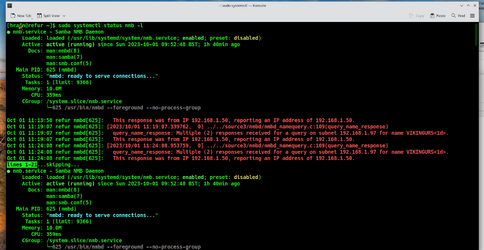
Also on the W11 system ensure Network discovery is on,and "allow remote connections to this computer" since Samba sends info to networked machines. E.G a remote server to a linux laptop

Screenshot_20231001_113344.png

Finally I'd also add openssh-server in Windows -- add via "Add optional feature" in settings and ensure its started and install openssh on your linux box and ensure that the ssh daemon is enabled and running.

sudo systemctl enable sshd (This only needs to be done once then it automatically starts at boot)

sudo systemctl start sshd

This allows you to SSH from Windows via command line directly into the
cli of the server (don't allow root ssh remote connection though).


Cheers
jimbo
 

My Computer My Computer

At a glance

Windows XP,11 Linux Fedora Rawhide pre-releas...2 X Intel i7
OS
Windows XP,11 Linux Fedora Rawhide pre-release 46
Computer type
PC/Desktop
CPU
2 X Intel i7
Screen Resolution
4KUHD X 2
yes, I found an easy way and am tired of using sudo nano on conf files in linux... now I use share with IP on the win11 end. All is fixed for me. Ubuntu often was be messed up if you didn't do something perfect. I am sick and tired of coding, I am retired and no longer have to worry about Dos, Cobolt, pascal, etc..etc.. binary, oct, hex... and machine language. I am tired of spending hours ready forums for editing files. I am good now. I just use my Linux computer to read my flight sim manuals while flying combat missions in VR. :)
 

My Computer My Computer

At a glance

Win11i9-1390064 GBNvidia RTX 5070 TI OC
OS
Win11
Computer type
PC/Desktop
Manufacturer/Model
Asus Home built
CPU
i9-13900
Motherboard
ASUS Strix Z790-H
Memory
64 GB
Graphics Card(s)
Nvidia RTX 5070 TI OC
Monitor(s) Displays
Sony 55"
Hard Drives
SSD
PSU
850 watt EVGA
Case
Cooler Master Haf 932
Cooling
CoolerMaster
Keyboard
RedDragon
Mouse
CoolerMaster
Internet Speed
300/300
Antivirus
Defender
Other Info
VR, Virtual Reality
yes, I found an easy way and am tired of using sudo nano on conf files in linux... now I use share with IP on the win11 end. All is fixed for me. Ubuntu often was be messed up if you didn't do something perfect. I am sick and tired of coding, I am retired and no longer have to worry about Dos, Cobolt, pascal, etc..etc.. binary, oct, hex... and machine language. I am tired of spending hours ready forums for editing files. I am good now. I just use my Linux computer to read my flight sim manuals while flying combat missions in VR. :)
Well done !!!
I don't like coding either !!! - not me

but there's plenty of good GUI editors on Linux too --UBUNTU is hideous BTW -- On my laptop I just use ARCH LINUX with KDE (desktop XORG and Wayland plasma) with almost zero bloat. Programs like kate (editor) dolphin and gparted are far better than the Windows File explorer, notepad and any Windows partition manager. krusader also is excellent for moving files around with multiple panels, comparing source etc etc.

Also almost no bloat and can run as many Windows VM's as you want on a FREE VM system (KVM/QEMU)

On a really old laptop - doesn't use many resources either :

Screenshot_20231001_150454.png

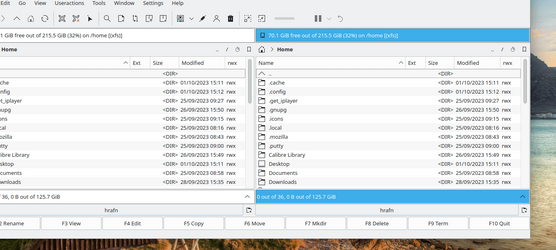
and the krusader app

Screenshot_20231001_151326.png

Also no 266 char limit on path / directory/file names lengths either on any Linux file manager.

Anyway enough of the Sales pitch -- glad you got it all fixed

cheers
jimbo
 

My Computer My Computer

At a glance

Windows XP,11 Linux Fedora Rawhide pre-releas...2 X Intel i7
OS
Windows XP,11 Linux Fedora Rawhide pre-release 46
Computer type
PC/Desktop
CPU
2 X Intel i7
Screen Resolution
4KUHD X 2
I was looking to go back to Linux after decades of windows, I know someone who used Ubuntu, because it does an incredible amount of tasks and used to run concerts, lighting, sounds and more,, also in routers...and have had to load it into routers to use tomato like features. and it was his go to linux. So, I took a chance on the flavor of linux, and haven't changed after I got into it a few years ago for my one computer for just Internet and reading docs only...

I thought about using another flavor, but I really wasn't going to do it unless another flavor appealed to me. Your post caught my attention for changing to a simpler easier one. I will give it some thought. Thanx!!!
 

My Computer My Computer

At a glance

Win11i9-1390064 GBNvidia RTX 5070 TI OC
OS
Win11
Computer type
PC/Desktop
Manufacturer/Model
Asus Home built
CPU
i9-13900
Motherboard
ASUS Strix Z790-H
Memory
64 GB
Graphics Card(s)
Nvidia RTX 5070 TI OC
Monitor(s) Displays
Sony 55"
Hard Drives
SSD
PSU
850 watt EVGA
Case
Cooler Master Haf 932
Cooling
CoolerMaster
Keyboard
RedDragon
Mouse
CoolerMaster
Internet Speed
300/300
Antivirus
Defender
Other Info
VR, Virtual Reality
I was looking to go back to Linux after decades of windows, I know someone who used Ubuntu, because it does an incredible amount of tasks and used to run concerts, lighting, sounds and more,, also in routers...and have had to load it into routers to use tomato like features. and it was his go to linux. So, I took a chance on the flavor of linux, and haven't changed after I got into it a few years ago for my one computer for just Internet and reading docs only...

I thought about using another flavor, but I really wasn't going to do it unless another flavor appealed to me. Your post caught my attention for changing to a simpler easier one. I will give it some thought. Thanx!!!
Arch Linux is a lot easier now these days -- download the iso and boot it up. It's command line based but these days there's a good "guided" wizard script you can use instead of the "old school manual way"). The wiki is also good - almost everything is covered on it and there's a good help forum.

Once you get the login just type arch-install and then it will ask a series of questions and install the basic package,
Exit and reboot. Then from the cli login simply run pacman -S <packages you want to install e.g a desktop GUI etc>

You'll want an Internet browser, a terminal program, a WYSISYG text editor to start with and then you can google etc for other stuff. Add also the YAY helper so you can also add packages from the AUR extra repository -- loads of good stuff in there too.GIT, CURL and WGET are also worth installing.

That way you keep it lean and mean -- when installing a desktop just install the base and add applications individually afterwards otherwise you'll get a whole slew of stuff you don't want or use. For VM's install qemu-desktop.

Cheers
jimbo
 

My Computer My Computer

At a glance

Windows XP,11 Linux Fedora Rawhide pre-releas...2 X Intel i7
OS
Windows XP,11 Linux Fedora Rawhide pre-release 46
Computer type
PC/Desktop
CPU
2 X Intel i7
Screen Resolution
4KUHD X 2
I will keep it all in mind. Ubuntu does have extensive help forums.. and I only want it for the backup and documents.. and of course Samba sucks, but can't fix that. One very annoying thing is that Ubuntu has constant updates. One doesn't have to apply them if they don't want to.
 

My Computer My Computer

At a glance

Win11i9-1390064 GBNvidia RTX 5070 TI OC
OS
Win11
Computer type
PC/Desktop
Manufacturer/Model
Asus Home built
CPU
i9-13900
Motherboard
ASUS Strix Z790-H
Memory
64 GB
Graphics Card(s)
Nvidia RTX 5070 TI OC
Monitor(s) Displays
Sony 55"
Hard Drives
SSD
PSU
850 watt EVGA
Case
Cooler Master Haf 932
Cooling
CoolerMaster
Keyboard
RedDragon
Mouse
CoolerMaster
Internet Speed
300/300
Antivirus
Defender
Other Info
VR, Virtual Reality

Latest Support Threads

Back
Top Bottom