windows backup and restore changed after update


smoothnobody

Well-known member
Local time
7:31 PM
Posts
137
OS
windows 11
22H2 changed something. i have a drive that i partition in two, windows and storage. i keep my system image on the storage partition. i use to be able to go to settings and restore this image. now it tells me it can not restore this image cause the image is on the drive and i need to use installation media. i created a USB and it worked. however, another change is it formatted my storage partition. it never formatted my storage partition before. wondering what has changed and if there is a way to make it work like it did before. i know windows claims this is a depreciated feature and is no longer updating it and everybody recommends i use another program. i never saw the need to use something else when this works and is built in. i also don't want to buy another USB.
 

My Computer My Computer

At a glance

windows 11
OS
windows 11
Just a comment, keeping a backup on the physical drive as the Operating System is installed on, even though on a separate partition, is taking a large risk, especially with older drives. Failure of the drive will prohibit saving the backup partition so ALL will be lost. As to the backup feature in Windows, they've been trying to get rid of that for awhile, basically was left over from Windows 7. Most recommendations, even from Microsoft, have been to use a third-party program, lots of posts on forums about it. And a second drive is the way to do it, either added internally or USB, maybe eSATA if the computer has the port. I'd choose a drive at least twice the size of the internal, actually what I do.
 

My Computers My Computers

  • At a glance

    Win11 Pro RTM Version 24H2 Build 26100.4202Intel Core i5 11th Gen. 2.40GHz12GB
    OS
    Win11 Pro RTM Version 24H2 Build 26100.4202
    Computer type
    Laptop
    Manufacturer/Model
    Dell Vostro 3400
    CPU
    Intel Core i5 11th Gen. 2.40GHz
    Memory
    12GB
    Hard Drives
    256GB SSD NVMe M.2
  • At a glance

    Win11 Pro RTM Version 24H2 Build 26100.4202Intel Core i5 10th Gen. 2.90GHz16GBOnboard, no VGA, using a DisplayPort-to-VGA a...
    Operating System
    Win11 Pro RTM Version 24H2 Build 26100.4202
    Computer type
    PC/Desktop
    Manufacturer/Model
    Dell Vostro 5890
    CPU
    Intel Core i5 10th Gen. 2.90GHz
    Memory
    16GB
    Graphics card(s)
    Onboard, no VGA, using a DisplayPort-to-VGA adapter
    Monitor(s) Displays
    24" Dell
    Hard Drives
    512GB SSD NVMe, 4TB Seagate HDD
    Browser
    Firefox, Edge
    Antivirus
    Windows Defender/Microsoft Security
i have everything on the storage partition backed up on a USB. i already acknowledged i am aware everybody recommends using another backup method.
 

My Computer My Computer

At a glance

windows 11
OS
windows 11

My Computers My Computers

  • At a glance

    Windows 11 Pro 25H2AMD Ryzen 9 7940HS32 GBRadeon 780M Graphics
    OS
    Windows 11 Pro 25H2
    Computer type
    PC/Desktop
    Manufacturer/Model
    Geekom AX7 Pro
    CPU
    AMD Ryzen 9 7940HS
    Memory
    32 GB
    Graphics Card(s)
    Radeon 780M Graphics
    Monitor(s) Displays
    Dell S2425H 24"
    Screen Resolution
    1920 x 1080
    Hard Drives
    2 TB NVMe SSD
    Internet Speed
    100 Mbs
    Browser
    Microsoft Edge / Firefox
    Antivirus
    F-Secure Security Suite
    Other Info
    All secure boot certificates updated to CA 2023
    Windows Production PCA 2011 certificate has been revoked.
  • At a glance

    Windows 11 Pro 25H212th Gen Intel Core i7-12700 processor (12-Co...16 GBIntel(R) UHD Graphics 770 with shared graphic...
    Operating System
    Windows 11 Pro 25H2
    Computer type
    PC/Desktop
    Manufacturer/Model
    Dell Inspiron 3910
    CPU
    12th Gen Intel Core i7-12700 processor (12-Core, 25M Cache, 2.1GHz to 4.8GHz)
    Motherboard
    Dell 0KHP4K
    Memory
    16 GB
    Graphics card(s)
    Intel(R) UHD Graphics 770 with shared graphics memory
    Monitor(s) Displays
    Dell 27" Monitor S2721DS,
    Screen Resolution
    QHD 2560 x 1440 @ 75 Hz
    Hard Drives
    1TB M.2, PCIe NVMe, SSD
    Internet Speed
    100 Mbps
    Browser
    Edge
    Antivirus
    F-Secure Security Suite
    Other Info
    All secure boot certificates updated to CA 2023
    Windows Production PCA 2011 certificate has been revoked.
  • HP Laptop 15-fd0xxx
    OS: Windows 11 Home 25H2
    Processor: 13th Gen Intel(R) Core(TM) i7-1355U (1.70 GHz), 10 Cores, 12 Logical Processors
    BIOS Version: AMI F.26 4/22/2026
    RAM: 16 GB
    SSD: 1 TB
    Screen Resolution: 1920 x 1080
    All secure boot certificates updated to CA 2023 by factory.
i have a drive that i partition in two, windows and storage. i keep my system image on the storage partition. i use to be able to go to settings and restore this image. now it tells me it can not...
... i know windows claims this is a depreciated feature and is no longer updating it and everybody recommends i use another program. i never saw the need to use something else when this works and is built in. i also don't want to buy another USB.
For most of my machines I too have a data partition where I create my system images. It's nice and convenient to restore from. However as Berton points out this is not much use if the drive fails on you, you'll loose the system image partition as well as your Windows partition. So once I have made my system image I then copy it to an external usb hard drive.

I used to use 'Backup and Restore (Windows 7)' for this but as you say, this has been a deprecated feature for five years now and no further development has taken place.

Microsoft said:
System Image Backup (SIB) Solution
We recommend that users use full-disk backup solutions from other vendors.

I switched to using Macrium Reflect Free after Microsoft broke their own system imaging in 32-bit windows 10 version 1803 and didn't bother to fix it until a year later when 1903 was released. If MS have broken it again with another update, then don't expect them to be in any hurry to fix it.

Macrium has worked flawlessly for me for more than four years and still does in the latest Windows 11 22H2.


My Computers My Computers

  • At a glance

    Windows 11 HomeAMD Athlon Silver 3050U8GBRadeon Graphics
    OS
    Windows 11 Home
    Computer type
    Laptop
    Manufacturer/Model
    Acer Aspire 3 A315-23-R9VY
    CPU
    AMD Athlon Silver 3050U
    Memory
    8GB
    Graphics Card(s)
    Radeon Graphics
    Monitor(s) Displays
    laptop screen
    Screen Resolution
    1366x768 native resolution, up to 2560x1440 with Radeon Virtual Super Resolution
    Hard Drives
    1TB Samsung EVO 870 SSD (from April 2026: 250GB EVO 850)
    Internet Speed
    150 Mbps
    Browser
    Edge, Firefox
    Antivirus
    Defender
    Other Info
    UPDATE - 11 April 2026: due to lid hinges starting to break up this laptop has been retired from active duty. The OS with all software and files has been migrated to my System Seven in 'Other systems' to carry on as my general purpose 'main machine'.

    I've now clean installed 25H2 and used Garlin's scripts to update Secure Boot to CA 2023 and revoke the PCA 2011 certificates. It's new role is to test secure boot issues.

    Info for 2021-2026:
    fully 'Windows 11 ready' laptop. Windows 10 C: partition migrated from my old unsupported 'main machine' then upgraded to 11. A test migration ran Insider builds for 2 months. When 11 was released on 5th October 2021 it was re-imaged back to 10 and was offered the upgrade in Windows Update on 20th October. Windows Update offered the 22H2 Feature Update on 20th September 2022. It got the 23H2 Feature Update on 4th November 2023 through Windows Update, 24H2 on 3rd October 2024 through Windows Update by setting the Target Release Version for 24H2, and 25H2 on 30th September 2025 through Windows Update by setting the Target Release Version for 25H2.
  • At a glance

    Windows 11 ProIntel® Core™ i5-520M8GB(integrated graphics) Intel HD Graphics
    Operating System
    Windows 11 Pro
    Computer type
    Laptop
    Manufacturer/Model
    Dell Latitude E4310
    CPU
    Intel® Core™ i5-520M
    Motherboard
    0T6M8G
    Memory
    8GB
    Graphics card(s)
    (integrated graphics) Intel HD Graphics
    Screen Resolution
    1366x768
    Hard Drives
    500GB Crucial MX500 SSD
    Browser
    Firefox, Edge
    Antivirus
    Defender
    Other Info
    unsupported machine: Legacy bios, MBR, TPM 1.2, upgraded from W10 to W11 using W10/W11 hybrid install media workaround.

    In-place upgrade to 22H2 using ISO and a workaround.
    Feature Update to 23H2 by manually installing the Enablement Package.
    In-place upgrade to 24H2 using hybrid 23H2/24H2 install media.
    Upgraded to 25H2 by Enablement Package.

    Also running Insider Experimental 263xx and 29xxx builds and Windows 10 as native boot .vhdx.
  • My SYSTEM THREE is a Dell Latitude 5410, i7-10610U, 32GB RAM, 512GB NVMe ssd, supported device running Windows 11 Pro.

    My SYSTEM FOUR was a 2-in-1 convertible Lenovo Yoga 11e (1st gen) type 20DA, Celeron N2930, 8GB RAM, 256GB ssd. Unsupported device. This has now been sold. It has been replaced by my System Eight.

    My SYSTEM FIVE is a Dell Latitude 3190 2-in-1, Pentium Silver N5030, 8GB RAM, 1TB NVMe ssd, supported device running Windows 11 Pro, plus Insider Beta, Experimental 263xx and 29xxx builds (and a few others) as a native boot .vhdx.

    My SYSTEM SIX is a Dell Latitude 5550, Core Ultra 7 165H, 64GB RAM, 1TB NVMe SSD, supported device, Windows 11 Pro, Hyper-V host machine. Updated to 25H2 on 30th September 2025.

    My SYSTEM SEVEN is a Lenovo Thinkpad T580, 1920x1080 touchscreen, Intel Core i7-8650U, 16GB RAM, 512GB NVMe SSD + 2nd 512GB NVMe SSD, a supported device for Windows 11. This is my current general purpose 'main machine'. The installed Windows 11 Home from my System One has been migrated to this machine. As its new home has an existing digital licence for Pro I've been able to upgrade the migrated OS from Home to Pro.

    My SYSTEM EIGHT is a 2-in-1 convertible Lenovo Yoga 11e (5th gen) type 20LN, Celeron N4120, 8GB RAM, 512GB NVMe ssd, a supported device for Windows 11. Currently running Windows 11 Pro, plus Insider Beta, Experimental 263xx and 29xxx builds as native boot vhdx.
is taking a large risk
Not large...huuuge. Half the reason to have a backup at all is to protect your data in case of hardware failure. Having a backup on the system drive completely negates that protection.

It's not just the folks here who advise not using the old backup/restore function in Windows. Microsoft does as well. For them to publicly say people should not use their own feature tells me something loud and clear. It makes no sense to me that anyone would want to use it when there are so many better solutions available.
 

My Computers My Computers

  • At a glance

    Windows 11 Pro 25H2 26200.9457i9-10900 10 core 20 threads32 gbnone-Intel UHD Graphics 630
    OS
    Windows 11 Pro 25H2 26200.9457
    Computer type
    PC/Desktop
    Manufacturer/Model
    Dell Optiplex 7080
    CPU
    i9-10900 10 core 20 threads
    Motherboard
    DELL 0J37VM
    Memory
    32 gb
    Graphics Card(s)
    none-Intel UHD Graphics 630
    Sound Card
    Integrated Realtek
    Monitor(s) Displays
    Benq 27
    Screen Resolution
    2560x1440
    Hard Drives
    2x1tb Solidigm m.2 nvme /External drives 512gb Samsung m.2 sata+2tb Kingston m2.nvme
    PSU
    500w
    Case
    MT
    Cooling
    Dell Premium
    Keyboard
    Logitech wired
    Mouse
    Logitech wireless
    Internet Speed
    so slow I'm too embarrassed to tell
    Browser
    #1 Edge #2 Firefox
    Antivirus
    Defender+MWB Premium
  • At a glance

    Windows 11 Pro 24H2 26200.9457AMD Ryzen 7 6800U32 gbintegrated
    Operating System
    Windows 11 Pro 24H2 26200.9457
    Computer type
    PC/Desktop
    Manufacturer/Model
    Beelink Mini PC SER5
    CPU
    AMD Ryzen 7 6800U
    Memory
    32 gb
    Graphics card(s)
    integrated
    Sound Card
    integrated
    Monitor(s) Displays
    Benq 27
    Screen Resolution
    2560x1440
    Hard Drives
    1TB Crucial nvme
    Keyboard
    Logitech wired
    Mouse
    Logitech wireless
    Internet Speed
    still too embarrassed to tell
    Browser
    Firefox
    Antivirus
    Defender
  • System 3 is non compliant Dell 9020 i7-4770/24gb ram Win11 PRO 26200.9457
are you guys even paying attention to what i am saying? i have already addressed the things you guys are repeating over and over. i don't want advice on how to backup. the purpose of this post is specifically what has changed with windows backup, does anybody know how to undo it, or prevent the unwanted behavior. if your post does not address these specific concerns it is not helping.
 

My Computer My Computer

At a glance

windows 11
OS
windows 11
the purpose of this post is specifically what has changed with windows backup, does anybody know how to undo it, or prevent the unwanted behavior. if your post does not address these specific concerns it is not helping.
The chances that anyone here still uses it are low. You are unlikely to fine the help you are asking for.
 

My Computers My Computers

  • At a glance

    Windows 11 HomeAMD Athlon Silver 3050U8GBRadeon Graphics
    OS
    Windows 11 Home
    Computer type
    Laptop
    Manufacturer/Model
    Acer Aspire 3 A315-23-R9VY
    CPU
    AMD Athlon Silver 3050U
    Memory
    8GB
    Graphics Card(s)
    Radeon Graphics
    Monitor(s) Displays
    laptop screen
    Screen Resolution
    1366x768 native resolution, up to 2560x1440 with Radeon Virtual Super Resolution
    Hard Drives
    1TB Samsung EVO 870 SSD (from April 2026: 250GB EVO 850)
    Internet Speed
    150 Mbps
    Browser
    Edge, Firefox
    Antivirus
    Defender
    Other Info
    UPDATE - 11 April 2026: due to lid hinges starting to break up this laptop has been retired from active duty. The OS with all software and files has been migrated to my System Seven in 'Other systems' to carry on as my general purpose 'main machine'.

    I've now clean installed 25H2 and used Garlin's scripts to update Secure Boot to CA 2023 and revoke the PCA 2011 certificates. It's new role is to test secure boot issues.

    Info for 2021-2026:
    fully 'Windows 11 ready' laptop. Windows 10 C: partition migrated from my old unsupported 'main machine' then upgraded to 11. A test migration ran Insider builds for 2 months. When 11 was released on 5th October 2021 it was re-imaged back to 10 and was offered the upgrade in Windows Update on 20th October. Windows Update offered the 22H2 Feature Update on 20th September 2022. It got the 23H2 Feature Update on 4th November 2023 through Windows Update, 24H2 on 3rd October 2024 through Windows Update by setting the Target Release Version for 24H2, and 25H2 on 30th September 2025 through Windows Update by setting the Target Release Version for 25H2.
  • At a glance

    Windows 11 ProIntel® Core™ i5-520M8GB(integrated graphics) Intel HD Graphics
    Operating System
    Windows 11 Pro
    Computer type
    Laptop
    Manufacturer/Model
    Dell Latitude E4310
    CPU
    Intel® Core™ i5-520M
    Motherboard
    0T6M8G
    Memory
    8GB
    Graphics card(s)
    (integrated graphics) Intel HD Graphics
    Screen Resolution
    1366x768
    Hard Drives
    500GB Crucial MX500 SSD
    Browser
    Firefox, Edge
    Antivirus
    Defender
    Other Info
    unsupported machine: Legacy bios, MBR, TPM 1.2, upgraded from W10 to W11 using W10/W11 hybrid install media workaround.

    In-place upgrade to 22H2 using ISO and a workaround.
    Feature Update to 23H2 by manually installing the Enablement Package.
    In-place upgrade to 24H2 using hybrid 23H2/24H2 install media.
    Upgraded to 25H2 by Enablement Package.

    Also running Insider Experimental 263xx and 29xxx builds and Windows 10 as native boot .vhdx.
  • My SYSTEM THREE is a Dell Latitude 5410, i7-10610U, 32GB RAM, 512GB NVMe ssd, supported device running Windows 11 Pro.

    My SYSTEM FOUR was a 2-in-1 convertible Lenovo Yoga 11e (1st gen) type 20DA, Celeron N2930, 8GB RAM, 256GB ssd. Unsupported device. This has now been sold. It has been replaced by my System Eight.

    My SYSTEM FIVE is a Dell Latitude 3190 2-in-1, Pentium Silver N5030, 8GB RAM, 1TB NVMe ssd, supported device running Windows 11 Pro, plus Insider Beta, Experimental 263xx and 29xxx builds (and a few others) as a native boot .vhdx.

    My SYSTEM SIX is a Dell Latitude 5550, Core Ultra 7 165H, 64GB RAM, 1TB NVMe SSD, supported device, Windows 11 Pro, Hyper-V host machine. Updated to 25H2 on 30th September 2025.

    My SYSTEM SEVEN is a Lenovo Thinkpad T580, 1920x1080 touchscreen, Intel Core i7-8650U, 16GB RAM, 512GB NVMe SSD + 2nd 512GB NVMe SSD, a supported device for Windows 11. This is my current general purpose 'main machine'. The installed Windows 11 Home from my System One has been migrated to this machine. As its new home has an existing digital licence for Pro I've been able to upgrade the migrated OS from Home to Pro.

    My SYSTEM EIGHT is a 2-in-1 convertible Lenovo Yoga 11e (5th gen) type 20LN, Celeron N4120, 8GB RAM, 512GB NVMe ssd, a supported device for Windows 11. Currently running Windows 11 Pro, plus Insider Beta, Experimental 263xx and 29xxx builds as native boot vhdx.
i understand
 

My Computer My Computer

At a glance

windows 11
OS
windows 11
Isn't there a Muphy's Law that applies to backups? The chance of a drive failing is inversely proportional to the quality of your backups. In other words, the worse your backup plan, the higher the chance that the HD will fail :-).
 

My Computers My Computers

  • At a glance

    Win11 Pro 26H2 (Release Preview)Intel i7-14650HX32 GBNo GPU - Built-in Intel Graphics
    OS
    Win11 Pro 26H2 (Release Preview)
    Computer type
    PC/Desktop
    Manufacturer/Model
    Acemagic Matrix M5
    CPU
    Intel i7-14650HX
    Memory
    32 GB
    Graphics Card(s)
    No GPU - Built-in Intel Graphics
    Sound Card
    Integrated
    Monitor(s) Displays
    Varies as machine will often be moved to locations with different monitors
    Screen Resolution
    Varies
    Hard Drives
    1 x 1TB Gen 4 NVMe SSD
    PSU
    120W Power Brick
    Keyboard
    Corsair K70 Max RGB Magnetic Keyboard
    Mouse
    Logitech MX Master 3
    Internet Speed
    1Gb Up / 1 Gb Down
    Browser
    Edge
    Antivirus
    Windows Defender
  • At a glance

    Win11 Pro 26H2 (Release Preview)Intel i7-1255U16 GBIntel Iris Xe Graphics
    Operating System
    Win11 Pro 26H2 (Release Preview)
    Computer type
    Laptop
    Manufacturer/Model
    Lenovo ThinkBook 13x Gen 2
    CPU
    Intel i7-1255U
    Memory
    16 GB
    Graphics card(s)
    Intel Iris Xe Graphics
    Sound Card
    Realtek® ALC3306-CG codec
    Monitor(s) Displays
    13.3-inch IPS Display
    Screen Resolution
    WQXGA (2560 x 1600)
    Hard Drives
    4 TB 4 x 4 NVMe SSD
    PSU
    USB-C / Thunderbolt 4 Power / Charging Using an Anker 160W Charger
    Keyboard
    Backlit, spill resistant keyboard
    Mouse
    Buttonless Glass Precision Touchpad
    Internet Speed
    1Gb Up / 1Gb Down
    Browser
    Edge
    Antivirus
    Windows Defender
    Other Info
    WiFi 6e / Bluetooth 5.1 / Facial Recognition / Fingerprint Sensor / ToF (Time of Flight) Human Presence Sensor
are you guys even paying attention to what i am saying? i have already addressed the things you guys are repeating over and over. i don't want advice on how to backup. the purpose of this post is specifically what has changed with windows backup, does anybody know how to undo it, or prevent the unwanted behavior. if your post does not address these specific concerns it is not helping.
No need to be so beliigerent. People here are unpaid adnd offer advice to help. It may not be what you want to hear but as @Bree says, few of us use it nowadays.

I am guessing MS have made an indavertent change i.e. a bug, or maybe you made a mistake in your backup.

Most of the third party tools have some kind of definition file that once created (and tested), you use it rather than going through the whole partition or drive selection process each time. I have one, and I use it to minimise risk of human error.

In the end, we would need a lot more information and testing to work out what went wrong, and to be honest, we just believe the solution is simple - follow MS advice and use a 3rd party tool.

So people are trying to help but it may not be specifically the help you requested. That is the nature of forums in general.
 

My Computer My Computer

At a glance

Windows 11 Pro + Win11 Canary VM.I9 13th gen i9-13900H 2.60 GHZ16 GB solderedIntegrated Intel Iris XE
OS
Windows 11 Pro + Win11 Canary VM.
Computer type
Laptop
Manufacturer/Model
ASUS Zenbook 14
CPU
I9 13th gen i9-13900H 2.60 GHZ
Motherboard
Yep, Laptop has one.
Memory
16 GB soldered
Graphics Card(s)
Integrated Intel Iris XE
Sound Card
Realtek built in
Monitor(s) Displays
laptop OLED screen
Screen Resolution
2880x1800 touchscreen
Hard Drives
1 TB NVME SSD (only weakness is only one slot)
PSU
Internal + 65W thunderbolt USB4 charger
Case
Yep, got one
Cooling
Stella Artois (UK pint cans - 568 ml) - extra cost.
Keyboard
Built in UK keybd
Mouse
Bluetooth , wireless dongled, wired
Internet Speed
900 mbs (ethernet), wifi 6 typical 350-450 mb/s both up and down
Browser
Edge
Antivirus
Defender
Other Info
TPM 2.0, 2xUSB4 thunderbolt, 1xUsb3 (usb a), 1xUsb-c, hdmi out, 3.5 mm audio out/in combo, ASUS backlit trackpad (inc. switchable number pad)

Macrium Reflect Home V8
Office 365 Family (6 users each 1TB onedrive space)
Hyper-V (a vm runs almost as fast as my older laptop)
belligerent is not the appropriate word to use here. just trying to reduce useless posts and stay on the topic. every time i post here about the built in system restore you guys swarm me about its depreciated even microsoft says don't use it there are better options use something else. unwanted advice. like going to a casino and telling people not to gamble. i specifically mentioned in my first post that i know with hopes i won't get lectured and we are still going in circles.
 

My Computer My Computer

At a glance

windows 11
OS
windows 11
......we are still going in circles.
Well, I am probably the most familiar here with using Backup & Restore to make system images. From 2015 up to 2018 I used it exclusively and regularly to image all my machines, I'm overly familiar with all its little foibles and idiosyncrasies. :(

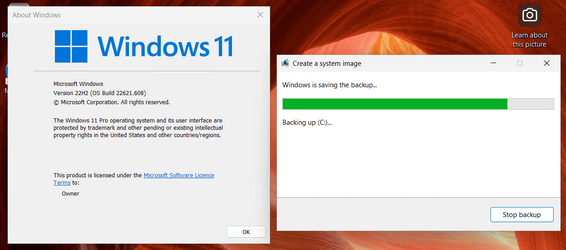
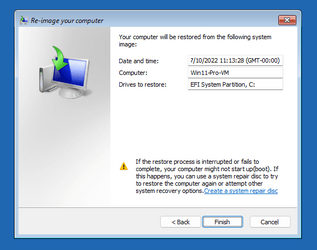
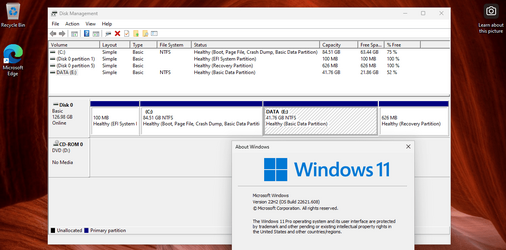
So I tested it in a Hyper-V virtual machine running Windows 11 22H2 build 22621.521 (the current Patch Tuesday build from 13 Sept.). It worked as normal. I then upgraded the machine to the latest optional Preview cumulative update, KB5017389, 22621.608, issued 30th Sept. It still worked normally, both for making a system image and restoring it by booting to its own Advance Startup options. The separate Data partition was untouched by the restore.

So whatever you issue is, it.s specific to your machine or what choices you may have made when creating the system image. It should work normally, I cannot reproduce you problems using the latest build of Windows 11 22H2.

SIB1.png

SIB2.pngSIB3.png

After the restore....

1665142678143.png
 
Last edited:

My Computers My Computers

  • At a glance

    Windows 11 HomeAMD Athlon Silver 3050U8GBRadeon Graphics
    OS
    Windows 11 Home
    Computer type
    Laptop
    Manufacturer/Model
    Acer Aspire 3 A315-23-R9VY
    CPU
    AMD Athlon Silver 3050U
    Memory
    8GB
    Graphics Card(s)
    Radeon Graphics
    Monitor(s) Displays
    laptop screen
    Screen Resolution
    1366x768 native resolution, up to 2560x1440 with Radeon Virtual Super Resolution
    Hard Drives
    1TB Samsung EVO 870 SSD (from April 2026: 250GB EVO 850)
    Internet Speed
    150 Mbps
    Browser
    Edge, Firefox
    Antivirus
    Defender
    Other Info
    UPDATE - 11 April 2026: due to lid hinges starting to break up this laptop has been retired from active duty. The OS with all software and files has been migrated to my System Seven in 'Other systems' to carry on as my general purpose 'main machine'.

    I've now clean installed 25H2 and used Garlin's scripts to update Secure Boot to CA 2023 and revoke the PCA 2011 certificates. It's new role is to test secure boot issues.

    Info for 2021-2026:
    fully 'Windows 11 ready' laptop. Windows 10 C: partition migrated from my old unsupported 'main machine' then upgraded to 11. A test migration ran Insider builds for 2 months. When 11 was released on 5th October 2021 it was re-imaged back to 10 and was offered the upgrade in Windows Update on 20th October. Windows Update offered the 22H2 Feature Update on 20th September 2022. It got the 23H2 Feature Update on 4th November 2023 through Windows Update, 24H2 on 3rd October 2024 through Windows Update by setting the Target Release Version for 24H2, and 25H2 on 30th September 2025 through Windows Update by setting the Target Release Version for 25H2.
  • At a glance

    Windows 11 ProIntel® Core™ i5-520M8GB(integrated graphics) Intel HD Graphics
    Operating System
    Windows 11 Pro
    Computer type
    Laptop
    Manufacturer/Model
    Dell Latitude E4310
    CPU
    Intel® Core™ i5-520M
    Motherboard
    0T6M8G
    Memory
    8GB
    Graphics card(s)
    (integrated graphics) Intel HD Graphics
    Screen Resolution
    1366x768
    Hard Drives
    500GB Crucial MX500 SSD
    Browser
    Firefox, Edge
    Antivirus
    Defender
    Other Info
    unsupported machine: Legacy bios, MBR, TPM 1.2, upgraded from W10 to W11 using W10/W11 hybrid install media workaround.

    In-place upgrade to 22H2 using ISO and a workaround.
    Feature Update to 23H2 by manually installing the Enablement Package.
    In-place upgrade to 24H2 using hybrid 23H2/24H2 install media.
    Upgraded to 25H2 by Enablement Package.

    Also running Insider Experimental 263xx and 29xxx builds and Windows 10 as native boot .vhdx.
  • My SYSTEM THREE is a Dell Latitude 5410, i7-10610U, 32GB RAM, 512GB NVMe ssd, supported device running Windows 11 Pro.

    My SYSTEM FOUR was a 2-in-1 convertible Lenovo Yoga 11e (1st gen) type 20DA, Celeron N2930, 8GB RAM, 256GB ssd. Unsupported device. This has now been sold. It has been replaced by my System Eight.

    My SYSTEM FIVE is a Dell Latitude 3190 2-in-1, Pentium Silver N5030, 8GB RAM, 1TB NVMe ssd, supported device running Windows 11 Pro, plus Insider Beta, Experimental 263xx and 29xxx builds (and a few others) as a native boot .vhdx.

    My SYSTEM SIX is a Dell Latitude 5550, Core Ultra 7 165H, 64GB RAM, 1TB NVMe SSD, supported device, Windows 11 Pro, Hyper-V host machine. Updated to 25H2 on 30th September 2025.

    My SYSTEM SEVEN is a Lenovo Thinkpad T580, 1920x1080 touchscreen, Intel Core i7-8650U, 16GB RAM, 512GB NVMe SSD + 2nd 512GB NVMe SSD, a supported device for Windows 11. This is my current general purpose 'main machine'. The installed Windows 11 Home from my System One has been migrated to this machine. As its new home has an existing digital licence for Pro I've been able to upgrade the migrated OS from Home to Pro.

    My SYSTEM EIGHT is a 2-in-1 convertible Lenovo Yoga 11e (5th gen) type 20LN, Celeron N4120, 8GB RAM, 512GB NVMe ssd, a supported device for Windows 11. Currently running Windows 11 Pro, plus Insider Beta, Experimental 263xx and 29xxx builds as native boot vhdx.
, another change is it formatted my storage partition. it never formatted my storage partition before. wondering what has changed
The only plausible explanation that I can think of is that the upgrade from 21H2 to 22H2 had to resize the Recovery partition, and in doing so had shrunk the Data partition slightly to make room for that. If so, then you could perhaps restore a 21H2 image and resize the Recovery partition yourself before upgrading to 22H2 again.

MiniTool Partition Wizard can help you do that, it's what I used to make the space for the new Data partition in my tests above.
 

My Computers My Computers

  • At a glance

    Windows 11 HomeAMD Athlon Silver 3050U8GBRadeon Graphics
    OS
    Windows 11 Home
    Computer type
    Laptop
    Manufacturer/Model
    Acer Aspire 3 A315-23-R9VY
    CPU
    AMD Athlon Silver 3050U
    Memory
    8GB
    Graphics Card(s)
    Radeon Graphics
    Monitor(s) Displays
    laptop screen
    Screen Resolution
    1366x768 native resolution, up to 2560x1440 with Radeon Virtual Super Resolution
    Hard Drives
    1TB Samsung EVO 870 SSD (from April 2026: 250GB EVO 850)
    Internet Speed
    150 Mbps
    Browser
    Edge, Firefox
    Antivirus
    Defender
    Other Info
    UPDATE - 11 April 2026: due to lid hinges starting to break up this laptop has been retired from active duty. The OS with all software and files has been migrated to my System Seven in 'Other systems' to carry on as my general purpose 'main machine'.

    I've now clean installed 25H2 and used Garlin's scripts to update Secure Boot to CA 2023 and revoke the PCA 2011 certificates. It's new role is to test secure boot issues.

    Info for 2021-2026:
    fully 'Windows 11 ready' laptop. Windows 10 C: partition migrated from my old unsupported 'main machine' then upgraded to 11. A test migration ran Insider builds for 2 months. When 11 was released on 5th October 2021 it was re-imaged back to 10 and was offered the upgrade in Windows Update on 20th October. Windows Update offered the 22H2 Feature Update on 20th September 2022. It got the 23H2 Feature Update on 4th November 2023 through Windows Update, 24H2 on 3rd October 2024 through Windows Update by setting the Target Release Version for 24H2, and 25H2 on 30th September 2025 through Windows Update by setting the Target Release Version for 25H2.
  • At a glance

    Windows 11 ProIntel® Core™ i5-520M8GB(integrated graphics) Intel HD Graphics
    Operating System
    Windows 11 Pro
    Computer type
    Laptop
    Manufacturer/Model
    Dell Latitude E4310
    CPU
    Intel® Core™ i5-520M
    Motherboard
    0T6M8G
    Memory
    8GB
    Graphics card(s)
    (integrated graphics) Intel HD Graphics
    Screen Resolution
    1366x768
    Hard Drives
    500GB Crucial MX500 SSD
    Browser
    Firefox, Edge
    Antivirus
    Defender
    Other Info
    unsupported machine: Legacy bios, MBR, TPM 1.2, upgraded from W10 to W11 using W10/W11 hybrid install media workaround.

    In-place upgrade to 22H2 using ISO and a workaround.
    Feature Update to 23H2 by manually installing the Enablement Package.
    In-place upgrade to 24H2 using hybrid 23H2/24H2 install media.
    Upgraded to 25H2 by Enablement Package.

    Also running Insider Experimental 263xx and 29xxx builds and Windows 10 as native boot .vhdx.
  • My SYSTEM THREE is a Dell Latitude 5410, i7-10610U, 32GB RAM, 512GB NVMe ssd, supported device running Windows 11 Pro.

    My SYSTEM FOUR was a 2-in-1 convertible Lenovo Yoga 11e (1st gen) type 20DA, Celeron N2930, 8GB RAM, 256GB ssd. Unsupported device. This has now been sold. It has been replaced by my System Eight.

    My SYSTEM FIVE is a Dell Latitude 3190 2-in-1, Pentium Silver N5030, 8GB RAM, 1TB NVMe ssd, supported device running Windows 11 Pro, plus Insider Beta, Experimental 263xx and 29xxx builds (and a few others) as a native boot .vhdx.

    My SYSTEM SIX is a Dell Latitude 5550, Core Ultra 7 165H, 64GB RAM, 1TB NVMe SSD, supported device, Windows 11 Pro, Hyper-V host machine. Updated to 25H2 on 30th September 2025.

    My SYSTEM SEVEN is a Lenovo Thinkpad T580, 1920x1080 touchscreen, Intel Core i7-8650U, 16GB RAM, 512GB NVMe SSD + 2nd 512GB NVMe SSD, a supported device for Windows 11. This is my current general purpose 'main machine'. The installed Windows 11 Home from my System One has been migrated to this machine. As its new home has an existing digital licence for Pro I've been able to upgrade the migrated OS from Home to Pro.

    My SYSTEM EIGHT is a 2-in-1 convertible Lenovo Yoga 11e (5th gen) type 20LN, Celeron N4120, 8GB RAM, 512GB NVMe ssd, a supported device for Windows 11. Currently running Windows 11 Pro, plus Insider Beta, Experimental 263xx and 29xxx builds as native boot vhdx.
As far as I can remember, every Windows 'Feature Upgrade' (including the transition from Win 10-11) since the Windows 10 Insider programme commenced has involved a full system rebuild, including editing the existing drive partition table. Editing the existing Partition Table is an essential part of the process because a new Recovery Partition has to be created whenever a 'full' Windows Upgrade is performed (i.e. whenever a 'Windows Old' system backup is created) and the space required has to be taken from somewhere (normally the C: Drive Partition with the new Recovery Partition being created immediately after).

IME with a UEFI formatted disk Windows usually also leaves behind the old Recovery Partition which can, of course, can be deleted and the space recovered. All you have to do is a before and after Disk Partition check to monitor what changed.
 

My Computers My Computers

  • At a glance

    macOS 14.x (plus Windows 11, Debian, FreeBSD ...Apple M1 Max (T6001) - 8 performance 2 effici...32GB LPDDR5Apple M1 Max (32-core)
    OS
    macOS 14.x (plus Windows 11, Debian, FreeBSD for ARM64)
    Computer type
    Laptop
    Manufacturer/Model
    MacBook Pro M1 MAX
    CPU
    Apple M1 Max (T6001) - 8 performance 2 efficiency cores
    Memory
    32GB LPDDR5
    Graphics Card(s)
    Apple M1 Max (32-core)
    Hard Drives
    a) 1TB SSD + + 1TB SD Card + external SSD Drives
    Browser
    1. Safari 2. DuckDuckGo
    Antivirus
    -
  • At a glance

    Windows 11 Pro, plus VirtualBox VMs: various ...i732GB
    Operating System
    Windows 11 Pro, plus VirtualBox VMs: various Windows & Linux
    Computer type
    Laptop
    Manufacturer/Model
    Microsoft Surface Laptop Studio
    CPU
    i7
    Memory
    32GB
    Hard Drives
    1TB SSD, plus external SSDs for Virtual Machines etc.
    Browser
    1. MS Edge 2. DuckDuckGo
    Antivirus
    Defender
a new Recovery Partition has to be created whenever a 'full' Windows Upgrade is performed....
Windows 11 is now capable of resizing the Recovery partition rather than creating a new one. Where the C: partition is followed immediately by the recovery partition (the default for a clean install) the Feature Update will shrink the C: partition a little to make room. Only when this is not possible will a new second recovery partition be created.
 

My Computers My Computers

  • At a glance

    Windows 11 HomeAMD Athlon Silver 3050U8GBRadeon Graphics
    OS
    Windows 11 Home
    Computer type
    Laptop
    Manufacturer/Model
    Acer Aspire 3 A315-23-R9VY
    CPU
    AMD Athlon Silver 3050U
    Memory
    8GB
    Graphics Card(s)
    Radeon Graphics
    Monitor(s) Displays
    laptop screen
    Screen Resolution
    1366x768 native resolution, up to 2560x1440 with Radeon Virtual Super Resolution
    Hard Drives
    1TB Samsung EVO 870 SSD (from April 2026: 250GB EVO 850)
    Internet Speed
    150 Mbps
    Browser
    Edge, Firefox
    Antivirus
    Defender
    Other Info
    UPDATE - 11 April 2026: due to lid hinges starting to break up this laptop has been retired from active duty. The OS with all software and files has been migrated to my System Seven in 'Other systems' to carry on as my general purpose 'main machine'.

    I've now clean installed 25H2 and used Garlin's scripts to update Secure Boot to CA 2023 and revoke the PCA 2011 certificates. It's new role is to test secure boot issues.

    Info for 2021-2026:
    fully 'Windows 11 ready' laptop. Windows 10 C: partition migrated from my old unsupported 'main machine' then upgraded to 11. A test migration ran Insider builds for 2 months. When 11 was released on 5th October 2021 it was re-imaged back to 10 and was offered the upgrade in Windows Update on 20th October. Windows Update offered the 22H2 Feature Update on 20th September 2022. It got the 23H2 Feature Update on 4th November 2023 through Windows Update, 24H2 on 3rd October 2024 through Windows Update by setting the Target Release Version for 24H2, and 25H2 on 30th September 2025 through Windows Update by setting the Target Release Version for 25H2.
  • At a glance

    Windows 11 ProIntel® Core™ i5-520M8GB(integrated graphics) Intel HD Graphics
    Operating System
    Windows 11 Pro
    Computer type
    Laptop
    Manufacturer/Model
    Dell Latitude E4310
    CPU
    Intel® Core™ i5-520M
    Motherboard
    0T6M8G
    Memory
    8GB
    Graphics card(s)
    (integrated graphics) Intel HD Graphics
    Screen Resolution
    1366x768
    Hard Drives
    500GB Crucial MX500 SSD
    Browser
    Firefox, Edge
    Antivirus
    Defender
    Other Info
    unsupported machine: Legacy bios, MBR, TPM 1.2, upgraded from W10 to W11 using W10/W11 hybrid install media workaround.

    In-place upgrade to 22H2 using ISO and a workaround.
    Feature Update to 23H2 by manually installing the Enablement Package.
    In-place upgrade to 24H2 using hybrid 23H2/24H2 install media.
    Upgraded to 25H2 by Enablement Package.

    Also running Insider Experimental 263xx and 29xxx builds and Windows 10 as native boot .vhdx.
  • My SYSTEM THREE is a Dell Latitude 5410, i7-10610U, 32GB RAM, 512GB NVMe ssd, supported device running Windows 11 Pro.

    My SYSTEM FOUR was a 2-in-1 convertible Lenovo Yoga 11e (1st gen) type 20DA, Celeron N2930, 8GB RAM, 256GB ssd. Unsupported device. This has now been sold. It has been replaced by my System Eight.

    My SYSTEM FIVE is a Dell Latitude 3190 2-in-1, Pentium Silver N5030, 8GB RAM, 1TB NVMe ssd, supported device running Windows 11 Pro, plus Insider Beta, Experimental 263xx and 29xxx builds (and a few others) as a native boot .vhdx.

    My SYSTEM SIX is a Dell Latitude 5550, Core Ultra 7 165H, 64GB RAM, 1TB NVMe SSD, supported device, Windows 11 Pro, Hyper-V host machine. Updated to 25H2 on 30th September 2025.

    My SYSTEM SEVEN is a Lenovo Thinkpad T580, 1920x1080 touchscreen, Intel Core i7-8650U, 16GB RAM, 512GB NVMe SSD + 2nd 512GB NVMe SSD, a supported device for Windows 11. This is my current general purpose 'main machine'. The installed Windows 11 Home from my System One has been migrated to this machine. As its new home has an existing digital licence for Pro I've been able to upgrade the migrated OS from Home to Pro.

    My SYSTEM EIGHT is a 2-in-1 convertible Lenovo Yoga 11e (5th gen) type 20LN, Celeron N4120, 8GB RAM, 512GB NVMe ssd, a supported device for Windows 11. Currently running Windows 11 Pro, plus Insider Beta, Experimental 263xx and 29xxx builds as native boot vhdx.
Just a thought, may be an idea to run SFC, could just be a corrupt system file that caused the problem, I'm inclined to think though that as suggested it may have been change of partition size resulting in not enough space to complete the restore although I would have though there would have been at least an error message of some kind.

Microsofts blurb on the Deprecation Windows 7 Backup and Restore deprecated - Win32 apps of course being recommended not to use it doesn't mean you can't, plenty of ancient programs work quite happily in Win11 any build.
 

My Computers My Computers

  • At a glance

    Windows 11 22H2 OS Build 22623.1095AMD Ryzen 7 3800X16GB Corsair Vengeance LPX DDR4 @3000MhzASUS - GeForce RTX 3070 Ti 8 GB TUF GAMING OC
    OS
    Windows 11 22H2 OS Build 22623.1095
    Computer type
    PC/Desktop
    Manufacturer/Model
    Self Build
    CPU
    AMD Ryzen 7 3800X
    Motherboard
    Asus PRIME B350-PLUS
    Memory
    16GB Corsair Vengeance LPX DDR4 @3000Mhz
    Graphics Card(s)
    ASUS - GeForce RTX 3070 Ti 8 GB TUF GAMING OC
    Sound Card
    On Board Realtec
    Monitor(s) Displays
    Acer KA241
    Screen Resolution
    1920 x 1080 @60Hz
    Hard Drives
    240GB PNY CS900 SSD - OS
    2 x 1TB Crucial MX500 SSD
    1 x 500GB Crucial MX300 SSD
    2TB Seagate ST2000DM001-1ER164
    2TB Seagate ST2000DM008-2FR102
    PSU
    750 Watt Corsair TX750 Plus
    Case
    Cooler Master 690 III
    Cooling
    Akasa AK98 5 Case Fans
    Keyboard
    Logitech K270 - wireless
    Mouse
    Logitech - M185 wireless
    Internet Speed
    BT Fibre 75 Mbps
    Browser
    Firefox
    Antivirus
    Windows Defender
    Other Info
    Use hardware KVM to switch monitors on three PCs and software (input director) to use mouse and keyboard on all 4 PCs.
  • At a glance

    Windows 11 Pro 22H2 build 22621.900Intel i5 - 1040016GB of HyperX Fury @ 2133 MhzEVGA 6GB GTX 1060.
    Operating System
    Windows 11 Pro 22H2 build 22621.900
    Computer type
    PC/Desktop
    Manufacturer/Model
    Dell Inspiron 3881 - modified with SFX PSU fitted internally
    CPU
    Intel i5 - 10400
    Motherboard
    Dell 032w55 version A00
    Memory
    16GB of HyperX Fury @ 2133 Mhz
    Graphics card(s)
    EVGA 6GB GTX 1060.
    Sound Card
    Builtin
    Monitor(s) Displays
    ACER KA241
    Screen Resolution
    1920x 1080 @60Hz
    Hard Drives
    256GB SK hynix NVMe
    1TB Western Digital WD10EZEX-75WN4A1
    PSU
    Modular 450 Watt Corsair SF450 Platinum ( Mod to replace the Dell 265 Watt PSU)
    Case
    Inspiron Small Desktop
    Cooling
    Dell stock cooler
    Keyboard
    Dell
    Mouse
    Dell
    Internet Speed
    BT Fibre 75 Mbps
    Browser
    Firefox
    Antivirus
    Windows Defender
    Other Info
    Use hardware KVM to switch monitors on three PCs and software (input director) to use mouse and keyboard on all 4 PCs.
Windows 11 is now capable of resizing the Recovery partition rather than creating a new one. Where the C: partition is followed immediately by the recovery partition (the default for a clean install) the Feature Update will shrink the C: partition a little to make room. Only when this is not possible will a new second recovery partition be created.
I am not sure if this is entirely the case. As far as I can tell, it will reuse an existing partition if it has enough space, but will recreate a new one by shrinking C drive as you say if it cannot reuse a partition. I am not aware of the existing recovery partition ever being resized.

I am pretty certain the only partition resized is the C drive, as Windows knows if there is enough spare space.

I do not actually know what could happen if you tried to update a Windows partition which could not be shrunk enough to hold a new recovery partition. However, I seriously doubt you do an upgrade anyway if it was that tight. From memory on my old 32GB emmc tablet, even if you had a usb drive to hold temporary files, you still needed about 4 GB space minimum to do the upgrade.

Also, it is not always clear because I have seen it also create a new one even if existing is big enough for the new winre.wim. I suspect this is when the existing recovery is not directly adjacent to the C drive but I cannot prove that.
 

My Computer My Computer

At a glance

Windows 11 Pro + Win11 Canary VM.I9 13th gen i9-13900H 2.60 GHZ16 GB solderedIntegrated Intel Iris XE
OS
Windows 11 Pro + Win11 Canary VM.
Computer type
Laptop
Manufacturer/Model
ASUS Zenbook 14
CPU
I9 13th gen i9-13900H 2.60 GHZ
Motherboard
Yep, Laptop has one.
Memory
16 GB soldered
Graphics Card(s)
Integrated Intel Iris XE
Sound Card
Realtek built in
Monitor(s) Displays
laptop OLED screen
Screen Resolution
2880x1800 touchscreen
Hard Drives
1 TB NVME SSD (only weakness is only one slot)
PSU
Internal + 65W thunderbolt USB4 charger
Case
Yep, got one
Cooling
Stella Artois (UK pint cans - 568 ml) - extra cost.
Keyboard
Built in UK keybd
Mouse
Bluetooth , wireless dongled, wired
Internet Speed
900 mbs (ethernet), wifi 6 typical 350-450 mb/s both up and down
Browser
Edge
Antivirus
Defender
Other Info
TPM 2.0, 2xUSB4 thunderbolt, 1xUsb3 (usb a), 1xUsb-c, hdmi out, 3.5 mm audio out/in combo, ASUS backlit trackpad (inc. switchable number pad)

Macrium Reflect Home V8
Office 365 Family (6 users each 1TB onedrive space)
Hyper-V (a vm runs almost as fast as my older laptop)
belligerent is not the appropriate word to use here. just trying to reduce useless posts and stay on the topic. every time i post here about the built in system restore you guys swarm me about its depreciated even microsoft says don't use it there are better options use something else. unwanted advice. like going to a casino and telling people not to gamble. i specifically mentioned in my first post that i know with hopes i won't get lectured and we are still going in circles.
You may be correct. Perhaps instead of belligerant a more accurate description would have been discourterous.
 

My Computers My Computers

  • At a glance

    Clean Install 26200.9168 Secure boot is on.AMD Ryzen 7 8845HSDDR5-5600 / PC5-44800 DDR5 SDRAM SO-DIMM32GAMD Radeon 780M
    OS
    Clean Install 26200.9168 Secure boot is on.
    Computer type
    PC/Desktop
    Manufacturer/Model
    Beelink SER8 Mini
    CPU
    AMD Ryzen 7 8845HS
    Motherboard
    AZW SER8 AMD Promontory/Bixby FCH
    Memory
    DDR5-5600 / PC5-44800 DDR5 SDRAM SO-DIMM32G
    Graphics Card(s)
    AMD Radeon 780M
    Sound Card
    AMD Zen - Audio Processor - HD Audio Controller
    Monitor(s) Displays
    1 LG HDR 32"
    Screen Resolution
    2560x1440
    Hard Drives
    1TB Crucial NVME Internal
    2TB Crucial NVME Internal
    2TB Crucial NVME External
    WD 1TB SSD SATA to USB3
    Samsung SSD 1TB SATA to USB3
    Samsung 500G SATA to USB3
    500G Crucial SSD to USB3
    PSU
    Beelink
    Case
    Beelink
    Cooling
    Beelink
    Keyboard
    Logitech Backlit USB
    Mouse
    Logitech M510
    Internet Speed
    250-500
    Browser
    Edge, Firefox, Chrome
    Antivirus
    Microsoft Security 1.451.235.0 version created 6-2-2026
    Other Info
    Macrium X Build 10.0.8843
    Minitool Pro Ultimate 13.9
    Aomie Partition Assistant Pro 10.12.0
    REVO Pro 5.5.2.0 Portable
    JAM Treesize 9.7.2.2203 Perpetual Outdated.
    JAM Ultrasearch Pro 4.9.1.1204 Perpetual Outdated.
    Malwarebytes Pro 5.6.5 Update 1.0.113698 Component 163.0.5714
    Screenpresso Pro 2.2.12.3 beta (.Net 4.8) 2026-5-026
    Hamrick Vue Scan Pro 9.7.99 for Epson Perfection V39II Flatbed Scanner
    Epson ES-500W Doc Scanner.
    Epson Eco Tank Printer 3850
    Thunderbird 154
    em Client 10.4.5674
    Affinity Suite Publisher, Designer, Photo 2.6.5
    Microsoft 365 MSO (Version 2608 Build 16.0.20326.20072) 64-bit
    Creative cloud Version 6911 Apps 6.9.0.618 CCLibrary 4.16.2 (Photo subscription)
    HXD Hex Editor Version 2.5.0.0
    DAW Software Reaper with Izotope Plugins
    WYSIWYG Web Builder 20.4.2
    Filezilla 3.70.5
    System Informer
    O&O Regedit
    Advanced IP Scanner 2.5.1
    PEAK DCA Transistor Graphical USB Interface for Viewing Transistor Operational Curves. Win
    Games - Win-7 Card Games
    Microsoft FSX "Pro Gold Flight Sim with add ons. Still works perfectly.
    Many Other free and paid applications
    Visual Studio 2026 Community 18,9.2
    Sordum Tools
    Oblique audio latency tool for Motu6.
    Original Microsoft FSX with accelerator pack. Still installs and works well.
  • At a glance

    Win11 Pro OEM 25H2 OS Build 26200.7019AMD Ryzen 7 8845HSDDR5 32GBeelink SER7
    Operating System
    Win11 Pro OEM 25H2 OS Build 26200.7019
    Computer type
    PC/Desktop
    Manufacturer/Model
    Beelink
    CPU
    AMD Ryzen 7 8845HS
    Motherboard
    AMD
    Memory
    DDR5 32G
    Graphics card(s)
    Beelink SER7
    Sound Card
    Beelink SER7
    Monitor(s) Displays
    Dell
    Screen Resolution
    Native
    Hard Drives
    1TB Crucial NVMe SSD 2G SATA
    PSU
    Beelink Proprietary
    Case
    Beelink Proprietary
    Cooling
    Beelink Proprietary
    Keyboard
    gaming keyboard
    Mouse
    MS
    Internet Speed
    T-Mobile 5G
    Antivirus
    Defender Malwarebytes
    Other Info
    Microsoft 365 Family Office
    Macrium X Subscription1 Version 10
    Mini-Tool Ultimate 13.0 Lifetime
    Malwarebytes Premium w/VPN 5
    Revo Pro Portable Pro 5
    Roboform 9.7.7.
    Others. (All legit)
Just a wild guess..............

It may have formatted the drive in order to expand the Recovery partition for the OS. Again, it's only a guess.
 

My Computer My Computer

At a glance

Multi-boot Windows 11 & 10 - RTM, RP, Beta, D...11th Gen i9-11900KF @ 3.50GHz, 8 cores/16 log...32GBNVIDIA GeForce RTX 3080 w/10GB GDDR5X mem
OS
Multi-boot Windows 11 & 10 - RTM, RP, Beta, Dev and Canary
Computer type
PC/Desktop
Manufacturer/Model
Alienware R12
CPU
11th Gen i9-11900KF @ 3.50GHz, 8 cores/16 logical proc.
Motherboard
Alienware 07HV66 (U3E1)
Memory
32GB
Graphics Card(s)
NVIDIA GeForce RTX 3080 w/10GB GDDR5X mem
Sound Card
Realtek High Definition Audio
Monitor(s) Displays
Samsung 27" Curved C27F591
Screen Resolution
1920 x 1080 x 60 hertz
Hard Drives
1TB NVMe PM961 NVMe SSD SAMSUNG (Boot),
2TB Seagate ST2000DM001-1ER164 (SATA),
1TB Samsung SSD 850 EVO,
1TB Seagate ST1000DM003-1ER162,
1TB WD Elements 10A8 USB Device,
1TB BUFFALO HD-PNTU3 USB Device,
1TB x4 Seagate BUP Slim SCSI Disk Device
PSU
850W PSU Liquid Cooled Chassis - CyberPower 1500 UPS
Case
Alienware Mid-Tower (Dell)
Cooling
Liquid Cooled - 3 fan - Top exhaust
Keyboard
Logitech K800 Wireless
Mouse
Logitech MX Master Wireless
Internet Speed
1 Gigabit
Browser
FF, Chrome, Opera, Edge
Antivirus
Defender, MBAM, SuperAntiSpyware
Other Info
Blueray R/W Optical,
Canon MX410 series Printer/Fax/Scanner/Copier,
Altec 5.1 Speakers L-R, Mid Base Boom,

Macrium Home Premium, Revo Pro, Screenspresso Pro
Back
Top Bottom