
Hi All
Ongoing random UEFI problem I need help with. I have had to fully recover my Win11P mirrored boot disk after Windows appears to have changed drive letters causing a boot fail. EG, Windows volume C gets assigned D, data drive volume D gets assigned C, 2nd data volume drive gets assigned F and so on. And a recovery partition is assigned a new drive letter.
I have tried;
Auto Windows system boot repair - no luck
I have used diskpart to manually reassign volumes - no luck, reverts back to what Windows wants
I have run Bootrec commands - no luck
I have run rebuild BCD - no luck
I have removed all non essential hard drives, tried pulling one M.2 drive, restart and applied bootrec commands - no luck
I have swapped M.2 drives around thinking maybe a faulty M.2. Rebuilt the OS mirror in the BIOS - no luck
I tried looking at the UEFI boot volume and Windows system location, looked fine (may not have been can't really tell)
Tried various Linux boot recovery, - no luck.
Finally I did a full (BMR type) Lazesoft recovery and was able to recover a previous Windows 25H2 .7462 image, now works again.
Thinking back about the last good boot, I saw a new 25H2 update being applied on shutdown. It seems to be
related to an UEFI issue, because the system sort of boots, but then cannot find the Windows system files because the
drive letters were changed. Off line file explorer found Windows ok, just under a different drive letter.
Also, inserting and removing USB FD in Windows and even booting Ventoy live Linux does not cause the random problem
of Windows reassigning drive letters.
So if you have any insight as to what might of caused this and how to prevent it happening again, I would appreciate
some input.
Thanks
Ongoing random UEFI problem I need help with. I have had to fully recover my Win11P mirrored boot disk after Windows appears to have changed drive letters causing a boot fail. EG, Windows volume C gets assigned D, data drive volume D gets assigned C, 2nd data volume drive gets assigned F and so on. And a recovery partition is assigned a new drive letter.
I have tried;
Auto Windows system boot repair - no luck
I have used diskpart to manually reassign volumes - no luck, reverts back to what Windows wants
I have run Bootrec commands - no luck
I have run rebuild BCD - no luck
I have removed all non essential hard drives, tried pulling one M.2 drive, restart and applied bootrec commands - no luck
I have swapped M.2 drives around thinking maybe a faulty M.2. Rebuilt the OS mirror in the BIOS - no luck
I tried looking at the UEFI boot volume and Windows system location, looked fine (may not have been can't really tell)
Tried various Linux boot recovery, - no luck.
Finally I did a full (BMR type) Lazesoft recovery and was able to recover a previous Windows 25H2 .7462 image, now works again.
Thinking back about the last good boot, I saw a new 25H2 update being applied on shutdown. It seems to be
related to an UEFI issue, because the system sort of boots, but then cannot find the Windows system files because the
drive letters were changed. Off line file explorer found Windows ok, just under a different drive letter.
Also, inserting and removing USB FD in Windows and even booting Ventoy live Linux does not cause the random problem
of Windows reassigning drive letters.
So if you have any insight as to what might of caused this and how to prevent it happening again, I would appreciate
some input.
Thanks
- Windows Build/Version
- 26200.8037
My Computer
At a glance
Windows 11Pi5-9400F16GBRadeon RX570
- OS
- Windows 11P
- Computer type
- PC/Desktop
- Manufacturer/Model
- EVGA Z370
- CPU
- i5-9400F
- Motherboard
- EVGA Classified K
- Memory
- 16GB
- Graphics Card(s)
- Radeon RX570
- Monitor(s) Displays
- Asus 27"
- Screen Resolution
- 2560x1440
- Hard Drives
- 256GB PCIe NMVE Patriot M.2, 6TB HGST HD, 10TB Seagate Exos-10 HD, 2TB Levon SSD
- PSU
- Smart 700W Thermaltake
- Case
- tower
- Cooling
- aircooled CPU, 3 140MM case fans
- Keyboard
- Rosewill US
- Mouse
- Logitech
- Internet Speed
- 300MB fiber
- Browser
- Firefox
- Other Info
- 4 port Intel GB NIC, 6 port SATA expansion, 3.5 and 2.5 removeable drive bays


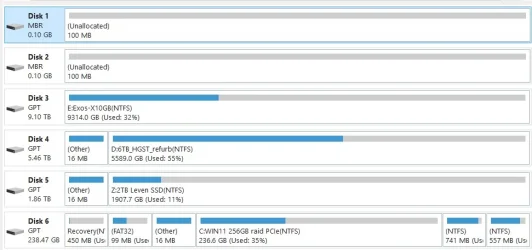
 1. WinRE runs in its own mini‑OS
 2. WinRE assigns letters in a different order
 . Perhaps this is well and good on an Enterprise OS but it has been my experience time and time again that mirroring Win 7, 8, "shoulda been 9", and 10 results in stability issues. I've always had better success mirroring my data drives only, which is partly why I currently run three different kinds of RAID. Again, user preference prevails. I was merely trying to discern the cause of the issue. I think zbook has it pegged.






