
Windows changes boot drive letter


PNWACE

Member
Local time
10:51 AM
Posts
4
OS
Windows 11P
Hi All
Ongoing random UEFI problem I need help with. I have had to fully recover my Win11P mirrored boot disk after Windows appears to have changed drive letters causing a boot fail. EG, Windows volume C gets assigned D, data drive volume D gets assigned C, 2nd data volume drive gets assigned F and so on. And a recovery partition is assigned a new drive letter.
I have tried;
Auto Windows system boot repair - no luck
I have used diskpart to manually reassign volumes - no luck, reverts back to what Windows wants
I have run Bootrec commands - no luck
I have run rebuild BCD - no luck
I have removed all non essential hard drives, tried pulling one M.2 drive, restart and applied bootrec commands - no luck
I have swapped M.2 drives around thinking maybe a faulty M.2. Rebuilt the OS mirror in the BIOS - no luck
I tried looking at the UEFI boot volume and Windows system location, looked fine (may not have been can't really tell)
Tried various Linux boot recovery, - no luck.
Finally I did a full (BMR type) Lazesoft recovery and was able to recover a previous Windows 25H2 .7462 image, now works again.

Thinking back about the last good boot, I saw a new 25H2 update being applied on shutdown. It seems to be
related to an UEFI issue, because the system sort of boots, but then cannot find the Windows system files because the
drive letters were changed. Off line file explorer found Windows ok, just under a different drive letter.
Also, inserting and removing USB FD in Windows and even booting Ventoy live Linux does not cause the random problem
of Windows reassigning drive letters.

So if you have any insight as to what might of caused this and how to prevent it happening again, I would appreciate
some input.

Thanks
 
Windows Build/Version
26200.8037

My Computer My Computer

At a glance

Windows 11Pi5-9400F16GBRadeon RX570
OS
Windows 11P
Computer type
PC/Desktop
Manufacturer/Model
EVGA Z370
CPU
i5-9400F
Motherboard
EVGA Classified K
Memory
16GB
Graphics Card(s)
Radeon RX570
Monitor(s) Displays
Asus 27"
Screen Resolution
2560x1440
Hard Drives
256GB PCIe NMVE Patriot M.2, 6TB HGST HD, 10TB Seagate Exos-10 HD, 2TB Levon SSD
PSU
Smart 700W Thermaltake
Case
tower
Cooling
aircooled CPU, 3 140MM case fans
Keyboard
Rosewill US
Mouse
Logitech
Internet Speed
300MB fiber
Browser
Firefox
Other Info
4 port Intel GB NIC, 6 port SATA expansion, 3.5 and 2.5 removeable drive bays
Windows volume C gets assigned D, data drive volume D gets assigned C, 2nd data volume drive gets assigned F and so on
How did you boot?
Into a USB such as an installation USB?

Windows can assign different drive letters [I once had a system that labelled its OS drive F:\, it was a dual-boot system yet showed F:\ even though booted into F:\'s OS] but I've never heard of one changing the OS drive letter when booting normally. So I don't think I can help if that's what you are referring to.
[Added later - I have reread the thread and now think you are indeed reporting non-standard OS drive letters.]


Denis
 

My Computer My Computer

At a glance

Windows 11 Home x64 Version 25H2 Build 26200....
OS
Windows 11 Home x64 Version 25H2 Build 26200.8037
No to an installation USB boot. But I did use the Lazesoft recovery BMR ISO to recover. I always separate the bootable C: disk from any data drives and I try and mirror the boot drives. So normal boot is from the 256GB MVMe assigned C drive(s) Thing is even with the other drives disconnected I could not correct (persistantly) the correct drive volumes I assigned with diskpart, which should have worked. Windows or something somewhere kept changing the drive letters. And most of the time it boots fine from the NVMe C drive. Just every now and then I get this drive letter reassignment. Below is what is normal;

Drive C:
Description Local Fixed Disk
Compressed No
File System NTFS
Size 236.65 GB (254,100,066,304 bytes)
Free Space 151.70 GB (162,890,162,176 bytes)
Volume Name WIN11 256GB raid PCIe
Volume Serial Number 26D0C860

Drive D:
Description Local Fixed Disk
Compressed No
File System NTFS
Size 5.46 TB (6,001,156,681,728 bytes)
Free Space 2.41 TB (2,651,672,735,744 bytes)
Volume Name 6TB_HGST_refurb
Volume Serial Number CC821872

Drive E:
Description Local Fixed Disk
Compressed No
File System NTFS
Size 9.10 TB (10,000,828,186,624 bytes)
Free Space 6.12 TB (6,726,578,765,824 bytes)
Volume Name Exos-X10GB
Volume Serial Number 0DE458D0

Drive Z:
Description Local Fixed Disk
Compressed No
File System NTFS
Size 1.86 TB (2,048,386,920,448 bytes)
Free Space 1.65 TB (1,809,012,830,208 bytes)
Volume Name 2TB Leven SSD
Volume Serial Number 9E0504AC

Thanks for looking
 

My Computer My Computer

At a glance

Windows 11Pi5-9400F16GBRadeon RX570
OS
Windows 11P
Computer type
PC/Desktop
Manufacturer/Model
EVGA Z370
CPU
i5-9400F
Motherboard
EVGA Classified K
Memory
16GB
Graphics Card(s)
Radeon RX570
Monitor(s) Displays
Asus 27"
Screen Resolution
2560x1440
Hard Drives
256GB PCIe NMVE Patriot M.2, 6TB HGST HD, 10TB Seagate Exos-10 HD, 2TB Levon SSD
PSU
Smart 700W Thermaltake
Case
tower
Cooling
aircooled CPU, 3 140MM case fans
Keyboard
Rosewill US
Mouse
Logitech
Internet Speed
300MB fiber
Browser
Firefox
Other Info
4 port Intel GB NIC, 6 port SATA expansion, 3.5 and 2.5 removeable drive bays
There is a possibility that you could have a rogue partition on another drive. BTW Nice choice of spinners. I recognize some of those. You may be able to correct this in MiniTool Partition Wizard. Another approach would be to get an HBA card. They're relatively inexpensive these days if you know where to look. MiniTool will show you hidden partitions that you won't otherwise see in Disk Manager. Anyway, just a suggestion.

*edit* I don't recommend mirroring the OS. That could be your issue right there.
 

My Computer My Computer

At a glance

WIN 11, WIN 10, WIN 8.1, WIN 7 U, WIN 7 PRO, ...Intel i7 6900K and i9-7960X / AMD 3800X (8 core)128 GB CORSAIR DOMINATOR PLATINUM (B DIE)NVIDIA 1070 and RTX 3070
OS
WIN 11, WIN 10, WIN 8.1, WIN 7 U, WIN 7 PRO, WIN 7 HOME (32 Bit), LINUX MINT
Computer type
PC/Desktop
Manufacturer/Model
DIY, ASUS, and DELL
CPU
Intel i7 6900K and i9-7960X / AMD 3800X (8 core)
Motherboard
ASUS X99E-WS USB 3.1 and ASUS X299 SAGE
Memory
128 GB CORSAIR DOMINATOR PLATINUM (B DIE)
Graphics Card(s)
NVIDIA 1070 and RTX 3070
Sound Card
Crystal Sound (onboard)
Monitor(s) Displays
single Samsung 30" 4K and 8" aux monitor
Screen Resolution
4K and something equally attrocious. I'll be working on this.
Hard Drives
A, B, C, D, E, F, G, H, I, J, K, L, M, N, O, P, Q, R, S, T, U, V, W

Ports X, Y, and Z are reserved for USB access and removable drives.

Drive types consist of the following: Various mechanical hard drives bearing the brand names, Seagate, Toshiba, and Western Digital. Various NVMe drives bearing the brand names Kingston, Intel, Silicon Power, Crucial, Western Digital, and Team Group. Various SATA SSDs bearing various different brand names.

RAID arrays included:

LSI RAID 10 (WD Velociraptors) 1115.72 GB
LSI RAID 10 (WD SSDS) 463.80 GB

INTEL RAID 0 (KINGSTON HYPER X) System 447.14 GB
INTEL RAID 1 TOSHIBA ENTERPRIZE class Data 2794.52 GB
INTEL RAID 1 SEAGATE HYBRID 931.51 GB
PSU
SEVERAL. I prefer my Corsair Platinum HX1000i but I also like EVGA power supplies
Case
ThermalTake Level 10 GT (among others)
Cooling
Noctua is my favorite and I use it in my main. I also own various other coolers.
Keyboard
all kinds.
Mouse
all kinds
Internet Speed
360 mbps - 1 gbps (depending)
Browser
FIREFOX
Antivirus
KASPERSKY (no apologies)
Other Info
Gave Dell touch screen with Windows 11 to daughter and got me an OTVOC. Being a PC builder I own many desktop PCs as well. I am a father of five providing PCs, laptops, and tablets for all my family, most of which I have modified, rebuilt, or simply built from scratch. I do not own a cell phone, never have, never will.
Please boot your computer with Windows Setup Media and from Windows Recovery Environment start the Command Prompt.

Please type below command into Command Prompt and press Enter key.

The following command scans integrity of all protected Windows system files and repairs files with problems when possible.

Code:
Sfc  /Scannow   /OFFBOOTDIR=C:\   /OFFWINDIR=C:\Windows


Please replace partition letter C: with Windows installed partition letter. When the computer boots into Windows Recovery Environment (WinRE) environment, the drive letter assign to Windows partition may not be C: drive letter because Windows 7, 8 , 8.1 and 10 creates a separate system partition when it's installed from scratch. The system partition contains boot files WinRE assigns the system partition the C: drive letter and the Windows installed partition will be assigned any other drive letter, usually D: drive letter is assign to Windows installed partition. The Bcdedit | find "osdevice" command can be used to find out the drive letter of the Windows installed partition, the output of the Bcdedit command is similar to this osdevice partition=D:. The drive letter after partition= is the drive letter of the Windows partition.
 

My Computer My Computer

At a glance

Windows 11AMD Ryzen 7 5700GMicron Technology DDR4-3200 16GBNVIDIA GeForce RTX 3060
OS
Windows 11
Computer type
PC/Desktop
Manufacturer/Model
HP Pavilion
CPU
AMD Ryzen 7 5700G
Motherboard
Erica6
Memory
Micron Technology DDR4-3200 16GB
Graphics Card(s)
NVIDIA GeForce RTX 3060
Sound Card
Realtek ALC671
Monitor(s) Displays
Samsung SyncMaster U28E590
Screen Resolution
3840 x 2160
Hard Drives
SAMSUNG MZVLQ1T0HALB-000H1
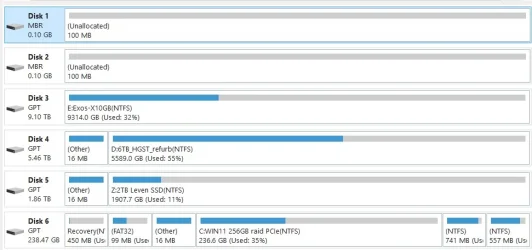
Hi. Thanks but I don't think mirroring the boot OS is an issue, I have other computers I have mirrored the OS and never had an issue like this. Did it all the time with servers. You may be right about a rogue partition. There are 2 unexplained 100MB 'disk drives' in Partition magic that I did not create but are in the 2 mirrored NVMe SSD's that appear to be outside of the mirror that the OS sees. I don't know how to delete these as they show up as drives not partitions.
 

Attachments

  • Partition magic disk layout.webp
    Partition magic disk layout.webp
    27.1 KB · Views: 1

My Computer My Computer

At a glance

Windows 11Pi5-9400F16GBRadeon RX570
OS
Windows 11P
Computer type
PC/Desktop
Manufacturer/Model
EVGA Z370
CPU
i5-9400F
Motherboard
EVGA Classified K
Memory
16GB
Graphics Card(s)
Radeon RX570
Monitor(s) Displays
Asus 27"
Screen Resolution
2560x1440
Hard Drives
256GB PCIe NMVE Patriot M.2, 6TB HGST HD, 10TB Seagate Exos-10 HD, 2TB Levon SSD
PSU
Smart 700W Thermaltake
Case
tower
Cooling
aircooled CPU, 3 140MM case fans
Keyboard
Rosewill US
Mouse
Logitech
Internet Speed
300MB fiber
Browser
Firefox
Other Info
4 port Intel GB NIC, 6 port SATA expansion, 3.5 and 2.5 removeable drive bays
To : Freebooter. Hi. I'll run the SFC commands when I can, the problem does not exist right now, so I'm not sure what the result will be.
I ran bcdedit the OP shows the OSdevice is partition c:.
You may be right about the WinRE being the cause, this OS has been upgraded many times so I'm not sure what the original Windows partition (disk) would have been. I'm assuming C: but maybe not. How to tell?
Why would WinRE change the volume drive letters, where does it get that information from that would tell it to change what is in the UEFI boot parameters? Something is happening ahead of WinRE that would kick it to WinRE during the boot process. I can see a normal boot start to happen, then WinRE kicks in with errors, I just can't see how to fix it. Only fix so far is, thank fully, is Lazesoft BMR, choose all partitions and recover the entire disk.

Sub note; ran sfc /scannow online it did find a repaired errors.
 

My Computer My Computer

At a glance

Windows 11Pi5-9400F16GBRadeon RX570
OS
Windows 11P
Computer type
PC/Desktop
Manufacturer/Model
EVGA Z370
CPU
i5-9400F
Motherboard
EVGA Classified K
Memory
16GB
Graphics Card(s)
Radeon RX570
Monitor(s) Displays
Asus 27"
Screen Resolution
2560x1440
Hard Drives
256GB PCIe NMVE Patriot M.2, 6TB HGST HD, 10TB Seagate Exos-10 HD, 2TB Levon SSD
PSU
Smart 700W Thermaltake
Case
tower
Cooling
aircooled CPU, 3 140MM case fans
Keyboard
Rosewill US
Mouse
Logitech
Internet Speed
300MB fiber
Browser
Firefox
Other Info
4 port Intel GB NIC, 6 port SATA expansion, 3.5 and 2.5 removeable drive bays
If the computer
To : Freebooter. Hi. I'll run the SFC commands when I can, the problem does not exist right now, so I'm not sure what the result will be.
I ran bcdedit the OP shows the OSdevice is partition c:.
You may be right about the WinRE being the cause, this OS has been upgraded many times so I'm not sure what the original Windows partition (disk) would have been. I'm assuming C: but maybe not. How to tell?
Why would WinRE change the volume drive letters, where does it get that information from that would tell it to change what is in the UEFI boot parameters? Something is happening ahead of WinRE that would kick it to WinRE during the boot process. I can see a normal boot start to happen, then WinRE kicks in with errors, I just can't see how to fix it. Only fix so far is, thank fully, is Lazesoft BMR, choose all partitions and recover the entire disk.

Sub note; ran sfc /scannow online it did find a repaired errors.


These AI links may be useful:


Code:
The Windows Recovery Environment (WinRE) changes drive letters because it operates as a separate,
lightweight operating system that does not load the standard Windows registry,
causing it to assign drive letters based on physical disk order rather than saved configuration.
This is a normal behavior where the system partition may appear as C: and recovery partitions may be assigned letters unexpectedly.


Why WinRE Shows Different Drive Letters​

🧠 1. WinRE runs in its own mini‑OS​

Windows Recovery Environment is basically a lightweight Windows PE system. It does not load your normal Windows registry, which is where your usual drive‑letter assignments are stored.
Because of that, WinRE has to assign letters on the fly, based on what it detects.

🔄 2. WinRE assigns letters in a different order​

WinRE scans disks and partitions in a simple, hardware‑level order:
  • Disk 0 → Partition 1 → Partition 2 → etc.
  • Then Disk 1 → Partition 1 → Partition 2 → etc.
It assigns letters as it finds partitions. This often results in:
PartitionIn WindowsIn WinRE
System Reserved / EFIHiddenC:
Actual Windows OSC:D: or E:
Recovery partitionHiddenNo letter or random letter

So your real Windows installation might show up as D: or E: in WinRE, which confuses a lot of people.


Best practice:
For each reboot into Windows RE > check the assignments as needed

bcdedit
bcdedit | find "osdevice"
 
Last edited:

My Computer My Computer

At a glance

Windows 10Intel(R) Core(TM) i7-4800MQ CPU @ 2.70GHz16 GB Total: Manufacturer : Samsung MemoryTyp...NVIDIA Quadro K3100M; Intel(R) HD Graphics 4600
OS
Windows 10
Computer type
Laptop
Manufacturer/Model
HP
CPU
Intel(R) Core(TM) i7-4800MQ CPU @ 2.70GHz
Motherboard
Product : 190A Version : KBC Version 94.56
Memory
16 GB Total: Manufacturer : Samsung MemoryType : DDR3 FormFactor : SODIMM Capacity : 8GB Speed : 1600
Graphics Card(s)
NVIDIA Quadro K3100M; Intel(R) HD Graphics 4600
Sound Card
IDT High Definition Audio CODEC; PNP Device ID HDAUDIO\FUNC_01&VEN_111D&DEV_76E0
Hard Drives
Model Hitachi HTS727575A9E364
Antivirus
Microsoft Defender
Other Info
Mobile Workstation
Personally I don't think it is advisable to mirror the drive with the OS on it. This is not to say that it can't be done as I've done it several times. I love trying things out :zany:. Perhaps this is well and good on an Enterprise OS but it has been my experience time and time again that mirroring Win 7, 8, "shoulda been 9", and 10 results in stability issues. I've always had better success mirroring my data drives only, which is partly why I currently run three different kinds of RAID. Again, user preference prevails. I was merely trying to discern the cause of the issue. I think zbook has it pegged.
 

My Computer My Computer

At a glance

WIN 11, WIN 10, WIN 8.1, WIN 7 U, WIN 7 PRO, ...Intel i7 6900K and i9-7960X / AMD 3800X (8 core)128 GB CORSAIR DOMINATOR PLATINUM (B DIE)NVIDIA 1070 and RTX 3070
OS
WIN 11, WIN 10, WIN 8.1, WIN 7 U, WIN 7 PRO, WIN 7 HOME (32 Bit), LINUX MINT
Computer type
PC/Desktop
Manufacturer/Model
DIY, ASUS, and DELL
CPU
Intel i7 6900K and i9-7960X / AMD 3800X (8 core)
Motherboard
ASUS X99E-WS USB 3.1 and ASUS X299 SAGE
Memory
128 GB CORSAIR DOMINATOR PLATINUM (B DIE)
Graphics Card(s)
NVIDIA 1070 and RTX 3070
Sound Card
Crystal Sound (onboard)
Monitor(s) Displays
single Samsung 30" 4K and 8" aux monitor
Screen Resolution
4K and something equally attrocious. I'll be working on this.
Hard Drives
A, B, C, D, E, F, G, H, I, J, K, L, M, N, O, P, Q, R, S, T, U, V, W

Ports X, Y, and Z are reserved for USB access and removable drives.

Drive types consist of the following: Various mechanical hard drives bearing the brand names, Seagate, Toshiba, and Western Digital. Various NVMe drives bearing the brand names Kingston, Intel, Silicon Power, Crucial, Western Digital, and Team Group. Various SATA SSDs bearing various different brand names.

RAID arrays included:

LSI RAID 10 (WD Velociraptors) 1115.72 GB
LSI RAID 10 (WD SSDS) 463.80 GB

INTEL RAID 0 (KINGSTON HYPER X) System 447.14 GB
INTEL RAID 1 TOSHIBA ENTERPRIZE class Data 2794.52 GB
INTEL RAID 1 SEAGATE HYBRID 931.51 GB
PSU
SEVERAL. I prefer my Corsair Platinum HX1000i but I also like EVGA power supplies
Case
ThermalTake Level 10 GT (among others)
Cooling
Noctua is my favorite and I use it in my main. I also own various other coolers.
Keyboard
all kinds.
Mouse
all kinds
Internet Speed
360 mbps - 1 gbps (depending)
Browser
FIREFOX
Antivirus
KASPERSKY (no apologies)
Other Info
Gave Dell touch screen with Windows 11 to daughter and got me an OTVOC. Being a PC builder I own many desktop PCs as well. I am a father of five providing PCs, laptops, and tablets for all my family, most of which I have modified, rebuilt, or simply built from scratch. I do not own a cell phone, never have, never will.
When the computer boots into Windows Recovery Environment (WinRE) environment, the drive letter assign to Windows partition may not be C: drive letter because Windows 7, 8 , 8.1 and 10 creates a separate system partition when it's installed from scratch. The system partition contains boot files WinRE assigns the system partition the C: drive letter and the Windows installed partition will be assigned any other drive letter, usually D: drive letter is assign to Windows installed partition.

This primarily applies to Legacy BIOS/MBR systems. In WinRE, the System Reserved partition is often assigned the C: drive letter because it is located before the Windows partition.

On UEFI/GPT systems, the system partition is the EFI system partition, which typically does not receive a drive letter in WinRE.

In WinRE, the Windows partition can be assigned any drive letter, depending on the disk and partition layout.
 

My Computers My Computers

  • At a glance

    Windows 11 ProAMD Ryzen 9 9950X3DKingston FURY Beast 64GB (2x32GB) DDR5 6000MT/sASUS TUF Gaming Radeon RX 9070 OC Edition 16G...
    OS
    Windows 11 Pro
    Computer type
    PC/Desktop
    CPU
    AMD Ryzen 9 9950X3D
    Motherboard
    ASRock B650E Taichi Lite
    Memory
    Kingston FURY Beast 64GB (2x32GB) DDR5 6000MT/s
    Graphics Card(s)
    ASUS TUF Gaming Radeon RX 9070 OC Edition 16GB GDDR6
    Hard Drives
    Solidigm P44 Pro 2TB M.2 NVMe SSD
  • At a glance

    Windows 11 HomeIntel Core Ultra 9 275HX64GB (2x 32GB) DDR5-6400NVIDIA GeForce RTX 5080 16GB GDDR7 Laptop GPU
    Operating System
    Windows 11 Home
    Computer type
    Laptop
    Manufacturer/Model
    Lenovo Legion Pro 7i Gen 10 16"
    CPU
    Intel Core Ultra 9 275HX
    Memory
    64GB (2x 32GB) DDR5-6400
    Graphics card(s)
    NVIDIA GeForce RTX 5080 16GB GDDR7 Laptop GPU
    Hard Drives
    2x 1TB M.2 NVMe SSD (SK Hynix)
Why would WinRE change the volume drive letters, where does it get that information from
Why are you now referring to WinRE?
I thought the problem affected normal booting.
WinRE labels the drives in sequence as it discovers them - it's not that it gets the information from somewhere else.


Denis
 

My Computer My Computer

At a glance

Windows 11 Home x64 Version 25H2 Build 26200....
OS
Windows 11 Home x64 Version 25H2 Build 26200.8037

Latest Support Threads

Back
Top Bottom




