Windows Defender antiransomware on Win 11


sypqys

Well-known member
Member
VIP
Local time
4:44 AM
Posts
184
Location
FR
OS
Windows 11 Home
Hello

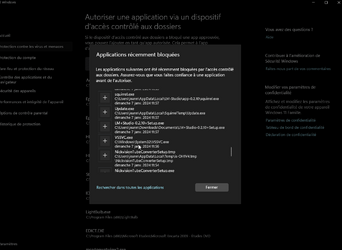
I don't understand, it blocks everything or almost everything, do I have to unblock everything here?
and how to unblock everything at once, because one by one it's long...

sorry because it is in french...
ApplicationFrameHost_f0WX2hMlkl.png
ApplicationFrameHost_NTIt4B2Ji2.png

Thanks a lot!
 
Windows Build/Version
11 Home / 22H2 22631.2861

My Computer My Computer

At a glance

Windows 11 HomeAMD Ryzen 5 5600G 3.9 GHz 6-CoreCorsair Vengeance LPX 16Go (2x8Go) DDR4 3200M...include to CPU
OS
Windows 11 Home
Computer type
PC/Desktop
Manufacturer/Model
msi - Built (June 2022)
CPU
AMD Ryzen 5 5600G 3.9 GHz 6-Core
Motherboard
MSI MAG B550M PRO-VDH WIFI
Memory
Corsair Vengeance LPX 16Go (2x8Go) DDR4 3200MHz C16 XMP 2.0
Graphics Card(s)
include to CPU
Sound Card
?
Monitor(s) Displays
BenQ GL2480, HP LE1901w
Screen Resolution
1920x1080
Hard Drives
SSD NVMe M.2 Samsung 970 EVO Plus 500 Go
HDD WD 2,5' 1 To (storage)
PSU
SeaSonic FOCUS GX 650 W 80+ Gold -
Case
be quiet! Pure Base 500 ATX,
Cooling
?
Keyboard
Kensington ValuKeyboard
Mouse
Logitec M190
Internet Speed
xDSL (Freebox)
Browser
Firefox
Antivirus
Windows Defender (with antiransomware function enabled)
Other Info
- "AdGuard Home" from Synology NAS DS720+(DNS) +
- Hard_Configurator (security enhancer + ConfigureDefender)
- Portmaster (free version- third firewall with AdGuard Home and Cloudflare DNS- setting : "Force Block Internet Access" and allow app per app)

- WingetUI
- Privazer
- HiBitUninstaller-Portable
- BloatyNosy
- hardentools (some security holes removed)
- OOSU10
- Optimizer
- Privacy.sexy
- Windows11Fixer
Blocks access to all 3rd party apps - which try to gain access to Windows folders (libraries Included). Windows already has predefined rules for its own software - or software installed through Microsoft Store, but - if you download the apps from a site - it's up to you (to test or decide if that software is safe enough - to access Windows files).
 
Last edited:

My Computer My Computer

At a glance

WinDOS 25H2Intel & AMDSO-DIMM SK Hynix 15.8 GB Dual-Channel DDR4-26...nVidia RTX 2060 6GB Mobile GPU (TU106M)
OS
WinDOS 25H2
Computer type
Laptop
CPU
Intel & AMD
Memory
SO-DIMM SK Hynix 15.8 GB Dual-Channel DDR4-2666 (2 x 8 GB) 1329MHz (19-19-19-43)
Graphics Card(s)
nVidia RTX 2060 6GB Mobile GPU (TU106M)
Sound Card
Onbord Realtek ALC1220
Screen Resolution
1920 x 1080
Hard Drives
1x Samsung PM981 NVMe PCIe M.2 512GB / 1x Seagate Expansion ST1000LM035 1TB
it blocks everything or almost everything, do I have to unblock everything here?

if you download the apps from a site - it's up to you (to test or decide if that software is safe enough - to access Windows files).

If you are sure can trust the 3rd party app, then you can allow it through Controlled Folder Access.


My Computers My Computers

  • At a glance

    Windows 11 HomeAMD Athlon Silver 3050U8GBRadeon Graphics
    OS
    Windows 11 Home
    Computer type
    Laptop
    Manufacturer/Model
    Acer Aspire 3 A315-23-R9VY
    CPU
    AMD Athlon Silver 3050U
    Memory
    8GB
    Graphics Card(s)
    Radeon Graphics
    Monitor(s) Displays
    laptop screen
    Screen Resolution
    1366x768 native resolution, up to 2560x1440 with Radeon Virtual Super Resolution
    Hard Drives
    1TB Samsung EVO 870 SSD (from April 2026: 250GB EVO 850)
    Internet Speed
    150 Mbps
    Browser
    Edge, Firefox
    Antivirus
    Defender
    Other Info
    fully 'Windows 11 ready' laptop. Windows 10 C: partition migrated from my old unsupported 'main machine' then upgraded to 11. A test migration ran Insider builds for 2 months. When 11 was released on 5th October 2021 it was re-imaged back to 10 and was offered the upgrade in Windows Update on 20th October. Windows Update offered the 22H2 Feature Update on 20th September 2022. It got the 23H2 Feature Update on 4th November 2023 through Windows Update, 24H2 on 3rd October 2024 through Windows Update by setting the Target Release Version for 24H2, and 25H2 on 30th September 2025 through Windows Update by setting the Target Release Version for 25H2.

    UPDATE - 11 April 2026: due to mechanical deterioration this PC has been retired from active duty. The OS with all software and files has been migrated to my System Seven in 'Other systems' to carry on as my general purpose 'main machine'.
  • At a glance

    Windows 11 ProIntel® Core™ i5-520M8GB(integrated graphics) Intel HD Graphics
    Operating System
    Windows 11 Pro
    Computer type
    Laptop
    Manufacturer/Model
    Dell Latitude E4310
    CPU
    Intel® Core™ i5-520M
    Motherboard
    0T6M8G
    Memory
    8GB
    Graphics card(s)
    (integrated graphics) Intel HD Graphics
    Screen Resolution
    1366x768
    Hard Drives
    500GB Crucial MX500 SSD
    Browser
    Firefox, Edge
    Antivirus
    Defender
    Other Info
    unsupported machine: Legacy bios, MBR, TPM 1.2, upgraded from W10 to W11 using W10/W11 hybrid install media workaround.

    In-place upgrade to 22H2 using ISO and a workaround.
    Feature Update to 23H2 by manually installing the Enablement Package.
    In-place upgrade to 24H2 using hybrid 23H2/24H2 install media.
    Upgraded to 25H2 by Enablement Package.

    Also running Insider Dev, and Canary builds and Windows 10 as native boot .vhdx.
  • My SYSTEM THREE is a Dell Latitude 5410, i7-10610U, 32GB RAM, 512GB NVMe ssd, supported device running Windows 11 Pro.

    My SYSTEM FOUR is a 2-in-1 convertible Lenovo Yoga 11e 20DA, Celeron N2930, 8GB RAM, 256GB ssd. Unsupported device: currently running Win10 Pro, plus Win11 Pro RTM and Insider Dev, Beta, and RP 24H2 as native boot vhdx.

    My SYSTEM FIVE is a Dell Latitude 3190 2-in-1, Pentium Silver N5030, 8GB RAM, 1TB NVMe ssd, supported device running Windows 11 Pro, plus Insider Beta, Dev, and Canary builds (and a few others) as a native boot .vhdx.

    My SYSTEM SIX is a Dell Latitude 5550, Core Ultra 7 165H, 64GB RAM, 1TB NVMe SSD, supported device, Windows 11 Pro 24H2, Hyper-V host machine. Updated to 25H2 on 30th September 2025.

    My SYSTEM SEVEN is a Lenovo Thinkpad T580, Intel Core i7-8650U, 16GB RAM, 512GB NVMe SSD + 2nd 512GB NVMe SSD, a supported device for Windows 11. This is my current general purpose 'main machine'. The installed Windows 11 Home from my System One has been migrated to this machine.
Many Controlled Folder Blocks are harmless. You may ignore most of them unless you are having problems with an app you're trying to run, e.g. I often see blocks for Aomei Backupper that are harmless.
 

My Computer My Computer

At a glance

Windows 11 Pro 25H2 26200.7840Intel Core i3-8145U16GB
OS
Windows 11 Pro 25H2 26200.7840
Computer type
Laptop
Manufacturer/Model
Lenovo IdeaPad L340
CPU
Intel Core i3-8145U
Memory
16GB
Hard Drives
500 GB M2 1 TB HDD
Internet Speed
400 MB
Browser
Chrome | Edge
Antivirus
Microsoft Defender | Block unknown executables | Various ASR rules enabled | Smart App Control
Back
Top Bottom