Solved Windows Defender keeps detecting and quarantining Trojan:Win32/Mamson.A!ml


cinematic6436

Well-known member
Local time
4:16 AM
Posts
22
OS
Windows 11
Microsoft Windows
Version 22H2 (OS Build 22621.1992)

Hi everyone. Since 07/24/23, Windows Defender has been dealing with the following problem on what appears to be a minute-by-minute basis.

***

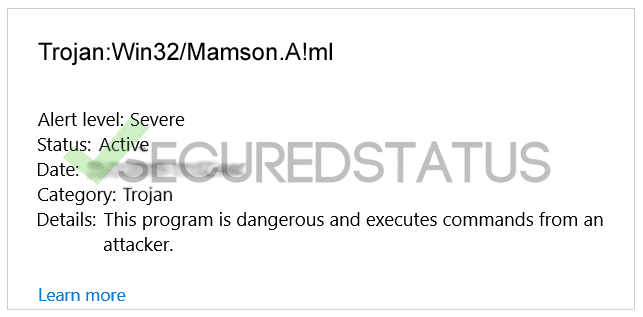
Detected: Trojan:Win32/Mamson.A!ml
Status: Quarantined
Quarantined files are in a restricted area where they can't harm your device. They will be removed automatically.

Date: 7/26/2023 11:51 AM
Details: This program is dangerous and executes commands from an attacker.

Affected items:
amsi: \Device\HarddiskVolume3\Windows\System32\WindowsPowerShell\v1.0\powershell.exe

***

Windows Defender isn't providing a permanent solution. I tried initiating "Microsoft Defender Antivirus (offline scan)" but after I click "Scan now" expecting a restart, nothing happens.

I ran Microsoft Support Emergency Response Tool overnight and it found four questionable items, none of which appeared to be the trojan in question or related to powershell.exe. I couldn't take detailed notes because my screen suddenly went black and I had to reboot.

I ran a Malwarebytes scan, but it isn't finding anything -- I even signed up for the 14-day premium trial.

Under "Programs and Features," the only item installed on 07/24/2023 was Microsoft Edge WebView2 Runtime. Before that, Microsoft Edge was listed as being installed on 07/22/2023.

I also tried restoring powershell.exe from a backup I made a couple of months ago but the problem persists.

Any help anyone could provide would be greatly appreciated!
 

My Computer My Computer

At a glance

Windows 11
OS
Windows 11

My Computers My Computers

  • At a glance

    Windows 11 Pro10th Gen Intel(R) Core(TM) i7-10700, 2.90GHz32GB, 2x16GB, DDR4, 2933MhzNVIDIA(R) GeForce(R) RTX 2060 SUPER(TM) 8GB G...
    OS
    Windows 11 Pro
    Computer type
    PC/Desktop
    Manufacturer/Model
    Dell 8940 XPS
    CPU
    10th Gen Intel(R) Core(TM) i7-10700, 2.90GHz
    Motherboard
    Dell 0KV3RP (U3E1)
    Memory
    32GB, 2x16GB, DDR4, 2933Mhz
    Graphics Card(s)
    NVIDIA(R) GeForce(R) RTX 2060 SUPER(TM) 8GB GDDR6
    Sound Card
    Onboard, Realtek Codec, NVIDIA Hi Def Audio, Intel Display Audio
    Monitor(s) Displays
    Dell UltraSharp U3415W
    Screen Resolution
    3440x1440
    Hard Drives
    2TB M.2 PCIe NVMe SSD; 2TB Samsung SSD 860 EVO; 2TB Samsung SSD 860 EVO 2
    PSU
    500 W Dell
    Case
    Night Sky Bezel Chassis
    Cooling
    Dell
    Keyboard
    Logi Wireless
    Mouse
    Logi Wireless
    Internet Speed
    111 Mbps Download, 132 Mbps Upload
    Browser
    Edge, Chrome
    Antivirus
    Windows Defender, MalwareBytes
  • At a glance

    Windows 11 ProIntel 13900K Core I9 24 Core LGA 170032GB (2x16) Kingston Fury Beast 6000MHZ DDR5nVidia 4090 Founders Edition
    Operating System
    Windows 11 Pro
    Computer type
    PC/Desktop
    Manufacturer/Model
    Falcon Northwest Talon
    CPU
    Intel 13900K Core I9 24 Core LGA 1700
    Motherboard
    Asus ROG Z970 Maximus Hero
    Memory
    32GB (2x16) Kingston Fury Beast 6000MHZ DDR5
    Graphics card(s)
    nVidia 4090 Founders Edition
    Sound Card
    Motherboard
    Monitor(s) Displays
    Alienware 34” Curved OLED
    Screen Resolution
    4K
    Hard Drives
    SSD M.2 Kingston Renegade Fury 4 TB x 2; Western Digital Red Pro 8 TB SATA III
    PSU
    1000W ECGA Platinum Modular ATX
    Case
    Falcon NW Custom
    Cooling
    AIO Falcon NW 280mm Liquid Cooler
    Keyboard
    Logitech Pro Gamer
    Mouse
    Logitech G502
    Internet Speed
    111 Mbps Download, 132 Mbps Upload
    Browser
    Edge, Chrome
    Antivirus
    Windows Defender, MalwareBytes
    Other Info
    Noise Blocker Fans

Thanks for the quick response. Yes -- the Microsoft link is where I got the Microsoft Safety Scanner (for some reason the EXE properties say it's the Microsoft Support Emergency Response Tool). I also went to the Secured Status link before posting here.

I'm going through the Malware Tips link right now. I'll post the results soon.
 

My Computer My Computer

At a glance

Windows 11
OS
Windows 11

Update -- I ran these programs both in safe mode and regular (I couldn't use Safe Mode with Networking as suggested because I only have a wifi connection, not ethernet).

Malwarebytes found nothing in either mode.
Hitman Pro found nothing in safe mode and would get hung up around 99% in regular.
Emsisoft Emergency Kit - Wouldn't start in safe mode. Found a few PUPs in regular but not Mamson.A!ml.
AdwCleaner - Found 7 PUPs but not Mamson.A!ml in safe mode. Did a second scan in regular and found nothing.

As a result, as soon as Windows starts, I get a notification that Defender dealt with Mamson.A!ml again, but the Windows Security Protection history now shows it doesn't have to deal with it every minute as it did before. So a big improvement, but I'm still concerned it still has to be dealt with every time Windows starts.
 
Last edited:

My Computer My Computer

At a glance

Windows 11
OS
Windows 11
Update -- I ran these programs both in safe mode and regular (I couldn't use Safe Mode with Networking as suggested because I only have a wifi connection, not ethernet).

Malwarebytes found nothing in either mode.
Hitman Pro found nothing in safe mode and would get hung up around 99% in regular.
Emsisoft Emergency Kit - Wouldn't start in safe mode. Found a few PUPs in regular but not Mamson.A!ml.
AdwCleaner - Found 7 PUPs but not Mamson.A!ml in safe mode. Did a second scan in regular and found nothing.

As a result, as soon as Windows starts, I get a notification that Defender dealt with Mamson.A!ml again, but the Windows Security Protection history now shows it doesn't have to deal with it every minute as it did before. So a big improvement, but I'm still concerned it still has to be dealt with every time Windows starts.
Here is a link to an article that will help you delete the quarantined item. This should take care of it once and tor all.
 

My Computers My Computers

  • At a glance

    Windows 11 Pro10th Gen Intel(R) Core(TM) i7-10700, 2.90GHz32GB, 2x16GB, DDR4, 2933MhzNVIDIA(R) GeForce(R) RTX 2060 SUPER(TM) 8GB G...
    OS
    Windows 11 Pro
    Computer type
    PC/Desktop
    Manufacturer/Model
    Dell 8940 XPS
    CPU
    10th Gen Intel(R) Core(TM) i7-10700, 2.90GHz
    Motherboard
    Dell 0KV3RP (U3E1)
    Memory
    32GB, 2x16GB, DDR4, 2933Mhz
    Graphics Card(s)
    NVIDIA(R) GeForce(R) RTX 2060 SUPER(TM) 8GB GDDR6
    Sound Card
    Onboard, Realtek Codec, NVIDIA Hi Def Audio, Intel Display Audio
    Monitor(s) Displays
    Dell UltraSharp U3415W
    Screen Resolution
    3440x1440
    Hard Drives
    2TB M.2 PCIe NVMe SSD; 2TB Samsung SSD 860 EVO; 2TB Samsung SSD 860 EVO 2
    PSU
    500 W Dell
    Case
    Night Sky Bezel Chassis
    Cooling
    Dell
    Keyboard
    Logi Wireless
    Mouse
    Logi Wireless
    Internet Speed
    111 Mbps Download, 132 Mbps Upload
    Browser
    Edge, Chrome
    Antivirus
    Windows Defender, MalwareBytes
  • At a glance

    Windows 11 ProIntel 13900K Core I9 24 Core LGA 170032GB (2x16) Kingston Fury Beast 6000MHZ DDR5nVidia 4090 Founders Edition
    Operating System
    Windows 11 Pro
    Computer type
    PC/Desktop
    Manufacturer/Model
    Falcon Northwest Talon
    CPU
    Intel 13900K Core I9 24 Core LGA 1700
    Motherboard
    Asus ROG Z970 Maximus Hero
    Memory
    32GB (2x16) Kingston Fury Beast 6000MHZ DDR5
    Graphics card(s)
    nVidia 4090 Founders Edition
    Sound Card
    Motherboard
    Monitor(s) Displays
    Alienware 34” Curved OLED
    Screen Resolution
    4K
    Hard Drives
    SSD M.2 Kingston Renegade Fury 4 TB x 2; Western Digital Red Pro 8 TB SATA III
    PSU
    1000W ECGA Platinum Modular ATX
    Case
    Falcon NW Custom
    Cooling
    AIO Falcon NW 280mm Liquid Cooler
    Keyboard
    Logitech Pro Gamer
    Mouse
    Logitech G502
    Internet Speed
    111 Mbps Download, 132 Mbps Upload
    Browser
    Edge, Chrome
    Antivirus
    Windows Defender, MalwareBytes
    Other Info
    Noise Blocker Fans
Here is a link to an article that will help you delete the quarantined item. This should take care of it once and tor all.
It appears the link is missing...
 

My Computer My Computer

At a glance

Windows 11
OS
Windows 11


Since it seems the malware has been eliminated, consider a reset of Windows Defender. If issue persists, would consider a System Restore or Clean Install. But would continue to closely monitor for a period with frequent scans with 3rd party AVs.
 

My Computer My Computer

At a glance

Win11 Ver 25H2 26200.6899Intel i58gb
OS
Win11 Ver 25H2 26200.6899
Computer type
Laptop
Manufacturer/Model
Dell
CPU
Intel i5
Memory
8gb
Screen Resolution
1920x1080
Hard Drives
256gb
Browser
Firefox
Antivirus
Windows Defender
Last edited:

My Computers My Computers

  • At a glance

    Win 11 Home ♦♦♦26200.8655 ♦♦♦♦♦♦♦25H2AMD Ryzen 7 3700XG.Skill (F4-3200C14D-16GTZKW)EVGA RTX 2070 (08G-P4-2171-KR)
    OS
    Win 11 Home ♦♦♦26200.8655 ♦♦♦♦♦♦♦25H2
    Computer type
    PC/Desktop
    Manufacturer/Model
    Built by Ghot® [May 2020]
    CPU
    AMD Ryzen 7 3700X
    Motherboard
    Asus Pro WS X570-ACE (BIOS 5302)
    Memory
    G.Skill (F4-3200C14D-16GTZKW)
    Graphics Card(s)
    EVGA RTX 2070 (08G-P4-2171-KR)
    Sound Card
    Realtek ALC1220P / ALC S1220A
    Monitor(s) Displays
    Dell U3011 30"
    Screen Resolution
    2560 x 1600
    Hard Drives
    2x Samsung 860 EVO 500GB,
    WD 4TB Black FZBX - SATA III,
    WD 8TB Black FZBX - SATA III,
    DRW-24B1ST CD/DVD Burner
    PSU
    PC Power & Cooling 750W Quad EPS12V
    Case
    Cooler Master ATCS 840 Tower
    Cooling
    CM Hyper 212 EVO (push/pull)
    Keyboard
    Ducky DK9008 Shine II Blue LED
    Mouse
    Logitech Optical M-100
    Internet Speed
    300/300
    Browser
    Firefox (latest)
    Antivirus
    Bitdefender Total Security
    Other Info
    Speakers: Klipsch Pro Media 2.1
  • At a glance

    Windows XP Pro 32bit w/SP3AMD Athlon 64 X2 5000+ (OC'd @ 3.2Ghz)TWIN2X2048-6400C4DHX (2 x 1GB, DDR2 800)EVGA 256-P2-N758-TR GeForce 8600GT SSC
    Operating System
    Windows XP Pro 32bit w/SP3
    Computer type
    PC/Desktop
    Manufacturer/Model
    Built by Ghot® (not in use)
    CPU
    AMD Athlon 64 X2 5000+ (OC'd @ 3.2Ghz)
    Motherboard
    ASUS M2N32-SLI Deluxe Wireless Edition
    Memory
    TWIN2X2048-6400C4DHX (2 x 1GB, DDR2 800)
    Graphics card(s)
    EVGA 256-P2-N758-TR GeForce 8600GT SSC
    Sound Card
    Onboard
    Monitor(s) Displays
    ViewSonic G90FB Black 19" Professional (CRT)
    Screen Resolution
    up to 2048 x 1536
    Hard Drives
    WD 36GB 10,000rpm Raptor SATA
    Seagate 80GB 7200rpm SATA
    Lite-On LTR-52246S CD/RW
    Lite-On LH-18A1P CD/DVD Burner
    PSU
    PC Power & Cooling Silencer 750 Quad EPS12V
    Case
    Generic Beige case, 80mm fans
    Cooling
    ZALMAN 9500A 92mm CPU Cooler
    Keyboard
    Logitech Classic Keybooard 200
    Mouse
    Logitech Optical M-BT96a
    Internet Speed
    300/300
    Browser
    Firefox 3.x ??
    Antivirus
    Symantec (Norton)
    Other Info
    Still assembled, still runs. Haven't turned it on for 15 years?
@cinematic6436 ..... lets see if we can find out more about the so called Trojan, this may be a "false positive" from MS !
Could you run these 2 scan's & see if it finds anything ?

Malwarebytes Anti-Rootkit - Scan Only
--------------------
Download Malwarebytes Anti-Rootkit and save it to your Desktop >>> Downloading Malwarebytes Anti-Rootkit
Right click the mbar icon and select Run as administrator
Click OK to install it on your desktop
Click Next on the following screen
On the Update Database: screen click Update to download the latest definition updates then click Next
Click Scan and allow the process to complete
Click the Exit button not Cleanup
A system-log report will be created in the mbar folder placed on your Desktop. Copy and paste the contents in your reply !

=================

RogueKiller

Download the right version of RogueKiller for your Windows version (32 or 64-bit) >>> Free Virus Cleaner | RogueKiller AntiMalware • Adlice Software
* Once done, move the executable file to your Desktop, right-click on it and select Spcusrh.pngRun as Administrator (for Windows Vista, 7, 8, 8.1 and 10 users)
* Click on the Start Scan button in the right panel, which will bring you to another tab, and click on it again (this time it'll be in the bottom right corner)
* Wait for the scan to complete
* On completion, the results will be displayed
* Check every single entry (threat found), and click on the Remove Selected button
* On completion, the results will be displayed. Click on the Open Report button in the bottom left corner, followed by the Open TXT button (also in the bottom left corner)
* This will open the report in Notepad. Copy/paste its content in your next reply
 

My Computer My Computer

At a glance

Windows11 23H2 (OS Build 22631.2428)2.90 gigahertz Intel Core i7-1070016214 Megabytes Usable Installed Memor
OS
Windows11 23H2 (OS Build 22631.2428)
Computer type
PC/Desktop
Manufacturer/Model
HP HP ENVY TE01
CPU
2.90 gigahertz Intel Core i7-10700
Motherboard
Board: HP 8767 A (SMVB)
Memory
16214 Megabytes Usable Installed Memor
Hard Drives
1511.52 Gigabytes Usable Hard Drive Capacity
1418.15 Gigabytes Hard Drive Free Space
Keyboard
Logitech wireless
Mouse
M 185 wireless
Internet Speed
12 ms Jitter 8 ms Download 10.5 Mbps Upload 1.7
Browser
Edge & FF
Antivirus
Windows Defender
Might want to try ESET's Online "One Time Scanner"...

It's been running for about 12 hours now, but seems to be going quite slowly -- only about 163,000+ items have been scanned.
 

My Computer My Computer

At a glance

Windows 11
OS
Windows 11


Since it seems the malware has been eliminated, consider a reset of Windows Defender. If issue persists, would consider a System Restore or Clean Install. But would continue to closely monitor for a period with frequent scans with 3rd party AVs.

The malware went from being detected every minute to being detected only when Windows 11 starts to not being detected at all -- the last instance in the protection history is 07/26/2023 at 4:25 PM.

I tried resetting Windows Defender but selecting the offline scan still doesn't work -- I click "Scan now" and still nothing happens, no restart or subsequent scan. I think I'm just going to live with it. The malware seems to be history and I'd hate to reset & have to reinstall everything.

Still, I'll install an additional AV just to be safe.
 

My Computer My Computer

At a glance

Windows 11
OS
Windows 11
@cinematic6436 ..... lets see if we can find out more about the so called Trojan, this may be a "false positive" from MS !
Could you run these 2 scan's & see if it finds anything ?

Malwarebytes Anti-Rootkit - Scan Only
--------------------
Download Malwarebytes Anti-Rootkit and save it to your Desktop >>> Downloading Malwarebytes Anti-Rootkit
Right click the mbar icon and select Run as administrator
Click OK to install it on your desktop
Click Next on the following screen
On the Update Database: screen click Update to download the latest definition updates then click Next
Click Scan and allow the process to complete
Click the Exit button not Cleanup
A system-log report will be created in the mbar folder placed on your Desktop. Copy and paste the contents in your reply !

=================

RogueKiller

Download the right version of RogueKiller for your Windows version (32 or 64-bit) >>> Free Virus Cleaner | RogueKiller AntiMalware • Adlice Software
* Once done, move the executable file to your Desktop, right-click on it and select Spcusrh.pngRun as Administrator (for Windows Vista, 7, 8, 8.1 and 10 users)
* Click on the Start Scan button in the right panel, which will bring you to another tab, and click on it again (this time it'll be in the bottom right corner)
* Wait for the scan to complete
* On completion, the results will be displayed
* Check every single entry (threat found), and click on the Remove Selected button
* On completion, the results will be displayed. Click on the Open Report button in the bottom left corner, followed by the Open TXT button (also in the bottom left corner)
* This will open the report in Notepad. Copy/paste its content in your next reply

Just finished the scan -- "No malware found!"
 

My Computer My Computer

At a glance

Windows 11
OS
Windows 11
@cinematic6436 ....... this program will delete/remove the programs you used in the cleaning & their logs !

Please download KpRm by Kernel-panik and save to your Desktop. >>> KpRm

* Click on KpRm.exe to run the tool.
* Vista/Windows 7/8/10 users right-click and select Run As Administrator.

* Put a check mark next to these items:
- Delete tools
- Delete now

* Click the "Run" button.
When the tool has finished, it will create and open a log report and delete itself.
 
Last edited:

My Computer My Computer

At a glance

Windows11 23H2 (OS Build 22631.2428)2.90 gigahertz Intel Core i7-1070016214 Megabytes Usable Installed Memor
OS
Windows11 23H2 (OS Build 22631.2428)
Computer type
PC/Desktop
Manufacturer/Model
HP HP ENVY TE01
CPU
2.90 gigahertz Intel Core i7-10700
Motherboard
Board: HP 8767 A (SMVB)
Memory
16214 Megabytes Usable Installed Memor
Hard Drives
1511.52 Gigabytes Usable Hard Drive Capacity
1418.15 Gigabytes Hard Drive Free Space
Keyboard
Logitech wireless
Mouse
M 185 wireless
Internet Speed
12 ms Jitter 8 ms Download 10.5 Mbps Upload 1.7
Browser
Edge & FF
Antivirus
Windows Defender
@cinematic6436 ....... this program will delete/remove the programs you used in the cleaning & their logs ! If it was me i would remove/disable Defender & re-start it !

Please download KpRm by Kernel-panik and save to your Desktop. >>> KpRm

* Click on KpRm.exe to run the tool.
* Vista/Windows 7/8/10 users right-click and select Run As Administrator.

* Put a check mark next to these items:
- Delete tools
- Delete now

* Click the "Run" button.
When the tool has finished, it will create and open a log report and delete itself.

Thanks for the suggestion. Will KpRm remove Defender & restart it? I clicked the link and didn't see it in the list of programs...
 

My Computer My Computer

At a glance

Windows 11
OS
Windows 11

My Computer My Computer

At a glance

Windows11 23H2 (OS Build 22631.2428)2.90 gigahertz Intel Core i7-1070016214 Megabytes Usable Installed Memor
OS
Windows11 23H2 (OS Build 22631.2428)
Computer type
PC/Desktop
Manufacturer/Model
HP HP ENVY TE01
CPU
2.90 gigahertz Intel Core i7-10700
Motherboard
Board: HP 8767 A (SMVB)
Memory
16214 Megabytes Usable Installed Memor
Hard Drives
1511.52 Gigabytes Usable Hard Drive Capacity
1418.15 Gigabytes Hard Drive Free Space
Keyboard
Logitech wireless
Mouse
M 185 wireless
Internet Speed
12 ms Jitter 8 ms Download 10.5 Mbps Upload 1.7
Browser
Edge & FF
Antivirus
Windows Defender
You can not remove Windows Defender but you can disable or hide it, it's best to download another program, virus protection and/or with a fire wall for protection !
 

My Computer My Computer

At a glance

Windows11 23H2 (OS Build 22631.2428)2.90 gigahertz Intel Core i7-1070016214 Megabytes Usable Installed Memor
OS
Windows11 23H2 (OS Build 22631.2428)
Computer type
PC/Desktop
Manufacturer/Model
HP HP ENVY TE01
CPU
2.90 gigahertz Intel Core i7-10700
Motherboard
Board: HP 8767 A (SMVB)
Memory
16214 Megabytes Usable Installed Memor
Hard Drives
1511.52 Gigabytes Usable Hard Drive Capacity
1418.15 Gigabytes Hard Drive Free Space
Keyboard
Logitech wireless
Mouse
M 185 wireless
Internet Speed
12 ms Jitter 8 ms Download 10.5 Mbps Upload 1.7
Browser
Edge & FF
Antivirus
Windows Defender
No sign of the malware since my last post, so it looks like this problem is taken care of. (y)


To everyone who made a suggestion -- thank you for helping me!
 

My Computer My Computer

At a glance

Windows 11
OS
Windows 11

Latest Support Threads

Back
Top Bottom