DrMopp
Well-known member
- Local time
- 3:10 PM
- Posts
- 60
- OS
- Windows 11 Pro 25H2
Problem
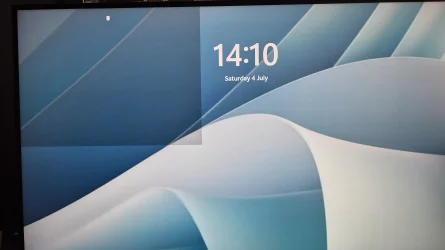
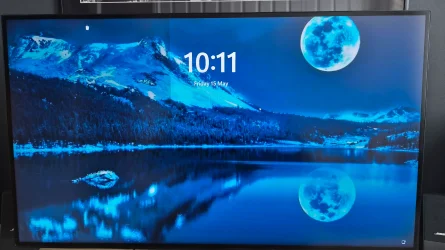
Upon booting my machine, the lock screen displays a visual glitch where the Windows Hello fingerprint icon is misaligned and a portion of the screen is darkened.
Actual Behavior
* The Windows Hello fingerprint icon is centered on the left side of the screen.
* The left side of the screen is darkened. Sometimes, only a quarter of the screen is darkened instead of the entire left half.
* This issue occurs regardless of which Lock Screen image is configured.
* Visually, it resembles the Windows Snap layout effect (as shown in the attached photos).
Has anyone encountered this specific lock screen layout issue before? Any help or troubleshooting suggestions would be greatly appreciated.
Upon booting my machine, the lock screen displays a visual glitch where the Windows Hello fingerprint icon is misaligned and a portion of the screen is darkened.
Actual Behavior
* The Windows Hello fingerprint icon is centered on the left side of the screen.
* The left side of the screen is darkened. Sometimes, only a quarter of the screen is darkened instead of the entire left half.
* This issue occurs regardless of which Lock Screen image is configured.
* Visually, it resembles the Windows Snap layout effect (as shown in the attached photos).
Has anyone encountered this specific lock screen layout issue before? Any help or troubleshooting suggestions would be greatly appreciated.
Attachments
My Computer
At a glance
Windows 11 Pro 25H2Intel(R) Core(TM) i7-1070016GB
- OS
- Windows 11 Pro 25H2
- Computer type
- PC/Desktop
- Manufacturer/Model
- Dell Optiplex
- CPU
- Intel(R) Core(TM) i7-10700
- Memory
- 16GB
- Monitor(s) Displays
- Dell U2722DE
- Screen Resolution
- 2560x1440
- Hard Drives
- NVMe Kioxia 512GB
- Keyboard
- Logi MX Keys
- Mouse
- Logi MX Vertical
- Internet Speed
- 76
- Browser
- Edge/Chrome/Firefox
- Antivirus
- Bitdefender