
Solved Windows Hello - GPO setting question


win11freak

Well-known member
Member
Local time
2:33 AM
Posts
252
OS
Windows 11 Pro 22H2
Hello Everyone,

I am using a Windows Hello PIN to sign in to my personal/consumer Windows 11 laptop and TPM is enabled and running.

However, the next time I decide to reinstall Windows 11 again, would this Group Policy setting need to be Enabled or should it be left as Not Configured since my laptop's TPM is running and is enabled by default?

See photo as to what I mean.

Thanks in Advance.
 

Attachments
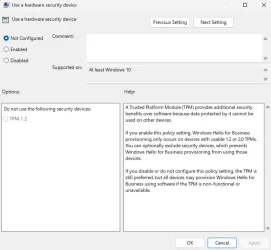
  • Screenshot 2026-08-15 081439.webp
    Screenshot 2026-08-15 081439.webp
    52.4 KB · Views: 1

My Computer My Computer

At a glance

Windows 11 Pro 22H2
OS
Windows 11 Pro 22H2
TPM 2.0 (Trusted Platform Module) is a strict hardware security requirement for Windows 11 no need to configure that policy as Windows 11 uses TMP 2.0.

How to Check for TPM 2.0

Press the Windows Key + R to open the run box.

Type tpm.msc and press Enter.

Look at the bottom right for Specification Version to see if it says 2.0.
 

My Computer My Computer

At a glance

Windows 11AMD Ryzen 7 5700GMicron Technology DDR4-3200 16GBNVIDIA GeForce RTX 3060
OS
Windows 11
Computer type
PC/Desktop
Manufacturer/Model
HP Pavilion
CPU
AMD Ryzen 7 5700G
Motherboard
Erica6
Memory
Micron Technology DDR4-3200 16GB
Graphics Card(s)
NVIDIA GeForce RTX 3060
Sound Card
Realtek ALC671
Monitor(s) Displays
Samsung SyncMaster U28E590
Screen Resolution
3840 x 2160
Hard Drives
SAMSUNG MZVLQ1T0HALB-000H1
I think you’re all set. There’s nothing to do.

Do remember that if you store passkeys in Windows Hello, a reinstallation or Windows being out of sync with the TPM could render those passkeys inaccessible. Make alternative login methods or store backup passkeys somewhere else.
 

My Computer My Computer

At a glance

Windows 11 Pro 25H2
OS
Windows 11 Pro 25H2
Computer type
PC/Desktop
So leaving it Not Configured would be ok since the TPM is functioning fine?
 

My Computer My Computer

At a glance

Windows 11 Pro 22H2
OS
Windows 11 Pro 22H2

My Computer My Computer

At a glance

Windows 11AMD Ryzen 7 5700GMicron Technology DDR4-3200 16GBNVIDIA GeForce RTX 3060
OS
Windows 11
Computer type
PC/Desktop
Manufacturer/Model
HP Pavilion
CPU
AMD Ryzen 7 5700G
Motherboard
Erica6
Memory
Micron Technology DDR4-3200 16GB
Graphics Card(s)
NVIDIA GeForce RTX 3060
Sound Card
Realtek ALC671
Monitor(s) Displays
Samsung SyncMaster U28E590
Screen Resolution
3840 x 2160
Hard Drives
SAMSUNG MZVLQ1T0HALB-000H1

Latest Support Threads

Back
Top Bottom




