Microsoft Learn:
What's happening
Windows Insider Preview builds are code-signed with flight certificates used to securely sign Insider Preview builds and encourage devices to stay on up-to-date, supported versions of Windows. The current certificates are expiring on August 11, 2026, so we're issuing renewal builds that carry the refreshed certificate. This is a routine, planned maintenance — not a response to any security issue.What's different this year: in the past this renewal primarily affected the Canary Channel only. Because of a shift in what is being signed, it now applies across other Insider channels, including Experimental & Beta.
Minimum build per channel
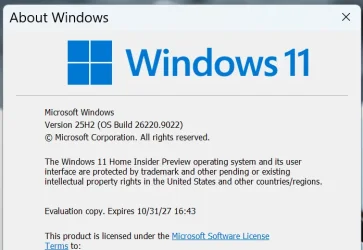
Not just any update will do — your device needs a build at or above the minimum for your channel to be on the renewed certificate. Once renewal builds become available, this table will list the lowest build number that carries the renewed certificate for each channel and core; anything below it is still on the expiring certificate.How to find your build number: press Windows + R, type winver, and press Enter. The dialog shows your build (e.g., "Version 25H2 (OS Build 26xxx.xxxx)") and its expiration date. Compare that build to the minimum below for your selected channel.
Find Windows 11 Version Number
This tutorial will show you how to find and see what the version number of the installed Windows 11 is on your PC. References: https://docs.microsoft.com/en-us/windows/release-health/windows11-release-information https://learn.microsoft.com/en-us/windows-insider/flight-hub/ Version Build...
 www.elevenforum.com
Channel Core Minimum Build:
- Experimental Future Platforms 29634.1000 (available July 27, 2026)
- Experimental 26H2 26300.9032 (available July 31, 2026)
- Experimental 26H1 28120.2630 (available July 31, 2026)
- Beta 25H2 26220.9022 (available July 31, 2026)
- Beta 26H1 28020.2623 (available July 31, 2026)
Keep your device up to date and take updates as they become available. To check manually:
- Open Settings > Windows Update.
- Select Check for updates.
- Install the offered build and restart — before August 11, 2026.
FAQ
I have more than one Insider device.Update each one independently before the deadline.
Which channel am I on?
Open Settings > Windows Update > Windows Insider Program to view, the above winver command will help with which core you are on.
I don't see the renewal build yet.
Renewal builds are available now (see table for build numbers), see Windows Insider Blog for the latest.
But winver tells me I have an updated cert — expiration showing 2027?
This may be showing as such due to a false positive on older builds than the above. Use the provided table above for confirmation.
Does this affect my activation or license?
No — this is only about the build-signing certificate.
Will I lose my apps, files, or settings?
No. It's a normal Windows Update and should not require a clean install in most circumstances.
What happens if I miss the deadline?
You'll see expiration notifications and builds on the old certificate stop being offered. Install the latest updates carrying the renewed certificate to recover.
Source:

Windows Insider Preview certificate renewal (Expiration: Aug 11, 2026) - Microsoft Q&A
Windows Insider Preview — Certificate Renewal (2026) What's changing, what to do, and the minimum build for your channel. What's happening Windows Insider Preview builds are code-signed with flight certificates used to securely sign Insider Preview…
learn.microsoft.com
Last edited: