Windows Keeps Creating New Network Profile Registry Entries


mccmw

Well-known member
Member
VIP
Local time
6:09 AM
Posts
520
OS
Windows 11
In NetworkList (Registry) Windows keeps creating new profiles...seemingly everytime I restart my computer...i.e. Network name with a # after it. The list can get quite long and I need to manually go in from time to time to delete them...to get the Wi-fi profile to show correctly without a # after. It only does this on one of my machines. I don't know why it does this but I'd love to know if someone else knows and can tell me how to get it to stop. Thanks.
 

My Computers My Computers

  • At a glance

    Windows 11Intel i7-7700K32GB 2666Mhz (Kingston Hyper X Fury)Powercolor RX6600XT
    OS
    Windows 11
    Computer type
    PC/Desktop
    Manufacturer/Model
    Custom
    CPU
    Intel i7-7700K
    Motherboard
    Asus Prime Z-270A
    Memory
    32GB 2666Mhz (Kingston Hyper X Fury)
    Graphics Card(s)
    Powercolor RX6600XT
    Sound Card
    N/A
    Monitor(s) Displays
    KTC
    Screen Resolution
    2560 x 1440
    Hard Drives
    1TB Western Digital SN770 (System) and 2TB Western Digital SN770 (Storage)
    Antivirus
    Windows Security
  • At a glance

    Windows 11 Homei9-11900H32GBIntegrated Intel and Nvidia 3050Ti
    Operating System
    Windows 11 Home
    Computer type
    Laptop
    Manufacturer/Model
    Dell/XPS 15 9510
    CPU
    i9-11900H
    Motherboard
    Unknown
    Memory
    32GB
    Graphics card(s)
    Integrated Intel and Nvidia 3050Ti
    Sound Card
    Integrated (Realtek)
    Monitor(s) Displays
    None
    Screen Resolution
    1920 x 1200 (non-Touch)
    Hard Drives
    2TB SK Hynix P41 Platinum
    Antivirus
    Windows Security
no idea what you are talking about - a screenshot would be helpful.
 

My Computers My Computers

  • At a glance

    win 11Pro 25H2 26200.8246I9-13900kG.Skill Ripjaws S5 32GB Kit DDR5 6000.GeForce RTX™ 3060 Ti VISION OC 8G (rev. 2.0)
    OS
    win 11Pro 25H2 26200.8246
    Computer type
    PC/Desktop
    Manufacturer/Model
    DIY: LianLi 207 case, ASUS mobo, Arctic aio cooling
    CPU
    I9-13900k
    Motherboard
    ASUS ROG STRIX Z790-E Gaming wifi-6E, latest AMI BIOS 3107
    Memory
    G.Skill Ripjaws S5 32GB Kit DDR5 6000.
    Graphics Card(s)
    GeForce RTX™ 3060 Ti VISION OC 8G (rev. 2.0)
    Sound Card
    on mobo
    Monitor(s) Displays
    Dell S3221QS (curved 32")
    Screen Resolution
    4K but I usually display at 1K
    Hard Drives
    Sam 980 Pro 1T M.2, 990Pro, WD 570, others(all NVMe)
    PSU
    Corsair RM750e fully modular
    Case
    Lian Li 207
    Cooling
    CPU:Arctic liq frz iii Pro 360 on top, CASE: 2 front fans IN, 2 bottom fans in.
    Keyboard
    Corsair K70 RGB Core
    Mouse
    Logitech M510
    Internet Speed
    100Mbps Comcast; I226-V NIC
    Browser
    Firefox(current)
    Antivirus
    on win BitDefender AV Free
    Other Info
    Terabyte Unlimited Image
    WuMgr, StartAllBack, , Revo Uninstaller Pro Portable.

    Davinci Resolve or Wondershare Filmora Basic to process my vlogs. DJI Pocket 2
  • At a glance

    win 10, Minti7-10510U 1.8-4.9GHz16GB DDR4Nvidia Quadro P520 2GB DDR5 supports 4K exter...
    Operating System
    win 10, Mint
    Computer type
    Laptop
    Manufacturer/Model
    Lenovo P15s
    CPU
    i7-10510U 1.8-4.9GHz
    Motherboard
    Intel SoC
    Memory
    16GB DDR4
    Graphics card(s)
    Nvidia Quadro P520 2GB DDR5 supports 4K external via HDMI or USB-C
    Sound Card
    Realtek ALC3287 HD
    Monitor(s) Displays
    15.6"
    Screen Resolution
    1K
    Hard Drives
    NVMe various
TBH I had no idea so I asked ChatGPT and Co-Pilot. Maybe something in their answers will help. Take it for what you will.

CO-PILOT ANSWER


Windows automatically creates new network profiles with a # suffix when it detects a network with the same name but considers it a new connection. This can happen due to changes in network settings, different DHCP configurations, or reconnecting after troubleshooting2.

If you'd like to stop Windows from incrementing network profile names, you can try:

  1. Deleting old profiles: Go to Settings > Network & Internet > Wi-Fi > Manage known networks and remove duplicate profiles.
  2. Using Command Prompt: Run netsh wlan show profiles to list saved profiles, then delete unwanted ones with netsh wlan delete profile name="ProfileName".
  3. Checking registry settings: Some users have reported that Windows keeps creating new profiles in the registry, which may require manual cleanup


ChatGPT Answer

When Windows creates a new network profile with a # suffix (e.g., "NetworkName#2"), it's typically because Windows is detecting a new connection to the same network but sees it as a different session. This can happen for several reasons:

1. If you have more than one network interface (like Ethernet and Wi-Fi, or even multiple Wi-Fi adapters), Windows might create a new profile with a # suffix to distinguish between different instances of the same network connection.

2. If the router or access point changes its network name (SSID), Windows might treat the same network as a new one, creating a new profile. This happens even if the SSID is technically the same but has been slightly altered (e.g., after a firmware update).

3. If you reset your network settings, or if there’s a change in configuration (e.g., new IP address assignment, DHCP reset), Windows may create a new profile to accommodate the new settings, even though it’s still the same network.

4. In environments with multiple access points broadcasting the same SSID (like in a large office or home with mesh Wi-Fi), Windows might create a new profile when you move between access points. It treats each new connection as a new instance of the same network.

5. Sometimes, if your device temporarily loses connection to a Wi-Fi network and reconnects, Windows may generate a new profile with the # suffix. This is especially true if the connection is unstable or interrupted.

6. Occasionally, a corrupted network profile could cause Windows to create a new profile with the # suffix. This could happen if settings or cached configurations become out of sync.

How to Manage or Fix It:​

  1. Forget the Network:If you're seeing multiple profiles for the same network, you can go to Settings > Network & Internet > Wi-Fi > Manage Known Networks, select the profile with the # suffix, and click Forget. Then reconnect to the network to create a clean profile.
  2. Check Network Adapters:Ensure there are no duplicate or unnecessary network adapters. You can check this by opening Device Manager, expanding Network adapters, and disabling any unused or duplicate interfaces.
  3. Reset Network Settings:If the problem persists, you can reset your network settings by going to Settings > Network & Internet > Status and clicking on Network reset. This will remove and reinstall all network adapters and reset configurations.
  4. Check Router Settings:If your router is changing the SSID or configuration often, you might want to check its settings to ensure it's stable.

 

My Computers My Computers

  • At a glance

    Windows 11 Pro 25H2 26200.9457i9-10900 10 core 20 threads32 gbnone-Intel UHD Graphics 630
    OS
    Windows 11 Pro 25H2 26200.9457
    Computer type
    PC/Desktop
    Manufacturer/Model
    Dell Optiplex 7080
    CPU
    i9-10900 10 core 20 threads
    Motherboard
    DELL 0J37VM
    Memory
    32 gb
    Graphics Card(s)
    none-Intel UHD Graphics 630
    Sound Card
    Integrated Realtek
    Monitor(s) Displays
    Benq 27
    Screen Resolution
    2560x1440
    Hard Drives
    2x1tb Solidigm m.2 nvme /External drives 512gb Samsung m.2 sata+2tb Kingston m2.nvme
    PSU
    500w
    Case
    MT
    Cooling
    Dell Premium
    Keyboard
    Logitech wired
    Mouse
    Logitech wireless
    Internet Speed
    so slow I'm too embarrassed to tell
    Browser
    #1 Edge #2 Firefox
    Antivirus
    Defender+MWB Premium
  • At a glance

    Windows 11 Pro 24H2 26200.9457AMD Ryzen 7 6800U32 gbintegrated
    Operating System
    Windows 11 Pro 24H2 26200.9457
    Computer type
    PC/Desktop
    Manufacturer/Model
    Beelink Mini PC SER5
    CPU
    AMD Ryzen 7 6800U
    Memory
    32 gb
    Graphics card(s)
    integrated
    Sound Card
    integrated
    Monitor(s) Displays
    Benq 27
    Screen Resolution
    2560x1440
    Hard Drives
    1TB Crucial nvme
    Keyboard
    Logitech wired
    Mouse
    Logitech wireless
    Internet Speed
    still too embarrassed to tell
    Browser
    Firefox
    Antivirus
    Defender
  • System 3 is non compliant Dell 9020 i7-4770/24gb ram Win11 PRO 26200.9457
no idea what you are talking about - a screenshot would be helpful.
I recently deleted them...when they build up again I'll take a screenshot. Basically, if you go to HKEY_LOCAL_MACHINE\SOFTWARE\Microsoft\Windows NT\CurrentVersion\NetworkList\Profiles it shows all of the network profiles you have used. There should only be one for each connection. However, some of mine keep adding #s after them. The profile should just say "Network" but there end up being entries for Network 2, Network 3, Network 4...etc.
 

My Computers My Computers

  • At a glance

    Windows 11Intel i7-7700K32GB 2666Mhz (Kingston Hyper X Fury)Powercolor RX6600XT
    OS
    Windows 11
    Computer type
    PC/Desktop
    Manufacturer/Model
    Custom
    CPU
    Intel i7-7700K
    Motherboard
    Asus Prime Z-270A
    Memory
    32GB 2666Mhz (Kingston Hyper X Fury)
    Graphics Card(s)
    Powercolor RX6600XT
    Sound Card
    N/A
    Monitor(s) Displays
    KTC
    Screen Resolution
    2560 x 1440
    Hard Drives
    1TB Western Digital SN770 (System) and 2TB Western Digital SN770 (Storage)
    Antivirus
    Windows Security
  • At a glance

    Windows 11 Homei9-11900H32GBIntegrated Intel and Nvidia 3050Ti
    Operating System
    Windows 11 Home
    Computer type
    Laptop
    Manufacturer/Model
    Dell/XPS 15 9510
    CPU
    i9-11900H
    Motherboard
    Unknown
    Memory
    32GB
    Graphics card(s)
    Integrated Intel and Nvidia 3050Ti
    Sound Card
    Integrated (Realtek)
    Monitor(s) Displays
    None
    Screen Resolution
    1920 x 1200 (non-Touch)
    Hard Drives
    2TB SK Hynix P41 Platinum
    Antivirus
    Windows Security
I recently deleted them...when they build up again I'll take a screenshot. Basically, if you go to HKEY_LOCAL_MACHINE\SOFTWARE\Microsoft\Windows NT\CurrentVersion\NetworkList\Profiles it shows all of the network profiles you have used. There should only be one for each connection. However, some of mine keep adding #s after them. The profile should just say "Network" but there end up being entries for Network 2, Network 3, Network 4...etc.
This is what I have in there...
Screenshot 2025-04-12 213510.webp
 

My Computers My Computers

  • At a glance

    win 11Pro 25H2 26200.8246I9-13900kG.Skill Ripjaws S5 32GB Kit DDR5 6000.GeForce RTX™ 3060 Ti VISION OC 8G (rev. 2.0)
    OS
    win 11Pro 25H2 26200.8246
    Computer type
    PC/Desktop
    Manufacturer/Model
    DIY: LianLi 207 case, ASUS mobo, Arctic aio cooling
    CPU
    I9-13900k
    Motherboard
    ASUS ROG STRIX Z790-E Gaming wifi-6E, latest AMI BIOS 3107
    Memory
    G.Skill Ripjaws S5 32GB Kit DDR5 6000.
    Graphics Card(s)
    GeForce RTX™ 3060 Ti VISION OC 8G (rev. 2.0)
    Sound Card
    on mobo
    Monitor(s) Displays
    Dell S3221QS (curved 32")
    Screen Resolution
    4K but I usually display at 1K
    Hard Drives
    Sam 980 Pro 1T M.2, 990Pro, WD 570, others(all NVMe)
    PSU
    Corsair RM750e fully modular
    Case
    Lian Li 207
    Cooling
    CPU:Arctic liq frz iii Pro 360 on top, CASE: 2 front fans IN, 2 bottom fans in.
    Keyboard
    Corsair K70 RGB Core
    Mouse
    Logitech M510
    Internet Speed
    100Mbps Comcast; I226-V NIC
    Browser
    Firefox(current)
    Antivirus
    on win BitDefender AV Free
    Other Info
    Terabyte Unlimited Image
    WuMgr, StartAllBack, , Revo Uninstaller Pro Portable.

    Davinci Resolve or Wondershare Filmora Basic to process my vlogs. DJI Pocket 2
  • At a glance

    win 10, Minti7-10510U 1.8-4.9GHz16GB DDR4Nvidia Quadro P520 2GB DDR5 supports 4K exter...
    Operating System
    win 10, Mint
    Computer type
    Laptop
    Manufacturer/Model
    Lenovo P15s
    CPU
    i7-10510U 1.8-4.9GHz
    Motherboard
    Intel SoC
    Memory
    16GB DDR4
    Graphics card(s)
    Nvidia Quadro P520 2GB DDR5 supports 4K external via HDMI or USB-C
    Sound Card
    Realtek ALC3287 HD
    Monitor(s) Displays
    15.6"
    Screen Resolution
    1K
    Hard Drives
    NVMe various
Yep...assuming that each of those profiles is different, they should simply be the SSID. Even though I only have one saved network, I'll end up with lots of them...the same name but with a number after. Something keeps triggering Windows to add a profile for the same name but with a number after it each time I turn off or restart my computer. The most "recent" profile it adds also becomes the name of my network adapter in Network and Sharing Center.
 

My Computers My Computers

  • At a glance

    Windows 11Intel i7-7700K32GB 2666Mhz (Kingston Hyper X Fury)Powercolor RX6600XT
    OS
    Windows 11
    Computer type
    PC/Desktop
    Manufacturer/Model
    Custom
    CPU
    Intel i7-7700K
    Motherboard
    Asus Prime Z-270A
    Memory
    32GB 2666Mhz (Kingston Hyper X Fury)
    Graphics Card(s)
    Powercolor RX6600XT
    Sound Card
    N/A
    Monitor(s) Displays
    KTC
    Screen Resolution
    2560 x 1440
    Hard Drives
    1TB Western Digital SN770 (System) and 2TB Western Digital SN770 (Storage)
    Antivirus
    Windows Security
  • At a glance

    Windows 11 Homei9-11900H32GBIntegrated Intel and Nvidia 3050Ti
    Operating System
    Windows 11 Home
    Computer type
    Laptop
    Manufacturer/Model
    Dell/XPS 15 9510
    CPU
    i9-11900H
    Motherboard
    Unknown
    Memory
    32GB
    Graphics card(s)
    Integrated Intel and Nvidia 3050Ti
    Sound Card
    Integrated (Realtek)
    Monitor(s) Displays
    None
    Screen Resolution
    1920 x 1200 (non-Touch)
    Hard Drives
    2TB SK Hynix P41 Platinum
    Antivirus
    Windows Security
I have two (Physical ETH) and WireShark VPN connection. Sounds like something is resetting the Adapter every time you start-up.

Maybe try a Newer or Older Driver (preferably a few versions away) to see if that's the culprit, if not that, Then check firewall AV software, see if they are not cycling Network Identifiers on you to keep you secure.
 

My Computer My Computer

At a glance

Windows 11 ProRyzen 5 5800X32Gb Corsair 3200Gigabyte RTX4070-Super
OS
Windows 11 Pro
Computer type
PC/Desktop
CPU
Ryzen 5 5800X
Motherboard
Asus B550 Strix gaming
Memory
32Gb Corsair 3200
Graphics Card(s)
Gigabyte RTX4070-Super
Screen Resolution
2x 1440, 1x 1080
Yep, I go in and clear them up every so often. It happens on both my LAN and WiFi networks. Adds an ascending number like 2, 3 and so on. Is an annoyance mostly. I even delete the original without the numeration and everything still works, may have to enter passkey again on reboot.
 

My Computer My Computer

At a glance

11 Pro 25H2i7-10750H16GB Samsung DDR4 3200Intel + Nvidia RTX3060 Laptop
OS
11 Pro 25H2
Computer type
Laptop
Manufacturer/Model
MSI
CPU
i7-10750H
Motherboard
MSI MS-17F5
Memory
16GB Samsung DDR4 3200
Graphics Card(s)
Intel + Nvidia RTX3060 Laptop
Sound Card
Realtek
Monitor(s) Displays
Samsung 24" Curved (HDMI)
Screen Resolution
1920x1080
Hard Drives
Sabrent Rocket Gen3 1Tb Smasung EVO 870 1TB
Antivirus
Bitdefender
Yep...assuming that each of those profiles is different, they should simply be the SSID. Even though I only have one saved network, I'll end up with lots of them...the same name but with a number after. Something keeps triggering Windows to add a profile for the same name but with a number after it each time I turn off or restart my computer. The most "recent" profile it adds also becomes the name of my network adapter in Network and Sharing Center.
It would only do this if it senses that it is a different one - ie re-plugged or on a different connection.
 

My Computers My Computers

  • At a glance

    win 11Pro 25H2 26200.8246I9-13900kG.Skill Ripjaws S5 32GB Kit DDR5 6000.GeForce RTX™ 3060 Ti VISION OC 8G (rev. 2.0)
    OS
    win 11Pro 25H2 26200.8246
    Computer type
    PC/Desktop
    Manufacturer/Model
    DIY: LianLi 207 case, ASUS mobo, Arctic aio cooling
    CPU
    I9-13900k
    Motherboard
    ASUS ROG STRIX Z790-E Gaming wifi-6E, latest AMI BIOS 3107
    Memory
    G.Skill Ripjaws S5 32GB Kit DDR5 6000.
    Graphics Card(s)
    GeForce RTX™ 3060 Ti VISION OC 8G (rev. 2.0)
    Sound Card
    on mobo
    Monitor(s) Displays
    Dell S3221QS (curved 32")
    Screen Resolution
    4K but I usually display at 1K
    Hard Drives
    Sam 980 Pro 1T M.2, 990Pro, WD 570, others(all NVMe)
    PSU
    Corsair RM750e fully modular
    Case
    Lian Li 207
    Cooling
    CPU:Arctic liq frz iii Pro 360 on top, CASE: 2 front fans IN, 2 bottom fans in.
    Keyboard
    Corsair K70 RGB Core
    Mouse
    Logitech M510
    Internet Speed
    100Mbps Comcast; I226-V NIC
    Browser
    Firefox(current)
    Antivirus
    on win BitDefender AV Free
    Other Info
    Terabyte Unlimited Image
    WuMgr, StartAllBack, , Revo Uninstaller Pro Portable.

    Davinci Resolve or Wondershare Filmora Basic to process my vlogs. DJI Pocket 2
  • At a glance

    win 10, Minti7-10510U 1.8-4.9GHz16GB DDR4Nvidia Quadro P520 2GB DDR5 supports 4K exter...
    Operating System
    win 10, Mint
    Computer type
    Laptop
    Manufacturer/Model
    Lenovo P15s
    CPU
    i7-10510U 1.8-4.9GHz
    Motherboard
    Intel SoC
    Memory
    16GB DDR4
    Graphics card(s)
    Nvidia Quadro P520 2GB DDR5 supports 4K external via HDMI or USB-C
    Sound Card
    Realtek ALC3287 HD
    Monitor(s) Displays
    15.6"
    Screen Resolution
    1K
    Hard Drives
    NVMe various
It would only do this if it senses that it is a different one - ie re-plugged or on a different connection.
Or something is, resetting/Identifying the connection as new. Have you checked event viewer to see if there are any clues?
 

My Computer My Computer

At a glance

Windows 11 ProRyzen 5 5800X32Gb Corsair 3200Gigabyte RTX4070-Super
OS
Windows 11 Pro
Computer type
PC/Desktop
CPU
Ryzen 5 5800X
Motherboard
Asus B550 Strix gaming
Memory
32Gb Corsair 3200
Graphics Card(s)
Gigabyte RTX4070-Super
Screen Resolution
2x 1440, 1x 1080
I'm not seeing anything in event viewer. It only does it on my laptop...desktop is fine. I just did a Windows 11 Network reset but I doubt that is the issue or will fix anything. As steveg said...it is more an annoyance than anything.
 
Last edited:

My Computers My Computers

  • At a glance

    Windows 11Intel i7-7700K32GB 2666Mhz (Kingston Hyper X Fury)Powercolor RX6600XT
    OS
    Windows 11
    Computer type
    PC/Desktop
    Manufacturer/Model
    Custom
    CPU
    Intel i7-7700K
    Motherboard
    Asus Prime Z-270A
    Memory
    32GB 2666Mhz (Kingston Hyper X Fury)
    Graphics Card(s)
    Powercolor RX6600XT
    Sound Card
    N/A
    Monitor(s) Displays
    KTC
    Screen Resolution
    2560 x 1440
    Hard Drives
    1TB Western Digital SN770 (System) and 2TB Western Digital SN770 (Storage)
    Antivirus
    Windows Security
  • At a glance

    Windows 11 Homei9-11900H32GBIntegrated Intel and Nvidia 3050Ti
    Operating System
    Windows 11 Home
    Computer type
    Laptop
    Manufacturer/Model
    Dell/XPS 15 9510
    CPU
    i9-11900H
    Motherboard
    Unknown
    Memory
    32GB
    Graphics card(s)
    Integrated Intel and Nvidia 3050Ti
    Sound Card
    Integrated (Realtek)
    Monitor(s) Displays
    None
    Screen Resolution
    1920 x 1200 (non-Touch)
    Hard Drives
    2TB SK Hynix P41 Platinum
    Antivirus
    Windows Security
I looked at your mobo and saw "5-Way Optimization with Auto-Tuning and FanXpert 4 automatically tailors...", which made me wonder if on each reboot, it is not automatically doing something... Look in BIOS and see (first, that you indeed have the latest one) if there is some switch in there to shut off the auto stuff.
 

My Computers My Computers

  • At a glance

    win 11Pro 25H2 26200.8246I9-13900kG.Skill Ripjaws S5 32GB Kit DDR5 6000.GeForce RTX™ 3060 Ti VISION OC 8G (rev. 2.0)
    OS
    win 11Pro 25H2 26200.8246
    Computer type
    PC/Desktop
    Manufacturer/Model
    DIY: LianLi 207 case, ASUS mobo, Arctic aio cooling
    CPU
    I9-13900k
    Motherboard
    ASUS ROG STRIX Z790-E Gaming wifi-6E, latest AMI BIOS 3107
    Memory
    G.Skill Ripjaws S5 32GB Kit DDR5 6000.
    Graphics Card(s)
    GeForce RTX™ 3060 Ti VISION OC 8G (rev. 2.0)
    Sound Card
    on mobo
    Monitor(s) Displays
    Dell S3221QS (curved 32")
    Screen Resolution
    4K but I usually display at 1K
    Hard Drives
    Sam 980 Pro 1T M.2, 990Pro, WD 570, others(all NVMe)
    PSU
    Corsair RM750e fully modular
    Case
    Lian Li 207
    Cooling
    CPU:Arctic liq frz iii Pro 360 on top, CASE: 2 front fans IN, 2 bottom fans in.
    Keyboard
    Corsair K70 RGB Core
    Mouse
    Logitech M510
    Internet Speed
    100Mbps Comcast; I226-V NIC
    Browser
    Firefox(current)
    Antivirus
    on win BitDefender AV Free
    Other Info
    Terabyte Unlimited Image
    WuMgr, StartAllBack, , Revo Uninstaller Pro Portable.

    Davinci Resolve or Wondershare Filmora Basic to process my vlogs. DJI Pocket 2
  • At a glance

    win 10, Minti7-10510U 1.8-4.9GHz16GB DDR4Nvidia Quadro P520 2GB DDR5 supports 4K exter...
    Operating System
    win 10, Mint
    Computer type
    Laptop
    Manufacturer/Model
    Lenovo P15s
    CPU
    i7-10510U 1.8-4.9GHz
    Motherboard
    Intel SoC
    Memory
    16GB DDR4
    Graphics card(s)
    Nvidia Quadro P520 2GB DDR5 supports 4K external via HDMI or USB-C
    Sound Card
    Realtek ALC3287 HD
    Monitor(s) Displays
    15.6"
    Screen Resolution
    1K
    Hard Drives
    NVMe various
EDIT: it might be worth your time, once you are on the latest BIOS, to boot to BIOS and click F5 to get defaults, and then click F10 to save and reboot.

I looked at your BIOS manual and didn't see anything obvious but I noticed you have 2 internal LAN controllers, which, if you are not using them, you might want to disable them.
 

My Computers My Computers

  • At a glance

    win 11Pro 25H2 26200.8246I9-13900kG.Skill Ripjaws S5 32GB Kit DDR5 6000.GeForce RTX™ 3060 Ti VISION OC 8G (rev. 2.0)
    OS
    win 11Pro 25H2 26200.8246
    Computer type
    PC/Desktop
    Manufacturer/Model
    DIY: LianLi 207 case, ASUS mobo, Arctic aio cooling
    CPU
    I9-13900k
    Motherboard
    ASUS ROG STRIX Z790-E Gaming wifi-6E, latest AMI BIOS 3107
    Memory
    G.Skill Ripjaws S5 32GB Kit DDR5 6000.
    Graphics Card(s)
    GeForce RTX™ 3060 Ti VISION OC 8G (rev. 2.0)
    Sound Card
    on mobo
    Monitor(s) Displays
    Dell S3221QS (curved 32")
    Screen Resolution
    4K but I usually display at 1K
    Hard Drives
    Sam 980 Pro 1T M.2, 990Pro, WD 570, others(all NVMe)
    PSU
    Corsair RM750e fully modular
    Case
    Lian Li 207
    Cooling
    CPU:Arctic liq frz iii Pro 360 on top, CASE: 2 front fans IN, 2 bottom fans in.
    Keyboard
    Corsair K70 RGB Core
    Mouse
    Logitech M510
    Internet Speed
    100Mbps Comcast; I226-V NIC
    Browser
    Firefox(current)
    Antivirus
    on win BitDefender AV Free
    Other Info
    Terabyte Unlimited Image
    WuMgr, StartAllBack, , Revo Uninstaller Pro Portable.

    Davinci Resolve or Wondershare Filmora Basic to process my vlogs. DJI Pocket 2
  • At a glance

    win 10, Minti7-10510U 1.8-4.9GHz16GB DDR4Nvidia Quadro P520 2GB DDR5 supports 4K exter...
    Operating System
    win 10, Mint
    Computer type
    Laptop
    Manufacturer/Model
    Lenovo P15s
    CPU
    i7-10510U 1.8-4.9GHz
    Motherboard
    Intel SoC
    Memory
    16GB DDR4
    Graphics card(s)
    Nvidia Quadro P520 2GB DDR5 supports 4K external via HDMI or USB-C
    Sound Card
    Realtek ALC3287 HD
    Monitor(s) Displays
    15.6"
    Screen Resolution
    1K
    Hard Drives
    NVMe various
Static or DHCP network? IP can change often with DHCP. if that is the issue, still not clear on what you are looking at... folder, computer, path, etc.
 

My Computer My Computer

At a glance

Win11i9-1390064 GBNvidia RTX 5070 TI OC
OS
Win11
Computer type
PC/Desktop
Manufacturer/Model
Asus Home built
CPU
i9-13900
Motherboard
ASUS Strix Z790-H
Memory
64 GB
Graphics Card(s)
Nvidia RTX 5070 TI OC
Monitor(s) Displays
Sony 55"
Hard Drives
SSD
PSU
850 watt EVGA
Case
Cooler Master Haf 932
Cooling
CoolerMaster
Keyboard
RedDragon
Mouse
CoolerMaster
Internet Speed
300/300
Antivirus
Defender
Other Info
VR, Virtual Reality
DHCP...no static IPs.
 

My Computers My Computers

  • At a glance

    Windows 11Intel i7-7700K32GB 2666Mhz (Kingston Hyper X Fury)Powercolor RX6600XT
    OS
    Windows 11
    Computer type
    PC/Desktop
    Manufacturer/Model
    Custom
    CPU
    Intel i7-7700K
    Motherboard
    Asus Prime Z-270A
    Memory
    32GB 2666Mhz (Kingston Hyper X Fury)
    Graphics Card(s)
    Powercolor RX6600XT
    Sound Card
    N/A
    Monitor(s) Displays
    KTC
    Screen Resolution
    2560 x 1440
    Hard Drives
    1TB Western Digital SN770 (System) and 2TB Western Digital SN770 (Storage)
    Antivirus
    Windows Security
  • At a glance

    Windows 11 Homei9-11900H32GBIntegrated Intel and Nvidia 3050Ti
    Operating System
    Windows 11 Home
    Computer type
    Laptop
    Manufacturer/Model
    Dell/XPS 15 9510
    CPU
    i9-11900H
    Motherboard
    Unknown
    Memory
    32GB
    Graphics card(s)
    Integrated Intel and Nvidia 3050Ti
    Sound Card
    Integrated (Realtek)
    Monitor(s) Displays
    None
    Screen Resolution
    1920 x 1200 (non-Touch)
    Hard Drives
    2TB SK Hynix P41 Platinum
    Antivirus
    Windows Security
the vpn must be dhcp. find a vpn forum for your product, brand, etc.. and look in there... could be an option to do what you want with info there.
 

My Computer My Computer

At a glance

Win11i9-1390064 GBNvidia RTX 5070 TI OC
OS
Win11
Computer type
PC/Desktop
Manufacturer/Model
Asus Home built
CPU
i9-13900
Motherboard
ASUS Strix Z790-H
Memory
64 GB
Graphics Card(s)
Nvidia RTX 5070 TI OC
Monitor(s) Displays
Sony 55"
Hard Drives
SSD
PSU
850 watt EVGA
Case
Cooler Master Haf 932
Cooling
CoolerMaster
Keyboard
RedDragon
Mouse
CoolerMaster
Internet Speed
300/300
Antivirus
Defender
Other Info
VR, Virtual Reality
Static or DHCP network? IP can change often with DHCP. if that is the issue, still not clear on what you are looking at... folder, computer, path, etc.

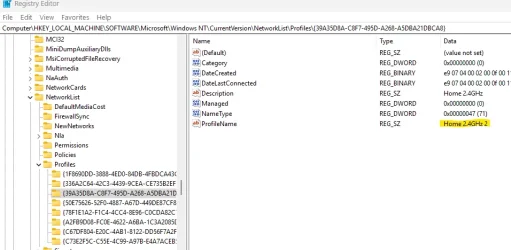
Pretty sure he's looking in registry. Notice the "2" it has created as an additional profile for my 2.4GHz wifi network. This is in addition to the original in one of the other folders which has no number. I clean mine up every so often.


Screenshot 2025-04-20 164928.webp
 

My Computer My Computer

At a glance

11 Pro 25H2i7-10750H16GB Samsung DDR4 3200Intel + Nvidia RTX3060 Laptop
OS
11 Pro 25H2
Computer type
Laptop
Manufacturer/Model
MSI
CPU
i7-10750H
Motherboard
MSI MS-17F5
Memory
16GB Samsung DDR4 3200
Graphics Card(s)
Intel + Nvidia RTX3060 Laptop
Sound Card
Realtek
Monitor(s) Displays
Samsung 24" Curved (HDMI)
Screen Resolution
1920x1080
Hard Drives
Sabrent Rocket Gen3 1Tb Smasung EVO 870 1TB
Antivirus
Bitdefender
Back
Top Bottom