
Solved Windows Secure Boot certificates expiring in 2026


jdUnionngarden

Well-known member
Member
Local time
6:41 AM
Posts
60
Location
Denver, CO
OS
Windows 11 Pro
Re: Windows Secure Boot certificates expiring in 2026
PowerSpec G355 Gaming Desktop PC
Windows 11 Pro, Ver. 25H2 (OS Build 26200.8037)

Howdy Folks, :-)
File this under "Trying to be Pro-Active"
Forgiveness requested if I chose the wrong forum: :mad:

My reading tells me the Secure Boot certificate for my system soon needs to be updated. I'm unsure exactly what's involved, though perhaps Windows Updates will handle this without my intervention.

TIA to all who read this and to those with a comment or suggestion.

Cheers!
:cool:
 

My Computer My Computer

At a glance

Windows 11 ProIntel Core i7-9700KF Processor 3.6GHz16GB DDR4-3000 RAMNVIDIA GeForce RTX 2060 6GB GDDR6
OS
Windows 11 Pro
Computer type
PC/Desktop
Manufacturer/Model
PowerSpec G355 Gaming Desktop PC
CPU
Intel Core i7-9700KF Processor 3.6GHz
Motherboard
ASUS Z390-P Prime Intel LGA 1151 ATX Motherboard
Memory
16GB DDR4-3000 RAM
Graphics Card(s)
NVIDIA GeForce RTX 2060 6GB GDDR6
Sound Card
Realtek High Definition Audio
Monitor(s) Displays
Dell SE2717HR RVJXC 27" Full HD 1920 X 1080 Monitor
Screen Resolution
Full HD 1920 X 1080, 96 dpi
Hard Drives
Primary: 500GB M.2 SSD
Data: 1TB HDD
PSU
600 Watt 80 Plus Power Supply
Case
(?) Open Front, Top, Bottom & Back
Cooling
3 Case Fans, 2 Graphics Card Fans, 1 CPU Fan
Keyboard
HP Wireless
Mouse
Logitech M510 Wireless
Internet Speed
Average 150 to 200+ Mbps via Xfinity xFi Pod to Ethernet cable
Browser
Firefox (Chrome Alternate rarely used)
Antivirus
Bitdefender
Other Info
Comcast Wi-Fi Router (~15 Ft. & 1 Floor below) runs 600+ Mbps
The PowerSpec G355 is a PC assembled by Micro Center, typically from an ASUS motherboard.

Please check your PC for the exact motherboard model, and confirm if you have the latest BIOS update. A factory update for Secure Boot certs may be available in a more recent BIOS version. If your BIOS stopped receiving updates before 2021-2022, the you will need to manually help the Secure Boot process by either adding a Secure Boot key from the BIOS menu, or deleting the current keys so a replacement set can be installed.

You can run my check script (as mentioned above) to report the PC's current status.
Code:
Check-UEFI.bat -verbose
 

My Computer My Computer

At a glance

Windows 7
OS
Windows 7
@garlin
These results cause me to think I didn't understand your instructions; kindly advise.

PS C:\WINDOWS\system32> manage-bde -Protectors -Disable C: -RebootCount 1
>> reg add HKEY_LOCAL_MACHINE\SYSTEM\CurrentControlSet\Control\Secureboot /v AvailableUpdates /t REG_DWORD /d 0x5944 /f
>> powershell Start-ScheduledTask -TaskName "\Microsoft\Windows\PI\Secure-Boot-Update"
BitLocker Drive Encryption: Configuration Tool version 10.0.26100
Copyright (C) 2013 Microsoft Corporation. All rights reserved.

Key protectors are disabled for volume C:.
The operation completed successfully.

PS C:\WINDOWS\system32> Check-UEFI.bat -verbose
Check-UEFI.bat : The term 'Check-UEFI.bat' is not recognized as the name of a cmdlet, function, script file, or operable program. Check the
spelling of the name, or if a path was included, verify that the path is correct and try again.
At line:1 char:1
+ Check-UEFI.bat -verbose
+ ~~~~~~~~~~~~~~
+ CategoryInfo : ObjectNotFound: (Check-UEFI.bat:String) [], CommandNotFoundException
+ FullyQualifiedErrorId : CommandNotFoundException

PS C:\WINDOWS\system32>
 

My Computer My Computer

At a glance

Windows 11 ProIntel Core i7-9700KF Processor 3.6GHz16GB DDR4-3000 RAMNVIDIA GeForce RTX 2060 6GB GDDR6
OS
Windows 11 Pro
Computer type
PC/Desktop
Manufacturer/Model
PowerSpec G355 Gaming Desktop PC
CPU
Intel Core i7-9700KF Processor 3.6GHz
Motherboard
ASUS Z390-P Prime Intel LGA 1151 ATX Motherboard
Memory
16GB DDR4-3000 RAM
Graphics Card(s)
NVIDIA GeForce RTX 2060 6GB GDDR6
Sound Card
Realtek High Definition Audio
Monitor(s) Displays
Dell SE2717HR RVJXC 27" Full HD 1920 X 1080 Monitor
Screen Resolution
Full HD 1920 X 1080, 96 dpi
Hard Drives
Primary: 500GB M.2 SSD
Data: 1TB HDD
PSU
600 Watt 80 Plus Power Supply
Case
(?) Open Front, Top, Bottom & Back
Cooling
3 Case Fans, 2 Graphics Card Fans, 1 CPU Fan
Keyboard
HP Wireless
Mouse
Logitech M510 Wireless
Internet Speed
Average 150 to 200+ Mbps via Xfinity xFi Pod to Ethernet cable
Browser
Firefox (Chrome Alternate rarely used)
Antivirus
Bitdefender
Other Info
Comcast Wi-Fi Router (~15 Ft. & 1 Floor below) runs 600+ Mbps
PS C:\WINDOWS\system32> Check-UEFI.bat -verbose
Check-UEFI.bat : The term 'Check-UEFI.bat' is not recognized as the name of a cmdlet, function, script file, or operable program. Check the
spelling of the name, or if a path was included, verify that the path is correct and try again.
You need to be in the same folder location as where you extracted the ZIP file. (not \Windows\System32).
 

My Computer My Computer

At a glance

Windows 7
OS
Windows 7
My lack of coding skills is likely the problem. I understand .bat files (in DOS) and thought it strange to see one in PS code.
Might the whole script be within the .bat file; if so where to I find it to download?
Sorry I need more hand-holding on this one. :confused:
 

My Computer My Computer

At a glance

Windows 11 ProIntel Core i7-9700KF Processor 3.6GHz16GB DDR4-3000 RAMNVIDIA GeForce RTX 2060 6GB GDDR6
OS
Windows 11 Pro
Computer type
PC/Desktop
Manufacturer/Model
PowerSpec G355 Gaming Desktop PC
CPU
Intel Core i7-9700KF Processor 3.6GHz
Motherboard
ASUS Z390-P Prime Intel LGA 1151 ATX Motherboard
Memory
16GB DDR4-3000 RAM
Graphics Card(s)
NVIDIA GeForce RTX 2060 6GB GDDR6
Sound Card
Realtek High Definition Audio
Monitor(s) Displays
Dell SE2717HR RVJXC 27" Full HD 1920 X 1080 Monitor
Screen Resolution
Full HD 1920 X 1080, 96 dpi
Hard Drives
Primary: 500GB M.2 SSD
Data: 1TB HDD
PSU
600 Watt 80 Plus Power Supply
Case
(?) Open Front, Top, Bottom & Back
Cooling
3 Case Fans, 2 Graphics Card Fans, 1 CPU Fan
Keyboard
HP Wireless
Mouse
Logitech M510 Wireless
Internet Speed
Average 150 to 200+ Mbps via Xfinity xFi Pod to Ethernet cable
Browser
Firefox (Chrome Alternate rarely used)
Antivirus
Bitdefender
Other Info
Comcast Wi-Fi Router (~15 Ft. & 1 Floor below) runs 600+ Mbps
You extract the ZIP file. Inside are a set of PowerShell and batch scripts. If you're not comfortable with PS, use the batch files (which in turn execute the PS scripts for you). The PS scripts do the real work, but not everyone's environment is configured to run PS scripts.

The batch files make the process easier if you're more into CMD files.

Run Check-UEFI.bat instead of running Check_UEFI-CA2023.ps1
Run Update-UEFI.bat instead of running Update_UEFI-CA2023.ps1

Any time an optional argument like "-Verbose" or "-Revoke" is needed, you can give it to the batch file in the same command line.
 

My Computer My Computer

At a glance

Windows 7
OS
Windows 7
@garlin
What actually happened is I didn't follow your instructions:
"You can run my check script (as mentioned above) to report the PC's current status."
and did not find any .zip files, thus used: [Check-UEFI.bat -verbose] quoted in this thread.
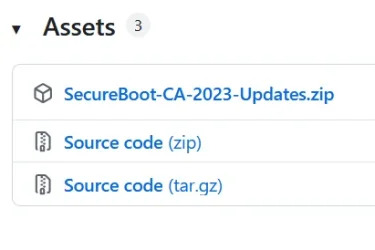
Now I have located your Tutorial and see 3 compressed files. Are those 3 files all the same just using different compression software, or am I to use them all?
Thanks again for your assistance (and patience!).
Cheers!
 

My Computer My Computer

At a glance

Windows 11 ProIntel Core i7-9700KF Processor 3.6GHz16GB DDR4-3000 RAMNVIDIA GeForce RTX 2060 6GB GDDR6
OS
Windows 11 Pro
Computer type
PC/Desktop
Manufacturer/Model
PowerSpec G355 Gaming Desktop PC
CPU
Intel Core i7-9700KF Processor 3.6GHz
Motherboard
ASUS Z390-P Prime Intel LGA 1151 ATX Motherboard
Memory
16GB DDR4-3000 RAM
Graphics Card(s)
NVIDIA GeForce RTX 2060 6GB GDDR6
Sound Card
Realtek High Definition Audio
Monitor(s) Displays
Dell SE2717HR RVJXC 27" Full HD 1920 X 1080 Monitor
Screen Resolution
Full HD 1920 X 1080, 96 dpi
Hard Drives
Primary: 500GB M.2 SSD
Data: 1TB HDD
PSU
600 Watt 80 Plus Power Supply
Case
(?) Open Front, Top, Bottom & Back
Cooling
3 Case Fans, 2 Graphics Card Fans, 1 CPU Fan
Keyboard
HP Wireless
Mouse
Logitech M510 Wireless
Internet Speed
Average 150 to 200+ Mbps via Xfinity xFi Pod to Ethernet cable
Browser
Firefox (Chrome Alternate rarely used)
Antivirus
Bitdefender
Other Info
Comcast Wi-Fi Router (~15 Ft. & 1 Floor below) runs 600+ Mbps

My Computer My Computer

At a glance

Windows 11 Home x64 Version 25H2 Build 26200....
OS
Windows 11 Home x64 Version 25H2 Build 26200.8037
@Try3
Yes, that's correct.
 

My Computer My Computer

At a glance

Windows 11 ProIntel Core i7-9700KF Processor 3.6GHz16GB DDR4-3000 RAMNVIDIA GeForce RTX 2060 6GB GDDR6
OS
Windows 11 Pro
Computer type
PC/Desktop
Manufacturer/Model
PowerSpec G355 Gaming Desktop PC
CPU
Intel Core i7-9700KF Processor 3.6GHz
Motherboard
ASUS Z390-P Prime Intel LGA 1151 ATX Motherboard
Memory
16GB DDR4-3000 RAM
Graphics Card(s)
NVIDIA GeForce RTX 2060 6GB GDDR6
Sound Card
Realtek High Definition Audio
Monitor(s) Displays
Dell SE2717HR RVJXC 27" Full HD 1920 X 1080 Monitor
Screen Resolution
Full HD 1920 X 1080, 96 dpi
Hard Drives
Primary: 500GB M.2 SSD
Data: 1TB HDD
PSU
600 Watt 80 Plus Power Supply
Case
(?) Open Front, Top, Bottom & Back
Cooling
3 Case Fans, 2 Graphics Card Fans, 1 CPU Fan
Keyboard
HP Wireless
Mouse
Logitech M510 Wireless
Internet Speed
Average 150 to 200+ Mbps via Xfinity xFi Pod to Ethernet cable
Browser
Firefox (Chrome Alternate rarely used)
Antivirus
Bitdefender
Other Info
Comcast Wi-Fi Router (~15 Ft. & 1 Floor below) runs 600+ Mbps
Not sure you what you mean by "3 compressed files".

There are (3) PowerShell files, ending in .ps1
There are (4) batch files, and (3) of them correspond to a matching PowerShell file.

Code:
 Directory of C:\Users\GARLIN\Downloads\SecureBoot-CA-2023-Updates

01/18/2026  04:21 PM               220 Check-DBX.bat
01/18/2026  04:21 PM               216 Check-UEFI.bat  <-- Run this one
04/24/2026  09:24 AM            35,771 Check_DBXUpdate.bin.ps1
04/24/2026  09:24 AM            54,315 Check_UEFI-CA2023.ps1
04/24/2026  09:24 AM               528 Clear-UEFI_Lock.bat
01/04/2026  10:12 AM             1,521 LICENSE
04/08/2026  09:24 AM             2,567 README_UEFI.TXT
01/18/2026  04:21 PM               195 Update-UEFI.bat  <-- Run this one to update, after you asked about the report from the first script
04/24/2026  09:24 AM            51,977 Update_UEFI-CA2023.ps1

You can run:
Check-UEFI.bat or Update-UEFI.bat

The other files don't need to be bothered with, and are included for those users who want to do other things.
 

My Computer My Computer

At a glance

Windows 7
OS
Windows 7
Thanks,
These are the files I referenced:

Assets.webp
 

My Computer My Computer

At a glance

Windows 11 ProIntel Core i7-9700KF Processor 3.6GHz16GB DDR4-3000 RAMNVIDIA GeForce RTX 2060 6GB GDDR6
OS
Windows 11 Pro
Computer type
PC/Desktop
Manufacturer/Model
PowerSpec G355 Gaming Desktop PC
CPU
Intel Core i7-9700KF Processor 3.6GHz
Motherboard
ASUS Z390-P Prime Intel LGA 1151 ATX Motherboard
Memory
16GB DDR4-3000 RAM
Graphics Card(s)
NVIDIA GeForce RTX 2060 6GB GDDR6
Sound Card
Realtek High Definition Audio
Monitor(s) Displays
Dell SE2717HR RVJXC 27" Full HD 1920 X 1080 Monitor
Screen Resolution
Full HD 1920 X 1080, 96 dpi
Hard Drives
Primary: 500GB M.2 SSD
Data: 1TB HDD
PSU
600 Watt 80 Plus Power Supply
Case
(?) Open Front, Top, Bottom & Back
Cooling
3 Case Fans, 2 Graphics Card Fans, 1 CPU Fan
Keyboard
HP Wireless
Mouse
Logitech M510 Wireless
Internet Speed
Average 150 to 200+ Mbps via Xfinity xFi Pod to Ethernet cable
Browser
Firefox (Chrome Alternate rarely used)
Antivirus
Bitdefender
Other Info
Comcast Wi-Fi Router (~15 Ft. & 1 Floor below) runs 600+ Mbps
You're looking at the GitHub page, it's the first ZIP file to download.
 

My Computer My Computer

At a glance

Windows 7
OS
Windows 7
Thanks very much,
 

My Computer My Computer

At a glance

Windows 11 ProIntel Core i7-9700KF Processor 3.6GHz16GB DDR4-3000 RAMNVIDIA GeForce RTX 2060 6GB GDDR6
OS
Windows 11 Pro
Computer type
PC/Desktop
Manufacturer/Model
PowerSpec G355 Gaming Desktop PC
CPU
Intel Core i7-9700KF Processor 3.6GHz
Motherboard
ASUS Z390-P Prime Intel LGA 1151 ATX Motherboard
Memory
16GB DDR4-3000 RAM
Graphics Card(s)
NVIDIA GeForce RTX 2060 6GB GDDR6
Sound Card
Realtek High Definition Audio
Monitor(s) Displays
Dell SE2717HR RVJXC 27" Full HD 1920 X 1080 Monitor
Screen Resolution
Full HD 1920 X 1080, 96 dpi
Hard Drives
Primary: 500GB M.2 SSD
Data: 1TB HDD
PSU
600 Watt 80 Plus Power Supply
Case
(?) Open Front, Top, Bottom & Back
Cooling
3 Case Fans, 2 Graphics Card Fans, 1 CPU Fan
Keyboard
HP Wireless
Mouse
Logitech M510 Wireless
Internet Speed
Average 150 to 200+ Mbps via Xfinity xFi Pod to Ethernet cable
Browser
Firefox (Chrome Alternate rarely used)
Antivirus
Bitdefender
Other Info
Comcast Wi-Fi Router (~15 Ft. & 1 Floor below) runs 600+ Mbps
Back
Top Bottom




