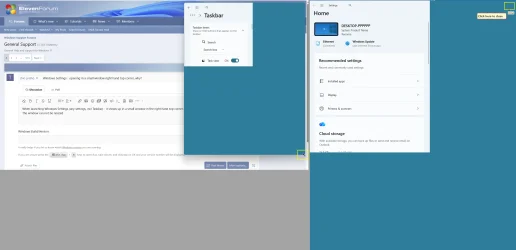
Windows Settings - opening in a small window right hand top corner, why?


tfwul

Well-known member
Member
Local time
12:25 AM
Posts
25
OS
Windows 11 Pro x64
When launching Windows Settings (any settings, incl Taskbar) - it shows up in a small window in the right hand top corner.
Initially the window can not be resized. However, after a few attempts, I am amble to resize that panel, but it is filled green/blue.
Then hit Win-I, to fill with settings, resizing, same green/blue, etc.
Best is to close the panel and do a Win-I again.

Anybody out there having a solution for this peculiar issue?

This is exists since I installed Windows 11 some months ago. So it is not a build version issue

Thanks.
 
Windows Build/Version
25H2 26200.8973

Attachments

  • Windows Settings-small window-right hand top corner 06082026 131536.webp
    Windows Settings-small window-right hand top corner 06082026 131536.webp
    105.4 KB · Views: 1

My Computer My Computer

At a glance

Windows 11 Pro x64Intel Core Ultra 9 285K, S185132GB (DDR5-5600)Asus GeForce RTX 5060 Ti, 8GB, Dual OC
OS
Windows 11 Pro x64
Computer type
PC/Desktop
CPU
Intel Core Ultra 9 285K, S1851
Motherboard
Asus ProArt Z890 Creator WiFi
Memory
32GB (DDR5-5600)
Graphics Card(s)
Asus GeForce RTX 5060 Ti, 8GB, Dual OC
Monitor(s) Displays
Asus ProArt OLED PA32UCDM
Screen Resolution
3840 x 2160
Hard Drives
1x Samsung 9100 Pro 1TB, PCIe 5.0 NVMe M.2, 2x Samsung 9100 Pro 4TB, PCIe 5.0 NVMe M.2
PSU
Corsair RM850e (2025)
Case
Corsair 5000T
Cooling
be quiet! Dark Rock Pro 5, 4x Noctua NF-A14x25 G2 LS-PWM (140mm)
Keyboard
Das Keyboard 4 Pro
Mouse
Logitech MX Master 4
Internet Speed
1Gbps
Browser
Microsoft Edge (Default)
Antivirus
Windows Security/Microsoft Defender
If you press
WinKey-LeftArrow
it should thereafter open in that new position.


Denis
 

My Computer My Computer

At a glance

Windows 11 Home x64 Version 25H2 Build 26200....
OS
Windows 11 Home x64 Version 25H2 Build 26200.9168
If I close the small panel - clicking on the invisible [X] and re-open it (e.g. Win-I) it will act normal, at least for that moment.
Later it will behave the same way. Never had this with Windows 10.

Just wonder: do others have the same issue..??
 

My Computer My Computer

At a glance

Windows 11 Pro x64Intel Core Ultra 9 285K, S185132GB (DDR5-5600)Asus GeForce RTX 5060 Ti, 8GB, Dual OC
OS
Windows 11 Pro x64
Computer type
PC/Desktop
CPU
Intel Core Ultra 9 285K, S1851
Motherboard
Asus ProArt Z890 Creator WiFi
Memory
32GB (DDR5-5600)
Graphics Card(s)
Asus GeForce RTX 5060 Ti, 8GB, Dual OC
Monitor(s) Displays
Asus ProArt OLED PA32UCDM
Screen Resolution
3840 x 2160
Hard Drives
1x Samsung 9100 Pro 1TB, PCIe 5.0 NVMe M.2, 2x Samsung 9100 Pro 4TB, PCIe 5.0 NVMe M.2
PSU
Corsair RM850e (2025)
Case
Corsair 5000T
Cooling
be quiet! Dark Rock Pro 5, 4x Noctua NF-A14x25 G2 LS-PWM (140mm)
Keyboard
Das Keyboard 4 Pro
Mouse
Logitech MX Master 4
Internet Speed
1Gbps
Browser
Microsoft Edge (Default)
Antivirus
Windows Security/Microsoft Defender
Try a repair install but be patient. It took 1 3/4 hours on my GMKtec device but it worked: -


My Computers My Computers

  • At a glance

    Windows 11 ProAMD Ryzen 9 8945HS32GB DDR5 SO-DIMMIntegrated AMD Radeon 780M (4.00 GHz)
    OS
    Windows 11 Pro
    Computer type
    PC/Desktop
    Manufacturer/Model
    GMKtec K11
    CPU
    AMD Ryzen 9 8945HS
    Memory
    32GB DDR5 SO-DIMM
    Graphics Card(s)
    Integrated AMD Radeon 780M (4.00 GHz)
    Monitor(s) Displays
    Benq 2250HM
    Screen Resolution
    1920 x 1080
    Hard Drives
    1 TB PCIe 4.0 NVMe M.2 SSD
  • At a glance

    Windows 11 HomeIntel® Core™ Ultra 7 - 255H processor16 GB LPDDR5 SDRAMIntel Arc 140T onboard graphics
    Operating System
    Windows 11 Home
    Computer type
    Laptop
    Manufacturer/Model
    ASUS Zenbook 14 OLED 14" Laptop - UX3405CA-QL192W
    CPU
    Intel® Core™ Ultra 7 - 255H processor
    Memory
    16 GB LPDDR5 SDRAM
    Graphics card(s)
    Intel Arc 140T onboard graphics
    Screen Resolution
    1920 x 1200 (16:10 WUXGA resolution) OLED Touchscreen
    Hard Drives
    1TB SSD
Force Windows to Memorize a New Window Size and Position
1) Open the Settings app (Win + I).
2) Click and drag the borders of the window to set your desired size and drag it to your preferred position on screen.
3) Press and hold the Ctrl key, then click the Close (X) button in the top right corner of the Settings window.
4) Reopen Settings (Win + I) to check if the position saved.

If that doesn't work, then Reset the Settings App:
1) Open PowerShell as an admin
2) Insert the following and press Enter:

Get-AppxPackage *Windows.ImmersiveControlPanel* | Reset-AppxPackage


If that didn't work, try this in PowerShell:
Open Command Prompt as an admin, paste and Enter the following:

PowerShell -ExecutionPolicy Unrestricted -Command "& {$manifest = (Get-AppxPackage *immersivecontrolpanel*).InstallLocation + '\AppxManifest.xml' ; Add-AppxPackage -DisableDevelopmentMode -Register $manifest}"
 

My Computer My Computer

At a glance

Windows 11
OS
Windows 11
Computer type
PC/Desktop
Manufacturer/Model
Custom Built
First of all: very sorry for the delay.
Many thanks for your reply. Truly appreciated.

I'll definitely give it a try next time.

Right now, a big miracle: Win-I opened in a 'normal' view!

This is the very first time since my Windows install a few months back....

Again thanks.
 

My Computer My Computer

At a glance

Windows 11 Pro x64Intel Core Ultra 9 285K, S185132GB (DDR5-5600)Asus GeForce RTX 5060 Ti, 8GB, Dual OC
OS
Windows 11 Pro x64
Computer type
PC/Desktop
CPU
Intel Core Ultra 9 285K, S1851
Motherboard
Asus ProArt Z890 Creator WiFi
Memory
32GB (DDR5-5600)
Graphics Card(s)
Asus GeForce RTX 5060 Ti, 8GB, Dual OC
Monitor(s) Displays
Asus ProArt OLED PA32UCDM
Screen Resolution
3840 x 2160
Hard Drives
1x Samsung 9100 Pro 1TB, PCIe 5.0 NVMe M.2, 2x Samsung 9100 Pro 4TB, PCIe 5.0 NVMe M.2
PSU
Corsair RM850e (2025)
Case
Corsair 5000T
Cooling
be quiet! Dark Rock Pro 5, 4x Noctua NF-A14x25 G2 LS-PWM (140mm)
Keyboard
Das Keyboard 4 Pro
Mouse
Logitech MX Master 4
Internet Speed
1Gbps
Browser
Microsoft Edge (Default)
Antivirus
Windows Security/Microsoft Defender

Latest Support Threads

Back
Top Bottom