Android Windows Subsystem for Android (WSA) 2304.40000.4.0 update on Windows 11


 github WSA:

We've shipped an update for Windows Subsystem for Android™ on Windows 11 to the Windows Subsystem for Android™ Preview Program. This update (2304.40000.3.0) will add package verification, improved reliability and AppLink support.

What’s New​

  • Package verification for apps on WSA: Android apps are scanned using anti-virus software installed on Windows prior to app installation.
  • Ability for users to configure how much memory to assign to Android
  • Android apps will be launched when a user opens the supported app link from any app (Android AppLink support)
  • Linux kernel updated to 5.15.94
  • WSA reliability and performance improvements


 Source:


See also:
 
Last edited:
When is the final rather than preview release due for Android apps?
 

My Computer My Computer

At a glance

Windows 11 ProCore i7-13700K64 GB Kingston Fury Beast DDR5Gigabyte GeForce RTX 2060 Super Gaming OC 8G
OS
Windows 11 Pro
Computer type
PC/Desktop
Manufacturer/Model
Self build
CPU
Core i7-13700K
Motherboard
Asus TUF Gaming Plus WiFi Z790
Memory
64 GB Kingston Fury Beast DDR5
Graphics Card(s)
Gigabyte GeForce RTX 2060 Super Gaming OC 8G
Sound Card
Realtek S1200A
Monitor(s) Displays
Viewsonic VP2770 & Dell (secondary)
Screen Resolution
2560 x 1440
Hard Drives
Kingston KC3000 2TB NVME SSD & SATA HDDs & SSD
PSU
EVGA SuperNova G2 850W
Case
Nanoxia Deep Silence 1
Cooling
Noctua NH-D14
Keyboard
Microsoft Digital Media Pro
Mouse
Logitech Wireless
Internet Speed
80 Mb / s
Browser
Chrome
Antivirus
Defender, Malwarebytes Free & AdwCleaner
When is the final rather than preview release due for Android apps?
I had an email from Amazon yesterday saying I could submit my apps to the store (I don't have any), so I think they are opening it right up now, and an end to preview is in sight.

Good news - your app catalog is eligible to be included in Amazon Appstore on Windows 11 developer preview, expanding your reach to hundreds of millions of new users. In the Developer Console, you will see “Windows Devices” under the Supported Devices menu and a new “Windows Devices” tab on the Device Support menu on the app detail page.

We recommend that you implement window resizing and map your app's input controls before submitting apps for testing. Find more technical documentation here.

Once you have implemented resizing and mapped input controls for your app, follow the below instructions to submit your app to Amazon Appstore on Windows 11 devices:

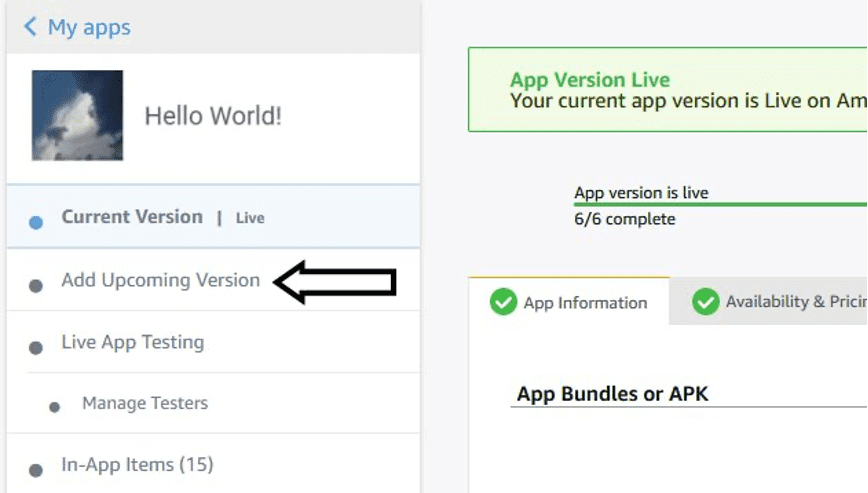
1) Create a version update for your app via "Add Upcoming Version"

WAYctBxPS0W27dDZepVUJA


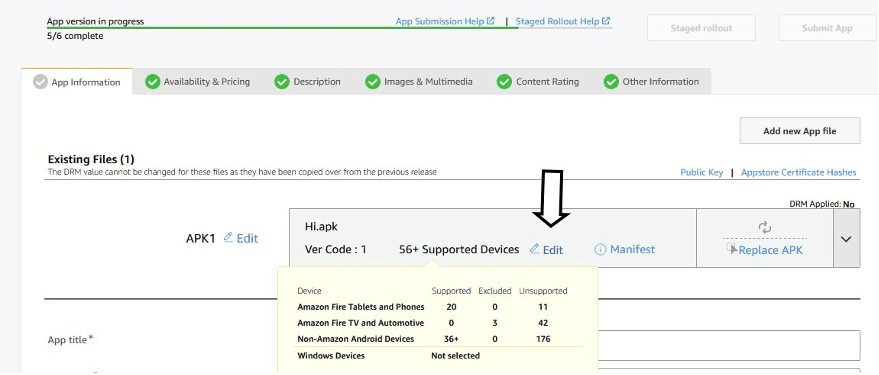
2) On the App Information tab, click the "Edit" link next to Supported Devices in the “Existing Files” section

u_qofkaZSdu83AeOtufzhw


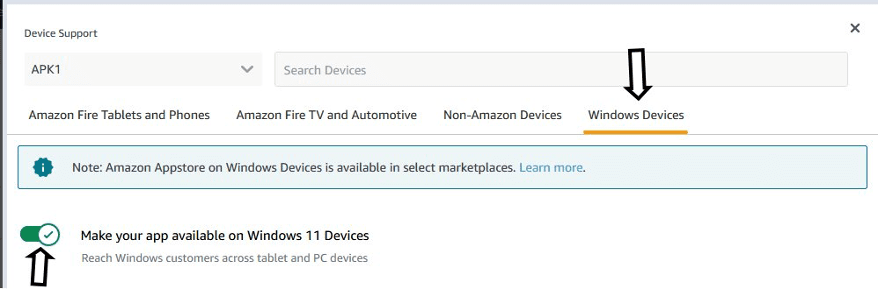
3) Click on the Windows Devices Tab and target Windows 11 devices by toggling the button as shown below.

3CMnfMUfQW2KMYHDPkHfUQ


We are continuously working on feature improvements to ensure broad compatibility for applications that will provide more support for developers in porting their apps. You can expect to receive updates on our blog channel and via email. Program FAQ’s are available on the Amazon Developer Portal.

Thank you for being part of the Amazon Appstore community, and if you have any further questions do not hesitate to reach out via Contact Us.
 

My Computers My Computers

  • At a glance

    Windows 11 WorkstationRyzen 9 5950XCorsair Vengeance RGB PRO Black 64GB (4x16GB)...ASUS AMD Radeon RX 6900 XT 16GB ROG Strix LC OC
    OS
    Windows 11 Workstation
    Computer type
    PC/Desktop
    Manufacturer/Model
    doofenshmirtz evil incorporated
    CPU
    Ryzen 9 5950X
    Motherboard
    Asus ROG Crosshair VIII Formula
    Memory
    Corsair Vengeance RGB PRO Black 64GB (4x16GB) 3600MHz AMD Ryzen Tuned DDR4
    Graphics Card(s)
    ASUS AMD Radeon RX 6900 XT 16GB ROG Strix LC OC
    Sound Card
    Sound BlasterX Katana
    Monitor(s) Displays
    3 x27" Dell U2724D & 1 x 34" Dell U3415W
    Hard Drives
    Samsung 980 Pro 1TB M.2 2280 PCI-e 4.0 x4 NVMe Solid State
    Drive
    PSU
    ASUS ROG THOR 850W 80 Plus Platinum
    Case
    ASUS ROG Strix Helios Midi-Tower ARGB Gaming Case
    Cooling
    ASUS ROG Strix LC Performance RGB AIO CPU Liquid Cooler - 360mm
    Keyboard
    Logi Ergo
    Mouse
    Logitech MX Vertical
    Internet Speed
    1000/200 Mbps
    Browser
    Chrome
    Antivirus
    Windows Defender, Malwarebytes Pro
    Other Info
    HP M281 Printer
    Logitech Brio Stream webcam
    Logitech G Yeti orb mic
  • At a glance

    Windows 11 ProSnapdragon X2 Plus64GB
    Operating System
    Windows 11 Pro
    Computer type
    Laptop
    Manufacturer/Model
    Surface Laptop
    CPU
    Snapdragon X2 Plus
    Memory
    64GB
    Monitor(s) Displays
    15"
  • Nothing to see here.
2304.40000.4.0 is out
 

My Computer My Computer

At a glance

WindowsXP/7/8/8.1/10/11,Linux,Android,FreeBSD...Intel® Core™ i7-8750H 8th Gen 2.2Ghz up to 4....64GB using 2x32GB CL16 Mushkin redLine modulesIntel UHD 630 & NVIDIA GeForce GTX 1050 Ti wi...
OS
WindowsXP/7/8/8.1/10/11,Linux,Android,FreeBSD Unix
Computer type
Laptop
Manufacturer/Model
Dell XPS 15 9570
CPU
Intel® Core™ i7-8750H 8th Gen 2.2Ghz up to 4.1Ghz
Motherboard
Dell XPS 15 9570
Memory
64GB using 2x32GB CL16 Mushkin redLine modules
Graphics Card(s)
Intel UHD 630 & NVIDIA GeForce GTX 1050 Ti with 4GB DDR5
Sound Card
Realtek ALC3266-CG
Monitor(s) Displays
15.6" 4K Touch UltraHD 3840x2160 made by Sharp
Screen Resolution
3840x2160 4K UltraHD
Hard Drives
Samsung MZ-V9P4T0B/AM 990 PRO 4TB PCIe®4.0 NVMe™ M.2 SSD was Toshiba KXG60ZNV1T02 NVMe 1TB SSD
PSU
Dell XPS 15 9570
Case
Dell XPS 15 9570
Cooling
Stock
Keyboard
Stock
Mouse
SwitftPoint ProPoint
Internet Speed
Comcast/XFinity 1.44Gbps/42.5Mbps
Browser
Microsoft EDGE (Chromium based) & Google Chrome
Antivirus
Windows Defender that came with Windows

Latest Support Threads

Back
Top Bottom