
Windows Update - 2026-01 Security Update (KB5074109) causes shutdowns instead of sleep


Philomacc11

Member
Local time
8:33 PM
Posts
13
OS
windows 11 Pro 25H2 build 26200.7462
I successfully installed this update over 2 weeks ago. Since installing I find that the system will not sleep. Instead it hangs on shutdown (eventually it will shut down after many minutes) usually I have to do a hard reset in order to get back to work but that entails all the usual boot stuff (+work has crashed) so very unwelcome.
There are many users worldwide that have reported the same annoying feature.
I believe that I have traced this to my hardware not supporting S0 but only S3. I have uninstalled the update and everything is good again.

So it seems that either:
(i) MS issue a fix that addresses this .. but there is nothing that I can see on MS official that suggests that they are interested in fixing this issue; there are many other issues with the update (BSOD, failure to install etc.) that they are working on but no mention of the S0/S3 problem.
(ii) or I change my hardware, which is frankly ridiculous; especially as the perceived wisdom is that S0 is designed with laptops in mind (to make them behave more like smartphones), but desktop PCs are far better served by retaining S3. I have a desktop (see my spec list).
(iii) or I abandon windows and go to Linux, which I am very reluctant to do for all the usual reasons.

Does anyone know whether MS will address this issue in "the big fix", when/if it arrives?

Thanks anyone
Phil
 
Windows Build/Version
Windows 11 Pro 25H2 build 26200.7462

My Computer

System One

  • OS
    windows 11 Pro 25H2 build 26200.7462
    Computer type
    PC/Desktop
    Manufacturer/Model
    custom
    CPU
    13th Gen Intel(R) Core(TM) i7-13700K (3.40 GHz), Raptor
    Motherboard
    Gigabyte B760M DS3H DDR4 (U3E1)
    Memory
    16GB DDR4
    Graphics Card(s)
    NVIDIA GeForce GT 710
    Sound Card
    Realtek High Definition Audio, NVIDIA High Definition Audio
    Monitor(s) Displays
    ASUS VZ279HE
    Screen Resolution
    1920 x 1080
    Hard Drives
    (1) Disc drive WD_BLACK SN850X 1000GB,
    (2) SSD CT1000MX500SSD1,
    (3) ASUS DRW-24D5MT
    PSU
    n/n
    Case
    n/n
    Cooling
    n/n (it's very quiet)
    Keyboard
    Logitech wireless desktop Mk30 model Y-R0002
    Mouse
    Logitech pebble M350
    Internet Speed
    down typically 130 Mbps, up typically 30 Mbps
    Browser
    Chrome Version 144.0.7559.110 (Official Build) (64-bit)
    Antivirus
    win11 AV/firewall + Malwarebytes
    Other Info
    AIRHUG 21 microphone on external USB; occasional use of Logitech webcam C920HD connected through external USB; printer (WIFI) Kyocera Ecosys M5526cdw
Have you checked for file corruptions? If not then run the following three commands in CMD or Powershell window. They can take some while so be patient.: -

sfc /scannow
dism /online /cleanup-image /scanhealth
dism /online /cleanup-image /restorehealth
 

My Computers

System One System Two

  • OS
    Windows 11 Pro
    Computer type
    PC/Desktop
    Manufacturer/Model
    GMKtec K11
    CPU
    AMD Ryzen 9 8945HS
    Memory
    32GB DDR5 SO-DIMM
    Graphics Card(s)
    Integrated AMD Radeon 780M (4.00 GHz)
    Monitor(s) Displays
    Benq 2250HM
    Screen Resolution
    1920 x 1080
    Hard Drives
    1 TB PCIe 4.0 NVMe M.2 SSD
  • Operating System
    Windows 11 Home
    Computer type
    Laptop
    Manufacturer/Model
    ASUS Zenbook 14 OLED 14" Laptop - UX3405CA-QL192W
    CPU
    Intel® Core™ Ultra 7 - 255H processor
    Memory
    16 GB LPDDR5 SDRAM
    Graphics card(s)
    Intel Arc 140T onboard graphics
    Screen Resolution
    1920 x 1200 (16:10 WUXGA resolution) OLED Touchscreen
    Hard Drives
    1TB SSD
I'll try that now thanks
 

My Computer

System One

  • OS
    windows 11 Pro 25H2 build 26200.7462
    Computer type
    PC/Desktop
    Manufacturer/Model
    custom
    CPU
    13th Gen Intel(R) Core(TM) i7-13700K (3.40 GHz), Raptor
    Motherboard
    Gigabyte B760M DS3H DDR4 (U3E1)
    Memory
    16GB DDR4
    Graphics Card(s)
    NVIDIA GeForce GT 710
    Sound Card
    Realtek High Definition Audio, NVIDIA High Definition Audio
    Monitor(s) Displays
    ASUS VZ279HE
    Screen Resolution
    1920 x 1080
    Hard Drives
    (1) Disc drive WD_BLACK SN850X 1000GB,
    (2) SSD CT1000MX500SSD1,
    (3) ASUS DRW-24D5MT
    PSU
    n/n
    Case
    n/n
    Cooling
    n/n (it's very quiet)
    Keyboard
    Logitech wireless desktop Mk30 model Y-R0002
    Mouse
    Logitech pebble M350
    Internet Speed
    down typically 130 Mbps, up typically 30 Mbps
    Browser
    Chrome Version 144.0.7559.110 (Official Build) (64-bit)
    Antivirus
    win11 AV/firewall + Malwarebytes
    Other Info
    AIRHUG 21 microphone on external USB; occasional use of Logitech webcam C920HD connected through external USB; printer (WIFI) Kyocera Ecosys M5526cdw
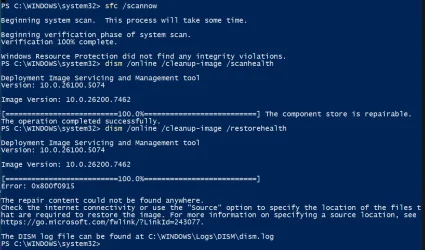
I think there were no corrupted files? (see image)

1770128941894.webp
 

My Computer

System One

  • OS
    windows 11 Pro 25H2 build 26200.7462
    Computer type
    PC/Desktop
    Manufacturer/Model
    custom
    CPU
    13th Gen Intel(R) Core(TM) i7-13700K (3.40 GHz), Raptor
    Motherboard
    Gigabyte B760M DS3H DDR4 (U3E1)
    Memory
    16GB DDR4
    Graphics Card(s)
    NVIDIA GeForce GT 710
    Sound Card
    Realtek High Definition Audio, NVIDIA High Definition Audio
    Monitor(s) Displays
    ASUS VZ279HE
    Screen Resolution
    1920 x 1080
    Hard Drives
    (1) Disc drive WD_BLACK SN850X 1000GB,
    (2) SSD CT1000MX500SSD1,
    (3) ASUS DRW-24D5MT
    PSU
    n/n
    Case
    n/n
    Cooling
    n/n (it's very quiet)
    Keyboard
    Logitech wireless desktop Mk30 model Y-R0002
    Mouse
    Logitech pebble M350
    Internet Speed
    down typically 130 Mbps, up typically 30 Mbps
    Browser
    Chrome Version 144.0.7559.110 (Official Build) (64-bit)
    Antivirus
    win11 AV/firewall + Malwarebytes
    Other Info
    AIRHUG 21 microphone on external USB; occasional use of Logitech webcam C920HD connected through external USB; printer (WIFI) Kyocera Ecosys M5526cdw
There are problems with Windows 11 Component Store but the repair failed with error code 0x800f0915.
Here is an AI generated response to query on 0x800f0915: -

Error 0x800f0915 occurs when DISM (Deployment Image Servicing and Management) cannot find the necessary repair files to fix system image corruption, typically during Windows updates or system repairs.
Primary Solutions

Use Windows Update as the repair source
Instead of relying on a local ISO, let DISM fetch files directly from Microsoft’s servers:
DISM /Online /Cleanup-Image /RestoreHealth /Source:WindowsUpdate

Enable .NET Framework 3.5
This often resolves underlying service issues:
Go to Control Panel > Programs > Turn Windows features on or off, and enable .NET Framework 3.5 (includes .NET 2.0 and 3.0).

Clean up the Windows component store
Run these commands in an elevated Command Prompt:

DISM /Online /Cleanup-Image /StartComponentCleanup /ResetBase
DISM /Online /Cleanup-Image /CheckHealth
DISM /Online /Cleanup-Image /ScanHealth
DISM /Online /Cleanup-Image /RestoreHealth


Reboot after completion.

Reset Windows Update components
Stop services, clear caches, and restart:

net stop bits
net stop wuauserv
net stop cryptsvc
ren "%ALLUSERSPROFILE%\Microsoft\Network\Downloader\qmgr*.dat" qmgr.dat.bak
ren "%SystemRoot%\SoftwareDistribution\DataStore" DataStore.bak
ren "%SystemRoot%\SoftwareDistribution\Download" Download.bak
ren "%SystemRoot%\System32\catroot2" catroot2.bak
net start bits
net start wuauserv
net start cryptsvc


Temporarily disable third-party antivirus
Security software can interfere with update processes.

Perform an in-place upgrade (Repair Install)
If all else fails, mount the latest Windows 11 24H2 ISO from Microsoft’s website, run setup.exe, and choose "Keep personal files and apps" to repair the system without data loss.

Note: The error is common in Windows 11 24H2 and may stem from corrupted update caches, missing system components, or interference from security software. Always check the DISM log at C:\Windows\Logs\DISM\dism.log for detailed diagnostics.
 

My Computers

System One System Two

  • OS
    Windows 11 Pro
    Computer type
    PC/Desktop
    Manufacturer/Model
    GMKtec K11
    CPU
    AMD Ryzen 9 8945HS
    Memory
    32GB DDR5 SO-DIMM
    Graphics Card(s)
    Integrated AMD Radeon 780M (4.00 GHz)
    Monitor(s) Displays
    Benq 2250HM
    Screen Resolution
    1920 x 1080
    Hard Drives
    1 TB PCIe 4.0 NVMe M.2 SSD
  • Operating System
    Windows 11 Home
    Computer type
    Laptop
    Manufacturer/Model
    ASUS Zenbook 14 OLED 14" Laptop - UX3405CA-QL192W
    CPU
    Intel® Core™ Ultra 7 - 255H processor
    Memory
    16 GB LPDDR5 SDRAM
    Graphics card(s)
    Intel Arc 140T onboard graphics
    Screen Resolution
    1920 x 1200 (16:10 WUXGA resolution) OLED Touchscreen
    Hard Drives
    1TB SSD
thank you but the problem lies in the update not my computer. Many other users have reported the same symptom and MS have acknowledged that this problem, exactly as described above, is in the update not the user's machine. They say they are working to fix it. This was not the case when I originally posted here so I guess MS have answered the question for me .. I just have to be patient!
Nevertheless I will look into possible component corruption, as you suggest, so thank you again for pointing me to this process.
 

My Computer

System One

  • OS
    windows 11 Pro 25H2 build 26200.7462
    Computer type
    PC/Desktop
    Manufacturer/Model
    custom
    CPU
    13th Gen Intel(R) Core(TM) i7-13700K (3.40 GHz), Raptor
    Motherboard
    Gigabyte B760M DS3H DDR4 (U3E1)
    Memory
    16GB DDR4
    Graphics Card(s)
    NVIDIA GeForce GT 710
    Sound Card
    Realtek High Definition Audio, NVIDIA High Definition Audio
    Monitor(s) Displays
    ASUS VZ279HE
    Screen Resolution
    1920 x 1080
    Hard Drives
    (1) Disc drive WD_BLACK SN850X 1000GB,
    (2) SSD CT1000MX500SSD1,
    (3) ASUS DRW-24D5MT
    PSU
    n/n
    Case
    n/n
    Cooling
    n/n (it's very quiet)
    Keyboard
    Logitech wireless desktop Mk30 model Y-R0002
    Mouse
    Logitech pebble M350
    Internet Speed
    down typically 130 Mbps, up typically 30 Mbps
    Browser
    Chrome Version 144.0.7559.110 (Official Build) (64-bit)
    Antivirus
    win11 AV/firewall + Malwarebytes
    Other Info
    AIRHUG 21 microphone on external USB; occasional use of Logitech webcam C920HD connected through external USB; printer (WIFI) Kyocera Ecosys M5526cdw
thank you but the problem lies in the update not my computer. Many other users have reported the same symptom and MS have acknowledged that this problem, exactly as described above, is in the update not the user's machine. They say they are working to fix it. This was not the case when I originally posted here so I guess MS have answered the question for me .. I just have to be patient!
Nevertheless I will look into possible component corruption, as you suggest, so thank you again for pointing me to this process.
Update ... so, hoping that MS has fixed this problem with S3 that it admits to know about, and having waited over a month, I went ahead and installed the latest update (KB5077181) (26200.7840) today .... and yes it produces exactly the same problem namely sleep mode hangs and requires hard reset to recover. Obviously MS have not fixed this issue so I will uninstall the update and resume my now, looking more certain, migration to Linux.
 

My Computer

System One

  • OS
    windows 11 Pro 25H2 build 26200.7462
    Computer type
    PC/Desktop
    Manufacturer/Model
    custom
    CPU
    13th Gen Intel(R) Core(TM) i7-13700K (3.40 GHz), Raptor
    Motherboard
    Gigabyte B760M DS3H DDR4 (U3E1)
    Memory
    16GB DDR4
    Graphics Card(s)
    NVIDIA GeForce GT 710
    Sound Card
    Realtek High Definition Audio, NVIDIA High Definition Audio
    Monitor(s) Displays
    ASUS VZ279HE
    Screen Resolution
    1920 x 1080
    Hard Drives
    (1) Disc drive WD_BLACK SN850X 1000GB,
    (2) SSD CT1000MX500SSD1,
    (3) ASUS DRW-24D5MT
    PSU
    n/n
    Case
    n/n
    Cooling
    n/n (it's very quiet)
    Keyboard
    Logitech wireless desktop Mk30 model Y-R0002
    Mouse
    Logitech pebble M350
    Internet Speed
    down typically 130 Mbps, up typically 30 Mbps
    Browser
    Chrome Version 144.0.7559.110 (Official Build) (64-bit)
    Antivirus
    win11 AV/firewall + Malwarebytes
    Other Info
    AIRHUG 21 microphone on external USB; occasional use of Logitech webcam C920HD connected through external USB; printer (WIFI) Kyocera Ecosys M5526cdw

I'm sure linux will solve the problems. Good luck.
 

My Computers

System One System Two

  • OS
    win 11 pro, 25H2
    Computer type
    PC/Desktop
    Manufacturer/Model
    Dell 790 (Mt)
    CPU
    i5-2400
    Motherboard
    Dell
    Memory
    32 GB DDR-3
    Graphics Card(s)
    Intel HD Graphics 2000 (on-board)
    Sound Card
    Intel Cougar Point PCH [B2] (On-Board)
    Monitor(s) Displays
    LG 27MN60T
  • Operating System
    Windows 11 home, 25H2
    Computer type
    Laptop
    Manufacturer/Model
    Dell Inspiron 17R SE 7720
    CPU
    Intel I7-3630QM
    Memory
    16GB DDR3
    Hard Drives
    Samsung 500GB SSD

Latest Support Threads

Back
Top Bottom



