Windows update keeps installing older Intel Arc graphics drivers


james_uk

Well-known member
Member
Local time
11:27 AM
Posts
86
OS
Windows 11
Hi, every time a new Intel ARC driver is released, I get an update from Intel Driver Assistant and I install it.
As soon as I restart my laptop, Windows update then installs a much older version, which is the version that was last released by my laptop maker, Asus.
If I then manually reinstall the newer driver again, either from intel driver support or from the Intel website, Windows just reinstalls this older driver again.

I have tried to manually uninstall the older driver, by ticking remove the software in device manager, and also deleted the folder that was in my 'drivers' folder that contained these old installation files, but nothing seems to be working.
Is there any way to stop Windows downgrading the driver every time it's updated, I don't want to be stuck on this March 2023 version, when Intel keep releasing new updates all the time for it.

Regards
James
 

My Computer My Computer

At a glance

Windows 11Intel i9 13980HX32GBNVidia Geforce 4070
OS
Windows 11
Computer type
Laptop
Manufacturer/Model
Asus ProArt Studiobook 16 OLED (H7604JI)
CPU
Intel i9 13980HX
Motherboard
Unknown
Memory
32GB
Graphics Card(s)
NVidia Geforce 4070
Monitor(s) Displays
16" Oled
Hard Drives
1TB
Try turning off automatic updates in Device Manager?
 

My Computer My Computer

At a glance

Windows 11Intel Core i9 13900HXAcer RTX 4080 Mobile
OS
Windows 11
Computer type
Laptop
Manufacturer/Model
Acer Helios16
CPU
Intel Core i9 13900HX
Graphics Card(s)
Acer RTX 4080 Mobile
Screen Resolution
2560x1650
Browser
Firefox, TOR, Palemoon
Hi, every time a new Intel ARC driver is released, I get an update from Intel Driver Assistant and I install it.
As soon as I restart my laptop, Windows update then installs a much older version, which is the version that was last released by my laptop maker, Asus.
If I then manually reinstall the newer driver again, either from intel driver support or from the Intel website, Windows just reinstalls this older driver again.

I have tried to manually uninstall the older driver, by ticking remove the software in device manager, and also deleted the folder that was in my 'drivers' folder that contained these old installation files, but nothing seems to be working.
Is there any way to stop Windows downgrading the driver every time it's updated, I don't want to be stuck on this March 2023 version, when Intel keep releasing new updates all the time for it.

Regards
James

Hi @james_uk

I agree this annoying when WU does this. It did it to me the other day. :(

To stop all driver updates via Windows Update there are several ways of doing this depending on which version of Windows 11 is being used (Pro or Home). Pro it can be done via the Group Policy Editor, Home via a Registry edit.
 

My Computers My Computers

  • At a glance

    Windows 11 Pro 25H2Intel Core i9 13900KCorsair Dominator Platinum 64gb 5600MT/s DDR5...Sapphire NITRO+ AMD Radeon RX 7900 XTX Vapor-...
    OS
    Windows 11 Pro 25H2
    Computer type
    PC/Desktop
    Manufacturer/Model
    Homebuilt
    CPU
    Intel Core i9 13900K
    Motherboard
    Asus ProArt Z790 Creator WiFi - Bios 3107
    Memory
    Corsair Dominator Platinum 64gb 5600MT/s DDR5 Dual Channel
    Graphics Card(s)
    Sapphire NITRO+ AMD Radeon RX 7900 XTX Vapor-X 24GB
    Sound Card
    External DAC: Cambridge Audio DACMagic200M - Headphone Amp: Topping L50
    Monitor(s) Displays
    Panasonic MX950 Mini LED 55" TV 120hz
    Screen Resolution
    3840 x 2160 120hz
    Hard Drives
    Samsung 980 Pro 2TB (OS)
    Samsung 980 Pro 1TB (Files)
    Lexar NZ790 4TB
    LaCie d2 Professional 6TB external - USB 3.1
    Seagate Expansion 16TB external - USB 3.2
    Seagate One Touch 18TB external HD - USB 3.0
    PSU
    Corsair RM1200x Shift
    Case
    Corsair RGB Smart Case 5000x (white)
    Cooling
    Corsair iCue H150i Elite Capellix XT
    Keyboard
    Incase Ergonomic USB (Microsoft clone)
    Mouse
    Logitech MX Master 3S
    Internet Speed
    Fibre 900/500 Mbps
    Browser
    Microsoft Edge Chromium
    Antivirus
    Bitdefender Total Security
    Other Info
    AMD Radeon Software & Drivers 26.1.1
    Hasleo Backup Suite
    Dashlane password manager
    Kensington Verimark fingerprint reader
    Logitech Brio 4K webcam
    Orico 10-port powered USB 3.0 hub
  • At a glance

    Windows 11 Pro 25H2Intel® Core™ i9-13900H32GB DDR4-3200 Dual channel*Intel Iris Xᵉ Graphics G7
    Operating System
    Windows 11 Pro 25H2
    Computer type
    Laptop
    Manufacturer/Model
    Asus Vivobook X1605VA
    CPU
    Intel® Core™ i9-13900H
    Motherboard
    Asus X1605VA bios 309
    Memory
    32GB DDR4-3200 Dual channel
    Graphics card(s)
    *Intel Iris Xᵉ Graphics G7
    Sound Card
    Realtek | Intel SST Bluetooth & USB
    Monitor(s) Displays
    16.0-inch, WUXGA 16:10 aspect ratio, IPS-level Panel
    Screen Resolution
    1920 x 1200 60hz
    Hard Drives
    512GB M.2 NVMe™ PCIe® 3.0 SSD
    Mouse
    Logitech MX Ergo Trackball
    Antivirus
    Bitdefender Total Security
    Other Info
    720p Webcam
    WiFi & USB to ethernet
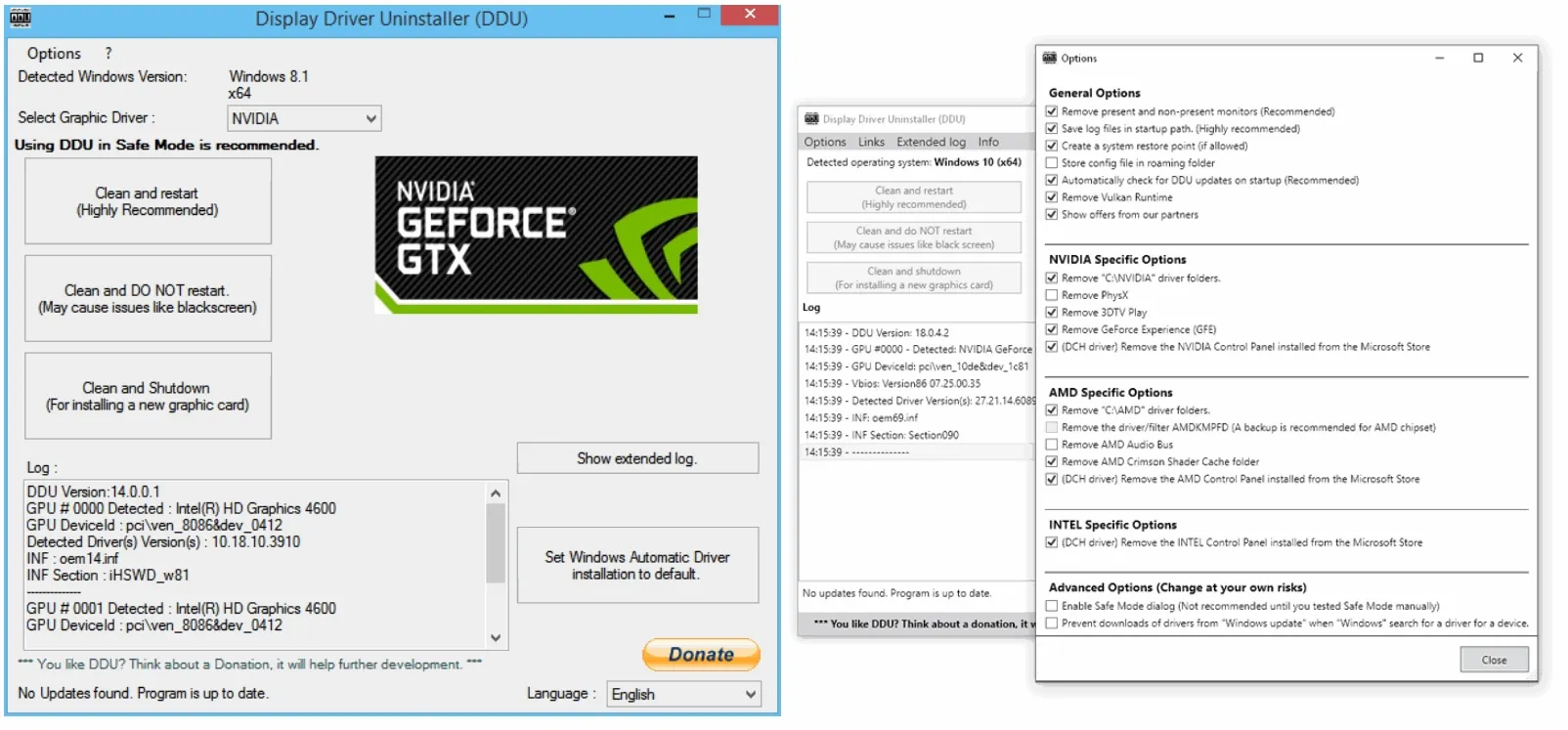
Try a clean install - by using DDU:


You could also use Windows Search and look for: View Advanced system settings - and check the following:

2024-12-18_194649.webp

Or even more than that - using Group Policy:


My Computer My Computer

At a glance

WinDOS 25H2Intel & AMDSO-DIMM SK Hynix 15.8 GB Dual-Channel DDR4-26...nVidia RTX 2060 6GB Mobile GPU (TU106M)
OS
WinDOS 25H2
Computer type
Laptop
CPU
Intel & AMD
Memory
SO-DIMM SK Hynix 15.8 GB Dual-Channel DDR4-2666 (2 x 8 GB) 1329MHz (19-19-19-43)
Graphics Card(s)
nVidia RTX 2060 6GB Mobile GPU (TU106M)
Sound Card
Onbord Realtek ALC1220
Screen Resolution
1920 x 1080
Hard Drives
1x Samsung PM981 NVMe PCIe M.2 512GB / 1x Seagate Expansion ST1000LM035 1TB
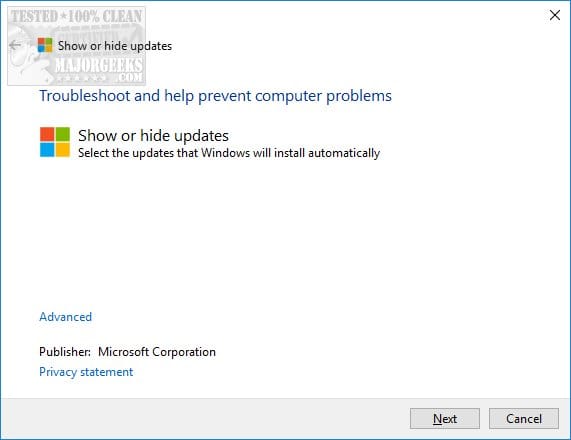
I use wushowhide


You run it before updating, then click hide updates and select the intel driver.

It no longer appears in updates.
 

My Computer My Computer

At a glance

Windows 11 Pro + Win11 Canary VM.I9 13th gen i9-13900H 2.60 GHZ16 GB solderedIntegrated Intel Iris XE
OS
Windows 11 Pro + Win11 Canary VM.
Computer type
Laptop
Manufacturer/Model
ASUS Zenbook 14
CPU
I9 13th gen i9-13900H 2.60 GHZ
Motherboard
Yep, Laptop has one.
Memory
16 GB soldered
Graphics Card(s)
Integrated Intel Iris XE
Sound Card
Realtek built in
Monitor(s) Displays
laptop OLED screen
Screen Resolution
2880x1800 touchscreen
Hard Drives
1 TB NVME SSD (only weakness is only one slot)
PSU
Internal + 65W thunderbolt USB4 charger
Case
Yep, got one
Cooling
Stella Artois (UK pint cans - 568 ml) - extra cost.
Keyboard
Built in UK keybd
Mouse
Bluetooth , wireless dongled, wired
Internet Speed
900 mbs (ethernet), wifi 6 typical 350-450 mb/s both up and down
Browser
Edge
Antivirus
Defender
Other Info
TPM 2.0, 2xUSB4 thunderbolt, 1xUsb3 (usb a), 1xUsb-c, hdmi out, 3.5 mm audio out/in combo, ASUS backlit trackpad (inc. switchable number pad)

Macrium Reflect Home V8
Office 365 Family (6 users each 1TB onedrive space)
Hyper-V (a vm runs almost as fast as my older laptop)
If going down the DDU path suggested by @neves disconnect the computer from the internet while uninstalling the unwanted the old drivers otherwise Windows Update will just reinstall the same drivers again.
 

My Computers My Computers

  • At a glance

    Windows 11 Pro 25H2Intel Core i9 13900KCorsair Dominator Platinum 64gb 5600MT/s DDR5...Sapphire NITRO+ AMD Radeon RX 7900 XTX Vapor-...
    OS
    Windows 11 Pro 25H2
    Computer type
    PC/Desktop
    Manufacturer/Model
    Homebuilt
    CPU
    Intel Core i9 13900K
    Motherboard
    Asus ProArt Z790 Creator WiFi - Bios 3107
    Memory
    Corsair Dominator Platinum 64gb 5600MT/s DDR5 Dual Channel
    Graphics Card(s)
    Sapphire NITRO+ AMD Radeon RX 7900 XTX Vapor-X 24GB
    Sound Card
    External DAC: Cambridge Audio DACMagic200M - Headphone Amp: Topping L50
    Monitor(s) Displays
    Panasonic MX950 Mini LED 55" TV 120hz
    Screen Resolution
    3840 x 2160 120hz
    Hard Drives
    Samsung 980 Pro 2TB (OS)
    Samsung 980 Pro 1TB (Files)
    Lexar NZ790 4TB
    LaCie d2 Professional 6TB external - USB 3.1
    Seagate Expansion 16TB external - USB 3.2
    Seagate One Touch 18TB external HD - USB 3.0
    PSU
    Corsair RM1200x Shift
    Case
    Corsair RGB Smart Case 5000x (white)
    Cooling
    Corsair iCue H150i Elite Capellix XT
    Keyboard
    Incase Ergonomic USB (Microsoft clone)
    Mouse
    Logitech MX Master 3S
    Internet Speed
    Fibre 900/500 Mbps
    Browser
    Microsoft Edge Chromium
    Antivirus
    Bitdefender Total Security
    Other Info
    AMD Radeon Software & Drivers 26.1.1
    Hasleo Backup Suite
    Dashlane password manager
    Kensington Verimark fingerprint reader
    Logitech Brio 4K webcam
    Orico 10-port powered USB 3.0 hub
  • At a glance

    Windows 11 Pro 25H2Intel® Core™ i9-13900H32GB DDR4-3200 Dual channel*Intel Iris Xᵉ Graphics G7
    Operating System
    Windows 11 Pro 25H2
    Computer type
    Laptop
    Manufacturer/Model
    Asus Vivobook X1605VA
    CPU
    Intel® Core™ i9-13900H
    Motherboard
    Asus X1605VA bios 309
    Memory
    32GB DDR4-3200 Dual channel
    Graphics card(s)
    *Intel Iris Xᵉ Graphics G7
    Sound Card
    Realtek | Intel SST Bluetooth & USB
    Monitor(s) Displays
    16.0-inch, WUXGA 16:10 aspect ratio, IPS-level Panel
    Screen Resolution
    1920 x 1200 60hz
    Hard Drives
    512GB M.2 NVMe™ PCIe® 3.0 SSD
    Mouse
    Logitech MX Ergo Trackball
    Antivirus
    Bitdefender Total Security
    Other Info
    720p Webcam
    WiFi & USB to ethernet
If going down the DDU path suggested by @neves disconnect the computer from the internet while uninstalling the unwanted the old drivers otherwise Windows Update will just reinstall the same drivers again.

Oh yes, forgot this part. 😅

Indeed, it's safer to disable the NW - before installing the new driver. Also recommend - having the driver ready/downloaded: Intel® Arc™ & Iris® Xe Graphics - Windows* - instead of using Intel Driver & Support Assistant - which needs internet connection to download it and install it.
 

My Computer My Computer

At a glance

WinDOS 25H2Intel & AMDSO-DIMM SK Hynix 15.8 GB Dual-Channel DDR4-26...nVidia RTX 2060 6GB Mobile GPU (TU106M)
OS
WinDOS 25H2
Computer type
Laptop
CPU
Intel & AMD
Memory
SO-DIMM SK Hynix 15.8 GB Dual-Channel DDR4-2666 (2 x 8 GB) 1329MHz (19-19-19-43)
Graphics Card(s)
nVidia RTX 2060 6GB Mobile GPU (TU106M)
Sound Card
Onbord Realtek ALC1220
Screen Resolution
1920 x 1080
Hard Drives
1x Samsung PM981 NVMe PCIe M.2 512GB / 1x Seagate Expansion ST1000LM035 1TB
There is this very useful tutorial here at ElevenForums:


My Computers My Computers

  • At a glance

    Windows 11 Pro 25H2Intel Core i9 13900KCorsair Dominator Platinum 64gb 5600MT/s DDR5...Sapphire NITRO+ AMD Radeon RX 7900 XTX Vapor-...
    OS
    Windows 11 Pro 25H2
    Computer type
    PC/Desktop
    Manufacturer/Model
    Homebuilt
    CPU
    Intel Core i9 13900K
    Motherboard
    Asus ProArt Z790 Creator WiFi - Bios 3107
    Memory
    Corsair Dominator Platinum 64gb 5600MT/s DDR5 Dual Channel
    Graphics Card(s)
    Sapphire NITRO+ AMD Radeon RX 7900 XTX Vapor-X 24GB
    Sound Card
    External DAC: Cambridge Audio DACMagic200M - Headphone Amp: Topping L50
    Monitor(s) Displays
    Panasonic MX950 Mini LED 55" TV 120hz
    Screen Resolution
    3840 x 2160 120hz
    Hard Drives
    Samsung 980 Pro 2TB (OS)
    Samsung 980 Pro 1TB (Files)
    Lexar NZ790 4TB
    LaCie d2 Professional 6TB external - USB 3.1
    Seagate Expansion 16TB external - USB 3.2
    Seagate One Touch 18TB external HD - USB 3.0
    PSU
    Corsair RM1200x Shift
    Case
    Corsair RGB Smart Case 5000x (white)
    Cooling
    Corsair iCue H150i Elite Capellix XT
    Keyboard
    Incase Ergonomic USB (Microsoft clone)
    Mouse
    Logitech MX Master 3S
    Internet Speed
    Fibre 900/500 Mbps
    Browser
    Microsoft Edge Chromium
    Antivirus
    Bitdefender Total Security
    Other Info
    AMD Radeon Software & Drivers 26.1.1
    Hasleo Backup Suite
    Dashlane password manager
    Kensington Verimark fingerprint reader
    Logitech Brio 4K webcam
    Orico 10-port powered USB 3.0 hub
  • At a glance

    Windows 11 Pro 25H2Intel® Core™ i9-13900H32GB DDR4-3200 Dual channel*Intel Iris Xᵉ Graphics G7
    Operating System
    Windows 11 Pro 25H2
    Computer type
    Laptop
    Manufacturer/Model
    Asus Vivobook X1605VA
    CPU
    Intel® Core™ i9-13900H
    Motherboard
    Asus X1605VA bios 309
    Memory
    32GB DDR4-3200 Dual channel
    Graphics card(s)
    *Intel Iris Xᵉ Graphics G7
    Sound Card
    Realtek | Intel SST Bluetooth & USB
    Monitor(s) Displays
    16.0-inch, WUXGA 16:10 aspect ratio, IPS-level Panel
    Screen Resolution
    1920 x 1200 60hz
    Hard Drives
    512GB M.2 NVMe™ PCIe® 3.0 SSD
    Mouse
    Logitech MX Ergo Trackball
    Antivirus
    Bitdefender Total Security
    Other Info
    720p Webcam
    WiFi & USB to ethernet
You can block WU from updating specific driver HWID's, using this tutorial:
How to Prevent Windows Update from Updating Specific Device Driver in Windows 10

I wrote a script, which lists all the current drivers, and you can quickly select which drivers you want blocked from updates.

1734574466664.webp

After the script is executed, it creates two reg files:
Enable_DeviceInstall_Restrictions.reg
Disable_DeviceInstall_Restrictions.reg

You can use the first reg file to block WU from updating the selected drivers. And the second file to remove the block (allowing WU to overwrite the drivers).
Using this method, updates for all non-blocked drivers are still allowed if you need them.
 

Attachments

My Computer My Computer

At a glance

Windows 7
OS
Windows 7
You can block WU from updating specific driver HWID's, using this tutorial:
How to Prevent Windows Update from Updating Specific Device Driver in Windows 10

I wrote a script, which lists all the current drivers, and you can quickly select which drivers you want blocked from updates.

View attachment 119749

After the script is executed, it creates two reg files:
Enable_DeviceInstall_Restrictions.reg
Disable_DeviceInstall_Restrictions.reg

You can use the first reg file to block WU from updating the selected drivers. And the second file to remove the block (allowing WU to overwrite the drivers).
Using this method, updates for all non-blocked drivers are still allowed if you need them.
Marlin, this looks really good and like it will do the job.

My only question though, when I preview the reg files, the file to enable wu looks correct as shown below:

Windows Registry Editor Version 5.00

[HKEY_LOCAL_MACHINE\SOFTWARE\Policies\Microsoft\Windows\DeviceInstall\Restrictions]
"DenyDeviceIDs"=dword:00000001
"DenyDeviceIDsRetroactive"=dword:00000000

[-HKEY_LOCAL_MACHINE\SOFTWARE\Policies\Microsoft\Windows\DeviceInstall\Restrictions\DenyDeviceIDs]
[HKEY_LOCAL_MACHINE\SOFTWARE\Policies\Microsoft\Windows\DeviceInstall\Restrictions\DenyDeviceIDs]
;
; Intel Corporation Intel(R) UHD Graphics
"1"="PCI\\VEN_8086&DEV_A788&SUBSYS_16E31043"

However, the one to disable doesn't seem to show any alterations as shown:

Windows Registry Editor Version 5.00

[-HKEY_LOCAL_MACHINE\SOFTWARE\Policies\Microsoft\Windows\DeviceInstall\Restrictions]

Would that stop all wu or is it supposed to stop just the intel arc driver i selected?

James
 

My Computer My Computer

At a glance

Windows 11Intel i9 13980HX32GBNVidia Geforce 4070
OS
Windows 11
Computer type
Laptop
Manufacturer/Model
Asus ProArt Studiobook 16 OLED (H7604JI)
CPU
Intel i9 13980HX
Motherboard
Unknown
Memory
32GB
Graphics Card(s)
NVidia Geforce 4070
Monitor(s) Displays
16" Oled
Hard Drives
1TB
1. To remove the reg settings, we simply use the [-HKEY\path\] shorthand which removes all registry data below a specific path.

So it effectively wipes all the changes in one pass. By default, you're not blocking any HWID's because it's a manual process. What's going to happen is you'll keep the old driver forever, or hope that a fixed driver gets released for WU.

2. One more note: this trick only blocks WU. If you manually install a new driver, or run some tool (like Intel's driver utility), then it's still allowed to replace drivers since WU isn't involved.
 

My Computer My Computer

At a glance

Windows 7
OS
Windows 7
Thats great, it has worked then, wu is no longer trying to update it.

Thank you very much for letting me use the script you made, thats so helpful :)
 

My Computer My Computer

At a glance

Windows 11Intel i9 13980HX32GBNVidia Geforce 4070
OS
Windows 11
Computer type
Laptop
Manufacturer/Model
Asus ProArt Studiobook 16 OLED (H7604JI)
CPU
Intel i9 13980HX
Motherboard
Unknown
Memory
32GB
Graphics Card(s)
NVidia Geforce 4070
Monitor(s) Displays
16" Oled
Hard Drives
1TB
The other way is to use WAU Manager which in normal mode requires approving everything before it installs. Instead of blocking, this gives you a choice of to install or not.
 

My Computer My Computer

At a glance

WindowsXP/7/8/8.1/10/11,Linux,Android,FreeBSD...Intel® Core™ i7-8750H 8th Gen 2.2Ghz up to 4....64GB using 2x32GB CL16 Mushkin redLine modulesIntel UHD 630 & NVIDIA GeForce GTX 1050 Ti wi...
OS
WindowsXP/7/8/8.1/10/11,Linux,Android,FreeBSD Unix
Computer type
Laptop
Manufacturer/Model
Dell XPS 15 9570
CPU
Intel® Core™ i7-8750H 8th Gen 2.2Ghz up to 4.1Ghz
Motherboard
Dell XPS 15 9570
Memory
64GB using 2x32GB CL16 Mushkin redLine modules
Graphics Card(s)
Intel UHD 630 & NVIDIA GeForce GTX 1050 Ti with 4GB DDR5
Sound Card
Realtek ALC3266-CG
Monitor(s) Displays
15.6" 4K Touch UltraHD 3840x2160 made by Sharp
Screen Resolution
3840x2160 4K UltraHD
Hard Drives
Samsung MZ-V9P4T0B/AM 990 PRO 4TB PCIe®4.0 NVMe™ M.2 SSD was Toshiba KXG60ZNV1T02 NVMe 1TB SSD
PSU
Dell XPS 15 9570
Case
Dell XPS 15 9570
Cooling
Stock
Keyboard
Stock
Mouse
SwitftPoint ProPoint
Internet Speed
Comcast/XFinity 1.44Gbps/42.5Mbps
Browser
Microsoft EDGE (Chromium based) & Google Chrome
Antivirus
Windows Defender that came with Windows
I use wushowhide


You run it before updating, then click hide updates and select the intel driver.

It no longer appears in updates.
I use this too. This is the fastest and easiest method.
 

My Computer My Computer

At a glance

Windows 11 Pro 25H2Intel Core i7-11800H16GB (2x8 GB)RTX 3060 Laptop GPU
OS
Windows 11 Pro 25H2
Computer type
Laptop
Manufacturer/Model
Acer Predator Helios 300 PH314-54-72ZJ
CPU
Intel Core i7-11800H
Motherboard
TGL
Memory
16GB (2x8 GB)
Graphics Card(s)
RTX 3060 Laptop GPU
Sound Card
Realtek ALC295
Monitor(s) Displays
1
Screen Resolution
2560 x 1440 @ 165Hz
Hard Drives
1TB NVMe SSD, 512GB NVMe SSD, 1TB 7200 RPM HDD
Cooling
Aeroblade 5th Gen 3D fan
Keyboard
RGB Laptop keyboard
Mouse
Logitech Lightsync G203
Internet Speed
175 Mbps up/175 Mbps down
Browser
Firefox with uBlock Origin and YouTube enhancing extensions..
Antivirus
Windows Security with Core Isolation on
I use wushowhide


You run it before updating, then click hide updates and select the intel driver.

It no longer appears in updates.
I use this method too which works fine
 

My Computer My Computer

At a glance

Windows 11 ProCore i7-13700K64 GB Kingston Fury Beast DDR5Gigabyte GeForce RTX 2060 Super Gaming OC 8G
OS
Windows 11 Pro
Computer type
PC/Desktop
Manufacturer/Model
Self build
CPU
Core i7-13700K
Motherboard
Asus TUF Gaming Plus WiFi Z790
Memory
64 GB Kingston Fury Beast DDR5
Graphics Card(s)
Gigabyte GeForce RTX 2060 Super Gaming OC 8G
Sound Card
Realtek S1200A
Monitor(s) Displays
Viewsonic VP2770 & Dell (secondary)
Screen Resolution
2560 x 1440
Hard Drives
Kingston KC3000 2TB NVME SSD & SATA HDDs & SSD
PSU
EVGA SuperNova G2 850W
Case
Nanoxia Deep Silence 1
Cooling
Noctua NH-D14
Keyboard
Microsoft Digital Media Pro
Mouse
Logitech Wireless
Internet Speed
80 Mb / s
Browser
Chrome
Antivirus
Defender, Malwarebytes Free & AdwCleaner
Back
Top Bottom