
Onionbelly
New member
- Local time
- 1:00 AM
- Posts
- 2
- OS
- Windows 11
Hello,
As per the title and screenshot, Windows 11 (26H2) automatically downloaded this NVIDIA Display Driver Update. To my knowledge, these NVIDIA updates are only automatically downloaded and installed on a fresh Windows 11 installation when no other display drivers are present. I already have NVIDIA driver version 596.49 installed (I prefer this version), so I am not sure why Windows is pushing an update I do not even need. It looks like it has already downloaded the driver and will install it automatically in the future, so I suspect that Wushowhide will not do anything.
There is a user on other forum who has the latest NVIDIA update (617.42) experiencing the same issue, so this seems like a bug. Does anyone know a fix for this?
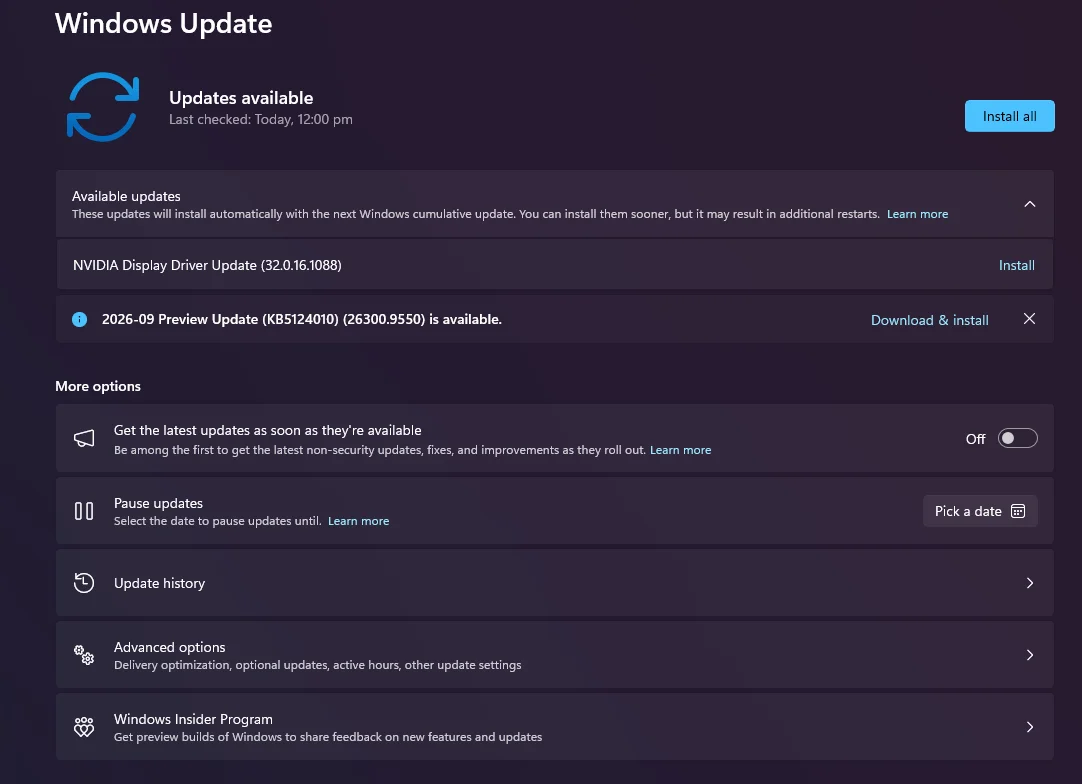
As per the title and screenshot, Windows 11 (26H2) automatically downloaded this NVIDIA Display Driver Update. To my knowledge, these NVIDIA updates are only automatically downloaded and installed on a fresh Windows 11 installation when no other display drivers are present. I already have NVIDIA driver version 596.49 installed (I prefer this version), so I am not sure why Windows is pushing an update I do not even need. It looks like it has already downloaded the driver and will install it automatically in the future, so I suspect that Wushowhide will not do anything.
There is a user on other forum who has the latest NVIDIA update (617.42) experiencing the same issue, so this seems like a bug. Does anyone know a fix for this?
- Windows Build/Version
- 26H2 (26300.9457)
My Computer
At a glance
Windows 11
- OS
- Windows 11
- Computer type
- PC/Desktop






