WinMac - The Ultimate Windows and macOS hybrid


asteski

WinMac dev
Member
Local time
9:56 AM
Posts
114
OS
Windows 11 Pro 25H2 (WinMac v1.4.0)
WinMac - The Ultimate Windows and macOS hybrid

WinMac is a revolutionary customization project that brings together the best of both Windows and macOS operating systems, offering users unique and seamless Windows experience. This project includes installation/uninstallation PowerShell scripts, which deploy well and not well known applications with pre-configured settings.

WinMac was born out of growing pain towards UI/UX decision in Windows 11 and getting MacBook Pro from company I work for, which led me to apply some solutions from macOS to Windows, eventually inspiring me to create this project, which I started April 2024.

Light Mode
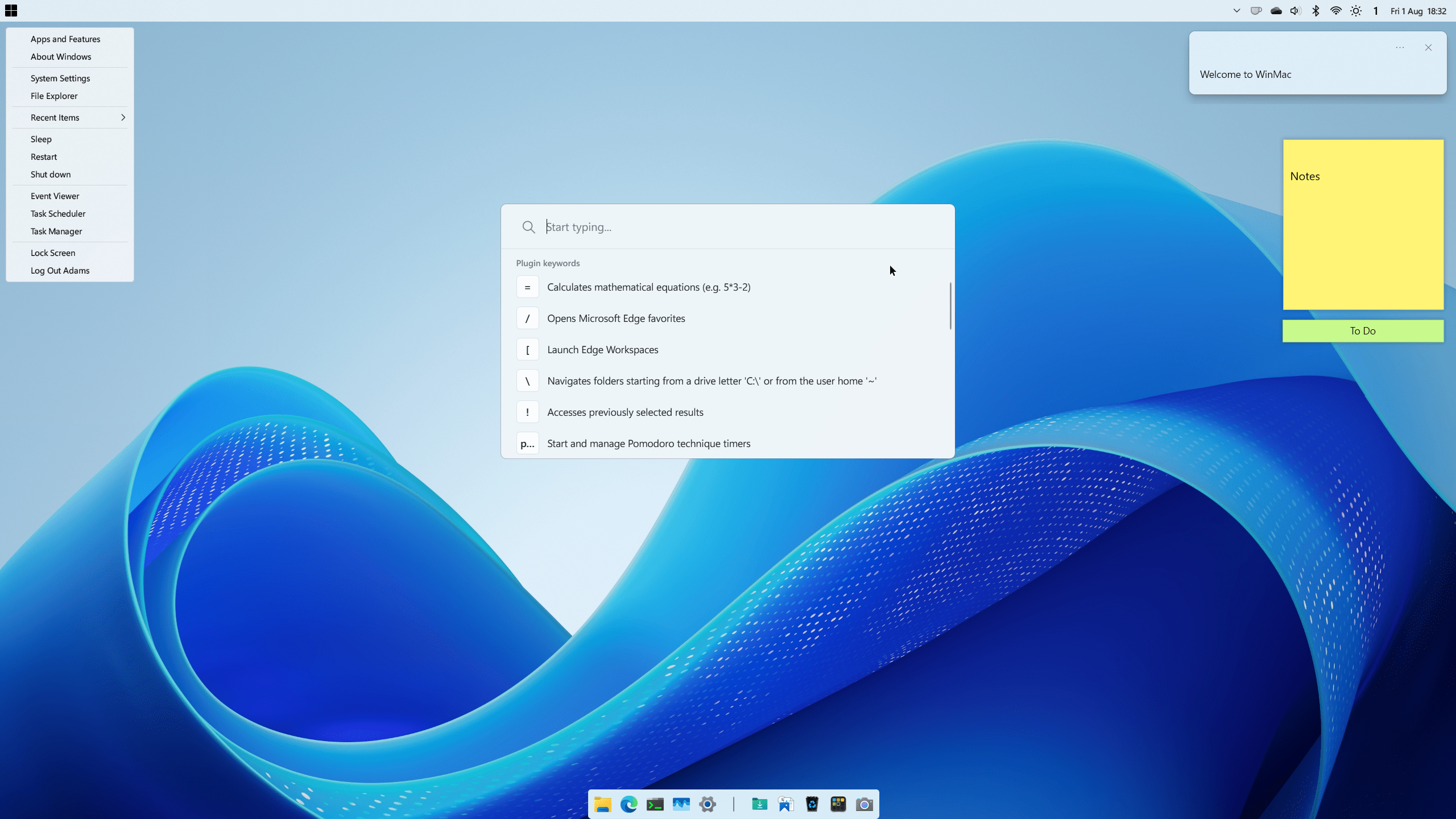
winmac_light_01.png


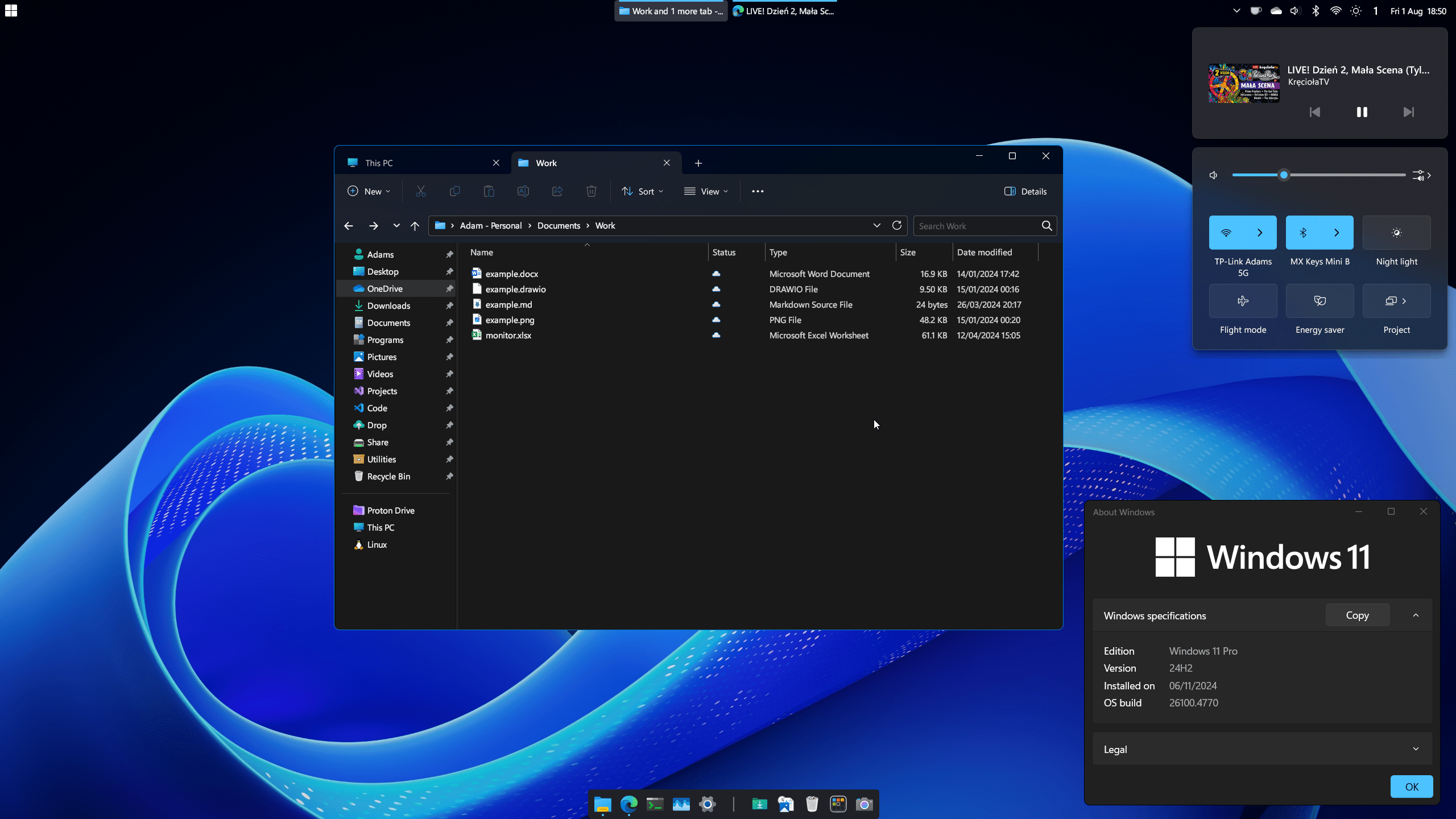
Dark Mode
winmac_dark_01.png


Features

- WinMac Menu - Start Menu replaced with newly developed Win32 app to fully resemble functionality of Apple Menu
- [Coming Soon] WinMac Toolbar - highly customizable toolbar added to taskbar to resemble macOS Menu Bar
- Quick Launcher - Spotlight-like launcher for power users that provides instant access to files, folders, calculator functions, applications, and settings on your system, among many other features
- Dock - highly customizable and feature-rich dock application, used to achieve macOS-like dock experience
- Hot Corners - assign custom actions triggered when you hover your mouse cursor over the screen corners
- Enhanced Start Menu - additionally you can choose to replace default Start menu with enhanced Windows 7 start menu
- Enhanced Taskbar - legacy Taskbar put on top, with enhanced capabilities and looks to match Windows 11 design
- Enhanced File Explorer - improved File Explorer looks and cleaned up context menus, which makes File Explorer load fast and look clean
- Enhanced Terminal - custom prompt and a ton of new custom functions and aliases, bringing most commonly used macOS/Linux commands
- Enhanced Icons - refresh legacy and default Windows components with modern set of icons
- Keyboard Shortcuts - new keyboard shortcuts to enhance Windows 11 workflow

Download and more information on WinMac GitHub page, incl. Wiki documentation. Supported on Windows 11 and Windows 10 with some caveats.
 
Last edited:

My Computers

System One System Two

  • OS
    Windows 11 Pro 25H2 (WinMac v1.4.0)
    Computer type
    PC/Desktop
    CPU
    Intel Core i5-12400F
    Motherboard
    B760 GAMING X DDR4
    Memory
    16 GB (DDR4, 3200 MHz)
    Graphics Card(s)
    NVIDIA GeForce RTX 2070 Super
    Screen Resolution
    2560x1440 @ 240Hz
    Other Info
    I loved modding and customizing operating systems since very young age, gaining experience from all important systems, including Windows, Ubuntu, MacOS and Android, which led to creation of Windows 11 mod called WinMac. Seamlessly blending the elegance of macOS with the versatility of Windows, my customized interface elevates user experience through meticulously crafted modifications and UI enhancements.

    With WinMac, every interaction with Windows 11 environment is imbued with a touch of sophistication, where the boundaries between the Windows and Mac universes blur, offering a sublime computing experience that transcends conventional limitations of Windows 11.
  • Operating System
    macOS Sonoma
    Computer type
    Laptop
    Manufacturer/Model
    Apple MacBook Pro
    CPU
    Apple M3 Pro
    Memory
    18 GB
WinMac v1.4.0

41st release includes integration of WinMac Menu as a Toolbar and a new WinMac Menu version, ton of new and UI improving changes to Windhawk mods, new keyboard shortcuts and many more!

What's Changed

WinMac Menu:
- replaced Stahky with WinMac Menu, which provides equivalent functionality through native integration with the Windows Taskbar as a toolbar (part of WinMac Menu component by default)
- updated WinMac Menu to version 0.8.0, which includes new features like:
- new menu item types like Force Quit to forcibly end a foreground app, This PC and Home which dynamically list their content​
- improved handling of long lists of files/folders in sub-menu​
- sorting options​

Windhawk:
- Toggle Hidden Files with Ctrl+H in File Explorer and Desktop, replacing its implementation as an AutoHotkey keyboard shortcut
- Hide Quick Access Pins for File Explorer
- swapped placement of core Windows 11 tray flyouts to adapt to taskbar position
- replaced Windows 11 Start Menu Styler with new Windows 11 Settings Styler mod
- plus few other additions like UXTheme Hook, Shrink Address Bar Height and Auto Dark Titlebar
- updated out-of-date mods

PowerToys:
- replaced Peek with QuickLook, which allows to be used in Open/Save dialog boxes
- added new PowerToys Run extension called Web Search Shortcut, to quickly use specific search engine via keyword prefixes

MacType:
- changed to default font rendering, as opposed to older defaults which are intended to be used with OLED monitors (previous ini files are still included)

StartAllBack:
- Notification Bell is now hidden upon installation
- enabled "Store and display recently opened items" by default

Open-Shell:
- changed Modern Shutdown to be triggered with Shift + Mouse Click on Start Menu icon instead of Shift + Windows key

Nexus Dock:
- more Dock themes and Indicators with different colors and sizes
- disabled *Activation acts as a toggle*

Keyboard Shortcuts:
- Win+f - trigger FancyZones Layout Editor
- Ctrl+, - trigger Edge and File Explorer settings
- Ctrl+Shift+l - copy current path in File Explorer
- Ctrl+Shift+g - trigger Copilot in Edge address bar
- Ctrl+Shift+f - search favourites in Edge from address bar
- Ctrl+Shift+a - search tabs in Edge from address bar
- Ctrl+Shift+h - search history in Edge from address bar
- Ctrl+Shift+d - duplicate tab in Edge
- Ctrl+Shift+z - reopen last tab in Edge

What's Fixed

- disabled the native Windows 11 Start Menu to prevent it from being triggered accidentally
- winver not being restored after uninstalling WinMac Menu
- clcd function going to wrong directory when custom folder name is used
- Command Palette kept running after installing PowerToys
- certain PowerToys plugins were installed with 64-bit version for ARM PCs
- MacType starting slowly upon Windows startup
- updated ThemeSwitcher script to be compatible with Auto Theme Switcher Windhawk mod
- icons not scaling properly in WinMac Menu
- changed explorer.exe file in Resource Redirect Blue folders theme to explorer.dll to mitigate problems with Windows Security
- ptr cli not being detectable by Terminal because of issues with adding its root folder to a PATH environment variable

Full Changelog: Feature/v1.4.0 by Asteski · Pull Request #61 · Asteski/WinMac
 

My Computers

System One System Two

  • OS
    Windows 11 Pro 25H2 (WinMac v1.4.0)
    Computer type
    PC/Desktop
    CPU
    Intel Core i5-12400F
    Motherboard
    B760 GAMING X DDR4
    Memory
    16 GB (DDR4, 3200 MHz)
    Graphics Card(s)
    NVIDIA GeForce RTX 2070 Super
    Screen Resolution
    2560x1440 @ 240Hz
    Other Info
    I loved modding and customizing operating systems since very young age, gaining experience from all important systems, including Windows, Ubuntu, MacOS and Android, which led to creation of Windows 11 mod called WinMac. Seamlessly blending the elegance of macOS with the versatility of Windows, my customized interface elevates user experience through meticulously crafted modifications and UI enhancements.

    With WinMac, every interaction with Windows 11 environment is imbued with a touch of sophistication, where the boundaries between the Windows and Mac universes blur, offering a sublime computing experience that transcends conventional limitations of Windows 11.
  • Operating System
    macOS Sonoma
    Computer type
    Laptop
    Manufacturer/Model
    Apple MacBook Pro
    CPU
    Apple M3 Pro
    Memory
    18 GB
Please tell us more. Is it it based on Unix or Windows kernel?
 

My Computers

System One System Two

  • OS
    Windows 11 Pro 25H2 26200.8524
    Computer type
    Laptop
    Manufacturer/Model
    Acemagic LX15PRO
    CPU
    AMD Ryzen 7 5825U with Radeon Graphics
    Memory
    16GB
    Screen Resolution
    1920 x 1080
    Hard Drives
    SSD 2TB
    Internet Speed
    30 Mbps
    Browser
    Brave
    Antivirus
    Webroot Secure Anywhere
    Other Info
    System 3

    Acer Swift SF114-34 laptop
    OS Windows 11 Pro 26200.8524
    CPU Pentium Silver N6000
    RAM 4GB
    SSD Samsung 970 EVO Plus SSD 2TB (an upgrade)
  • Operating System
    Windows 11 Pro 23H2 22631.2506
    Computer type
    Laptop
    Manufacturer/Model
    HP Mini 210-1090NR PC (bought in late 2009!)
    CPU
    Atom N450 1.66GHz
    Memory
    2GB
    Browser
    Brave
    Antivirus
    Webroot
Please tell us more. Is it it based on Unix or Windows kernel?
So to summarize it's basically a compilation of pre-configured apps and utilities like for example PowerToys, StartAllBack and Nexus Dock, Windhawk mods and my own app called WinMac Menu, with a ton of additional tweaks and improvements for the OS, and it's mainly suited for Windows 11. It is installed using PowerShell script, that come in form of GUI or fully terminal-based installation, including uninstallation script.

You can read more about the apps I've used on WinMac wiki page, among ton of other documentation I've included there.
 

My Computers

System One System Two

  • OS
    Windows 11 Pro 25H2 (WinMac v1.4.0)
    Computer type
    PC/Desktop
    CPU
    Intel Core i5-12400F
    Motherboard
    B760 GAMING X DDR4
    Memory
    16 GB (DDR4, 3200 MHz)
    Graphics Card(s)
    NVIDIA GeForce RTX 2070 Super
    Screen Resolution
    2560x1440 @ 240Hz
    Other Info
    I loved modding and customizing operating systems since very young age, gaining experience from all important systems, including Windows, Ubuntu, MacOS and Android, which led to creation of Windows 11 mod called WinMac. Seamlessly blending the elegance of macOS with the versatility of Windows, my customized interface elevates user experience through meticulously crafted modifications and UI enhancements.

    With WinMac, every interaction with Windows 11 environment is imbued with a touch of sophistication, where the boundaries between the Windows and Mac universes blur, offering a sublime computing experience that transcends conventional limitations of Windows 11.
  • Operating System
    macOS Sonoma
    Computer type
    Laptop
    Manufacturer/Model
    Apple MacBook Pro
    CPU
    Apple M3 Pro
    Memory
    18 GB
"WinMac is a revolutionary customization project that brings together the best of both Windows and macOS operating systems."

But it does not incorporate anything from the Apple OS!
 

My Computers

System One System Two

  • OS
    Windows 11 Pro 25H2 26200.8524
    Computer type
    Laptop
    Manufacturer/Model
    Acemagic LX15PRO
    CPU
    AMD Ryzen 7 5825U with Radeon Graphics
    Memory
    16GB
    Screen Resolution
    1920 x 1080
    Hard Drives
    SSD 2TB
    Internet Speed
    30 Mbps
    Browser
    Brave
    Antivirus
    Webroot Secure Anywhere
    Other Info
    System 3

    Acer Swift SF114-34 laptop
    OS Windows 11 Pro 26200.8524
    CPU Pentium Silver N6000
    RAM 4GB
    SSD Samsung 970 EVO Plus SSD 2TB (an upgrade)
  • Operating System
    Windows 11 Pro 23H2 22631.2506
    Computer type
    Laptop
    Manufacturer/Model
    HP Mini 210-1090NR PC (bought in late 2009!)
    CPU
    Atom N450 1.66GHz
    Memory
    2GB
    Browser
    Brave
    Antivirus
    Webroot
Back
Top Bottom