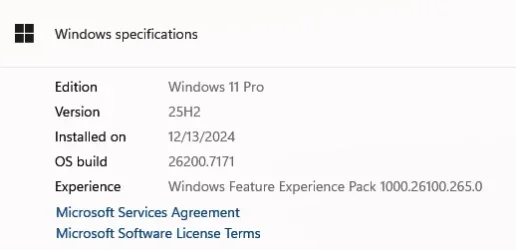
Winver replacement


Graulges

Well-known member
Member
VIP
Local time
6:22 PM
Posts
3,010
Location
France
OS
Windows 11 Pro 25H2 26200.8457

My Computer

System One

  • OS
    Windows 11 Pro 25H2 26200.8457
    Computer type
    PC/Desktop
    Manufacturer/Model
    Home built
    CPU
    Ryzen 5 7600
    Motherboard
    Gigabyte B650M Aorus Elite AX Ice
    Memory
    32 Gb DDR5 6000Hz Corsair Vengeance
    Graphics Card(s)
    Sapphire Pulse RX 7600
    Sound Card
    Internal Realtek
    Monitor(s) Displays
    Samsung 32" Odyssey G5 G50D QHD
    Screen Resolution
    2560 x 1440
    Hard Drives
    WD Black SN 770 1Tb; SanDisk SDSSDA240G ; Seagate 2Tb HDD
    PSU
    MSI MAG A750GL
    Case
    Enermax Marbleshell MS21
    Cooling
    Thermaltake Peerless Assassin 120 White ARGB, 3 x 120 intake, 1 x 120 exhaust
    Keyboard
    Aukey KM-G12
    Mouse
    Razer Basilisk v3 Pro 35K
    Internet Speed
    1 Gb/s up & 800 Mb/s down
    Browser
    Brave / Edge
    Antivirus
    Windows / Malwarebytes
Hmmm - I cannot see much point in it as all info is easily found in settings menus (about / storage)
 

My Computer

System One

  • OS
    Windows 11 Pro + Win11 Canary VM.
    Computer type
    Laptop
    Manufacturer/Model
    ASUS Zenbook 14
    CPU
    I9 13th gen i9-13900H 2.60 GHZ
    Motherboard
    Yep, Laptop has one.
    Memory
    16 GB soldered
    Graphics Card(s)
    Integrated Intel Iris XE
    Sound Card
    Realtek built in
    Monitor(s) Displays
    laptop OLED screen
    Screen Resolution
    2880x1800 touchscreen
    Hard Drives
    1 TB NVME SSD (only weakness is only one slot)
    PSU
    Internal + 65W thunderbolt USB4 charger
    Case
    Yep, got one
    Cooling
    Stella Artois (UK pint cans - 568 ml) - extra cost.
    Keyboard
    Built in UK keybd
    Mouse
    Bluetooth , wireless dongled, wired
    Internet Speed
    900 mbs (ethernet), wifi 6 typical 350-450 mb/s both up and down
    Browser
    Edge
    Antivirus
    Defender
    Other Info
    TPM 2.0, 2xUSB4 thunderbolt, 1xUsb3 (usb a), 1xUsb-c, hdmi out, 3.5 mm audio out/in combo, ASUS backlit trackpad (inc. switchable number pad)

    Macrium Reflect Home V8
    Office 365 Family (6 users each 1TB onedrive space)
    Hyper-V (a vm runs almost as fast as my older laptop)
True but it's just nicer than winver:D
 

My Computer

System One

  • OS
    Windows 11 Pro 25H2 26200.8457
    Computer type
    PC/Desktop
    Manufacturer/Model
    Home built
    CPU
    Ryzen 5 7600
    Motherboard
    Gigabyte B650M Aorus Elite AX Ice
    Memory
    32 Gb DDR5 6000Hz Corsair Vengeance
    Graphics Card(s)
    Sapphire Pulse RX 7600
    Sound Card
    Internal Realtek
    Monitor(s) Displays
    Samsung 32" Odyssey G5 G50D QHD
    Screen Resolution
    2560 x 1440
    Hard Drives
    WD Black SN 770 1Tb; SanDisk SDSSDA240G ; Seagate 2Tb HDD
    PSU
    MSI MAG A750GL
    Case
    Enermax Marbleshell MS21
    Cooling
    Thermaltake Peerless Assassin 120 White ARGB, 3 x 120 intake, 1 x 120 exhaust
    Keyboard
    Aukey KM-G12
    Mouse
    Razer Basilisk v3 Pro 35K
    Internet Speed
    1 Gb/s up & 800 Mb/s down
    Browser
    Brave / Edge
    Antivirus
    Windows / Malwarebytes
And do read the Notes on that link:

Notes​

  • Modern Winver is still in development! There may be bugs, incompatibilities or incorrect information. Please file an issue if you run into problems.
  • Huge thanks to @gus33000 for developing RegistyRT.
  • Modern Winver is based on an old project by the same name, which you can find here. It was built in WPF, and is only designed for Windows 10. It's unsupported now but you're welcome to check it out if you're interested.
 

My Computers

System One System Two

  • OS
    Win11 Pro RTM Version 24H2 Build 26100.4202
    Computer type
    Laptop
    Manufacturer/Model
    Dell Vostro 3400
    CPU
    Intel Core i5 11th Gen. 2.40GHz
    Memory
    12GB
    Hard Drives
    256GB SSD NVMe M.2
  • Operating System
    Win11 Pro RTM Version 24H2 Build 26100.4202
    Computer type
    PC/Desktop
    Manufacturer/Model
    Dell Vostro 5890
    CPU
    Intel Core i5 10th Gen. 2.90GHz
    Memory
    16GB
    Graphics card(s)
    Onboard, no VGA, using a DisplayPort-to-VGA adapter
    Monitor(s) Displays
    24" Dell
    Hard Drives
    512GB SSD NVMe, 4TB Seagate HDD
    Browser
    Firefox, Edge
    Antivirus
    Windows Defender/Microsoft Security
Just came across this and another similar.
Sadly both don't allow any way to replace the simple press start and type winver/do the same in a run command window.
Using the winver command for decades, it's just 'too hard basket' and both these lovely replacement apps fail by being unable to replace the winver, which is an old habit that I'm not gonna change.
 

My Computer

System One

  • OS
    Win 11 23H2 Enterprise
    Computer type
    PC/Desktop
    Manufacturer/Model
    Self-Built
    CPU
    Ryzen 9800X3D
    Motherboard
    MSI MAG X870 Tomahawk WiFi
    Memory
    G.Skill Trident Z RGB 6200MT CL30
    Graphics Card(s)
    MSI RTX 5090 Suprim SoC
    Sound Card
    Sound Blaster G8
    Monitor(s) Displays
    LG C2 42 Main Desktop, 3x Gigabyte FI32Q in a triple array for gaming simulations
    Screen Resolution
    3840x2160, 2560x1440 (3)
    Hard Drives
    WD SN850X 2TB M.2 NVME (OS Drive), WD SN850X 2TB M.2 NVME, 2x Crucial 2TB SSD, Crucial 1TB SSD, Seagate Barracuda 2TB HDD
    PSU
    NZXT C1200 Gold ATX 3.1-Fully Modular/Low-Noise-1200 Watts-12V-2x6 Connector-Zero Fan Mode-100% Japanese Capacitors
    Case
    NZXT H7
    Cooling
    EK AIO Elite 360mm Elite
    Keyboard
    Razer Huntsman V3 Pro
    Mouse
    Logitech G502X
    Internet Speed
    1GB
    Browser
    Edge Chromium
    Antivirus
    Windows Defender
Not much need for winver anymore as the info is in setting > about.

Screenshot 2025-11-19 143927.webp
 

My Computer

System One

  • OS
    Windows 11 Pro
It does get the insider type wrong. Mine is release-preview and it displays dev.

Here is the way I found to get the proper information from the registry (in powershell function):

Code:
function get-WindowsVersion {

#  get details of windows versions for printing (may need to know version on particular day)

   $key = "HKLM:\software\microsoft\windows nt\CurrentVersion"
   $pname=(Get-ItemProperty "$key" ProductName).ProductName
   $dis = (Get-ItemProperty "$key" DisplayVersion).DisplayVersion
   $v1 = (Get-ItemProperty "$key" CurrentMajorVersionNumber).CurrentMajorVersionNumber
   $v2 = (Get-ItemProperty "$key" CurrentMinorVersionNumber).CurrentMinorVersionNumber
   $v3 = (Get-ItemProperty "$key" CurrentBuild).CurrentBuild
   $v4 = (Get-ItemProperty "$key" UBR).UBR
   $ed = (Get-ItemProperty "$key" EditionID).EditionID
   $key = "HKLM:\software\microsoft\WindowsSelfHost\Applicability"
   $en = Get-ItemProperty "$key" EnablePreviewBuilds -ErrorAction SilentlyContinue
   if ( $en ) {
      $epb = $en.EnablePreviewBuilds  
      if ( $epb -ne 0 )
        {
        $bn = (Get-ItemProperty "$key" BranchName).Branchname
        $Ins = "$bn channel"
        }
      }
   return "$pname $dis $v1.$v2.$v3.$v4 $Ins"

   }

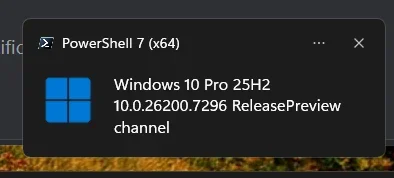
Which yields for me:

Windows 10 Pro 25H2 10.0.26200.7296 ReleasePreview channel

I have also turned this into a notification and have a login task that sends the notification if the output has changed so that it pops up after an update:


Screenshot 2025-11-19 174246.webp
 

My Computers

System One System Two

  • OS
    Windows 11 Pro x64
    Computer type
    PC/Desktop
    Manufacturer/Model
    📷🔈🎧 🪛 DIY Photoshop/Audio/Game/tinker
    CPU
    i9 14900K P/E 5.8/4.5 GHz, cache 5.0 GHz
    Motherboard
    Asus ROG Maximus Z790 Dark Hero
    Memory
    🐏 96GB (2x48) G.skill Ripjaws 6800 MT/s
    Graphics Card(s)
    Asus ROG Strix 4070 Ti OC
    Sound Card
    🔊Bowers & Wilkins 606 S3 speakers; Audiolabs 7000a integrated amp; RSL 10S Mk2 sub; Creative Pebble Pro Minimilist
    Monitor(s) Displays
    🖥️🖥️ Eizo CG2730 ColorEdge, ViewSonic VP2768
    Screen Resolution
    🖥️🖥️ 2560 x 1440p x 2
    Hard Drives
    💾 WDC SN850X 4TB nvme, SN850 1TB nvme, SK-Hynix 2 TB P41 nvme,. Sabrent USB-C DS-SC5B 5-bay docking station: 6TB WDC Black, 6TB Ironwolf Pro; 2x 2TB WDC Black HDD
    PSU
    ⚡️ 850W Seasonic Vertex PX-850 ATX 3.0/PCI-E 5.0
    Case
    Fractal Design North XL Mesh, Black Walnut
    Cooling
    ❄️ EK Nucleus black 360 AIO w/Phanteks T30-120 fans, 2 Noctua NF-A14 Chromax case fan, 1 T30-120 fan cooling memory
    Keyboard
    ⌨️ Keychron Q3 Max TKL with custom GMK Redsuns Red Samuri keycaps, TX Stabs
    Mouse
    🖱️ Logitech G305 wireless gaming
    Internet Speed
    ⬇️ 500 Mb/s ⬆️ 12 Mb/s
    Browser
    🔥🦊 Firefox
    Antivirus
    🦺 Defender, Macrium Reflect X 🏆
    Other Info
    Phangkey Amaterasu V2 Desk Mat
  • Computer type
    Laptop
    Manufacturer/Model
    💻 Apple 13" Macbook Pro 2020 (m1)
    CPU
    Apple M1
    Screen Resolution
    2560x1600
    Browser
    Firefox
Only one Get-ItemProperty call to CurrentVersion is really needed. You can do this instead.

Code:
$key = "HKLM:\software\microsoft\windows nt\CurrentVersion"
$cv = Get-ItemProperty $key
  
$pname= $cv.ProductName
$dis = $cv.DisplayVersion
$v1 = $cv.CurrentMajorVersionNumber
$v2 = $cv.CurrentMinorVersionNumber
$v3 = $cv.CurrentBuild
$v4 = $cv.UBR
$ed = $cv.EditionID
 

My Computer

System One

  • OS
    Windows 7
Tried this out of curiosity but it doesn't work well with my recommended scaling of 150% as all the text overlaps and is a jumbled mess. I'll stick with my short cut icon for winver on my taskbar to quickly check. A dark version would have been nice though if the text scaled properly.
 

My Computers

System One System Two

  • OS
    Windows 11 25H2
    Computer type
    Laptop
    Manufacturer/Model
    Alienware 18 Area-51
    CPU
    Intel Core Ultra 9 275HX (24-Core)
    Motherboard
    Alienware
    Memory
    64GB DDR5 6400MT/s
    Graphics Card(s)
    NVIDIA GeForce RTX 5080 and Intel UHD Graphics
    Sound Card
    Onboard, Realtek high-performance Audio chips (ALC3329 & ALC1708))
    Monitor(s) Displays
    300HZ 18-inch QHD 500 nit Comfort View+
    Screen Resolution
    2560 x 1600
    Hard Drives
    2TB NVMe M.2 PCIe Gen 5 SSD
    Case
    Magnesium Alloy
    Cooling
    Advanced Cryo-Tech Quad-Fan Cooling system & large vapor chamber
    Keyboard
    Cherry MX ultra low profile mechanical keyboard with per key AlienFX RGB lighting
    Mouse
    Logitech MX Master 4
    Browser
    Vivaldi (main), Firefox, Chrome, Edge
    Antivirus
    MS Defender and Malwarebytes Free
  • Operating System
    Windows 11 25H2
    Computer type
    Laptop
    Manufacturer/Model
    Microsoft Surface Laptop 7
    CPU
    Qualcomm Snapdragon X Elite (12 Core) ARM based CPU
    Motherboard
    Microsoft Corp.
    Memory
    16GB LPDDR5
    Graphics card(s)
    Qualcomm Adreno X1-85
    Sound Card
    Omnisonic speakers with Dolby Atmos spatial sound
    Monitor(s) Displays
    120 Hz 13.8-inch 600 nit PixelSense Flow touchscreen
    Screen Resolution
    2304x1536
    Hard Drives
    1TB NVMe Gen 4 SSD
    Case
    Anodized Aluminum
    Cooling
    Traditional active cooling fan system
    Keyboard
    Mechanical QWERTY, backlit when in use
    Mouse
    Logitech MX Master 4 and Surface Arc Mouse
    Browser
    Vivaldi (main), Firefox, Chrome, Edge
    Antivirus
    MS Defender and Malwarebytes Free

Latest Support Threads

Back
Top Bottom