Xbox Mode Begins Rolling Out to Players on Windows 11 PCs


 Xbox Wire:

Beginning today, we’re excited to share that Xbox mode will begin rolling out in select markets to Windows 11 PCs, including laptops, desktops, and tablets, bringing a console-inspired Xbox experience to more players than ever.

Whether you’re playing on a high-performance desktop, a gaming laptop, or a Windows handheld, Xbox mode makes it easier to jump into your games. It adds another way to enjoy games on your PC – with a controller-optimized, full screen experience that is built for play.

Some players in select markets will be able to download the Xbox mode experience today, with availability expanding to more players in those markets over the next several weeks.

A More Immersive Way to Play on PC

Xbox mode is designed for the moments when you want your games to take center stage on Windows 11 PCs and handhelds. Inspired by the Xbox console experience, Xbox mode offers a streamlined interface that puts your library and recently played titles within easy reach while minimizing background distractions.

With Xbox mode, you can:
  • Browse and launch games using a controller optimized interface.
  • Jump back and forth between Xbox mode and the Windows 11 desktop whenever you want.
  • Access an aggregated game library, including the full games catalog from Xbox Game Pass, and installed games from leading PC storefronts.
Because Xbox mode is built on Windows, you still get the flexibility and openness of PC gaming, while enjoying a more immersive and streamlined way to play.

Since first introducing Xbox mode, formerly known as “full screen experience”, on Windows handhelds, we’ve been listening closely to player feedback and continuing to evolve the experience across devices. Those learnings directly shaped Xbox mode on Windows 11 PCs.

Xbox mode is another step in our broader work to make Xbox feel consistent across screens while giving you more choice in how and where you play. Windows has long been an important part of the PC gaming ecosystem, supporting innovation through its open platform. Together with Windows, Xbox is taking everything we’ve learned about building a world-class operating system for gaming and continuing to evolve the experiences that meet players where and how they choose to play.

How to Get Xbox mode on Your Windows 11 PC

Xbox mode is rolling out gradually to ensure a great experience for everyone. To get access as soon as it becomes available for your PC, make sure your device is set to receive the latest Windows updates:
  1. Open Settings on your Windows 11 PC
  2. Select Windows Update
  3. Turn on Get the latest updates as soon as they are available
Once the update is available on your device, you will be able to jump into Xbox mode directly from your PC and start playing.

We will continue evolving Xbox mode based on your feedback as we continue enhancing the Xbox experience on Windows. We cannot wait to see how you make Xbox mode part of your gaming setup.


 Source:


See also:

 
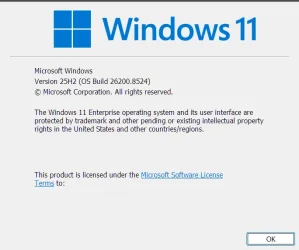
Windows 25H2 (OS Build 26200.8457)
I do NOT have "Get the latest updates as soon as they are available" checked, but Xbox mode is 100% launching every time I open a game?
I do NOT see the extra 'Xbox Mode' toggles in Settings>Gaming - only the normal Win 11 Gaming Mode (enabled).
I had not installed any of the registry downloads to turn it on before today, thinking that it might show the new settings in Windows Gaming settings, but it did not.
Xbox Mode still works though, able to access the interface (CTRL+SHIFT+O) and have the HUD displayed etc.

I mean it's great that I have it working, and it does make a difference for sure, but why it's there is a mystery?
Any clue what's going on here?

PS - I guess everyone else but me on these forums are not interested in this update or gaming in general since I'm the only reply?? LOL.
 

My Computer

System One

  • OS
    Win 11 23H2 Enterprise
    Computer type
    PC/Desktop
    Manufacturer/Model
    Self-Built
    CPU
    Ryzen 9800X3D
    Motherboard
    MSI MAG X870 Tomahawk WiFi
    Memory
    G.Skill Trident Z RGB 6200MT CL30
    Graphics Card(s)
    MSI RTX 5090 Suprim SoC
    Sound Card
    Sound Blaster G8
    Monitor(s) Displays
    LG C2 42 Main Desktop, 3x Gigabyte FI32Q in a triple array for gaming simulations
    Screen Resolution
    3840x2160, 2560x1440 (3)
    Hard Drives
    WD SN850X 2TB M.2 NVME (OS Drive), WD SN850X 2TB M.2 NVME, 2x Crucial 2TB SSD, Crucial 1TB SSD, Seagate Barracuda 2TB HDD
    PSU
    NZXT C1200 Gold ATX 3.1-Fully Modular/Low-Noise-1200 Watts-12V-2x6 Connector-Zero Fan Mode-100% Japanese Capacitors
    Case
    NZXT H7
    Cooling
    EK AIO Elite 360mm Elite
    Keyboard
    Razer Huntsman V3 Pro
    Mouse
    Logitech G502X
    Internet Speed
    1GB
    Browser
    Edge Chromium
    Antivirus
    Windows Defender
Windows 25H2 (OS Build 26200.8457)
I do NOT have "Get the latest updates as soon as they are available" checked, but Xbox mode is 100% launching every time I open a game?
I do NOT see the extra 'Xbox Mode' toggles in Settings>Gaming - only the normal Win 11 Gaming Mode (enabled).
I had not installed any of the registry downloads to turn it on before today, thinking that it might show the new settings in Windows Gaming settings, but it did not.
Xbox Mode still works though, able to access the interface (CTRL+SHIFT+O) and have the HUD displayed etc.

I mean it's great that I have it working, and it does make a difference for sure, but why it's there is a mystery?
Any clue what's going on here?

PS - I guess everyone else but me on these forums are not interested in this update or gaming in general since I'm the only reply?? LOL.

Hey mate, :alien:

You can use the ViVeTool command below to enable the Xbox Mode feature.

vivetool /enable /id:59765208,58989070


My Computers

System One System Two

  • OS
    Windows 11 Pro for Workstations
    Computer type
    PC/Desktop
    Manufacturer/Model
    Custom self build
    CPU
    Intel i7-8700K 5 GHz
    Motherboard
    ASUS ROG Maximus XI Formula Z390
    Memory
    64 GB (4x16GB) G.SKILL TridentZ RGB DDR4 3600 MHz (F4-3600C18D-32GTZR)
    Graphics Card(s)
    ASUS ROG-STRIX-GTX1080TI-O11G-GAMING (11GB GDDR5X)
    Sound Card
    Integrated Digital Audio (S/PDIF)
    Monitor(s) Displays
    2 x Samsung Odyssey G75 27"
    Screen Resolution
    2560x1440
    Hard Drives
    1TB Samsung 990 PRO M.2,
    4TB Samsung 990 PRO M.2,
    TerraMaster F8 SSD Plus NAS
    PSU
    Seasonic Prime Titanium 850W
    Case
    Thermaltake Core P3 wall mounted
    Cooling
    Corsair Hydro H115i
    Keyboard
    Amazon Basics Wired Full Keyboard MD005
    Mouse
    Logitech MX Master 4
    Internet Speed
    2 Gbps Download and 100 Mbps Upload
    Browser
    Chrome and Edge
    Antivirus
    Microsoft Defender
    Other Info
    Logitech Z625 speaker system,
    Logitech BRIO 4K Pro webcam,
    HP Color LaserJet Pro MFP M477fdn,
    CyberPower CP1500PFCLCD
    Galaxy S23 Plus phone
  • Operating System
    Windows 11 Pro
    Computer type
    Laptop
    Manufacturer/Model
    Surface Laptop 7 Copilot+ PC
    CPU
    Snapdragon X Elite (12 core) 3.42 GHz
    Memory
    16 GB LPDDR5x-7467 MHz
    Monitor(s) Displays
    15" HDR
    Screen Resolution
    2496 x 1664
    Hard Drives
    1 TB SSD
    Internet Speed
    Wi-Fi 7 and Bluetooth 5.4
    Browser
    Chrome and Edge
    Antivirus
    Microsoft Defender
Hey mate, :alien:

You can use the ViVeTool command below to enable the Xbox Mode feature.

vivetool /enable /id:59765208,58989070

Thanks Brink!
However, like I said, it's actually all working and I can see it actively releasing RAM and stopping various unnecessary windows services when a game is launched. The issue is that I don't see the Xbox Mode details in Windows>settings>gaming>game mode.
I can access the overlay and use all the features, I'm just missing the windows settings option that is supposed to have enabled it - this is super odd since it just started happening on it's own and I have no clue why windows settings doesn't seem to see the toggle for it?
I guess I will just wait for that part to show up since using vive tool, would not really provide any benefit other than perhaps show that toggle.
 

My Computer

System One

  • OS
    Win 11 23H2 Enterprise
    Computer type
    PC/Desktop
    Manufacturer/Model
    Self-Built
    CPU
    Ryzen 9800X3D
    Motherboard
    MSI MAG X870 Tomahawk WiFi
    Memory
    G.Skill Trident Z RGB 6200MT CL30
    Graphics Card(s)
    MSI RTX 5090 Suprim SoC
    Sound Card
    Sound Blaster G8
    Monitor(s) Displays
    LG C2 42 Main Desktop, 3x Gigabyte FI32Q in a triple array for gaming simulations
    Screen Resolution
    3840x2160, 2560x1440 (3)
    Hard Drives
    WD SN850X 2TB M.2 NVME (OS Drive), WD SN850X 2TB M.2 NVME, 2x Crucial 2TB SSD, Crucial 1TB SSD, Seagate Barracuda 2TB HDD
    PSU
    NZXT C1200 Gold ATX 3.1-Fully Modular/Low-Noise-1200 Watts-12V-2x6 Connector-Zero Fan Mode-100% Japanese Capacitors
    Case
    NZXT H7
    Cooling
    EK AIO Elite 360mm Elite
    Keyboard
    Razer Huntsman V3 Pro
    Mouse
    Logitech G502X
    Internet Speed
    1GB
    Browser
    Edge Chromium
    Antivirus
    Windows Defender
Thanks Brink!
However, like I said, it's actually all working and I can see it actively releasing RAM and stopping various unnecessary windows services when a game is launched. The issue is that I don't see the Xbox Mode details in Windows>settings>gaming>game mode.
I can access the overlay and use all the features, I'm just missing the windows settings option that is supposed to have enabled it - this is super odd since it just started happening on it's own and I have no clue why windows settings doesn't seem to see the toggle for it?
I guess I will just wait for that part to show up since using vive tool, would not really provide any benefit other than perhaps show that toggle.

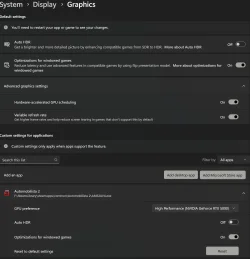
Since you don't have the "Xbox Mode" toggle, you might check this below to see if it may be related instead.


My Computers

System One System Two

  • OS
    Windows 11 Pro for Workstations
    Computer type
    PC/Desktop
    Manufacturer/Model
    Custom self build
    CPU
    Intel i7-8700K 5 GHz
    Motherboard
    ASUS ROG Maximus XI Formula Z390
    Memory
    64 GB (4x16GB) G.SKILL TridentZ RGB DDR4 3600 MHz (F4-3600C18D-32GTZR)
    Graphics Card(s)
    ASUS ROG-STRIX-GTX1080TI-O11G-GAMING (11GB GDDR5X)
    Sound Card
    Integrated Digital Audio (S/PDIF)
    Monitor(s) Displays
    2 x Samsung Odyssey G75 27"
    Screen Resolution
    2560x1440
    Hard Drives
    1TB Samsung 990 PRO M.2,
    4TB Samsung 990 PRO M.2,
    TerraMaster F8 SSD Plus NAS
    PSU
    Seasonic Prime Titanium 850W
    Case
    Thermaltake Core P3 wall mounted
    Cooling
    Corsair Hydro H115i
    Keyboard
    Amazon Basics Wired Full Keyboard MD005
    Mouse
    Logitech MX Master 4
    Internet Speed
    2 Gbps Download and 100 Mbps Upload
    Browser
    Chrome and Edge
    Antivirus
    Microsoft Defender
    Other Info
    Logitech Z625 speaker system,
    Logitech BRIO 4K Pro webcam,
    HP Color LaserJet Pro MFP M477fdn,
    CyberPower CP1500PFCLCD
    Galaxy S23 Plus phone
  • Operating System
    Windows 11 Pro
    Computer type
    Laptop
    Manufacturer/Model
    Surface Laptop 7 Copilot+ PC
    CPU
    Snapdragon X Elite (12 core) 3.42 GHz
    Memory
    16 GB LPDDR5x-7467 MHz
    Monitor(s) Displays
    15" HDR
    Screen Resolution
    2496 x 1664
    Hard Drives
    1 TB SSD
    Internet Speed
    Wi-Fi 7 and Bluetooth 5.4
    Browser
    Chrome and Edge
    Antivirus
    Microsoft Defender
Hey Brink!
I have had 'Optimizations for Windowed Games' on globally for as long as I can remember.
I also double check that it's also enabled for each new game I install, in addition to ensuring that I don't allow Windows to choose the performance mode, instead choosing the drop-down that correlates to my Nvidia GPU.
So, this isn't likely the cause?
Also attached an image of my current Windows version.
1780694324610.webp
1780694453230.webp
 

My Computer

System One

  • OS
    Win 11 23H2 Enterprise
    Computer type
    PC/Desktop
    Manufacturer/Model
    Self-Built
    CPU
    Ryzen 9800X3D
    Motherboard
    MSI MAG X870 Tomahawk WiFi
    Memory
    G.Skill Trident Z RGB 6200MT CL30
    Graphics Card(s)
    MSI RTX 5090 Suprim SoC
    Sound Card
    Sound Blaster G8
    Monitor(s) Displays
    LG C2 42 Main Desktop, 3x Gigabyte FI32Q in a triple array for gaming simulations
    Screen Resolution
    3840x2160, 2560x1440 (3)
    Hard Drives
    WD SN850X 2TB M.2 NVME (OS Drive), WD SN850X 2TB M.2 NVME, 2x Crucial 2TB SSD, Crucial 1TB SSD, Seagate Barracuda 2TB HDD
    PSU
    NZXT C1200 Gold ATX 3.1-Fully Modular/Low-Noise-1200 Watts-12V-2x6 Connector-Zero Fan Mode-100% Japanese Capacitors
    Case
    NZXT H7
    Cooling
    EK AIO Elite 360mm Elite
    Keyboard
    Razer Huntsman V3 Pro
    Mouse
    Logitech G502X
    Internet Speed
    1GB
    Browser
    Edge Chromium
    Antivirus
    Windows Defender
Hey Brink!
I have had 'Optimizations for Windowed Games' on globally for as long as I can remember.
I also double check that it's also enabled for each new game I install, in addition to ensuring that I don't allow Windows to choose the performance mode, instead choosing the drop-down that correlates to my Nvidia GPU.
So, this isn't likely the cause?
Also attached an image of my current Windows version.

Doesn't seem related then. Could just be the game or a setting in the game.
 

My Computers

System One System Two

  • OS
    Windows 11 Pro for Workstations
    Computer type
    PC/Desktop
    Manufacturer/Model
    Custom self build
    CPU
    Intel i7-8700K 5 GHz
    Motherboard
    ASUS ROG Maximus XI Formula Z390
    Memory
    64 GB (4x16GB) G.SKILL TridentZ RGB DDR4 3600 MHz (F4-3600C18D-32GTZR)
    Graphics Card(s)
    ASUS ROG-STRIX-GTX1080TI-O11G-GAMING (11GB GDDR5X)
    Sound Card
    Integrated Digital Audio (S/PDIF)
    Monitor(s) Displays
    2 x Samsung Odyssey G75 27"
    Screen Resolution
    2560x1440
    Hard Drives
    1TB Samsung 990 PRO M.2,
    4TB Samsung 990 PRO M.2,
    TerraMaster F8 SSD Plus NAS
    PSU
    Seasonic Prime Titanium 850W
    Case
    Thermaltake Core P3 wall mounted
    Cooling
    Corsair Hydro H115i
    Keyboard
    Amazon Basics Wired Full Keyboard MD005
    Mouse
    Logitech MX Master 4
    Internet Speed
    2 Gbps Download and 100 Mbps Upload
    Browser
    Chrome and Edge
    Antivirus
    Microsoft Defender
    Other Info
    Logitech Z625 speaker system,
    Logitech BRIO 4K Pro webcam,
    HP Color LaserJet Pro MFP M477fdn,
    CyberPower CP1500PFCLCD
    Galaxy S23 Plus phone
  • Operating System
    Windows 11 Pro
    Computer type
    Laptop
    Manufacturer/Model
    Surface Laptop 7 Copilot+ PC
    CPU
    Snapdragon X Elite (12 core) 3.42 GHz
    Memory
    16 GB LPDDR5x-7467 MHz
    Monitor(s) Displays
    15" HDR
    Screen Resolution
    2496 x 1664
    Hard Drives
    1 TB SSD
    Internet Speed
    Wi-Fi 7 and Bluetooth 5.4
    Browser
    Chrome and Edge
    Antivirus
    Microsoft Defender
I also checked that I have KB5083631 installed, which it is.
 

My Computer

System One

  • OS
    Win 11 23H2 Enterprise
    Computer type
    PC/Desktop
    Manufacturer/Model
    Self-Built
    CPU
    Ryzen 9800X3D
    Motherboard
    MSI MAG X870 Tomahawk WiFi
    Memory
    G.Skill Trident Z RGB 6200MT CL30
    Graphics Card(s)
    MSI RTX 5090 Suprim SoC
    Sound Card
    Sound Blaster G8
    Monitor(s) Displays
    LG C2 42 Main Desktop, 3x Gigabyte FI32Q in a triple array for gaming simulations
    Screen Resolution
    3840x2160, 2560x1440 (3)
    Hard Drives
    WD SN850X 2TB M.2 NVME (OS Drive), WD SN850X 2TB M.2 NVME, 2x Crucial 2TB SSD, Crucial 1TB SSD, Seagate Barracuda 2TB HDD
    PSU
    NZXT C1200 Gold ATX 3.1-Fully Modular/Low-Noise-1200 Watts-12V-2x6 Connector-Zero Fan Mode-100% Japanese Capacitors
    Case
    NZXT H7
    Cooling
    EK AIO Elite 360mm Elite
    Keyboard
    Razer Huntsman V3 Pro
    Mouse
    Logitech G502X
    Internet Speed
    1GB
    Browser
    Edge Chromium
    Antivirus
    Windows Defender
Doesn't seem related then. Could just be the game or a setting in the game.
Thanks.
But no, it's that the actual Xbox Mode option in windows gaming section setting just simply isn't there, despite the feature working.
 

My Computer

System One

  • OS
    Win 11 23H2 Enterprise
    Computer type
    PC/Desktop
    Manufacturer/Model
    Self-Built
    CPU
    Ryzen 9800X3D
    Motherboard
    MSI MAG X870 Tomahawk WiFi
    Memory
    G.Skill Trident Z RGB 6200MT CL30
    Graphics Card(s)
    MSI RTX 5090 Suprim SoC
    Sound Card
    Sound Blaster G8
    Monitor(s) Displays
    LG C2 42 Main Desktop, 3x Gigabyte FI32Q in a triple array for gaming simulations
    Screen Resolution
    3840x2160, 2560x1440 (3)
    Hard Drives
    WD SN850X 2TB M.2 NVME (OS Drive), WD SN850X 2TB M.2 NVME, 2x Crucial 2TB SSD, Crucial 1TB SSD, Seagate Barracuda 2TB HDD
    PSU
    NZXT C1200 Gold ATX 3.1-Fully Modular/Low-Noise-1200 Watts-12V-2x6 Connector-Zero Fan Mode-100% Japanese Capacitors
    Case
    NZXT H7
    Cooling
    EK AIO Elite 360mm Elite
    Keyboard
    Razer Huntsman V3 Pro
    Mouse
    Logitech G502X
    Internet Speed
    1GB
    Browser
    Edge Chromium
    Antivirus
    Windows Defender
Back
Top Bottom