Your device ran into a problem and needs to restart.


StickyBanana

Member
Local time
4:23 AM
Posts
21
OS
Windows 11
Hello,

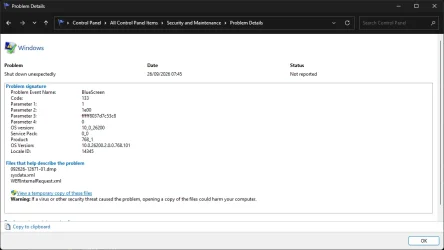
Just today when I turn on my PC i got this error message "Your device ran into problem and needs to restart." I don't manage to see the error code because it happen so fast, I checked the reliability history on control panel it did shows some error (screenshot attached), the pc was never ran into problem before because 4 months ago I just done clean install windows, never installed anything suspicious and just yesterday i've done updating windows, gpu driver, and everything else. What might causing this problem? or this just can be ignored? The PC runs fine after that error restart.

Thanks!
 

Attachments
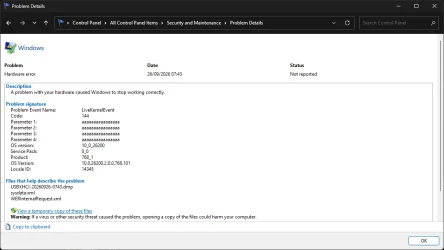
  • Screenshot 2026-09-26 075724.webp
    Screenshot 2026-09-26 075724.webp
    39.1 KB · Views: 1
  • Screenshot 2026-09-26 075805.webp
    Screenshot 2026-09-26 075805.webp
    34.7 KB · Views: 1

My Computer My Computer

At a glance

Windows 11
OS
Windows 11
Computer type
PC/Desktop
Just yesterday i've done updating windows, gpu driver, and everything else. What might causing this problem?
Any one of the things you mentioned...or something else.

If it happened only once , personally I would not worry about it if Windows is working fine now. Windows does have flatulence every once in a while. If it happens again, then I would worry about it.
Here's the information you need to gather to report it here.
 

My Computers My Computers

  • At a glance

    Windows 11 Pro 25H2 26200.9457i9-10900 10 core 20 threads32 gbnone-Intel UHD Graphics 630
    OS
    Windows 11 Pro 25H2 26200.9457
    Computer type
    PC/Desktop
    Manufacturer/Model
    Dell Optiplex 7080
    CPU
    i9-10900 10 core 20 threads
    Motherboard
    DELL 0J37VM
    Memory
    32 gb
    Graphics Card(s)
    none-Intel UHD Graphics 630
    Sound Card
    Integrated Realtek
    Monitor(s) Displays
    Benq 27
    Screen Resolution
    2560x1440
    Hard Drives
    2x1tb Solidigm m.2 nvme /External drives 512gb Samsung m.2 sata+2tb Kingston m2.nvme
    PSU
    500w
    Case
    MT
    Cooling
    Dell Premium
    Keyboard
    Logitech wired
    Mouse
    Logitech wireless
    Internet Speed
    so slow I'm too embarrassed to tell
    Browser
    #1 Edge #2 Firefox
    Antivirus
    Defender+MWB Premium
  • At a glance

    Windows 11 Pro 24H2 26200.9457AMD Ryzen 7 6800U32 gbintegrated
    Operating System
    Windows 11 Pro 24H2 26200.9457
    Computer type
    PC/Desktop
    Manufacturer/Model
    Beelink Mini PC SER5
    CPU
    AMD Ryzen 7 6800U
    Memory
    32 gb
    Graphics card(s)
    integrated
    Sound Card
    integrated
    Monitor(s) Displays
    Benq 27
    Screen Resolution
    2560x1440
    Hard Drives
    1TB Crucial nvme
    Keyboard
    Logitech wired
    Mouse
    Logitech wireless
    Internet Speed
    still too embarrassed to tell
    Browser
    Firefox
    Antivirus
    Defender
  • System 3 is non compliant Dell 9020 i7-4770/24gb ram Win11 PRO 26200.9457
Not long ago, the same thing happened to me. When I booted up my computer, as soon as the login screen appeared, I got a blue screen and the computer restarted. That had never happened to me before. To find out the cause, I did exactly what I recommend you do. I installed the WinDbg app from the Microsoft Store (it’s an official Microsoft app) so I could open the memory dump that’s generated when you get a BSOD. I’m not an expert on this at all, but after reading through every line of the report, I saw that the sound card driver was the culprit. It turns out that driver was in conflict with the antivirus update that had been installed at the time.
 

My Computer My Computer

At a glance

Win 11 Pro 23H213700K32GB DDR5 Kingston Fury Renegade @6400MSI GeForce RTX 4070 Ti Gaming X Slim White 12G
OS
Win 11 Pro 23H2
Computer type
PC/Desktop
CPU
13700K
Motherboard
MAG Z790 TOMAHAWK WIFI (7D91vHH - 0x12F)
Memory
32GB DDR5 Kingston Fury Renegade @6400
Graphics Card(s)
MSI GeForce RTX 4070 Ti Gaming X Slim White 12G
Sound Card
Creative Sound Blaster Z SE
Monitor(s) Displays
ASUS VA24DQ
Hard Drives
WD Black SN850X 2TB (main)
SAMSUNG SSD 990 Pro 2TB
WD Blue 1TB 7200rpm
PSU
Corsair RM1000x SHIFT
Case
DeepCool CH560 WH
Cooling
Noctua NH-D15S
Keyboard
Ducky One 3 Pro Nazca Line
Mouse
Logitech G403 HERO
It happens on mine, sometimes after an update, sometimes it has to make changes or repairs and then it is all good. I wouldn't worry about it. I read something about it a while back.
 

My Computer My Computer

At a glance

Ryzen 5800X64GB GSkill DDR4MSI RX6750 XT OC
Computer type
PC/Desktop
Manufacturer/Model
MSI
CPU
Ryzen 5800X
Motherboard
MSI X570S Carbon Pro
Memory
64GB GSkill DDR4
Graphics Card(s)
MSI RX6750 XT OC
Monitor(s) Displays
Dell U2711
Screen Resolution
1920 x 1080
Hard Drives
Nexstorage NN4LE 2TB2C
PSU
850 watt
Cooling
Corsair H100i
Back
Top Bottom