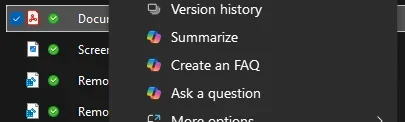
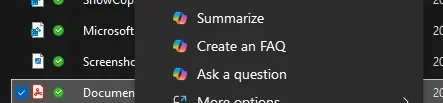
Help requested: remove Copilot, prevent re-install, remove context menu options.


x4138

Member
Local time
7:36 PM
Posts
14
OS
Windows 11 Home 25H2
Greetings. I'm very new here so if I break any rules, please let me know and I'll adjust asap.

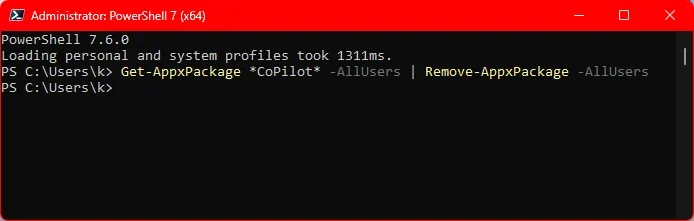
I've uninstalled Copilot using the native uninstall, BCUnistaller (highly recommend as a general tool), PowerShell commands, and Registry Editor.

I've also disabled Copilot on each Office desktop app (Options > Copilot > uncheck Enable Copilot).

These methods worked for a while but now the context menu options are back, and Copilot was enabled in PowerPoint (but not Word or Excel).
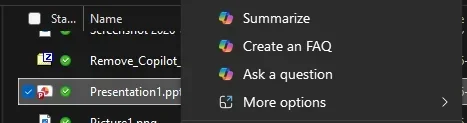
1775962177366.webp

I can't find any evidence that Copilot is installed or enabled in any way, but I'm hoping someone has a permanent solution.

Many thanks in advance.
 
Windows Build/Version
Windows 11 Home Version 25H2, OS build:26200.8039, Windows Feature Experience Pack 1000.26100.300.0

My Computer

System One

  • OS
    Windows 11 Home 25H2
    Computer type
    Laptop
    Manufacturer/Model
    Dell Inspiron 16 7630 2-in-1
    CPU
    13th Gen Intel(R) Core(TM) i7-1360P (2.20 GHz)
    Memory
    16.0 GB (15.7 GB usable)
    Graphics Card(s)
    Intel(R) Iris(R) Xe Graphics, NVIDIA GeForce MX550
    Monitor(s) Displays
    Dell INSPIRON SDC4164, LG HDR WFHD, LG HDR WFHD, ViewSonic VX3276-FHD
    Screen Resolution
    3840x2400, 2560x1080, 2560x1080, 1920x1080
    Hard Drives
    NVMe KBG50ZNS1T02 NVMe KIOXIA 1024GB
    Keyboard
    Razer BlackWidow Chroma RZ03-0122x
    Mouse
    Logitech M510 Wireless Mouse
    Browser
    Brave
    Other Info
    64-bit operating system, x64-based processor, Pen and touch support with 10 touch points, Dell Dock WD19, Crucial X9 Pro 4TB Portable SSD
I can't find any evidence that Copilot is installed or enabled in any way, but I'm hoping someone has a permanent solution.
Type in admin powershell.

Code:
Get-AppxPackage *CoPilot* -AllUsers | Remove-AppxPackage -AllUsers

You can also use group policy.

User Configuration > Administrative Templates > Windows Components > Windows Copilot

Enable "Turn off Windows Copilot"
 

My Computer

System One

  • OS
    Windows 11 Pro
try these and reboot:

Office context menus (files, not inside office docs):
Code:
Windows Registry Editor Version 5.00

[HKEY_CURRENT_USER\Software\Microsoft\Office\16.0\Common\ExperimentConfigs\ExternalFeatureOverrides\officecopilot]
"Microsoft.Office.Copilot"="false"

Edge - Adds it to PDF files context:
Code:
Windows Registry Editor Version 5.00

[HKEY_CURRENT_USER\Software\Policies\Microsoft\Edge]
"CopilotEnabled"=dword:00000000
"EdgeCopilotFeaturesEnabled"=dword:00000000

Copilot general context:
Code:
Windows Registry Editor Version 5.00

[HKEY_CURRENT_USER\Software\Microsoft\Windows\CurrentVersion\Explorer\Advanced]
"ShowCopilotContextMenu"=dword:00000000
 

My Computer

System One

  • OS
    Windows 11 Pro
If you need it (I don't see any context menu entries relating to Copilot after having uninstalled it):

- although perhaps you have something specific to Office.
 

My Computer

System One

  • OS
    Windows 11 Pro
    Computer type
    Laptop
    Manufacturer/Model
    Lenovo t480s
    CPU
    i7-8650U
    Memory
    16GB
    Graphics Card(s)
    Intel UHD 620
    Screen Resolution
    1920x1080
    Hard Drives
    C SN810 SDCPNRY-512G-1006
    Browser
    Edge, Firefox
    Antivirus
    Defender
If the context menu items you want to remove are delivered in the same way as the generic 'Ask Copilot', then one or both of the following Poweshell one-liners may show the CLSID that you would need to block in the same way as Add or Remove "Ask Copilot" Context Menu in Windows 11 and 10

So start Powershell, copy and paste each of the following in,(and press enter) and look at the results. If you have Photos or Paint or new Notepad installed they should show up, as will 'Ask Copilot' if you have simply disabled the context menu, rather than uninstall it. You need to select the whole line, although some will probably be hidden, although visible by using the horizantal scrollbar. The easiest thing to do is to treble click in the code window.

Powershell:
(Get-AppxPackage | Get-AppxPackageManifest) | foreach { $_.package.Applications.Application.Extensions.Extension.comServer.SurrogateServer} | select  displayname, {$_.class.id} | format-list
and
Powershell:
(Get-AppxPackage | Get-AppxPackageManifest) | foreach { $_.package.Applications.Application.Extensions.Extension.FileExplorerContextMenus.itemtype.verb} | select  Id,Clsid -unique
let us know if you see anything of interest.
 

My Computers

System One System Two

  • OS
    Windows 11 25H2 Pro Build 26200
    Computer type
    PC/Desktop
    Manufacturer/Model
    MSI PRO ADL-U Cubi 5 (MS-B0A8)
    CPU
    i3-1215U
    Memory
    8GB
    Monitor(s) Displays
    Sony 43" 4k TV
    Screen Resolution
    3840x2160
    Hard Drives
    250GB NVMe M.2 PCIe Gen 3 SSD
    PSU
    External 65W
    Case
    Mini PC
    Browser
    FireFox
    Antivirus
    MS
  • Operating System
    Windows 11 Pro 25H2
    Computer type
    PC/Desktop
    Manufacturer/Model
    Dell Optiplex 3070 SFF
    CPU
    Intel i3-9100
    Memory
    16GB DDR4
    Monitor(s) Displays
    Dell S2721
    Screen Resolution
    3840 x 2160
    Hard Drives
    Samsung 500GB nvMe
    Case
    Dell small form factor
    Keyboard
    Cherry mechanical (Blue)
    Mouse
    Microsoft
    Antivirus
    MS Defender
If you need it (I don't see any context menu entries relating to Copilot after having uninstalled it):

- although perhaps you have something specific to Office.
Yes thank you, I have already applied these (and bookmarked the post for when a new fix is inevitably needed).
 

My Computer

System One

  • OS
    Windows 11 Home 25H2
    Computer type
    Laptop
    Manufacturer/Model
    Dell Inspiron 16 7630 2-in-1
    CPU
    13th Gen Intel(R) Core(TM) i7-1360P (2.20 GHz)
    Memory
    16.0 GB (15.7 GB usable)
    Graphics Card(s)
    Intel(R) Iris(R) Xe Graphics, NVIDIA GeForce MX550
    Monitor(s) Displays
    Dell INSPIRON SDC4164, LG HDR WFHD, LG HDR WFHD, ViewSonic VX3276-FHD
    Screen Resolution
    3840x2400, 2560x1080, 2560x1080, 1920x1080
    Hard Drives
    NVMe KBG50ZNS1T02 NVMe KIOXIA 1024GB
    Keyboard
    Razer BlackWidow Chroma RZ03-0122x
    Mouse
    Logitech M510 Wireless Mouse
    Browser
    Brave
    Other Info
    64-bit operating system, x64-based processor, Pen and touch support with 10 touch points, Dell Dock WD19, Crucial X9 Pro 4TB Portable SSD
Type in admin powershell.

Code:
Get-AppxPackage *CoPilot* -AllUsers | Remove-AppxPackage -AllUsers

You can also use group policy.

User Configuration > Administrative Templates > Windows Components > Windows Copilot

Enable "Turn off Windows Copilot"
Thank you, I did run that PowerShell command. Assuming it worked? ¯\_(ツ)_/¯

1776023178712.webp

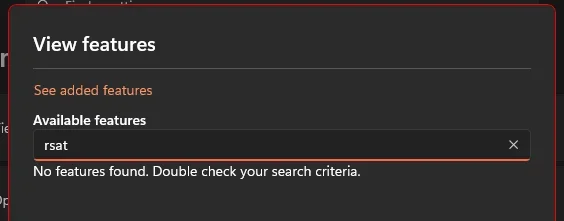
RE: Group policy - this is something I've never done before. The sources I found online reference tools ("Computer Configuration" and "User Configuration" as you mentioned) I do not find on my PC or as optional features (RSAT) to install. Is this something that can be done on Win11 Home? Or am I looking in the wrong place?

1776023504577.webp
1776023426508.webp
 

My Computer

System One

  • OS
    Windows 11 Home 25H2
    Computer type
    Laptop
    Manufacturer/Model
    Dell Inspiron 16 7630 2-in-1
    CPU
    13th Gen Intel(R) Core(TM) i7-1360P (2.20 GHz)
    Memory
    16.0 GB (15.7 GB usable)
    Graphics Card(s)
    Intel(R) Iris(R) Xe Graphics, NVIDIA GeForce MX550
    Monitor(s) Displays
    Dell INSPIRON SDC4164, LG HDR WFHD, LG HDR WFHD, ViewSonic VX3276-FHD
    Screen Resolution
    3840x2400, 2560x1080, 2560x1080, 1920x1080
    Hard Drives
    NVMe KBG50ZNS1T02 NVMe KIOXIA 1024GB
    Keyboard
    Razer BlackWidow Chroma RZ03-0122x
    Mouse
    Logitech M510 Wireless Mouse
    Browser
    Brave
    Other Info
    64-bit operating system, x64-based processor, Pen and touch support with 10 touch points, Dell Dock WD19, Crucial X9 Pro 4TB Portable SSD
Office context menus (files, not inside office docs):
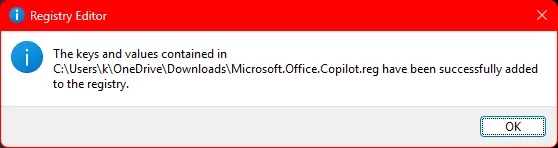
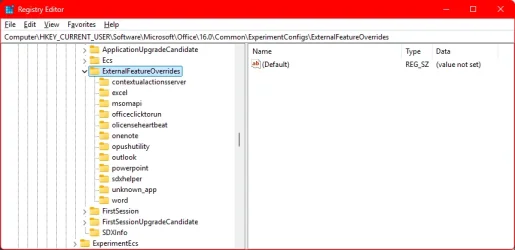
Windows Registry Editor Version 5.00 [HKEY_CURRENT_USER\Software\Microsoft\Office\16.0\Common\ExperimentConfigs\ExternalFeatureOverrides\officecopilot] "Microsoft.Office.Copilot"="false"
I don't seem to have this one. Should I create it?
1776023733064.webp

Edge - Adds it to PDF files context:
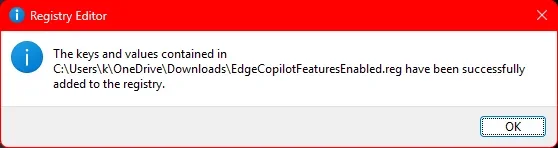
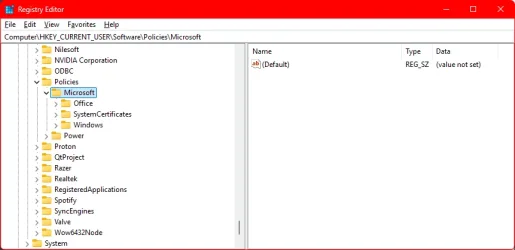
Windows Registry Editor Version 5.00 [HKEY_CURRENT_USER\Software\Policies\Microsoft\Edge] "CopilotEnabled"=dword:00000000 "EdgeCopilotFeaturesEnabled"=dword:00000000
Or this one...
1776023841937.webp


Copilot general context:
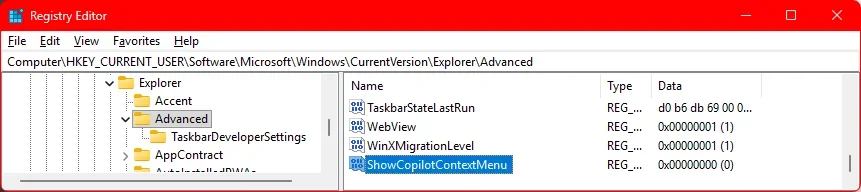
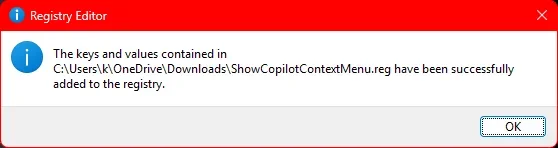
Windows Registry Editor Version 5.00 [HKEY_CURRENT_USER\Software\Microsoft\Windows\CurrentVersion\Explorer\Advanced] "ShowCopilotContextMenu"=dword:00000000
Had to add it myself.
1776024009863.webp
 

My Computer

System One

  • OS
    Windows 11 Home 25H2
    Computer type
    Laptop
    Manufacturer/Model
    Dell Inspiron 16 7630 2-in-1
    CPU
    13th Gen Intel(R) Core(TM) i7-1360P (2.20 GHz)
    Memory
    16.0 GB (15.7 GB usable)
    Graphics Card(s)
    Intel(R) Iris(R) Xe Graphics, NVIDIA GeForce MX550
    Monitor(s) Displays
    Dell INSPIRON SDC4164, LG HDR WFHD, LG HDR WFHD, ViewSonic VX3276-FHD
    Screen Resolution
    3840x2400, 2560x1080, 2560x1080, 1920x1080
    Hard Drives
    NVMe KBG50ZNS1T02 NVMe KIOXIA 1024GB
    Keyboard
    Razer BlackWidow Chroma RZ03-0122x
    Mouse
    Logitech M510 Wireless Mouse
    Browser
    Brave
    Other Info
    64-bit operating system, x64-based processor, Pen and touch support with 10 touch points, Dell Dock WD19, Crucial X9 Pro 4TB Portable SSD

My Computer

System One

  • OS
    Windows 11 Pro 64-bit
    Computer type
    PC/Desktop
    Manufacturer/Model
    Alienware Aurora R16
    CPU
    Intel Core i9-14900KF
    Motherboard
    Alienware 0RF96M (U3E1)
    Memory
    64 GB
    Graphics Card(s)
    4083MB NVIDIA GeForce RTX 4090
    Monitor(s) Displays
    ROG XG43UQ 43 inch monitor
    Screen Resolution
    (3840x2160@120Hz)
    Hard Drives
    Samsung SSD 870 EVO 2TB
    NVMe Samsung 2048GB
I don't seem to have this one. Should I create it?


Or this one...


Had to add it myself.
each code - copy and paste into it's own notepad instance. for each:
file > save as > name it whatever.reg
in the type dropdown, choose All Files
1776024167393.webp

double click each .reg to merge it
reboot
 

My Computer

System One

  • OS
    Windows 11 Pro
each code - copy and paste into it's own notepad instance. for each:
file > save as > name it whatever.reg
in the type dropdown, choose All Files
View attachment 168568

double click each .reg to merge it
reboot
1776025145978.webp
1776025160166.webp
1776025167584.webp
🥹
1776026107718.webp

But thank you. I'm sure this helped my mission overall.
 

My Computer

System One

  • OS
    Windows 11 Home 25H2
    Computer type
    Laptop
    Manufacturer/Model
    Dell Inspiron 16 7630 2-in-1
    CPU
    13th Gen Intel(R) Core(TM) i7-1360P (2.20 GHz)
    Memory
    16.0 GB (15.7 GB usable)
    Graphics Card(s)
    Intel(R) Iris(R) Xe Graphics, NVIDIA GeForce MX550
    Monitor(s) Displays
    Dell INSPIRON SDC4164, LG HDR WFHD, LG HDR WFHD, ViewSonic VX3276-FHD
    Screen Resolution
    3840x2400, 2560x1080, 2560x1080, 1920x1080
    Hard Drives
    NVMe KBG50ZNS1T02 NVMe KIOXIA 1024GB
    Keyboard
    Razer BlackWidow Chroma RZ03-0122x
    Mouse
    Logitech M510 Wireless Mouse
    Browser
    Brave
    Other Info
    64-bit operating system, x64-based processor, Pen and touch support with 10 touch points, Dell Dock WD19, Crucial X9 Pro 4TB Portable SSD

My Computer

System One

  • OS
    Windows 11 Home 25H2
    Computer type
    Laptop
    Manufacturer/Model
    Dell Inspiron 16 7630 2-in-1
    CPU
    13th Gen Intel(R) Core(TM) i7-1360P (2.20 GHz)
    Memory
    16.0 GB (15.7 GB usable)
    Graphics Card(s)
    Intel(R) Iris(R) Xe Graphics, NVIDIA GeForce MX550
    Monitor(s) Displays
    Dell INSPIRON SDC4164, LG HDR WFHD, LG HDR WFHD, ViewSonic VX3276-FHD
    Screen Resolution
    3840x2400, 2560x1080, 2560x1080, 1920x1080
    Hard Drives
    NVMe KBG50ZNS1T02 NVMe KIOXIA 1024GB
    Keyboard
    Razer BlackWidow Chroma RZ03-0122x
    Mouse
    Logitech M510 Wireless Mouse
    Browser
    Brave
    Other Info
    64-bit operating system, x64-based processor, Pen and touch support with 10 touch points, Dell Dock WD19, Crucial X9 Pro 4TB Portable SSD
My Computer

System One

  • OS
    Windows 11 Home 25H2
    Computer type
    Laptop
    Manufacturer/Model
    Dell Inspiron 16 7630 2-in-1
    CPU
    13th Gen Intel(R) Core(TM) i7-1360P (2.20 GHz)
    Memory
    16.0 GB (15.7 GB usable)
    Graphics Card(s)
    Intel(R) Iris(R) Xe Graphics, NVIDIA GeForce MX550
    Monitor(s) Displays
    Dell INSPIRON SDC4164, LG HDR WFHD, LG HDR WFHD, ViewSonic VX3276-FHD
    Screen Resolution
    3840x2400, 2560x1080, 2560x1080, 1920x1080
    Hard Drives
    NVMe KBG50ZNS1T02 NVMe KIOXIA 1024GB
    Keyboard
    Razer BlackWidow Chroma RZ03-0122x
    Mouse
    Logitech M510 Wireless Mouse
    Browser
    Brave
    Other Info
    64-bit operating system, x64-based processor, Pen and touch support with 10 touch points, Dell Dock WD19, Crucial X9 Pro 4TB Portable SSD
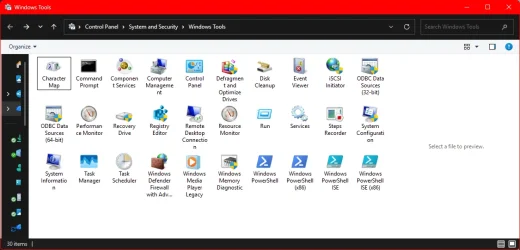
heres the reg for that GPO

Code:
Windows Registry Editor Version 5.00

[HKEY_CURRENT_USER\Software\Policies\Microsoft\Windows\WindowsCopilot]
"TurnOffWindowsCopilot"=dword:00000001


also - are these entries only when you right click a file in onedrive?
 

My Computer

System One

  • OS
    Windows 11 Pro
If the context menu items you want to remove are delivered in the same way as the generic 'Ask Copilot', then one or both of the following Poweshell one-liners may show the CLSID that you would need to block in the same way as Add or Remove "Ask Copilot" Context Menu in Windows 11 and 10

So start Powershell, copy and paste each of the following in,(and press enter) and look at the results. If you have Photos or Paint or new Notepad installed they should show up, as will 'Ask Copilot' if you have simply disabled the context menu, rather than uninstall it. You need to select the whole line, although some will probably be hidden, although visible by using the horizantal scrollbar. The easiest thing to do is to treble click in the code window.

Powershell:
(Get-AppxPackage | Get-AppxPackageManifest) | foreach { $_.package.Applications.Application.Extensions.Extension.comServer.SurrogateServer} | select  displayname, {$_.class.id} | format-list
and
Powershell:
(Get-AppxPackage | Get-AppxPackageManifest) | foreach { $_.package.Applications.Application.Extensions.Extension.FileExplorerContextMenus.itemtype.verb} | select  Id,Clsid -unique
let us know if you see anything of interest.

Apologies, didn't realized I skipped over your comment. Here's what I got, it all looks pretty standard to me? I do have the default/base version of Nilesoft Shell installed, so I think that explains the 'Command0-9'.

Powershell:
PowerShell 7.6.0
PS C:\Users\k> (Get-AppxPackage | Get-AppxPackageManifest) | foreach { $_.package.Applications.Application.Extensions.Extension.comServer.SurrogateServer} | select  displayname, {$_.class.id} | format-list

DisplayName : WindowsTerminalShellExt
$_.class.id : 9f156763-7844-4dc4-b2b1-901f640f5155

DisplayName : Photos Shell Extension
$_.class.id : {BFE0E2A4-C70C-4AD7-AC3D-10D1ECEBB5B4, 7a53b94a-4e6e-4826-b48e-535020b264e5}

DisplayName : Notepad++ Shell Extension
$_.class.id : E6950302-61F0-4FEB-97DB-855E30D4A991

DisplayName : Context Menu Items
$_.class.id : {5250E46F-BB09-D602-5891-F476DC89B700, 5250E46F-BB09-D602-5891-F476DC89B701,
              5250E46F-BB09-D602-5891-F476DC89B702, 5250E46F-BB09-D602-5891-F476DC89B703…}

DisplayName : Paint Shell Extensions
$_.class.id : 2430F218-B743-4FD6-97BF-5C76541B4AE9

DisplayName : Context menu verb handler
$_.class.id : AAF1E27D-4976-49C2-8895-AAFA743C0A7E

DisplayName : Context menu verb handler
$_.class.id : 8F491918-259F-451A-950F-8C3EBF4864AF

DisplayName : Context menu verb handler
$_.class.id : 69824FC6-4660-4A09-9E7C-48DA63C6CC0F

PS C:\Users\k> (Get-AppxPackage | Get-AppxPackageManifest) | foreach { $_.package.Applications.Application.Extensions.Extension.FileExplorerContextMenus.itemtype.verb} | select  Id,Clsid -unique

Id                      Clsid
--                      -----
OpenTerminalHere        9f156763-7844-4dc4-b2b1-901f640f5155
AShellEdit              BFE0E2A4-C70C-4AD7-AC3D-10D1ECEBB5B4
CreateWithDesigner      7a53b94a-4e6e-4826-b48e-535020b264e5
ShellEdit               BFE0E2A4-C70C-4AD7-AC3D-10D1ECEBB5B4
EditWithNotepadPlusPlus E6950302-61F0-4FEB-97DB-855E30D4A991
Command0                1FA0E654-C9F2-4A1F-9800-B9A75D744B00
Command1                1FA0E654-C9F2-4A1F-9800-B9A75D744B01
Command2                1FA0E654-C9F2-4A1F-9800-B9A75D744B02
Command3                1FA0E654-C9F2-4A1F-9800-B9A75D744B03
Command4                1FA0E654-C9F2-4A1F-9800-B9A75D744B04
Command5                1FA0E654-C9F2-4A1F-9800-B9A75D744B05
Command0                5250E46F-BB09-D602-5891-F476DC89B700
EditInPaint             2430F218-B743-4FD6-97BF-5C76541B4AE9
FileLocksmithCommand    AAF1E27D-4976-49C2-8895-AAFA743C0A7E
ImageResizerCommand     8F491918-259F-451A-950F-8C3EBF4864AF
NewPlusCommand          69824FC6-4660-4A09-9E7C-48DA63C6CC0F

PS C:\Users\k>
 

My Computer

System One

  • OS
    Windows 11 Home 25H2
    Computer type
    Laptop
    Manufacturer/Model
    Dell Inspiron 16 7630 2-in-1
    CPU
    13th Gen Intel(R) Core(TM) i7-1360P (2.20 GHz)
    Memory
    16.0 GB (15.7 GB usable)
    Graphics Card(s)
    Intel(R) Iris(R) Xe Graphics, NVIDIA GeForce MX550
    Monitor(s) Displays
    Dell INSPIRON SDC4164, LG HDR WFHD, LG HDR WFHD, ViewSonic VX3276-FHD
    Screen Resolution
    3840x2400, 2560x1080, 2560x1080, 1920x1080
    Hard Drives
    NVMe KBG50ZNS1T02 NVMe KIOXIA 1024GB
    Keyboard
    Razer BlackWidow Chroma RZ03-0122x
    Mouse
    Logitech M510 Wireless Mouse
    Browser
    Brave
    Other Info
    64-bit operating system, x64-based processor, Pen and touch support with 10 touch points, Dell Dock WD19, Crucial X9 Pro 4TB Portable SSD
heres the reg for that GPO

Code:
Windows Registry Editor Version 5.00

[HKEY_CURRENT_USER\Software\Policies\Microsoft\Windows\WindowsCopilot]
"TurnOffWindowsCopilot"=dword:00000001


also - are these entries only when you right click a file in onedrive?

Excellent, added.

Edit: Super weird but it doesn't show me that last question of yours in the original comment. I only saw it when I posted my own reply.

YES! I just checked. Only .docx, .xlsx, .pdf, .txt, .pptx files in OneDrive have the 3 Copilot context menu items. You're on to something!
 

My Computer

System One

  • OS
    Windows 11 Home 25H2
    Computer type
    Laptop
    Manufacturer/Model
    Dell Inspiron 16 7630 2-in-1
    CPU
    13th Gen Intel(R) Core(TM) i7-1360P (2.20 GHz)
    Memory
    16.0 GB (15.7 GB usable)
    Graphics Card(s)
    Intel(R) Iris(R) Xe Graphics, NVIDIA GeForce MX550
    Monitor(s) Displays
    Dell INSPIRON SDC4164, LG HDR WFHD, LG HDR WFHD, ViewSonic VX3276-FHD
    Screen Resolution
    3840x2400, 2560x1080, 2560x1080, 1920x1080
    Hard Drives
    NVMe KBG50ZNS1T02 NVMe KIOXIA 1024GB
    Keyboard
    Razer BlackWidow Chroma RZ03-0122x
    Mouse
    Logitech M510 Wireless Mouse
    Browser
    Brave
    Other Info
    64-bit operating system, x64-based processor, Pen and touch support with 10 touch points, Dell Dock WD19, Crucial X9 Pro 4TB Portable SSD
Excellent, added.

Edit: Super weird but it doesn't show me that last question of yours in the original comment. I only saw it when I posted my own reply.

YES! I just checked. Only .docx, .xlsx, .pdf, .txt, .pptx files in OneDrive have the 3 Copilot context menu items. You're on to something!
run this one

Code:
Windows Registry Editor Version 5.00

[HKEY_LOCAL_MACHINE\SOFTWARE\Microsoft\Windows\CurrentVersion\Shell Extensions\Blocked]
"{2E2F0A1C-2E5B-4F0B-8A6A-1A1A1A1A1A1A}"=""
 

My Computer

System One

  • OS
    Windows 11 Pro
run this one

Code:
Windows Registry Editor Version 5.00

[HKEY_LOCAL_MACHINE\SOFTWARE\Microsoft\Windows\CurrentVersion\Shell Extensions\Blocked]
"{2E2F0A1C-2E5B-4F0B-8A6A-1A1A1A1A1A1A}"=""
Still they persist.

1776028777626.webp

Sidenote: could I combine all these reg files into one?
 

My Computer

System One

  • OS
    Windows 11 Home 25H2
    Computer type
    Laptop
    Manufacturer/Model
    Dell Inspiron 16 7630 2-in-1
    CPU
    13th Gen Intel(R) Core(TM) i7-1360P (2.20 GHz)
    Memory
    16.0 GB (15.7 GB usable)
    Graphics Card(s)
    Intel(R) Iris(R) Xe Graphics, NVIDIA GeForce MX550
    Monitor(s) Displays
    Dell INSPIRON SDC4164, LG HDR WFHD, LG HDR WFHD, ViewSonic VX3276-FHD
    Screen Resolution
    3840x2400, 2560x1080, 2560x1080, 1920x1080
    Hard Drives
    NVMe KBG50ZNS1T02 NVMe KIOXIA 1024GB
    Keyboard
    Razer BlackWidow Chroma RZ03-0122x
    Mouse
    Logitech M510 Wireless Mouse
    Browser
    Brave
    Other Info
    64-bit operating system, x64-based processor, Pen and touch support with 10 touch points, Dell Dock WD19, Crucial X9 Pro 4TB Portable SSD
Still they persist.

View attachment 168576

Sidenote: could I combine all these reg files into one?
yes. you can do it manually or use winaerotweaker if you want a gui...

@x4138
also - run this one:
Code:
Windows Registry Editor Version 5.00

[HKEY_LOCAL_MACHINE\SOFTWARE\Microsoft\Windows\CurrentVersion\Shell Extensions\Blocked]
"{F8F0D5A4-1B7F-4A5A-9D3D-1F0F5C1A1A1A}"=""
"{A82C3F3E-5D2B-4F3A-8E9F-1C1A1A1A1A1A}"=""
"{C1E1B9F1-9F3A-4A5C-8D1A-1A1A1A1A1A1A}"=""

reboot. if still there, clear icon cache via command prompt:
Code:
ie4uinit.exe -ClearIconCache
 

My Computer

System One

  • OS
    Windows 11 Pro
Back
Top Bottom