computer still running Version 23H2 (os build 22631.6199)


lnjr

Well-known member
Member
Local time
4:24 PM
Posts
43
OS
windows 11 Pro
I have a windows 11 Pro Geekom Mini PC that is still running version 23H2 (OS Build 22631.6199). I have not been online much recently and just started seeing information about a secure boot deadline of June 2026. I am not sure how to make sure if there is something that I need to do or how to check on this on my pc. I also have the feeling that my pc has not updated the version that is running on my pc and when I checked for updates the computer says that it is up to date.
As I said, I haven't been online much over the past year or so, but when I have turned it on, I do see that there are updates for Cumulative Update for Windows 11 Version 23H2 for x64-based Systems, Microsoft Defender updates. There was a Update for Windows Security platform - KB5007651 (Version 10.0.29510.1001) back in February of this year. Microsoft Office updates, 2025-11 Cumulative Update for Windows 11 Version 23H2 for x64-based Systems (KB5068865) that was installed 11/12/25.

Should I have gotten an update to a newer version or is there an update to the current version that I should have installed that Windows Update did not do?


Is this anything that I should be doing that windows update is not doing or be concerned with?

Thank You.
 
Windows Build/Version
Version 23H2 (OS Build 22631.6199)

My Computers

System One System Two

  • OS
    windows 11 Pro
    Computer type
    PC/Desktop
    Manufacturer/Model
    geekom mini IT11
    CPU
    11th Gen Intel Core i7-11390H (4 Cores, 8 Threads, 12M
    Memory
    32GB dual channel (DDR4)
    Graphics Card(s)
    Intel® Iris® Xe
    Monitor(s) Displays
    HP S2031
    Hard Drives
    1TB SSD
  • Operating System
    Windows 11 Pro
    Computer type
    PC/Desktop
    Manufacturer/Model
    Geekom Mini PC XT13 Pro
    CPU
    Intel Core i7-13620H
    Memory
    DDR4: SO-DIMM 32GB
    Monitor(s) Displays
    HPS2031
    Hard Drives
    M.2 1TB
What matters for Secure Boot is installing the latest Monthly Update (May or June 2026).

Check with Geekom support if a newer BIOS update is available which includes the CA 2023 certs. Some PC's may have BIOS'es with the dreaded OEM "Test Key", and those are considered mostly insecure. If you have one, there is a way to delete all factory keys and install a complete set of MS keys which gets you past the CA 2023 migration problem.

But find out if there's a BIOS update which makes the update process simpler.
 

My Computer

System One

  • OS
    Windows 7
Please perform the following steps:


1) Add WMIC:

DISM /Online /Add-Capability /CapabilityName:WMIC~~~~


2) Run Tuneup plus > post a share link


3) Run the V2 log collector > post a share link


4) Run administrative PS > post share links

Get-HotFix
UsoClient StartScan
dism /Online /Get-Packages
 

My Computer

System One

  • OS
    Windows 10
    Computer type
    Laptop
    Manufacturer/Model
    HP
    CPU
    Intel(R) Core(TM) i7-4800MQ CPU @ 2.70GHz
    Motherboard
    Product : 190A Version : KBC Version 94.56
    Memory
    16 GB Total: Manufacturer : Samsung MemoryType : DDR3 FormFactor : SODIMM Capacity : 8GB Speed : 1600
    Graphics Card(s)
    NVIDIA Quadro K3100M; Intel(R) HD Graphics 4600
    Sound Card
    IDT High Definition Audio CODEC; PNP Device ID HDAUDIO\FUNC_01&VEN_111D&DEV_76E0
    Hard Drives
    Model Hitachi HTS727575A9E364
    Antivirus
    Microsoft Defender
    Other Info
    Mobile Workstation
I'm still using version 23H2, and I've already updated my certificates without having to run any of the scripts posted on this forum.

The first thing you need to do is update your system's firmware. According to @KevTech, there's a recent update for your system, so I assume it already contains the necessary information to update the certicates.

Next, you need to update Windows. You have two options. The first one, if your system supports it, is to update to 24H2 or 25H2 via Windows Update.

The second option, which is the one I chose, is to block updates to version 23H2. Since version 23H2 is no longer supported for the Home and Pro editions, you will no longer receive updates through Windows Update. The last automatic update for 23H2 through Windows Update is KB5068865 from November 2025.

However, since the Enterprise and Education editions of 23H2 are still supported until November 2026, you can download all the necessary updates manually and install them on your system without any issues. Since December 2025, there has been a monthly update. Install all updates in chronological order. These manual updates work for any version of 23H2, whether Home, Pro, Enterprise, or Education. The most important manual update is the one from March or April (I don't remember), which includes an automatic script that officially checks and updates the 2023 certificates.

The latest version of Windows 11 23H2 is 22631.7079.
 

My Computer

System One

  • OS
    Win 11 Pro 23H2
    Computer type
    PC/Desktop
    CPU
    13700K
    Motherboard
    MAG Z790 TOMAHAWK WIFI (7D91vHH - 0x12F)
    Memory
    32GB DDR5 Kingston Fury Renegade @6400
    Graphics Card(s)
    MSI GeForce RTX 4070 Ti Gaming X Slim White 12G
    Sound Card
    Creative Sound Blaster Z SE
    Monitor(s) Displays
    ASUS VA24DQ
    Hard Drives
    WD Black SN850X 2TB (main)
    SAMSUNG SSD 990 Pro 2TB
    WD Blue 1TB 7200rpm
    PSU
    Corsair RM1000x SHIFT
    Case
    DeepCool CH560 WH
    Cooling
    Noctua NH-D15S
    Keyboard
    Ducky One 3 Pro Nazca Line
    Mouse
    Logitech G403 HERO
There is a second option. Install VM and run Windows 24H2/25H2 as a guest OS. Its not going to run natively but its a small tradeoff for extending an old PC's useful life. Hardware is an artificial limit.
 

My Computers

System One System Two

  • OS
    Windows 11 Education For 25H2
    Computer type
    Laptop
    Manufacturer/Model
    HP ZBook G2
    CPU
    Intel® Core i7 5500u
    Motherboard
    HP
    Memory
    8 GB
    Graphics Card(s)
    Intel HD Family Graphics 5500 AMD Firepro 4150M
    Sound Card
    Realtek High Audio
    Hard Drives
    1 TB SSD
    Mouse
    HP USB Mouse
    Antivirus
    Windows Defender
  • Operating System
    Windows 11 Pro For Workstations 25H2
    Computer type
    Laptop
    Manufacturer/Model
    HP Zbook G4
    CPU
    Xeon 1535m v6
    Motherboard
    HP
    Memory
    32 GB
    Graphics card(s)
    AMD Quadro Pro 4100
    Sound Card
    Bang and Olufson Audio
    Hard Drives
    1TB SSD
    Mouse
    HP USB Mouse
    Antivirus
    Windows Defender
The Secure Boot update task is present in all currently supported W10 22H2, W11 23H2, 24H2/25H2 and Windows Server releases. You don't need to upgrade Windows (stay on 23H2) to apply the Secure Boot updates.

But you should be on the latest Monthly Update after installing the BIOS update, because the boot manager's been changed several times for security reasons. Last being in April 2026.
 

My Computer

System One

  • OS
    Windows 7
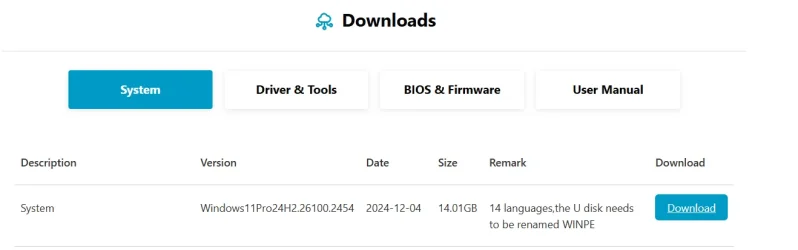
Thanks for all the suggestions. I did go to geekom and for the XT13 PRO series it states that there is a system update. 1780676145400.webp

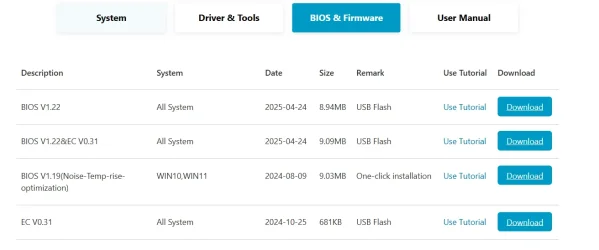
Under BIOS & Firmware the are a few items
1780676218641.webp

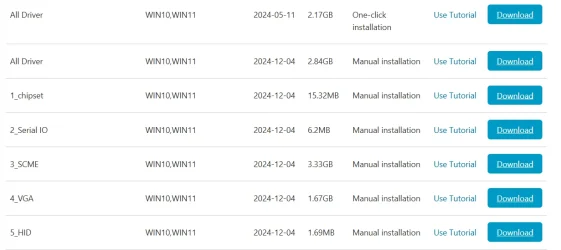
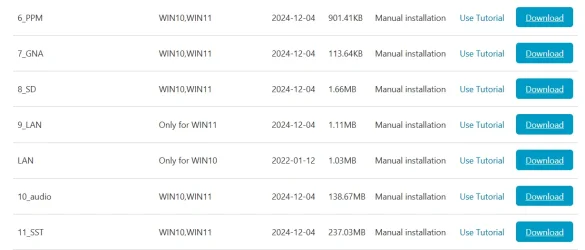
under drivers & Tools there are quite a few items
1780676298923.webp
1780676340708.webp
1780676367093.webp

Looks like I am going to need to find out which BIOS is in my computer right now and what I need to update regarding the BIOS and then the other stuff.

Then see if my system supports the update to 24H2 or 25H2 . If not then it looks like I may need to find out how to download all the necessary updates manually and install them on your system as win11Raider stated.

Thanks. I will let you know how everything goes.
 

My Computers

System One System Two

  • OS
    windows 11 Pro
    Computer type
    PC/Desktop
    Manufacturer/Model
    geekom mini IT11
    CPU
    11th Gen Intel Core i7-11390H (4 Cores, 8 Threads, 12M
    Memory
    32GB dual channel (DDR4)
    Graphics Card(s)
    Intel® Iris® Xe
    Monitor(s) Displays
    HP S2031
    Hard Drives
    1TB SSD
  • Operating System
    Windows 11 Pro
    Computer type
    PC/Desktop
    Manufacturer/Model
    Geekom Mini PC XT13 Pro
    CPU
    Intel Core i7-13620H
    Memory
    DDR4: SO-DIMM 32GB
    Monitor(s) Displays
    HPS2031
    Hard Drives
    M.2 1TB
I think you will have no problem upgrading to version 24H2 or 25H2.

However, if you prefer to stay with version 23H2, you will first need to block updates to 24H2 or 25H2 using the InControl app (which is free, secure, and very easy to use). Updates for version 23H2 can be found here (on the left panel, you can find the updates for every month. The go down and in "How to get this update", select "Catalog").
 

My Computer

System One

  • OS
    Win 11 Pro 23H2
    Computer type
    PC/Desktop
    CPU
    13700K
    Motherboard
    MAG Z790 TOMAHAWK WIFI (7D91vHH - 0x12F)
    Memory
    32GB DDR5 Kingston Fury Renegade @6400
    Graphics Card(s)
    MSI GeForce RTX 4070 Ti Gaming X Slim White 12G
    Sound Card
    Creative Sound Blaster Z SE
    Monitor(s) Displays
    ASUS VA24DQ
    Hard Drives
    WD Black SN850X 2TB (main)
    SAMSUNG SSD 990 Pro 2TB
    WD Blue 1TB 7200rpm
    PSU
    Corsair RM1000x SHIFT
    Case
    DeepCool CH560 WH
    Cooling
    Noctua NH-D15S
    Keyboard
    Ducky One 3 Pro Nazca Line
    Mouse
    Logitech G403 HERO

Latest Support Threads

Back
Top Bottom