BitLocker


GrayOldman1

I play with Trains
Member
Local time
5:31 PM
Posts
48
OS
Windows 11
Running Windows 11 home. Should bit locker be on or off.
 

My Computer

System One

  • OS
    Windows 11
    Computer type
    PC/Desktop
    Manufacturer/Model
    Myself
    CPU
    Ryzen 5-5600x
    Motherboard
    Asus B550A Gaming
    Memory
    16 GB
    Graphics Card(s)
    Nvida GeForce GTX 1060 6GB
    Sound Card
    On board sound
    Monitor(s) Displays
    Wide screen Samsung
    Hard Drives
    Evo M.2 Boot Drive 500GB, Evo 250 GB ssd, 2 each Seagate 3 Terabyte Hard disks.
    Teramaster NAS F4-210 with 4 6TB drives.
    PSU
    EVGA
    Case
    Rosewell
    Cooling
    Cooler master
    Mouse
    Logtech
    Internet Speed
    1.2 Mbps
    Other Info
    Computers I have had are Ti-99A, Commodore 64(2) Original IBM PC with 2 floppies drives. Commodore 128, PC base 286, 386 cpu, Compaq 386 with internal DSL modem.
    A number of other computers, and now my last one.(I think)
It depends whether you wish to have the extra security it provides.

You need to be fully aware of the implications of running BitLocker, mainly that you absolutely must back up your recovery keys in case you need them at any time. Fwiw I use BitLocker and have all drives and their partitions encrypted including external HDD's and flash drives using 'BitLocker To Go' for those. As long as you have a copy of the keys you should be fine. You need the keys if for example you clean install and need to access an encrypted drive or partition or if you perhaps alter the disk structure and resize a partition. Apart from major events like that it operates seamlessly.
 

My Computer

System One

  • OS
    W11 Pro x64 ongoing Canary 29500 latest builds
    Computer type
    Laptop
    Manufacturer/Model
    Dell 7760 Mobile Precision 17"
    CPU
    Intel i5
    Motherboard
    Unknown
    Memory
    8Gb
    Graphics Card(s)
    Intel HD Graphics
    Sound Card
    Realtek
    Monitor(s) Displays
    Internal
    Hard Drives
    2 x 256Gb SSD
    PSU
    Dell 240 watt
    Mouse
    Dell Premier Bluetooth
    Internet Speed
    50Mbps
    Browser
    Edge
    Antivirus
    Default Microsoft Security
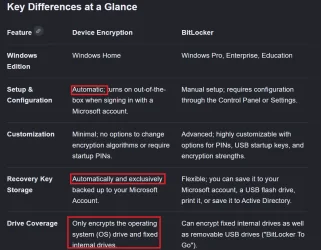
There is no Bitlocker in Home but is called device encryption. There are differences.
Screenshot 2026-06-05 140827.webp
 

My Computers

System One System Two

  • OS
    Windows 11 Pro 25H2
    Computer type
    PC/Desktop
    Manufacturer/Model
    Dell Optiplex 7080
    CPU
    i9-10900 10 core 20 threads
    Motherboard
    DELL 0J37VM
    Memory
    32 gb
    Graphics Card(s)
    none-Intel UHD Graphics 630
    Sound Card
    Integrated Realtek
    Monitor(s) Displays
    Benq 27
    Screen Resolution
    2560x1440
    Hard Drives
    2x1tb Solidigm m.2 nvme /External drives 512gb Samsung m.2 sata+2tb Kingston m2.nvme
    PSU
    500w
    Case
    MT
    Cooling
    Dell Premium
    Keyboard
    Logitech wired
    Mouse
    Logitech wireless
    Internet Speed
    so slow I'm too embarrassed to tell
    Browser
    #1 Edge #2 Firefox
    Antivirus
    Defender+MWB Premium
  • Operating System
    Windows 11 Pro 24H2 26200.8457
    Computer type
    PC/Desktop
    Manufacturer/Model
    Beelink Mini PC SER5
    CPU
    AMD Ryzen 7 6800U
    Memory
    32 gb
    Graphics card(s)
    integrated
    Sound Card
    integrated
    Monitor(s) Displays
    Benq 27
    Screen Resolution
    2560x1440
    Hard Drives
    1TB Crucial nvme
    Keyboard
    Logitech wired
    Mouse
    Logitech wireless
    Internet Speed
    still too embarrassed to tell
    Browser
    Firefox
    Antivirus
    Defender
    Other Info
    System 3 is non compliant Dell 9020 i7-4770/24gb ram Win11 PRO 26200.8457

Latest Support Threads

Back
Top Bottom