
Solved Can the bitlocker key be backed up when bitlocker is NOT turned on?


VinceB

Active member
Member
Local time
1:23 AM
Posts
82
OS
Windows 11 Pro, 25H2, 10.0.26200 Build 26200
I recently did a DELL factory reset.
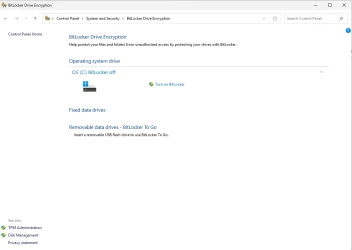
I have bitlocker turned off.
When attempting to backup, I see:
1777479759636.webp

Can the bitlocker key be backed up when bitlocker is NOT turned on?
 

My Computers My Computers

  • At a glance

    Windows 11 Pro, 25H2, 10.0.26200 Build 26200Intel, i964 GB RAMIntel UHD Graphics 770 on motherboard
    OS
    Windows 11 Pro, 25H2, 10.0.26200 Build 26200
    Computer type
    PC/Desktop
    Manufacturer/Model
    DELL XPS-8960
    CPU
    Intel, i9
    Memory
    64 GB RAM
    Graphics Card(s)
    Intel UHD Graphics 770 on motherboard
    Sound Card
    Realtek Audio on motherboard
    Monitor(s) Displays
    DELL P2314T, DELL 15 inch
    Screen Resolution
    1920 x 1080 x 60 Hz
    Hard Drives
    4 TB SSD,
    WD Passport USB HDD, 2TB
    SEAGATE USB HDD & HUB, 4TB
    Case
    XPS tower
    Cooling
    within 2 ft of casement window
    Keyboard
    MS Enhanced
    Mouse
    UINEER wired mouse, model U6W
    Internet Speed
    Ethernet 802.3
    Browser
    Chrome, Firefox
    Antivirus
    Win11 Pro
    Other Info
    EPSON ET-4950 Series; Print, Scan, FAX
  • At a glance

    Windows 10 HomeIntel i712 GBGeForce
    Operating System
    Windows 10 Home
    Computer type
    PC/Desktop
    Manufacturer/Model
    DELL
    CPU
    Intel i7
    Memory
    12 GB
    Graphics card(s)
    GeForce
    Monitor(s) Displays
    DELL P1705
    Hard Drives
    540 HDD
    Case
    XPS tower
    Browser
    Chrome, Firefox
No because no key is active if bitlocker is off.
 

My Computers My Computers

  • At a glance

    Windows 11 Pro 25H2 26200.8655i9-10900 10 core 20 threads32 gbnone-Intel UHD Graphics 630
    OS
    Windows 11 Pro 25H2 26200.8655
    Computer type
    PC/Desktop
    Manufacturer/Model
    Dell Optiplex 7080
    CPU
    i9-10900 10 core 20 threads
    Motherboard
    DELL 0J37VM
    Memory
    32 gb
    Graphics Card(s)
    none-Intel UHD Graphics 630
    Sound Card
    Integrated Realtek
    Monitor(s) Displays
    Benq 27
    Screen Resolution
    2560x1440
    Hard Drives
    2x1tb Solidigm m.2 nvme /External drives 512gb Samsung m.2 sata+2tb Kingston m2.nvme
    PSU
    500w
    Case
    MT
    Cooling
    Dell Premium
    Keyboard
    Logitech wired
    Mouse
    Logitech wireless
    Internet Speed
    so slow I'm too embarrassed to tell
    Browser
    #1 Edge #2 Firefox
    Antivirus
    Defender+MWB Premium
  • At a glance

    Windows 11 Pro 24H2 26200.8457AMD Ryzen 7 6800U32 gbintegrated
    Operating System
    Windows 11 Pro 24H2 26200.8457
    Computer type
    PC/Desktop
    Manufacturer/Model
    Beelink Mini PC SER5
    CPU
    AMD Ryzen 7 6800U
    Memory
    32 gb
    Graphics card(s)
    integrated
    Sound Card
    integrated
    Monitor(s) Displays
    Benq 27
    Screen Resolution
    2560x1440
    Hard Drives
    1TB Crucial nvme
    Keyboard
    Logitech wired
    Mouse
    Logitech wireless
    Internet Speed
    still too embarrassed to tell
    Browser
    Firefox
    Antivirus
    Defender
    Other Info
    System 3 is non compliant Dell 9020 i7-4770/24gb ram Win11 PRO 26200.8457
The manage-bde command will confirm if you don't have a BitLocker key:

Code:
> manage-bde -protectors -get C:
BitLocker Drive Encryption: Configuration Tool version 10.0.26100
Copyright (C) 2013 Microsoft Corporation. All rights reserved.

Volume C: []
All Key Protectors

ERROR: No key protectors found.
 

My Computer My Computer

At a glance

Windows 7
OS
Windows 7
The manage-bde command will confirm if you don't have a BitLocker key:
Does it mean that the key is generated every time when BitLocker is activated? If so, the saved key becomes useless if the worked BitLocker was turned off and then back on.
 

My Computer My Computer

At a glance

Windows 11 Pro 25H2AMD Rysen 5 4600H32 GB (2 x 16 GB Samsung SO-DIMM DDR4-3200)GeForce GTX 1650 Ti, 4 GB GDDR6
OS
Windows 11 Pro 25H2
Computer type
Laptop
Manufacturer/Model
Lenovo Legion 5-15ARH05
CPU
AMD Rysen 5 4600H
Memory
32 GB (2 x 16 GB Samsung SO-DIMM DDR4-3200)
Graphics Card(s)
GeForce GTX 1650 Ti, 4 GB GDDR6
Screen Resolution
1920x1080
Hard Drives
SSD M.2 512 GB SAMSUNG MZALQ512; SSD M.2 1 TB Seagate FireCuda 530
Mouse
Logitech M650L in Bluetooth mode
No because no key is active if bitlocker is off.
Does that apply if bitlocker had been turned on (it was in my case, and I recently turned it off) ?
 

My Computers My Computers

  • At a glance

    Windows 11 Pro, 25H2, 10.0.26200 Build 26200Intel, i964 GB RAMIntel UHD Graphics 770 on motherboard
    OS
    Windows 11 Pro, 25H2, 10.0.26200 Build 26200
    Computer type
    PC/Desktop
    Manufacturer/Model
    DELL XPS-8960
    CPU
    Intel, i9
    Memory
    64 GB RAM
    Graphics Card(s)
    Intel UHD Graphics 770 on motherboard
    Sound Card
    Realtek Audio on motherboard
    Monitor(s) Displays
    DELL P2314T, DELL 15 inch
    Screen Resolution
    1920 x 1080 x 60 Hz
    Hard Drives
    4 TB SSD,
    WD Passport USB HDD, 2TB
    SEAGATE USB HDD & HUB, 4TB
    Case
    XPS tower
    Cooling
    within 2 ft of casement window
    Keyboard
    MS Enhanced
    Mouse
    UINEER wired mouse, model U6W
    Internet Speed
    Ethernet 802.3
    Browser
    Chrome, Firefox
    Antivirus
    Win11 Pro
    Other Info
    EPSON ET-4950 Series; Print, Scan, FAX
  • At a glance

    Windows 10 HomeIntel i712 GBGeForce
    Operating System
    Windows 10 Home
    Computer type
    PC/Desktop
    Manufacturer/Model
    DELL
    CPU
    Intel i7
    Memory
    12 GB
    Graphics card(s)
    GeForce
    Monitor(s) Displays
    DELL P1705
    Hard Drives
    540 HDD
    Case
    XPS tower
    Browser
    Chrome, Firefox
Does it mean that the key is generated every time when BitLocker is activated? If so, the saved key becomes useless if the worked BitLocker was turned off and then back on.
That is correct. Co-pilot explains it like this.

Yes — a brand‑new BitLocker recovery key is generated every time you turn BitLocker on, even if you previously had it enabled before.

That’s because the recovery key is tied to the specific encryption session and protector set created when BitLocker initializes. When you turn BitLocker off, the drive is fully decrypted and all previous protectors (including the old recovery key) are deleted. When you turn it on again, Windows creates a new encryption key and a new recovery key.
 

My Computers My Computers

  • At a glance

    Windows 11 Pro 25H2 26200.8655i9-10900 10 core 20 threads32 gbnone-Intel UHD Graphics 630
    OS
    Windows 11 Pro 25H2 26200.8655
    Computer type
    PC/Desktop
    Manufacturer/Model
    Dell Optiplex 7080
    CPU
    i9-10900 10 core 20 threads
    Motherboard
    DELL 0J37VM
    Memory
    32 gb
    Graphics Card(s)
    none-Intel UHD Graphics 630
    Sound Card
    Integrated Realtek
    Monitor(s) Displays
    Benq 27
    Screen Resolution
    2560x1440
    Hard Drives
    2x1tb Solidigm m.2 nvme /External drives 512gb Samsung m.2 sata+2tb Kingston m2.nvme
    PSU
    500w
    Case
    MT
    Cooling
    Dell Premium
    Keyboard
    Logitech wired
    Mouse
    Logitech wireless
    Internet Speed
    so slow I'm too embarrassed to tell
    Browser
    #1 Edge #2 Firefox
    Antivirus
    Defender+MWB Premium
  • At a glance

    Windows 11 Pro 24H2 26200.8457AMD Ryzen 7 6800U32 gbintegrated
    Operating System
    Windows 11 Pro 24H2 26200.8457
    Computer type
    PC/Desktop
    Manufacturer/Model
    Beelink Mini PC SER5
    CPU
    AMD Ryzen 7 6800U
    Memory
    32 gb
    Graphics card(s)
    integrated
    Sound Card
    integrated
    Monitor(s) Displays
    Benq 27
    Screen Resolution
    2560x1440
    Hard Drives
    1TB Crucial nvme
    Keyboard
    Logitech wired
    Mouse
    Logitech wireless
    Internet Speed
    still too embarrassed to tell
    Browser
    Firefox
    Antivirus
    Defender
    Other Info
    System 3 is non compliant Dell 9020 i7-4770/24gb ram Win11 PRO 26200.8457
The manage-bde command will confirm if you don't have a BitLocker key:

Code:
> manage-bde -protectors -get C:
BitLocker Drive Encryption: Configuration Tool version 10.0.26100
Copyright (C) 2013 Microsoft Corporation. All rights reserved.

Volume C: []
All Key Protectors

ERROR: No key protectors found.
How is the manage-bde command given? I am not a Geek/Guru ~!~ ;-)
I am a novice.

EDITed: OKay: I GOOGLED and found the answer.
 

My Computers My Computers

  • At a glance

    Windows 11 Pro, 25H2, 10.0.26200 Build 26200Intel, i964 GB RAMIntel UHD Graphics 770 on motherboard
    OS
    Windows 11 Pro, 25H2, 10.0.26200 Build 26200
    Computer type
    PC/Desktop
    Manufacturer/Model
    DELL XPS-8960
    CPU
    Intel, i9
    Memory
    64 GB RAM
    Graphics Card(s)
    Intel UHD Graphics 770 on motherboard
    Sound Card
    Realtek Audio on motherboard
    Monitor(s) Displays
    DELL P2314T, DELL 15 inch
    Screen Resolution
    1920 x 1080 x 60 Hz
    Hard Drives
    4 TB SSD,
    WD Passport USB HDD, 2TB
    SEAGATE USB HDD & HUB, 4TB
    Case
    XPS tower
    Cooling
    within 2 ft of casement window
    Keyboard
    MS Enhanced
    Mouse
    UINEER wired mouse, model U6W
    Internet Speed
    Ethernet 802.3
    Browser
    Chrome, Firefox
    Antivirus
    Win11 Pro
    Other Info
    EPSON ET-4950 Series; Print, Scan, FAX
  • At a glance

    Windows 10 HomeIntel i712 GBGeForce
    Operating System
    Windows 10 Home
    Computer type
    PC/Desktop
    Manufacturer/Model
    DELL
    CPU
    Intel i7
    Memory
    12 GB
    Graphics card(s)
    GeForce
    Monitor(s) Displays
    DELL P1705
    Hard Drives
    540 HDD
    Case
    XPS tower
    Browser
    Chrome, Firefox
I never had BitLocker enabled on my test system.

1. Enabling BitLocker creates a new key.
Code:
Volume C: []
All Key Protectors

    TPM:
      ID: {2AB725F4-C578-47B4-BC44-0999195C1CBB}
      PCR Validation Profile:
        0, 2, 4, 11

    Numerical Password:
      ID: {00C96152-0FAD-4A2C-BDCE-72C7A9A05875}
      Password:
        305173-273867-479919-444202-713878-315524-436777-228228
      Backup type:
        Saved to file

2. Disabling (not suspending) BitLocker deletes the key.
Code:
Volume C: []
All Key Protectors

ERROR: No key protectors found.

3. Re-enabling BitLocker creates a different key.
Code:
Volume C: []
All Key Protectors

    TPM:
      ID: {5D78AC42-789E-436B-A4F0-6C1A25544727}
      PCR Validation Profile:
        0, 2, 4, 11

    Numerical Password:
      ID: {63236E39-D8EA-497F-B49B-8C2352A6D9CB}
      Password:
        607574-689469-104148-496518-358600-025762-045089-221991
      Backup type:
        Saved to file

This is from my test VM, so I'm not endangering myself by revealing my BitLocker password.
 

My Computer My Computer

At a glance

Windows 7
OS
Windows 7
Back
Top Bottom




