15,000MBps Gen 5 Nvme, slow boot time?


Danny_G13

New member
Local time
1:29 PM
Posts
7
OS
Windows 11
So I'm on a Gigabyte Z890 Master, 285K, 48GB RAM @ 8000. And the OP NvMe as system disk.

Fairly nippy PC.

And yet Windows 11 is bizarrely slow to shut down, restart and boot.

I don't know what I should be expecting but from the spinning Windows 11 logo beginning on the black boot screen it's maybe 15-20 seconds before I see the desktop?

I feel with my hardware it should be faster.

Is Windows 11 really just this slow to restart, shutdown and boot?

Thanks!
 
Windows Build/Version
Windows 11 25H2

My Computer

System One

  • OS
    Windows 11
    Computer type
    PC/Desktop
    Manufacturer/Model
    Gigabyte
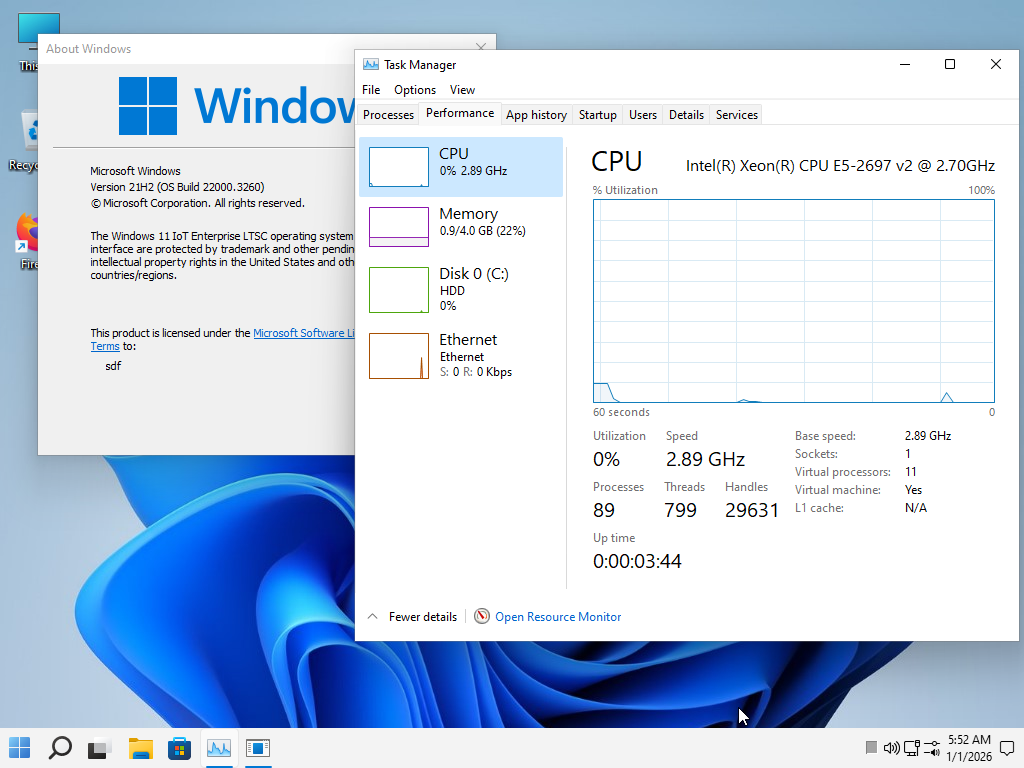
Perhaps the buggy Windows 11 25H2 is indeed bad in terms of boot time, but the older Windows 11 21H2, without a lot of bugs, is fast.
The boot time should be a maximum of 6 seconds; if it takes longer, then something is wrong.
To turn off and restart, then a maximum of 3 seconds.


fcajCX.png


if you test this version
Test it and then let us know if the boot time improved in this version
 
Last edited:

My Computer

System One

  • OS
    Windows 11 Iot Enterprise 21h2 22000.3260
    Computer type
    PC/Desktop
    Manufacturer/Model
    Asus
    CPU
    xeon E5-2697v2
    Motherboard
    rampage iv extreme
    Memory
    32gb 8x4gb ddr3 1333 mhz
    Graphics Card(s)
    gtx 570 poit of view
    Sound Card
    realtek HD (ALC898)
    Monitor(s) Displays
    samsung b2030
    Screen Resolution
    1600x900
    Hard Drives
    2tb hd 5400 rpm
    3tb hd 5400 rpm
    1tb nvme pcie 3.0
    PSU
    hx850w
    Keyboard
    mtek
    Internet Speed
    500/250 gpon
    Browser
    r3dfox 146.0
    Antivirus
    none
I don't think the problem is due to W11 25H2, my restarts, shutdowns and boots are very fast, shutdowns are blazing fast boot time from button switching to W11 logon screen 14/15 seconds except after updates.
 

My Computer

System One

  • OS
    W11, always updated with latest builds
    Computer type
    PC/Desktop
    Manufacturer/Model
    Self-made
    CPU
    AMD Ryzen 9 9900X
    Motherboard
    ASUS TUF Gaming B850-Plus WiFi
    Memory
    G.Skill Trident Z5 Neo RGB 32GB Kit DDR5-6000 CL30 (F5-6000J3038F16GX2-TZ5NR)
    Graphics Card(s)
    ASUS Dual GeForce RTX™ 3060 V2 OC Edition 12GB GDDR6
    Monitor(s) Displays
    Eizo CS240, Calibrated with Datacolr SpyderX
    Screen Resolution
    1920X1200
    Hard Drives
    Crucial T705 SSD 1TB PCIe Gen5 NVMe M.2- SO+Archive
    Lexar EQ790 1TB SSD M.2 2280 PCIe Gen4x4 NVMe 1.4- LR& PS Workspace
    PHIXERO SSD P5000-512GB M.2 2280 PCIe Gen4- Backups
    Seagate ST8000DM04- Photo Archive, SATA HD
    Western Digital WD2002FAEX- Generic archive, SATA HD
    PSU
    Be Quiet 850W Pure Power 12M per Pc ATX
    Case
    Phanteks XT Pro
    Cooling
    Be quiet Pure loop 2 360mm
    Keyboard
    Logitech
    Mouse
    Logitech
    Internet Speed
    D/L-700/800 Mbps; U/L 250/300 Mbps WiFi 7 from motherboard
    Browser
    Edge
    Antivirus
    Avast
    Other Info
    Mostly used for photo retouching software & some video slideshows.
Hi,

You can see in Task manager which app took the most time to load. It may be a third-party app that slowed down Windows when restarting or booting from shutdown.
 

My Computer

System One

  • OS
    Windows 11 Pro 25H2
    Computer type
    Laptop
    Manufacturer/Model
    ASUS ROG STRIX G513RC
    CPU
    AMD Ryzen™ 7 6800H 3.2-4.7 GHz
    Memory
    32 GB DDR5 4800MHz Dual Channel Crucial
    Graphics Card(s)
    NVIDIA GeForce RTX™ 3050
    Monitor(s) Displays
    15.6 inches FHD (1920 x 1080) IPS Display
    Hard Drives
    Crucial T500 2TB
    Western Digital Black SN770 2TB
    Keyboard
    RGB Keyboard
  • Like
Reactions: Gas
So I'm on a Gigabyte Z890 Master, 285K, 48GB RAM @ 8000. And the OP NvMe as system disk.

Fairly nippy PC.

And yet Windows 11 is bizarrely slow to shut down, restart and boot.

I don't know what I should be expecting but from the spinning Windows 11 logo beginning on the black boot screen it's maybe 15-20 seconds before I see the desktop?

I feel with my hardware it should be faster.

Is Windows 11 really just this slow to restart, shutdown and boot?

Thanks!
Mine takes 18 seconds to boot using a Gen 5 SSD.
 

My Computer

System One

  • OS
    Windows 11 Pro 25H2 (RP channel)
    Computer type
    PC/Desktop
    Manufacturer/Model
    MSI
    CPU
    AMD Ryzen 7 9800X3D 8-core
    Motherboard
    MEG X870E Godlike
    Memory
    64GB Corsair Titanium 6000/CL30
    Graphics Card(s)
    MSI Suprim 5080 SOC
    Sound Card
    Soundblaster AE-9
    Monitor(s) Displays
    ASUS TUF Gaming VG289Q
    Screen Resolution
    3840x2160
    Hard Drives
    Samsung 9100 Pro 4TB (gen 5 x4, system drive/games)
    Samsung 990 Pro 2TB
    Samsung 980 Pro 2TB
    Samsung 870 Evo 4TB
    Samsung 870 Evo 2TB
    Samsung T9 4TB
    PSU
    Seasonic PX-2200
    Case
    Bequiet! Dark Base Pro 901
    Cooling
    Noctua NH-D15S Chromax black
    Keyboard
    Logitech G915 X (wired)
    Mouse
    Logitech G903 with PowerPlay charger
    Internet Speed
    900Mb/sec
    Browser
    Microsoft Edge
    Antivirus
    Windows Defender
Hi,

You can see in Task manager which app took the most time to load. It may be a third-party app that slowed down Windows when restarting or booting from shutdown.
Where in task manager is that? I know about startup apps of course, but where does it show you those measurements?
 

My Computer

System One

  • OS
    Windows 11
    Computer type
    PC/Desktop
    Manufacturer/Model
    Gigabyte
Perhaps the buggy Windows 11 25H2 is indeed bad in terms of boot time, but the older Windows 11 21H2, without a lot of bugs, is fast.
The boot time should be a maximum of 6 seconds; if it takes longer, then something is wrong.
To turn off and restart, then a maximum of 3 seconds.


fcajCX.png


if you test this version
Test it and then let us know if the boot time improved in this version
Appreciate the reply but a clean install is always going to be faster is it not? This Windows 11 I'm on was installed a while ago and it's been well maintained, but I switched motherboard (Z790 to Z890) and since then the boot speed has just felt slow - mainly since the new Windows 11 build I think?
 

My Computer

System One

  • OS
    Windows 11
    Computer type
    PC/Desktop
    Manufacturer/Model
    Gigabyte
  • Haha
Reactions: Gas
There is nothing wrong with your PC.

In Task Manager > Startup Apps, you can show additional columns by Right Clicking column titles and tick the ones you want to show.

Quotations of SSD speeds are specially devised with Manufacturers and benchmarkers to give daft numbers which is far from the realistic situation.
 

My Computer

System One

  • OS
    Windows 11
In this video, we delve into the common issue of slow boot times in Windows and how to effectively troubleshoot it using Process Monitor.
 

My Computer

System One

  • OS
    Windows 11
    Computer type
    PC/Desktop
    Manufacturer/Model
    HP Pavilion
    CPU
    AMD Ryzen 7 5700G
    Motherboard
    Erica6
    Memory
    Micron Technology DDR4-3200 16GB
    Graphics Card(s)
    NVIDIA GeForce RTX 3060
    Sound Card
    Realtek ALC671
    Monitor(s) Displays
    Samsung SyncMaster U28E590
    Screen Resolution
    3840 x 2160
    Hard Drives
    SAMSUNG MZVLQ1T0HALB-000H1
Where in task manager is that? I know about startup apps of course, but where does it show you those measurements?
In Startup apps section it shows the startup impact but only as low/medium/high and the BIOS time. But this can also serve to identify the apps that take longer to load. You can try to disable them and restart the pc to see if there's actual impact on the bootup process.
 

My Computer

System One

  • OS
    Windows 11 Pro 25H2
    Computer type
    Laptop
    Manufacturer/Model
    ASUS ROG STRIX G513RC
    CPU
    AMD Ryzen™ 7 6800H 3.2-4.7 GHz
    Memory
    32 GB DDR5 4800MHz Dual Channel Crucial
    Graphics Card(s)
    NVIDIA GeForce RTX™ 3050
    Monitor(s) Displays
    15.6 inches FHD (1920 x 1080) IPS Display
    Hard Drives
    Crucial T500 2TB
    Western Digital Black SN770 2TB
    Keyboard
    RGB Keyboard
Appreciate the reply but a clean install is always going to be faster is it not? This Windows 11 I'm on was installed a while ago and it's been well maintained, but I switched motherboard (Z790 to Z890) and since then the boot speed has just felt slow - mainly since the new Windows 11 build I think?
So you're using an old OS install that started on different model motherboard? That is probably your core issue right there. The OS could be trying to load drivers for hardware that no longer exists on your system. I realize some folks do this, but it is a bad practice.
 

My Computer

System One

  • OS
    Windows 11 25H2
    Computer type
    PC/Desktop
    Manufacturer/Model
    EVGA home brew
    CPU
    Broadwell-e 6850K 4.5ghz @1.36v
    Motherboard
    EVGA X99 FTW K
    Memory
    32GB Corsair LPM 3600 C16
    Graphics Card(s)
    EVGA RTX 3080Ti FTW
    Sound Card
    Asus Centurion true 7.1 headset. (5 speakers in each earpeice)
    Monitor(s) Displays
    LG C4 55"
    Screen Resolution
    4K 144hz
    Hard Drives
    Various models of SSDs ~10TB No HDDs installed.
    PSU
    be quiet! BN516 Straight Power 12-1000w 80 Plus Platinum
    Case
    Corsair 780T modified to dual 200mm intake fans
    Cooling
    Corsair H110i
    Keyboard
    Corsair K95 Platinum
    Mouse
    Corsair M65 RGB Elite
    Internet Speed
    50Mbs
So you're using an old OS install that started on different model motherboard? That is probably your core issue right there. The OS could be trying to load drivers for hardware that no longer exists on your system. I realize some folks do this, but it is a bad practice.

Fair comment but I'd removed all old drivers using Driver Store Explorer and everything from hidden devices. There's few to no bloated unneeded drivers in there.
 

My Computer

System One

  • OS
    Windows 11
    Computer type
    PC/Desktop
    Manufacturer/Model
    Gigabyte
Fair comment but I'd removed all old drivers using Driver Store Explorer and everything from hidden devices. There's few to no bloated unneeded drivers in there.
In real world usage loading a lot of small files, as during an OS boot, a NVME is only about twice as fast as a SSD.
 

My Computer

System One

  • OS
    Windows 11 25H2
    Computer type
    PC/Desktop
    Manufacturer/Model
    EVGA home brew
    CPU
    Broadwell-e 6850K 4.5ghz @1.36v
    Motherboard
    EVGA X99 FTW K
    Memory
    32GB Corsair LPM 3600 C16
    Graphics Card(s)
    EVGA RTX 3080Ti FTW
    Sound Card
    Asus Centurion true 7.1 headset. (5 speakers in each earpeice)
    Monitor(s) Displays
    LG C4 55"
    Screen Resolution
    4K 144hz
    Hard Drives
    Various models of SSDs ~10TB No HDDs installed.
    PSU
    be quiet! BN516 Straight Power 12-1000w 80 Plus Platinum
    Case
    Corsair 780T modified to dual 200mm intake fans
    Cooling
    Corsair H110i
    Keyboard
    Corsair K95 Platinum
    Mouse
    Corsair M65 RGB Elite
    Internet Speed
    50Mbs
In real world usage loading a lot of small files, as during an OS boot, a NVME is only about twice as fast as a SSD.
I actually test this before. I set my NVMe speede to 1x instead of 5x, the boot time was less than a second different
 

My Computer

System One

  • OS
    Windows 11 Pro 25H2 (RP channel)
    Computer type
    PC/Desktop
    Manufacturer/Model
    MSI
    CPU
    AMD Ryzen 7 9800X3D 8-core
    Motherboard
    MEG X870E Godlike
    Memory
    64GB Corsair Titanium 6000/CL30
    Graphics Card(s)
    MSI Suprim 5080 SOC
    Sound Card
    Soundblaster AE-9
    Monitor(s) Displays
    ASUS TUF Gaming VG289Q
    Screen Resolution
    3840x2160
    Hard Drives
    Samsung 9100 Pro 4TB (gen 5 x4, system drive/games)
    Samsung 990 Pro 2TB
    Samsung 980 Pro 2TB
    Samsung 870 Evo 4TB
    Samsung 870 Evo 2TB
    Samsung T9 4TB
    PSU
    Seasonic PX-2200
    Case
    Bequiet! Dark Base Pro 901
    Cooling
    Noctua NH-D15S Chromax black
    Keyboard
    Logitech G915 X (wired)
    Mouse
    Logitech G903 with PowerPlay charger
    Internet Speed
    900Mb/sec
    Browser
    Microsoft Edge
    Antivirus
    Windows Defender
An "NVMe" is also a SSD. NVMe refers to an access protocol.
Indeed. Perhaps I should have been more formal. The point is the same that a PCIE Gen 5 NVME SSD is only about twice as fast as a GEN III SATA SSD drive QD1 random read performance, right? 🤷‍♂️
 

My Computer

System One

  • OS
    Windows 11 25H2
    Computer type
    PC/Desktop
    Manufacturer/Model
    EVGA home brew
    CPU
    Broadwell-e 6850K 4.5ghz @1.36v
    Motherboard
    EVGA X99 FTW K
    Memory
    32GB Corsair LPM 3600 C16
    Graphics Card(s)
    EVGA RTX 3080Ti FTW
    Sound Card
    Asus Centurion true 7.1 headset. (5 speakers in each earpeice)
    Monitor(s) Displays
    LG C4 55"
    Screen Resolution
    4K 144hz
    Hard Drives
    Various models of SSDs ~10TB No HDDs installed.
    PSU
    be quiet! BN516 Straight Power 12-1000w 80 Plus Platinum
    Case
    Corsair 780T modified to dual 200mm intake fans
    Cooling
    Corsair H110i
    Keyboard
    Corsair K95 Platinum
    Mouse
    Corsair M65 RGB Elite
    Internet Speed
    50Mbs
Indeed. Perhaps I should have been more formal. The point is the same that a PCIE Gen 5 NVME SSD is only about twice as fast as a GEN III SATA SSD drive QD1 random read performance, right? 🤷‍♂️
Maybe some sort of incompatibility between the SSD and the MOBO. For example, the SSD may be working in 5x2 mode (2 lanes).
 

My Computer

System One

  • OS
    Windows 10
NVME random reads at QD1 depth are only about twice as fast as random reads at QD1 depth on a gen III SATA SSD. If you're arguing that it is some compatibility/configuration issue, then, cite some formal evidence. Thanks.
 

My Computer

System One

  • OS
    Windows 11 25H2
    Computer type
    PC/Desktop
    Manufacturer/Model
    EVGA home brew
    CPU
    Broadwell-e 6850K 4.5ghz @1.36v
    Motherboard
    EVGA X99 FTW K
    Memory
    32GB Corsair LPM 3600 C16
    Graphics Card(s)
    EVGA RTX 3080Ti FTW
    Sound Card
    Asus Centurion true 7.1 headset. (5 speakers in each earpeice)
    Monitor(s) Displays
    LG C4 55"
    Screen Resolution
    4K 144hz
    Hard Drives
    Various models of SSDs ~10TB No HDDs installed.
    PSU
    be quiet! BN516 Straight Power 12-1000w 80 Plus Platinum
    Case
    Corsair 780T modified to dual 200mm intake fans
    Cooling
    Corsair H110i
    Keyboard
    Corsair K95 Platinum
    Mouse
    Corsair M65 RGB Elite
    Internet Speed
    50Mbs
Appreciate the reply but a clean install is always going to be faster is it not? This Windows 11 I'm on was installed a while ago and it's been well maintained, but I switched motherboard (Z790 to Z890) and since then the boot speed has just felt slow - mainly since the new Windows 11 build I think?
You should write this information in the first line of your post, I would never do what you have done, and I'm sure is what the majority of the member in this forum thinks.
 

My Computer

System One

  • OS
    W11, always updated with latest builds
    Computer type
    PC/Desktop
    Manufacturer/Model
    Self-made
    CPU
    AMD Ryzen 9 9900X
    Motherboard
    ASUS TUF Gaming B850-Plus WiFi
    Memory
    G.Skill Trident Z5 Neo RGB 32GB Kit DDR5-6000 CL30 (F5-6000J3038F16GX2-TZ5NR)
    Graphics Card(s)
    ASUS Dual GeForce RTX™ 3060 V2 OC Edition 12GB GDDR6
    Monitor(s) Displays
    Eizo CS240, Calibrated with Datacolr SpyderX
    Screen Resolution
    1920X1200
    Hard Drives
    Crucial T705 SSD 1TB PCIe Gen5 NVMe M.2- SO+Archive
    Lexar EQ790 1TB SSD M.2 2280 PCIe Gen4x4 NVMe 1.4- LR& PS Workspace
    PHIXERO SSD P5000-512GB M.2 2280 PCIe Gen4- Backups
    Seagate ST8000DM04- Photo Archive, SATA HD
    Western Digital WD2002FAEX- Generic archive, SATA HD
    PSU
    Be Quiet 850W Pure Power 12M per Pc ATX
    Case
    Phanteks XT Pro
    Cooling
    Be quiet Pure loop 2 360mm
    Keyboard
    Logitech
    Mouse
    Logitech
    Internet Speed
    D/L-700/800 Mbps; U/L 250/300 Mbps WiFi 7 from motherboard
    Browser
    Edge
    Antivirus
    Avast
    Other Info
    Mostly used for photo retouching software & some video slideshows.
Back
Top Bottom