2 Monitors, one with Remote Desktop


See the resolution and refresh rate. Unlike VGA, HDMI and DP don't support all resolutions and refresh rates. Use a standard one such as 1920x1080 @ 60Hz. 75Hz, for example, is not supported.
 

My Computers My Computers

  • At a glance

    Windows 11 Pro 23H2 (5699), 25H2 (8655)Mobile DualCore Intel Core 2 Duo T7250, 2000 MHz4GBMobile Intel(R) GMA 4500M (Mobile 4 series)
    OS
    Windows 11 Pro 23H2 (5699), 25H2 (8655)
    Computer type
    Laptop
    Manufacturer/Model
    Acer Extensa 5630EZ
    CPU
    Mobile DualCore Intel Core 2 Duo T7250, 2000 MHz
    Motherboard
    Acer Extensa 5630
    Memory
    4GB
    Graphics Card(s)
    Mobile Intel(R) GMA 4500M (Mobile 4 series)
    Sound Card
    Realtek ALC268 @ Intel 82801IB ICH9 - High Definition Audio Controller
    Monitor(s) Displays
    1
    Screen Resolution
    1280x800
    Hard Drives
    Samsung SSD 850 EVO 250GB SATA Device (250 GB, SATA-III)
    Internet Speed
    VDSL 50 Mbps
    Browser
    MICROSOFT EDGE
    Antivirus
    WINDOWS DEFENDER
    Other Info
    Legacy MBR installation, no TPM, no Secure Boot, no WDDM 2.0 graphics drivers, no SSE4.2, cannot get more unsupported ;) This is only my test laptop. I had installed Windows 11 here before upgrading my main PC. For my main PC I use everyday see my 2nd system specs.
  • At a glance

    Windows 11 Pro v25H2 (build 26200.8655)Intel Core-i7 3770 3.40GHz s1155 (3rd generat...2x Kingston Hyper-X Blu 8GB DDR3-1600GIGABYTE GeForce RTX 3050 WINDFORCE OC V2 6GB...
    Operating System
    Windows 11 Pro v25H2 (build 26200.8655)
    Computer type
    PC/Desktop
    Manufacturer/Model
    Custom-built PC
    CPU
    Intel Core-i7 3770 3.40GHz s1155 (3rd generation)
    Motherboard
    Asus P8H61 s1155 ATX
    Memory
    2x Kingston Hyper-X Blu 8GB DDR3-1600
    Graphics card(s)
    GIGABYTE GeForce RTX 3050 WINDFORCE OC V2 6GB (GV-N3050WF2OCV2-6GD)
    Sound Card
    Realtek HD audio (ALC887)
    Monitor(s) Displays
    Sony Bravia KDL-19L4000 19" LCD TV via VGA
    Screen Resolution
    1440x900 32-bit 60Hz
    Hard Drives
    WD Blue SA510 2.5 1000GB SSD as system disk, Western Digital Caviar Purple 4TB SATA III (WD40PURZ) as second
    PSU
    Thermaltake Litepower RGB 550W Full Wired
    Case
    SUPERCASE MIDI-TOWER
    Cooling
    Deepcool Gamma Archer CPU cooler, 1x 8cm fan at the back
    Keyboard
    Mitsumi 101-key PS/2
    Mouse
    Sunnyline OptiEye PS/2
    Internet Speed
    100Mbps
    Browser
    Microsoft Edge, Mozilla Firefox
    Antivirus
    Microsoft Windows Defender
    Other Info
    Legacy BIOS (MBR) installation, no TPM, no Secure Boot, WDDM 3.0 graphics drivers, WEI score 7.4
I changed it to a different VGA cable - no difference. Then I used the adapter to be able to plug the VGA into the DP 1.4 port, for some reason that didn't work well. Not sure why it goes black, losing the picture.

Could be a couple of things... :think:

Is your video card integrated (shares memory with your main memory)? Check to see if you have it on the highest available setting (like 128MB).

If after you check your refresh rate & that does not help, maybe its time to dump your VGA monitor for an inexpensive new HDMI monitor model & use an HDMI>DP adapter or better yet, use an HDMI > DP video cable. This way you'll have one less connection between devices.

Cheers!
 

My Computer My Computer

At a glance

Windows 11 Pro Version 23H2 (Build: 22631.4317)7th gen Intel® Core™ i5 - 7200U (3MB Cache, 2...16GB => 8GB [on-board] & 8GB Kingston HyperX ...Intel® HD Graphics 620
OS
Windows 11 Pro Version 23H2 (Build: 22631.4317)
Computer type
Laptop
Manufacturer/Model
Asus Flipbook Q504UAK - BHI5T13 [ Hybrid (2-in-1) Touch ]
CPU
7th gen Intel® Core™ i5 - 7200U (3MB Cache, 2.5GHz)
Motherboard
ASUS UX560A
Memory
16GB => 8GB [on-board] & 8GB Kingston HyperX DDR4 2666MHZ SoDIMM
Graphics Card(s)
Intel® HD Graphics 620
Sound Card
Harmon/Kardon built-in
Monitor(s) Displays
1
Screen Resolution
Touchscreen: 39.6 cm (15.6") Full HD 1920 x 1080 pixels Matt 16:9
Hard Drives
Samsung 2TB SSD 870 EVO [SATA]; Samsung 1TB SSD 980 PRO [NVMe Gen3];
Samsung 4TB SSD T7 Shield [Portable]
PSU
[email protected] 45W - [email protected] 65W PD (USB-C to Barrel plug 4.0mm x 1.35mm)
Case
Aluminum
Cooling
Standard cooling fan
Keyboard
Backlit, built-in keyboard
Mouse
Logitech Mice: G502X & G602
Internet Speed
802.11ac
Browser
Firefox v131.0.2
Other Info
Card Reader, WLAN, 802.11a, 802.11b, 802.11g, Wi-Fi 4 (802.11n), Wi-Fi 5 (802.11ac) , Webcam, HDMI x1
One thing comes to mind on this. Bad VGA monitor.

Hooking into an HDMI or DP port with an adapter is a sub-optimal way to go when connecting a monitor. Adapters are usually made cheaply and don't work very well in my experience. It's better to use native cables. Of course, that means in your case you would need to buy a new monitor with at least an HDMI port.

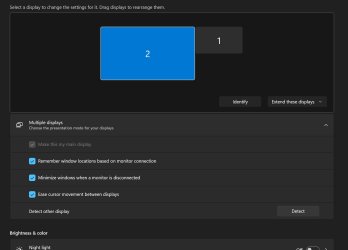
In answer to your original question: It is possible to use Remote Desktop on one monitor and work on the other. I do it all the time. I drag my Remote Desktop window to my second monitor and it works easy peasy. My setup is like this:

Screen.jpg

My main monitor is identified as monitor 2 and I have chosen to make this my main display. My second monitor is on the right and is labeled #1. (It's just the way my cables worked out and I am too lazy to change it). In your case, just make the right hand monitor your main display and then dragging to the left will work for you as long as the displays are extended.

I don't think the display extension is causing your headache though. I think you have a problem with your VGA monitor.

Which reminds me, what kind of graphics card are we talking about here?
 

My Computer My Computer

At a glance

Win 11 Pro 25H2Intel i7 13700KF32 GB Team Group DDR5 - 6000 CL 30ASUS TUF GAMING RTX 3070 Ti
OS
Win 11 Pro 25H2
Computer type
PC/Desktop
Manufacturer/Model
Self build
CPU
Intel i7 13700KF
Motherboard
Gigabyte Z790 UD AC
Memory
32 GB Team Group DDR5 - 6000 CL 30
Graphics Card(s)
ASUS TUF GAMING RTX 3070 Ti
Sound Card
On board Realtek
Monitor(s) Displays
ACER 34 inch
Screen Resolution
4K
Hard Drives
1 TB Samsung 980 Pro Nvme, 1 TB Samsung 970 EVO Nvme, 2 x Samsung 970 2TB SSD SATA
PSU
EVGA 1000Q
Case
Rosewill something or other
Cooling
Noctua NH-D15. A whole schwak of Noctua case fans. $$$
Keyboard
Logitech G815
Mouse
Logitech G502 Hero
Internet Speed
700 up, 600 down
Browser
Firefox
Antivirus
MalwareBytes
Unlike VGA that supports many resolutions and many refresh rates for the same resolution, DP and HDMI support only specific standard resolutions at 60Hz refresh rate only. This includes 800x600, 1024x768, 1280x1024, 1280x720, 1600x1200, 1920x1080, for example. Non-standard and weird resolutions such as 1368X768, 1440x900 and 1680x1050 are not supported. Make sure you select a standard resolution at 60Hz to maximize compatibility when using the DP to VGA or HDMI to VGA adapter. 1280x720 at 60Hz is a good starting point for most monitors. Try that first.
 

My Computers My Computers

  • At a glance

    Windows 11 Pro 23H2 (5699), 25H2 (8655)Mobile DualCore Intel Core 2 Duo T7250, 2000 MHz4GBMobile Intel(R) GMA 4500M (Mobile 4 series)
    OS
    Windows 11 Pro 23H2 (5699), 25H2 (8655)
    Computer type
    Laptop
    Manufacturer/Model
    Acer Extensa 5630EZ
    CPU
    Mobile DualCore Intel Core 2 Duo T7250, 2000 MHz
    Motherboard
    Acer Extensa 5630
    Memory
    4GB
    Graphics Card(s)
    Mobile Intel(R) GMA 4500M (Mobile 4 series)
    Sound Card
    Realtek ALC268 @ Intel 82801IB ICH9 - High Definition Audio Controller
    Monitor(s) Displays
    1
    Screen Resolution
    1280x800
    Hard Drives
    Samsung SSD 850 EVO 250GB SATA Device (250 GB, SATA-III)
    Internet Speed
    VDSL 50 Mbps
    Browser
    MICROSOFT EDGE
    Antivirus
    WINDOWS DEFENDER
    Other Info
    Legacy MBR installation, no TPM, no Secure Boot, no WDDM 2.0 graphics drivers, no SSE4.2, cannot get more unsupported ;) This is only my test laptop. I had installed Windows 11 here before upgrading my main PC. For my main PC I use everyday see my 2nd system specs.
  • At a glance

    Windows 11 Pro v25H2 (build 26200.8655)Intel Core-i7 3770 3.40GHz s1155 (3rd generat...2x Kingston Hyper-X Blu 8GB DDR3-1600GIGABYTE GeForce RTX 3050 WINDFORCE OC V2 6GB...
    Operating System
    Windows 11 Pro v25H2 (build 26200.8655)
    Computer type
    PC/Desktop
    Manufacturer/Model
    Custom-built PC
    CPU
    Intel Core-i7 3770 3.40GHz s1155 (3rd generation)
    Motherboard
    Asus P8H61 s1155 ATX
    Memory
    2x Kingston Hyper-X Blu 8GB DDR3-1600
    Graphics card(s)
    GIGABYTE GeForce RTX 3050 WINDFORCE OC V2 6GB (GV-N3050WF2OCV2-6GD)
    Sound Card
    Realtek HD audio (ALC887)
    Monitor(s) Displays
    Sony Bravia KDL-19L4000 19" LCD TV via VGA
    Screen Resolution
    1440x900 32-bit 60Hz
    Hard Drives
    WD Blue SA510 2.5 1000GB SSD as system disk, Western Digital Caviar Purple 4TB SATA III (WD40PURZ) as second
    PSU
    Thermaltake Litepower RGB 550W Full Wired
    Case
    SUPERCASE MIDI-TOWER
    Cooling
    Deepcool Gamma Archer CPU cooler, 1x 8cm fan at the back
    Keyboard
    Mitsumi 101-key PS/2
    Mouse
    Sunnyline OptiEye PS/2
    Internet Speed
    100Mbps
    Browser
    Microsoft Edge, Mozilla Firefox
    Antivirus
    Microsoft Windows Defender
    Other Info
    Legacy BIOS (MBR) installation, no TPM, no Secure Boot, WDDM 3.0 graphics drivers, WEI score 7.4

Latest Support Threads

Back
Top Bottom