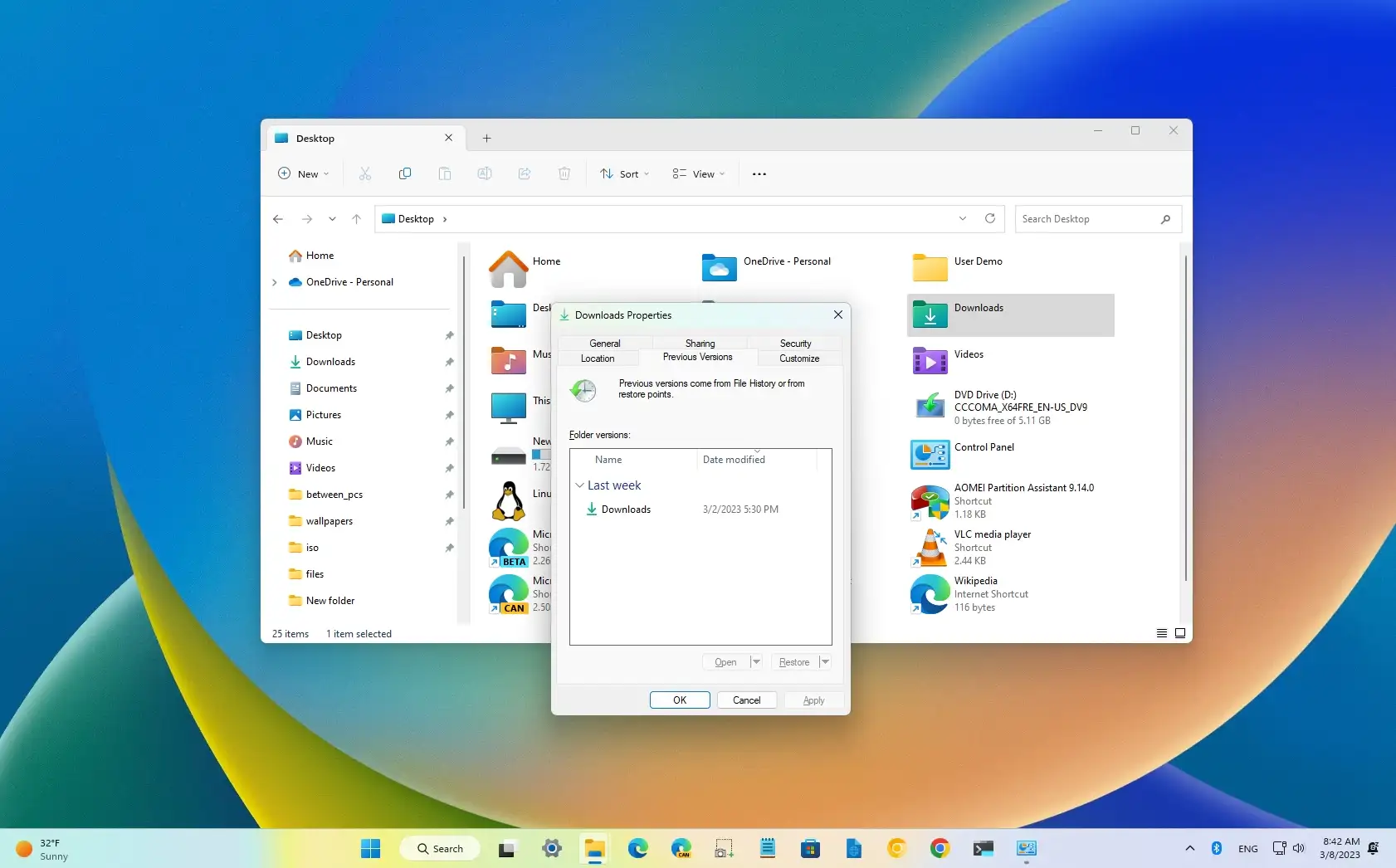
22H2 breaks Previous Versions by System Restore, how to re-enable it?


Thanks, but I already know how to backup. And as I said in the post above yours....


And I use Acronis for my backups and recoveries. And thanks for the link to the Windows 10 post. Good now (y)

Thanks.

I started FH on my new W11 system and then discovered it wasn't copying the same folders it did under W10. Then I learned there was no longer any way to designate what to copy. I guess MS is already decontenting FH. I turned off FH and am now running Macrium Reflect to backup the file section of the C drive. It's not automatic like FH, but it works. Plus I can get multiple versions on the internal 1TB HDD drive. Also using MR to create full system images on other 1 TB USB drives after WU runs.
Guys, such programs like Macrium Reflect and Acronis are best used for full image backups like a system image to recover in case of a disaster, bad Windows update scewing up Windows, bad driver updates, etc.

Using an individual file backup such as SyncBack or the likes quickly copies or deletes only the changes from the source to the destination and is 100% accurate and reliable and happens within seconds to your external medial.

Offcourse, use what you think best works for you but IMO this is a much better and more efficient way for backing up personal files and whatnot.
 

My Computers My Computers

  • At a glance

    Windows 11 ProIntel Core Ultra 9 275HXSK Hynix 64GB DDR5-5600MHz RAMGeForce RTX 5090 24 GB GDDR7 VRAM
    OS
    Windows 11 Pro
    Computer type
    Laptop
    Manufacturer/Model
    ASUS ROG Strix SCAR 16 G635LX
    CPU
    Intel Core Ultra 9 275HX
    Motherboard
    ASUS
    Memory
    SK Hynix 64GB DDR5-5600MHz RAM
    Graphics Card(s)
    GeForce RTX 5090 24 GB GDDR7 VRAM
    Sound Card
    Dolby Atmos-powered speakers - 2 tweeters and 3 downward firing woofers
    Monitor(s) Displays
    INNOCN GA27T1M 27' 1440p 320Hz Mini-LED Monitor
    Screen Resolution
    QHD (2560x1440)
    Hard Drives
    2x WD_BLACK SN850X 8TB SSDs (RAID 0)
    PSU
    380W AC Power Adapter
    Cooling
    Thermal Grizzly Conductonaut + IETS GT600 Cooling Pad
    Keyboard
    ROG Strix Scope II 96 RX Wireless
    Mouse
    ROG Chakram X Origin
    Internet Speed
    1 GBPS Down / 882 MBPS Up
    Browser
    Google Chrome
    Antivirus
    AVG Internet Security
  • At a glance

    Windows 11 EducationAMD Ryzen 9 27016GB LPDDR5X 7500 RAMnVIDIA GeForce RTX 5050 8GB GDDR7
    Operating System
    Windows 11 Education
    Computer type
    Laptop
    Manufacturer/Model
    ASUS ROG Zephyrus G14 GA403UH
    CPU
    AMD Ryzen 9 270
    Memory
    16GB LPDDR5X 7500 RAM
    Graphics card(s)
    nVIDIA GeForce RTX 5050 8GB GDDR7
    Sound Card
    Realtek
    Monitor(s) Displays
    14' ROG Nebula Display 3K OLED 120Hz
    Screen Resolution
    2880 x 1800
    Hard Drives
    Samsung 990 PRO 4TB SSD
    PSU
    Rectangle Conn, 200W AC Adapter
    Cooling
    Thermal Grizzly Conductonaut
    Mouse
    ASUS ROG Chakram X Origin Gaming Mouse
    Internet Speed
    1 GBPS Down / 875 MBPS Up
    Browser
    Google Chrome
    Antivirus
    AVG Internet Security

@Spartan, please read and "follow" the thread before making assumptions. It's NOT about backups, it's about the OP having an issue they would like resolved concerning the ability to enable "Previous Versions". "My" suggestion was to enable File History, another opined its been depreciated.

I mentioned Acronis due to your quote of my post as you provided a video of what "you" use for "backups. That not the issue.

That's where we are. Additionally, I have no issues, and my posts are merely suggestions to help the OP.

Thank you.
 

My Computers My Computers

  • At a glance

    Windows 11 Pro 24H2 (Build 26100.4770)Intel Core 9 Ultra 285K64G (4x16) DDR5 Corsair RGB Dominator Platinu...Radeon (XFX Mercury) RX 9070XT OC (with Magne...
    OS
    Windows 11 Pro 24H2 (Build 26100.4770)
    Computer type
    PC/Desktop
    Manufacturer/Model
    Custom built
    CPU
    Intel Core 9 Ultra 285K
    Motherboard
    Gigabyte Aorus Z890 Xtreme AI Top
    Memory
    64G (4x16) DDR5 Corsair RGB Dominator Platinum (6400Mhz)
    Graphics Card(s)
    Radeon (XFX Mercury) RX 9070XT OC (with Magnetic Fans)
    Sound Card
    Onboard (DTS:X® Ultra Audio: ESS ES9280A DAC)
    Monitor(s) Displays
    27-inch Eizo Color Edge - CG2700X
    Screen Resolution
    3840 x 2160
    Hard Drives
    4 Samsung NVM 990 Pro drives: 1TB (OS), 2TB, 2 X 4TB.
    PSU
    Seasonic TX-1300 (1300 Watts)
    Case
    Cooler Master H500M
    Cooling
    Corsair Link Titan 280 RX RGB
    Keyboard
    Logitech Craft
    Mouse
    Logitech MX Master 3S
    Internet Speed
    1TB Download. 512mb Upload
    Browser
    Microsoft Edge Chromium
    Antivirus
    Windows Security
    Other Info
    System used for gaming, photography, music, school.
  • At a glance

    Windows 11 Pro 24H2 (Build 26100.4061)Intel Core i9-9900K32gig (4 x 8) Corsair Dominator Platinum DDR4...Radeon XFX Merc 7900XT (20gig)
    Operating System
    Windows 11 Pro 24H2 (Build 26100.4061)
    Computer type
    PC/Desktop
    Manufacturer/Model
    Custom built
    CPU
    Intel Core i9-9900K
    Motherboard
    Gigabyte Z390 Aorus Xtreme
    Memory
    32gig (4 x 8) Corsair Dominator Platinum DDR4 3600Mhz (B-Die)
    Graphics card(s)
    Radeon XFX Merc 7900XT (20gig)
    Sound Card
    Onboard
    Monitor(s) Displays
    24-Inch NEC PA242W
    Screen Resolution
    2880 x 1800
    Hard Drives
    2 X NVME, 1 X SATA SSD
    PSU
    EVGA Super Nova 1000 P2 (1000 Watt)
    Case
    Phantek Enthoo Luxe
    Cooling
    Corsair H115i Elite AIO Cooler
    Keyboard
    Logitech Keys
    Mouse
    Logitech MX Master 3
    Internet Speed
    1TB Download. 512mb Upload
    Browser
    Microsoft Edge Chromium
    Antivirus
    Windows Security
    Other Info
    Backup System
I started FH on my new W11 system and then discovered it wasn't copying the same folders it did under W10. Then I learned there was no longer any way to designate what to copy. I guess MS is already decontenting FH. I turned off FH and am now running Macrium Reflect to backup the file section of the C drive. It's not automatic like FH, but it works. Plus I can get multiple versions on the internal 1TB HDD drive. Also using MR to create full system images on other 1 TB USB drives after WU runs.
I agree FH isn't the best but the workaround to add extra folders than the limits that Win 11 imposes is to add them to a custom or existing library as you can backup copies of any of your libraries.
 

My Computer My Computer

At a glance

11
OS
11
I appreciate all the discussion, I also put this on reddit and didn't get much interest.
It does seem strange that no one has found a simple registry fix to re-enable the Previous Versions as usually MS just hide stuff rather than take it out altogether

I have mounted a virtual disk on an internal drive and am using File History to that drive as a way to get some Previous Versions available!

I use Macrium for a reliable backup and also have SyncBack which is great for backing up various folders. Both of these are really useful and work very well.
Macrium has saved me from a messed up system and a probable reinstall of Windows so many times.
 

My Computer My Computer

At a glance

11
OS
11
I appreciate all the discussion, I also put this on reddit and didn't get much interest.
It does seem strange that no one has found a simple registry fix to re-enable the Previous Versions as usually MS just hide stuff rather than take it out altogether
I actually posted a suggestion on enabling File History, which in theory should solve the issue,
You will need to setup "File History" to recover previous versions of files. I know that box also mentions "Restore Points" but be aware System Restore (the system responsible for "Restore Points) does NOT copy or restore personal files and folders as stated in the link @Winuser posted.

If you want "Previous Versions" of files you need File History enabled - Enable or Disable File History in Windows 11 Tutorial
You said you used it as a "workaround"....
Ah yes, Shadow Explorer is the software used in the video kindly posted by FreeBooter. I just enabled File History today as a workaround.
So does the mean the issue is solved or what??? :unsure:
 

My Computers My Computers

  • At a glance

    Windows 11 Pro 24H2 (Build 26100.4770)Intel Core 9 Ultra 285K64G (4x16) DDR5 Corsair RGB Dominator Platinu...Radeon (XFX Mercury) RX 9070XT OC (with Magne...
    OS
    Windows 11 Pro 24H2 (Build 26100.4770)
    Computer type
    PC/Desktop
    Manufacturer/Model
    Custom built
    CPU
    Intel Core 9 Ultra 285K
    Motherboard
    Gigabyte Aorus Z890 Xtreme AI Top
    Memory
    64G (4x16) DDR5 Corsair RGB Dominator Platinum (6400Mhz)
    Graphics Card(s)
    Radeon (XFX Mercury) RX 9070XT OC (with Magnetic Fans)
    Sound Card
    Onboard (DTS:X® Ultra Audio: ESS ES9280A DAC)
    Monitor(s) Displays
    27-inch Eizo Color Edge - CG2700X
    Screen Resolution
    3840 x 2160
    Hard Drives
    4 Samsung NVM 990 Pro drives: 1TB (OS), 2TB, 2 X 4TB.
    PSU
    Seasonic TX-1300 (1300 Watts)
    Case
    Cooler Master H500M
    Cooling
    Corsair Link Titan 280 RX RGB
    Keyboard
    Logitech Craft
    Mouse
    Logitech MX Master 3S
    Internet Speed
    1TB Download. 512mb Upload
    Browser
    Microsoft Edge Chromium
    Antivirus
    Windows Security
    Other Info
    System used for gaming, photography, music, school.
  • At a glance

    Windows 11 Pro 24H2 (Build 26100.4061)Intel Core i9-9900K32gig (4 x 8) Corsair Dominator Platinum DDR4...Radeon XFX Merc 7900XT (20gig)
    Operating System
    Windows 11 Pro 24H2 (Build 26100.4061)
    Computer type
    PC/Desktop
    Manufacturer/Model
    Custom built
    CPU
    Intel Core i9-9900K
    Motherboard
    Gigabyte Z390 Aorus Xtreme
    Memory
    32gig (4 x 8) Corsair Dominator Platinum DDR4 3600Mhz (B-Die)
    Graphics card(s)
    Radeon XFX Merc 7900XT (20gig)
    Sound Card
    Onboard
    Monitor(s) Displays
    24-Inch NEC PA242W
    Screen Resolution
    2880 x 1800
    Hard Drives
    2 X NVME, 1 X SATA SSD
    PSU
    EVGA Super Nova 1000 P2 (1000 Watt)
    Case
    Phantek Enthoo Luxe
    Cooling
    Corsair H115i Elite AIO Cooler
    Keyboard
    Logitech Keys
    Mouse
    Logitech MX Master 3
    Internet Speed
    1TB Download. 512mb Upload
    Browser
    Microsoft Edge Chromium
    Antivirus
    Windows Security
    Other Info
    Backup System
I actually posted a suggestion on enabling File History, which in theory should solve the issue,

You said you used it as a "workaround"....

So does the mean the issue is solved or what??? :unsure:
well... ideally someone will find a registry tweak or a way to re-enable the old pre 22H2 Previous Versions as they are a very neat and convenient way to just quickly get an old copy of a file or folder if you need to revert.
File History is not as good as it doesn't take a snapshot of your whole system drive as the System Restore\ Shadow Copy method does.
I have added some important folders to my Documents library so FH is now keeping old copies of those.
At least I have something in the Previous Version tab now when I click on it sometimes :)
 

My Computer My Computer

At a glance

11
OS
11
Wasn't aware of that one. Do you have a link?
I think this is a rumour - it is not listed as a deprecated feature like system image backup.
 

My Computer My Computer

At a glance

Windows 11 Pro + Win11 Canary VM.I9 13th gen i9-13900H 2.60 GHZ16 GB solderedIntegrated Intel Iris XE
OS
Windows 11 Pro + Win11 Canary VM.
Computer type
Laptop
Manufacturer/Model
ASUS Zenbook 14
CPU
I9 13th gen i9-13900H 2.60 GHZ
Motherboard
Yep, Laptop has one.
Memory
16 GB soldered
Graphics Card(s)
Integrated Intel Iris XE
Sound Card
Realtek built in
Monitor(s) Displays
laptop OLED screen
Screen Resolution
2880x1800 touchscreen
Hard Drives
1 TB NVME SSD (only weakness is only one slot)
PSU
Internal + 65W thunderbolt USB4 charger
Case
Yep, got one
Cooling
Stella Artois (UK pint cans - 568 ml) - extra cost.
Keyboard
Built in UK keybd
Mouse
Bluetooth , wireless dongled, wired
Internet Speed
900 mbs (ethernet), wifi 6 typical 350-450 mb/s both up and down
Browser
Edge
Antivirus
Defender
Other Info
TPM 2.0, 2xUSB4 thunderbolt, 1xUsb3 (usb a), 1xUsb-c, hdmi out, 3.5 mm audio out/in combo, ASUS backlit trackpad (inc. switchable number pad)

Macrium Reflect Home V8
Office 365 Family (6 users each 1TB onedrive space)
Hyper-V (a vm runs almost as fast as my older laptop)
I think this is a rumour - it is not listed as a deprecated feature like system image backup.
Yeah, I agree it's a rumor as I've not seen anything official from Microsoft, but I also don't doubt it based on the @Winuser post.
 

My Computers My Computers

  • At a glance

    Windows 11 Pro 24H2 (Build 26100.4770)Intel Core 9 Ultra 285K64G (4x16) DDR5 Corsair RGB Dominator Platinu...Radeon (XFX Mercury) RX 9070XT OC (with Magne...
    OS
    Windows 11 Pro 24H2 (Build 26100.4770)
    Computer type
    PC/Desktop
    Manufacturer/Model
    Custom built
    CPU
    Intel Core 9 Ultra 285K
    Motherboard
    Gigabyte Aorus Z890 Xtreme AI Top
    Memory
    64G (4x16) DDR5 Corsair RGB Dominator Platinum (6400Mhz)
    Graphics Card(s)
    Radeon (XFX Mercury) RX 9070XT OC (with Magnetic Fans)
    Sound Card
    Onboard (DTS:X® Ultra Audio: ESS ES9280A DAC)
    Monitor(s) Displays
    27-inch Eizo Color Edge - CG2700X
    Screen Resolution
    3840 x 2160
    Hard Drives
    4 Samsung NVM 990 Pro drives: 1TB (OS), 2TB, 2 X 4TB.
    PSU
    Seasonic TX-1300 (1300 Watts)
    Case
    Cooler Master H500M
    Cooling
    Corsair Link Titan 280 RX RGB
    Keyboard
    Logitech Craft
    Mouse
    Logitech MX Master 3S
    Internet Speed
    1TB Download. 512mb Upload
    Browser
    Microsoft Edge Chromium
    Antivirus
    Windows Security
    Other Info
    System used for gaming, photography, music, school.
  • At a glance

    Windows 11 Pro 24H2 (Build 26100.4061)Intel Core i9-9900K32gig (4 x 8) Corsair Dominator Platinum DDR4...Radeon XFX Merc 7900XT (20gig)
    Operating System
    Windows 11 Pro 24H2 (Build 26100.4061)
    Computer type
    PC/Desktop
    Manufacturer/Model
    Custom built
    CPU
    Intel Core i9-9900K
    Motherboard
    Gigabyte Z390 Aorus Xtreme
    Memory
    32gig (4 x 8) Corsair Dominator Platinum DDR4 3600Mhz (B-Die)
    Graphics card(s)
    Radeon XFX Merc 7900XT (20gig)
    Sound Card
    Onboard
    Monitor(s) Displays
    24-Inch NEC PA242W
    Screen Resolution
    2880 x 1800
    Hard Drives
    2 X NVME, 1 X SATA SSD
    PSU
    EVGA Super Nova 1000 P2 (1000 Watt)
    Case
    Phantek Enthoo Luxe
    Cooling
    Corsair H115i Elite AIO Cooler
    Keyboard
    Logitech Keys
    Mouse
    Logitech MX Master 3
    Internet Speed
    1TB Download. 512mb Upload
    Browser
    Microsoft Edge Chromium
    Antivirus
    Windows Security
    Other Info
    Backup System
I digged a lot using IDA/WinDBG to found out the reason. This behavior is about Scoped Shadowcopy. From Windows 8, system restore only snapshot system files on drive C but exclude user files. So we cannot access them in previous version tab. If you do so or use ShadowExplorer, you will get corrupted files.
Set HKEY_LOCAL_MACHINE\SOFTWARE\Microsoft\Windows NT\CurrentVersion\SystemRestore ScopeSnapshots=0 could disable this and let system restore do a full snapshot like Win7 does.
Or manually run wmic shadowcopy call create volume=C:\ to make snapshot like Windows Server does.
 

My Computer My Computer

At a glance

Windows 11
OS
Windows 11
Computer type
PC/Desktop

I am not sure that is the issue here, because an earlier post by chip222 implies shadow explorer finds the files he is looking for.
 
Last edited:

My Computers My Computers

  • At a glance

    Win7,Win11i7-97002x16gb 3600mhz
    OS
    Win7,Win11
    Computer type
    PC/Desktop
    CPU
    i7-9700
    Motherboard
    gigabyte b365m ds3h
    Memory
    2x16gb 3600mhz
    Monitor(s) Displays
    benq gw2480
    PSU
    bequiet pure power 11 400CM
    Cooling
    cryorig m9i
  • At a glance

    win7,win11i5-84002x8gb 3200
    Operating System
    win7,win11
    Computer type
    PC/Desktop
    CPU
    i5-8400
    Motherboard
    gigabyte b365m ds3h
    Memory
    2x8gb 3200
    PSU
    xfx pro 450
I wish Previous Versions from System Restore Points still worked today... sigh... File History is a bad implementation IMHO because it takes huge amount of disk space for file copies, basically good only if you have a NAS.
Always wondered if there was a registry trick or something to force re-enable it...

EDIT:
sites like:
... claim using, on a daily basis:
Batch:
wmic shadowcopy call create Volume=C:\
should do it even on Win11, and that the shadow copy created this way is different from usual system restore points...
 
Last edited:

My Computer My Computer

At a glance

Windows 11 HomeIntel i9-13980HX32GB DDR5 5600MHzNVidia GTX 4090 Laptop 256bit 16GB 175W
OS
Windows 11 Home
Computer type
Laptop
Manufacturer/Model
ASUS ROG SCAR 18
CPU
Intel i9-13980HX
Memory
32GB DDR5 5600MHz
Graphics Card(s)
NVidia GTX 4090 Laptop 256bit 16GB 175W
Sound Card
Realtek ALC285 + Dolby Atmos
Monitor(s) Displays
G-Sync NE180QDM-NZ2 18" 16:10, FreeSync Premium XiaoMi Mi 34" 21:9
Screen Resolution
2560x1600@240Hz (internal), 3440x1440@144Hz (external)
Hard Drives
NVMe Lexar NM790 1TB 6GB/s, NVMe Lexar NM790 4TB 6GB/s
PSU
330W (laptop PSU)
Mouse
ROG Strix Carry Wireless-BT mouse
Other Info
4K UHD USB Archgon Star Blu-Ray 4K UHD,
8BitDo Arcade Stick,
Vader 4 Pro controller
Ok... I tested the manual wmic trick above and indeed it does work, for dirs and files! :party:

1729676796238.png 1729679999742.png

How to test it: use the wmic cmd above and wait some minutes (the OS will create a shadow copy in background), then change a file in C: drive and open its Properties... You should now see a previous version of that file available! Previous folders can be explored at any time even without changes.
 
Last edited:

My Computer My Computer

At a glance

Windows 11 HomeIntel i9-13980HX32GB DDR5 5600MHzNVidia GTX 4090 Laptop 256bit 16GB 175W
OS
Windows 11 Home
Computer type
Laptop
Manufacturer/Model
ASUS ROG SCAR 18
CPU
Intel i9-13980HX
Memory
32GB DDR5 5600MHz
Graphics Card(s)
NVidia GTX 4090 Laptop 256bit 16GB 175W
Sound Card
Realtek ALC285 + Dolby Atmos
Monitor(s) Displays
G-Sync NE180QDM-NZ2 18" 16:10, FreeSync Premium XiaoMi Mi 34" 21:9
Screen Resolution
2560x1600@240Hz (internal), 3440x1440@144Hz (external)
Hard Drives
NVMe Lexar NM790 1TB 6GB/s, NVMe Lexar NM790 4TB 6GB/s
PSU
330W (laptop PSU)
Mouse
ROG Strix Carry Wireless-BT mouse
Other Info
4K UHD USB Archgon Star Blu-Ray 4K UHD,
8BitDo Arcade Stick,
Vader 4 Pro controller
there is also shadowcopyview, a small portable which doesn't require net bloatwork. It can display the contents of the shadowcopy volumes and you can copy out anything you want.

it also runs in bog standard pe which is very useful.

Not sure if this is a issue with ShadowCopyView but if what you are copying has a large file, Shadowcopyview's process will just exit on it's own.
 

My Computer My Computer

At a glance

WindowsXP/7/8/8.1/10/11,Linux,Android,FreeBSD...Intel® Core™ i7-8750H 8th Gen 2.2Ghz up to 4....64GB using 2x32GB CL16 Mushkin redLine modulesIntel UHD 630 & NVIDIA GeForce GTX 1050 Ti wi...
OS
WindowsXP/7/8/8.1/10/11,Linux,Android,FreeBSD Unix
Computer type
Laptop
Manufacturer/Model
Dell XPS 15 9570
CPU
Intel® Core™ i7-8750H 8th Gen 2.2Ghz up to 4.1Ghz
Motherboard
Dell XPS 15 9570
Memory
64GB using 2x32GB CL16 Mushkin redLine modules
Graphics Card(s)
Intel UHD 630 & NVIDIA GeForce GTX 1050 Ti with 4GB DDR5
Sound Card
Realtek ALC3266-CG
Monitor(s) Displays
15.6" 4K Touch UltraHD 3840x2160 made by Sharp
Screen Resolution
3840x2160 4K UltraHD
Hard Drives
Samsung MZ-V9P4T0B/AM 990 PRO 4TB PCIe®4.0 NVMe™ M.2 SSD was Toshiba KXG60ZNV1T02 NVMe 1TB SSD
PSU
Dell XPS 15 9570
Case
Dell XPS 15 9570
Cooling
Stock
Keyboard
Stock
Mouse
SwitftPoint ProPoint
Internet Speed
Comcast/XFinity 1.44Gbps/42.5Mbps
Browser
Microsoft EDGE (Chromium based) & Google Chrome
Antivirus
Windows Defender that came with Windows
I copied a system image vhd about 70gb a while ago. That was a single file. Probably a good idea to copy folders with masses of files one by one.

I have copied an os from the shadowcopy a few times. e.g. Create a folder on the destination called windows. Then copy the source system32 into it, then the source syswow64, then winsxs, then the rest.

I have explorer in my pe and that failed to copy the windows folder in one go.

I found it easier to create a .wim of the shadowcopy if the os from the shadow is required.
 

My Computers My Computers

  • At a glance

    Win7,Win11i7-97002x16gb 3600mhz
    OS
    Win7,Win11
    Computer type
    PC/Desktop
    CPU
    i7-9700
    Motherboard
    gigabyte b365m ds3h
    Memory
    2x16gb 3600mhz
    Monitor(s) Displays
    benq gw2480
    PSU
    bequiet pure power 11 400CM
    Cooling
    cryorig m9i
  • At a glance

    win7,win11i5-84002x8gb 3200
    Operating System
    win7,win11
    Computer type
    PC/Desktop
    CPU
    i5-8400
    Motherboard
    gigabyte b365m ds3h
    Memory
    2x8gb 3200
    PSU
    xfx pro 450
I copied a system image vhd about 70gb a while ago. That was a single file. Probably a good idea to copy folders with masses of files one by one.

I have copied an os from the shadowcopy a few times. e.g. Create a folder on the destination called windows. Then copy the source system32 into it, then the source syswow64, then winsxs, then the rest.

I have explorer in my pe and that failed to copy the windows folder in one go.

I found it easier to create a .wim of the shadowcopy if the os from the shadow is required.
I copied the default profile folder for Chrome and the process exited and I tried it multiple times, when I copied everything inside that folder one at a time, it worked fine. It's not the 70GB in your example that is the problem, it's only when a single file is big, since it's like it's overloading some buffer or something. The reason you didn't have the problem is you didn'ttry to copy an entire top level folder with everything under it. So in my case, it was copying just the default profile in Chrome folder, it didn't have the problem if I only selected a few items in that folder but some extensions have really big files. So I am not sure if the issue is ShadowCopyView itself or not.
 

My Computer My Computer

At a glance

WindowsXP/7/8/8.1/10/11,Linux,Android,FreeBSD...Intel® Core™ i7-8750H 8th Gen 2.2Ghz up to 4....64GB using 2x32GB CL16 Mushkin redLine modulesIntel UHD 630 & NVIDIA GeForce GTX 1050 Ti wi...
OS
WindowsXP/7/8/8.1/10/11,Linux,Android,FreeBSD Unix
Computer type
Laptop
Manufacturer/Model
Dell XPS 15 9570
CPU
Intel® Core™ i7-8750H 8th Gen 2.2Ghz up to 4.1Ghz
Motherboard
Dell XPS 15 9570
Memory
64GB using 2x32GB CL16 Mushkin redLine modules
Graphics Card(s)
Intel UHD 630 & NVIDIA GeForce GTX 1050 Ti with 4GB DDR5
Sound Card
Realtek ALC3266-CG
Monitor(s) Displays
15.6" 4K Touch UltraHD 3840x2160 made by Sharp
Screen Resolution
3840x2160 4K UltraHD
Hard Drives
Samsung MZ-V9P4T0B/AM 990 PRO 4TB PCIe®4.0 NVMe™ M.2 SSD was Toshiba KXG60ZNV1T02 NVMe 1TB SSD
PSU
Dell XPS 15 9570
Case
Dell XPS 15 9570
Cooling
Stock
Keyboard
Stock
Mouse
SwitftPoint ProPoint
Internet Speed
Comcast/XFinity 1.44Gbps/42.5Mbps
Browser
Microsoft EDGE (Chromium based) & Google Chrome
Antivirus
Windows Defender that came with Windows
In my previous post

I have explorer in my pe and that failed to copy the windows folder in one go.
I dont think the problem is with shadowcopyview. It is a very useful program.
 

My Computers My Computers

  • At a glance

    Win7,Win11i7-97002x16gb 3600mhz
    OS
    Win7,Win11
    Computer type
    PC/Desktop
    CPU
    i7-9700
    Motherboard
    gigabyte b365m ds3h
    Memory
    2x16gb 3600mhz
    Monitor(s) Displays
    benq gw2480
    PSU
    bequiet pure power 11 400CM
    Cooling
    cryorig m9i
  • At a glance

    win7,win11i5-84002x8gb 3200
    Operating System
    win7,win11
    Computer type
    PC/Desktop
    CPU
    i5-8400
    Motherboard
    gigabyte b365m ds3h
    Memory
    2x8gb 3200
    PSU
    xfx pro 450
In my previous post


I dont think the problem is with shadowcopyview. It is a very useful program.
Not talking about PE and it could be either shadowcopyview ran out of resources or something. Not saying it's not useful but if the process somehow acts like something killed it, then it would be a issue. I couldn't test it as I just did a in-place repair install and all the shadow's are gone. But basically, one way to know if it's shadowcopyview or not that's the problem is also use shadow explorer with the exact set of files and see if it has the same problem or not and if it does, then it's not shadowcopyview but if it doesn't, then it's a shadowcopyview issue.
 

My Computer My Computer

At a glance

WindowsXP/7/8/8.1/10/11,Linux,Android,FreeBSD...Intel® Core™ i7-8750H 8th Gen 2.2Ghz up to 4....64GB using 2x32GB CL16 Mushkin redLine modulesIntel UHD 630 & NVIDIA GeForce GTX 1050 Ti wi...
OS
WindowsXP/7/8/8.1/10/11,Linux,Android,FreeBSD Unix
Computer type
Laptop
Manufacturer/Model
Dell XPS 15 9570
CPU
Intel® Core™ i7-8750H 8th Gen 2.2Ghz up to 4.1Ghz
Motherboard
Dell XPS 15 9570
Memory
64GB using 2x32GB CL16 Mushkin redLine modules
Graphics Card(s)
Intel UHD 630 & NVIDIA GeForce GTX 1050 Ti with 4GB DDR5
Sound Card
Realtek ALC3266-CG
Monitor(s) Displays
15.6" 4K Touch UltraHD 3840x2160 made by Sharp
Screen Resolution
3840x2160 4K UltraHD
Hard Drives
Samsung MZ-V9P4T0B/AM 990 PRO 4TB PCIe®4.0 NVMe™ M.2 SSD was Toshiba KXG60ZNV1T02 NVMe 1TB SSD
PSU
Dell XPS 15 9570
Case
Dell XPS 15 9570
Cooling
Stock
Keyboard
Stock
Mouse
SwitftPoint ProPoint
Internet Speed
Comcast/XFinity 1.44Gbps/42.5Mbps
Browser
Microsoft EDGE (Chromium based) & Google Chrome
Antivirus
Windows Defender that came with Windows
I cba to do that.
 

My Computers My Computers

  • At a glance

    Win7,Win11i7-97002x16gb 3600mhz
    OS
    Win7,Win11
    Computer type
    PC/Desktop
    CPU
    i7-9700
    Motherboard
    gigabyte b365m ds3h
    Memory
    2x16gb 3600mhz
    Monitor(s) Displays
    benq gw2480
    PSU
    bequiet pure power 11 400CM
    Cooling
    cryorig m9i
  • At a glance

    win7,win11i5-84002x8gb 3200
    Operating System
    win7,win11
    Computer type
    PC/Desktop
    CPU
    i5-8400
    Motherboard
    gigabyte b365m ds3h
    Memory
    2x8gb 3200
    PSU
    xfx pro 450
Back
Top Bottom