Solved 22H2 Explorer Tabs weird behaviour


chip222

Well-known member
Member
Local time
3:43 AM
Posts
35
OS
11
Screenshot 2022-07-18 110723.png

Can anyone work out what is up.

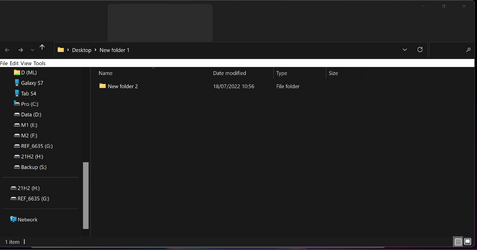
Just trying 22H2 and when I Open a new tab in File Explorer I briefly see the expected Command Bar then it slowly slides down until I am left with theses massive grey tabs :(

Also pretty sure the thin white bar below the title bar with "File, Edit, View, Tools" shouldn't be there .

Any ideas would be much appreciated.
 

My Computer My Computer

At a glance

11
OS
11
View attachment 34335

Can anyone work out what is up.

Just trying 22H2 and when I Open a new tab in File Explorer I briefly see the expected Command Bar then it slowly slides down until I am left with theses massive grey tabs :(

Also pretty sure the thin white bar below the title bar with "File, Edit, View, Tools" shouldn't be there .

Any ideas would be much appreciated.
The thin white bar is because in your explorer options you have "always show menus" set on. However, it should not be white in the dark theme. That's a reported bug.
 

My Computers My Computers

  • At a glance

    Windows 11 Home 26H2 RPIntel I3-1010016 GBNvidia GT 1030
    OS
    Windows 11 Home 26H2 RP
    Computer type
    PC/Desktop
    Manufacturer/Model
    Self-build
    CPU
    Intel I3-10100
    Motherboard
    MSI H410M-PRO
    Memory
    16 GB
    Graphics Card(s)
    Nvidia GT 1030
    Sound Card
    Motherboard default
    Monitor(s) Displays
    Philips 27 inch
    Screen Resolution
    1920x1080
    Hard Drives
    Samsung EVO 970 NVMe SSD 256 Gb
    Samsung QVO 870 SATA SSD 2 Tb
    PSU
    ATX 450W
    Keyboard
    Logitech
    Mouse
    Logitech Wireless
    Internet Speed
    930 Mb down / 120 Mb up
    Browser
    Edge
    Antivirus
    Windows Defender
    Other Info
    Microsoft Office 2021 Plus
  • At a glance

    Windows 11 HomeIntel i3-810016 GbNvidia GT 720
    Operating System
    Windows 11 Home
    Computer type
    PC/Desktop
    Manufacturer/Model
    Self-build
    CPU
    Intel i3-8100
    Motherboard
    Gigabyte Z370 D3
    Memory
    16 Gb
    Graphics card(s)
    Nvidia GT 720
    Sound Card
    Motherboard default
    Monitor(s) Displays
    Philips 27-inch
    Screen Resolution
    1920x1080
    Hard Drives
    Samsung 960 NVMe SSD 256 Gb
    Seagate 2 Tb HDD
    PSU
    ATX 450W
    Keyboard
    Microsoft
    Mouse
    Logitech Wireless
    Internet Speed
    930 Mb down / 120 Mb up
    Browser
    Edge
    Antivirus
    Windows Defender
The thin white bar is because in your explorer options you have "always show menus" set on. However, it should not be white in the dark theme. That's a reported bug.
Thanks, I managed to get rid of the white bar through that menu.
I should just mention this is 22H2 (build 22622.290) from the Insider Beta channel.
Maybe the huge tabs are just because this version of 22H2 is still in beta.
 

My Computer My Computer

At a glance

11
OS
11
Marking as solved fixed in build 22622.436
 

My Computer My Computer

At a glance

11
OS
11

Latest Support Threads

Back
Top Bottom