
24H2 networking issues - Already tried every fix, can anyone help?


Tracian

New member
Local time
6:32 PM
Posts
16
OS
Windows 11
Hi guys! As they say... you are my last hope!

Briefly put:
- I updated to 24H2. All network functionality broke [My possibly wrong diagnosis: every IP call gets rerouted onto localhost]
- I tried every fix known, including every single one listed in this thread. No joy
- I reverted to 23H2. Internet connection now works again, but local network remains broken (can see a NAS, for example, but cannot connect to it via Explorer. Https connection seems fine though)
- I tried getting help through every customer care known to man. No joy
- I've identified a possible cause in the Network Discoverability option, that keeps disabling as soon as I close the Network Options panel
- I tried every fix for that too. Guess what? No joy
- I'd very much love to be able to access my NAS and stuff again. Can anybody help?

Also, I harbor a faint hope that 25H2 might fix this - but would it be possible to skip 24H2 at all when updating? Please note that as soon as 24H2 hits the PC, all traffic including Windows Update stops.
 
Windows Build/Version
Win 11 23H2 - Build 22631.5768 / 1000.22700.1106.0

My Computer My Computer

At a glance

Windows 1112th Gen Intel(R) Core(TM) i5-12400F 2.50 GHz64,0 GB
OS
Windows 11
Computer type
PC/Desktop
Manufacturer/Model
Custom
CPU
12th Gen Intel(R) Core(TM) i5-12400F 2.50 GHz
Motherboard
Asustek PRIME H610M-A D4
Memory
64,0 GB
Internet Speed
1Gb
Browser
Chrome
Antivirus
Windows Defender
Other Info
Processore 12th Gen Intel(R) Core(TM) i5-12400F 2.50 GHz
RAM installata 64,0 GB (63,8 GB utilizzabile)
Tipo sistema Sistema operativo a 64 bit, processore basato su x64
Penna e tocco Nessun input penna o tocco disponibile per questo schermo

Edizione Windows 11 Home
Versione 23H2
Data installazione: ‎28/‎04/‎2025
Build sistema operativo 22631.5768
Esperienza Pacchetto di esperienze per funzionalità Windows 1000.22700.1106.0
In my circumstances i can still access my NAS in all permutations, i just can't access anything else apart from 23H2 machine on the currently available pending update for 24H2. Current functional 24H2 is 26100 4946, My only 23H2 machine is built accessible in all permutations.
 

My Computers My Computers

  • At a glance

    Windows 11 Enterprise 25H2 26200 7462Intel XEON E5-2699 v364GB Teamgroup UD4-3600NVIDIA GeForce GTX 1080 Ti
    OS
    Windows 11 Enterprise 25H2 26200 7462
    Computer type
    PC/Desktop
    Manufacturer/Model
    Custom Build
    CPU
    Intel XEON E5-2699 v3
    Motherboard
    ASUS X99-A
    Memory
    64GB Teamgroup UD4-3600
    Graphics Card(s)
    NVIDIA GeForce GTX 1080 Ti
    Sound Card
    Integrated
    Monitor(s) Displays
    ACER X34 Predator
    Screen Resolution
    3440 x 1440
    Hard Drives
    Crucial CT1000P 3P SSD8 1TB
    Crucial CT1000 BX500 SSD 1TB
    PSU
    GameMax Pro
    Case
    Fractal Design
    Cooling
    Corsair H110iGT + 6 140mm Fans
    Keyboard
    Corsair K4
    Mouse
    G-Skill G502
    Internet Speed
    300MBs
    Browser
    Chrome
    Antivirus
    OEM
    Other Info
    ASUS RT-AC87U Router
  • At a glance

    25H2 26200.50748GB
    Operating System
    25H2 26200.5074
    Computer type
    Laptop
    Manufacturer/Model
    ASUS X555LA
    Memory
    8GB
    Browser
    Chrome
    Antivirus
    OEM
There are a large number of posts now on quite a number of threads dealing with the nasty way that MS has reconfigured networking from 24H2 26100.5710 onwards. Some people have found various network issues on 26100.4946.

Although my small home network is ok on 26100.4946, I have found now that I cannot log into my router. The ID/password combination is now just ignored. I can access through a legacy Win11 Lite machine I have using a Chrome-based browser (but not Firefox); slim pickings, thanks MS.

Although my two 24H2 machines are using Win11 Home, I have installed GPEDIT.MSC on both. Using this, Computer Configuration>Administration Templates>Network>Lanman Workstation>Enable Insecure Guest Logons is fully turned on in both machines - as advised on multiple threads here.

Makes no difference. Only the Win11 Lite machine using a Chrome-based browser can access my router parameters.

MS have now fiddled the "security" on small home networks to the point that they are becoming almost unuseable. So very clever.

This, plus the coming Certificate and Boot changes, may be sufficient as a tipping point for the MS market.
 

My Computer My Computer

At a glance

Windows 11Intel i5 10210U16GbIntel UHD
OS
Windows 11
Computer type
Laptop
Manufacturer/Model
HP 15s_du1xxx
CPU
Intel i5 10210U
Motherboard
85F1
Memory
16Gb
Graphics Card(s)
Intel UHD
Sound Card
Realtek
Screen Resolution
1920 x 1080
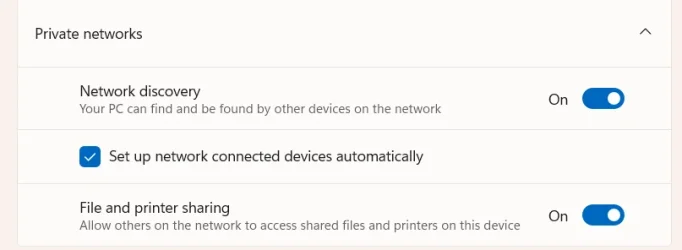
I am at build 26100.5074 and at Advanced Sharing Settings I see "Network Discovery" set to ON, "File and Printer Sharing" set to ON and the box "setup network connected devices automatically" checked. Just see if you have the same. Also I have noticed that some older update switched my network from private to public. Make sure it is set to private on all computers.
 

My Computers My Computers

  • At a glance

    Windows 11 Pro 23H2 (5699), 25H2 (8875)Mobile DualCore Intel Core 2 Duo T7250, 2000 MHz4GBMobile Intel(R) GMA 4500M (Mobile 4 series)
    OS
    Windows 11 Pro 23H2 (5699), 25H2 (8875)
    Computer type
    Laptop
    Manufacturer/Model
    Acer Extensa 5630EZ
    CPU
    Mobile DualCore Intel Core 2 Duo T7250, 2000 MHz
    Motherboard
    Acer Extensa 5630
    Memory
    4GB
    Graphics Card(s)
    Mobile Intel(R) GMA 4500M (Mobile 4 series)
    Sound Card
    Realtek ALC268 @ Intel 82801IB ICH9 - High Definition Audio Controller
    Monitor(s) Displays
    1
    Screen Resolution
    1280x800
    Hard Drives
    Samsung SSD 850 EVO 250GB SATA Device (250 GB, SATA-III)
    Internet Speed
    VDSL 50 Mbps
    Browser
    MICROSOFT EDGE
    Antivirus
    WINDOWS DEFENDER
    Other Info
    Legacy MBR installation, no TPM, no Secure Boot, no WDDM 2.0 graphics drivers, no SSE4.2, cannot get more unsupported ;) This is only my test laptop. I had installed Windows 11 here before upgrading my main PC. For my main PC I use everyday see my 2nd system specs.
  • At a glance

    Windows 11 Pro v25H2 (build 26200.8875)Intel Core-i7 3770 3.40GHz s1155 (3rd generat...2x Kingston Hyper-X Blu 8GB DDR3-1600GIGABYTE GeForce RTX 3050 WINDFORCE OC V2 6GB...
    Operating System
    Windows 11 Pro v25H2 (build 26200.8875)
    Computer type
    PC/Desktop
    Manufacturer/Model
    Custom-built PC
    CPU
    Intel Core-i7 3770 3.40GHz s1155 (3rd generation)
    Motherboard
    Asus P8H61 s1155 ATX
    Memory
    2x Kingston Hyper-X Blu 8GB DDR3-1600
    Graphics card(s)
    GIGABYTE GeForce RTX 3050 WINDFORCE OC V2 6GB (GV-N3050WF2OCV2-6GD)
    Sound Card
    Realtek HD audio (ALC887)
    Monitor(s) Displays
    Sony Bravia KDL-19L4000 19" LCD TV via VGA
    Screen Resolution
    1440x900 32-bit 60Hz
    Hard Drives
    WD Blue SA510 2.5 1000GB SSD as system disk, Western Digital Caviar Purple 4TB SATA III (WD40PURZ) as second
    PSU
    Thermaltake Litepower RGB 550W Full Wired
    Case
    SUPERCASE MIDI-TOWER
    Cooling
    Deepcool Gamma Archer CPU cooler, 1x 8cm fan at the back
    Keyboard
    Mitsumi 101-key PS/2
    Mouse
    Sunnyline OptiEye PS/2
    Internet Speed
    100Mbps
    Browser
    Microsoft Edge, Mozilla Firefox
    Antivirus
    Microsoft Windows Defender
    Other Info
    Legacy BIOS (MBR) installation, no TPM, no Secure Boot, WDDM 3.0 graphics drivers, WEI score 7.4
I am at build 26100.5074 and at Advanced Sharing Settings I see "Network Discovery" set to ON, "File and Printer Sharing" set to ON and the box "setup network connected devices automatically" checked. Just see if you have the same. Also I have noticed that some older update switched my network from private to public. Make sure it is set to private on all computers.

My "Network discovery" toggle simply reverts back to OFF as soon as I leave the panel. Everything else is set up just like you suggest.
 

My Computer My Computer

At a glance

Windows 1112th Gen Intel(R) Core(TM) i5-12400F 2.50 GHz64,0 GB
OS
Windows 11
Computer type
PC/Desktop
Manufacturer/Model
Custom
CPU
12th Gen Intel(R) Core(TM) i5-12400F 2.50 GHz
Motherboard
Asustek PRIME H610M-A D4
Memory
64,0 GB
Internet Speed
1Gb
Browser
Chrome
Antivirus
Windows Defender
Other Info
Processore 12th Gen Intel(R) Core(TM) i5-12400F 2.50 GHz
RAM installata 64,0 GB (63,8 GB utilizzabile)
Tipo sistema Sistema operativo a 64 bit, processore basato su x64
Penna e tocco Nessun input penna o tocco disponibile per questo schermo

Edizione Windows 11 Home
Versione 23H2
Data installazione: ‎28/‎04/‎2025
Build sistema operativo 22631.5768
Esperienza Pacchetto di esperienze per funzionalità Windows 1000.22700.1106.0
My "Network discovery" toggle simply reverts back to OFF as soon as I leave the panel. Everything else is set up just like you suggest.
Well, that's a king-sized problem, you'll want to track down the reason for that!

If you don't see this under Advanced Sharing Settings, that's where you start. If you have your network listed as a public network, fix that first!

1757011019870.webp
 

My Computers My Computers

  • At a glance

    Win 11 Pro 25H2, Build 26200.8894Intel Core i5 1450064GB DDR4GeForce RTX 4060
    OS
    Win 11 Pro 25H2, Build 26200.8894
    Computer type
    PC/Desktop
    Manufacturer/Model
    Home Brew
    CPU
    Intel Core i5 14500
    Motherboard
    Gigabyte B760M G P WIFI
    Memory
    64GB DDR4
    Graphics Card(s)
    GeForce RTX 4060
    Sound Card
    Chipset Realtek
    Monitor(s) Displays
    LG 45" Ultragear, Acer 24" 1080p
    Screen Resolution
    5120x1440, 1920x1080
    Hard Drives
    Crucial P310 2TB 2280 PCIe Gen4 3D NAND NVMe M.2 SSD (O/S)
    Silicon Power 2TB US75 NVMe PCIe Gen4 M.2 2280 SSD (backup)
    Crucial BX500 2TB 3D NAND (2nd backup)
    Seagate 4TB Ironwolf, rotating HDD archive files
    External off-line backup Drives: 2 NVMe 4TB drives in external enclosures
    PSU
    Thermaltake Toughpower GF3 750W
    Case
    LIAN LI LANCOOL 216 E-ATX PC Case
    Cooling
    Lots of fans!
    Keyboard
    Microsoft Comfort Curve 2000
    Mouse
    Logitech G305
    Internet Speed
    Verizon FiOS 1GB
    Browser
    Firefox
    Antivirus
    Malware Bytes & Windows Defender Security
  • At a glance

    Win 11 Pro 25H2, Build 26200.8894Intel Core i5 1440032GB DDR5Intel 700 Embedded GPU
    Operating System
    Win 11 Pro 25H2, Build 26200.8894
    Computer type
    PC/Desktop
    Manufacturer/Model
    Home Brew
    CPU
    Intel Core i5 14400
    Motherboard
    Gigabyte B760M DS3H AX
    Memory
    32GB DDR5
    Graphics card(s)
    Intel 700 Embedded GPU
    Sound Card
    Realtek Embedded
    Monitor(s) Displays
    27" HP 1080p
    Screen Resolution
    1920x1080
    Hard Drives
    Crucial P310 2TB 2280 PCIe Gen4 eD NAND PCIe SSD
    Samsung EVO 990 2TB NVMe Gen4 SSD
    Samsung 2TB SATA SSD
    PSU
    Thermaltake Smart BM3 650W
    Case
    Okinos Micro ATX Case
    Cooling
    Fans
    Keyboard
    Microsoft Comfort Curve 2000
    Mouse
    Logitech G305
    Internet Speed
    Verizon FiOS 1GB
    Browser
    Firefox
    Antivirus
    Malware Bytes & Windows Defender Security
  • Nimo N171 17" Laptop, (Intel i3-1215U, 16GB RAM, 2TB NVMe, Win11 Pro)
    Acemagic Vista Mini PC V1 (Intel N150, 16GB RAM, 1TB NVMe, Win11 Pro)
    HP ENVY h8-1540t, (24GB RAM, 2TB SSD, 2TB HDD, Win11 Pro)
Well, that's a king-sized problem, you'll want to track down the reason for that!
Yup, I'd figured that out myself :). That's why I'm here asking for your suggested fixes.

And yes, of course I'm set as Private Network.
 

My Computer My Computer

At a glance

Windows 1112th Gen Intel(R) Core(TM) i5-12400F 2.50 GHz64,0 GB
OS
Windows 11
Computer type
PC/Desktop
Manufacturer/Model
Custom
CPU
12th Gen Intel(R) Core(TM) i5-12400F 2.50 GHz
Motherboard
Asustek PRIME H610M-A D4
Memory
64,0 GB
Internet Speed
1Gb
Browser
Chrome
Antivirus
Windows Defender
Other Info
Processore 12th Gen Intel(R) Core(TM) i5-12400F 2.50 GHz
RAM installata 64,0 GB (63,8 GB utilizzabile)
Tipo sistema Sistema operativo a 64 bit, processore basato su x64
Penna e tocco Nessun input penna o tocco disponibile per questo schermo

Edizione Windows 11 Home
Versione 23H2
Data installazione: ‎28/‎04/‎2025
Build sistema operativo 22631.5768
Esperienza Pacchetto di esperienze per funzionalità Windows 1000.22700.1106.0
Yup, I'd figured that out myself :). That's why I'm here asking for your suggested fixes.

And yes, of course I'm set as Private Network.
Have you tried all the usual DISM and SFC routines?
 

My Computers My Computers

  • At a glance

    Windows 11 Enterprise 25H2 26200 7462Intel XEON E5-2699 v364GB Teamgroup UD4-3600NVIDIA GeForce GTX 1080 Ti
    OS
    Windows 11 Enterprise 25H2 26200 7462
    Computer type
    PC/Desktop
    Manufacturer/Model
    Custom Build
    CPU
    Intel XEON E5-2699 v3
    Motherboard
    ASUS X99-A
    Memory
    64GB Teamgroup UD4-3600
    Graphics Card(s)
    NVIDIA GeForce GTX 1080 Ti
    Sound Card
    Integrated
    Monitor(s) Displays
    ACER X34 Predator
    Screen Resolution
    3440 x 1440
    Hard Drives
    Crucial CT1000P 3P SSD8 1TB
    Crucial CT1000 BX500 SSD 1TB
    PSU
    GameMax Pro
    Case
    Fractal Design
    Cooling
    Corsair H110iGT + 6 140mm Fans
    Keyboard
    Corsair K4
    Mouse
    G-Skill G502
    Internet Speed
    300MBs
    Browser
    Chrome
    Antivirus
    OEM
    Other Info
    ASUS RT-AC87U Router
  • At a glance

    25H2 26200.50748GB
    Operating System
    25H2 26200.5074
    Computer type
    Laptop
    Manufacturer/Model
    ASUS X555LA
    Memory
    8GB
    Browser
    Chrome
    Antivirus
    OEM
Have you tried all the usual DISM and SFC routines?
Yes, as specified in the opening post, I did try every single fix listed in the relevant thread already, with zero success.
 

My Computer My Computer

At a glance

Windows 1112th Gen Intel(R) Core(TM) i5-12400F 2.50 GHz64,0 GB
OS
Windows 11
Computer type
PC/Desktop
Manufacturer/Model
Custom
CPU
12th Gen Intel(R) Core(TM) i5-12400F 2.50 GHz
Motherboard
Asustek PRIME H610M-A D4
Memory
64,0 GB
Internet Speed
1Gb
Browser
Chrome
Antivirus
Windows Defender
Other Info
Processore 12th Gen Intel(R) Core(TM) i5-12400F 2.50 GHz
RAM installata 64,0 GB (63,8 GB utilizzabile)
Tipo sistema Sistema operativo a 64 bit, processore basato su x64
Penna e tocco Nessun input penna o tocco disponibile per questo schermo

Edizione Windows 11 Home
Versione 23H2
Data installazione: ‎28/‎04/‎2025
Build sistema operativo 22631.5768
Esperienza Pacchetto di esperienze per funzionalità Windows 1000.22700.1106.0
I'm somewhat at a loss if you've tried "all the possible fixes", that would mean there's nothing more left to do...
 

My Computers My Computers

  • At a glance

    Win 11 Pro 25H2, Build 26200.8894Intel Core i5 1450064GB DDR4GeForce RTX 4060
    OS
    Win 11 Pro 25H2, Build 26200.8894
    Computer type
    PC/Desktop
    Manufacturer/Model
    Home Brew
    CPU
    Intel Core i5 14500
    Motherboard
    Gigabyte B760M G P WIFI
    Memory
    64GB DDR4
    Graphics Card(s)
    GeForce RTX 4060
    Sound Card
    Chipset Realtek
    Monitor(s) Displays
    LG 45" Ultragear, Acer 24" 1080p
    Screen Resolution
    5120x1440, 1920x1080
    Hard Drives
    Crucial P310 2TB 2280 PCIe Gen4 3D NAND NVMe M.2 SSD (O/S)
    Silicon Power 2TB US75 NVMe PCIe Gen4 M.2 2280 SSD (backup)
    Crucial BX500 2TB 3D NAND (2nd backup)
    Seagate 4TB Ironwolf, rotating HDD archive files
    External off-line backup Drives: 2 NVMe 4TB drives in external enclosures
    PSU
    Thermaltake Toughpower GF3 750W
    Case
    LIAN LI LANCOOL 216 E-ATX PC Case
    Cooling
    Lots of fans!
    Keyboard
    Microsoft Comfort Curve 2000
    Mouse
    Logitech G305
    Internet Speed
    Verizon FiOS 1GB
    Browser
    Firefox
    Antivirus
    Malware Bytes & Windows Defender Security
  • At a glance

    Win 11 Pro 25H2, Build 26200.8894Intel Core i5 1440032GB DDR5Intel 700 Embedded GPU
    Operating System
    Win 11 Pro 25H2, Build 26200.8894
    Computer type
    PC/Desktop
    Manufacturer/Model
    Home Brew
    CPU
    Intel Core i5 14400
    Motherboard
    Gigabyte B760M DS3H AX
    Memory
    32GB DDR5
    Graphics card(s)
    Intel 700 Embedded GPU
    Sound Card
    Realtek Embedded
    Monitor(s) Displays
    27" HP 1080p
    Screen Resolution
    1920x1080
    Hard Drives
    Crucial P310 2TB 2280 PCIe Gen4 eD NAND PCIe SSD
    Samsung EVO 990 2TB NVMe Gen4 SSD
    Samsung 2TB SATA SSD
    PSU
    Thermaltake Smart BM3 650W
    Case
    Okinos Micro ATX Case
    Cooling
    Fans
    Keyboard
    Microsoft Comfort Curve 2000
    Mouse
    Logitech G305
    Internet Speed
    Verizon FiOS 1GB
    Browser
    Firefox
    Antivirus
    Malware Bytes & Windows Defender Security
  • Nimo N171 17" Laptop, (Intel i3-1215U, 16GB RAM, 2TB NVMe, Win11 Pro)
    Acemagic Vista Mini PC V1 (Intel N150, 16GB RAM, 1TB NVMe, Win11 Pro)
    HP ENVY h8-1540t, (24GB RAM, 2TB SSD, 2TB HDD, Win11 Pro)
Windows Update might have replaced your network driver, see if there is any one from manufacturer to download and install. Alternatively, you can load Device Manager, click on the network adapter and then press the DEL key (uninstall). If you are asked to delete the driver, click yes. Restart the computer to see if Windows automatically install the proper driver and works.
 

My Computers My Computers

  • At a glance

    Windows 11 Pro 23H2 (5699), 25H2 (8875)Mobile DualCore Intel Core 2 Duo T7250, 2000 MHz4GBMobile Intel(R) GMA 4500M (Mobile 4 series)
    OS
    Windows 11 Pro 23H2 (5699), 25H2 (8875)
    Computer type
    Laptop
    Manufacturer/Model
    Acer Extensa 5630EZ
    CPU
    Mobile DualCore Intel Core 2 Duo T7250, 2000 MHz
    Motherboard
    Acer Extensa 5630
    Memory
    4GB
    Graphics Card(s)
    Mobile Intel(R) GMA 4500M (Mobile 4 series)
    Sound Card
    Realtek ALC268 @ Intel 82801IB ICH9 - High Definition Audio Controller
    Monitor(s) Displays
    1
    Screen Resolution
    1280x800
    Hard Drives
    Samsung SSD 850 EVO 250GB SATA Device (250 GB, SATA-III)
    Internet Speed
    VDSL 50 Mbps
    Browser
    MICROSOFT EDGE
    Antivirus
    WINDOWS DEFENDER
    Other Info
    Legacy MBR installation, no TPM, no Secure Boot, no WDDM 2.0 graphics drivers, no SSE4.2, cannot get more unsupported ;) This is only my test laptop. I had installed Windows 11 here before upgrading my main PC. For my main PC I use everyday see my 2nd system specs.
  • At a glance

    Windows 11 Pro v25H2 (build 26200.8875)Intel Core-i7 3770 3.40GHz s1155 (3rd generat...2x Kingston Hyper-X Blu 8GB DDR3-1600GIGABYTE GeForce RTX 3050 WINDFORCE OC V2 6GB...
    Operating System
    Windows 11 Pro v25H2 (build 26200.8875)
    Computer type
    PC/Desktop
    Manufacturer/Model
    Custom-built PC
    CPU
    Intel Core-i7 3770 3.40GHz s1155 (3rd generation)
    Motherboard
    Asus P8H61 s1155 ATX
    Memory
    2x Kingston Hyper-X Blu 8GB DDR3-1600
    Graphics card(s)
    GIGABYTE GeForce RTX 3050 WINDFORCE OC V2 6GB (GV-N3050WF2OCV2-6GD)
    Sound Card
    Realtek HD audio (ALC887)
    Monitor(s) Displays
    Sony Bravia KDL-19L4000 19" LCD TV via VGA
    Screen Resolution
    1440x900 32-bit 60Hz
    Hard Drives
    WD Blue SA510 2.5 1000GB SSD as system disk, Western Digital Caviar Purple 4TB SATA III (WD40PURZ) as second
    PSU
    Thermaltake Litepower RGB 550W Full Wired
    Case
    SUPERCASE MIDI-TOWER
    Cooling
    Deepcool Gamma Archer CPU cooler, 1x 8cm fan at the back
    Keyboard
    Mitsumi 101-key PS/2
    Mouse
    Sunnyline OptiEye PS/2
    Internet Speed
    100Mbps
    Browser
    Microsoft Edge, Mozilla Firefox
    Antivirus
    Microsoft Windows Defender
    Other Info
    Legacy BIOS (MBR) installation, no TPM, no Secure Boot, WDDM 3.0 graphics drivers, WEI score 7.4
Windows Update might have replaced your network driver, see if there is any one from manufacturer to download and install. Alternatively, you can load Device Manager, click on the network adapter and then press the DEL key (uninstall). If you are asked to delete the driver, click yes. Restart the computer to see if Windows automatically install the proper driver and works.
I'm thinking pretty much the same thing. I have experienced something similar with switches between some of the PCs in my house and my router. If it keeps toggling back to "OFF" on Network Discovery something is generating that issue and if it isn't third party then it is deliberately set to stay off. Perhaps this was done upon installation of Windows?
 

My Computer My Computer

At a glance

WIN 11, WIN 10, WIN 8.1, WIN 7 U, WIN 7 PRO, ...Intel i7 6900K and i9-7960X / AMD 3800X (8 core)128 GB CORSAIR DOMINATOR PLATINUM (B DIE)NVIDIA 1070 and RTX 3070
OS
WIN 11, WIN 10, WIN 8.1, WIN 7 U, WIN 7 PRO, WIN 7 HOME (32 Bit), LINUX MINT
Computer type
PC/Desktop
Manufacturer/Model
DIY, ASUS, and DELL
CPU
Intel i7 6900K and i9-7960X / AMD 3800X (8 core)
Motherboard
ASUS X99E-WS USB 3.1 and ASUS X299 SAGE
Memory
128 GB CORSAIR DOMINATOR PLATINUM (B DIE)
Graphics Card(s)
NVIDIA 1070 and RTX 3070
Sound Card
Crystal Sound (onboard)
Monitor(s) Displays
single Samsung 30" 4K and 8" aux monitor
Screen Resolution
4K and something equally attrocious. I'll be working on this.
Hard Drives
A, B, C, D, E, F, G, H, I, J, K, L, M, N, O, P, Q, R, S, T, U, V, W

Ports X, Y, and Z are reserved for USB access and removable drives.

Drive types consist of the following: Various mechanical hard drives bearing the brand names, Seagate, Toshiba, and Western Digital. Various NVMe drives bearing the brand names Kingston, Intel, Silicon Power, Crucial, Western Digital, and Team Group. Various SATA SSDs bearing various different brand names.

RAID arrays included:

LSI RAID 10 (WD Velociraptors) 1115.72 GB
LSI RAID 10 (WD SSDS) 463.80 GB

INTEL RAID 0 (KINGSTON HYPER X) System 447.14 GB
INTEL RAID 1 TOSHIBA ENTERPRIZE class Data 2794.52 GB
INTEL RAID 1 SEAGATE HYBRID 931.51 GB
PSU
SEVERAL. I prefer my Corsair Platinum HX1000i but I also like EVGA power supplies
Case
ThermalTake Level 10 GT (among others)
Cooling
Noctua is my favorite and I use it in my main. I also own various other coolers.
Keyboard
all kinds.
Mouse
all kinds
Internet Speed
360 mbps - 1 gbps (depending)
Browser
FIREFOX
Antivirus
KASPERSKY (no apologies)
Other Info
Gave Dell touch screen with Windows 11 to daughter and got me an OTVOC. Being a PC builder I own many desktop PCs as well. I am a father of five providing PCs, laptops, and tablets for all my family, most of which I have modified, rebuilt, or simply built from scratch. I do not own a cell phone, never have, never will.
Use a live Linux USB or live WinPE USB, if you prefer Windows, to check that your network card works properly. I think you should solve it by installing the proper network driver. In worst case you can take a backup and reinstall Windows, but hopefully you don't need to go through all that trouble.
 

My Computers My Computers

  • At a glance

    Windows 11 Pro 23H2 (5699), 25H2 (8875)Mobile DualCore Intel Core 2 Duo T7250, 2000 MHz4GBMobile Intel(R) GMA 4500M (Mobile 4 series)
    OS
    Windows 11 Pro 23H2 (5699), 25H2 (8875)
    Computer type
    Laptop
    Manufacturer/Model
    Acer Extensa 5630EZ
    CPU
    Mobile DualCore Intel Core 2 Duo T7250, 2000 MHz
    Motherboard
    Acer Extensa 5630
    Memory
    4GB
    Graphics Card(s)
    Mobile Intel(R) GMA 4500M (Mobile 4 series)
    Sound Card
    Realtek ALC268 @ Intel 82801IB ICH9 - High Definition Audio Controller
    Monitor(s) Displays
    1
    Screen Resolution
    1280x800
    Hard Drives
    Samsung SSD 850 EVO 250GB SATA Device (250 GB, SATA-III)
    Internet Speed
    VDSL 50 Mbps
    Browser
    MICROSOFT EDGE
    Antivirus
    WINDOWS DEFENDER
    Other Info
    Legacy MBR installation, no TPM, no Secure Boot, no WDDM 2.0 graphics drivers, no SSE4.2, cannot get more unsupported ;) This is only my test laptop. I had installed Windows 11 here before upgrading my main PC. For my main PC I use everyday see my 2nd system specs.
  • At a glance

    Windows 11 Pro v25H2 (build 26200.8875)Intel Core-i7 3770 3.40GHz s1155 (3rd generat...2x Kingston Hyper-X Blu 8GB DDR3-1600GIGABYTE GeForce RTX 3050 WINDFORCE OC V2 6GB...
    Operating System
    Windows 11 Pro v25H2 (build 26200.8875)
    Computer type
    PC/Desktop
    Manufacturer/Model
    Custom-built PC
    CPU
    Intel Core-i7 3770 3.40GHz s1155 (3rd generation)
    Motherboard
    Asus P8H61 s1155 ATX
    Memory
    2x Kingston Hyper-X Blu 8GB DDR3-1600
    Graphics card(s)
    GIGABYTE GeForce RTX 3050 WINDFORCE OC V2 6GB (GV-N3050WF2OCV2-6GD)
    Sound Card
    Realtek HD audio (ALC887)
    Monitor(s) Displays
    Sony Bravia KDL-19L4000 19" LCD TV via VGA
    Screen Resolution
    1440x900 32-bit 60Hz
    Hard Drives
    WD Blue SA510 2.5 1000GB SSD as system disk, Western Digital Caviar Purple 4TB SATA III (WD40PURZ) as second
    PSU
    Thermaltake Litepower RGB 550W Full Wired
    Case
    SUPERCASE MIDI-TOWER
    Cooling
    Deepcool Gamma Archer CPU cooler, 1x 8cm fan at the back
    Keyboard
    Mitsumi 101-key PS/2
    Mouse
    Sunnyline OptiEye PS/2
    Internet Speed
    100Mbps
    Browser
    Microsoft Edge, Mozilla Firefox
    Antivirus
    Microsoft Windows Defender
    Other Info
    Legacy BIOS (MBR) installation, no TPM, no Secure Boot, WDDM 3.0 graphics drivers, WEI score 7.4
Windows Update might have replaced your network driver, see if there is any one from manufacturer to download and install. Alternatively, you can load Device Manager, click on the network adapter and then press the DEL key (uninstall). If you are asked to delete the driver, click yes. Restart the computer to see if Windows automatically install the proper driver and works.
I already deleted and reinstalled all the network drivers, to no avail.

Please note that every other connection seems to work fine (I'm using it right now to post this)
 

My Computer My Computer

At a glance

Windows 1112th Gen Intel(R) Core(TM) i5-12400F 2.50 GHz64,0 GB
OS
Windows 11
Computer type
PC/Desktop
Manufacturer/Model
Custom
CPU
12th Gen Intel(R) Core(TM) i5-12400F 2.50 GHz
Motherboard
Asustek PRIME H610M-A D4
Memory
64,0 GB
Internet Speed
1Gb
Browser
Chrome
Antivirus
Windows Defender
Other Info
Processore 12th Gen Intel(R) Core(TM) i5-12400F 2.50 GHz
RAM installata 64,0 GB (63,8 GB utilizzabile)
Tipo sistema Sistema operativo a 64 bit, processore basato su x64
Penna e tocco Nessun input penna o tocco disponibile per questo schermo

Edizione Windows 11 Home
Versione 23H2
Data installazione: ‎28/‎04/‎2025
Build sistema operativo 22631.5768
Esperienza Pacchetto di esperienze per funzionalità Windows 1000.22700.1106.0
I don't think is related, but some old update changed the protocol of network authentication so other computers could not access a shared printer. When trying to remove the shared printer and connect again you saw either error 0x00000709 or 0x0000011b. To fix that follow these instructions. This might also work for accessing shared folders:

Open the Registry Editor and navigate to

HKEY_LOCAL_MACHINE\Software\Policies\Microsoft\Windows NT\Printers\RPC
(create missing Keys Printers and RPC)

Create a new DWORD (32-bit) Value named RpcUseNamedPipeProtocol and set its data to 0.

Then navigate to

HKEY_LOCAL_MACHINE\System\CurrentControlSet\Control\Print

Create a new DWORD (32-bit) Value named RpcAuthnLevelPrivacyEnabled and set its data to 0.

Restart your computer or the Print Spooler service.

Microsoft often tries to introduce new features but breaks old ones in the process. Ancient Greeks said "Μην εισάγεις καινά δαιμόνια", literally "Don't introduce new daemons" (don't introduce new unknown concepts, entities, features, properties, you-name-it, deal with the existing ones first).
 
Last edited:

My Computers My Computers

  • At a glance

    Windows 11 Pro 23H2 (5699), 25H2 (8875)Mobile DualCore Intel Core 2 Duo T7250, 2000 MHz4GBMobile Intel(R) GMA 4500M (Mobile 4 series)
    OS
    Windows 11 Pro 23H2 (5699), 25H2 (8875)
    Computer type
    Laptop
    Manufacturer/Model
    Acer Extensa 5630EZ
    CPU
    Mobile DualCore Intel Core 2 Duo T7250, 2000 MHz
    Motherboard
    Acer Extensa 5630
    Memory
    4GB
    Graphics Card(s)
    Mobile Intel(R) GMA 4500M (Mobile 4 series)
    Sound Card
    Realtek ALC268 @ Intel 82801IB ICH9 - High Definition Audio Controller
    Monitor(s) Displays
    1
    Screen Resolution
    1280x800
    Hard Drives
    Samsung SSD 850 EVO 250GB SATA Device (250 GB, SATA-III)
    Internet Speed
    VDSL 50 Mbps
    Browser
    MICROSOFT EDGE
    Antivirus
    WINDOWS DEFENDER
    Other Info
    Legacy MBR installation, no TPM, no Secure Boot, no WDDM 2.0 graphics drivers, no SSE4.2, cannot get more unsupported ;) This is only my test laptop. I had installed Windows 11 here before upgrading my main PC. For my main PC I use everyday see my 2nd system specs.
  • At a glance

    Windows 11 Pro v25H2 (build 26200.8875)Intel Core-i7 3770 3.40GHz s1155 (3rd generat...2x Kingston Hyper-X Blu 8GB DDR3-1600GIGABYTE GeForce RTX 3050 WINDFORCE OC V2 6GB...
    Operating System
    Windows 11 Pro v25H2 (build 26200.8875)
    Computer type
    PC/Desktop
    Manufacturer/Model
    Custom-built PC
    CPU
    Intel Core-i7 3770 3.40GHz s1155 (3rd generation)
    Motherboard
    Asus P8H61 s1155 ATX
    Memory
    2x Kingston Hyper-X Blu 8GB DDR3-1600
    Graphics card(s)
    GIGABYTE GeForce RTX 3050 WINDFORCE OC V2 6GB (GV-N3050WF2OCV2-6GD)
    Sound Card
    Realtek HD audio (ALC887)
    Monitor(s) Displays
    Sony Bravia KDL-19L4000 19" LCD TV via VGA
    Screen Resolution
    1440x900 32-bit 60Hz
    Hard Drives
    WD Blue SA510 2.5 1000GB SSD as system disk, Western Digital Caviar Purple 4TB SATA III (WD40PURZ) as second
    PSU
    Thermaltake Litepower RGB 550W Full Wired
    Case
    SUPERCASE MIDI-TOWER
    Cooling
    Deepcool Gamma Archer CPU cooler, 1x 8cm fan at the back
    Keyboard
    Mitsumi 101-key PS/2
    Mouse
    Sunnyline OptiEye PS/2
    Internet Speed
    100Mbps
    Browser
    Microsoft Edge, Mozilla Firefox
    Antivirus
    Microsoft Windows Defender
    Other Info
    Legacy BIOS (MBR) installation, no TPM, no Secure Boot, WDDM 3.0 graphics drivers, WEI score 7.4
Back
Top Bottom




